# EDD_Download
La classe EDD\_Download viene utilizzata per ottenere dati su un Download specifico, creare nuovi Download e modificare Download esistenti. Le proprietà pubbliche che possono essere gestite con questa classe sono:
- $ID = 0;
- $post\_author = 0;
- $post\_date = '0000-00-00 00:00:00';
- $post\_date\_gmt = '0000-00-00 00:00:00';
- $post\_content = '';
- $post\_title = '';
- $post\_excerpt = '';
- $post\_status = 'publish';
- $comment\_status = 'open';
- $ping\_status = 'open';
- $post\_password = '';
- $post\_name = '';
- $to\_ping = '';
- $pinged = '';
- $post\_modified = '0000-00-00 00:00:00';
- $post\_modified\_gmt = '0000-00-00 00:00:00';
- $post\_content\_filtered = '';
- $post\_parent = 0;
- $guid = '';
- $menu\_order = 0;
- $post\_mime\_type = '';
- $comment\_count = 0;
- $filter;
**Nota**: Le proprietà sopra elencate sono ereditate e identiche alle proprietà in WP\_Post.
### Creazione di un Download
Per creare un nuovo download, prima istanzia la classe e poi esegui il metodo create().
```
$new_download = new EDD_Download;
$new_download->create();
```
Questo creerà un singolo Download con impostazioni predefinite, che sono una bozza con il titolo 'New Download Product'.
Il metodo create utilizza
[wp\_insert\_post()](https://codex.wordpress.org/Function_Reference/wp_insert_post), quindi puoi passare qualsiasi argomento a create() che [wp\_insert\_post()](https://codex.wordpress.org/Function_Reference/wp_insert_post) può accettare. Qualcosa del genere funzionerebbe bene:
```
$new_download = new EDD_Download;
$download_args = array(
'post_title' => 'Il mio eBook',
'post_content' => 'Questo è il mio eBook. Bella lunga descrizione.',
'post_status' => 'publish',
)
$new_download->create( $download_args );
```
### Caricamento di un Download Esistente
Questo si ottiene semplicemente passando un ID di Download al nome della classe durante l'istanziazione.
Esempio:
```
$my_download = new EDD_Download( 1492 );
```
### Metodi di recupero dati
EDD\_Download ha una varietà di metodi per ottenere dati sul Download, manipolare metadati e testare varie cose.
##### get\_ID()
Questo metodo restituisce semplicemente l'ID del Download.
Esempio:
```
$download_id = $my_download->get_ID();
```
Restituisce: un intero, come 1492.
##### get\_price()
Questo metodo restituisce il prezzo del Download in formato double, senza simbolo di valuta.
Esempio:
```
$download_price = $my_download->get_price();
```
Restituisce: un double, come 9.99. Su questo risultato si possono fare calcoli.
##### get\_prices()
Questo metodo restituisce un array dei prezzi variabili del Download in formato double, senza simbolo di valuta.
Esempio:
```
$variable_prices = $my_download->get_prices();
```
Restituisce un array di prezzi come questo:
```
Array
(
[1] => Array
(
[index] => 1
[name] => Regular
[amount] => 9.99
)
[2] => Array
(
[index] =>
[name] => Unleaded
[amount] => 19.99
)
```
##### is\_single\_price\_mode()
Determina se la modalità Prezzo Singolo è abilitata o disabilitata. La modalità Prezzo Singolo si riferisce alla possibilità di acquistare contemporaneamente più opzioni di prezzo. Nell'interfaccia utente di Easy Digital Downloads la casella di controllo per essa si trova sotto Prezzi Variabili.
Esempio:
```
$is_single_price_mode = $my_download->is_single_price_mode();
```
Restituisce: true o false
##### has\_variable\_prices()
Determina se i Prezzi Variabili sono abilitati o disabilitati su un Download specifico.
Esempio:
```
$download_price = $my_download->has_variable_prices();
```
Restituisce: true o false
##### get\_files()
Questo metodo restituisce un array dei file allegati al Download
Esempio:
```
$my_files = $my_download->get_files();
```
Restituisce un array di prezzi come questo:
```
Array
(
[0] => Array
(
[attachment_id] => 10
[name] => Be Kind To Your Web Footed Friends
[file] => https://example.com/wp-content/uploads/edd/2015/05/be_kind_to_your_web_footed_friend.mp3
[condition] => all
)
)
```
##### get\_file\_download\_limit()
Questo metodo ottiene il numero di volte in cui questo file può essere scaricato.
Esempio:
```
$download_limit = $my_download->get_file_download_limit();
```
Restituisce: un intero, come 100.
##### get\_file\_price\_condition()
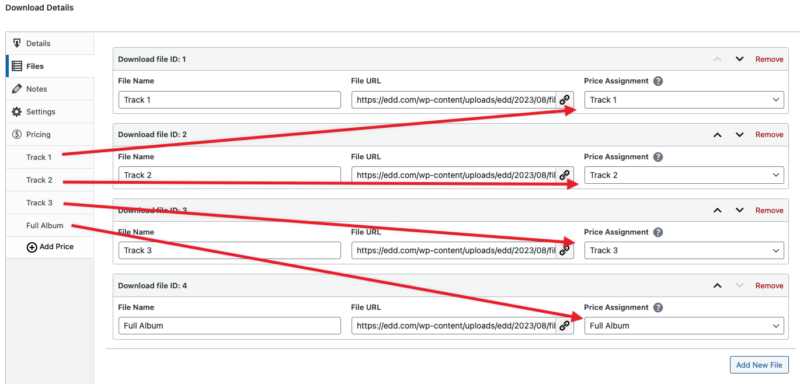
Quando un prodotto ha prezzi variabili, uno o più file possono essere disponibili per l'acquisto. Nella sezione Assegnazione Prezzi, i file possono essere associati a tutte le opzioni di prezzo o solo a quelle specifiche. Nell'esempio seguente il file è associato alle tracce 1, 2, 3 e Album completo.
Esempio:
```
$price_condition = $my_download->get_file_price_condition();
```
Restituisce: un intero, come 2.
##### get\_type()
Restituisce un valore che indica se il Download è un Bundle o Default.
Esempio:
```
$download_type = $my_download->get_type();
```
Restituisce: 'default' o 'bundle'
##### is\_bundled\_download()
Determina se questo è un download in bundle.
Esempio:
```
$is_bundled_download = $my_download->is_bundled_download();
```
Restituisce: true o false
##### get\_bundled\_downloads()
Ottiene gli ID dei Download degli articoli in un Download in bundle.
Esempio:
```
$bundled_downloads = $my_download->get_bundled_downloads();
```
Restituisce: Un array di ID di Download come questo:
```
Array
(
[0] => 68
[1] => 114
)
```
**Nota**: get\_bundled\_downloads() restituirà un array vuoto se il prodotto non è un bundle, quindi considera di fare qualcosa del genere:
```
if ( $my_download->is_bundled_download() ) {
$bundled_downloads = $my_download->get_bundled_downloads();
}
```
##### get\_notes()
Restituisce le note per un Download come stringa.
Esempio:
```
$download_notes = $my_download->get_notes();
```
Restituisce: Le note come stringa, e mantiene le interruzioni di riga.
##### get\_sku()
Restituisce lo SKU per un Download come stringa.
Esempio:
```
$download_sku = $my_download->get_sku();
```
Restituisce: Lo SKU come stringa
##### get\_button\_behavior()
Restituisce cosa succede quando qualcuno fa clic sul pulsante Acquista
Esempio:
```
$download_button_behavior = $my_download->get_button_behavior();
```
Restituisce: 'direct' per Acquista Ora o 'add\_to\_cart' per Aggiungi al Carrello.
##### get\_sales()
Restituisce il numero di vendite completate per questo articolo
Esempio:
```
$download_sales = $my_download->get_sales();
```
Restituisce: un intero come 42
##### increase\_sales()
Incrementa il numero di vendite di 1. Non può accettare input, non può aumentare di più di 1.
Esempio:
```
$increase_sales = $my_download->increase_sales();
```
Restituisce: false in caso di fallimento o un intero del nuovo conteggio delle vendite.
##### decrease\_sales()
Decrementa il numero di vendite di 1. Non può accettare input, non può aumentare di più di 1.
Esempio:
```
$decrease_sales = $my_download->decrease_sales();
```
Restituisce: false in caso di fallimento o un intero del nuovo conteggio delle vendite.
##### get\_earnings()
Restituisce il guadagno totale per questo download.
Esempio:
```
$download_earnings = $my_download->get_earnings();
```
Restituisce: un float come 152.69
##### increase\_earnings( mixed $amount = 0 )
Aumenta i guadagni totali per un Download dell'importo di input.
Esempio:
```
$increase_earnings = $my_download->increase_earnings();
```
Restituisce: false in caso di fallimento o un float del nuovo importo, come 247.39
##### decrease\_earnings( mixed $amount = 0 )
Diminuisce i guadagni totali per un Download dell'importo di input.
Esempio:
```
$decrease_earnings = $my_download->decrease_earnings();
```
Restituisce: false in caso di fallimento o un float del nuovo importo, come 147.39
##### is\_free( mixed $price\_id = false )
Verifica se il download è gratuito, O se l'ID del prezzo fornito è gratuito.
Esempio:
```
$is_free = $my_download->is_free();
```
Restituisce: true o false