


Een fotograaf in Toronto verkoopt een preset-pakket aan een koper in Lissabon. Die verkoop vereist Portugese btw, ook al heeft de fotograaf nog nooit zaken gedaan in Portugal.
Zo werkt EU btw voor digitale producten. De belasting volgt uw klant, niet uw bedrijf.
Elk EU-land stelt zijn eigen tarief vast, en zakelijke kopers volgen andere regels. Het is veel om handmatig bij te houden.
Het goede nieuws? Easy Digital Downloads (EDD) Pro heeft EU btw-afhandeling ingebouwd. In deze handleiding leert u wanneer u EU btw moet aanrekenen en hoe de EU btw-afhandeling van Easy Digital Downloads het drukke werk voor u regelt.
- Belangrijkste punten
- Wat is EU btw op digitale producten?
- Moet u EU btw in rekening brengen op digitale producten?
- Waar u verantwoordelijk voor bent (en wat EDD regelt)
- Hoe Easy Digital Downloads EU btw regelt
- Hoe EU btw in te stellen in Easy Digital Downloads
- Gebruikt u al de EU btw-plugin? Schakel over naar ingebouwde btw
- Snelle antwoorden op uw EU btw-vragen
- Verwerkt Easy Digital Downloads EU btw zonder een plugin?
- Moet ik EU btw in rekening brengen als mijn bedrijf niet in de EU is gevestigd?
- Is EU btw-afhandeling inbegrepen in de gratis versie van EDD?
- Wat gebeurt er als een btw-nummer niet kan worden gecontroleerd bij het afrekenen?
- Dient Easy Digital Downloads mijn btw-aangifte voor mij in?
- Wat is de makkelijkste manier om btw op digitale downloads in WordPress af te handelen?
- Verkoop met vertrouwen aan EU-klanten
Belangrijkste punten
- Het land van de koper bepaalt: U rekent btw aan tegen het lokale EU-tarief van uw klant, niet het tarief waar uw bedrijf is gevestigd.
- Niet-EU-verkopers beginnen onmiddellijk: De drempel van €10.000 helpt alleen verkopers gevestigd in de EU. Iedereen anders is btw verschuldigd vanaf hun eerste EU-verkoop.
- Bedrijven krijgen een verleggingsregeling: Een geldig btw-nummer betekent dat u 0% aanrekent en de zakelijke koper de btw verrekent.
- EDD Pro automatiseert het: Easy Digital Downloads Pro werkt EU-tarieven wekelijks bij en controleert btw-nummers direct bij het afrekenen.
- U dient nog steeds de aangifte in: EDD levert de rapporten, maar registreren voor OSS en per kwartaal indienen is aan u.
Wat is EU btw op digitale producten?
EU btw (belasting over de toegevoegde waarde) is een verbruiksbelasting die EU-landen heffen op de meeste verkopen, inclusief digitale producten zoals e-books, software, online cursussen en muziek. Wanneer u een digitaal product verkoopt aan een consument, rekent u het btw-tarief van het land van de koper aan, niet uw eigen tarief.
Dit is de regel sinds 2015. Het geldt of uw bedrijf nu in Dublin of Denver is gevestigd.
Elk van de 27 EU-landen stelt zijn eigen standaardtarief vast. Die tarieven veranderen van tijd tot tijd, wat deels verklaart waarom het handmatig bijhouden ervan rommelig wordt.
Als u ook in euro's prijst voor EU-kopers, leidt onze handleiding voor het verkopen van digitale producten in meerdere valuta's u erdoorheen.
Moet u EU btw in rekening brengen op digitale producten?
Ja, als u digitale producten verkoopt aan consumenten in de EU. Verkopers buiten de EU zijn vanaf hun allereerste verkoop aan een EU-consument EU btw verschuldigd. Verkopers binnen de EU schakelen over op het aanrekenen van het lokale tarief van de koper zodra hun grensoverschrijdende EU-verkopen €10.000 per jaar passeren.
Waar uw bedrijf is gevestigd, doet er minder toe dan waar uw kopers zijn. Een cursusmaker in Texas met een paar studenten in Duitsland moet btw aanrekenen, net als een softwarewinkel in Berlijn.
De drempel van €10.000 en op wie deze van toepassing is
Het cijfer van €10.000 zul je vaak tegenkomen. Het is echt, maar geldt alleen voor bedrijven die in een EU-land gevestigd zijn.
Onder dat bedrag kan een in de EU gevestigde verkoper de btw van zijn thuisland in rekening brengen voor verkopen aan andere EU-landen. Zodra die verkopen de €10.000 per jaar passeren, brengen ze in plaats daarvan het lokale tarief van elke koper in rekening.
Als uw bedrijf buiten de EU is gevestigd, is er helemaal geen drempel. De One Stop Shop-richtlijnen van de Europese Commissie behandelen de details.
Belastingregels zijn afhankelijk van uw situatie, dus het is verstandig om uw verplichtingen te verifiëren bij een belastingadviseur.
B2B-verkopen en de verleggingsregeling
Verkoop aan een bedrijf werkt anders. Wanneer een zakelijke koper in een ander EU-land u een geldig btw-nummer verstrekt, brengt u hen geen btw in rekening.
In plaats daarvan verrekent het bedrijf de btw in zijn eigen land. Dit wordt de reverse charge genoemd.
De addertje onder het gras? U moet bevestigen dat het btw-nummer echt is voordat u de belasting overslaat. EU-btw-nummers worden gecontroleerd tegen VIES, de database met btw-nummers van de Europese Commissie.
Er is één uitzondering om op te letten. Verkopen aan bedrijven in uw eigen thuisland worden meestal nog steeds belast met btw, zelfs met een geldig nummer.
Wat met btw in het VK?
Het VK verliet het btw-systeem van de EU na Brexit. Verkopen in het VK worden niet op uw EU-aangifte vermeld en de btw-registratie in het VK wordt afzonderlijk afgehandeld via HMRC.
Easy Digital Downloads kan nog steeds Britse btw-nummers valideren bij het afrekenen. Het heeft ook een apart veld voor uw eigen Britse btw-nummer.
Waar u verantwoordelijk voor bent (en wat EDD afhandelt)
Het juiste btw-tarief in rekening brengen is slechts een deel van de naleving van de EU-btw. De meeste verkopers registreren zich ook via de One Stop Shop (OSS), waarmee u één btw-aangifte kunt indienen voor al uw EU-verkopen in plaats van u in elk land te registreren.
Als u in de EU gevestigd bent, gebruikt u het Unie-schema van de OSS in uw thuisland. Als u buiten de EU gevestigd bent, gebruikt u het niet-Unie-schema en kiest u één EU-land om u bij te registreren.
Vóór juli 2021 heette dit systeem MOSS. U zult die naam nog steeds tegenkomen in oudere handleidingen.
| Uw verplichting | Wat Easy Digital Downloads doet | Wat u moet doen |
|---|---|---|
| Het juiste btw-tarief berekenen | Voegt EU-tarieven toe en werkt ze wekelijks bij | Schakel automatische tarieven in en bekijk uw belastinginstellingen |
| Zakelijke btw-nummers valideren | Controleert nummers bij het afrekenen en past de reverse charge toe | Niets extra's |
| Klanten btw-gegevens verstrekken | Voegt btw-informatie toe aan bestellingen, ontvangsten en facturen | Voer uw bedrijfs- en btw-gegevens in |
| Administratie bijhouden | Slaat btw-gegevens en het factuuradres op bij elke bestelling | Vraag uw belastingadviseur welke locatiebewijzen u moet bewaren |
| Registreren voor OSS | Niet afgehandeld door EDD | Registreren bij een EU-belastingdienst |
| Dien kwartaalaangiften in | Exporteert het EU BTW-rapport en de EC-verkooplijst | Dien uw aangifte in en betaal de verschuldigde btw |
EU-regels vereisen dat u uw verkoopgegevens 10 jaar bewaart. Bewaar dus die oude bestellingen.
Hoe Easy Digital Downloads EU btw regelt
Easy Digital Downloads Pro integreert EU btw-afhandeling rechtstreeks in de plugin. U heeft geen aparte btw-plugin of externe validatieservice nodig.
Zodra het is ingeschakeld, regelt het vier taken voor u.
Automatische EU btw-tarieven
Schakel Automatische tarieven in, en EDD voegt het huidige btw-tarief voor elk EU-land toe aan uw winkel. Het controleert wekelijks op nieuwe tarieven.
Als u al handmatig een tarief voor een land heeft ingesteld, zal EDD dit niet overschrijven. U behoudt de controle over aangepaste instellingen.

Btw-nummer validatie bij het afrekenen
Wanneer een koper bij het afrekenen een EU- of VK-land kiest, verschijnt er een veld voor het btw-nummer. Kopers uit andere landen zien dit nooit, dus uw afrekenproces blijft overzichtelijk.
De koper voert zijn nummer in en klikt op Valideren. Als het nummer geldig is en de verleggingsregeling van toepassing is, verwijdert EDD de btw onmiddellijk van hun bestelling.
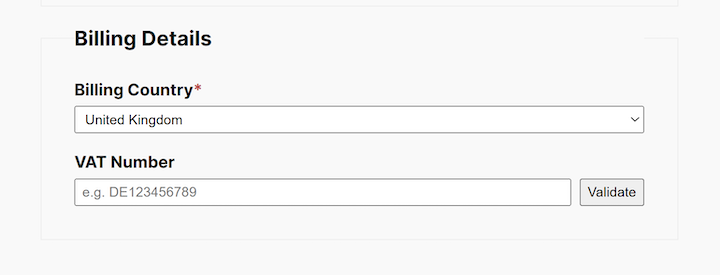
Wat als de VIES-service van de EU offline is? EDD heft de belasting, zodat de verkoop toch doorgaat, en controleert daarna het nummer opnieuw. Met Automatische terugbetaling van belasting bij vertraagde validatie ingeschakeld, betaalt EDD de belasting automatisch terug zodra het nummer is gecontroleerd.

Btw-gegevens op bestellingen, ontvangstbewijzen en facturen
Elke bestelling krijgt zijn eigen btw-sectie. U vindt deze onder het tabblad BTW op de detailpagina van de bestelling.
Wilt u dat klanten het ook zien? Schakel Bestelgegevens in uw EU btw-instellingen in om btw-informatie toe te voegen aan hun ontvangstbewijs.

De btw-gegevens van uw bedrijf worden ook weergegeven op EDD-facturen, die zijn ingebouwd in Easy Digital Downloads Pro.
EU btw-rapporten voor uw kwartaalaangifte
Wanneer het tijd is om aangifte te doen, ga naar Downloads » Rapporten » Exporteren. U vindt twee btw-exporten:
- EU BTW-rapport: Een CSV van alle EU btw die u heeft geïnd, voor uw OSS-aangifte.
- EC-verkooplijstrapport: Een CSV van uw verkopen aan btw-geregistreerde bedrijven, voor uw EC-verkooplijst.
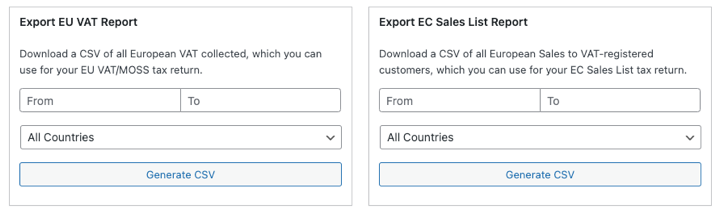
Onze documentatie over EU btw-exporten legt uit wat er in elk bestand staat.
Hoe EU btw in te stellen in Easy Digital Downloads
De installatie duurt slechts enkele minuten. Zorg ervoor dat u een actieve Easy Digital Downloads Pro-licentie en de nieuwste versie van de plugin heeft voordat u begint.
Stap 1: Belastingen en EU btw inschakelen
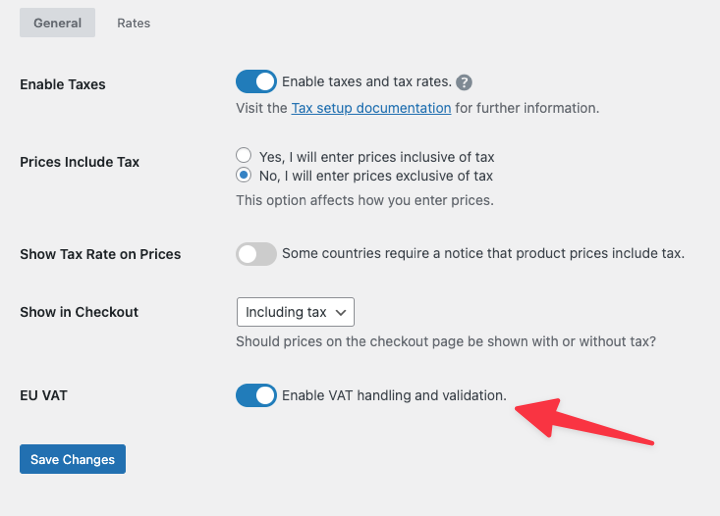
Ga in uw WordPress-dashboard naar Downloads » Instellingen » Belastingen en vink Belastingen inschakelen aan.
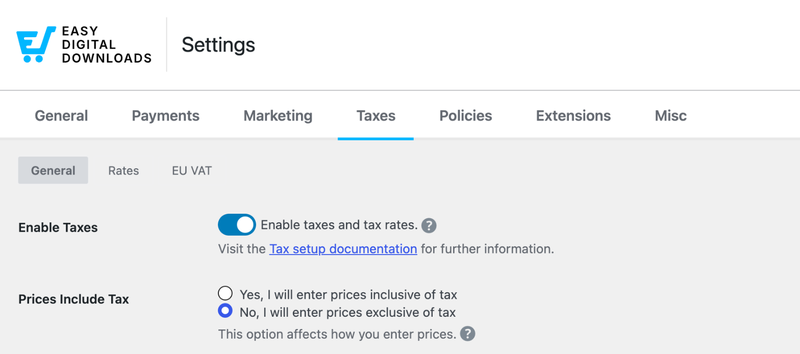
Scroll naar beneden naar EU BTW en vink BTW-afhandeling en validatie inschakelen aan. Klik vervolgens op Wijzigingen opslaan.
Stap 2: Voer uw bedrijfsbtw-gegevens in
Nadat u opslaat, verschijnt er een nieuwe sectie EU BTW onder Belastingen. Klik erop om de installatie te voltooien.
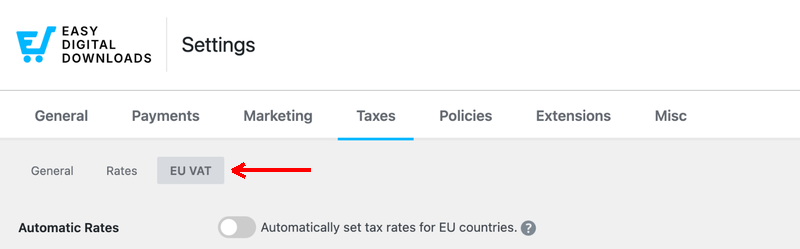
Schakel Automatische tarieven in, zodat uw tarieven actueel blijven. Vul vervolgens uw Bedrijfsinformatie in, inclusief uw EU BTW-nummer en Land van btw-registratie. Voeg ook uw VK BTW-nummer toe als u er een heeft.
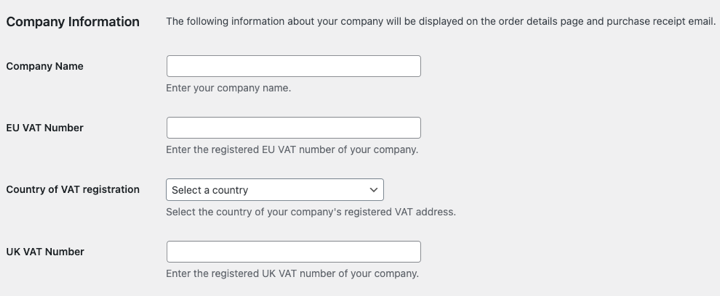
Deze details worden weergegeven op de bonnetjes en facturen van uw klanten, dus controleer ze goed voordat u op Wijzigingen opslaan klikt.
Als uw bedrijf zich in de EU bevindt, laat u BTW-verlegging in thuisland? uitgeschakeld, tenzij uw lokale belastingdienst dit toestaat voor binnenlandse zakelijke verkopen.
Stap 3: Test uw afrekening
Bezoek uw afrekenpagina en kies een EU-land als factuurland. Het veld voor het btw-nummer zou moeten verschijnen. Schakel over naar een land buiten de EU en het VK, en het zou moeten verdwijnen.
Voer een btw-nummer in en klik op Valideren om de btw-verlegging in actie te zien.
Voor elke instelling in detail, zie onze EU btw-instellingen documentatie.
Gebruikt u al de EU btw-plugin? Schakel over naar ingebouwde btw
Jarenlang voegden EDD-winkels EU btw-ondersteuning toe met een aparte plugin genaamd Easy Digital Downloads EU VAT. Als dat op u van toepassing is, is overstappen eenvoudig.
Wanneer u EU btw inschakelt in Easy Digital Downloads (Stap 1 hierboven), wordt de oude plugin automatisch gedeactiveerd. Uw eerdere bestellingen behouden al hun btw-informatie.
Dat is één plugin minder om bij te werken. Onze EU btw-migratiegids begeleidt u bij de overstap.
Snelle antwoorden op uw EU btw-vragen
Verwerkt Easy Digital Downloads EU btw zonder een plugin?
Ja. Easy Digital Downloads Pro bevat ingebouwde EU btw-afhandeling. Het voegt EU-belastingtarieven toe, werkt ze wekelijks bij, valideert EU- en VK-btw-nummers bij het afrekenen en past de btw-verlegging toe voor in aanmerking komende zakelijke kopers. U hebt geen aparte btw-plugin of externe validatieservice nodig.
Moet ik EU btw in rekening brengen als mijn bedrijf niet in de EU is?
Ja. Als u digitale producten verkoopt aan consumenten in de EU, bent u btw verschuldigd vanaf uw eerste verkoop, ongeacht waar uw bedrijf is gevestigd. De drempel van €10.000 is alleen van toepassing op bedrijven die in de EU zijn gevestigd. De meeste verkopers buiten de EU registreren zich eenmalig via het OSS niet-Unie-regeling.
Is EU btw-afhandeling inbegrepen in de gratis versie van EDD?
Nee. EU btw-afhandeling, inclusief automatische tarieven en btw-nummer validatie, vereist Easy Digital Downloads Pro met een actieve licentie. In de gratis versie toont de EU btw-instelling een optie om te upgraden. U kunt nog steeds handmatig belastingtarieven toevoegen in de belastinginstellingen van de gratis versie.
Wat gebeurt er als een btw-nummer niet kan worden gecontroleerd bij het afrekenen?
Als de VIES-service van de EU onbeschikbaar is, brengt EDD de belasting in rekening zodat de bestelling toch kan worden voltooid. Vervolgens controleert het de btw-nummer opnieuw op de achtergrond. Met 'Automatische terugbetaling belasting bij vertraagde validatie' ingeschakeld, retourneert EDD de belasting zodra het nummer is bevestigd. Anders ontvangt u een e-mail om de bestelling te beoordelen.
Dient Easy Digital Downloads mijn btw-aangifte voor mij in?
Nee. EDD verzamelt de juiste btw en geeft u de benodigde rapporten, maar u dient de aangifte zelf in. Exporteer het EU btw-rapport en de EC-verkooplijst vanuit Downloads » Rapporten » Exporteren, en gebruik deze om uw driemaandelijkse OSS-aangifte te voltooien.
Wat is de makkelijkste manier om btw op digitale downloads in WordPress af te handelen?
Gebruik een e-commerce plugin die btw voor u afhandelt. Easy Digital Downloads Pro is gemaakt voor digitale producten en bevat direct EU btw-afhandeling. Schakel het in, voeg uw bedrijfsgegevens toe en EDD regelt de tarieven en btw-nummercontroles bij het afrekenen.
Verkoop met vertrouwen aan EU-klanten
EU btw klinkt eng, maar het komt grotendeels neer op twee taken: het juiste tarief in rekening brengen en goede administratie bijhouden. Met de EU btw-afhandeling van Easy Digital Downloads draait de eerste taak op de automatische piloot, en de rapporten dekken het grootste deel van de tweede.
Al op Pro? Ga naar Downloads » Instellingen » Belastingen en schakel vandaag nog EU btw in.
Gebruikt u de gratis versie? Upgrade naar een Easy Digital Downloads Pass om ingebouwde EU btw-afhandeling voor uw winkel te ontgrendelen.
📣 P.S. Vergeet niet om zich te abonneren op onze nieuwsbrief en ons te volgen op Facebook, Twitter/X, of LinkedIn voor meer WordPress-bronnen!








