


Het runnen van een succesvolle online winkel betekent doorgaans het ondersteunen van meerdere valuta's en wisselkoersen.
Easy Digital Downloads’ Multi-Currency add-on is al lange tijd een vaste waarde hiervoor - waarmee digitale verkopers moeiteloos meerdere valuta's op hun WordPress-site kunnen accepteren en weergeven.
En de nieuwste versie maakt het nog eenvoudiger om internationale verkopen te maximaliseren.
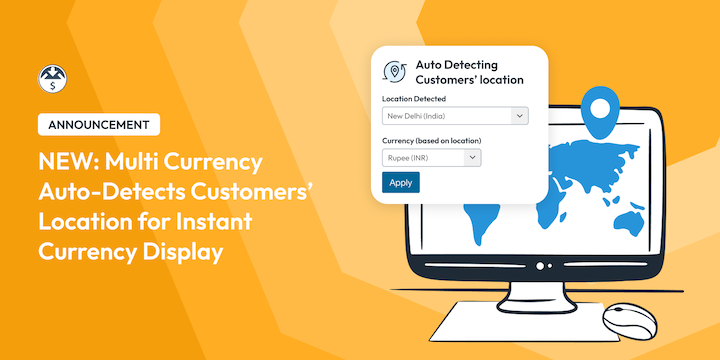
Multi Currency detecteert nu automatisch de locatie van uw bezoekers en toont direct prijzen in de juiste valuta. 🎉
Geen ingewikkelde configuraties. Geen verwarring. Gewoon een naadloze, gelokaliseerde winkelervaring die voelt alsof u uw winkel speciaal voor hen heeft gebouwd.
Lees hieronder meer over deze opwindende nieuwe update!
Wat is er nieuw: Automatische valutadetectie
Deze Multi Currency update is om een aantal redenen opwindend. Hieronder enkele van de grootste hoogtepunten van wat u kunt verwachten wanneer u de nieuwste versie van deze extensie gebruikt.
Automatische locatiedetectie 📍
Uw site weet nu direct waar bezoekers vandaan browsen met behulp van ons geavanceerde geolocatie-eindpunt. Dit betekent dat u automatisch de valuta kunt detecteren en instellen op basis van de locatie van de bezoeker.
Directe valutad weergave ✅
Met de instelling Automatisch Valuta Detecteren ingeschakeld, kunt u bezoekers een valutaselectiewidget tonen, zodat ze moeiteloos de valuta kunnen selecteren die ze willen gebruiken.
Gestroomlijnde wisselkoersen 💱
In tegenstelling tot eerdere versies of andere e-commerce plug-ins die dure externe services of complexe API-instellingen vereisen, werkt onze automatische detectie direct uit de doos met behulp van onze ingebouwde geolocatietechnologie.
We beheren wisselkoersen zonder dat u API-sleutels hoeft te beheren.
Voordelen van EDD Multi Currency Auto-Detect
Stel je voor: een klant uit het VK bezoekt uw website met digitale cursussen en ziet onmiddellijk '£47' in plaats van '$59'. In plaats van te moeten gissen naar de conversieberekening of zich zorgen te maken over verborgen kosten, kopen ze gewoon.
Terwijl andere e-commerce plug-ins vereisen dat u betaalt voor dure geolocatieservices of klanten dwingt om elke keer handmatig hun valuta te selecteren, regelt Easy Digital Downloads alles automatisch.
Denk er eens over na: hoeveel meer internationale verkopen zou u kunnen sluiten door elke wrijving uit het aankoopproces te halen?
Onze automatische detectie werkt naadloos samen met al uw bestaande Easy Digital Downloads-functies - softwarelicenties, terugkerende betalingen, kortingscodes en meer. Uw internationale klanten krijgen dezelfde krachtige ervaring, alleen in hun voorkeursvaluta.
Bovendien helpt u klanten die vervelende 3% valutaconversiekosten te vermijden die banken graag toevoegen. Wanneer ze prijzen in hun lokale valuta zien, weten ze precies wat ze betalen.
- Verwijder aankoopwrijving en bereik wereldwijde doelgroepen zonder de barrière van onbekende prijzen
- Verkoop digitale producten met prijzen die logisch zijn voor kopers wereldwijd
- Toon prijzen die lokaal aanvoelen voor klanten in meer dan 20 valuta
Stel Multi Currency Auto-Detect in
Een ander voordeel van deze update is hoe ongelooflijk eenvoudig het is om in te stellen. Hieronder zal ik u door het korte en eenvoudige proces leiden om de Multi Currency add-on in te stellen en de opties voor automatische valutadetectie in WordPress te configureren.
Stap 1. Installeer/Update Multi Currency Addon
Als u dat nog niet hebt gedaan, installeer en activeer dan de Multi Currency extensie op uw EDD-site. Merk op dat deze extensie alleen beschikbaar is voor EDD Pro-gebruikers. Lite-gebruikers kunnen deze krijgen door te upgraden naar een van de Pro-abonnementen.
Ga naar Downloads » Extensies, zoek naar Multi Currency en selecteer Installeren.
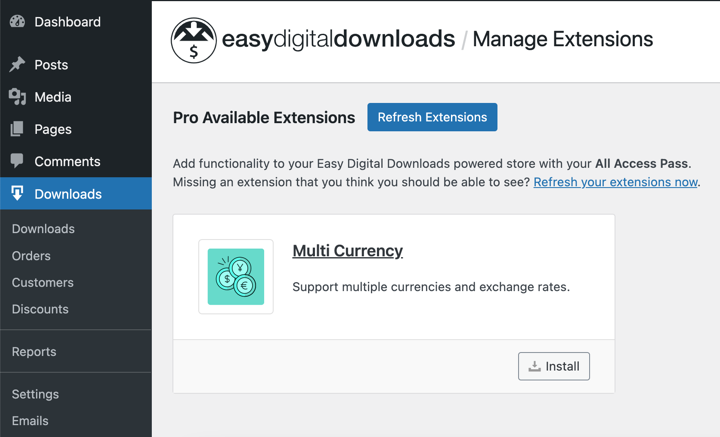
Het wordt automatisch geactiveerd.
Als u het al geïnstalleerd en geactiveerd hebt, controleer dan of u de nieuwste versie (1.2.0) gebruikt.
Zorg ervoor dat u ook de standaardvaluta van uw winkel hebt ingesteld (Downloads » Instellingen » Algemeen » Valuta).
Stap 2. Schakel Automatische Valutadetectie in
Zoek vervolgens de instellingen voor Multi Currency onder Downloads » Instellingen » Betalingen » Multi Currency in uw WordPress-admin.
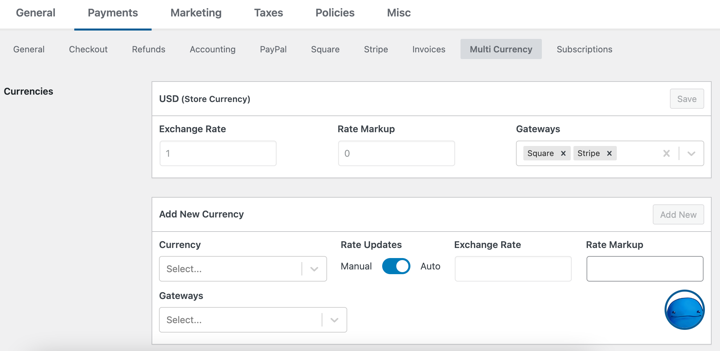
Binnen het instellingenpaneel Valuta's kunt u de valuta's kiezen en toevoegen die u wilt ondersteunen uit onze lijst van meer dan 200 opties.
De nieuwe instelling Automatische Valutadetectie bevindt zich in de tweede helft van het scherm. Klik om deze instelling in te schakelen.
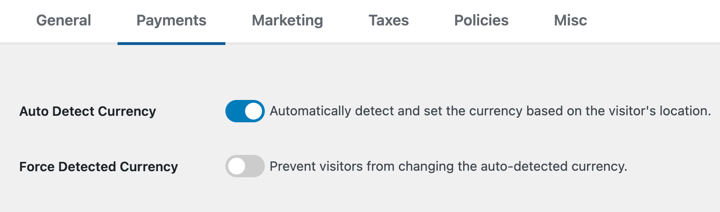
Met deze optie ingeschakeld, wordt de valuta automatisch gedetecteerd op basis van de geolocatie van de gebruiker. Als er geen valuta wordt gedetecteerd voor hun locatie, wordt deze ingesteld op de standaardvaluta van uw winkel.
Met Automatische Valutadetectie ingeschakeld, kunt u ook Gedetecteerde Valuta Forceren activeren.
Deze optie verbergt de valutaselector widget voor bezoekers, zodat ze de automatisch gedetecteerde valuta niet kunnen kiezen of wijzigen. Het dwingt hen om de standaardvaluta te gebruiken die voor hen is gedetecteerd en bepaald.
Stap 3. Configureer Updates van Wisselkoersen
Voorbij zijn de dagen van het selecteren en toevoegen van API-sleutels voor services die wisselkoersen bieden. Vergeet het gedoe van het bijhouden van wisselkoersen - Multi Currency werkt ze automatisch voor u bij, direct uit de doos.
Selecteer eenvoudig de schakelaar naast Automatische Tariefupdates, en het wordt voor u afgehandeld.
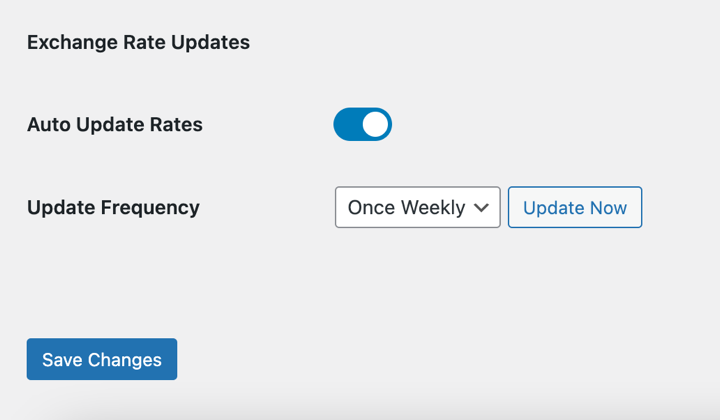
In de dropdown Updatefrequentie kunt u kiezen hoe vaak de wisselkoersen moeten worden bijgewerkt.
Opties zijn Eens per uur, Eens per dag, Twee keer per dag, of Eens per week.
Vergeet niet uw wijzigingen op te slaan als u klaar bent.
Vanaf de voorkant van uw site zouden klanten nu een kleine valutaindicator moeten zien die hun gedetecteerde locatie en lokale prijzen toont.
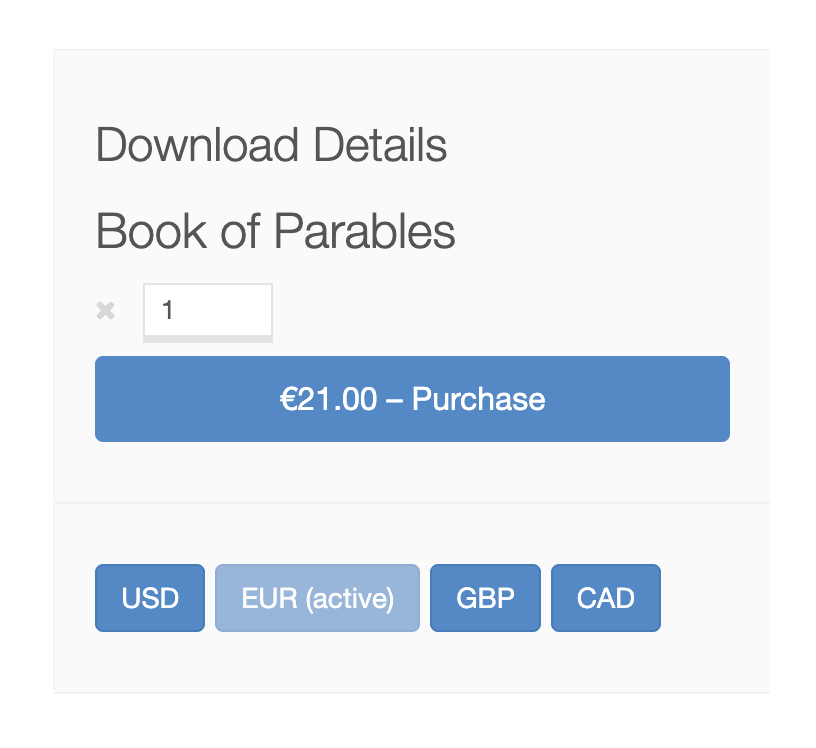
Ze kunnen nog steeds handmatig van valuta wisselen indien nodig, maar de meesten zullen dat niet hoeven te doen.
⚙ Voor meer diepgaande begeleiding en informatie, bekijk onze Multi Currency Setup Documentatie.
Automatische Valutadetectie Toevoegen aan WordPress
Stop het verliezen van verkopen door valuta-onduidelijkheid. Uw digitale producten verdienen een wereldwijd publiek, en nu heeft u de tools om hen correct te bedienen.
De automatische detectiefunctie voor meerdere valuta's is nu beschikbaar voor alle Easy Digital Downloads Pro licentiehouders.
Werk uw Multi-Currency add-on eenvoudig bij naar versie 1.2.0 (of hoger) en begin vandaag nog met het converteren van meer internationale bezoekers naar betalende klanten.
Gebruikt u nog steeds EDD Lite? Koop vandaag nog een premium pas om toegang te krijgen tot Multi Currency, plus tientallen andere geavanceerde functies en tools!
Voor meer informatie kunt u terecht op:
📣 P.S. Vergeet niet om zich te abonneren op onze nieuwsbrief en ons te volgen op Facebook, Twitter/X, of LinkedIn voor meer WordPress-bronnen!








