


Als elke klant hetzelfde aankoopbewijs ontvangt, ongeacht wat ze kopen of of ze een nieuwe klant zijn of een terugkerende loyale klant, mis je een kans om contact te leggen.
Met EDD's Conditionele E-mail Tags kun je de manier waarop je communiceert met je klanten veranderen. 🎉
Je kunt verschillende inhoud tonen aan verschillende klanten, allemaal binnen één e-mailsjabloon. Een nieuwe klant krijgt een warm welkom. Een gastklant krijgt een zetje om een account aan te maken. Een PayPal-klant ziet betalingsspecifieke bevestigingsgegevens.
Geen extra sjablonen. Geen handmatige segmentatie. Alleen slimmere e-mails die persoonlijk aanvoelen.
Deze functie is exclusief beschikbaar voor Easy Digital Downloads Pro-gebruikers.
- Wat je kunt doen met conditionele e-mail tags
- Hoe je EDD conditionele e-mail tags gebruikt
- Tips om het meeste uit conditionele tags te halen
- Veelgestelde vragen over EDD conditionele e-mail tags
- Is deze functie beschikbaar in de gratis versie van Easy Digital Downloads?
- Kan ik meer dan één conditioneel blok in dezelfde e-mail gebruiken?
- Kan ik conditionele tags gebruiken naast andere EDD-sjabloontags?
- Werken conditionele tags met externe e-mailbezorgingsservices?
- Wat gebeurt er als aan een voorwaarde niet wordt voldaan?
- Begin vandaag nog met het verzenden van slimmere e-mails
Wat je kunt doen met conditionele e-mail tags ⭐️
EDD conditionele e-mail tags geven je precieze controle over wat elke klant ziet. Dit is wat mogelijk is.
Verwelkom nieuwe klanten 👋
Je eerste aankoope-mail is de beste kans om een blijvende indruk te maken.
Met conditionele tags kun je automatisch een welkomstbericht, een link naar je startgids, of zelfs een speciale kortingscode opnemen - maar alleen voor klanten die voor het eerst bij je kopen. Terugkerende klanten zien dit nooit.
Bereik Gastklanten 👤
Klanten die als gast afrekenen zijn een natuurlijke fit voor een opvolgbericht.
Gebruik de voorwaarde 'Gast Aankoop' om een gerichte boodschap te tonen, alleen aan gastkopers. Nodig hen uit een account aan te maken om hun aankoopgeschiedenis in te zien, toekomstige aankopen te versnellen en meer uit hun aankopen te halen.
Voeg Betaalspecifieke Bevestigingsdetails Toe 💳
Stripe- en PayPal-klanten hebben soms verschillende vragen na het afrekenen.
Voorwaardelijke e-mail tags laten je Stripe-klanten een PCI-nalevingsnotitie en een link naar hun Stripe-dashboard zien, terwijl PayPal-klanten PayPal-specifieke bevestigingsdetails zien. Dezelfde e-mailsjabloon, op maat gemaakte inhoud voor elk.
Koppel Meerdere Voorwaarden Met EN Logica 🔗
Moet je heel specifiek worden? Combineer voorwaarden.
Je kunt inhoud creëren die alleen verschijnt wanneer twee voorwaarden beide waar zijn — bijvoorbeeld, wanneer een klant zowel een eerste-aankoper is EN PayPal gebruikte om af te rekenen. Gebruik EN logica om zeer gerichte berichten te maken voor precieze klantsegmenten.
Hoe je EDD conditionele e-mail tags gebruikt
Voorwaardelijke tags instellen kost slechts een paar klikken in de e-mail editor. Hier is hoe.
Stap 1. Open de E-mail Editor
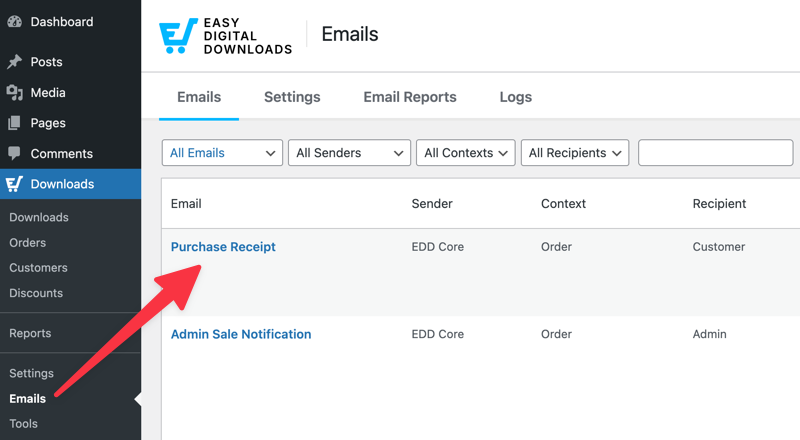
Ga naar Downloads » E-mails in je WordPress dashboard en klik op de e-mail die je wilt bewerken, zoals je Aankoopbewijs.
Stap 2. Klik op de Voorwaardenknop
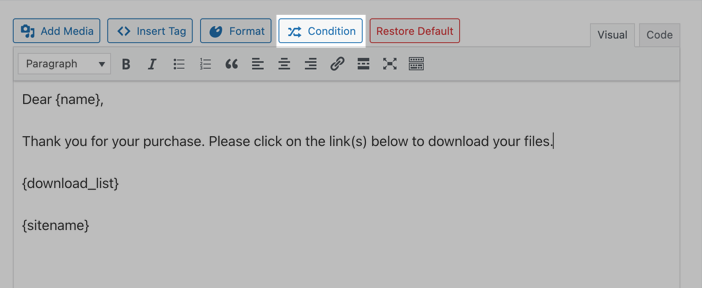
Plaats je cursor in de berichttekst waar je de voorwaardelijke inhoud wilt laten verschijnen. Klik vervolgens op de knop Voorwaarde in de werkbalk van de editor.
Stap 3. Configureer je voorwaarde
Een modaal venster verschijnt met de volgende opties:
- Voorwaarde: Selecteer wat te evalueren. Opties zijn onder andere Eerste Aankoop van Gebruiker, Betaalmethode, etc.
- Operator: Kies hoe de voorwaarde te vergelijken: is, is niet, groter dan, kleiner dan, of bevat.
- Waarde: Voer de vergelijkingswaarde in. Bijvoorbeeld, 250 voor een drempelwaarde voor het bestelbedrag, of selecteer Stripe voor een specifieke betaalgateway.
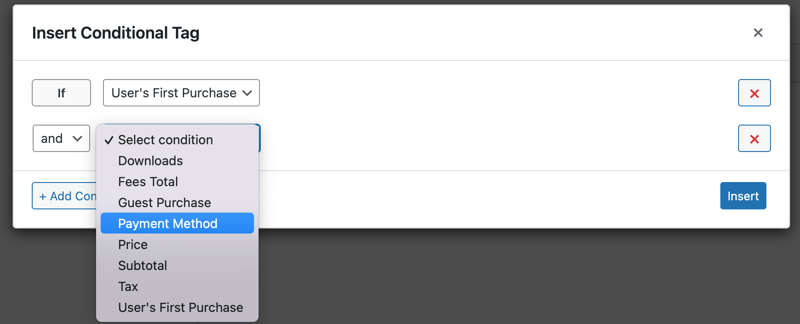
Selecteer Voorwaarde Toevoegen om meer voorwaarden toe te voegen indien nodig. Vervolgens kun je kiezen uit de en/of logica.
Stap 4. Voeg je inhoud in en voeg toe
Wanneer je klaar bent met het toevoegen van de voorwaarde(n), klik op Invoegen. Dit voegt de voorwaardelijke inhoud (omwikkeld met {if} tags) toe aan je e-mail met de "content" placeholder.
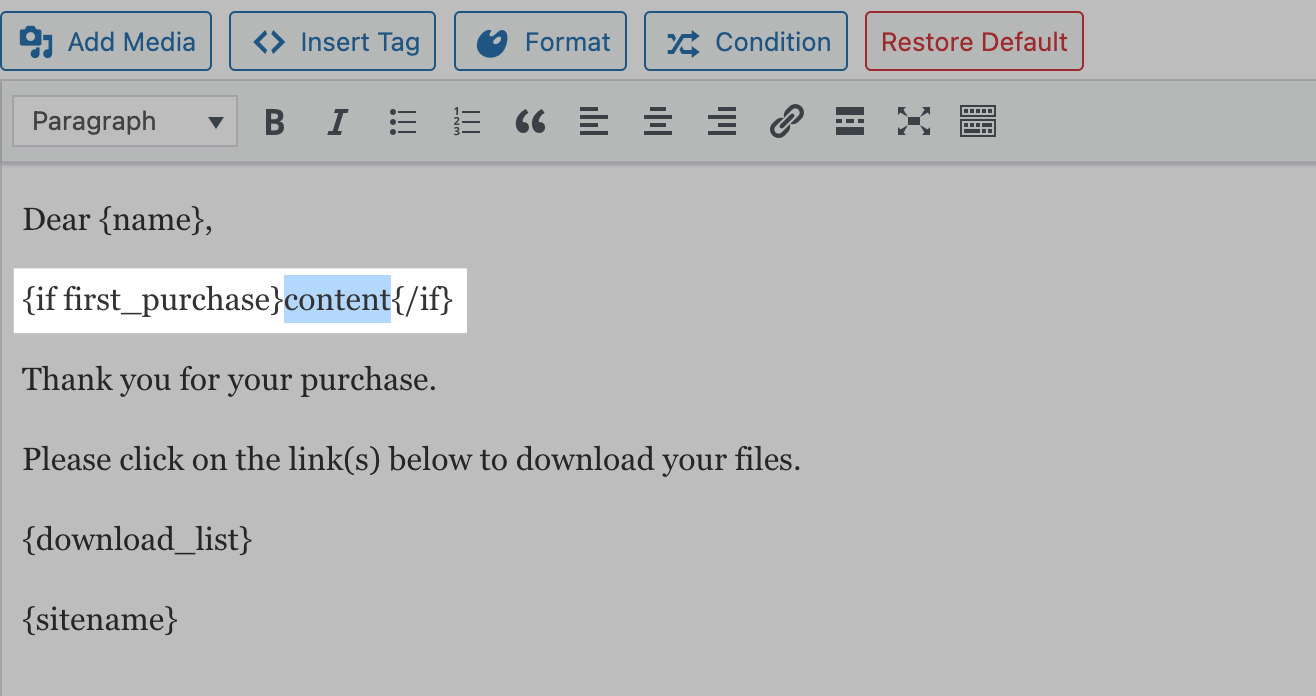
Hier kun je de voorwaardelijke berichttekst typen of plakken die moet verschijnen wanneer aan de gespecificeerde parameters wordt voldaan.
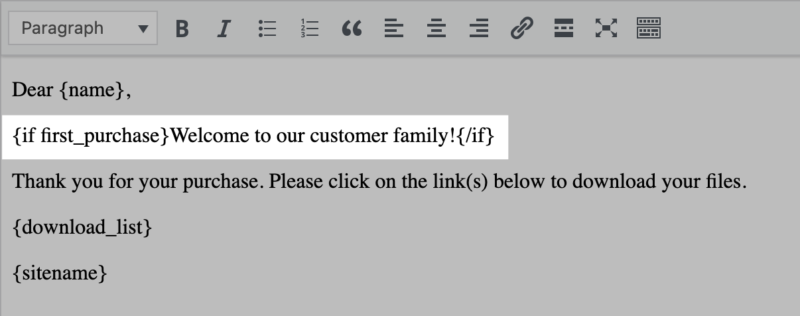
Stap 5. Opslaan en testen
Klik op Opslaan om je e-mail bij te werken. Voer vervolgens een testaankoop uit die overeenkomt met je voorwaarde om te bevestigen dat alles er goed uitziet.
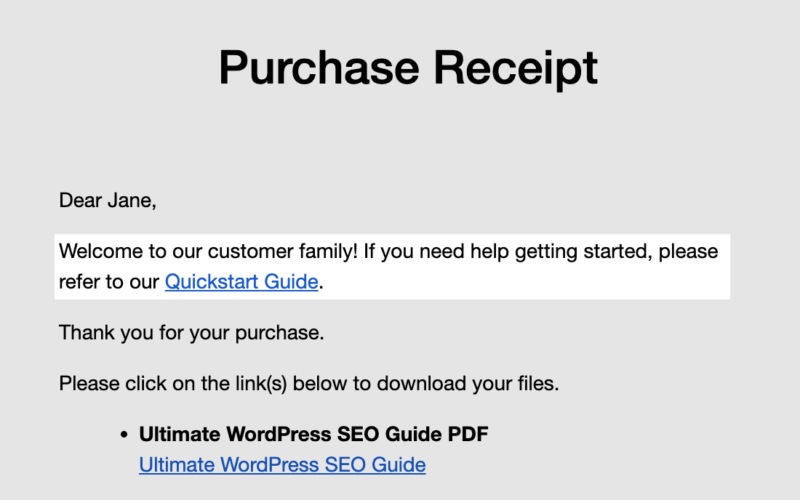
Herhaal deze stappen voor elk voorwaardelijk blok dat je aan de e-mail wilt toevoegen.
Tips om het meeste uit Voorwaardelijke Tags te halen 💡
Een paar dingen die een verschil zullen maken terwijl je je voorwaardelijke e-mailinhoud opbouwt.
Laat personalisatie doelbewust aanvoelen. Wanneer klanten inhoud zien die op hen is afgestemd, komt het beter over wanneer het met opzet zo is geschreven. Omarm de personalisatie; probeer het niet te verbergen.
Test elk scenario voordat u live gaat. Voer een testaankoop uit voor elke voorwaarde die u hebt ingesteld: een koper die voor het eerst koopt, een terugkerende klant, verschillende betaalmethoden, een bestelling boven en onder uw drempelwaarde. Vang eventuele problemen op voordat echte klanten ze zien.
Houd uw voorwaarden eenvoudig. Eén of twee voorwaarden per blok zijn gemakkelijker te beheren en te troubleshooten dan een lange reeks AND/OR-operators. Als uw logica complex wordt, verdeel deze dan in afzonderlijke blokken.
Prestaties zijn geen zorg. Voorwaardelijke tags hebben minimale verwerkings overhead. Zelfs winkels met een hoog volume zullen geen impact opmerken op de snelheid van e-mailbezorging.
Veelgestelde vragen over EDD conditionele e-mail tags
Laten we afsluiten door enkele veelgestelde vragen over de voorwaardelijke e-mailtags van EDD te beantwoorden.
Is deze functie beschikbaar in de gratis versie van Easy Digital Downloads?
Nee. Voorwaardelijke e-mailtags van EDD zijn een Pro-functie. U hebt een actief Easy Digital Downloads Pro-abonnement nodig om ze te gebruiken.
Kan ik meer dan één conditioneel blok in dezelfde e-mail gebruiken?
Ja. U kunt zoveel {if}-blokken toevoegen als u nodig hebt aan één e-mailsjabloon. Elk blok wordt onafhankelijk geëvalueerd wanneer de e-mail wordt verzonden.
Kan ik conditionele tags gebruiken naast andere EDD-sjabloontags?
Ja. Voorwaardelijke tags werken samen met alle standaard sjabloontags van EDD. U kunt tags zoals {name}, {receipt_id}, of {download_list}opnemen in een voorwaardelijk blok.
Werken conditionele tags met externe e-mailbezorgingsservices?
Ja. Voorwaardelijke tags worden verwerkt door Easy Digital Downloads voordat de e-mail wordt overgedragen aan uw mailserver of bezorgservice. Ze zijn volledig compatibel met WP Mail SMTP, SendGrid, Mailgun en vergelijkbare providers.
Wat gebeurt er als aan een voorwaarde niet wordt voldaan?
Als de voorwaarde als onwaar wordt geëvalueerd, wordt de inhoud binnen het voorwaardelijke blok eenvoudigweg niet opgenomen in de e-mail. De rest van de e-mail wordt normaal weergegeven.
Begin Vandaag Nog Slimmer E-mails te Versturen 🚀
Voorwaardelijke e-mailtags van EDD bieden u een krachtige manier om van elke aankoopbon een gevoel te geven dat deze speciaal voor die klant is geschreven, zonder extra werk van uw kant na de initiële installatie.
Klaar om ze aan het werk te zetten? Bekijk de volledige documentatie van EDD's voorwaardelijke e-mailtags voor de complete referentie van voorwaarden en syntaxisgids.
Hebt u Easy Digital Downloads Pro nog niet? Pak er vandaag nog een om voorwaardelijke e-mailtags en al het andere dat Pro te bieden heeft te ontgrendelen.
U kunt ook de release notes bekijken om te zien welke andere spannende updates beschikbaar zijn.
📣 P.S. Vergeet niet om zich te abonneren op onze nieuwsbrief en ons te volgen op Facebook, Twitter/X, of LinkedIn voor meer WordPress-bronnen!








