


Per molti negozi WordPress, accettare PayPal ha significato una cosa al momento del checkout: il familiare pulsante giallo di PayPal. È affidabile e gli acquirenti lo conoscono bene.
Ma il modo in cui le persone pagano continua a evolversi e i tuoi clienti desiderano la libertà di scegliere come effettuare il checkout. Quindi abbiamo completamente rinnovato l'esperienza PayPal in Easy Digital Downloads.
Con un'unica connessione, ora possono utilizzare PayPal, Venmo, carte di debito e credito, Apple Pay e Google Pay, oltre a PayPal Fastlane per un checkout ospite più veloce.
Il risultato è un checkout moderno che consente a ogni acquirente di pagare nel modo preferito e di procedere più velocemente. Ecco cosa puoi offrire e come attivarlo.
- Punti chiave
- Cosa puoi offrire con PayPal in Easy Digital Downloads
- Come aggiungere altri metodi di pagamento PayPal in WordPress
- FAQ: Metodi di pagamento PayPal e Fastlane
- PayPal Fastlane è gratuito in Easy Digital Downloads?
- I miei clienti hanno bisogno di un account PayPal per utilizzare Fastlane?
- Perché non vedo i nuovi metodi di pagamento sul mio negozio?
- Quali metodi di pagamento vedranno i miei clienti?
- Funzionerà se sto usando EDD Lite?
- Devo cambiare qualcosa al checkout affinché funzioni?
- Ci sono commissioni per accettare pagamenti PayPal?
- Inizia oggi stesso a offrire più modi per pagare
Punti chiave
- PayPal Fastlane ora è integrato in EDD, velocizzando il checkout per i clienti abituali e gli ospiti.
- I clienti hanno più modi per pagare, inclusi Venmo, carte di debito e credito, Apple Pay, Google Pay e PayPal da un'unica connessione.
- I negozi possono passare da un singolo pulsante PayPal a un checkout completo multi-metodo.
Cosa puoi offrire con PayPal in Easy Digital Downloads
Questo aggiornamento cambia ciò che il tuo checkout WordPress può offrire.
Una gamma completa di metodi di pagamento PayPal
Con PayPal connesso, il tuo checkout può presentare una gamma completa di opzioni di pagamento ai clienti:
- PayPal: Il classico checkout che i tuoi clienti già conoscono.
- Venmo: Popolare tra gli acquirenti più giovani negli Stati Uniti.
- Carte di debito e credito: I clienti possono pagare con carta senza un account PayPal.
- Apple Pay e Google Pay: Pagamenti veloci da dispositivi mobili e browser.
Offrire Venmo, carte e portafogli digitali insieme a PayPal significa che più acquirenti possono completare un acquisto nel modo che preferiscono.
I metodi visualizzati dipendono dal tuo paese e dall'idoneità del tuo account PayPal. PayPal mostra a ciascun cliente le opzioni disponibili per lui.
Oltre a questi metodi, Fastlane di PayPal velocizza il checkout per i clienti abituali e gli ospiti.
Checkout ospite più veloce con Fastlane di PayPal
PayPal Fastlane è l'esperienza di checkout ospite veloce di PayPal, creata per far completare rapidamente e senza sforzo il pagamento agli acquirenti.
Quando un cliente abituale raggiunge il tuo checkout, Fastlane lo riconosce e compila automaticamente i suoi dati di pagamento. Conferma e ha finito, senza digitare nulla e senza cercare una carta.
Questa velocità ripaga dove conta di più. Più velocemente qualcuno può pagare, più agevole è il percorso verso un acquisto completato, il che significa meno carrelli abbandonati. Per i prodotti digitali, dove l'acquirente vuole solo il suo file o la sua licenza velocemente, è una vittoria facile.
Soprattutto, i clienti non hanno bisogno di un account PayPal per usarlo. Fastlane funziona per gli ospiti, quindi apre il tuo checkout a persone che potrebbero aver abbandonato prima.
Un checkout che funziona per ogni cliente
Indipendentemente dal piano Easy Digital Downloads che stai utilizzando, il tuo checkout può offrire più metodi di pagamento PayPal e Fastlane.
La vittoria è per i tuoi clienti. Possono pagare nel modo che preferiscono già, e Fastlane fa completare il checkout agli acquirenti abituali e agli ospiti in pochi secondi.
Come aggiungere altri metodi di pagamento PayPal in WordPress
Ci sono due passaggi per sbloccare le opzioni aggiuntive. Il secondo è facile da perdere, quindi non saltarlo.
Se non hai ancora collegato PayPal al tuo negozio, puoi seguire la nostra guida per accettare pagamenti PayPal o fare riferimento alla nostra documentazione di configurazione PayPal.
Passaggio 1: Aggiorna Easy Digital Downloads
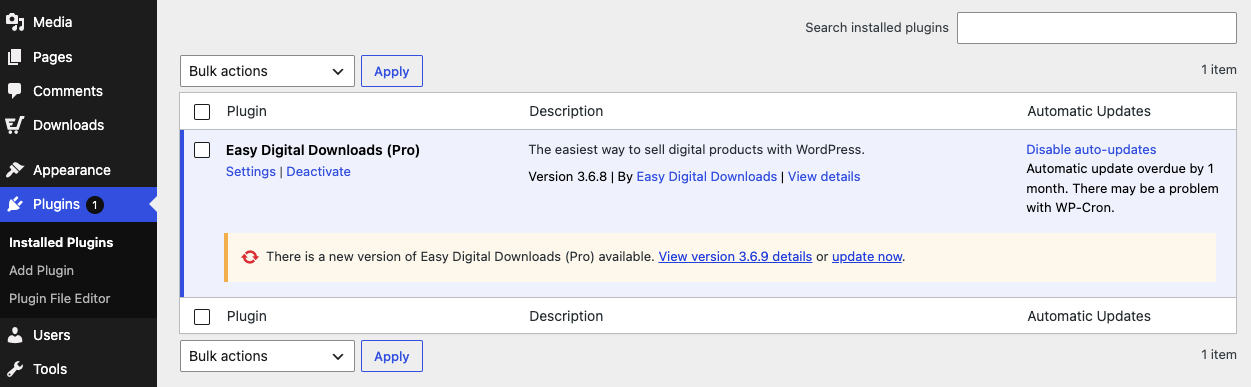
Innanzitutto, assicurati di utilizzare l'ultima versione di Easy Digital Downloads. I nuovi metodi di pagamento PayPal vengono forniti con l'aggiornamento, quindi non li vedrai finché il tuo plugin non sarà aggiornato.
Vai su Plugin nella tua bacheca di WordPress. Se è disponibile una versione più recente del tuo plugin Easy Digital Downloads, seleziona aggiorna ora.
Passaggio 2: Disconnetti e riconnetti il tuo account PayPal
⚠️ Importante: I nuovi metodi di pagamento PayPal vengono aggiunti per i negozi appena collegati. Se il tuo negozio ha collegato PayPal prima di questa versione, devi disconnettere e riconnettere per attivarli. Durante questa operazione, alcuni browser potrebbero notificarti che è stata richiesta una finestra popup; assicurati di consentirla.
Vai su Download » Impostazioni » Pagamenti » PayPal e seleziona l'opzione Disconnetti da PayPal.
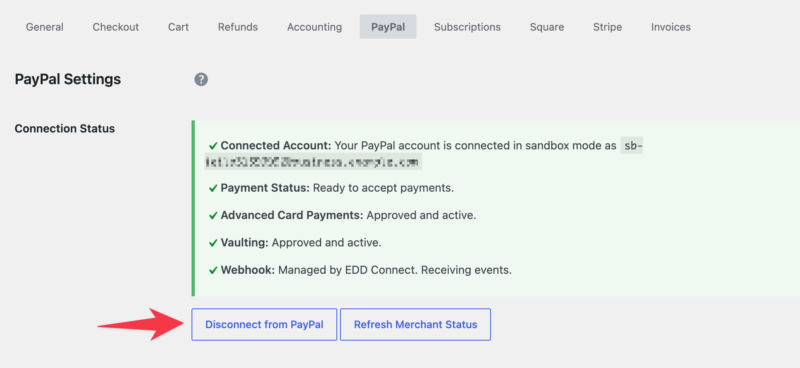
Quindi, connettiti di nuovo utilizzando lo stesso account.
PayPal ristabilirà la connessione con l'elenco dei metodi di pagamento supportati da PayPal che puoi abilitare.
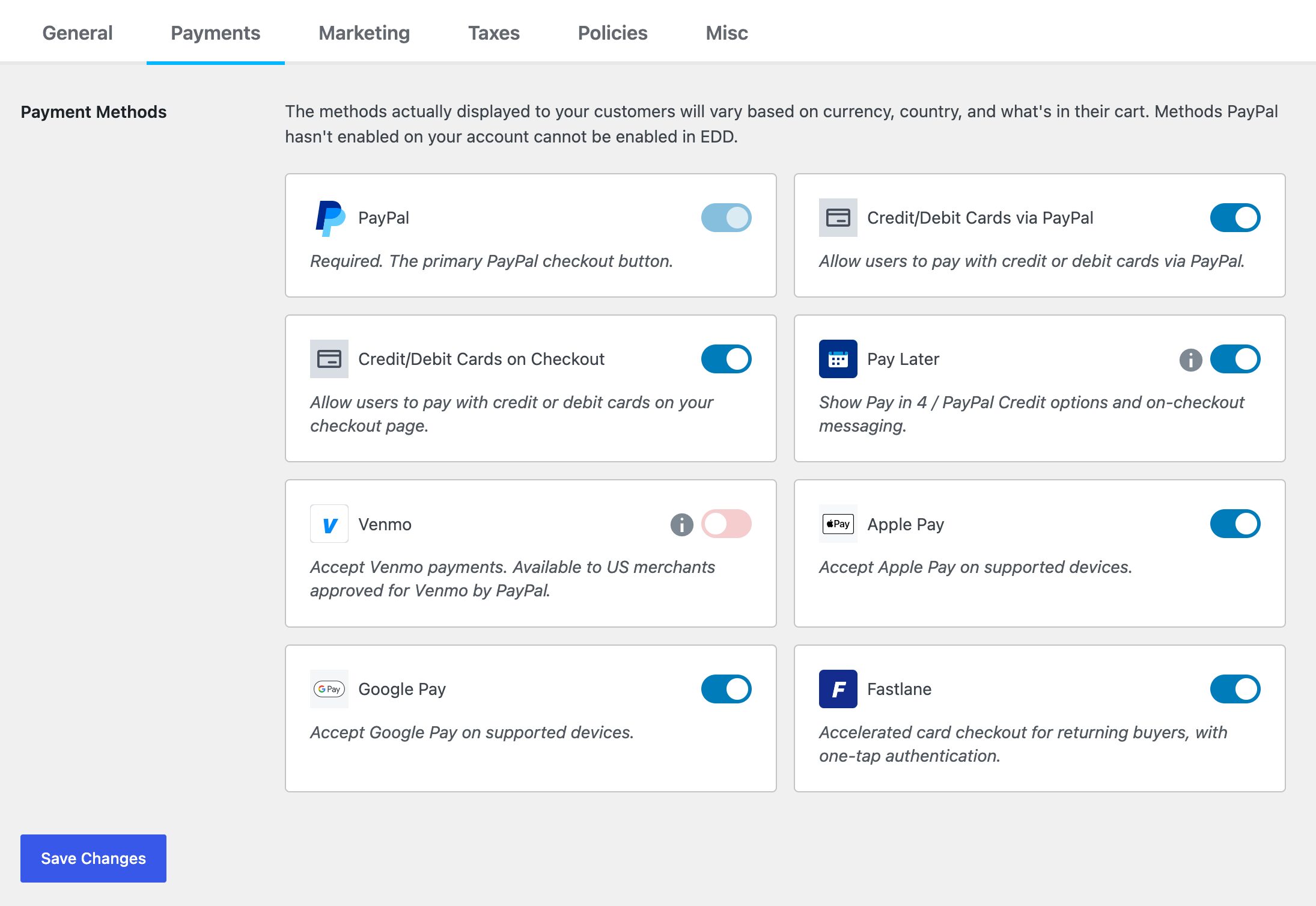
Seleziona Salva modifiche.
Vai al tuo checkout e conferma che le nuove opzioni appaiano. Per i dettagli completi sulla connessione, consulta la documentazione di configurazione PayPal.
FAQ: Metodi di pagamento PayPal e Fastlane
Hai ancora domande sui nuovi metodi di pagamento PayPal e Fastlane? Ecco risposte rapide alle più comuni su questo aggiornamento WordPress PayPal.
PayPal Fastlane è gratuito in Easy Digital Downloads?
Sì. Fastlane e i metodi di pagamento PayPal aggiuntivi sono integrati in Easy Digital Downloads. Hai solo bisogno dell'ultima versione collegata al tuo account PayPal per iniziare a usarli.
I miei clienti hanno bisogno di un account PayPal per utilizzare Fastlane?
No. Fastlane è progettato per il checkout degli ospiti, quindi i clienti possono pagare rapidamente senza creare o accedere a un account PayPal. Possono anche pagare con carta, Venmo, Apple Pay o Google Pay a seconda della disponibilità.
Perché non vedo i nuovi metodi di pagamento sul mio negozio?
I nuovi metodi sono abilitati per i negozi appena collegati. Se hai collegato PayPal prima di questo aggiornamento, scollega e ricollega il tuo account in Download » Impostazioni » Pagamenti » PayPal per attivarli.
Quali metodi di pagamento vedranno i miei clienti?
Dipende dal tuo paese e dall'idoneità del tuo account PayPal. PayPal mostra automaticamente a ciascun cliente i metodi disponibili per loro, che possono includere PayPal, Venmo, carte di debito e credito, Apple Pay e Google Pay. Se un metodo che desideri non viene visualizzato, dovrai contattare PayPal per richiederlo. Queste autorizzazioni sono controllate da PayPal, non da Easy Digital Downloads.
Funzionerà se sto usando EDD Lite?
Sì. L'aggiornamento all'ultima versione di Easy Digital Downloads ti fornisce tutti i metodi di pagamento elencati sopra.
Devo cambiare qualcosa al checkout affinché funzioni?
Non è richiesta alcuna configurazione personalizzata. Una volta aggiornato Easy Digital Downloads e ricollegato PayPal, i metodi di pagamento disponibili appariranno automaticamente al checkout.
Ci sono commissioni per accettare pagamenti PayPal?
Le commissioni di elaborazione standard di PayPal si applicano a ogni transazione. Sulla versione lite/gratuita di Easy Digital Downloads, c'è anche una commissione di transazione del 3%. L'aggiornamento a EDD Pro rimuove quella commissione del 3%, il che significa che paghi solo le tariffe standard di PayPal.
Inizia oggi stesso a offrire più modi per pagare
Offrire ai clienti più modi per pagare è uno dei modi più semplici per aumentare le tue vendite, e ora è integrato direttamente nel tuo negozio. Con PayPal Fastlane e i nuovi metodi di pagamento in Easy Digital Downloads, il tuo checkout può offrire la velocità e la scelta che gli acquirenti si aspettano.
Aggiorna Easy Digital Downloads, ricollega il tuo account PayPal e inizia oggi stesso a offrire Venmo, carte, portafogli digitali e un checkout più veloce per gli ospiti.
Nuovo in Easy Digital Downloads? Inizia in pochi minuti e imposta un checkout che offra a ogni cliente un modo per pagare.
Scopri di più su questo aggiornamento nelle nostre Note di rilascio.
📣 P.S. Assicurati di iscriverti alla nostra newsletter e di seguirci su Facebook, Twitter/X, o LinkedIn per altre risorse WordPress!








