


Wat als uw WordPress-winkel automatisch de perfecte producten aan elke klant zou kunnen aanbevelen? Geen handmatige instellingen. Geen complexe regels. Gewoon slimme productaanbevelingen die de verkoop stimuleren.
Studies tonen aan dat gepersonaliseerde aanbevelingen de gemiddelde bestelwaarde met 10% of meer verhogen. En het instellen van AI-productsuggesties in WordPress maakt dit mogelijk.
Easy Digital Downloads' Cart Recommendations-functie is een AI-systeem dat uw productcatalogus automatisch analyseert. Het stelt relevante items direct voor in uw winkelwagenvoorbeeld - precies wanneer klanten het meest betrokken zijn.
Het beste deel? Geen programmering vereist. Het systeem onderhoudt zichzelf naarmate uw catalogus groeit. In deze tutorial leert u hoe u AI-gestuurde aanbevelingen op uw WordPress-site instelt.
- Wat zijn AI-productaanbevelingen? 🤖
- Voordelen van AI-aanbevelingen voor digitale winkels
- Hoe de slimme winkelwagenaanbevelingen van EDD werken
- Vereisten: Wat u nodig hebt
- AI-productaanbevelingen instellen in EDD
- Best practices voor het maximaliseren van AI-productaanbevelingen
- Veelgestelde vragen over AI-productaanbevelingen in WordPress
Wat zijn AI-productaanbevelingen? 🤖
AI-productaanbevelingen gebruiken machine learning-algoritmen om uw productcatalogus en de relaties tussen items te analyseren. In plaats van dat u handmatig bepaalt welke producten bij elkaar horen, bestudeert de AI uw producttitels, beschrijvingen en categorieën om diepe verbanden te identificeren en de beste combinaties voor te stellen op basis van de unieke gegevens van uw winkel.
Zie het als een superintelligente verkoopassistent die leert van elke aankoop en steeds beter wordt in het doen van suggesties.
Het belangrijkste verschil tussen op regels gebaseerde aanbevelingen (zoals "vaak samen gekocht") en echte AI-aanbevelingen is leren. Op regels gebaseerde systemen volgen vooraf ingestelde regels. AI-systemen passen hun suggesties aan en verbeteren deze op basis van nieuwe gegevens.
Voordelen van AI-aanbevelingen voor digitale winkels 📈
Verhoog de gemiddelde bestelwaarde (AOV)
AI-aanbevelingen verhogen de AOV doorgaans met ongeveer 10% of meer. Sommige digitale winkels zien zelfs hogere winsten door geautomatiseerde cross-selling.
Gemiddelde bestelwaarde (AOV) = Totale omzet ÷ Totaal aantal bestellingen
Laten we zeggen dat uw huidige AOV $50 is met 100 bestellingen per maand ($5.000 omzet). Een stijging van 20% in AOV betekent:
- Nieuwe AOV: $60 per bestelling
- Hetzelfde 100 bestellingen: $6.000 omzet
- Extra $1.000 maandelijkse omzet zonder extra verkeer
Voor digitale producten werkt dit bijzonder goed omdat u complementaire items aanbeveelt, zoals:
- Een e-boek bij een videocursus
- Een premium plugin met een WordPress-thema
- Geavanceerde sjablonen met basisontwerppakketten
- Bonusmateriaal bij hoofdproducten
Verbeterde klantervaring door personalisatie
Relevante aanbevelingen helpen klanten tools te ontdekken waarvan ze niet wisten dat ze die nodig hadden. In plaats van door uw volledige catalogus te bladeren, zien ze gepersonaliseerde product suggesties die passen bij hun interesses. Dit creëert een meer gepersonaliseerde winkelervaring en verhoogt de klanttevredenheid.
Lagere tarieven voor verlaten winkelwagentjes
Wanneer klanten waardevolle add-ons zien tijdens het afrekenen, is de kans groter dat ze hun aankoop voltooien. De AI vangt ze op het hoogtepunt van de koopintentie en biedt dwingende redenen om de transactie af te ronden.
Tijdsbesparing door automatisering
Als u niet handmatig gerelateerde items voor elke download wilt samenstellen, regelt echte cross-sell automatisering dit voor u. Voor digitale verkopers met tientallen of honderden producten bespaart dit talloze uren en levert het nauwkeurigere aanbevelingen op dan handmatige selectie.
Dit werkt bijzonder goed voor bestanden en downloads vanwege de directe levering en lage overheadkosten voor add-ons. Er is geen voorraadbeheer of verzendkosten om u zorgen over te maken - alleen pure winst uit intelligente suggesties.
Hoe EDD AI Winkelwagen Aanbevelingen Werken 🎯
Nieuw bij Easy Digital Downloads (EDD)? Als u het nog niet gebruikt, Easy Digital Downloads is een complete eCommerce-oplossing voor WordPress, speciaal ontworpen voor het verkopen van digitale producten. Hoewel veel gebruikers worstelen met complexe WooCommerce productaanbevelingen die zijn gebouwd voor fysiek winkelen, is EDD gestroomlijnd voor digitale producten en bestanden, waaronder software, e-books, documenten en mediabestanden.
U hebt geen opgeblazen plug-in voor productaanbevelingen van derden nodig; EDD bouwt deze krachtige functies rechtstreeks in het kernplatform in. Omdat EDD de unieke aard van digitaal verkopen begrijpt, kan het soepelere, snellere winkelervaringen leveren.
De slimme winkelwagenaanbevelingen van EDD verschijnen in het winkelwagen-previewpaneel - dat uitschuifbare winkelwagentje dat verschijnt wanneer klanten items toevoegen.
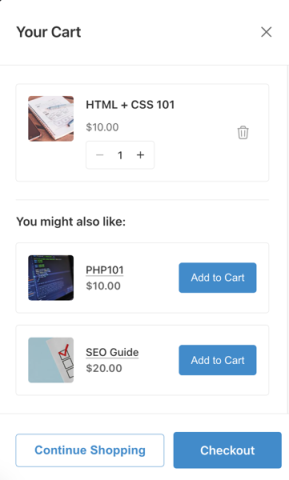
Dit is de perfecte locatie omdat het de winkelstroom niet onderbreekt. Klanten kunnen suggesties zien zonder de huidige pagina te verlaten of ergens anders naartoe te worden omgeleid.
Deze winkelwagen-upsells voor WordPress zijn ontworpen om kopers op het hoogtepunt van de aankoopintentie te vangen. Wanneer iemand een item aan zijn winkelwagen toevoegt, is hij al in de "koopmodus" - dit is het ideale moment om aanvullende producten voor te stellen.
Het Algoritme Achter de Magie
Het systeem van EDD maakt gebruik van een geavanceerde AI-engine om productbewuste aanbevelingen te doen. Door de inhoud en context van uw downloads te analyseren, identificeert de AI logische verbanden - zoals hoe een specifieke plugin een bepaald WordPress-thema aanvult - en stelt automatisch de meest relevante items voor.
Het systeem heeft een minimale hoeveelheid gegevens nodig om nauwkeurige aanbevelingen te doen. Voor nieuwe winkels kan het verschillende weken aan verkoopgegevens duren voordat de AI sterke patronen kan identificeren. Zodra er echter voldoende informatie is, worden de suggesties steeds nauwkeuriger.
EDD Aanbevolen Producten versus Slimme Winkelwagen Aanbevelingen
EDD biedt nog steeds de extensie Aanbevolen Producten voor basale product suggesties. Deze extensie gebruikt echter regelgebaseerde aanbevelingen: u selecteert handmatig welke producten u voor elk artikel wilt aanbevelen. Het wordt niet aangedreven door AI.
De aanbevolen oplossing is de functie Slimme AI Winkelwagen Aanbevelingen, beschikbaar met de Winkelwagen Voorbeeld functionaliteit wanneer u een EDD Pro licentie gebruikt. Dit biedt echte, door machine learning aangedreven suggesties die in de loop van de tijd verbeteren.
Vereisten: Wat u nodig heeft ✅
Voordat u AI-productaanbevelingen instelt, zorg ervoor dat u het volgende heeft:
- WordPress installatie
- Easy Digital Downloads plugin & actieve Pro licentie (vereist voor AI-aanbevelingen)
- Producten in uw EDD catalogus (minimaal 10-15 producten werken het beste voor zinvolle aanbevelingen)
De gratis versie van Easy Digital Downloads biedt basale e-commerce functionaliteit, inclusief de uitklapbare Winkelwagen Voorbeeld. Maar de AI-aangedreven winkelwagen aanbevelingen vereisen EDD Pro.
AI-productaanbevelingen instellen in EDD
Laten we het volledige installatieproces doorlopen. Elke stap is eenvoudig en duurt slechts enkele minuten om te voltooien.
Stap 1. Werk bij naar de nieuwste EDD versie 🔃
Voordat u Winkelwagen Aanbevelingen inschakelt, zorg ervoor dat u de nieuwste EDD Pro versie gebruikt.
Log in op uw WordPress admin dashboard. Navigeer naar Dashboard » Updates. Controleer op updates voor Easy Digital Downloads.

Klik op Nu bijwerken als er een update beschikbaar is. Wacht tot de update is voltooid.
Dit is belangrijk omdat Winkelwagen Aanbevelingen een nieuwere functie is. Het vereist de nieuwste EDD versie om correct te functioneren.
Stap 2. Schakel Winkelwagen Voorbeeld in 🛒
De functie Winkelwagen Voorbeeld creëert een uitklapbare winkelwagenlade die verschijnt wanneer klanten items aan hun winkelwagen toevoegen. Dit niet-intrusieve ontwerp laat klanten hun winkelwageninhoud bekijken en AI-aanbevelingen zien zonder de huidige pagina te verlaten.
Hier is waarom de Winkelwagen Voorbeeld de perfecte locatie is voor AI-productaanbevelingen:
- Het onderbreekt de browse-ervaring niet.
- Klanten zijn al in de "aankoopmodus" wanneer ze het zien.
- Het uitklapbare ontwerp voelt modern en professioneel aan.
- Het werkt naadloos op zowel desktop- als mobiele apparaten.
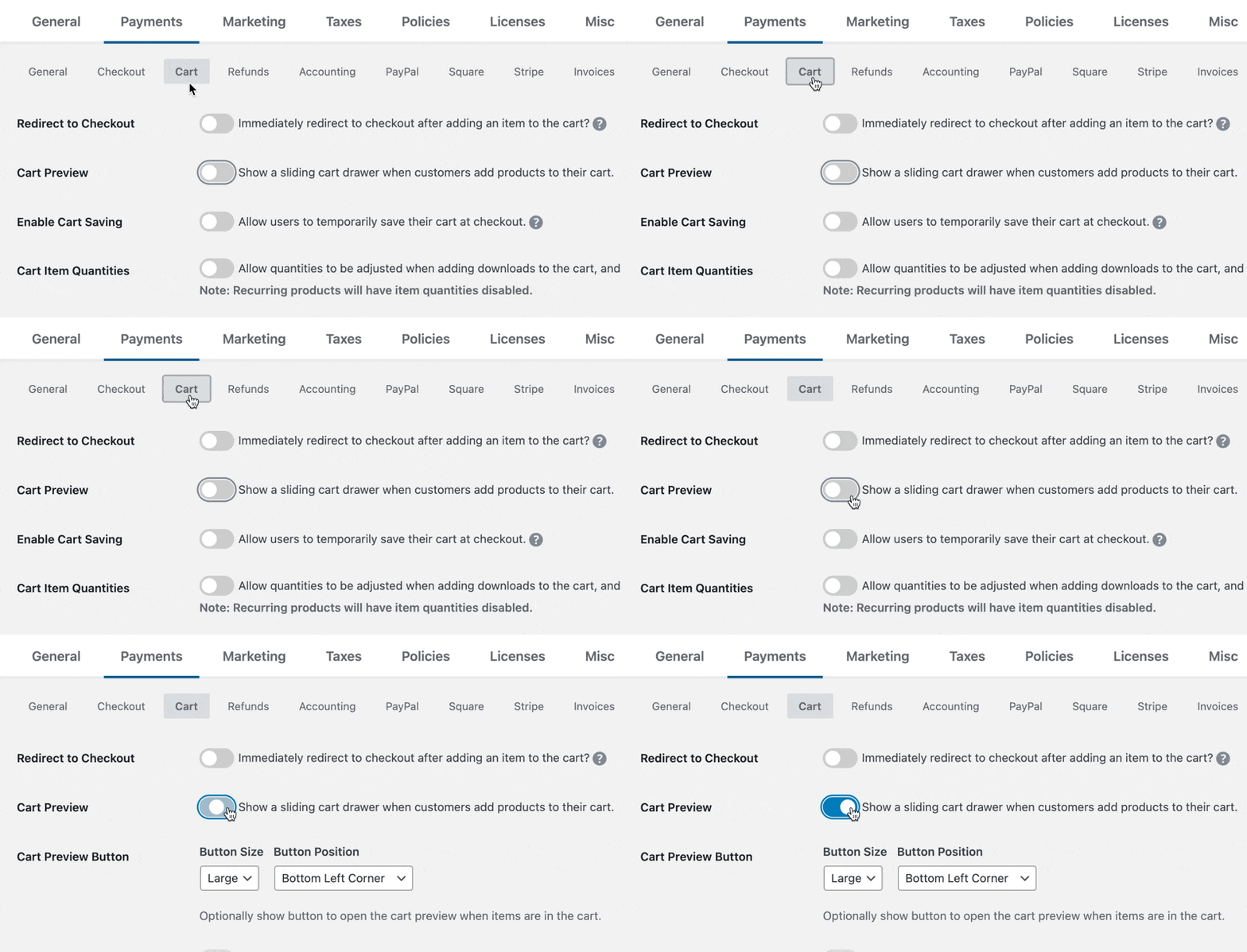
Instellingen voor Winkelwagen Voorbeeld openen
Om Winkelwagen Voorbeeld in te schakelen in EDD, volg deze stappen:
- Navigeer vanuit uw WordPress admin dashboard naar Downloads » Instellingen » Betalingen.
- Klik op het tabblad Winkelwagen bovenaan de pagina.
- Scroll naar beneden om de sectie Winkelwagen Voorbeeld te vinden.
- Vink het vakje aan om Winkelwagen Voorbeeld inschakelen.
- Klik op Wijzigingen opslaan.
Zodra ingeschakeld, creëert de Winkelwagenvoorbeeld een uitschuifbaar paneel dat vanaf de rechterkant van het scherm verschijnt wanneer klanten producten aan hun winkelwagen toevoegen. Dit zorgt voor een soepele, moderne winkelervaring die extra aankopen stimuleert.
Stap 3. Winkelwagen Aanbevelingen inschakelen 🔮
Nadat u Winkelwagenvoorbeeld hebt ingeschakeld, ziet u direct onder de instellingen van Winkelwagenvoorbeeld een nieuwe sectie Winkelwagen Aanbevelingen verschijnen. Hier gebeurt de magie.
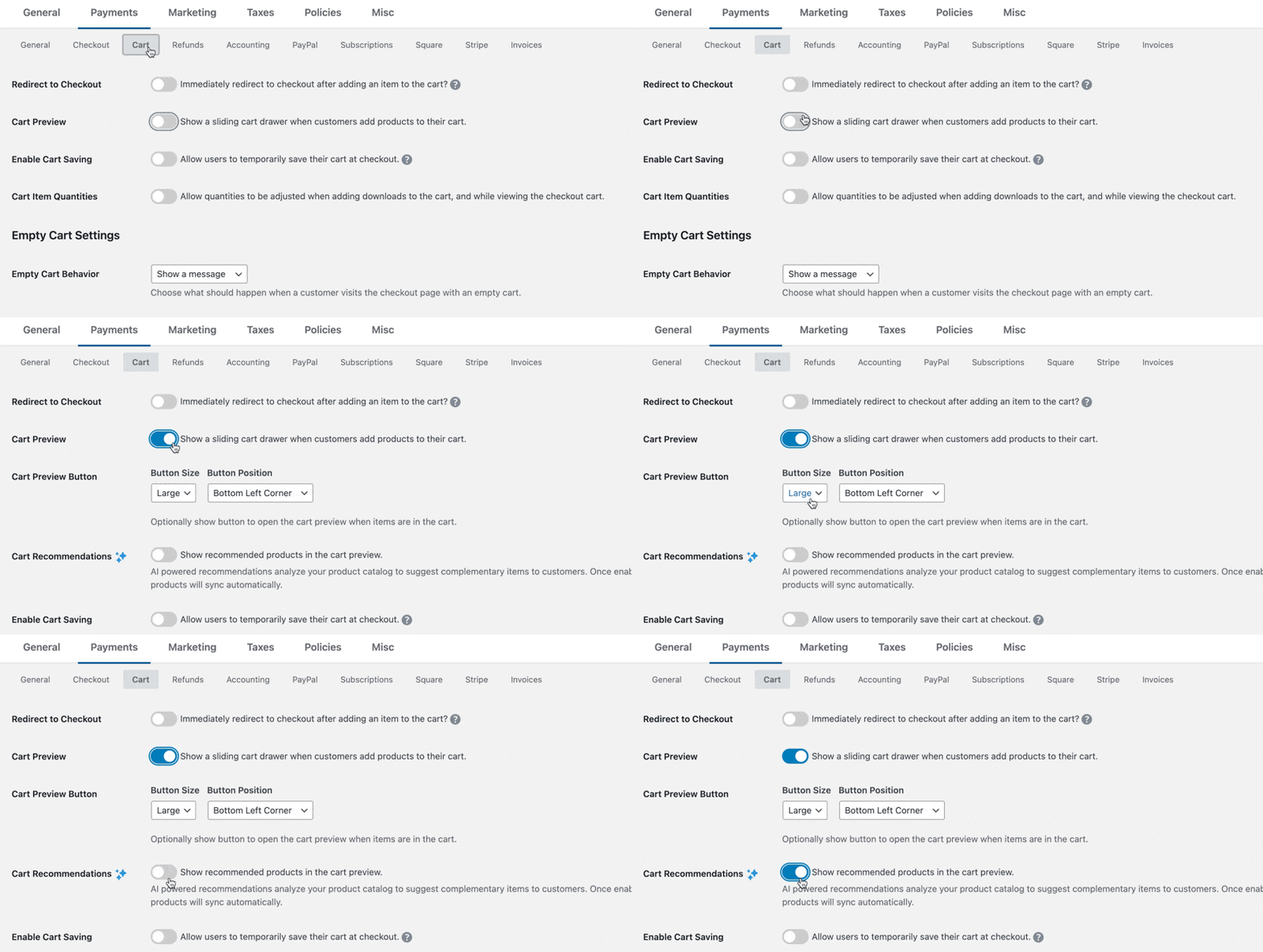
AI Winkelwagen Aanbevelingen inschakelen
- Scroll in hetzelfde Winkelwagen instellingentabblad naar beneden naar de sectie Winkelwagen Aanbevelingen.
- Schakel de schakelaar naar Winkelwagen Aanbevelingen inschakelen.
- Klik op Wijzigingen opslaan.
Dat is alles! De installatie is opzettelijk eenvoudig omdat EDD alle complexe AI-verwerking op de achtergrond afhandelt. U hoeft geen algoritmen te configureren, gegevensfeeds in te stellen of aanbevelingslogica te beheren – het systeem doet dit automatisch.
Stap 4. Wachten op synchronisatie productcatalogus ⏱️
Zodra u Winkelwagen Aanbevelingen inschakelt, begint EDD automatisch met het synchroniseren van uw productcatalogus met de AI-aanbevelingsservice. Deze eerste synchronisatie duurt meestal slechts een paar minuten, afhankelijk van het aantal producten in uw winkel.
Tijdens het synchronisatieproces, EDD:
- Analyseert de structuur van uw productcatalogus.
- Identificeert productcategorieën en relaties.
- Begint met het verzamelen van productgegevens.
- Bereidt de basis voor aanbevelingen voor.
U hoeft niets te doen tijdens dit proces – wacht gewoon tot de synchronisatie is voltooid. Voor winkels met honderden producten kan de synchronisatie 15-30 minuten duren. De meeste winkels voltooien de synchronisatie binnen 5 minuten.
Stap 5. AI Productaanbevelingen testen 🧪
Zodra de synchronisatie is voltooid, verschijnen AI-productaanbevelingen automatisch in het Winkelwagenvoorbeeldpaneel wanneer klanten items aan hun winkelwagen toevoegen.
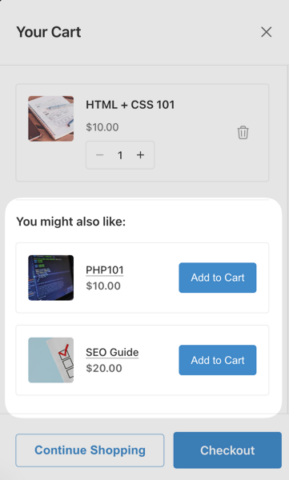
Hier leest u hoe u het systeem kunt testen.
Testen als een klant
- Bezoek de voorkant van uw winkel (open een nieuw incognitovenster).
- Voeg een product toe aan uw winkelwagen.
- Let op het Winkelwagenvoorbeeldpaneel dat van rechts naar buiten schuift.
- Zoek naar de sectie “Aanbevolen voor u” of “Misschien vindt u dit ook leuk”.
- Verifieer dat relevante producten als suggesties verschijnen.
Wat te verwachten
In eerste instantie kunnen aanbevelingen eenvoudig of beperkt lijken, omdat de AI tijd nodig heeft om te leren. Naarmate u meer producten toevoegt en uw beschrijvingen en categorieën verfijnt, blijft de AI-engine leren en zijn aanbevelingen vernieuwen om perfect gesynchroniseerd te blijven met uw inventaris.
Prestaties monitoren
Houd deze belangrijke statistieken bij om de effectiviteit van uw AI-aanbevelingen te meten:
- Click-through rates op aanbevolen producten.
- Conversieratio's van aanbevelingen naar aankopen.
- Gemiddelde orderwaarde verbeteringen.
- Omzettoerekening van door AI voorgestelde producten.
De meeste EDD Pro-gebruikers zien merkbare verbeteringen in deze statistieken binnen 2-4 weken na het inschakelen van Winkelwagen-aanbevelingen, zodra de AI voldoende gegevens heeft verzameld om intelligente suggesties te doen.
⚙️ Voor meer begeleiding, bekijk onze Documentatie voor het inschakelen van winkelwagen-aanbevelingen.
Best practices voor het maximaliseren van AI-productaanbevelingen
Beginnen met een nieuwe winkel (minimale gegevens)
Wanneer je net begint, heeft de AI niet veel klantgegevens om mee te werken. Hier zijn strategieën om sneller betere aanbevelingen te krijgen:
Terwijl je wacht tot de AI gegevens verzamelt, kun je nog steeds effectief cross-sellen:
- Gebruik EDD's handmatige cross-sell functies voor je top producten
- Maak productbundels voor duidelijk gerelateerde artikelen
- Voeg secties "Vaak samen gekocht" toe aan productpagina's
Als je overstapt van een ander platform, importeer dan zoveel mogelijk historische verkoopgegevens.
Voor nieuwe winkels is de AI aanvankelijk meer afhankelijk van inhoudelijke gelijkenis (productcategorieën, beschrijvingen, tags) dan van gedragsgegevens. Zorg ervoor dat je producten correct zijn gecategoriseerd en getagd om het systeem te helpen logische verbanden te leggen.
Stel realistische verwachtingen
Verwacht niet onmiddellijk perfecte aanbevelingen.
Onthoud dat AI-aanbevelingen beter worden naarmate ze meer gegevens verzamelen. Verwacht niet onmiddellijk perfecte suggesties. Geef het systeem een paar weken om je producten te leren kennen.
Categoriseer producten voor betere aanbevelingen
Goede productcategorisatie helpt de AI verbanden tussen artikelen te begrijpen:
- Gebruik specifieke, beschrijvende categorieën
- Pas relevante tags toe op producten
- Schrijf gedetailleerde productbeschrijvingen
- Groepeer gerelateerde producten logisch
Veelgestelde vragen over AI-productaanbevelingen in WordPress
Laten we afsluiten door enkele veelgestelde vragen te beantwoorden over AI-gestuurde slimme winkelwagen-aanbevelingen en hoe je ze kunt gebruiken voor je digitale winkel in WordPress.
Heb ik EDD Pro nodig voor AI-aanbevelingen?
Ja, AI-gestuurde winkelwagen-aanbevelingen vereisen een actieve Easy Digital Downloads Pro-licentie. De gratis versie van EDD bevat basisfuncties voor e-commerce, maar de slimme functie Winkelwagen-aanbevelingen met machine learning-algoritmen is alleen beschikbaar in EDD Pro.
Wat is het verschil tussen EDD Aanbevolen Producten en AI-productaanbevelingen?
EDD Aanbevolen Producten is een aparte extensie die gebaseerd is op historische verkopen, terwijl Slimme Winkelwagen-aanbevelingen een functie is die is ingebouwd in EDD Pro en AI gebruikt om productinhoud te analyseren. AI-aanbevelingen verbeteren na verloop van tijd en vereisen geen handmatige configuratie.
Zullen AI-aanbevelingen mijn site vertragen?
Nee, EDD's AI-aanbevelingen zijn ontworpen voor prestaties. De verwerking van aanbevelingen gebeurt op de servers van EDD, niet op je WordPress-site. De winkelwagen-preview laadt aanbevelingen asynchroon, zodat ze geen invloed hebben op je paginalaadtijden of siteprestaties.
Kan ik AI-aanbevelingen handmatig overschrijven?
Momenteel is de Cart Recommendations-functie van EDD volledig geautomatiseerd – je kunt specifieke aanbevelingen niet handmatig overschrijven. Je kunt de functie echter volledig uitschakelen of de aparte Recommended Products-extensie gebruiken voor handmatige controle naast het AI-systeem.
Hoeveel aanbevelingen zien klanten in hun winkelwagen?
Klanten zien tot 3 aanbevolen producten per winkelwagen. Het exacte aantal is afhankelijk van de relevantieberekeningen van het AI-algoritme. Deze limiet voorkomt dat klanten overweldigd raken, terwijl er toch zinvolle suggesties worden gedaan.
Verhoog Verkoop met AI Productaanbevelingen
Het toevoegen van AI-productaanbevelingen aan je WordPress-winkel met Easy Digital Downloads is een van de slimste zetten die je kunt maken om de omzet te verhogen zonder meer verkeer te genereren.
De Cart Recommendations-functie maakt dit ongelooflijk eenvoudig. Schakel gewoon Cart Preview in, zet Cart Recommendations aan en laat het machine learning-algoritme het werk doen.
Klaar om je digitale productverkopen te stimuleren met slimme aanbevelingen? Schakel vandaag nog de Cart Preview- en Recommendations-functies van EDD in. Als je nog geen Pro-pas hebt, scoor er dan vandaag een om deze functie uit te proberen!
Wat is de volgende stap? Ontdek meer manieren om de afhaakpercentages van winkelwagens in WordPress te verminderen.
📣 P.S. Vergeet niet om zich te abonneren op onze nieuwsbrief en ons te volgen op Facebook, Twitter/X, of LinkedIn voor meer WordPress-bronnen!








