


Wil je een online winkel opzetten? Goed idee. Dit is een geweldige manier om een succesvol bedrijf of een bijverdienste op te bouwen met een bijna onbeperkt publiek.
Wat is het beste platform om te gebruiken? In dit artikel vergelijken we Shopify met BigCommerce en Easy Digital Downloads. Elk van deze e-commerceoplossingen is populair en krachtig.

We helpen je beslissen welke het beste bij je past. Laten we beginnen!
Welke is het beste voor digitale producten?
Aangezien je op EasyDigitalDownloads.com bent beland, is de kans groot dat je geïnteresseerd bent in het verkopen van digitale producten (zoals PDF's, afbeeldingen, spreadsheets, documenten of software) en niet fysieke producten (zoals kleding, koffie of voedingssupplementen).
Wat is de beste manier om digitale producten te verkopen? Op je eigen website waar je volledige controle hebt over alles.
✅ Klantbeleving en branding
✅ Vaste kosten
✅ De mogelijkheid om de functionaliteit van je website uit te breiden naarmate je groeit
De e-commerce die het beste aan die eisen voldoet, is een WordPress-website met Easy Digital Downloads.
Waarom WordPress? Omdat je je website bezit als je WordPress gebruikt. Als je verkoopt op marktplaatsen zoals Etsy of SaaS-platforms zoals Shopify of BigCommerce, huur je je digitale vastgoed. Je hebt minder controle en de voorwaarden van je aanwezigheid op hun platform kunnen op elk moment veranderen.
Waarom Easy Digital Downloads (EDD)? Omdat het speciaal is ontworpen om het zo snel en gemakkelijk mogelijk te maken om je digitale producten te verkopen. EDD is speciaal ontworpen voor digitale producten en wordt vertrouwd door meer dan 50.000 websites.
Met WordPress en EDD heb je volledige controle over alles.
Instellingsstappen voor digitale producten
Deze tabel geeft een overzicht van de stappen die nodig zijn om een Shopify-, BigCommerce- of Easy Digital Downloads-winkel op te zetten. Je zult merken dat het verkopen van digitale producten op Shopify als een bijzaak kan worden beschouwd. Het is helemaal niet ontworpen voor digitale producten.
| Shopify | BigCommerce | Easy Digital Downloads |
|---|---|---|
| Verkrijg een domeinnaam | Verkrijg een domeinnaam | Verkrijg een domeinnaam |
| Stel Shopify-account in | Stel BigCommerce-account in | Stel een WordPress-site in |
| Kies gratis of betaald thema | Kies gratis of betaald thema | Kies gratis of betaald thema |
| Maak een product | Maak een product | Installeer EDD-plugin |
| Schakel diverse instellingen voor fysieke producten uit en/of negeer ze | Schakel diverse instellingen voor fysieke producten uit en/of negeer ze | Maak een download (product) |
| Zoek en installeer add-on/app voor digitale downloads | Schakel de modus voor digitale producten in | Selecteer een betaalmethode |
| Configureer add-on/app voor digitale downloads | Selecteer een betaalmethode | Bekijk / test productpagina |
| Ga terug naar productinstellingen, klik op het product, voeg een bijlage voor digitale downloads toe | Bekijk / test productpagina | Begin met verkopen |
| Bijlagebestand voor digitale downloads koppelen en configureren | Begin met verkopen | |
| Selecteer een betaalmethode | ||
| Bekijk / test productpagina | ||
| Begin met verkopen |
BigCommerce is gemakkelijker te gebruiken dan Shopify voor digitale producten. En Easy Digital Downloads is gemakkelijker dan beide.
Digitaal Eerst
Alleen EDD is een digitale-first oplossing. Het heeft ook digitale productfuncties die krachtiger zijn en niet beschikbaar zijn met Shopify of BigCommerce (zonder add-ons van derden).
Bekijk deze digitale-first extensies die we maken om uw digitale productverkoop te stimuleren:
- Softwarelicenties – Genereer automatisch licentiecodes, beheer verlengingen en beheer upgrades voor uw digitale producten.
- Facturen – Maak aantrekkelijke facturen en bied eenvoudige aankoopgeschiedenispagina's om de klantloyaliteit te vergroten.
- Frontend Inzendingen – Sta andere productmakers toe om op uw website te verkopen, waardoor uw website een marktplaats wordt om de verkoop exponentieel te laten groeien.
Begin met EDD door de Pass te kiezen die het beste bij uw behoeften past.
⬇️ Laten we Shopify vs. BigCommerce vs. Easy Digital Downloads in meer detail vergelijken. Lees verder.
Prijzen
Shopify en BigCommerce worden maandelijks gefactureerd. Easy Digital Downloads wordt jaarlijks gefactureerd met 50% introductiekorting voor het eerste jaar!
Dit maakt EDD bijzonder goed voor het starten van een nieuw digitaal productbedrijf. U kunt beginnen met weinig initiële overheadkosten.
| Shopify | BigCommerce | Easy Digital Downloads |
|---|---|---|
| Basic: €348 per jaar (€29 per maand) | Essentials Standard: €359 per jaar (€29,95 per maand) | Personal Pass: €99,50 (eerste jaar, daarna €199 per jaar) (€16,50 per maand) |
| Standard: €948 per jaar (€79 per maand) | Essentials Plus: €959 per jaar (€79,95 per maand) | Extended Pass: €199,50 (eerste jaar, daarna €399 per jaar) (€33 per maand) |
| Advanced: €3.588 per jaar (€299 per maand) | Essentials Pro: €3.599 per jaar (€299,95 per maand) | Professional Pass: €299,50 (eerste jaar, daarna €599 per jaar) (€50 per maand) |
| Enterprise: €24.000 per jaar (€2.000 per maand of vraag een aangepaste offerte aan) | Onderneming: Alleen aangepaste offerte | All Access Pass: €499,50 (eerste jaar, daarna €999 per jaar) (€83 per maand) |
🤷🏾 Heb je nog geen WordPress-site? Geen probleem. Je kunt er heel gemakkelijk een opzetten en de kosten zijn erg laag.
- We raden aan om een beheerde WordPress-host te gebruiken. Installeer en beheer WordPress en Easy Digital Downloads met SiteGround Managed EDD Hosting, of
- Bekijk deze gids voor het selecteren van een goede webhost (met kortingscodes!)
Installatie
Zoals we hierboven al hebben vermeld, is het instellen van een product het eenvoudigst met Easy Digital Downloads. Laten we een gedetailleerdere kijk nemen.
Shopify-instellingen
Om een product in te stellen dat u op Shopify wilt verkopen, klikt u op de groene knop Product toevoegen op de startchecklist (als uw site nieuw is) of klikt u op het menu-item Producten aan de linkerkant en vervolgens op Product toevoegen.
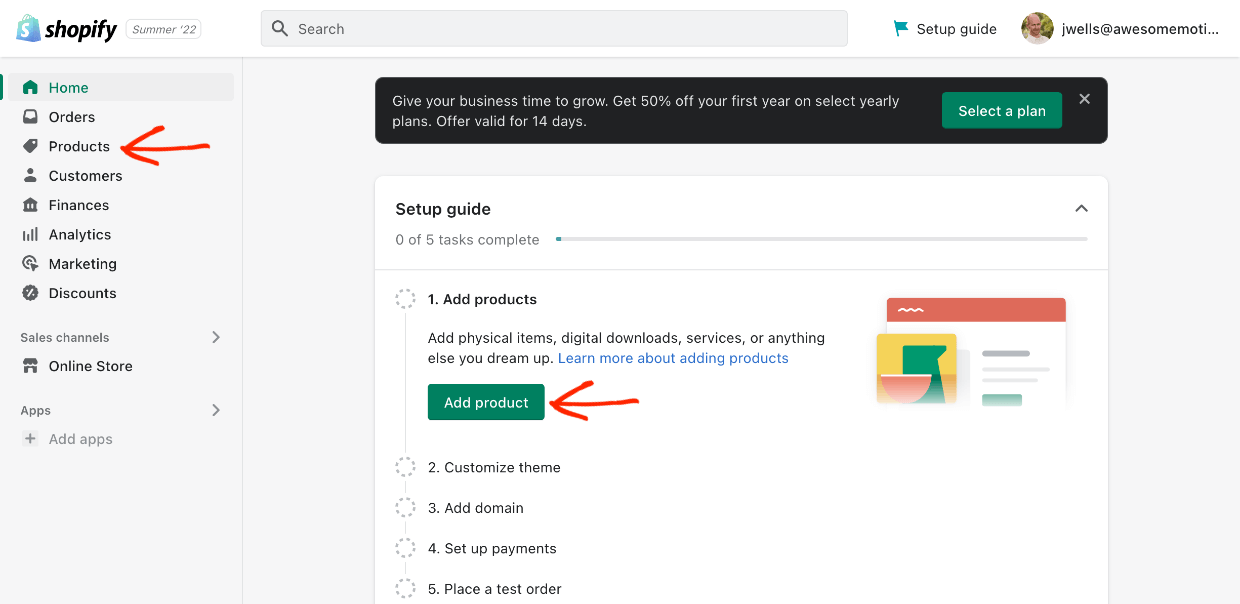
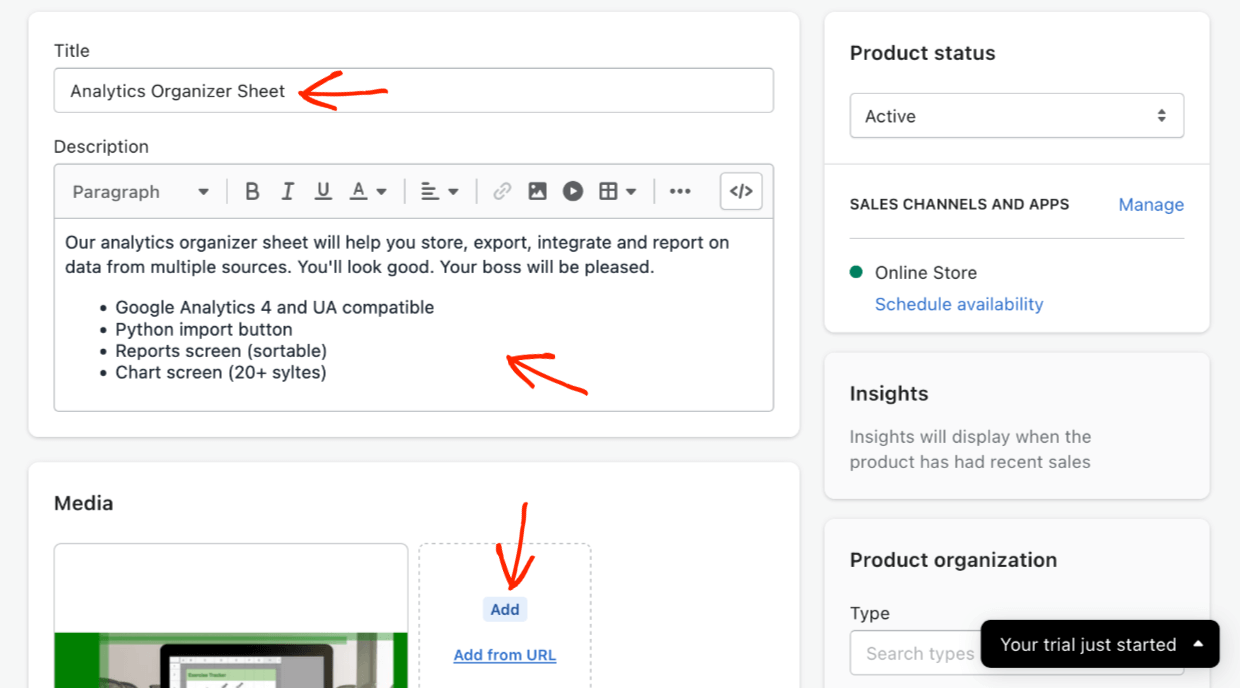
- Stap 1: voeg een titel en beschrijving toe, en dan
- Stap 2: voeg een productafbeelding toe
- Stap 3: stel een prijs in
Niet Ontworpen Voor Digitaal
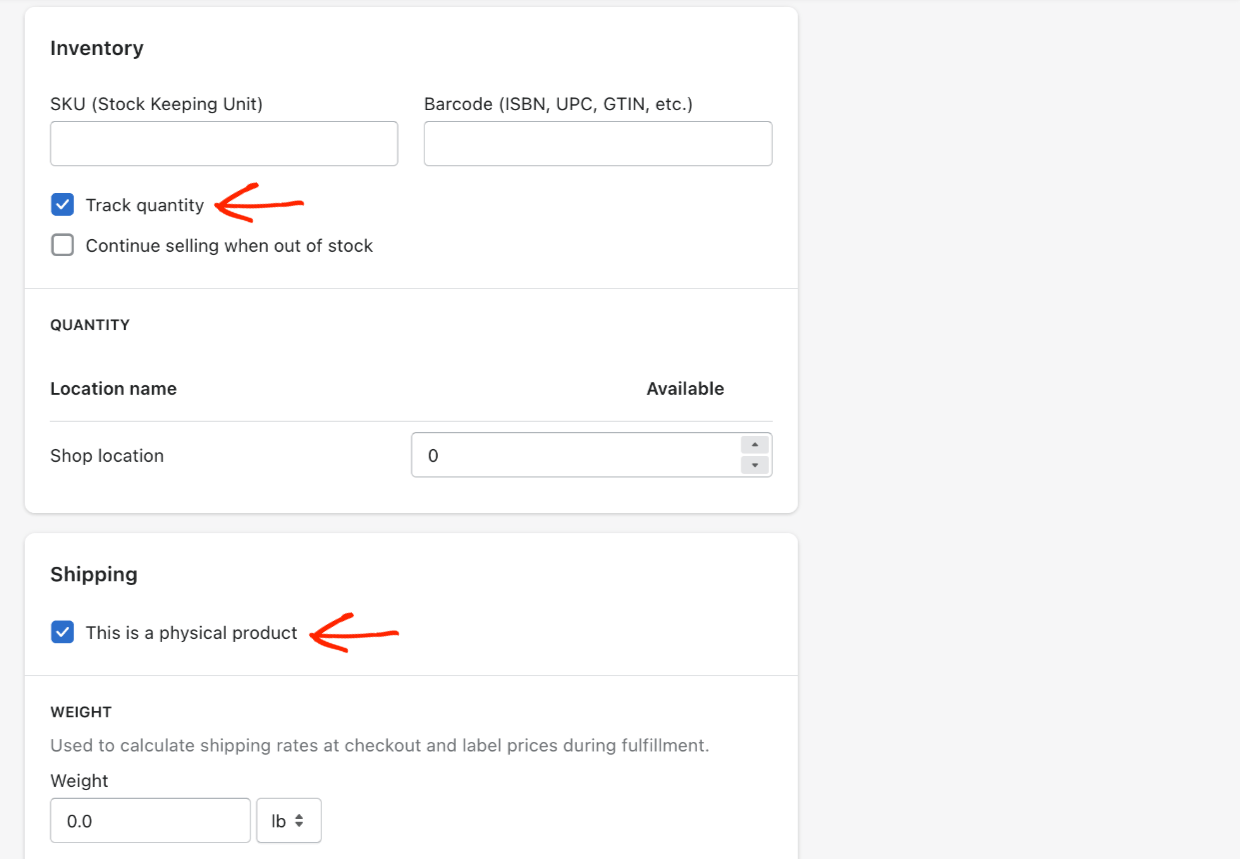
Stap 4: u zult merken dat er allerlei instellingen zijn die u niet nodig hebt als u digitale producten verkoopt. Onder Voorraad moet u 'Voorraad bijhouden' uitschakelen, omdat u een onbeperkte voorraad hebt.
Stap 5: Schakel onder Verzending 'Dit is een fysiek product' uit.
Zelfs na dit alles bent u er nog lang niet. 😩
Stap 7: u moet een gratis app installeren genaamd Digital Downloads.
- Klik in het dashboardmenu aan de linkerkant op 'Apps toevoegen'
- Zoek vervolgens naar 'Digital Downloads'
- Wanneer u het vindt, klikt u op App toevoegen. Vanaf hier wordt het verwarrend...
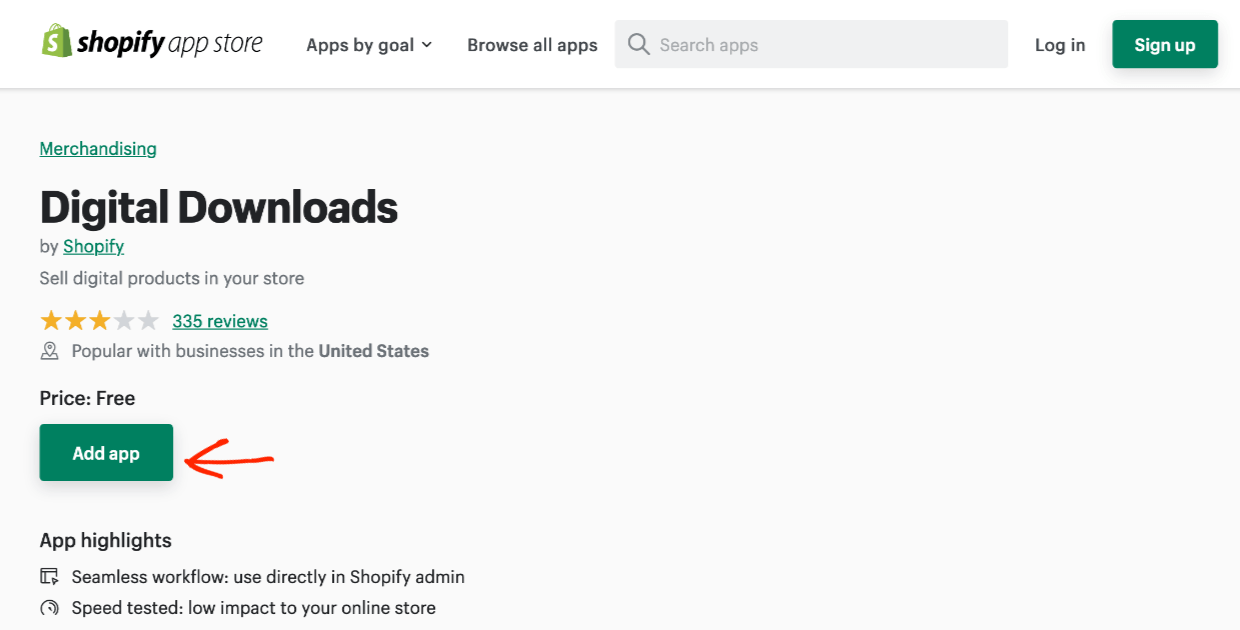
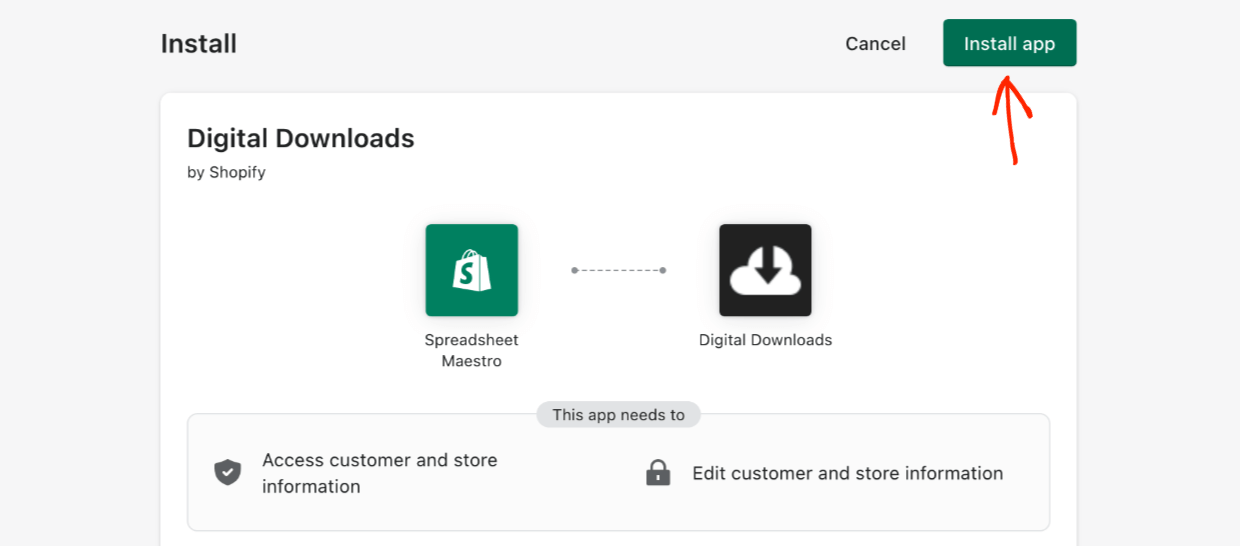
- Er wordt een nieuw tabblad geopend. Klik op App installeren. Uw controlepaneel/dashboard wordt geladen in een nieuw tabblad
- Vervolgens moet u de app installeren door op de knop Digital Downloads toevoegen rechtsboven te klikken
Stap 9: Vervolgens wordt u naar een pagina geleid die een beetje op een foutpagina lijkt. Klik op de knop 'Producten bekijken'. Nog veel meer klikken te gaan.
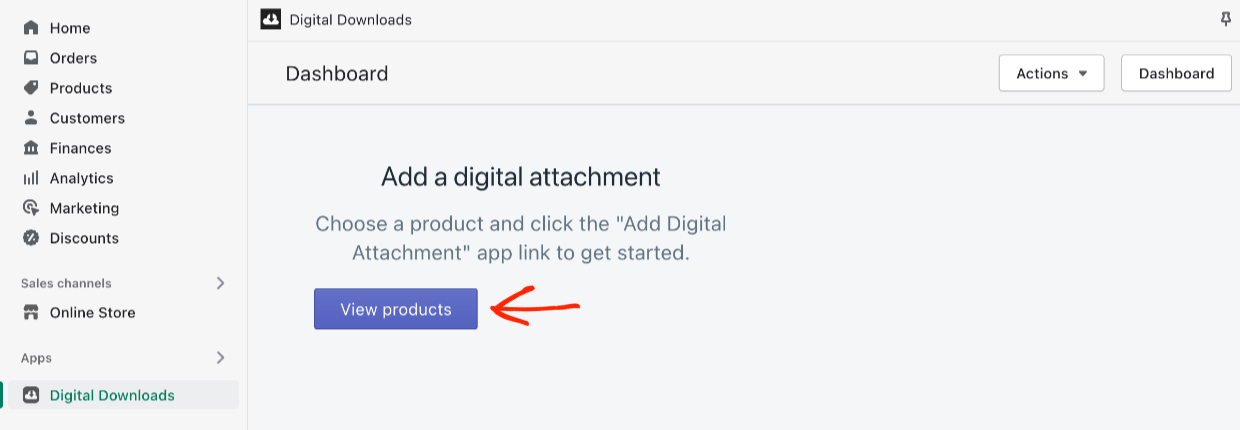
Klik vervolgens op het Product dat u al een beetje zojuist hebt gemaakt. U bent terug waar u begon op de Productpagina. De Digital Downloads-app voelt niet erg geïntegreerd aan. Er zijn geen nieuwe vakken met instellingen op de hoofdpagina die gemakkelijk te zien zijn.
Stap 10: Het is een beetje verwarrend. U moet klikken op de kleine knop Meer acties rechtsboven. Klik vervolgens op Digitale bijlage toevoegen.
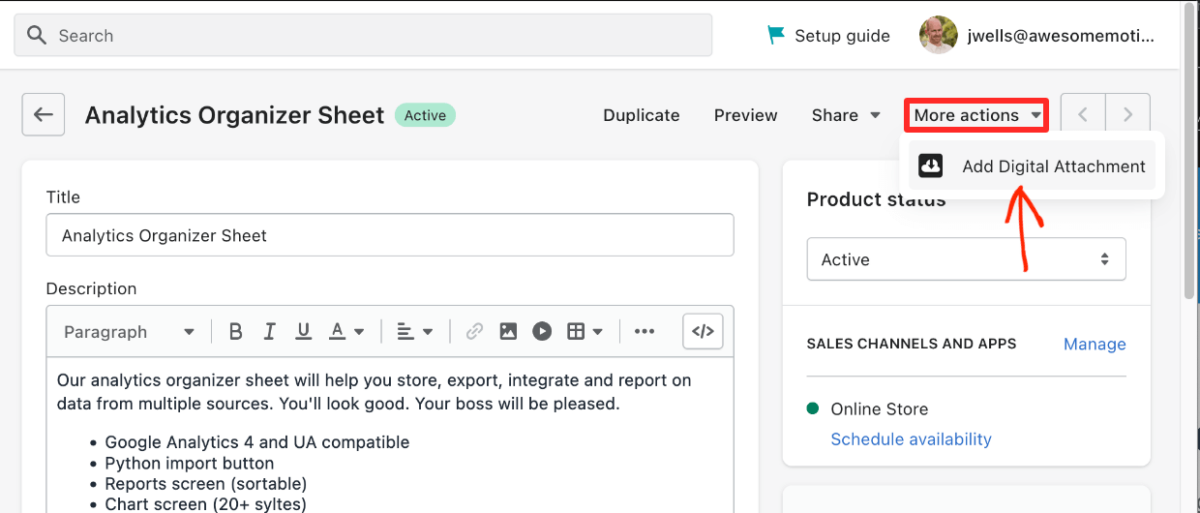
Daarna wordt u naar een *nieuwe* pagina met een *nieuwe* interface geleid. Klik op het blauwe Bestand uploaden om uw productbestand bij te voegen.
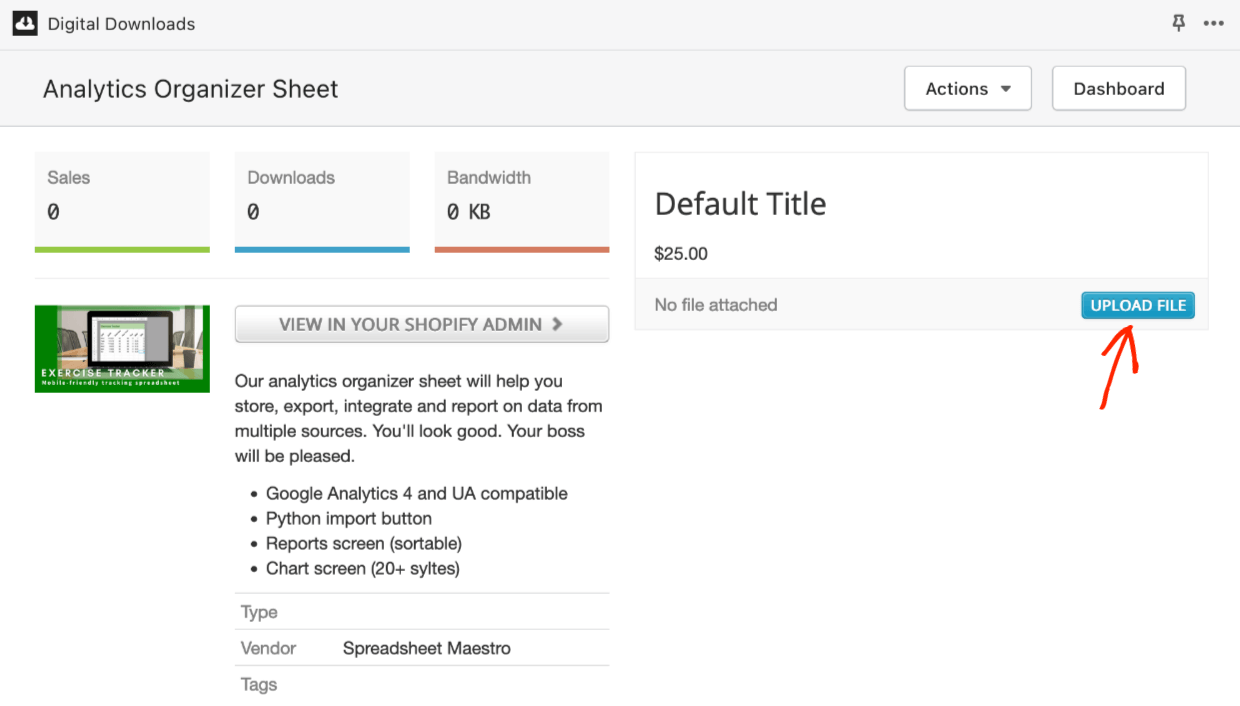
⬆️ De maximale uploadgrootte voor bestanden is 5 gigabyte.
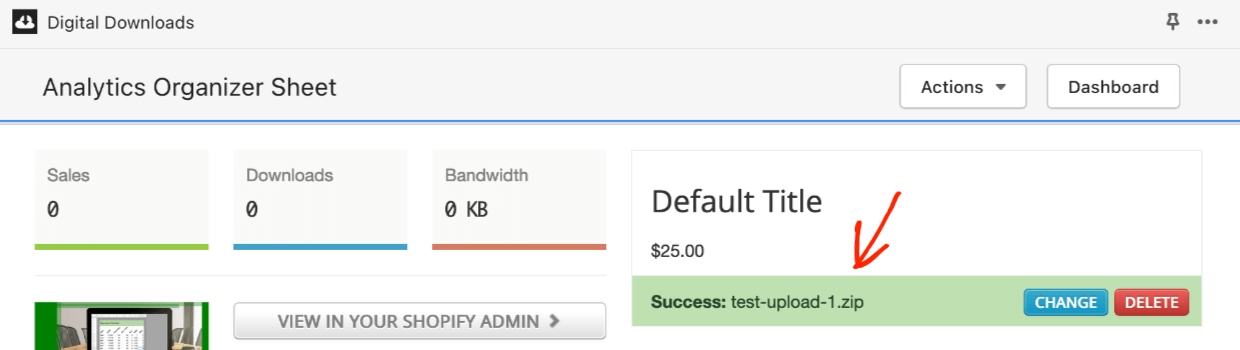
Poeh. Oké. Nu hebt u een product ingesteld, een digitaal product, dat bijna klaar is om te verkopen (nadat u een betaalmethode hebt gekozen).
Voorbeeld op Frontend
Klik op Online winkel in het linkermenu. Zoek vervolgens de knop Online winkel bekijken. Hiermee kunt u zien hoe het nieuwe product eruit zal zien voor potentiële klanten. Klanten klikken op Toevoegen aan winkelwagen of Nu kopen om een aankoop te doen.
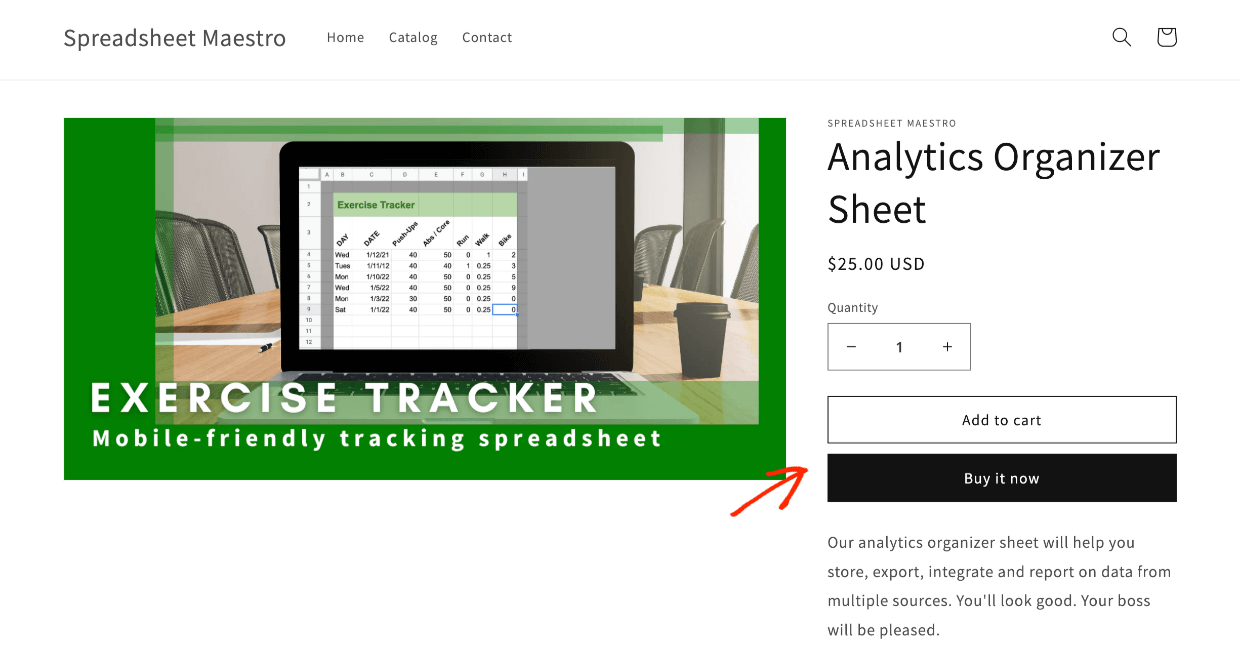
U kunt zien dat Shopify niet echt is ontworpen voor het instellen van een digitaal product. Er zijn een heleboel onnodige stappen, ongeveer 10, afhankelijk van hoe u ze telt. En u moet al die stappen steeds opnieuw doen (tenzij u een product dupliceert, dat slaat een *paar* stappen over). BigCommerce is eenvoudiger.
BigCommerce-instellingen
Om een product in te stellen met BigCommerce, ga je naar het menu aan de linkerkant. Klik op Products en vervolgens op Add. Voer vervolgens de Product Information in.
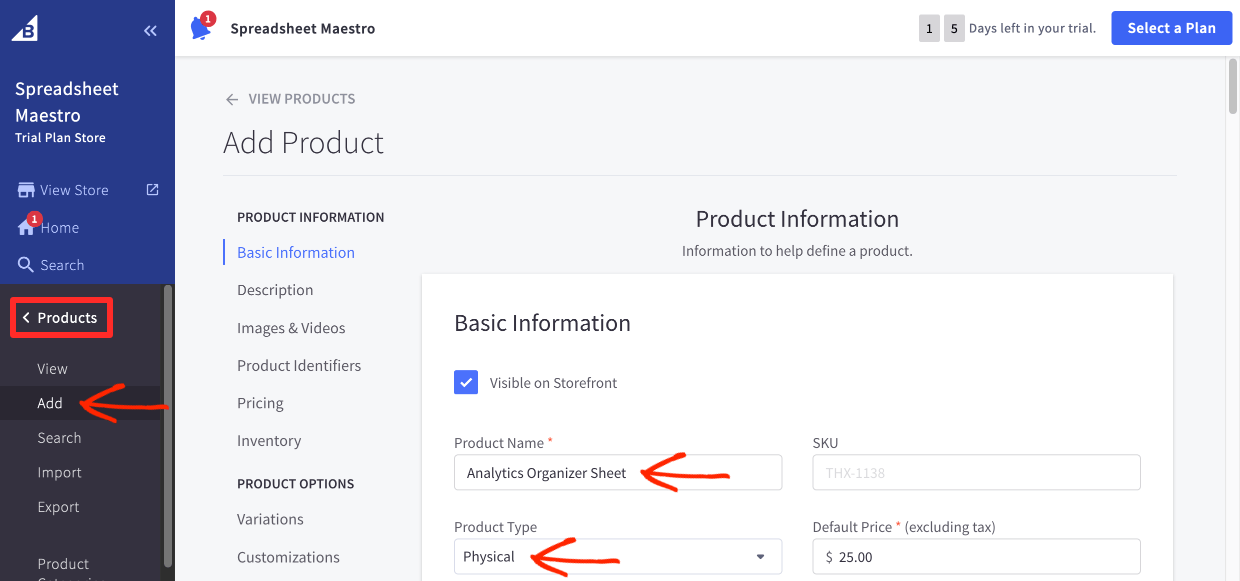
- Stap 1: voeg een Productnaam toe
- Stap 2: selecteer Digitaal onder Producttype
Wanneer u dit doet, wordt het product naar de digitale modus gedraaid. Een reeks opties die u niet nodig hebt, zoals Gewicht, verdwijnen en een knop Bestanden verschijnt.
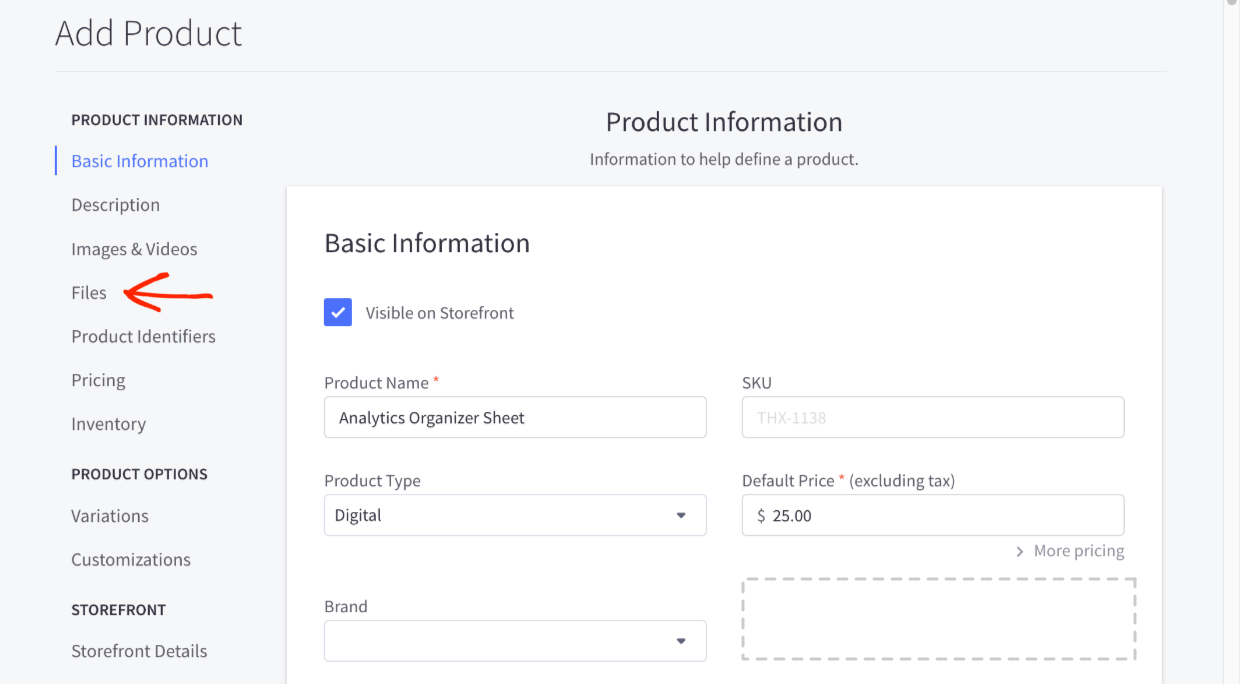
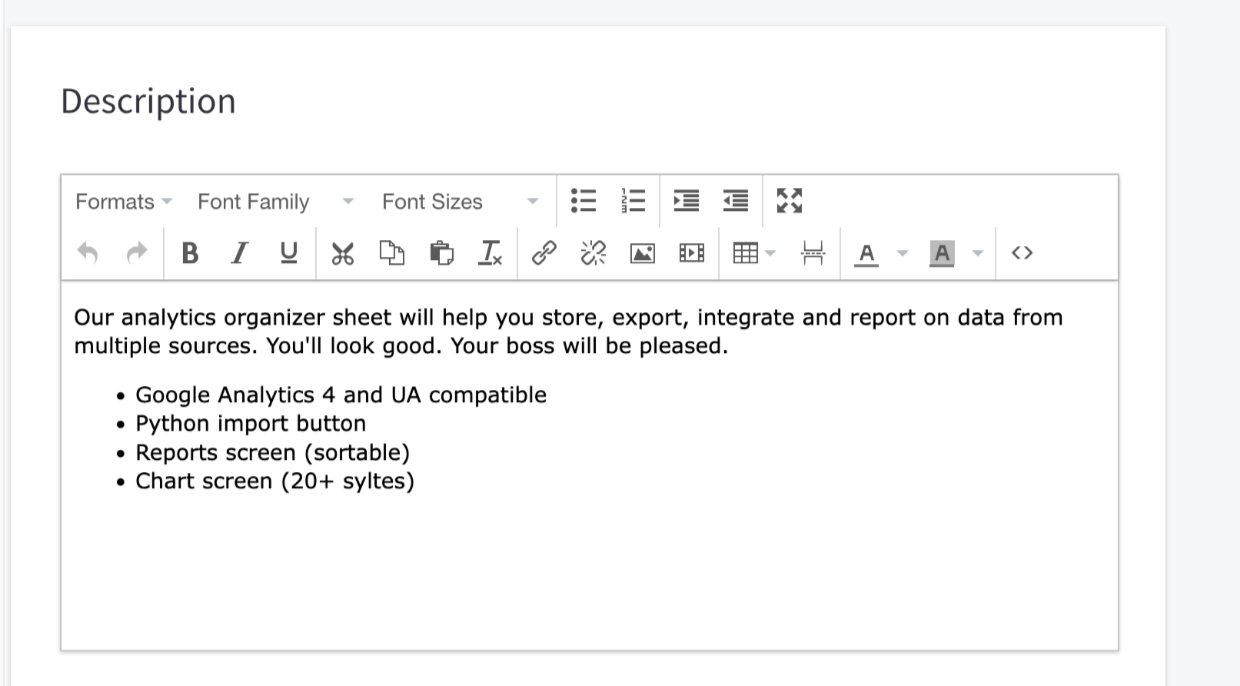
- Stap 3: voeg een Beschrijving toe
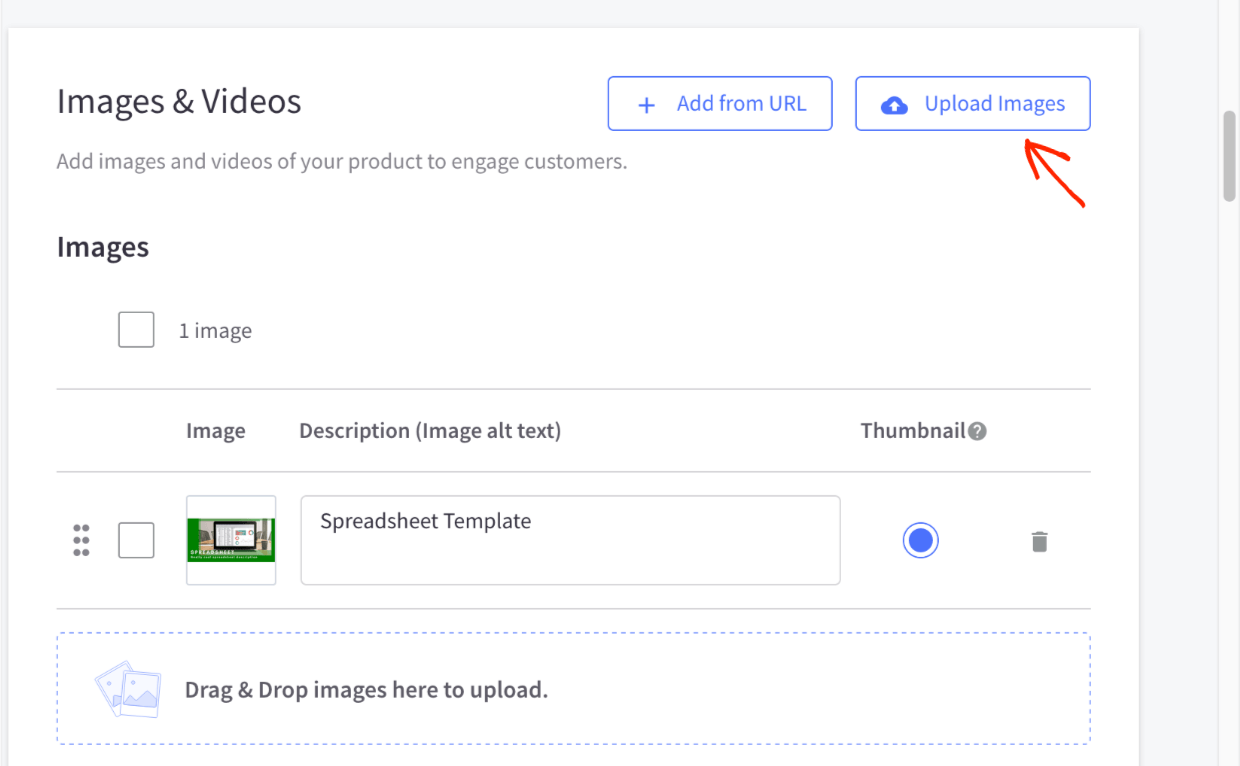
- Stap 4: Voeg een productafbeelding toe onder Afbeeldingen en Video
- Stap 5: voeg het/de bestand(en) toe die de klant ontvangt na aankoop onder Bestanden
- Upload het bestand
- Geef het een beschrijving (dit is de klikbare link)
- Stel het maximale aantal keren in dat een klant het bestand kan downloaden
- Stel de tijd in voordat downloads worden uitgeschakeld (om piraterij te verminderen/voorkomen)
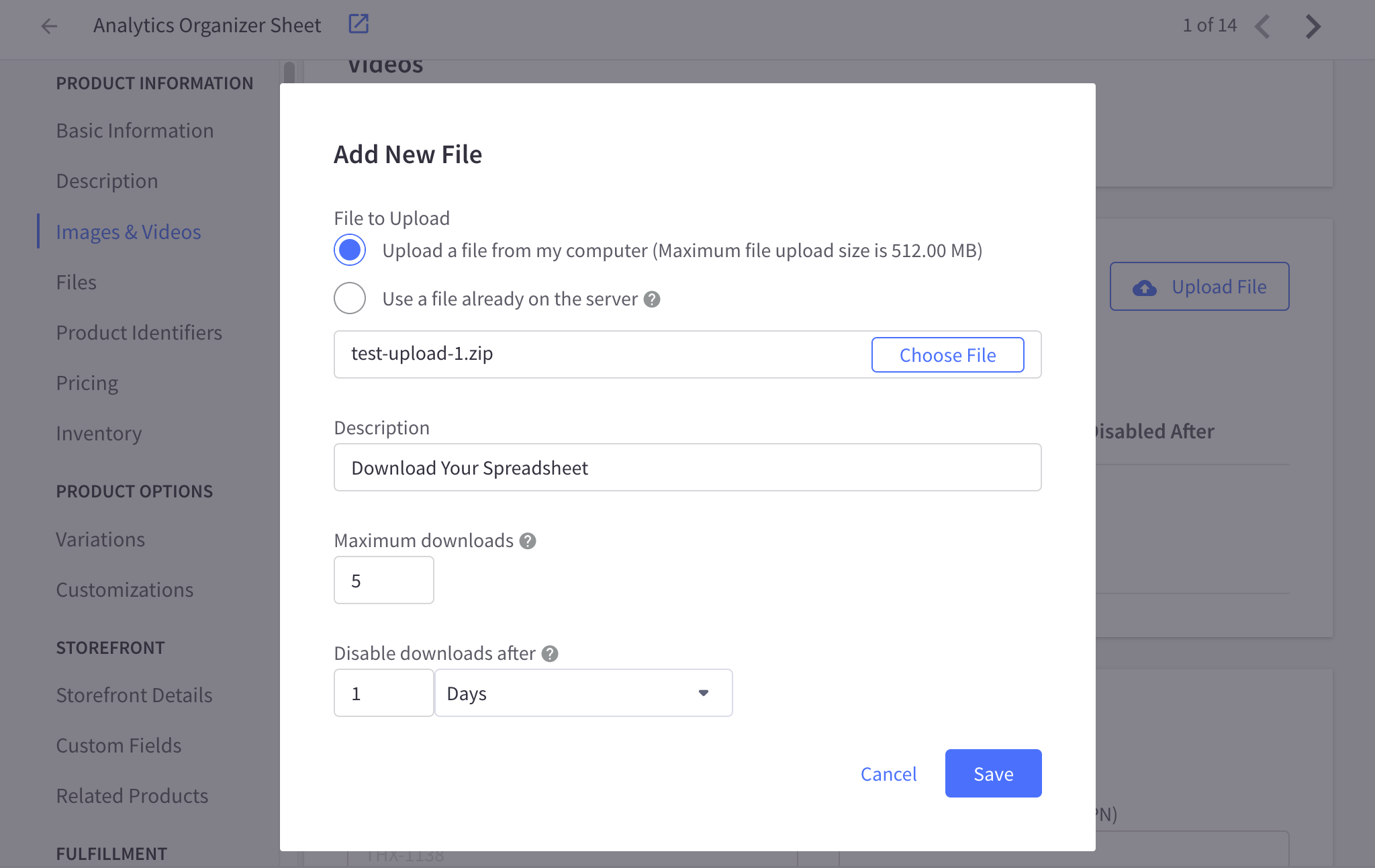
⬆️ De maximale uploadgrootte van bestanden is 512 megabytes. Dit is niet erg groot als u foto's, video's of afbeeldingen verkoopt en kan leiden tot uitdagingen bij het gebruik van BigCommerce. Shopify staat tot 5 GB toe. Easy Digital Downloads is onbeperkt.
- Stap 6 stel een prijs in onder Prijzen.
- Er zijn geavanceerde instellingen onder Toon geavanceerde prijzen die bedoeld zijn voor fysieke goederen. U kunt die negeren.
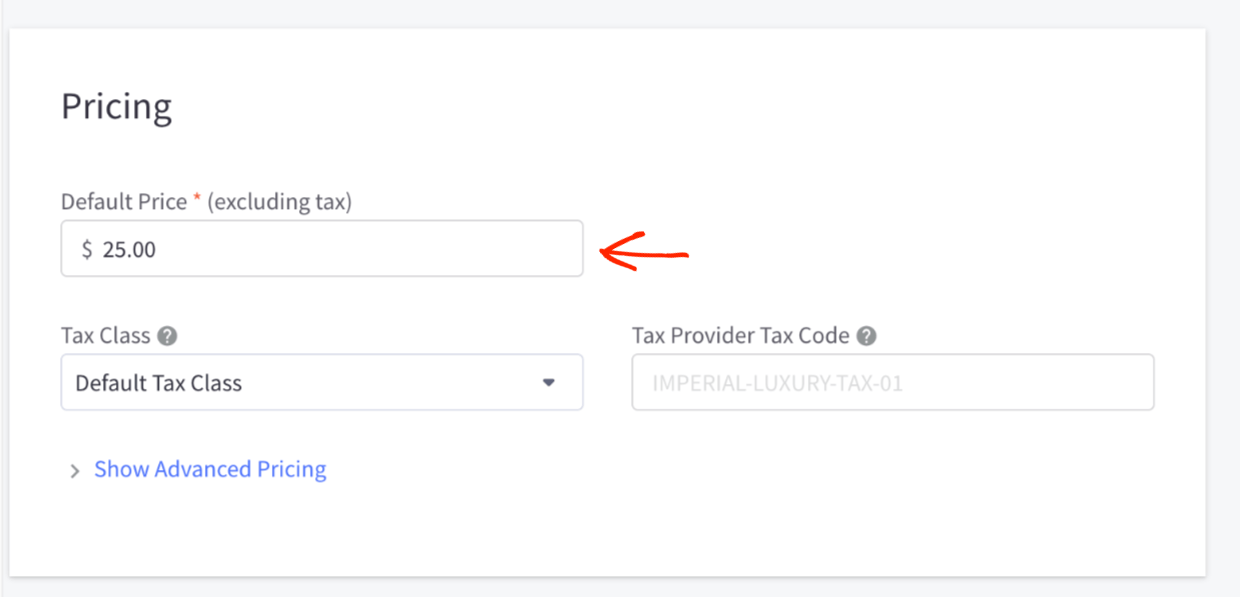
Klik ten slotte op Opslaan. U heeft een product te koop gemaakt. Het is veel gemakkelijker om een digitaal product te maken met BigCommerce dan met Shopify. We laten u zien hoe Easy Digital Downloads nog gemakkelijker is.
Voorbeeld op Frontend
Dit is hoe uw product er aan de voorkant uitziet met het standaard BigCommerce-thema.
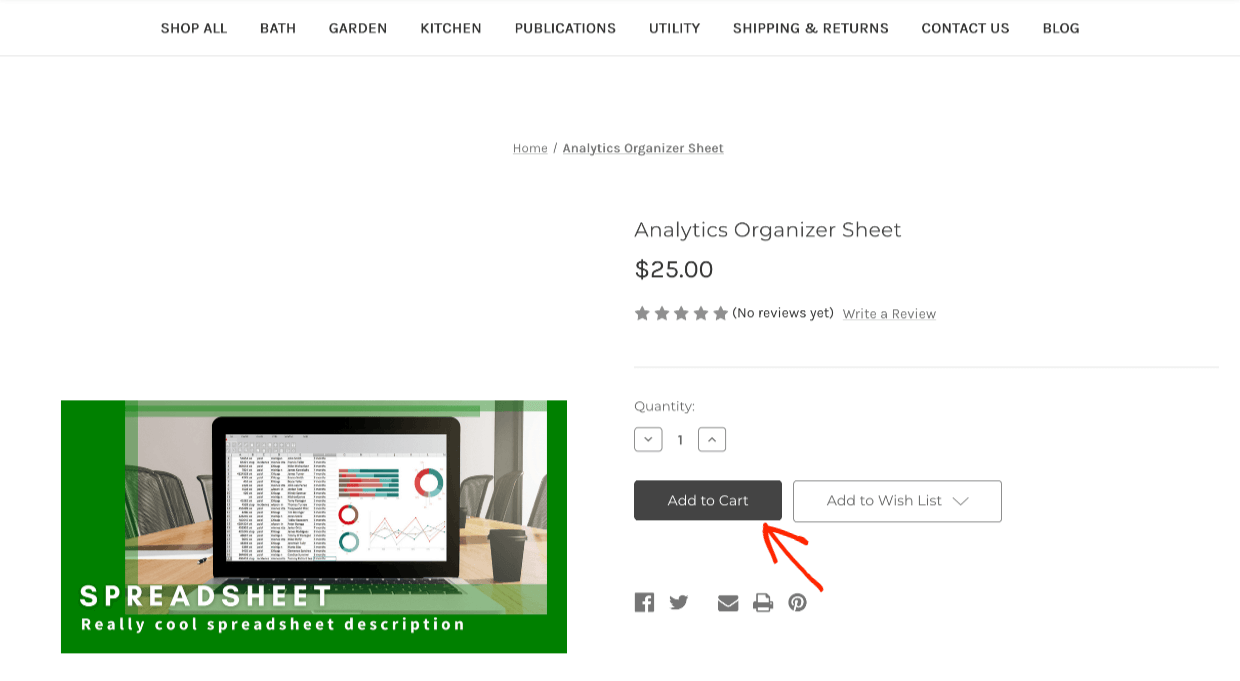
U zult merken dat het 'stock' Cornerstone-thema een aantal voorbeeldpagina's en menu-items heeft die u niet wilt en die gericht zijn op fysieke productwinkels. We praten hieronder meer over thema's.
Easy Digital Downloads Installatie
😇 Het instellen van een digitaal product om te verkopen is het gemakkelijkst met Easy Digital Downloads. Dat komt omdat EDD speciaal is gebouwd voor het verkopen van digitale bestanden, downloads, virtuele producten en downloadbare producten.
Wanneer EDD is geïnstalleerd op uw WordPress-site, heeft u een nieuw tabblad in het linkermenu met de naam Downloads. EDD noemt de producten die u verkoopt 'downloads'.
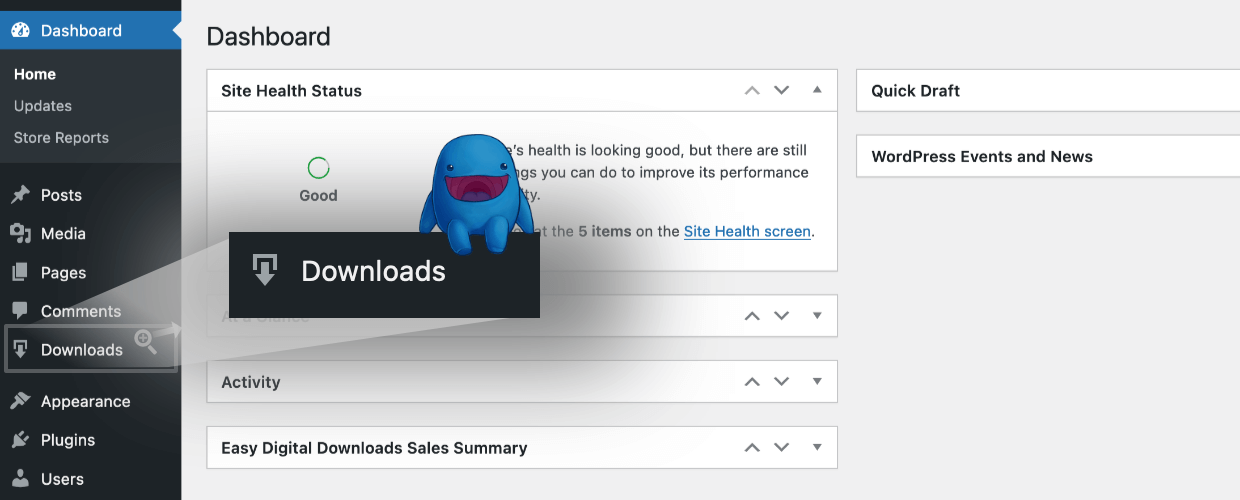
Klik op Downloads en vervolgens op Nieuwe toevoegen.
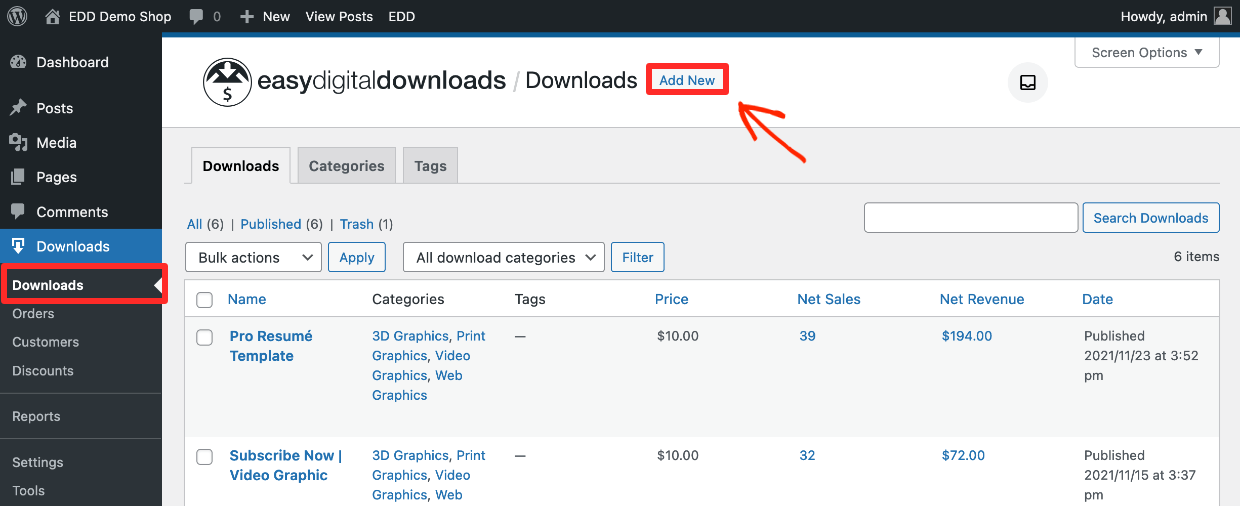
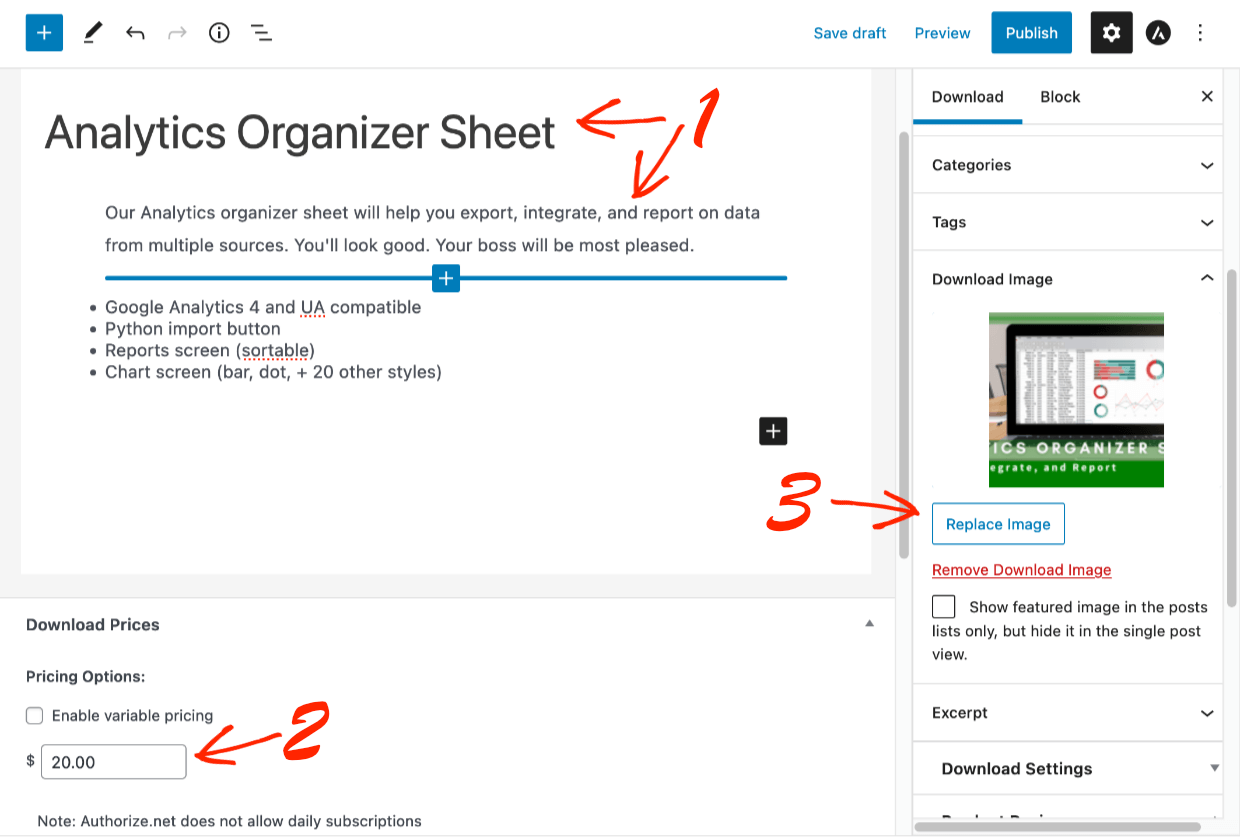
Nu, in tegenstelling tot Shopify en in mindere mate BigCommerce, is het supergemakkelijk om in te stellen.
- Stap 1: voeg een titel en beschrijving toe, en dan
- Stap 2: voeg een productafbeelding toe
- Stap 3: stel een prijs in
- Stap 4: Klik onder Downloadbestanden op Nieuw bestand toevoegen om het bestand te uploaden dat de klant na aankoop ontvangt. De Bestandsnaam wordt automatisch toegevoegd, of voer tekst in zoals 'Download uw spreadsheet' in plaats daarvan. Dit is de klikbare tekst die de klant krijgt op de pagina met de aankoopbevestiging en de e-mail met het aankoopbewijs.
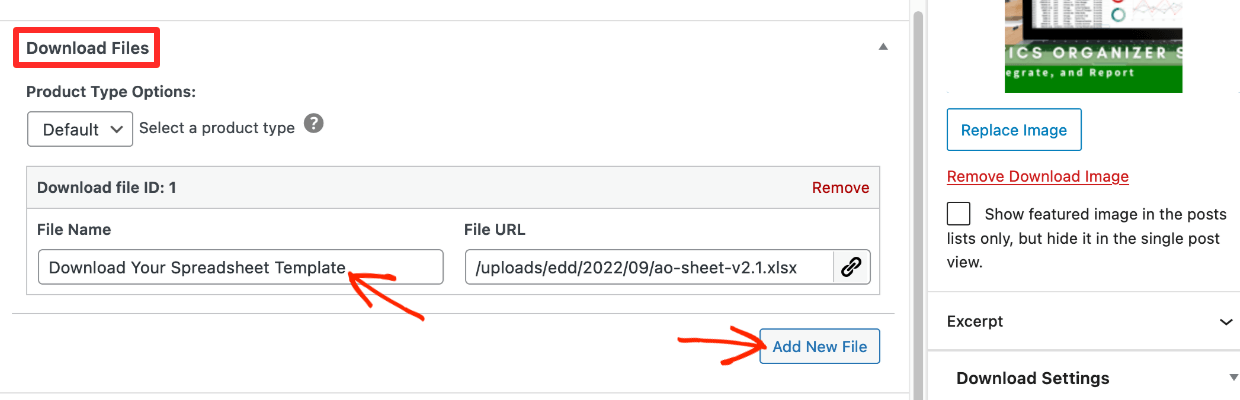
⬆️ De maximale uploadgrootte die u kunt uploaden, wordt bepaald door de instellingen van uw WordPress-site en uw webhost. U kunt het instellen zo groot als u wilt.
U kunt uw bestanden ook serveren vanaf Amazon S3 of Dropbox om de downloadsnelheid voor klanten te verhogen en beter in uw workflow te passen als u die tools gebruikt. Dit is een voorbeeld van digitale-gerichte functies die EDD intern bouwt en die andere oplossingen niet hebben (of ze vereisen externe add-ons).
🎉 Dat is alles. Slechts 4 stappen.
Opmerking: Easy Digital Downloads heeft meer privacy-/anti-piraterijcontroles dan Shopify en BigCommerce. Hiermee kunt u uw bestanden beschermen tegen ongeautoriseerde downloads.
• 🏆 EDD – Onder Downloads > Instellingen > DIVERSEN > Bestandsdownloads; u kunt de downloadmethode, het aantal toegestane downloads, de vervaltijd van links instellen en opnieuw downloaden in het accountgebied uitschakelen (4 opties).
• BigCommerce – U kunt het aantal downloads en de vervaltijd instellen (2 opties).
• Shopify – U kunt een downloadlimiet instellen (1 optie).
Voorbeeld op Frontend
Klik op Publiceren en vervolgens op Download bekijken om de product-/downloadpagina te zien zoals de potentiële klant deze zal zien. Klanten klikken op Kopen om toe te voegen aan winkelwagen en af te rekenen.
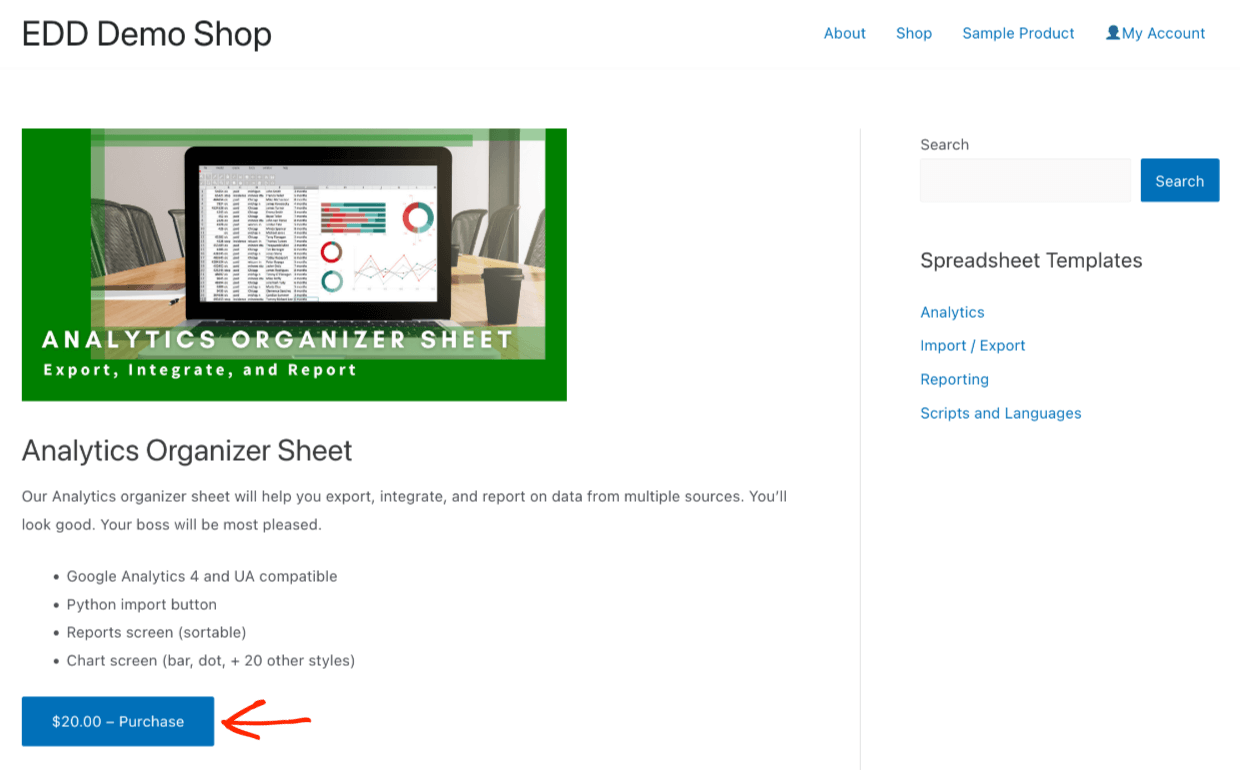
🏆 EDD is eenvoudiger in te stellen bij de verkoop van digitale producten, omdat het alleen is ontworpen voor digitale producten. Als u voornamelijk digitale producten verkoopt, maar ook een paar fysieke producten, hebben we een Simple Shipping extensie.
Betalingen
Shopify, BigCommerce en Easy Digital Downloads hebben allemaal veel betalingsopties. Het is zeer onwaarschijnlijk dat een van deze drie platforms niet heeft wat u nodig heeft.
Shopify Payments
Om betalingen in uw Shopify-winkel in te stellen, klikt u op de knop Instellingen aan de linkerkant van het dashboardmenu.
Klik vervolgens op Betalingen om een betaalmethode te kiezen en te configureren.
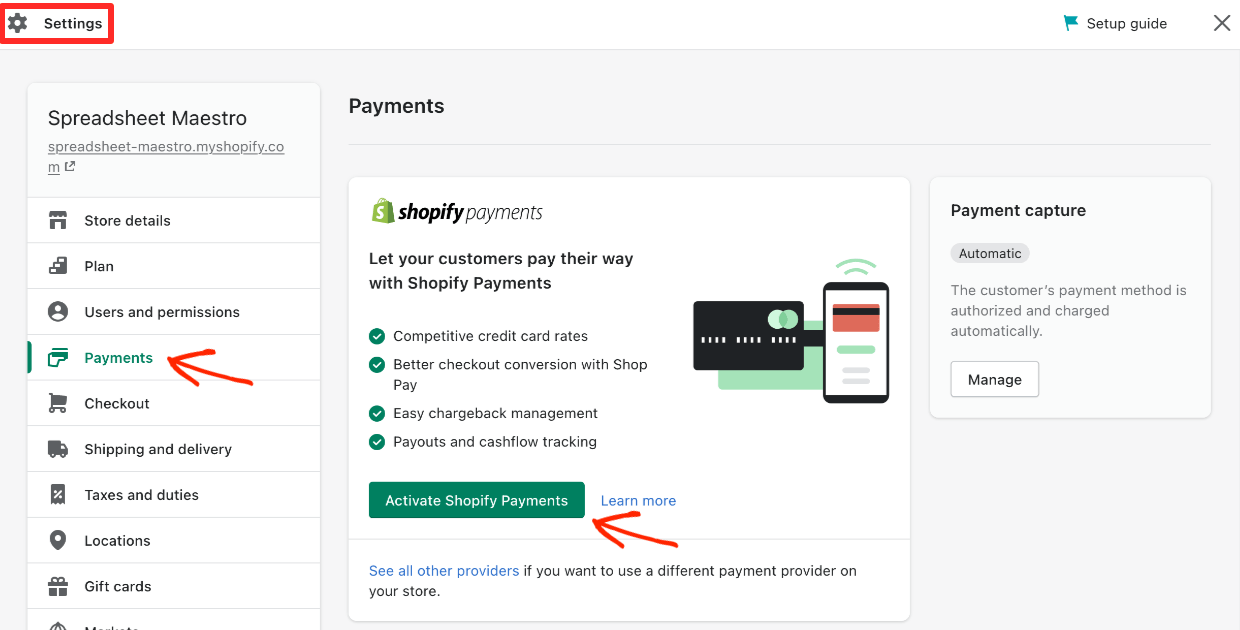
Shopify heeft zijn eigen betaalgateway, simpelweg genaamd Shopify Payments. Ze zetten zich sterk in om u hun systeem te laten gebruiken. Het wordt aangedreven door Stripe, een toonaangevende betaalgateway voor online verkopers.
Shopify laat u niet toe om uw eigen Stripe-account in te stellen. BigCommerce en Easy Digital Downloads wel.
- 🟢 De voordelen van de interne Shopify Payments optie is dat deze eenvoudig in te stellen is, en u klanten 'Shop Pay' kunt laten gebruiken. Bedrijven die nieuw zijn met het maken van online winkels houden van het gebruiksgemak.
- 🔴 De nadelen zijn dat Shopify Payments fungeert als een onnodige tussenpersoon tussen u en Stripe. Dat maakt veel online verkopers nerveus. U kunt een Google-zoekopdracht uitvoeren en veel ontwikkelaars en bedrijfseigenaren vinden die Shopify Payments niet leuk vinden.
Gebrek aan volledige controle
U geeft Shopify VEEL controle over uw bedrijf wanneer u een winkel opzet, als u hen (Shopify Payments) ook als uw betaalgateway gebruikt.
De transactiekosten die Shopify in rekening brengt met Shopify Payments beginnen bij 2,9% + 30 cent per transactie. Dat is eerlijk en gemiddeld. Maar wat als ze het tarief in de toekomst wijzigen?
Mogelijk moet u een betaalprovider wijzigen, wat veel werk en verstoring voor bestaande klanten kan opleveren. Wat als u in de toekomst lagere transactiekosten wilt onderhandelen naarmate uw winkel groeit. Dat kan niet.
🔎 Verduidelijking:
Het is gemakkelijk om Shopify Payments en Shop Pay te verwarren.
– Shopify Payments is wat winkeleigenaren gebruiken om creditcard- en debetcardbetalingen online te accepteren (een betaalprovider).
– Shop Pay is wat klanten kunnen gebruiken om producten te kopen in uw winkel en andere Shopify-winkels. Hiermee kunnen klanten een account aanmaken en hoeven ze hun creditcardgegevens niet opnieuw in te voeren tussen winkels die op Shopify draaien. Shop Pay biedt klanten ook de mogelijkheid om in termijnen te betalen. Hier is een geweldig gedetailleerd artikel als u meer wilt weten.
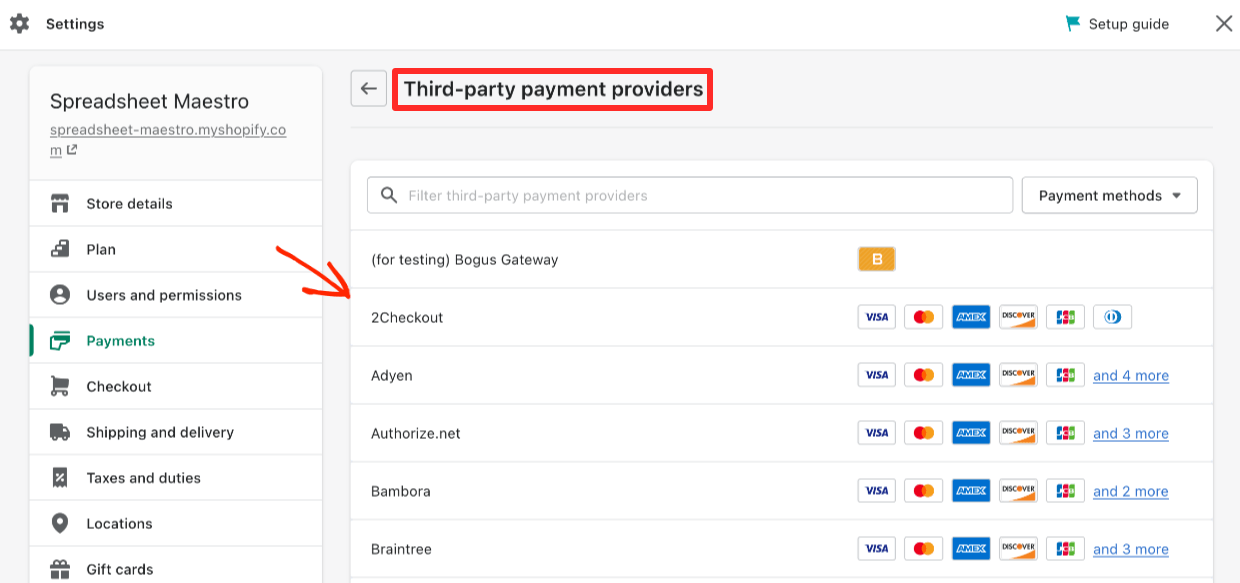
Hoewel de knop erg klein is 😉, staat Shopify u toe om andere "providers" voor betalingen te gebruiken. Hun lijst is behoorlijk uitgebreid. Bijna elke betaaloptie die u zich kunt bedenken, is beschikbaar. U zult merken dat Stripe geen van de opties is, omdat Shopify optreedt als tussenpersoon tussen u en Stripe, waardoor u Shopify Payments moet gebruiken.
BigCommerce Payments
Klik in uw BigCommerce-dashboard in het linkermenu onder Instellingen. Klik vervolgens op Betalingen.
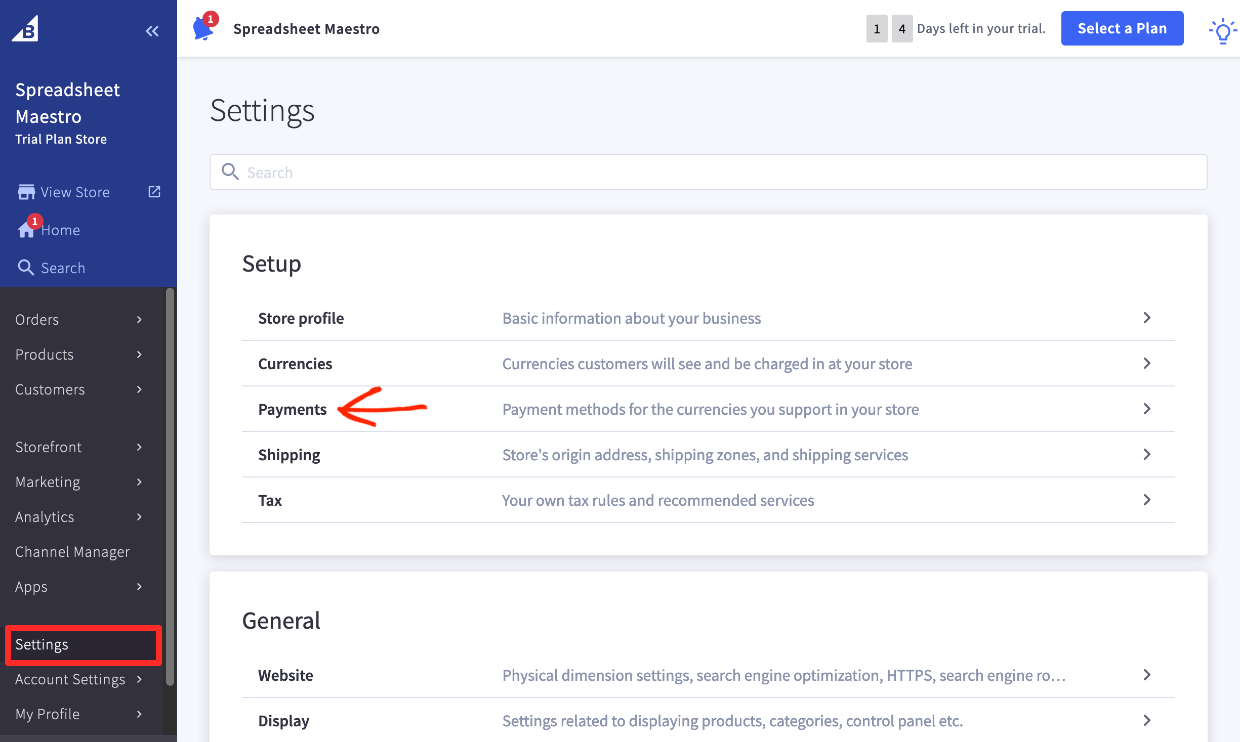
Hier ziet u een lijst met betaalopties. De voorkeursbetaalprovider van BigCommerce is Paypal (aangedreven door Braintree). Direct daaronder ziet u Stripe.
Aangezien u uw eigen Stripe-account kunt instellen, is BigCommerce een opener systeem dan Shopify.
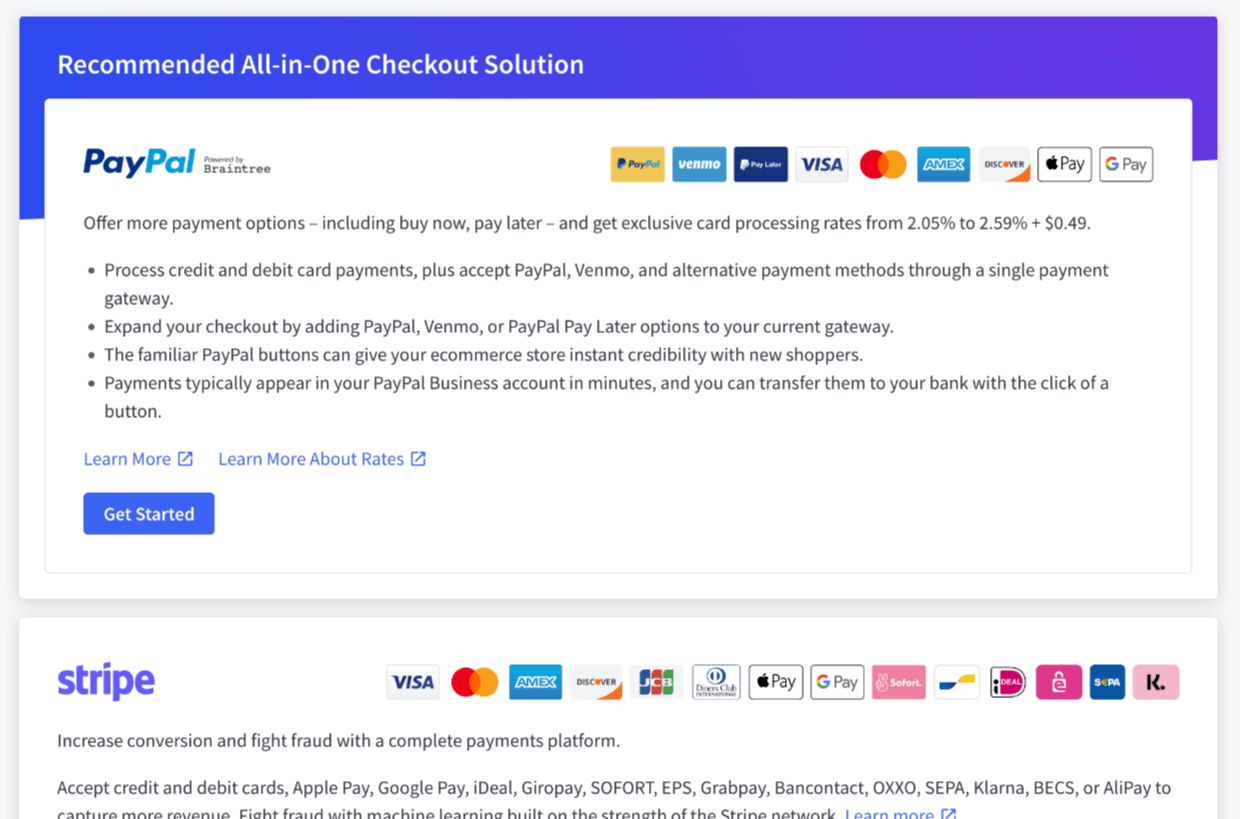
👉🏾 We raden u aan Stripe te gebruiken als uw betaalprovider als deze beschikbaar is in uw regio. Wij denken dat het de beste mix is van krachtig en gemakkelijk te gebruiken.
BigCommerce biedt ook meer dan 35 andere providers. U zou goed moeten kunnen werken, wat uw keuze ook is.
Easy Digital Downloads Betalingen
Easy Digital Downloads heeft integraties met veel van de populairste betaalproviders, waaronder Stripe, PayPal en Authorize.net. Klik hier om ze te bekijken. Wanneer u een Extended Pass koopt, krijgt u toegang tot elk van onze betaalproviders.
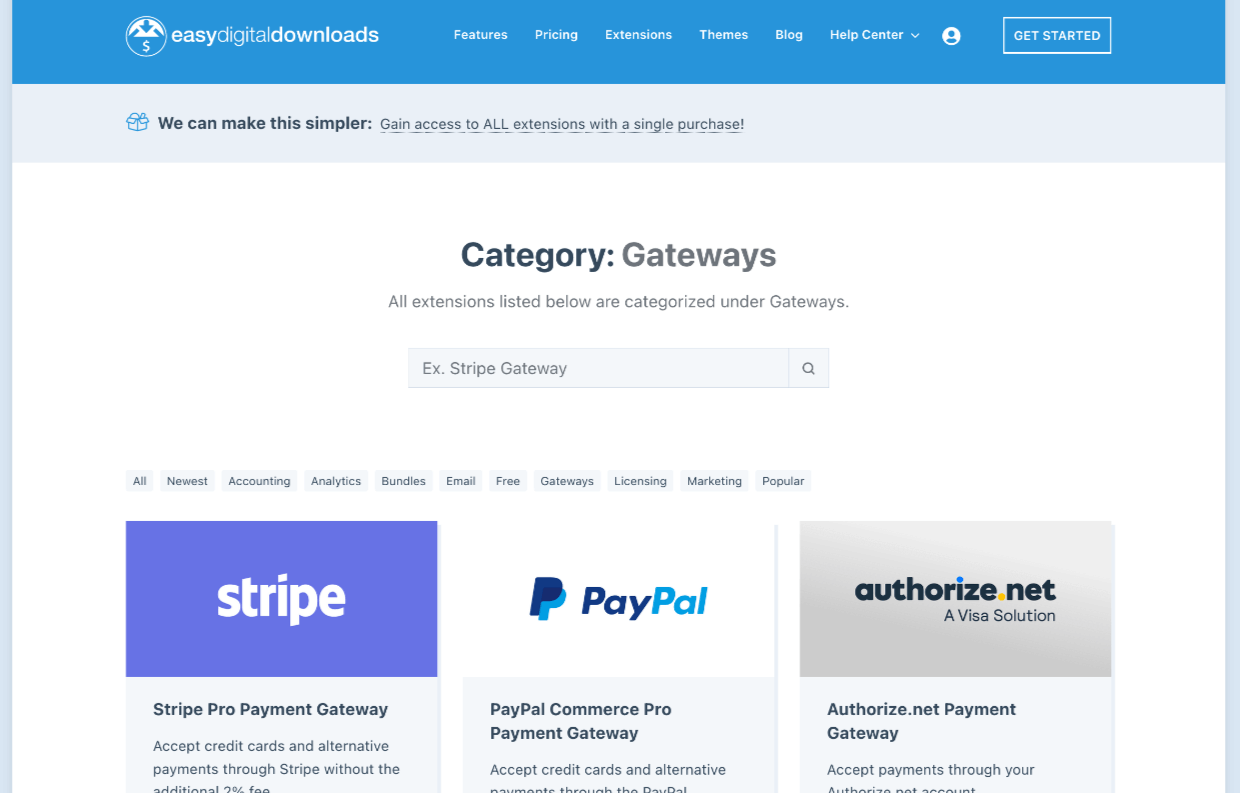
We raden aan Stripe te gebruiken. Het is gemakkelijk te gebruiken en zit boordevol krachtige functies. U kunt uw eigen Stripe-account rechtstreeks vanuit EDD instellen en hoeft nooit uw WordPress-dashboard te verlaten.
In tegenstelling tot Shopify dat Shopify Payments gebruikt, treden wij niet op als tussenpersoon tussen u en Stripe. We maken het gemakkelijk om Stripe in te stellen en te gebruiken op uw voorwaarden. U kunt inloggen op uw eigen Stripe-account, dashboard, en zelfs onderhandelen over lagere transactiekosten naarmate uw site groeit.
Abonnementen (Terugkerende Betalingen)
Maak gebruik van onze krachtige Recurring Payments-extensie om abonnementen op producten te verkopen. Kies uit maandelijkse, jaarlijkse of andere minder gebruikelijke betalingsschema's.
🏆 Een belangrijk voordeel van het gebruik van Easy Digital Downloads is dat het geïntegreerd is met Stripe (en vele andere betaalproviders). Daarom:
- U kunt erop vertrouwen dat het 'gewoon werkt', omdat het is gebouwd, onderhouden en ondersteund door het EDD-team. En,
- Wij staan u toe om uw eigen Stripe (of andere) account te hebben, waardoor u volledige controle heeft.
Easy Digital Downloads is een open systeem.
Ondersteuning
Het is belangrijk dat u hulp kunt krijgen als er iets misgaat of als u iets niet begrijpt. E-commerce kan ingewikkeld zijn, hoe hard Shopify, BigCommerce en Easy Digital Downloads ook werken om het zo eenvoudig mogelijk te maken.
Alle drie de opties hebben grote secties op hun websites gewijd aan ondersteuning of documentatie (vaak 'Docs' genoemd). Hier kunt u uzelf helpen met alle informatie die u nodig heeft voor ondersteuning.
Alle drie de producten hebben ook speciale ondersteuningsteams die klaarstaan om u te helpen wanneer u het nodig heeft. Elk heeft ook communityforums waar u met andere gebruikers kunt praten om te leren of vragen te stellen.
| Shopify | BigCommerce | Easy Digital Downloads |
|---|---|---|
| Ondersteuning / Docs Pagina's | Ondersteuning / Docs Pagina's | Ondersteuning / Docs Pagina's |
| Speciaal ticket/e-mail, chat en callback ondersteuningsteam | Speciaal ticket/e-mail, chat en telefoon ondersteuningsteam | Speciaal ticket/e-mail ondersteuningsteam |
| Communityforums | Communityforums | Communityforums (bewaakt door het EDD-team) |
Aanpassing (Thema's)
Shopify, BigCommerce en Easy Digital Downloads bieden allemaal vergelijkbare thema-aanpassingsopties. U kunt kiezen uit gratis of betaalde thema's. U kunt deze thema's aanpassen. Er zijn ook bureaus die een aangepast thema voor u bouwen.
Easy Digital Downloads is gebouwd op WordPress. WordPress drijft meer dan 40% van het hele internet aan. 🤯 Dus WordPress heeft de meeste opties als het gaat om aanpassing.
| Shopify | BigCommerce | Easy Digital Downloads |
|---|---|---|
| 9 Gratis thema's | ~ 12 Gratis thema's | 9.000+ gratis thema's |
| 80+ Betaalde Thema's | 170+ Betaalde thema's | Onbekend (enorm) aantal betaalde thema's |
| Pagina-bouwers (zoals SeedProd) maken grenzeloze aanpassing mogelijk |
Shopify Aanpassing
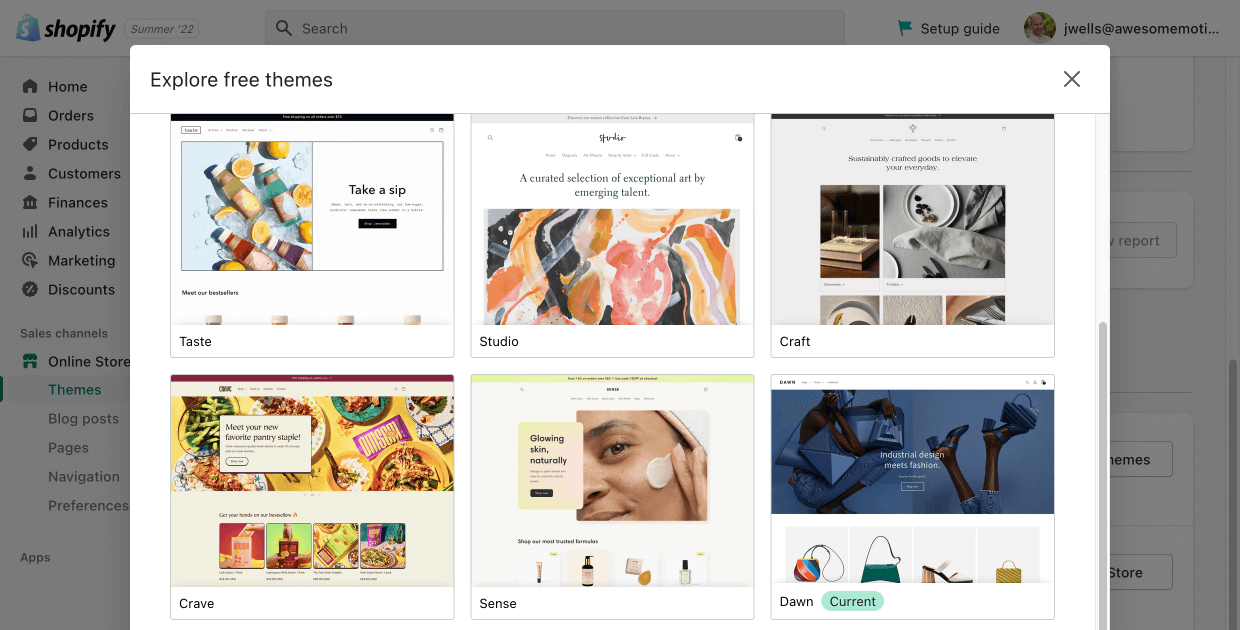
Met mijn Shopify gratis proefperiode kreeg ik het 'Dawn'-thema.
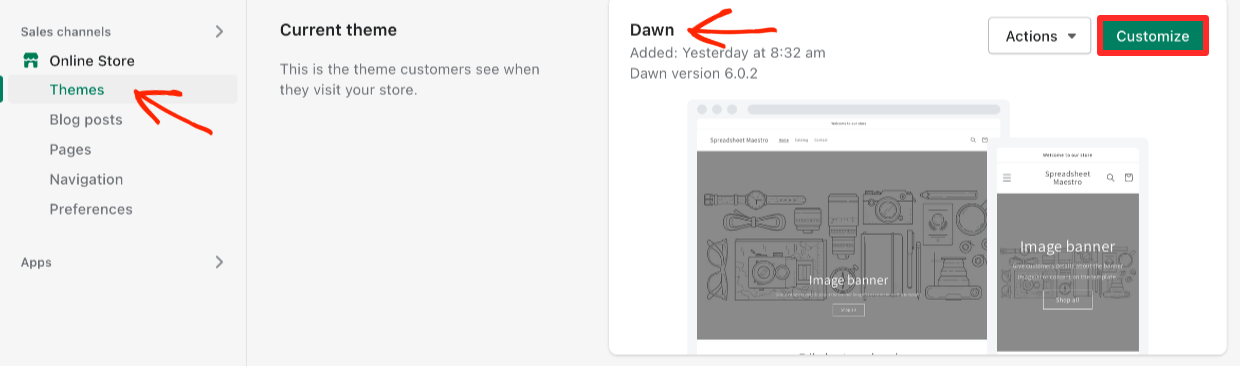
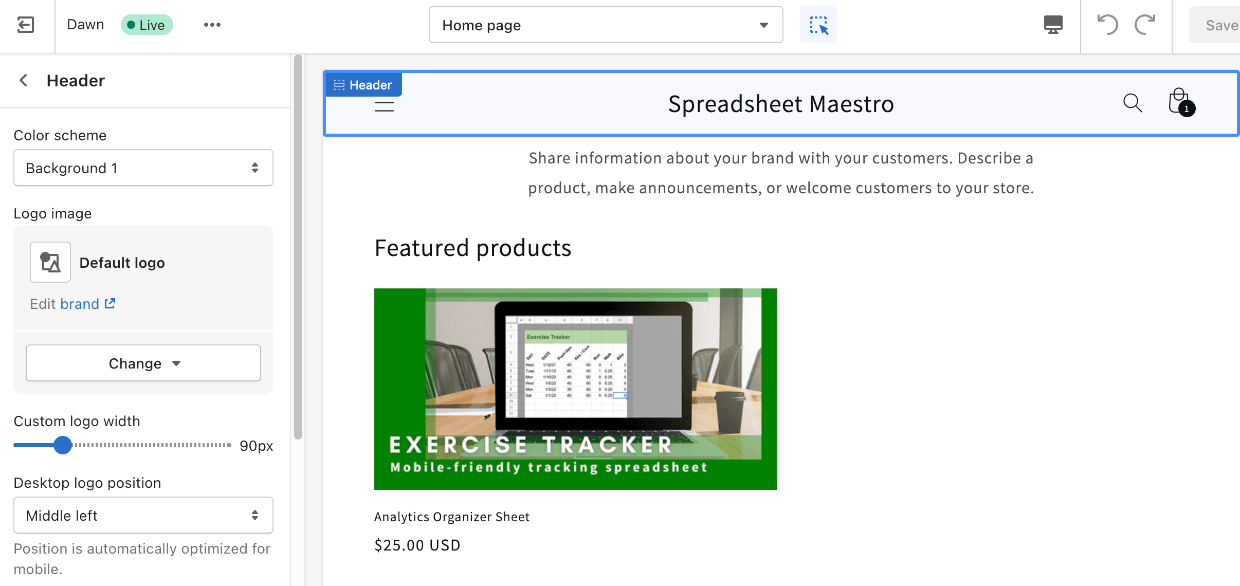
Dit thema, en andere, kunnen direct op het Shopify-dashboard worden aangepast met een drag-and-drop-editor.
Er is een gratis thema-galerij in het Shopify-dashboard.
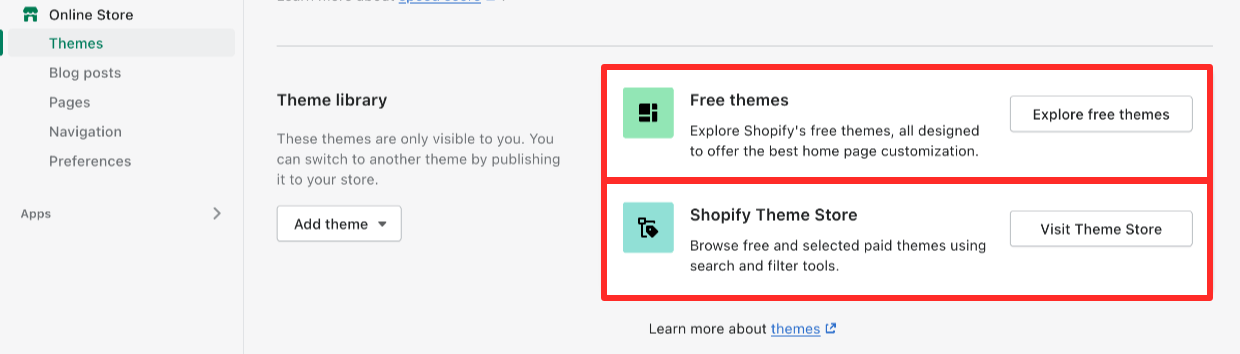
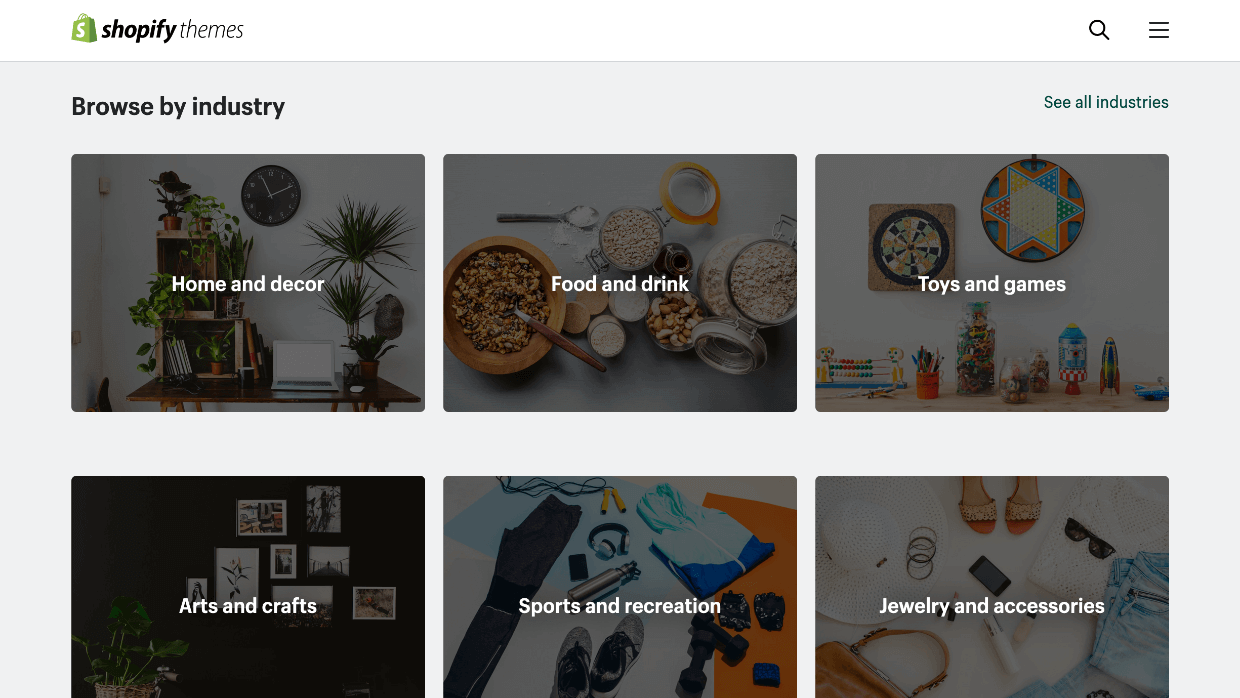
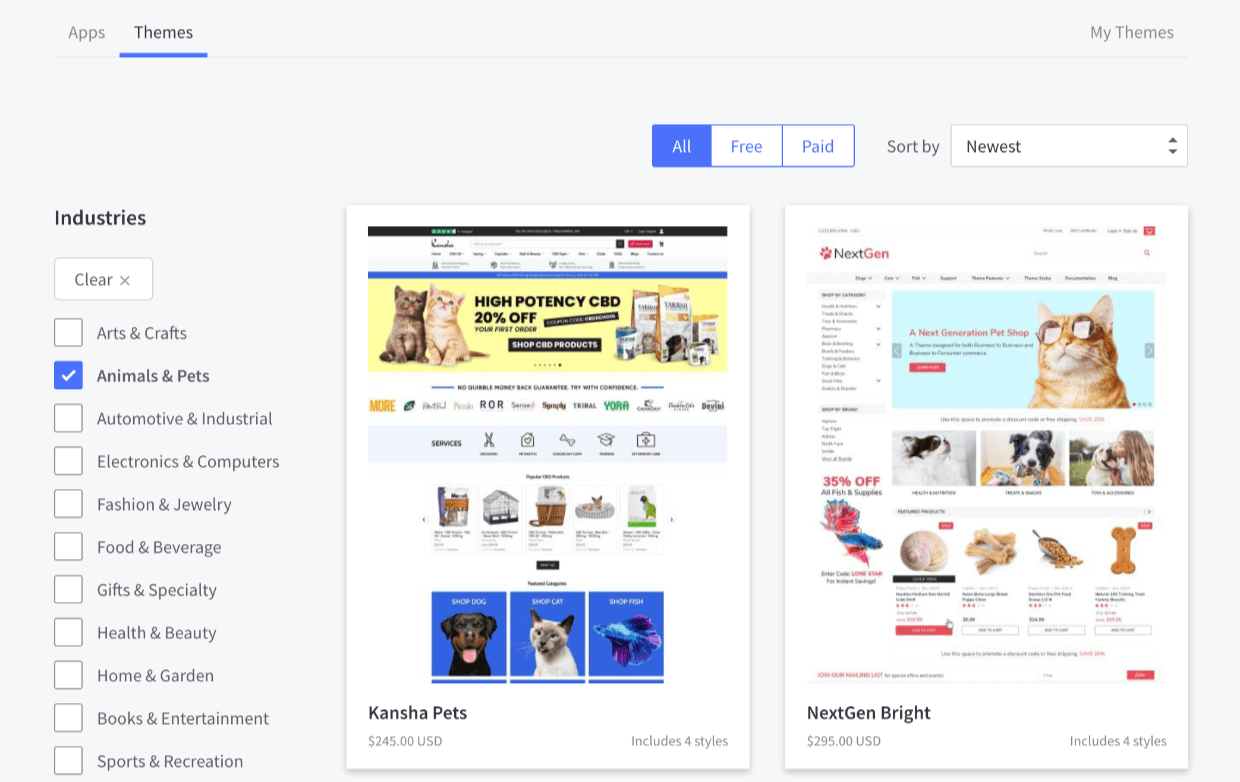
Er is ook een website voor betaalde thema's op themes.shopify.com. Hier kunt u bladeren op type of branche, naast andere filters. U kunt daar ook de gratis thema's bekijken. De meeste betaalde thema's kosten tussen de $240 en $350. De thema's worden grotendeels gebouwd en ondersteund door externe ontwikkelaars.
BigCommerce Aanpassing
De gratis proefversie van BigCommerce bevatte een thema genaamd Cornerstone Light.
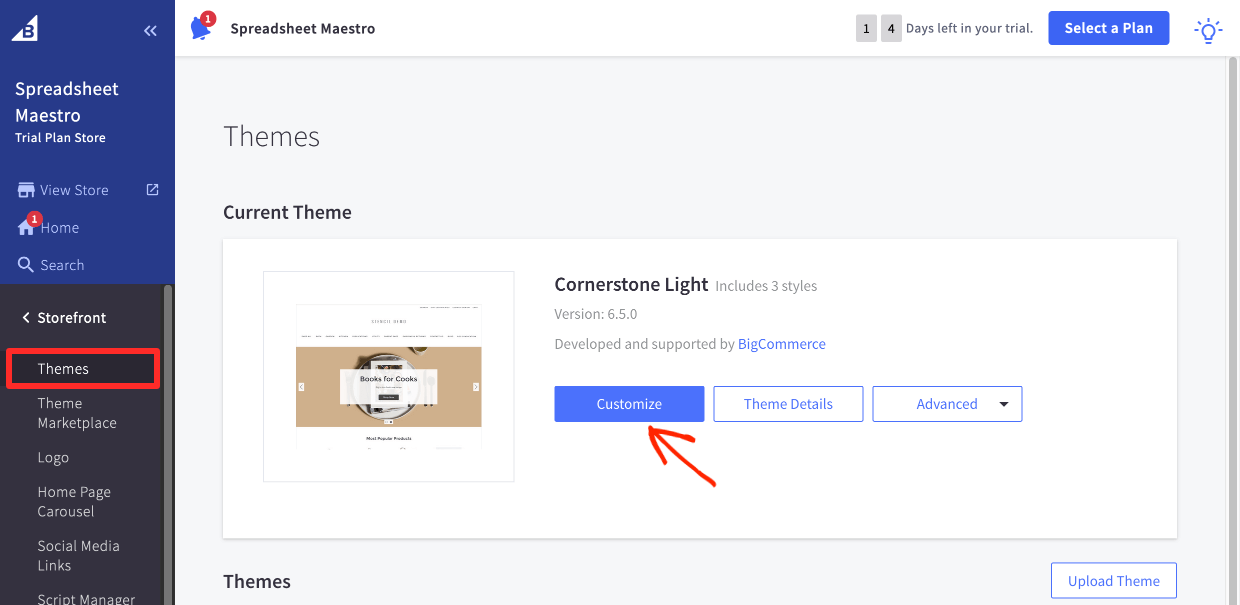
U kunt op Aanpassen klikken en visuele wijzigingen aanbrengen in dit thema met een drag-and-drop interface.
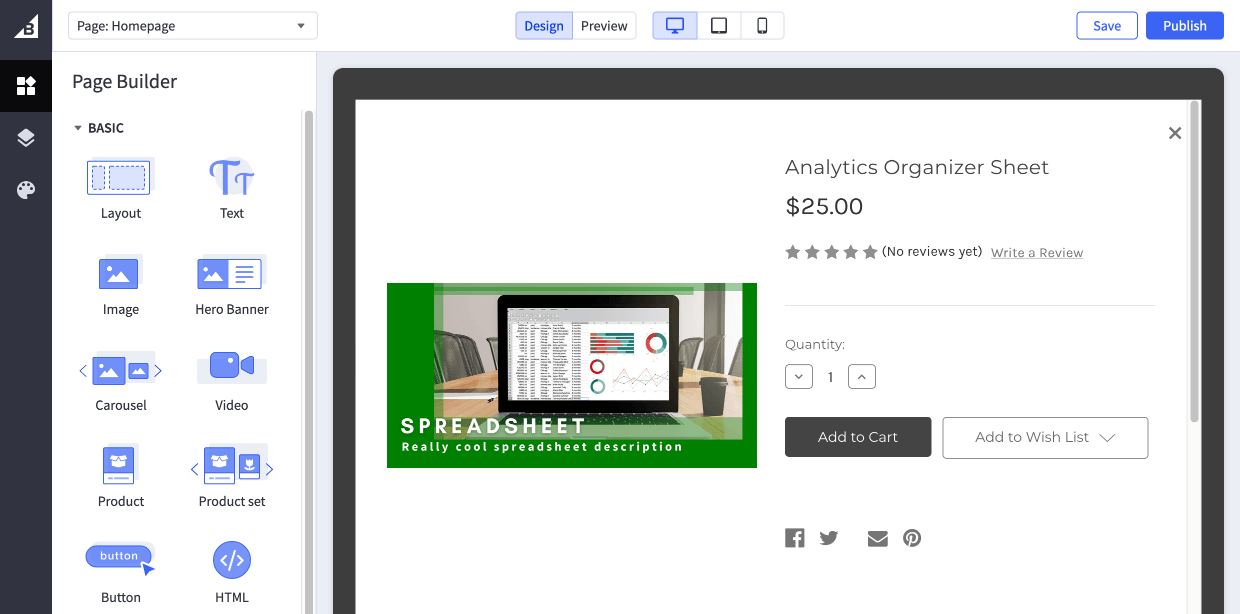
BigCommerce heeft een Thema Marktplaats waar u gratis en betaalde thema's kunt bekijken. Deze thema's worden meestal ontwikkeld en ondersteund door externe ontwikkelaars. Betaalde thema's kosten meestal tussen de $130 en $250.
Easy Digital Downloads Maatwerk
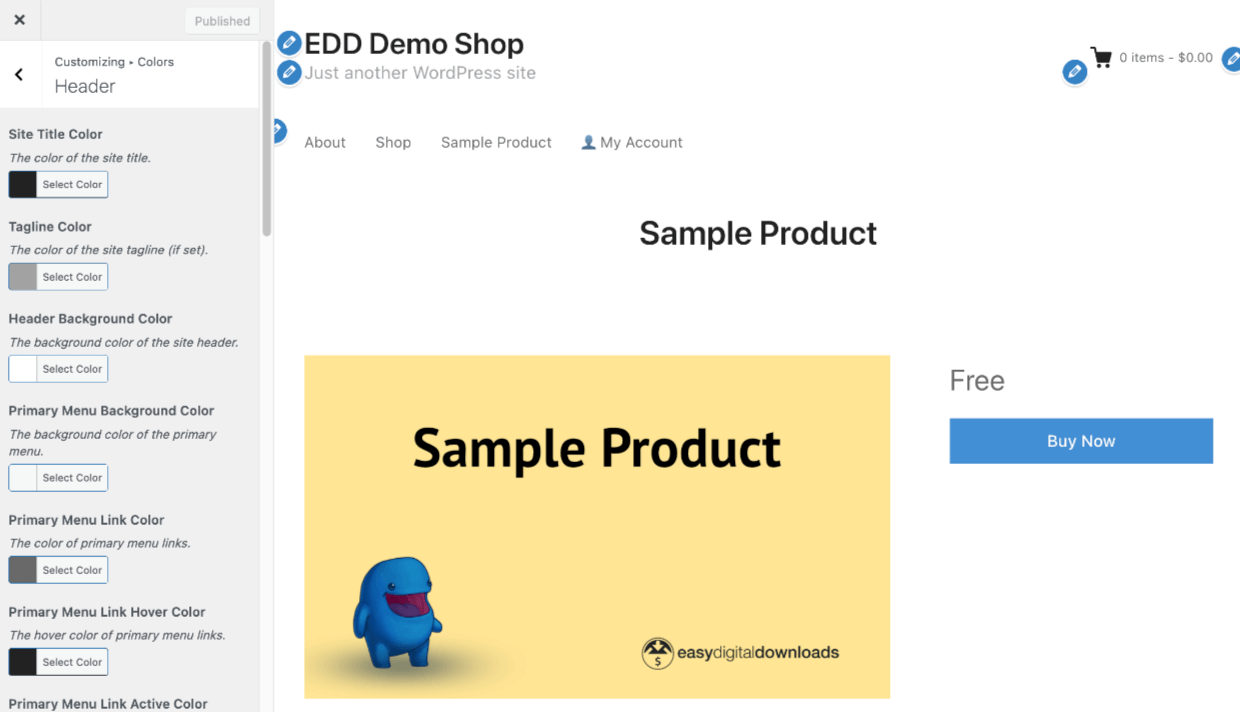
EDD werkt goed met elk WordPress-thema. De styling is ontworpen om de stijlen van uw thema over te nemen (matchen).
De meeste WordPress-thema's bevatten een Customizer waarmee u eenvoudig het visuele uiterlijk van uw website en winkel kunt aanpassen.
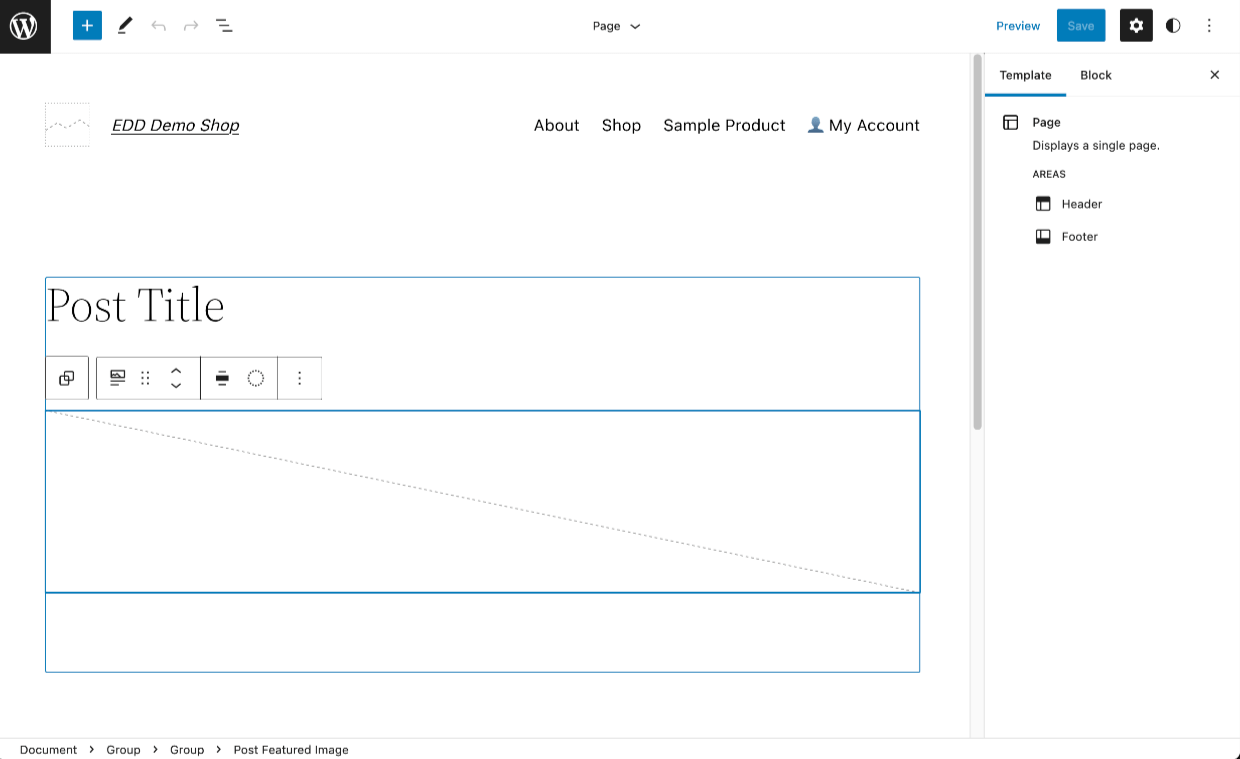
WordPress.org rolt ook Full Site Editing (FSE) uit. FSE-compatibele thema's stellen u in staat om het visuele uiterlijk van uw website te beheren met een eenvoudig te gebruiken drag-and-drop-interface.
U kunt een van de meer dan 9.000 WordPress-thema's in de WordPress.org Theme Directory gebruiken of kijken naar onze voorgestelde thema's.
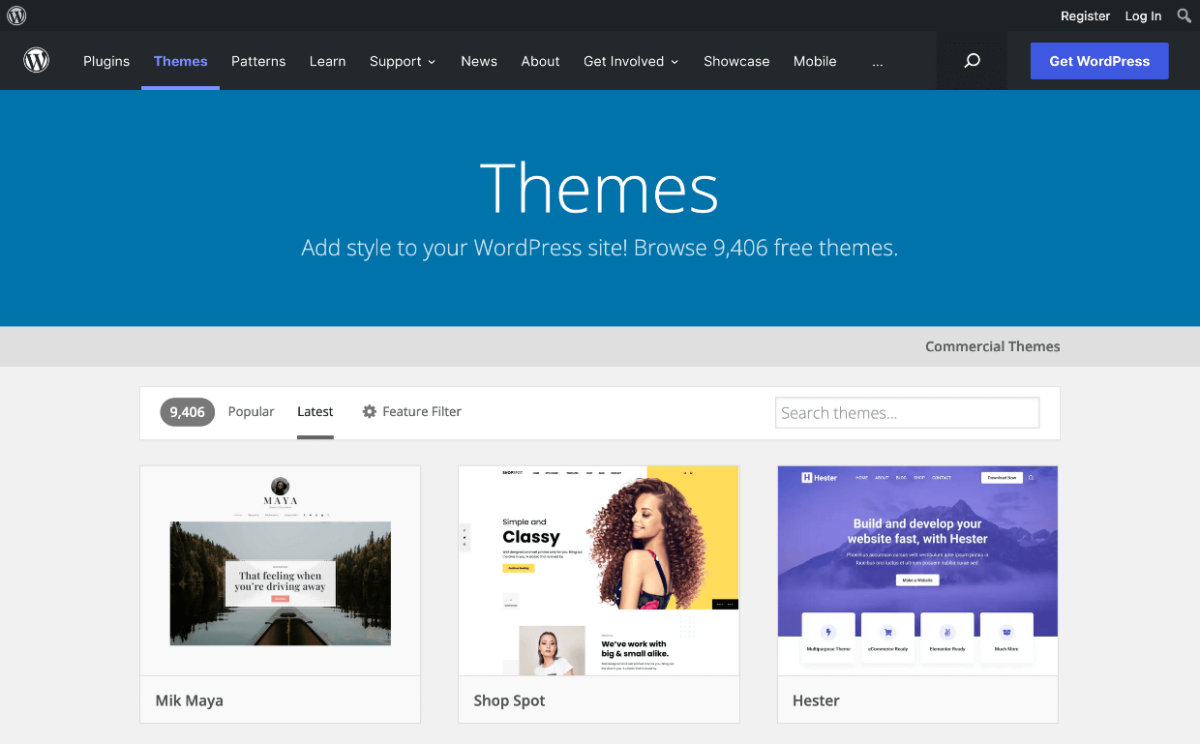
🏆 EDD is de winnaar als het gaat om aanpassing. Er zijn veel meer gratis en betaalde thema-opties. Het WordPress-ecosysteem is het grootste ter wereld, waardoor u toegang heeft tot tal van doe-het-zelf-tools en het grootste netwerk van ontwikkelaars en bureaus om iets op maat te bouwen. U kunt hulp krijgen in elke prijsklasse.
- Bekijk onze gratis en betaalde EDD-geoptimaliseerde thema-suggesties
- Leer hoe u uw eigen aangepaste thema maakt, zonder code te schrijven!
Conclusie
Goed gedaan. U heeft Shopify vergeleken met BigCommerce en Easy Digital Downloads.
Welke moet u gebruiken?
Wij denken dat EDD uw beste optie is voor het verkopen van digitale producten. Begin vandaag nog!
- Een WordPress-site is krachtig, betaalbaar en kan zich aanpassen aan uw groei.
- Easy Digital Downloads is speciaal gebouwd voor digitale producten en heeft digitale functies die andere oplossingen niet hebben (of waarvoor uitbreidingen van derden nodig zijn).
- Eenvoudigere productcreatie
- Gespecialiseerde functies (zoals softwarelicenties, aangepaste facturen, frontend-inzendingen voor marktplaatsen)
- Meer geavanceerde bescherming van uw productbestanden tegen ongeautoriseerde downloads
- Volledige controle over branding, klantervaring en overheadkosten
Als u toch besluit om voor een SaaS te gaan, raden we BigCommerce aan, omdat het gemakkelijker is om met digitale producten te werken dan met Shopify.
Een ander alternatief
Een geweldig alternatief voor het verkopen van fysieke producten is WooCommerce. Kijk hoe het zich verhoudt:
- Shopify vs. WooCommerce
- BigCommerce vs. WooCommerce
- We raden BlueHost Managed WooCommerce Premium aan voor het hosten van uw Woo-site. Zij installeren WooCommerce en WordPress op een server met beveiligingsfuncties en die klaar is voor verkeerspieken.
Volgende!
We hebben veel meer bronnen voor digitale makers zoals jij. Waar wil je hierna meer over leren?
- 🤼 Marktplaatsen vs. Uw Eigen Winkel
- 🏁 Productideeën die u direct kunt starten
- 🤑 De verbazingwekkende voordelen van het verkopen van digitale producten
- 📈 De populairste downloads om te verkopen
Zorg ervoor dat u zich abonneert op onze nieuwsbrief of volg ons op Facebook en Twitter om onze nieuwste bronnen voor digitale makers te ontvangen.








