



Als online verkoper is een van de meest effectieve dingen die u kunt doen om de verkoop te stimuleren, het verzamelen en weergeven van sociaal bewijs zoals klantrecensies op uw website. Easy Digital Downloads maakt het ongelooflijk eenvoudig om productrecensies aan WordPress toe te voegen in slechts een paar snelle stappen.
Meer dan 90% van de klanten leest online recensies voordat ze kopen. Mensen vertrouwen van nature meer op de meningen van hun leeftijdsgenoten dan op directe marketingboodschappen.
Wanneer effectief geïmplementeerd, kunnen klantrecensies het verkeer naar uw website aanzienlijk verhogen, vertrouwen opbouwen bij uw publiek en uiteindelijk meer verkopen genereren.
Dus wat is de beste manier om productrecensies te verzamelen en toe te voegen aan WordPress? Ik zal alles behandelen wat u moet weten in deze gids.
Waarom productrecensies toevoegen aan WordPress?
Productrecensies zijn veel meer dan alleen getuigenissen. Ze zijn een veelzijdig bezit dat een grote impact kan hebben op uw online bedrijf.
Het begrijpen van hun belang is de eerste stap om hun kracht te benutten.
Bouw vertrouwen & geloofwaardigheid op
Recensies dienen als tastbaar bewijs en eerlijk sociaal bewijs dat nieuwe bezoekers laten zien dat anderen uw producten leuk vinden.
In de kern is sociaal bewijs een psychologisch fenomeen waarbij mensen de acties van anderen aannemen in een poging om correct gedrag voor een bepaalde situatie te weerspiegelen.
In de context van e-commerce betekent dit dat potentiële klanten eerder vertrouwen zullen hebben in en zullen kopen van een bedrijf wanneer ze zien dat anderen dit al hebben gedaan en tevreden zijn.
Verhoog de verkoop
Goede recensies kunnen uw verkopen enorm stimuleren. Mensen voelen zich comfortabeler bij het kopen wanneer ze positieve feedback zien.
Onderzoek geeft aan dat 84% van de consumenten online recensies net zo veel vertrouwt als persoonlijke aanbevelingen van vrienden. Studies tonen ook consequent aan dat producten met recensies aanzienlijk hogere conversiepercentages hebben dan producten zonder.
Zelfs negatieve recensies, wanneer professioneel en transparant afgehandeld, kunnen vertrouwen opbouwen door uw toewijding aan klanttevredenheid en continue verbetering aan te tonen.
Verbeter SEO
Productrecensies spelen een belangrijke, vaak onderschatte, rol in de SEO-strategie van uw WordPress-site.
Recensies voegen nieuwe, relevante woorden toe aan uw site. Zoekmachines houden van deze frisse, door gebruikers gegenereerde inhoud (UGC).
Productrecensie schema kan er ook voor zorgen dat uw recensies met sterbeoordelingen worden weergegeven in Google zoekresultaten. Schema Markup is een vorm van microdata die u kunt toevoegen aan de HTML van uw website om zoekmachines te helpen de inhoud op uw pagina's beter te begrijpen.
Verzamel waardevolle feedback
Naast hun impact op verkoop en SEO, zijn productrecensies een onschatbare bron van directe feedback van klanten.
Ze bieden inzichten die u leren wat klanten geweldig vinden en waar u dingen kunt verbeteren. Zelfs niet zo goede recensies kunnen u helpen groeien.
WordPress-recensiefuncties begrijpen
Voordat we duiken in de praktische stappen voor het toevoegen van productrecensies, is het essentieel om te begrijpen hoe recensiesystemen functioneren binnen het WordPress-ecosysteem. Deze duidelijkheid helpt u weloverwogen beslissingen te nemen over de beste aanpak voor uw specifieke behoeften.
WordPress wordt standaard geleverd met een ingebouwd reactiesysteem.
Dit systeem is uitstekend voor het faciliteren van discussies over blogposts, waardoor lezers hun gedachten kunnen delen, vragen kunnen stellen en interactie kunnen hebben met uw inhoud.
Maar het is cruciaal om onderscheid te maken tussen deze algemene reactiefunctie en een speciaal productrecensiesysteem.
Native WordPress-reacties zijn doorgaans ongestructureerd. Hoewel gebruikers tekstreacties kunnen achterlaten, missen ze de specifieke functies die essentieel zijn voor productrecensies, zoals:
| Sterbeoordelingen | De mogelijkheid om een kwantitatieve beoordeling (bijv. 1 tot 5 sterren) aan een product toe te kennen. |
| Recensietitels | Een speciaal veld voor een beknopte samenvatting van de recensie. |
| Productassociatie | Een duidelijke koppeling tussen de recensie en een specifiek product. |
| Gestructureerde gegevens | Automatische generatie van schema-markup voor rich snippets in zoekresultaten. |
| Moderatiemogelijkheden | Tools om recensies goed te keuren, af te keuren, te bewerken, als spam te markeren of te verwijderen. Dit zorgt ervoor dat alleen legitieme en passende recensies op uw site worden weergegeven. |
Pogingen om het native WordPress-reactiesysteem te hergebruiken voor productrecensies zouden inefficiënt zijn. Het beperkt uw vermogen om te profiteren van de volledige voordelen van recensies, vooral op het gebied van SEO en gebruikerservaring.
Hier worden gespecialiseerde productrecensieplugins onmisbaar. U kunt ze gebruiken om klantrecensies te verzamelen via een eenvoudig formulier.
Productrecensies toevoegen aan WordPress
Nu u de immense waarde van klantgetuigenissen begrijpt, duiken we in de praktische stappen voor het toevoegen van productrecensies aan uw WordPress-website.
Er zijn meerdere methoden om uit te kiezen. De beste oplossing hangt af van wat u verkoopt, het type online winkel dat u heeft en welke functies u het meest nodig heeft.
Methode 1. Gebruik van Easy Digital Downloads Reviews
Het WordPress-ecosysteem biedt een overvloed aan plugins die zijn ontworpen om productrecensies af te handelen. Als u een online winkel runt, moet de plugin naadloos integreren met uw gekozen e-commerceoplossing.
Stap 1. Installeer EDD Reviews Add-On
Als u digitale producten verkoopt met Easy Digital Downloads (EDD), is de EDD Reviews extensie de beste manier om recensies aan WordPress toe te voegen.

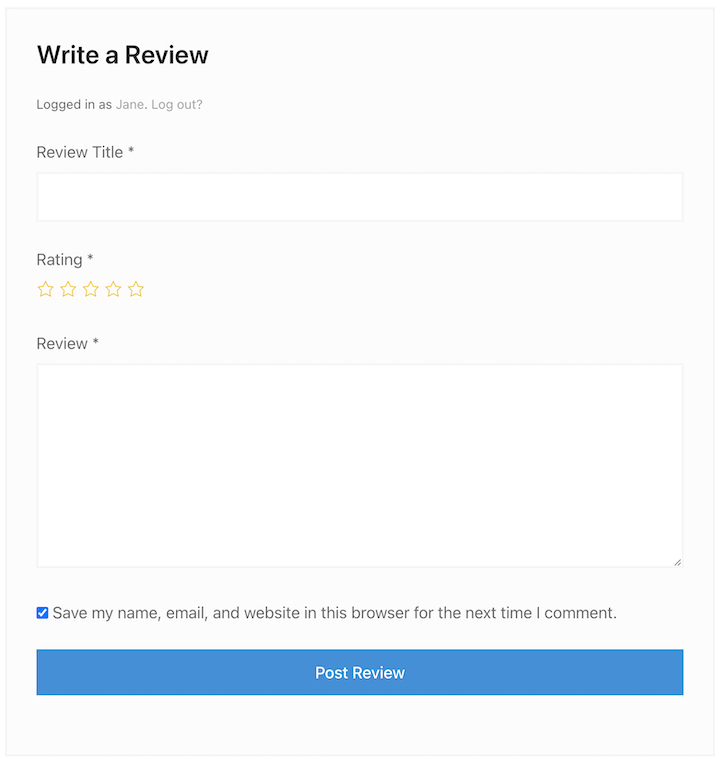
Het werkt naadloos samen met EDD. Klanten kunnen sterbeoordelingen en geschreven recensies achterlaten. Het toont ook Verified Customer-badges om vertrouwen op te bouwen.
Bovendien is het gratis inbegrepen bij een Extended pass of hoger.
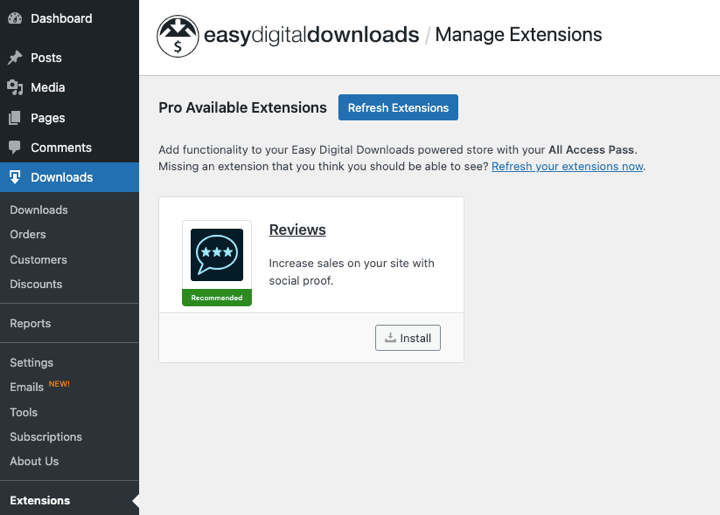
Om het te installeren, gaat u eenvoudig naar Downloads » Extensies vanuit uw WordPress-admingebied. Zoek Reviews en selecteer vervolgens Installeren.
Stap 2. Configureer Recensie-instellingen
Vervolgens kunt u de Reviews-instellingen configureren onder Downloads » Instellingen » Marketing » Reviews.
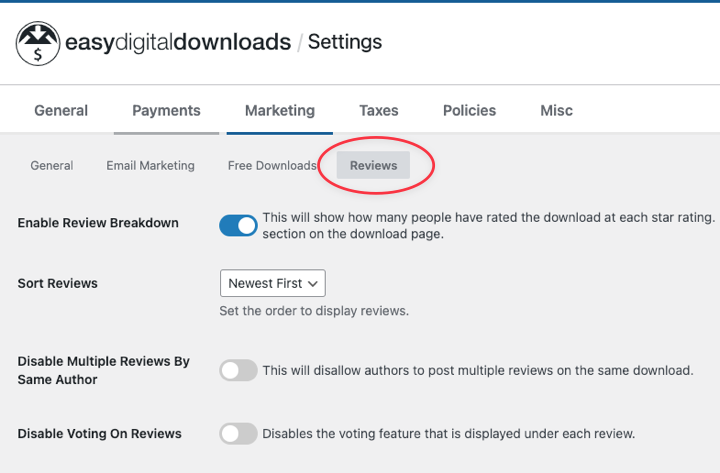
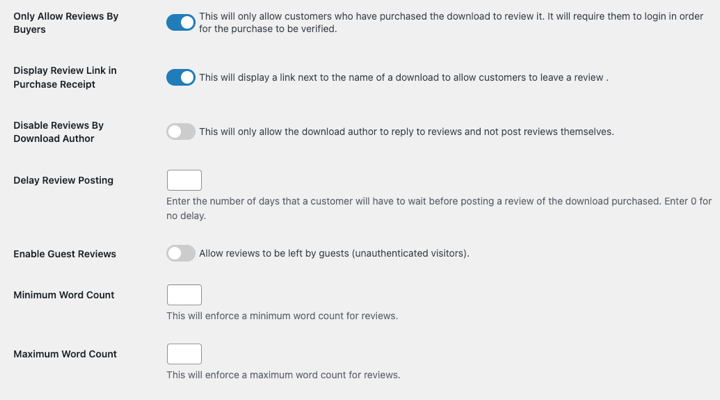
Hier vindt u tal van opties om instellingen naar wens aan te passen. U kunt bijvoorbeeld beoordelingen eerst goedkeuren of kiezen waar ze worden weergegeven.
Stap 3. Verzamelen & Beheren Beoordelingen Toevoegen
Om productrecensies op uw WordPress-site weer te geven, kunt u het EDD Reviews-blok gebruiken in een bericht of pagina.
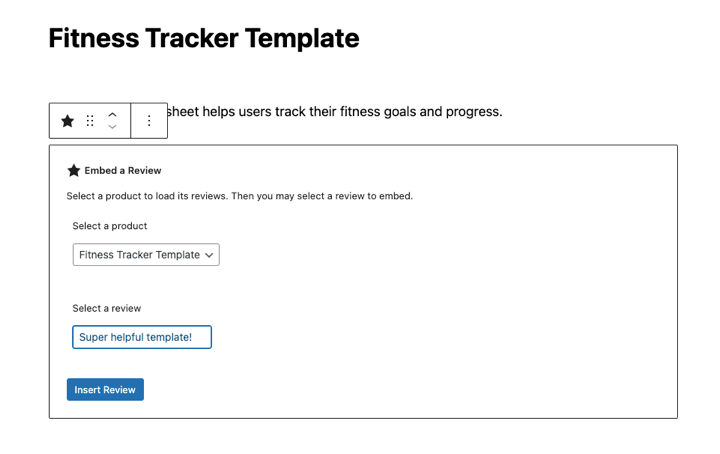
Eenmaal gepubliceerd, kunt u het formulier vanaf de voorkant van uw site bekijken en beginnen met het verzamelen van beoordelingen!
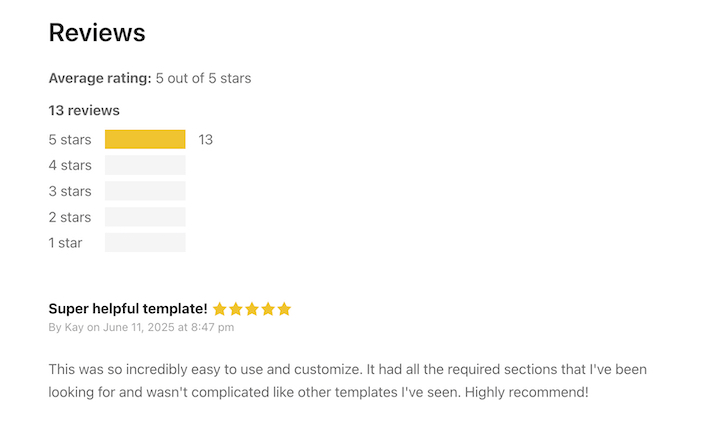
Om klanten aan te moedigen beoordelingen achter te laten, kunt u een link toevoegen aan e-mails en kortingsprikkels aanbieden.
Om beoordelingen te beheren, gaat u naar Downloads » Beoordelingen.
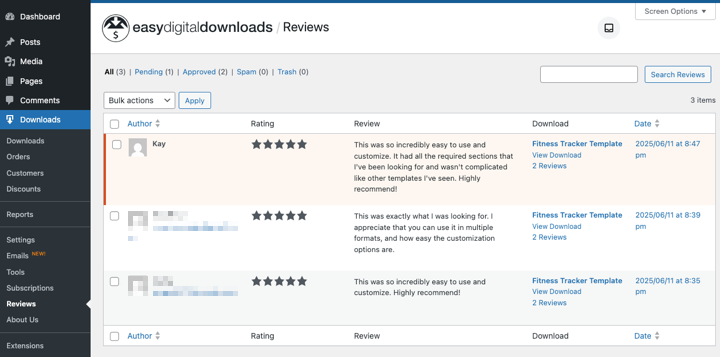
U kunt elke beoordeling goedkeuren/afkeuren, beantwoorden, bewerken, als spam markeren of verwijderen. Het werkt net als de ingebouwde commentaarfunctionaliteit van WordPress.
⚙️ Bekijk gerust onze documentatie voor het instellen van beoordelingen voor meer diepgaande begeleiding.
Tips voor het Gebruiken van Productrecensies in WordPress
Hier zijn enkele tips en de beste strategieën die u kunt gebruiken om de effectiviteit van productrecensies op uw WordPress-site te maximaliseren.
Vraag om Beoordelingen
Vraag nieuwe klanten of tevreden klanten om beoordelingen. Ik raad aan om geautomatiseerde aanvraag-e-mails in te stellen die u van tijd tot tijd verzendt.
Wanneer in de klantreis is uw klant waarschijnlijk het meest tevreden? Overweeg een geautomatiseerde e-mail die op dat moment om een beoordeling vraagt.
Bied Prikkels Aan
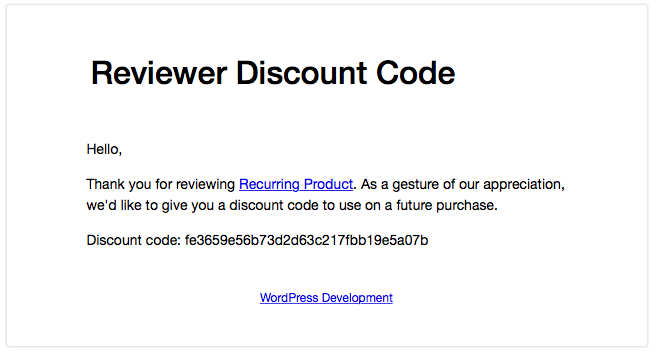
De eenvoudigste manier om klanten aan te moedigen productrecensies op uw site achter te laten, is door ze ervoor te belonen.
Easy Digital Downloads maakt dit eenvoudig. U kunt automatisch een speciale korting aanbieden in ruil voor een productrecensie.
Badge Weergeven
Als u een goed aantal positieve beoordelingen op een extern platform verzamelt, toon dan een vertrouwensbadge op uw website.

Deze bouwen vertrouwen op bij potentiële klanten.
Reageren op Beoordelingen
In de meeste gevallen moet u reageren wanneer u een nieuwe beoordeling ontvangt. Dit toont goede klantenservice en ondersteuning.
Mogelijk moet u een maandelijkse of driemaandelijkse controle van externe beoordelingssites instellen om de zaken regelmatig te monitoren.
Wanneer u positieve beoordelingen ontvangt, is meestal een simpele 'dank u wel' een goede reactie.
Voor negatieve beoordelingen, hoewel ingewikkelder, is het het beste om ze niet te negeren of ertegenin te gaan. Wees authentiek en persoonlijk om de situatie aan te pakken.
Veelgestelde vragen over het toevoegen van recensies aan WordPress
Laten we afsluiten met een paar veelgestelde vragen over hoe productrecensies aan WordPress-sites kunnen worden toegevoegd.
Wat is de beste manier om productrecensies aan WordPress toe te voegen?
De beste manier om productrecensies aan WordPress toe te voegen is via uw e-commerce oplossing, zoals Easy Digital Downloads of WooCommerce. Als u geen van beide gebruikt, kunt u een speciale WordPress-recensieplug-in gebruiken, zoals Site Reviews.
Hoe krijg ik meer beoordelingen voor mijn producten?
Verstuur e-mails na een aankoop waarin om een beoordeling wordt gevraagd (plug-ins kunnen dit automatisch doen). Maak het gemakkelijk om een beoordeling achter te laten. U kunt ook een klein geschenk aanbieden, zoals een kortingsbon voor een toekomstige aankoop.
Hoe krijg ik sterbeoordelingen in Google?
Om sterbeoordelingen in Google te krijgen, moet u productrecensies toevoegen aan WordPress met een plugin die Schema Markup ondersteunt, zoals AIOSEO. Deze speciale code vertelt Google over uw recensies, waardoor sterbeoordelingen in zoekresultaten kunnen verschijnen.
Voeg vandaag nog productrecensies toe aan WordPress
Gefeliciteerd! U heeft nu een uitgebreid begrip gekregen van hoe u productrecensies aan WordPress kunt toevoegen. Door de strategieën in deze gids te implementeren, voegt u niet zomaar een functie toe; u investeert in een krachtige groeimotor voor uw online bedrijf.
Als u digitale producten verkoopt maar nog geen Easy Digital Downloads-abonnement heeft, neem er dan vandaag nog een en begin gratis met het gebruiken van de Reviews-add-on!
Wat is de volgende stap? Leer hoe u affiliate- en verwijzingsmarketing gebruikt om de verkoop te stimuleren!
📣 P.S. Vergeet niet om zich te abonneren op onze nieuwsbrief en ons te volgen op Facebook, Twitter/X, of LinkedIn voor meer WordPress-bronnen!








