


多くのWordPressストアにとって、PayPalを受け入れることは、チェックアウト時に一つのことを意味していました。それは、おなじみの黄色いPayPalボタンです。信頼性が高く、買い物客はそれをよく知っています。
しかし、人々がお金を払う方法は進化し続けており、お客様はチェックアウト方法を自由に選べることを望んでいます。そのため、Easy Digital DownloadsのPayPal体験を完全に刷新しました。
1つの接続で、PayPal、Venmo、デビットカード、クレジットカード、Apple Pay、Google Pay、さらにPayPal Fastlaneによる迅速なゲストチェックアウトが利用できるようになりました。
その結果、すべての買い物客が好みの方法で支払い、より迅速に処理を進めることができるモダンなチェックアウトが実現しました。提供できる機能と有効化の方法をご紹介します。
主なポイント
- PayPal FastlaneはEDDに組み込まれ、リピーターおよびゲストのお客様のチェックアウトを高速化します。
- お客様は、Venmo、デビットカード、クレジットカード、Apple Pay、Google Pay、およびPayPalを含む、より多くの支払い方法を1つの接続で利用できます。
- ストアは、単一のPayPalボタンから、複数の決済方法に対応した完全なチェックアウトへと移行できます。
Easy Digital DownloadsのPayPalで提供できる機能
このアップデートにより、WordPressのチェックアウトで提供できるものが変わります。
充実したPayPal決済方法
PayPalを接続すると、チェックアウトでお客様に幅広い支払いオプションを提供できます:
- PayPal:お客様がすでに知っている、クラシックなチェックアウト。
- Venmo:米国の若い購入者に人気があります。
- デビットカードおよびクレジットカード:お客様はPayPalアカウントなしでカードで支払うことができます。
- Apple PayおよびGoogle Pay:モバイルおよびブラウザベースの迅速な支払い。
Venmo、カード、デジタルウォレットをPayPalと併用して提供することで、より多くの購入者が好みの方法で購入を完了できるようになります。
表示される方法は、国とPayPalアカウントの適格性によって異なります。PayPalはお客様ごとに利用可能なオプションを表示します。
これらの方法に加えて、PayPalのFastlaneは、リピート購入者とゲストのチェックアウトを高速化します。
PayPalのFastlaneによる高速ゲストチェックアウト
PayPal Fastlaneは、PayPalの高速ゲストチェックアウトエクスペリエンスであり、購入者を迅速かつ簡単に決済に誘導するように構築されています。
リピート購入者がチェックアウトに到達すると、Fastlaneが購入者を認識し、支払い情報を自動的に入力します。確認するだけで完了し、入力やカードを探す必要はありません。
そのスピードは最も重要な場所で成果を発揮します。支払いが速いほど、購入完了への道はスムーズになり、カート放棄が減少します。購入者がファイルやライセンスをすぐに必要とするデジタル製品にとっては、簡単な勝利です。
何よりも、お客様はPayPalアカウントがなくても使用できます。Fastlaneはゲストにも対応しているため、以前に離脱した可能性のある人々にもチェックアウトを開きます。
すべてのお客様に対応するチェックアウト
どのEasy Digital Downloadsプランをご利用の場合でも、チェックアウトでより多くのPayPal支払い方法とFastlaneを提供できます。
お客様にとってのメリットです。お客様はすでに好む方法で支払うことができ、Fastlaneはリピート購入者とゲストを数秒でチェックアウトに誘導します。
WordPressでPayPal決済方法を追加する方法
追加オプションを有効にするには、2つのステップがあります。2番目のステップは簡単に見落とす可能性があるため、スキップしないでください。
まだPayPalをストアに接続していない場合は、PayPal支払いを受け付ける方法のガイドを参照するか、PayPalセットアップドキュメントを参照してください。
ステップ1:Easy Digital Downloadsをアップデートする
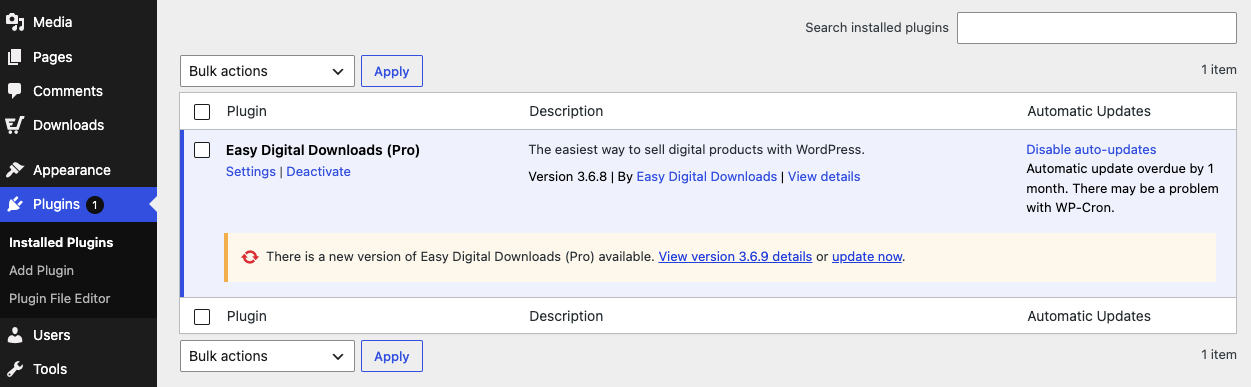
まず、Easy Digital Downloadsの最新バージョンを実行していることを確認してください。新しいPayPal支払い方法はアップデートに含まれているため、プラグインが最新でないと表示されません。
WordPressダッシュボードのプラグインに移動します。Easy Digital Downloadsプラグインの新しいバージョンが利用可能な場合は、今すぐ更新を選択します。
ステップ2:PayPalアカウントを切断して再接続する
⚠️ 重要:新しいPayPal支払い方法は、新しく接続されたストアに追加されます。このリリースより前にPayPalを接続したストアの場合、有効にするには切断して再接続する必要があります。この間、一部のブラウザでポップアップが要求されたという通知が表示される場合があります。必ず許可してください。
ダウンロード » 設定 » 支払い » PayPal に移動し、PayPalから切断オプションを選択します。
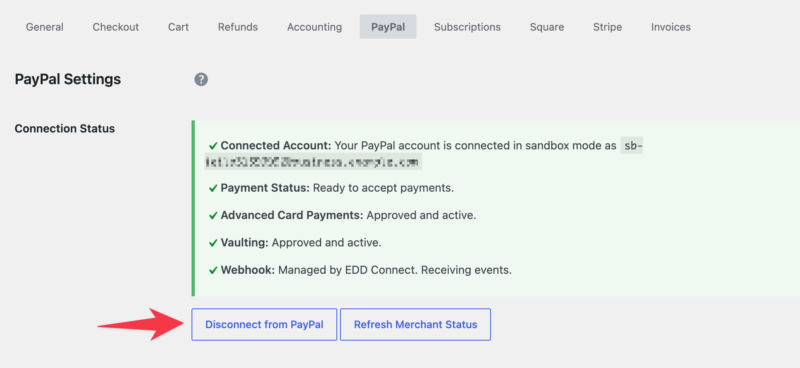
次に、同じアカウントを使用して再度接続します。
PayPalは、有効にできるPayPal対応支払い方法のリストを再確立します。
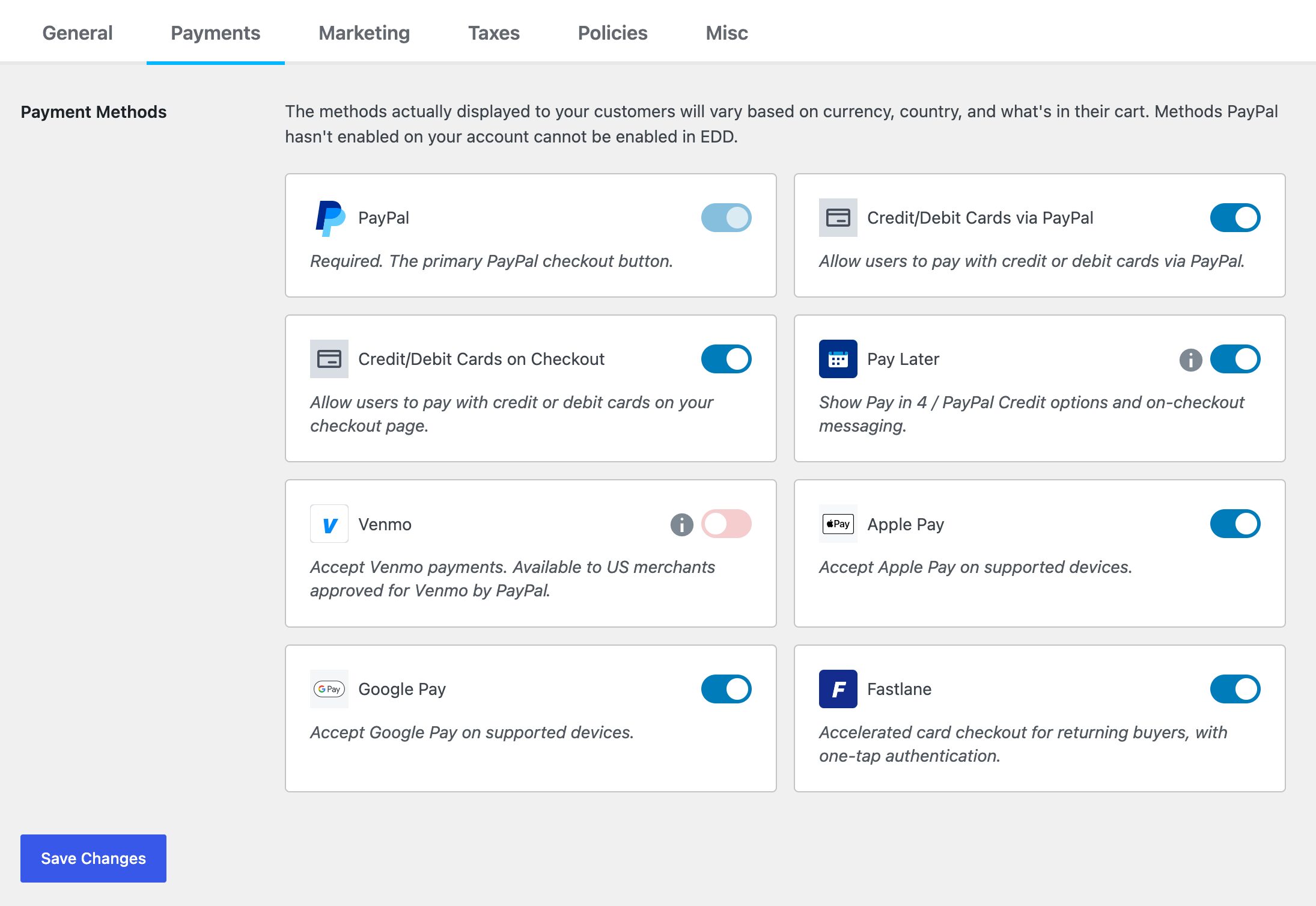
変更を保存を選択します。
チェックアウトに移動し、新しいオプションが表示されていることを確認します。完全な接続詳細は、PayPalセットアップドキュメントを参照してください。
よくある質問:PayPal決済方法とFastlane
新しいPayPal支払い方法とFastlaneについて、まだ質問がありますか?このWordPress PayPalアップデートに関する最も一般的な質問への簡単な回答を以下に示します。
Easy Digital DownloadsでPayPal Fastlaneは無料ですか?
はい。Fastlaneと追加のPayPal決済方法はEasy Digital Downloadsに組み込まれています。それらを使用するには、最新バージョンをPayPalアカウントに接続するだけです。
Fastlaneを使用するために、お客様はPayPalアカウントが必要ですか?
いいえ。Fastlaneはゲストチェックアウト用に構築されているため、顧客はPayPalアカウントを作成またはログインせずに迅速に支払うことができます。また、利用可能な場合はカード、Venmo、Apple Pay、またはGoogle Payで支払うこともできます。
ストアに新しい決済方法が表示されないのはなぜですか?
新しい方法は新しく接続されたストアで有効になっています。このアップデートの前にPayPalを接続した場合、それらをオンにするには、Downloads » Settings » Payments » PayPalの下でアカウントを切断して再接続してください。
お客様にはどの決済方法が表示されますか?
お住まいの国とPayPalアカウントの適格性によって異なります。PayPalは、PayPal、Venmo、デビットカードおよびクレジットカード、Apple Pay、Google Payなどの利用可能な方法を各顧客に自動的に表示します。希望する方法が表示されない場合は、PayPalに連絡してリクエストする必要があります。これらの権限は、Easy Digital Downloadsではなく、PayPalによって制御されます。
EDD Liteを使用している場合、これは機能しますか?
はい。Easy Digital Downloadsの最新バージョンに更新すると、上記のすべての決済方法が利用できるようになります。
これが機能するために、チェックアウトで何か変更する必要がありますか?
カスタムセットアップは不要です。Easy Digital Downloadsを更新してPayPalを再接続すると、利用可能な決済方法がチェックアウト時に自動的に表示されます。
PayPal決済を受け入れるのに手数料はかかりますか?
PayPalの標準処理手数料がすべてのトランザクションに適用されます。Easy Digital DownloadsのLite/無料バージョンでは、3%のトランザクション手数料もかかります。EDD Proにアップグレードすると、この3%の手数料が削除され、PayPalの標準レートのみが適用されます。
今日から、より多くの支払い方法を提供しましょう
顧客に支払い方法を増やすことは、売上を伸ばす最も簡単な方法の1つであり、それがストアに組み込まれました。Easy Digital DownloadsのPayPal Fastlaneと新しい決済方法により、チェックアウトは買い物客が期待するスピードと選択肢を提供できます。
Easy Digital Downloadsを更新し、PayPalアカウントを再接続して、本日よりVenmo、カード、デジタルウォレット、および高速なゲストチェックアウトの提供を開始してください。
Easy Digital Downloadsは初めてですか? 数分で開始 して、すべての顧客に支払い方法を提供するチェックアウトを設定してください。
このアップデートの詳細については、リリースノートをご覧ください。
📣追伸:ニュースレターを購読し、Facebook、Twitter/X、またはLinkedInでフォローして、WordPressのリソースをさらに入手してください!








