


¿Y si tu tienda de WordPress pudiera recomendar automáticamente los productos perfectos a cada cliente? Sin configuración manual. Sin reglas complejas. Solo recomendaciones de productos inteligentes que aumentan las ventas.
Los estudios demuestran que las recomendaciones personalizadas aumentan el valor promedio del pedido en un 10% o más. Y la configuración de sugerencias de productos con IA en WordPress hace que esto sea posible.
La función de Recomendaciones de Carrito de Easy Digital Downloads es un sistema de IA que analiza tu catálogo de productos automáticamente. Sugiere artículos relevantes directamente en la vista previa de tu carrito, justo cuando los clientes están más comprometidos.
¿La mejor parte? Cero código requerido. El sistema se mantiene solo a medida que tu catálogo crece. En este tutorial, aprenderás cómo configurar recomendaciones impulsadas por IA en tu sitio de WordPress.
- ¿Qué son las recomendaciones de productos con IA? 🤖
- Beneficios de las recomendaciones de IA para tiendas digitales
- Cómo funcionan las recomendaciones inteligentes de carrito de EDD
- Prerrequisitos: Lo que necesitarás
- Configurar recomendaciones de productos con IA en EDD
- Mejores prácticas para maximizar las recomendaciones de productos con IA
- Preguntas frecuentes sobre recomendaciones de productos con IA en WordPress
¿Qué son las recomendaciones de productos con IA? 🤖
Las recomendaciones de productos con IA utilizan algoritmos de aprendizaje automático para analizar tu catálogo de productos y cómo se relacionan los artículos entre sí. En lugar de que tú decidas manualmente qué productos van juntos, la IA estudia los títulos, descripciones y categorías de tus productos para identificar relaciones profundas y sugerir las mejores combinaciones basadas en los datos únicos de tu tienda.
Piénsalo como tener un asistente de ventas súper inteligente que aprende de cada compra y mejora sus sugerencias con el tiempo.
La diferencia clave entre las recomendaciones basadas en reglas (como "comprados juntos frecuentemente") y las recomendaciones de IA verdaderas es el aprendizaje. Los sistemas basados en reglas siguen reglas preestablecidas. Los sistemas de IA adaptan y mejoran sus sugerencias basándose en nuevos datos.
Beneficios de las recomendaciones de IA para tiendas digitales 📈
Aumentar el valor promedio del pedido (AOV)
Las recomendaciones de IA suelen aumentar el AOV en aproximadamente un 10% o más. Algunas tiendas digitales ven ganancias aún mayores a través de la venta cruzada automatizada.
Valor Promedio del Pedido (AOV) = Ingresos Totales ÷ Número Total de Pedidos
Digamos que tu AOV actual es de $50 con 100 pedidos al mes ($5,000 de ingresos). Un aumento del 20% en el AOV significa:
- Nuevo AOV: $60 por pedido
- Mismos 100 pedidos: $6,000 de ingresos
- $1,000 adicionales de ingresos mensuales sin tráfico adicional
Para productos digitales, esto funciona especialmente bien porque estás recomendando artículos complementarios como:
- Un eBook para acompañar un curso en video
- Un plugin premium con un tema de WordPress
- Plantillas avanzadas con paquetes de diseño básicos
- Materiales de bonificación con productos principales
Experiencia del cliente mejorada a través de la personalización
Las recomendaciones relevantes ayudan a los clientes a descubrir herramientas que no sabían que necesitaban. En lugar de navegar por todo su catálogo, ven sugerencias de productos personalizadas que coinciden con sus intereses. Esto crea una experiencia de compra más personalizada y aumenta la satisfacción del cliente.
Tasas de abandono de carrito reducidas
Cuando los clientes ven complementos valiosos durante el pago, es más probable que completen su compra. La IA los capta en el momento de máxima intención de compra y les brinda razones convincentes para finalizar la transacción.
Ahorro de tiempo gracias a la automatización
Si no desea curar manualmente artículos relacionados para cada descarga, la automatización real de ventas cruzadas se encarga de esto por usted. Para vendedores digitales con docenas o cientos de productos, esto ahorra incontables horas mientras ofrece recomendaciones más precisas que la selección manual.
Esto funciona especialmente bien para archivos y descargas debido a la entrega instantánea y los bajos costos operativos para los complementos. No hay gestión de inventario ni costos de envío de los que preocuparse: solo ganancias puras de sugerencias inteligentes.
Cómo funcionan las recomendaciones de carrito con IA de EDD 🎯
¿Nuevo en Easy Digital Downloads (EDD)? Si aún no lo está utilizando, Easy Digital Downloads es una solución completa de comercio electrónico para WordPress diseñada específicamente para vender productos digitales. Mientras que muchos usuarios luchan con las complejas recomendaciones de productos de WooCommerce que están diseñadas para compras físicas, EDD está optimizado para productos y archivos digitales, incluyendo software, libros electrónicos, documentos y archivos multimedia.
No necesita un plugin de recomendación de productos de terceros sobrecargado; EDD integra estas potentes funciones directamente en la plataforma principal. Debido a que EDD comprende la naturaleza única de la venta digital, puede ofrecer experiencias de pago más fluidas y rápidas.
Las recomendaciones inteligentes de carrito de EDD aparecen en el panel de vista previa del carrito: ese cajón de carrito que se desliza y aparece cuando los clientes agregan artículos.
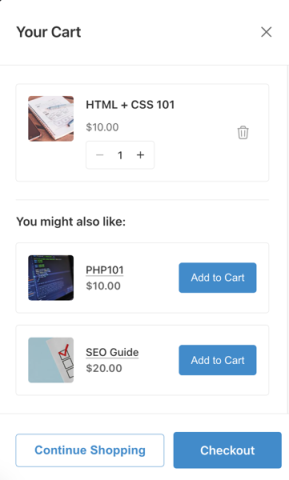
Esta es la ubicación perfecta porque no interrumpe el flujo de compra. Los clientes pueden ver sugerencias sin salir de la página actual ni ser redirigidos a otro lugar.
Estas ventas adicionales en el carrito para WordPress están diseñadas para captar a los compradores en el momento de máxima intención de compra. Cuando alguien agrega un artículo a su carrito, ya está en "modo de compra", lo que lo convierte en el momento ideal para sugerir productos complementarios.
El algoritmo detrás de la magia
El sistema de EDD utiliza un sofisticado motor de IA para ofrecer recomendaciones conscientes del producto. Al analizar el contenido y el contexto de sus descargas, la IA identifica conexiones lógicas, como cómo un plugin específico complementa un cierto tema de WordPress, y sugiere los artículos más relevantes automáticamente.
El sistema requiere una cantidad m ilde{i}nima de datos para hacer recomendaciones precisas. Para tiendas nuevas, puede tomar varias semanas de datos de ventas antes de que la IA pueda identificar patrones s ilde{o}lidos. Sin embargo, una vez que tenga suficiente informaci ilde{o}n, las sugerencias ser ilde{a}n cada vez m ilde{a}s precisas.
Productos Recomendados de EDD vs. Recomendaciones Inteligentes del Carrito
EDD a ilde{u}n ofrece la extensi ilde{o}n Productos Recomendados para sugerencias b ilde{a}sicas de productos. Sin embargo, esta extensi ilde{o}n utiliza recomendaciones basadas en reglas: usted selecciona manualmente qu ilde{e} productos recomendar para cada art ilde{i}culo. No est ilde{a} impulsada por IA.
La soluci ilde{o}n recomendada es la funci ilde{o}n Recomendaciones Inteligentes de IA para el Carrito disponible con la funcionalidad de Vista Previa del Carrito cuando est ilde{a} utilizando una licencia de EDD Pro. Esto proporciona verdaderas sugerencias impulsadas por aprendizaje autom ilde{a}tico que mejoran con el tiempo.
Prerrequisitos: Lo que necesitar ilde{a}s ✅
Antes de configurar las recomendaciones de productos con IA, aseg ilde{u}rate de tener:
- Instalaci ilde{o}n de WordPress
- Plugin Easy Digital Downloads & licencia Pro activa (requerida para recomendaciones de IA)
- Productos en tu cat ilde{a}logo de EDD (al menos 10-15 productos funcionan mejor para recomendaciones significativas)
La versi ilde{o}n gratuita de Easy Digital Downloads proporciona funcionalidad b ilde{a}sica de comercio electr ilde{o}nico, incluida la Vista Previa del Carrito que se desliza. Pero las recomendaciones del carrito impulsadas por IA requieren EDD Pro.
Configurar recomendaciones de productos con IA en EDD
Repasemos el proceso completo de configuraci ilde{o}n. Cada paso es sencillo y solo toma unos minutos completarlo.
Paso 1. Actualiza a la ilde{U}ltima versi ilde{o}n de EDD 🔃
Antes de habilitar las Recomendaciones del Carrito, aseg ilde{u}rate de estar ejecutando la ilde{u}ltima versi ilde{o}n de EDD Pro.
Inicia sesi ilde{o}n en tu panel de administraci ilde{o}n de WordPress. Navega a Panel » Actualizaciones. Busca actualizaciones de Easy Digital Downloads.

Haz clic en Actualizar ahora si hay una actualizaci ilde{o}n disponible. Espera a que se complete la actualizaci ilde{o}n.
Esto es importante porque las Recomendaciones del Carrito son una funci ilde{o}n m ilde{a}s nueva. Requiere la ilde{u}ltima versi ilde{o}n de EDD para funcionar correctamente.
Paso 2. Habilita la Vista Previa del Carrito 🛒
La funci ilde{o}n Vista Previa del Carrito crea un caj ilde{o}n de carrito que se desliza y aparece cuando los clientes agregan art ilde{i}culos a su carrito. Este dise ilde{n}o no intrusivo permite a los clientes ver el contenido de su carrito y las recomendaciones de IA sin navegar fuera de la p ilde{a}gina actual.
He aqu ilde{i} por qu ilde{e} la Vista Previa del Carrito es la ubicaci ilde{o}n perfecta para las recomendaciones de productos con IA:
- No interrumpe la experiencia de navegaci ilde{o}n.
- Los clientes ya est ilde{a}n en "modo de compra" cuando la ven.
- El dise ilde{n}o deslizante se siente moderno y profesional.
- Funciona perfectamente tanto en dispositivos de escritorio como m ilde{o}viles.
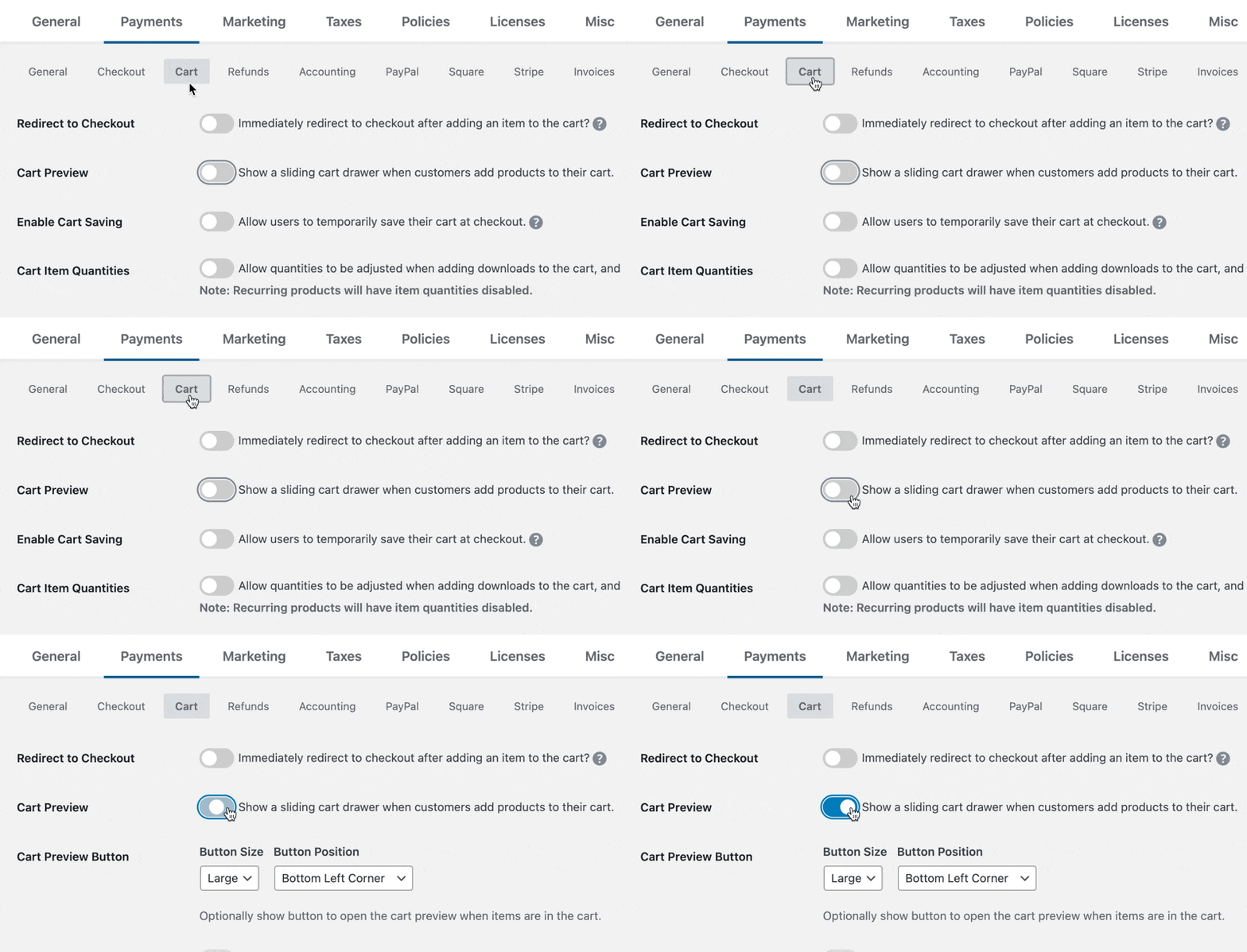
Acceso a la Configuraci ilde{o}n de la Vista Previa del Carrito
Para habilitar la Vista Previa del Carrito en EDD, sigue estos pasos:
- Desde tu panel de administraci ilde{o}n de WordPress, navega a Descargas » Ajustes » Pagos.
- Haz clic en la pesta ilde{n}a Carrito en la parte superior de la p ilde{a}gina.
- Despl ilde{a}zate hacia abajo para encontrar la secci ilde{o}n Vista Previa del Carrito.
- Marca la casilla para Habilitar Vista Previa del Carrito.
- Haz clic en Guardar Cambios.
Una vez habilitada, la Vista Previa del Carrito crea un panel deslizable que aparece desde el lado derecho de la pantalla cuando los clientes agregan productos a su carrito. Esto proporciona una experiencia de compra fluida y moderna que fomenta compras adicionales.
Paso 3. Habilitar Recomendaciones del Carrito 🔮
Después de activar la Vista Previa del Carrito, verás una nueva sección Recomendaciones del Carrito que aparece justo debajo de la configuración de la Vista Previa del Carrito. Aquí es donde ocurre la magia.
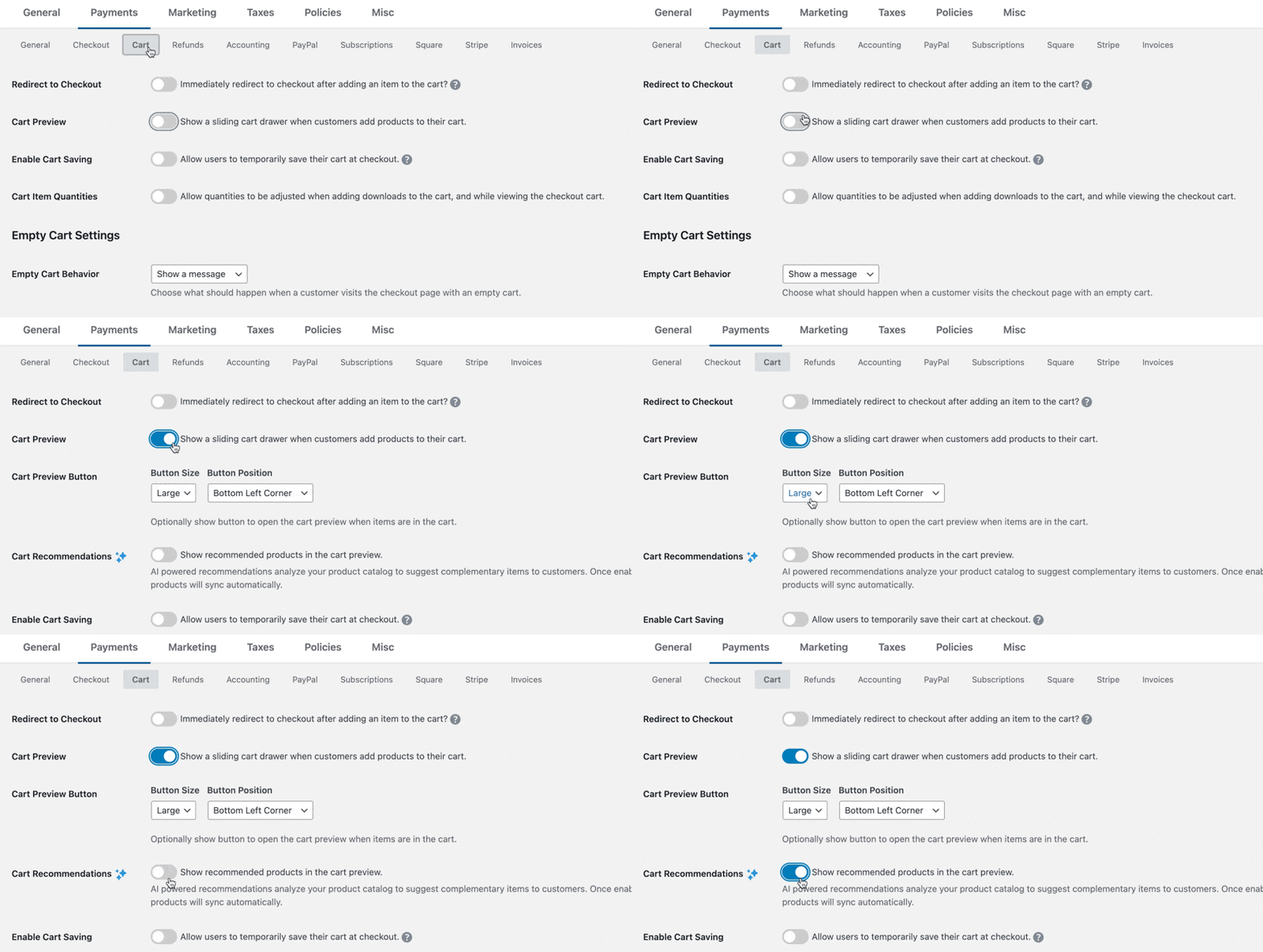
Habilitando Recomendaciones de Productos con IA
- En la misma pestaña de configuración de Carrito, desplázate hacia abajo hasta la sección Recomendaciones del Carrito.
- Activa el interruptor para Habilitar Recomendaciones del Carrito.
- Haz clic en Guardar Cambios.
¡Eso es todo! La configuración es intencionalmente simple porque EDD maneja todo el procesamiento complejo de IA en segundo plano. No necesitas configurar algoritmos, configurar fuentes de datos ni administrar la lógica de recomendación; el sistema lo hace automáticamente.
Paso 4. Esperar a que el Catálogo de Productos se Sincronice ⏱️
Una vez que habilitas las Recomendaciones del Carrito, EDD comienza automáticamente a sincronizar tu catálogo de productos con el servicio de recomendación de IA. Esta sincronización inicial generalmente toma solo unos minutos, dependiendo de cuántos productos tengas en tu tienda.
Durante el proceso de sincronización, EDD:
- Analiza la estructura de tu catálogo de productos.
- Identifica categorías y relaciones de productos.
- Comienza a recopilar datos de productos.
- Prepara la base para las recomendaciones.
No necesitas hacer nada durante este proceso; solo espera a que se complete la sincronización. Para tiendas con cientos de productos, la sincronización podría tomar de 15 a 30 minutos. La mayoría de las tiendas completan la sincronización en menos de 5 minutos.
Paso 5. Probar las Recomendaciones de Productos con IA 🧪
Una vez que la sincronización se complete, las recomendaciones de productos con IA aparecerán automáticamente en el panel de Vista Previa del Carrito cuando los clientes agreguen artículos a su carrito.
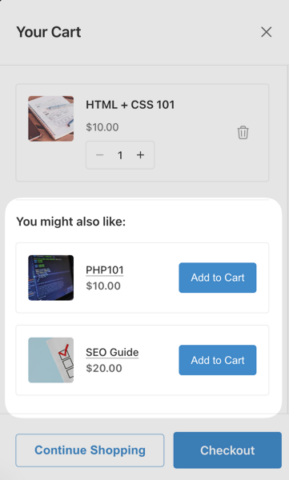
Así es como puedes probar el sistema.
Probando como Cliente
- Visita el front-end de tu tienda (abre una nueva ventana del navegador en modo incógnito).
- Agrega cualquier producto a tu carrito.
- Observa cómo el panel de Vista Previa del Carrito se desliza desde la derecha.
- Busca la sección “Recomendado para ti” o “Quizás también te guste”.
- Verifica que aparezcan productos relevantes como sugerencias.
Qué Esperar
Inicialmente, las recomendaciones pueden parecer básicas o limitadas porque la IA necesita tiempo para aprender. A medida que agregues más productos y refines tus descripciones y categorías, el motor de IA continuará aprendiendo y actualizando sus recomendaciones para mantenerse perfectamente sincronizado con tu inventario.
Monitoreando el Rendimiento
Haz un seguimiento de estas métricas clave para medir la efectividad de tus recomendaciones de IA:
- Tasas de clics en productos recomendados.
- Tasas de conversión de recomendaciones a compras.
- Mejoras en el valor promedio del pedido.
- Atribución de ingresos de productos sugeridos por IA.
La mayoría de los usuarios de EDD Pro ven mejoras notables en estas métricas dentro de 2 a 4 semanas después de habilitar las Recomendaciones de Carrito, una vez que la IA ha recopilado suficientes datos para hacer sugerencias inteligentes.
⚙️ Para obtener más orientación, consulta nuestra Documentación de Habilitación de Recomendaciones de Carrito.
Mejores prácticas para maximizar las recomendaciones de productos con IA
Comenzando con una Tienda Nueva (Datos Mínimos)
Cuando recién comienzas, la IA no tiene muchos datos de clientes para trabajar. Aquí tienes estrategias para obtener mejores recomendaciones más rápido:
Mientras esperas que la IA recopile datos, aún puedes vender cruzado de manera efectiva:
- Usa las funciones de venta cruzada manuales de EDD para tus productos principales
- Crea paquetes de productos para artículos obviamente relacionados
- Agrega secciones de “Comprados juntos frecuentemente” a las páginas de productos
Si te mudas de otra plataforma, importa la mayor cantidad posible de datos históricos de ventas.
Para tiendas nuevas, la IA inicialmente se basa más en la similitud de contenido (categorías de productos, descripciones, etiquetas) que en datos de comportamiento. Asegúrate de que tus productos estén correctamente categorizados y etiquetados para ayudar al sistema a hacer conexiones lógicas.
Establece Expectativas Realistas
No esperes recomendaciones perfectas de inmediato.
Recuerda, las recomendaciones de IA mejoran con el tiempo a medida que recopilan más datos. No esperes sugerencias perfectas de inmediato. Dale al sistema unas semanas para que aprenda tus productos.
Categoriza Productos para Mejores Recomendaciones
La categorización adecuada de productos ayuda a la IA a comprender las relaciones entre los artículos:
- Usa categorías específicas y descriptivas
- Aplica etiquetas relevantes a los productos
- Escribe descripciones detalladas de los productos
- Agrupa productos relacionados lógicamente
Preguntas frecuentes sobre recomendaciones de productos con IA en WordPress
Concluyamos respondiendo algunas preguntas frecuentes sobre las recomendaciones de carrito inteligentes impulsadas por IA y cómo usarlas para tu tienda digital en WordPress.
¿Necesito EDD Pro para recomendaciones de IA?
Sí, las recomendaciones de carrito impulsadas por IA requieren una licencia activa de Easy Digital Downloads Pro. La versión gratuita de EDD incluye funcionalidad básica de comercio electrónico, pero la función inteligente de Recomendaciones de Carrito con algoritmos de aprendizaje automático solo está disponible en EDD Pro.
¿Cuál es la diferencia entre Productos Recomendados de EDD y recomendaciones de productos de IA?
Productos Recomendados de EDD es una extensión separada que se basa en ventas históricas, mientras que Recomendaciones de Carrito Inteligentes es una función integrada en EDD Pro que utiliza IA para analizar el contenido del producto. Las recomendaciones de IA mejoran con el tiempo y no requieren configuración manual.
¿Las recomendaciones de IA ralentizarán mi sitio?
No, las recomendaciones de IA de EDD están diseñadas para el rendimiento. El procesamiento de recomendaciones ocurre en los servidores de EDD, no en tu sitio de WordPress. La Vista Previa del Carrito carga las recomendaciones de forma asíncrona, por lo que no afectan la velocidad de carga de tu página ni el rendimiento de tu sitio.
¿Puedo anular manualmente las recomendaciones de IA?
Actualmente, la función de recomendaciones del carrito de EDD está completamente automatizada; no puedes anular manualmente recomendaciones específicas. Sin embargo, puedes deshabilitar la función por completo o usar la extensión separada de Productos Recomendados para un control manual junto con el sistema de IA.
¿Cuántas recomendaciones verán los clientes en su carrito?
Los clientes ven hasta 3 productos recomendados por carrito. El número exacto depende de los cálculos de relevancia del algoritmo de IA. Este límite evita abrumar a los clientes y, al mismo tiempo, proporciona sugerencias significativas.
Impulsa las ventas con recomendaciones de productos por IA
Agregar recomendaciones de productos por IA a tu tienda de WordPress con Easy Digital Downloads es una de las decisiones más inteligentes que puedes tomar para aumentar los ingresos sin atraer más tráfico.
La función de recomendaciones del carrito hace que esto sea increíblemente simple. Simplemente habilita la vista previa del carrito, activa las recomendaciones del carrito y deja que el algoritmo de aprendizaje automático haga el trabajo.
¿Listo para impulsar las ventas de tus productos digitales con recomendaciones inteligentes? Habilita hoy mismo las funciones de vista previa y recomendaciones del carrito de EDD. Si aún no tienes un pase Pro, ¡consigue uno hoy mismo para probar esta función!
¿Qué sigue? Explora más formas de reducir las tasas de abandono del carrito en WordPress.
📣 P.S. Asegúrate de suscribirte a nuestro boletín y síguenos en Facebook, Twitter/X o LinkedIn para obtener más recursos de WordPress.








