


Wilt u streamingvideo of -audio verkopen, maar alleen aan mensen die er daadwerkelijk voor hebben betaald?
Dat is een andere uitdaging dan het verkopen van downloads. Bij een download gaat het bestand één keer over en bent u klaar.
Bij streaming leeft uw content op een pagina. Iedereen met de link kan het technisch gezien bekijken, tenzij u het vergrendelt.
Het goede nieuws? U hoeft geen compleet nieuw platform te bouwen om dit te doen. Als u al digitale producten verkoopt met Easy Digital Downloads (EDD), kunt u een streamingpagina beperken tot alleen betalende klanten, en alles op één plek houden.
Deze gids leidt u precies door hoe u streamingvideo of -audio verkoopt en de toegang ertoe beperkt, of u nu één video of een hele bibliotheek afschermt.
Belangrijkste punten
- Geen lidmaatschapsplugin nodig. Content Restriction voegt toegangsbeheer rechtstreeks toe aan uw bestaande EDD-winkel.
- Eenmalig of abonnement. Beperk op basis van een enkele aankoop of een actief Recurring Payments-abonnement.
- Elk platform, elke domeinvergrendeling. Vimeo, Wistia of YouTube werken allemaal. Betaalde niveaus voegen privacy op domeinniveau toe.
- Klanten krijgen automatisch toegang. Geleverd via de aankoopbevestigingspagina en ontvangstbevestigingsemail, geen handmatig werk.
- Waarom Toegang Beperken in plaats van een Lidmaatschapsite Bouwen
- Hoe Streaming Video/Audio te Verkopen met Content Restriction
- Toegang Beperken op Abonnement
- Toegang Verkopen tot een Gehele Streamingbibliotheek
- Uw Streamingcontent Veilig Houden
- Veelgestelde Vragen over het Verkopen van Streaming Video en Audio
- Begin met het Verkopen van Toegang tot uw Streamingcontent
Waarom Toegang Beperken in plaats van een Lidmaatschapsite Bouwen
Als u rondzoekt naar hoe u streamingcontent kunt afschermen, vindt u veel advies dat u naar speciale lidmaatschapsplugins of zelfstandige streamingplatforms verwijst.
Dat is de juiste keuze voor sommige bedrijven. Maar het is overkill voor veel andere.
Het onderscheid dat ertoe doet is dit: als je al digitale producten verkoopt, zoals e-books, sjablonen of software, heb je geen apart lidmaatschapssysteem nodig, alleen om een beperkte streamingpagina toe te voegen. Je kunt dat bovenop de winkel die je al hebt toevoegen.
Content Restriction, een functie van Easy Digital Downloads, laat je specifieke pagina's of berichten beperken tot klanten die een specifiek product hebben gekocht. Je bestaande checkout, bestaande klanten en bestaande dashboard werken gewoon allemaal.
Wanneer is een specifieke lidmaatschaps- of cursusplugin zinvoller? Als gegate video- of audiocursussen het enige zijn wat je verkoopt, zonder andere digitale producten, past een speciaal gebouwd cursusplatform misschien beter bij je workflow. Bekijk onze handleiding voor het verkopen van digitale cursussen als dat op jou van toepassing is.
Maar als je producten verkoopt en aan de zijkant streamingtoegang wilt toevoegen (of als bonus gekoppeld aan een aankoop), lees dan verder. Dat is precies waar Content Restriction voor is gemaakt.
Hoe Streaming Video/Audio te Verkopen met Content Restriction
Deze walkthrough gaat ervan uit dat je al digitale producten verkoopt, of van plan bent dat te doen, en een streamingpagina met beperkte toegang daarbovenop wilt toevoegen.
Stap 1: Installeer Easy Digital Downloads en Content Restriction
Content Restriction is beschikbaar vanaf de Extended Pass, dus koop die pass eerst. Het ontgrendelt ook de abonnements- en All Access-functies die later in deze handleiding worden behandeld, dus het is hoe dan ook het juiste startpunt.
Als je Easy Digital Downloads nog niet op je site hebt draaien, installeer dan eerst de gratis kernplugin. Ga naar Plugins » Nieuwe toevoegen, zoek naar Easy Digital Downloads, klik dan op Nu installeren en Activeren.
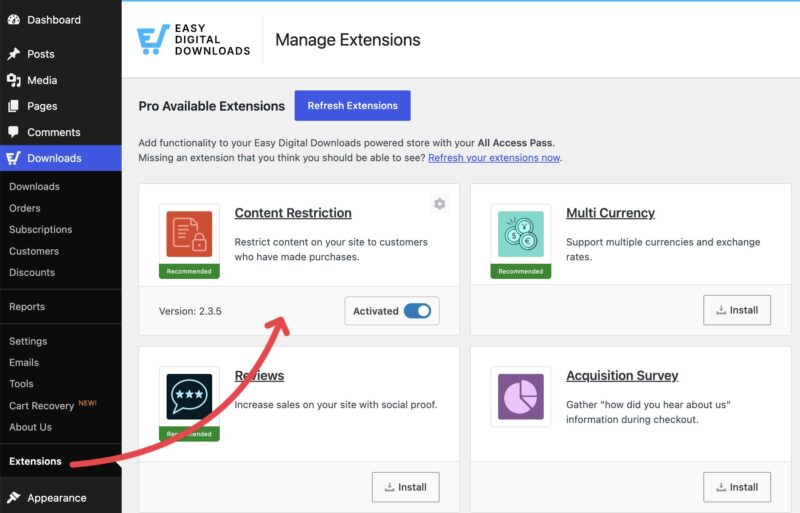
Zodra je Extended Pass actief is, ga je in je WordPress-dashboard naar Downloads » Extensies. Zoek Content Restriction in de lijst en klik op Installeren. EDD installeert en activeert het automatisch voor je, er is geen aparte download-en-uploadstap nodig.
Stap 2: Kies en Configureer uw Video- of Audiohost
Je hebt ergens nodig om het daadwerkelijke video- of audiobestand te hosten. Vimeo en Wistia zijn beide solide keuzes voor video, en Podbean of SoundCloud werken goed voor audio.
Specifiek voor toegangscontrole is één instelling het belangrijkst: gratis accounts op Vimeo en Wistia bevatten geen domein-niveau privacy.Dat is de instelling die voorkomt dat je video ergens anders dan op je eigen site wordt ingesloten.
Met een betaald account kun je de weergave beperken tot alleen je domein. Zonder dat kan iemand technisch gezien je embedcode pakken en elders gebruiken, zelfs als ze Content Restriction op je daadwerkelijke pagina niet kunnen omzeilen.
Als domeinvergrendeling belangrijk is voor je bedrijf, budgetteer dan voor een betaald videohostingniveau naast je Extended Pass.
Verkoopt u streaming audio? Hetzelfde idee geldt voor Podbean. Een niet-vermelde aflevering blijft buiten podcastgidsen en zoekresultaten, maar iedereen met de directe link kan nog steeds luisteren. Een veilige privé podcast, beschikbaar op betaalde abonnementen, vereist daadwerkelijk inloggegevens om toegang te krijgen, wat de nauwere equivalent is van domeinvergrendeling aan de videokant.
Zodra uw account en privacyinstellingen klaar zijn, kopieert u uw insluitcode. U heeft deze nodig in de volgende stap.
Stap 3: Maak de Pagina en Embed uw Content
Ga naar Pagina's » Pagina Toevoegen (of Berichten » Bericht Toevoegen, beide werken) en geef de pagina een titel. Plak uw insluitcode in een nieuw blok. De meeste videohosts, waaronder Vimeo en Wistia, zetten een geplakte link automatisch om in een insluitblok, dus u hoeft de HTML niet aan te raken.
U hoeft hier geen volledige pagina aan te wijden. Als u liever slechts een deel van een pagina wilt beperken, zoals één sectie van een grotere verkoop- of informatiepagina, bevat Content Restriction een [edd_restrict] shortcode precies daarvoor. Plaats deze rond de sectie die u wilt beveiligen, en de rest van de pagina blijft zichtbaar voor iedereen.
Als u tevreden bent met hoe het eruitziet, klikt u op Publiceren. Uw streaminginhoud is live op de pagina, hoewel nog niet beperkt. De volgende stap is ervoor te zorgen dat alleen betalende klanten deze daadwerkelijk kunnen zien.
Stap 4: Beperk de Pagina tot Betalende Klanten
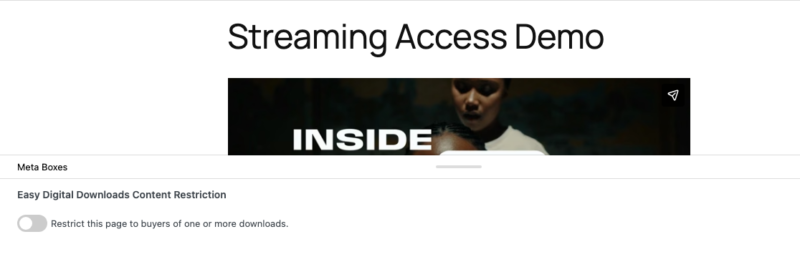
Nu voor de kerninstelling. Ga terug en bewerk de pagina die u in Stap 3 heeft gemaakt. Onder de contenteditor vindt u een sectie Content Restriction. Vink het vakje aan voor Beperk deze pagina tot kopers van een of meer downloads.
U ziet een veld Download. Begin met typen om te zoeken en kies een van de volgende opties:
- Klanten die een download hebben gekocht: elke klant die iets uit uw winkel heeft gekocht, kan de pagina bekijken.
- Een specifiek product op naam: alleen klanten die dat exacte product hebben gekocht.
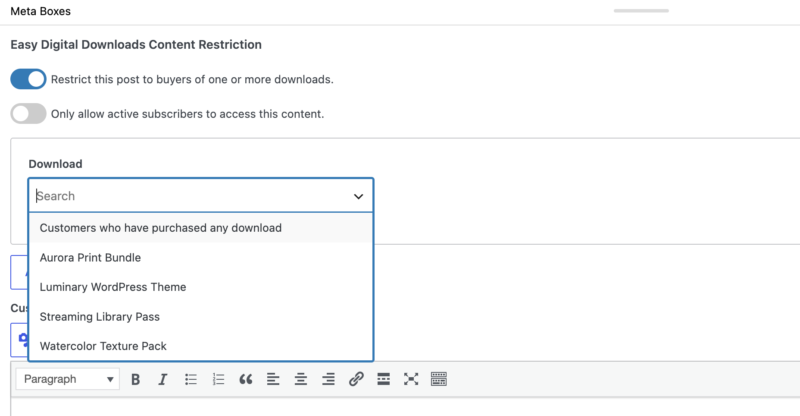
Meer dan één kwalificerend product toestaan? Klik op Nieuwe Download Toevoegen om een nieuwe rij toe te voegen en een ander product te selecteren. EDD verleent toegang aan elke klant die ten minste een van de door u geselecteerde producten heeft gekocht, dus dit is hoe u toegang zou koppelen aan een cursus, een bundel of een paar individuele aankopen tegelijk.
Dat is alles. Klik op Bijwerken, en de pagina is nu beperkt.
Stap 5: Lever Toegang Na Aankoop
Zodra een klant het kwalificerende product koopt, moet deze de streamingpagina daadwerkelijk vinden. EDD regelt dit op twee manieren.
Ten eerste verschijnt de paginalink automatisch op de aankoopbevestigingspagina van de klant direct na het afrekenen.
Ten tweede kunt u deze toevoegen aan de e-mail met het aankoopbewijs met behulp van de template tag {page_list}, die specifiek is toegevoegd door Content Restriction. Ga naar Downloads » E-mails, klik op Aankoopbewijs, en plaats de tag in uw ontvangsttekst.
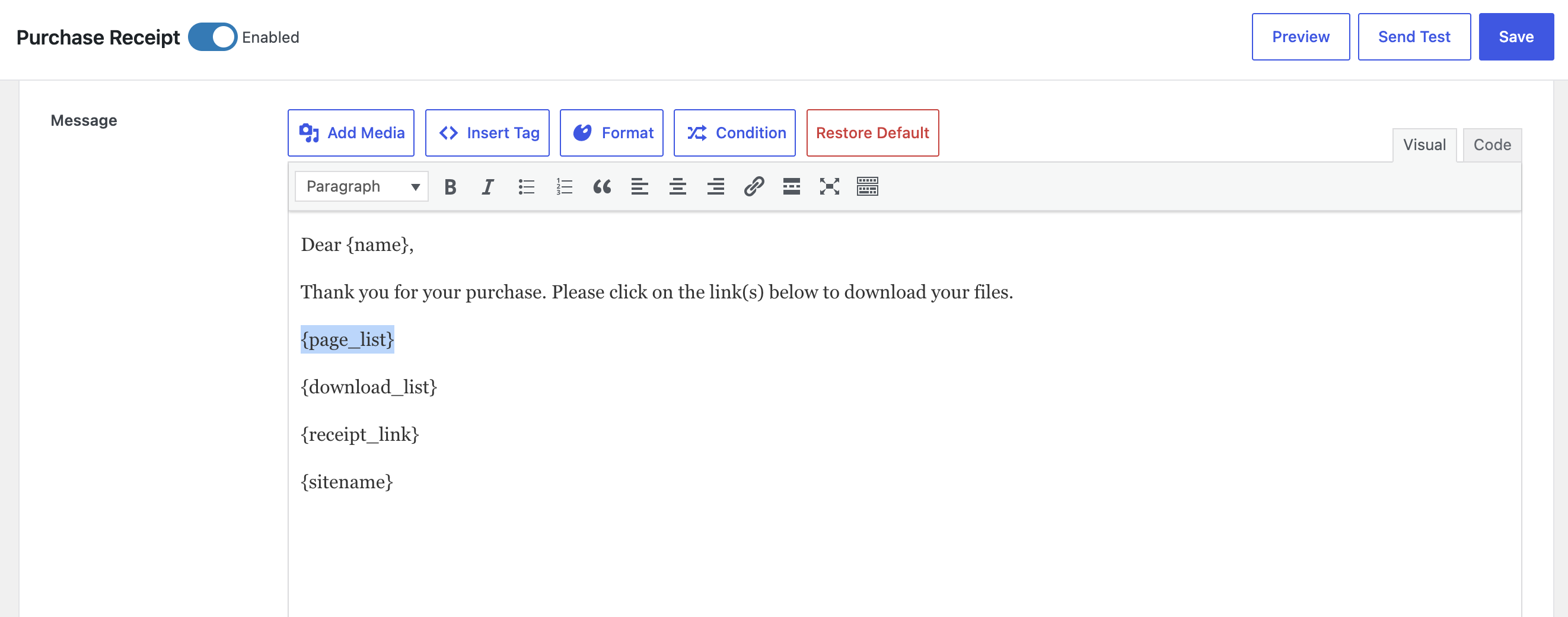
Eén ding om op te letten: als je slechts af en toe beperkte streamingcontent verkoopt, toont het plakken van {page_list} in je standaard ontvangstbewijs dit aan elke klant, zelfs aan klanten die iets ongerelateerds hebben gekocht.
Gebruik in plaats daarvan EDD's Voorwaardelijke E-mail Tags. Klik op Voorwaarde in de werkbalk van de e-mail-editor, stel de voorwaarde in op het specifieke product dat je streamingpagina ontgrendelt, en voeg {page_list} alleen toe binnen die voorwaarde. Op die manier verschijnt de link alleen in het ontvangstbewijs voor klanten die er daadwerkelijk toegang toe hebben gekocht.
Toegang Beperken op Abonnement
Soms past een eenmalige aankoop niet bij je bedrijf. Als je wilt dat klanten blijven betalen om te blijven kijken, zijn abonnementen logischer.
Dit past goed bij streamingcontent in het bijzonder. Een gedownload bestand wordt één keer gebruikt en blijft voor altijd op het apparaat van iemand staan, dus een eenmalige prijs is logisch. Een streamingpagina daarentegen blijft elke maand op je server leven. Door deze maandelijks of jaarlijks te factureren, stem je je inkomsten af op je werkelijke doorlopende hostingkosten.
Dat is waar Terugkerende Betalingen om de hoek komt kijken. Het regelt geautomatiseerde facturering volgens een schema dat je instelt, dagelijks, wekelijks, maandelijks of jaarlijks, zonder dat je na de installatie iets hoeft te doen.
Zodra Terugkerende Betalingen actief is, ga je terug naar je instellingen voor Contentbeperking, selecteer je het abonnementproduct in het veld Download zoals je bij elk ander product zou doen, en vink vervolgens Alleen actieve abonnees toegang geven tot deze content aan.

Het verschil is eenvoudig maar belangrijk: een eenmalige aankoop geeft toegang voor altijd. Met dat vakje aangevinkt, is toegang afhankelijk van een actief abonnement. Als het abonnement van een klant verloopt, vervalt ook hun toegang tot de streamingpagina.
Dit werkt goed voor één afgeschermd item of een klein aantal ervan, zoals een maandelijkse bonusvideo of een doorlopende audioserie. Lees meer over het instellen hiervan in onze gids over hoe je eenvoudig abonnementen verkoopt met WordPress.
Toegang Verkopen tot een Gehele Streamingbibliotheek
Alles hierboven werkt prima voor het afschermen van één video of één audiobestand. Maar wat als je niet één item verkoopt? Wat als je toegang verkoopt tot tientallen ervan?
Denk aan lesbibliotheken of een groeiende backcatalogus van streamingcontent. Dat is een ander soort bedrijf, en Easy Digital Downloads heeft hiervoor een speciaal ingebouwde functie: All Access.
All Access is geen vervanging voor Contentbeperking. Het werkt ernaast. [internal link: All Access feature page] stelt je in staat om één "pas" product te verkopen dat vele downloadbare producten of beperkte pagina's tegelijkertijd ontgrendelt, in plaats van een aparte aankoop voor elk ervan te vereisen.
Om het te gebruiken voor streaming content, zou je een All-Access-abonnement product instellen, terugkeren naar je Content Restriction instellingen, en dat abonnement product selecteren in het veld Download, op dezelfde manier als je elk ander product zou selecteren. Klanten met een actief abonnement krijgen toegang. Iedereen anders ziet je standaard aankoopprompt.
Je kunt All-Access ook combineren met Recurring Payments, zodat het abonnement zelf automatisch wordt verlengd in plaats van een eenmalige aankoop te vereisen.
Het instellen van een All-Access-abonnement vanaf nul is een project op zich, dus we zullen de volledige instelling hier niet herhalen. Onze gids Hoe verkoop je All-Access lidmaatschappen behandelt dit in detail.
Uw Streamingcontent Veilig Houden
Content Restriction regelt de toegangscontrole aan jouw WordPress-kant. Maar je video- of audiohost heeft zijn eigen beveiligingslaag die ook de moeite waard is om in te stellen.
Domeinvergrendeling, beschikbaar op betaalde niveaus van Vimeo en Wistia, voorkomt dat je embed-code ergens anders dan op je eigen domein werkt. Dat is belangrijk omdat Content Restriction alleen controleert wie jouw pagina mag bekijken. Het voorkomt niet dat iemand een onbeperkte embed-code kopieert en elders gebruikt.
Zelfs zonder domeinvergrendeling kan een vastberaden bezoeker niet zomaar de URL van je streamingpagina raden of delen om Content Restriction te omzeilen. Het controleert elke keer eerst hun account en aankoopgeschiedenis.
Als je meer nodig hebt, bieden de meeste videohostingplatforms ook encryptie en geografische beperkingen op hun betaalde niveaus. Dat zijn instellingen op platformniveau, niet iets wat Content Restriction regelt, dus controleer direct de privacy- of beveiligingsinstellingen van je host.
In duidelijke bewoordingen doet elk iets anders:
- Encryptie versleutelt je video- of audiobestand tijdens het transport, zodat het niet kan worden onderschept en bekeken door iemand anders dan de bedoelde speler.
- Geografische beperkingen blokkeren afspelen vanuit specifieke landen of regio's, handig als je licentielimieten hebt of je content lokaal wilt houden waar je klanten zich daadwerkelijk bevinden.
- Referrer-beperkingen zijn een lichtere versie van domeinvergrendeling. Ze controleren waar een videoverzoek vandaan komt en blokkeren het als het niet jouw site is, hoewel een vastberaden bezoeker dit soms kan spoofen.
Geen van deze vervangt Content Restriction. Het zijn extra lagen aan de hostingzijde, de moeite waard om in te schakelen als je content waardevol genoeg is om de moeite van iemand om te kopiëren waard te zijn.
Veelgestelde Vragen over het Verkopen van Streaming Video en Audio
Kan ik streaming video of audio beperken zonder een volledige lidmaatschapsplugin?
Ja. Content Restriction voegt toegangsbeheer rechtstreeks toe aan je bestaande Easy Digital Downloads winkel, geen aparte lidmaatschapsplugin vereist. Een speciale lidmaatschaps- of cursusplugin is alleen zinvol als je alleen video's of audio met beperkte toegang verkoopt.
Heb ik een betaald video hostingplan nodig om de toegang te beperken?
Niet om Content Restriction zelf te gebruiken. Maar domein-niveau privacy, wat voorkomt dat je video ergens anders dan op je site wordt afgespeeld, vereist wel een betaald niveau van Vimeo of Wistia.
Kan ik toegang beperken op basis van een abonnement in plaats van een eenmalige aankoop?
Ja. Stel Recurring Payments in, selecteer het abonnementsproduct in het veld Download, en vink vervolgens Alleen actieve abonnees toestaan deze inhoud te openen aan in je Content Restriction-instellingen.
Wat is het verschil tussen Content Restriction en een All-Access-abonnement?
Content Restriction is wat de pagina daadwerkelijk vergrendelt, hoe dan ook. Een All Access Pass is één type kwalificerende aankoop, het beste voor het verkopen van toegang tot een hele streamingbibliotheek in plaats van één item.
Kan ik streaming audio op dezelfde manier verkopen als streaming video?
Ja. De installatie van Content Restriction is identiek. Host je audio gewoon bij een platform zoals Podbean of SoundCloud in plaats van Vimeo of Wistia.
Hebben klanten een account nodig om beperkte inhoud te openen?
Ja. EDD maakt automatisch een klantaccount aan tijdens het afrekenen, en dat account is wat Content Restriction controleert voordat de toegang wordt verleend.
Kan ik slechts een deel van een pagina beperken, of voorkomen dat niet-klanten deze via een directe URL vinden?
Beide, ja. Gebruik de [edd_restrict] shortcode om een deel van een pagina te beveiligen in plaats van het geheel. En Content Restriction blokkeert niet-kopers, zelfs als ze de directe URL hebben, omdat het hun account controleert, niet alleen de zichtbaarheid van de pagina.
Begin met het Verkopen van Toegang tot uw Streamingcontent
Het beperken van de toegang tot streaming video of audio hoeft niet te betekenen dat je een tweede platform moet bouwen.
Met Content Restriction bovenop je bestaande Easy Digital Downloads winkel, kun je een enkel item of een hele bibliotheek beveiligen, allemaal zonder WordPress te verlaten.
Als je liever downloadbare video- of audiostanden verkoopt in plaats van gestreamde toegang, bekijk dan onze gids over hoe je video's verkoopt voor dat deel.
📣 P.S. Vergeet niet om zich te abonneren op onze nieuwsbrief en ons te volgen op Facebook, Twitter/X, of LinkedIn voor meer WordPress-bronnen!








