


Video blijft groeien als een van de populairste soorten content online, en steeds meer makers zetten het elk jaar om in een reëel inkomen. Als je video's online wilt verkopen, heb je meer keuzes dan je misschien denkt: eenmalige downloads, abonnementen, streamingtoegang, of een combinatie van alle drie.
Deze gids leidt je door hoe je video's op de slimme manier online verkoopt.
Je leert hoe je de juiste aanpak voor je content kiest, je video's prijst, je werk beschermt en je eigen winkel opzet met WordPress en Easy Digital Downloads (EDD), zonder dat er codeervaardigheden nodig zijn.
- Belangrijkste punten
- Waarom video's online verkopen?
- Soorten video's om online te verkopen
- Kiezen hoe je je video's verkoopt
- Hoe verkoop je video's online met WordPress
- Hoe je je video's promoot nadat je ze hebt gepubliceerd
- Veelgestelde vragen over het verkopen van video's online
- Wat is de beste manier om video's online te verkopen?
- Kan ik video's importeren op mijn WordPress-site?
- Hoeveel moet ik vragen voor mijn video's?
- Kan ik video's verkopen als abonnement in plaats van eenmalige aankoop?
- Hoe bescherm ik mijn video's tegen piraterij?
- Heb ik een website nodig om video's online te verkopen?
- Begin met het verkopen van video's met WordPress en EDD
Belangrijkste punten
- Bezit je verkoopkanaal: Verkopen vanaf je eigen website levert meer inkomsten en controle op dan marktplaatsen of platforms.
- Kies eerst een model: Kies tussen eenmalige downloads, abonnementen of gebundelde toegang voordat je je winkel bouwt.
- Prijs met een doel: Baseer je prijs op productkwaliteit, lengte en hoe exclusief je content is.
- Geen codeervaardigheden nodig: Easy Digital Downloads regelt de WordPress-installatie, van prijzen tot bestandslevering.
Waarom video's online verkopen?
Er zijn tal van redenen om video's online te verkopen in plaats van alleen te vertrouwen op advertenties of sponsoring.
Direct verkopen stelt je in staat geld te verdienen met je werk zonder te wachten op een deal met een merk of te hopen dat het aandeel in advertentie-inkomsten van een platform de moeite waard is. Mensen kijken graag naar videocontent, en die vraag neemt niet af.
Wanneer je video's online verkoopt, kunnen klanten kopen wanneer ze maar willen. Je hoeft geen dure advertentiecampagnes te voeren, alleen maar om een verkoop te realiseren.
Je krijgt ook meer controle over je publiek. Door je eigen website en e-maillijst te gebruiken, kun je specifieke kijkers bereiken in plaats van te hopen dat de juiste persoon je content toevallig vindt.
Soorten video's om online te verkopen
Bijna elke videocontent kan een betaald product worden, vooral als het leert, vermaakt of iemand helpt een probleem op te lossen.
Enkele populaire soorten video's om online te verkopen zijn:
- Online cursussen en tutorials: Stap-voor-stap lessen over een vaardigheid of onderwerp. Digitale cursussen verkopen werkt goed als je video's deel uitmaken van een grotere cursus.
- Achter de schermen of exclusieve content: Vlogs, uitgebreide versies of bonusmateriaal voor je grootste fans.
- Films, shows of series: Originele videoprojecten die je direct wilt monetariseren.
- Stock footage: Clips die andere makers of bedrijven kunnen licentiëren voor hun eigen projecten.
Kiezen hoe je je video's verkoopt
Voordat je iets bouwt, bepaal je hoe je je video's wilt verkopen. Die keuze beïnvloedt je website, je prijzen en hoe je je content beschermt.
Marktplaats, Streamingplatform of je eigen website?
Je hebt drie brede opties om video's online te verkopen: een marktplaats, een streamingplatform of je eigen website.
- Marktplaatsen en stockvideowebsites: Hebben al een publiek, dus de installatie is vaak sneller. De afweging is reëel: ze nemen een deel van elke verkoop, en de klantrelatie behoort toe aan de marktplaats, niet aan jou.
- Streamingplatforms: Werken goed als je toegang wilt verkopen tot video die in een browser wordt afgespeeld in plaats van een downloadbaar bestand. Dat is een andere opzet dan wat deze gids behandelt. Als je toegang tot gestreamd materiaal wilt, bekijk dan in plaats daarvan onze gids voor het verkopen van streaming video en audio.
- Je eigen website: Geeft je de meeste controle. Je behoudt meer van elke verkoop, hebt de klantrelatie in eigen hand en bepaalt precies hoe je winkel eruitziet en werkt. Het kost meer tijd om op te zetten dan een marktplaats, maar die inspanning betaalt zich na verloop van tijd terug.
Zie onze volledige uitsplitsing van:
- Marktplaatsen versus je eigen winkel
- Je eigen website verkiezen boven sociale media
- Wat het echt kost om een e-commerce website te runnen
Deze gids richt zich op het verkopen van video-downloads vanaf je eigen website met WordPress.
Een Monetisatiemodel kiezen: Eenmalig, Abonnement of Bundel
Als je eenmaal weet dat je vanaf je eigen website verkoopt, kies dan hoe klanten gaan betalen. De meeste videospecialisten gebruiken een van de drie modellen: een eenmalige aankoop voor een enkele video, een abonnement voor voortdurende toegang tot nieuwe content, of gebundelde toegang tot een hele bibliotheek tegelijk.
- Eenmalige aankoop. De klant betaalt eenmalig en downloadt het bestand. Dit is het eenvoudigste model om op te zetten en de focus van deze gids. Het werkt goed voor losse video's, cursussen of een enkele diepgaande tutorial.
- Abonnement. Klanten betalen op terugkerende basis (maandelijks of jaarlijks) voor voortdurende toegang tot je videobibliotheek. Dit past goed als je regelmatig nieuwe video's publiceert. De Recurring Payments-functie van EDD regelt de facturatie automatisch. Lees meer over het opbouwen van terugkerende inkomstenstromen als dit model je interesseert.
- Gebundelde toegang. Klanten betalen eenmalig, of op abonnementsbasis, voor toegang tot een groep video's in plaats van elke video afzonderlijk te kopen. De All Access-functie van EDD maakt dit eenvoudig om in te stellen. Bekijk onze gids voor het verkopen van all-access lidmaatschappen voor de volledige uitleg.
Je hoeft niet voor altijd maar één te kiezen. Veel verkopers beginnen met eenmalige aankopen en voegen later een abonnement of bundeloptie toe naarmate hun videobibliotheek groeit.
Hoeveel moet je vragen voor je video's?
Videoprijzen hangen grotendeels af van de lengte, productkwaliteit en hoe exclusief de content is. Een korte tutorial kan voor een paar euro worden verkocht, terwijl een diepgaande cursus of een volledige video redelijkerwijs $20 tot $100 of meer kan kosten.
Enkele factoren die van invloed zijn op wat je kunt vragen:
- Lengte en diepgang: Langere, meer uitgebreide video's ondersteunen meestal een hogere prijs dan een korte clip.
- Productiekwaliteit: Professionele bewerking, audio en beelden rechtvaardigen een premie boven een informele opname.
- Exclusiviteit: Content die mensen nergens anders kunnen krijgen, zoals behind-the-scenes beelden of een unieke vaardigheid, ondersteunt hogere prijzen dan iets dat breed beschikbaar is.
- Gangbare prijs in jouw niche: Kijk naar wat vergelijkbare makers vragen voor vergelijkbare content voordat je een prijs vaststelt.
Beschouw uw eerste prijs niet als definitief. Begin met een redelijk getal en pas dit vervolgens aan op basis van de reacties van klanten. EDD laat u variabele prijzen aanmaken als u dezelfde video wilt aanbieden tegen verschillende prijsniveaus, zoals een basisdownload versus een bundel met bonusmateriaal. Voor een diepere kijk op prijsstrategie, zie onze gids over prijsmodellen en strategieën.
Hoe verkoop je video's online met WordPress
Nu u uw aanpak en prijsstelling hebt gekozen, is het tijd voor de daadwerkelijke installatie. Hier leest u hoe u video's online verkoopt met WordPress en Easy Digital Downloads, van uw eerste plugin-installatie tot uw eerste verkoop.
Stap 1: Zet je WordPress-site op
Heeft u al een WordPress-site? Ga verder naar Stap 2.
Als u nog geen website heeft, is WordPress de beste plek om te beginnen. Het is flexibel, het is niet gebonden aan de regels van één platform, en het is de basis waarop bijna elke optie in deze gids is gebouwd.
WordPress zelf is gratis, maar u heeft hosting nodig. Ik raad Levamo aan. Het is gebouwd voor dynamische WordPress-sites, wat hier belangrijk is: Easy Digital Downloads verwerkt afrekeningen, genereert veilige downloadlinks en valideert aankopen in realtime, en de infrastructuur van Levamo is gebouwd om dat snel te houden zonder dat caching in de weg staat.
Voor een volledige vergelijking van hostingopties, zie onze aanbevelingen voor WordPress-hosting.
Stap 2: Verkrijg Easy Digital Downloads
Download en installeer vervolgens Easy Digital Downloads.
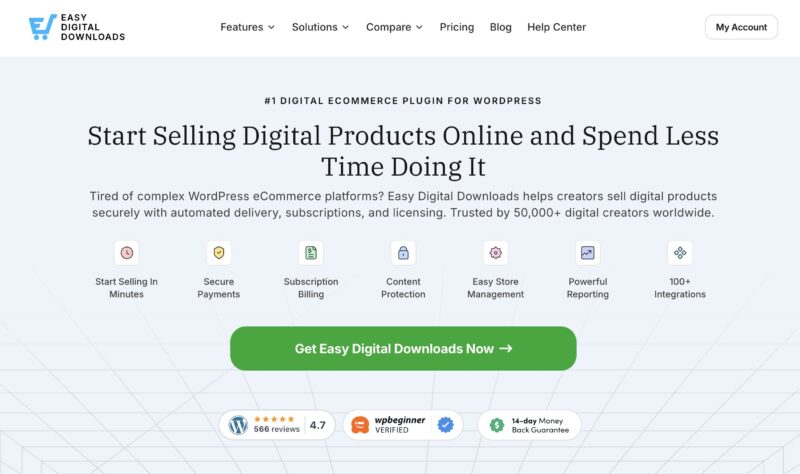
EDD is een WordPress-plugin die speciaal is gebouwd voor het verkopen van digitale producten, waaronder video. In tegenstelling tot algemene e-commerce plugins die zijn gebouwd voor fysieke goederen, is EDD speciaal ontworpen voor precies wat u hier doet. Het is ook een sterk alternatief voor WooCommerce als u niets fysieks verkoopt.
De gratis Core-versie laat u digitale producten toevoegen, productpagina's maken en betaalmethoden configureren. Voor de ideale set functies voor het verkopen van video, pakt u een EDD Pass om Content Restriction, All Access, Recurring Payments en Amazon S3 of DropBox-integratie te ontgrendelen, die allemaal later in deze gids worden behandeld.
Als u hulp nodig heeft bij het installeren van de plugin, zie onze gids over het installeren en activeren van Easy Digital Downloads.
Zodra EDD actief is, ziet u een nieuw menu-item Downloads in uw WordPress-dashboard. Ga naar Downloads » Instellingen » Betalingen om een betaalprovider zoals Stripe of PayPal te koppelen.
Stap 3: Creëer uw downloadproduct (video)
Nu is het tijd om uw video toe te voegen als een digitaal product, wat EDD een "Download" noemt.
Ga naar Downloads » Download toevoegen. Geef uw video een duidelijke titel en schrijf een beschrijving die potentiële kopers vertelt wat ze krijgen.
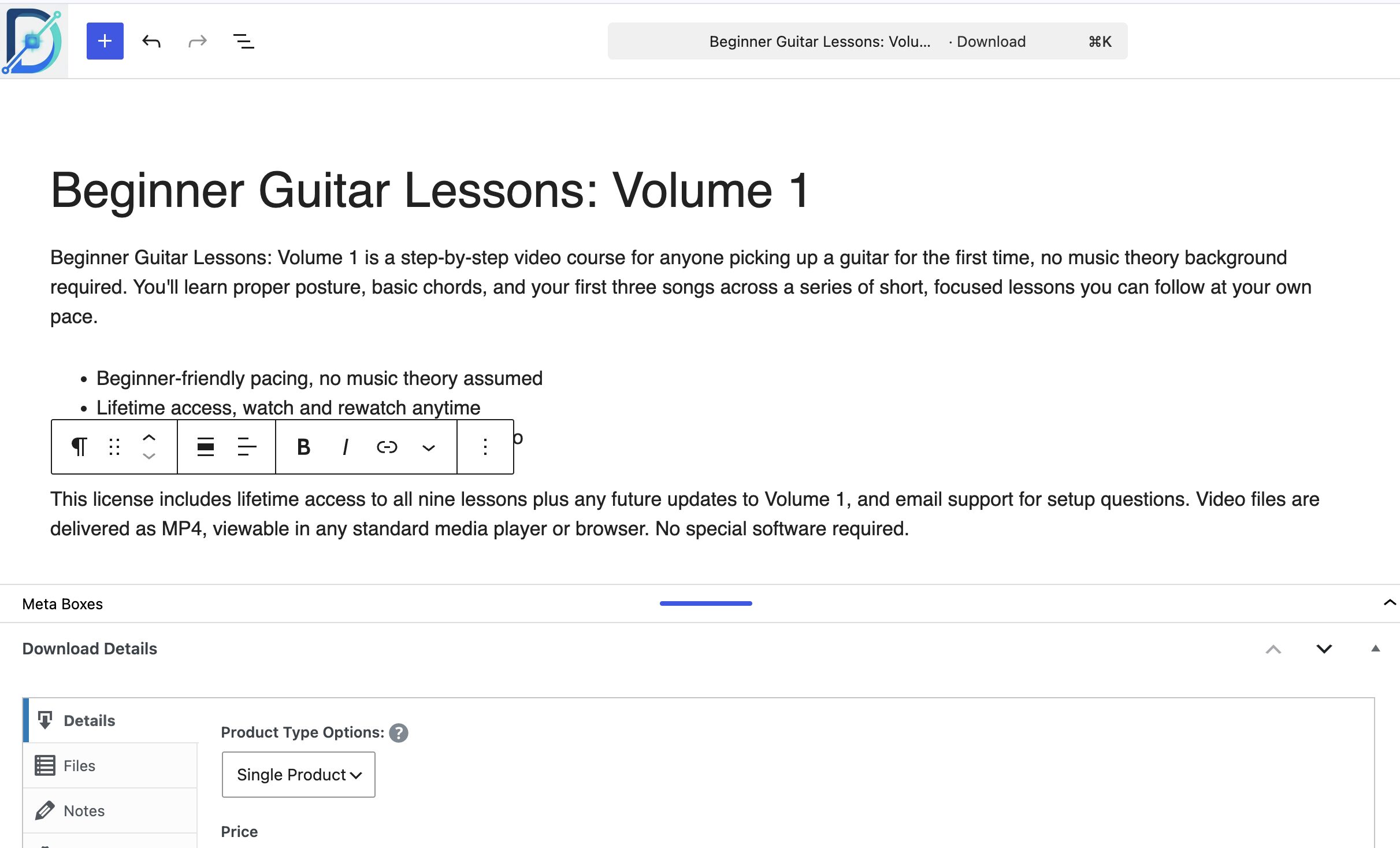
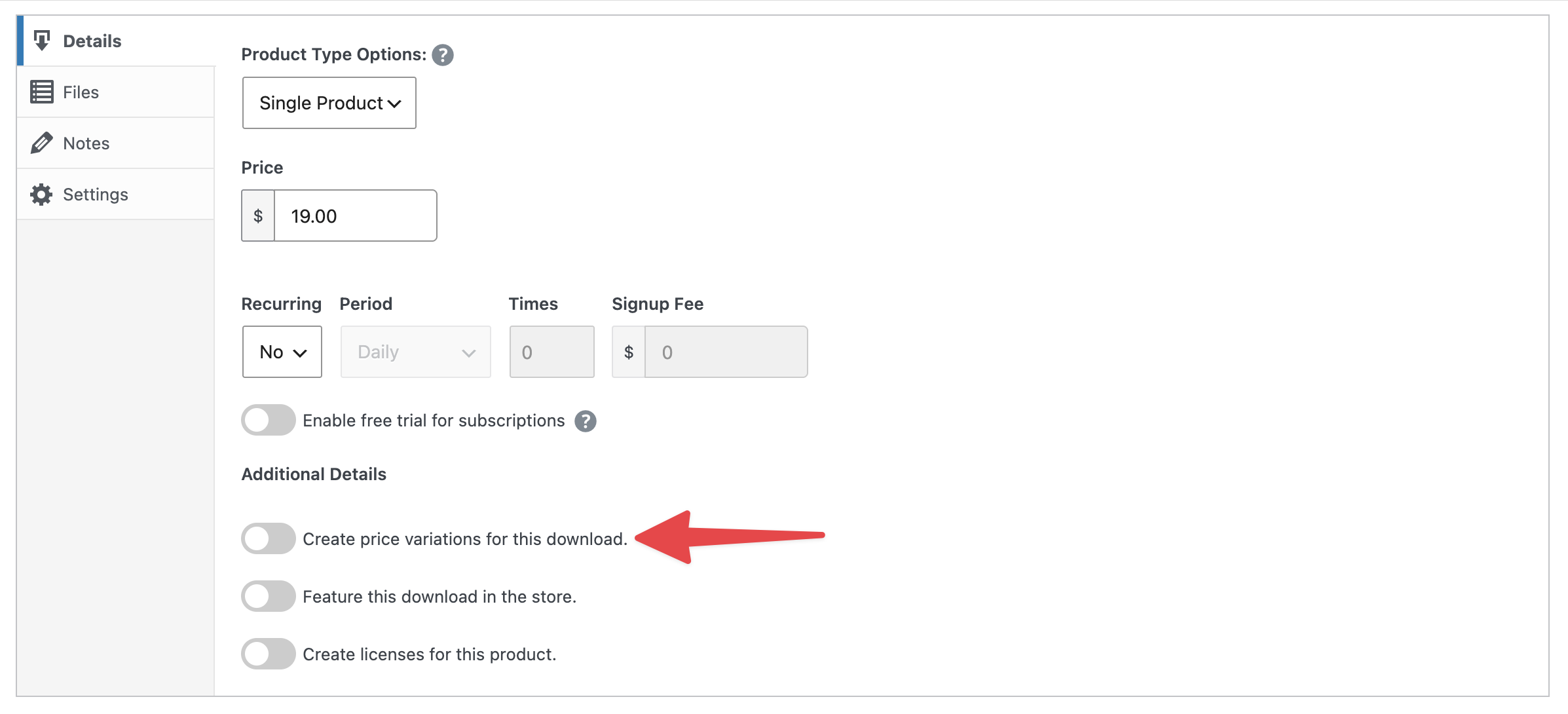
Selecteer binnen het vak Downloadgegevens onder de editor Producttype en kies Enkel product voor een zelfstandige video. EDD ondersteunt ook Bundel en Service, maar Enkel product is wat u wilt voor één video.
Stel vervolgens je prijs in het veld Prijs in met behulp van de prijsrichtlijnen uit deze handleiding. Als je dezelfde video wilt aanbieden voor verschillende prijzen, zoals een basisversie en een bundel met bonusmateriaal, schakel dan Maak prijsvariaties voor deze download in om het tabblad Prijzen weer te geven. Meer informatie over het instellen van variabele prijzen.
Upload nu je daadwerkelijke video. Onder het tabblad Bestanden voeg je een Bestandsnaam toe (het label dat klanten zien, zoals “Download mijn video”) en upload je je bestand onder Bestands-URL. Je bestand is automatisch beschermd tegen zoekmachines en niet-klanten. Gebruik Bestand toevoegen als je meer dan één bestand toevoegt.
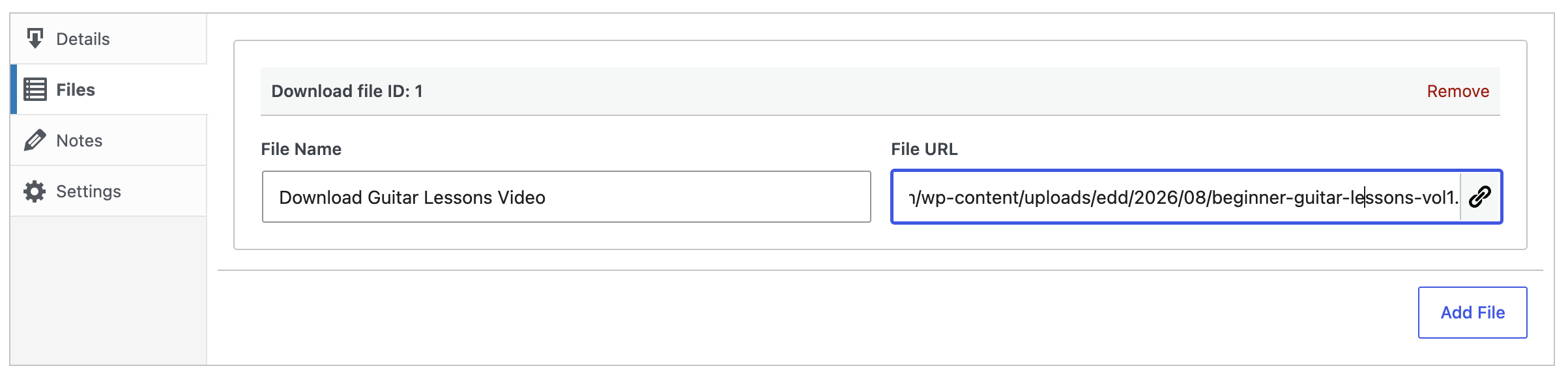
De meeste videobestanden werken beter als een ZIP-bestand voor het uploaden.
Gebruik voor de uitgelichte afbeelding van je product de selector voor uitgelichte afbeeldingen in de zijbalk (Downloadafbeelding instellen). Dit is de productafbeelding die klanten zien wanneer ze je winkel doorbladeren.
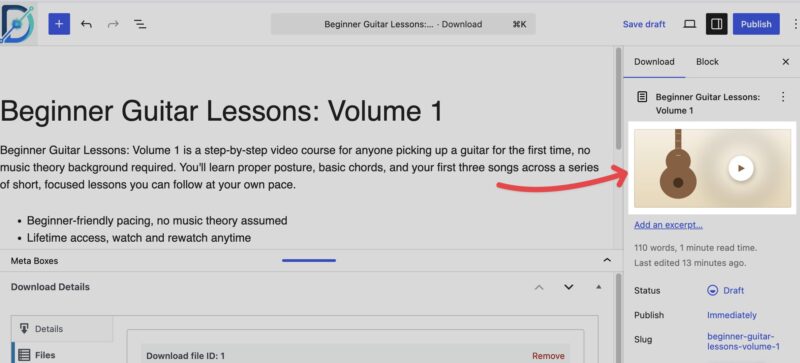
Als je klaar bent om je werk te controleren, klik je op Concept opslaan en vervolgens op Voorbeeld bekijken om precies te zien wat klanten op de live productpagina zullen zien.
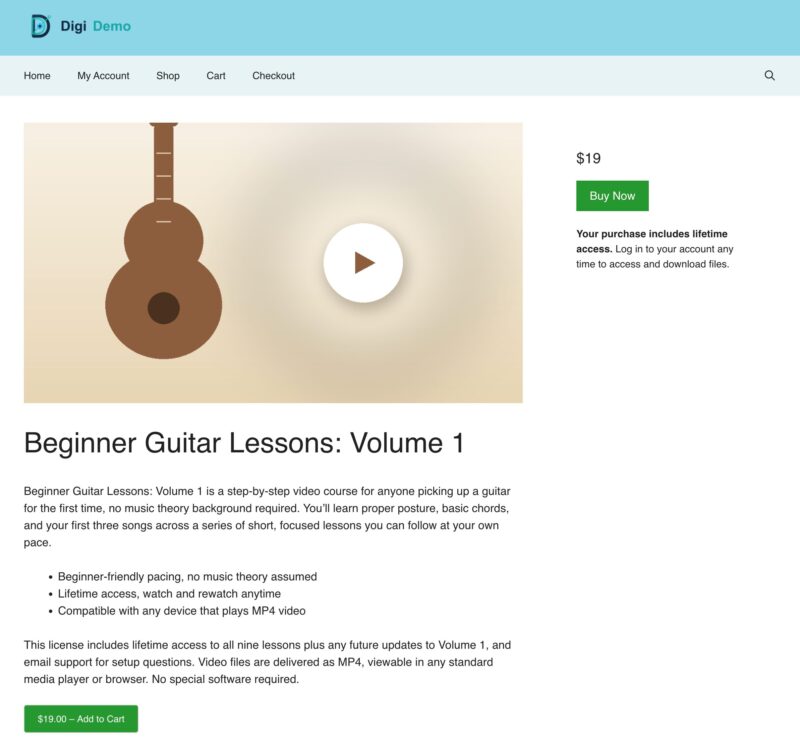
Het algehele uiterlijk van je site hangt af van je WordPress-thema, dus maak je geen zorgen als de standaardstijl er in eerste instantie eenvoudig uitziet.
Stap 4: Publiceer en Beveilig je Video
Tevreden met hoe alles eruitziet? Klik op Publiceren. Je ziet een checklist voor publicatie met een instelling voor Zichtbaarheid. Openbaar is geschikt voor de meeste winkels; gebruik Alleen privé of Beveiligd met wachtwoord als je de pagina test voordat je live gaat.
Zodra een klant koopt, ontvangen ze een e-mail ter bevestiging van de aankoop met een link om de video te downloaden. Je kunt deze e-mail aanpassen onder Downloads » Instellingen » E-mails » Aankoopbewijzen.
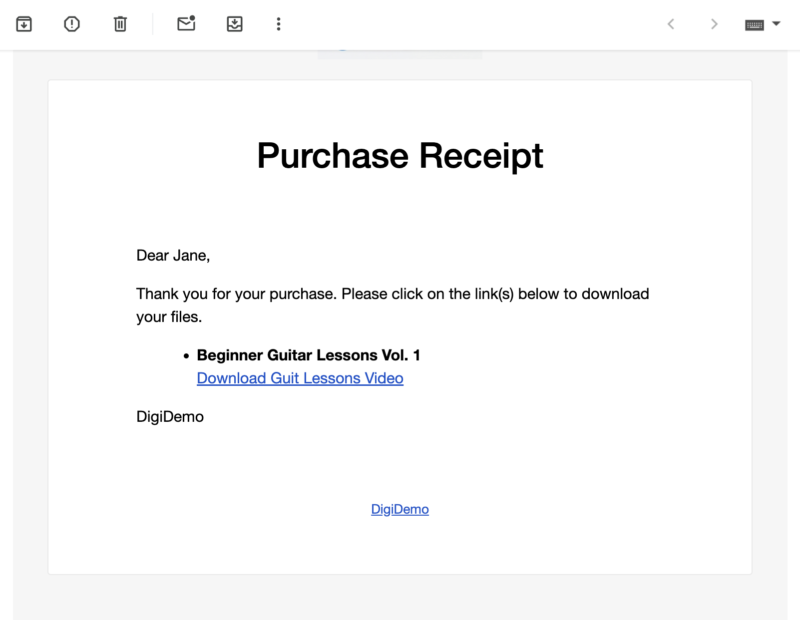
Die downloadlink verloopt standaard automatisch na 24 uur, wat helpt om informele deling te voorkomen. Je kunt dat vervalvenster aanpassen of op elk moment een link opnieuw uitgeven aan een klant.
Als je je zorgen maakt dat je video na aankoop wordt herverdeeld, overweeg dan om toegang te verlenen tot een streamingpagina in plaats van helemaal geen downloadbaar bestand aan te bieden. De functie Contentbeperking van EDD laat je precies dat doen, waardoor een pagina wordt beperkt zodat alleen betalende klanten deze kunnen bekijken.
Onze handleiding voor het verkopen van streaming video en audio behandelt die instelling in detail als het piraterijrisico een grotere zorg is voor je inhoud dan gemak.
EDD Bonusfuncties
Zodra je videowinkel draait, kunnen een paar functies helpen om deze te laten groeien.
- Amazon S3 of Dropbox-integratie: Als je grote videobestanden verkoopt, kan je webhost moeite hebben om ze snel te leveren. Met deze functies kun je bestanden opslaan op infrastructuur die hiervoor is gebouwd.
- Contentbeperking: Verleen toegang tot een pagina in plaats van een downloadbaar bestand te verkopen, handig als je toegang tot streaming wilt verkopen.
- Onbeperkte Toegang: Bundel meerdere video's zodat klanten toegang kunnen kopen tot uw hele bibliotheek in één keer in plaats van één video per keer.
- Terugkerende Betalingen: Stel automatische abonnementsfacturering in voor voortdurende toegang tot nieuwe inhoud.
Deze functies (en meer) worden geleverd met een EDD Pass. Bekijk de prijzen van EDD voor meer informatie.
Hoe je je video's promoot nadat je ze hebt gepubliceerd
Het publiceren van uw video is nog maar het begin. Een paar eenvoudige stappen na de lancering kunnen uw verkopen aanzienlijk verhogen.
- Bouw een e-maillijst op. Klanten die eenmalig kopen, zijn uw beste publiek voor toekomstige video's. Een eenvoudige leadmagneet, zoals een gratis korte clip of preview, is een gemakkelijke manier om e-mails te verzamelen voordat iemand iets koopt.
- Deel op sociale media. Plaats een trailer, een clip achter de schermen of een korte highlight reel op de platforms die uw publiek al gebruikt. Link terug naar uw productpagina, niet naar een volledige kopie van de video.
- Optimaliseer uw productpagina voor zoekopdrachten. Mensen zoeken naar het soort video dat u verkoopt, en een duidelijke, goed gestructureerde productpagina kan kopers aantrekken die nog nooit van u hebben gehoord, ook via AI-zoektools. Zie onze gids voor het vindbaar maken van uw digitale producten voor AI-zoekopdrachten voor een startchecklist.
- Gebruik YouTube als teaser-kanaal, niet als uw winkel. Een korte, gratis preview op YouTube kan verkeer naar uw betaalde versie leiden zonder het geheel weg te geven.
Niets hiervan hoeft allemaal tegelijk te gebeuren. Kies één of twee promotiekanalen die bij uw publiek passen en bouw van daaruit verder.
Veelgestelde vragen over het verkopen van video's online
Wat is de beste manier om video's online te verkopen?
De beste manier om video's online te verkopen is via je eigen website. Het geeft je de meeste controle over prijzen, klantgegevens en de koopervaring. WordPress is het populairste platform om die website te bouwen, en Easy Digital Downloads maakt het eenvoudig om je WordPress-site om te zetten in een winkel voor video's en andere digitale producten.
Kan ik video's importeren op mijn WordPress-site?
Ja. Als u meerdere video's tegelijk uploadt, kunt u ze in bulk importeren als een CSV-bestand in plaats van ze één voor één handmatig toe te voegen. Ga in EDD naar Downloads » Tools » Importeren/Exporteren en gebruik de optie Downloadproducten importeren.
Hoeveel moet ik vragen voor mijn video's?
Het hangt af van de lengte, productkwaliteit en exclusiviteit. Korte tutorials worden vaak voor een paar euro verkocht, terwijl uitgebreide cursussen of volledige video's redelijkerwijs € 20 tot € 100 of meer kunnen kosten. Kijk wat vergelijkbare makers in jouw niche vragen, pas dan je prijs aan op basis van hoe klanten reageren.
Kan ik video's verkopen als abonnement in plaats van eenmalige aankoop?
Ja. De functie Terugkerende Betalingen van EDD stelt u in staat om klanten periodiek te factureren voor voortdurende toegang tot uw videobibliotheek. Dit werkt goed als u regelmatig nieuwe video's publiceert, in plaats van een enkele eenmalige download te verkopen.
Hoe bescherm ik mijn video's tegen piraterij?
Easy Digital Downloads beschermt je downloadlinks automatisch tegen zoekmachines en niet-klanten, en je kunt links laten verlopen na een bepaalde tijd. Voor sterkere bescherming kun je een streamingpagina beveiligen in plaats van een downloadbaar bestand aan te bieden, zodat klanten kunnen kijken maar nooit het bronbestand daadwerkelijk downloaden.
Heb ik een website nodig om video's online te verkopen?
Technisch gezien niet. U kunt in plaats daarvan een marktplaats of een alles-in-één videoplatform gebruiken. Maar uw eigen website geeft u meer controle over prijzen, branding en klantgegevens, en u behoudt meer van elke verkoop, aangezien u geen platformkosten betaalt.
Begin met het verkopen van video's met WordPress en EDD
U heeft nu alles wat u nodig heeft om video's online te verkopen: een monetisatiemodel, een prijsstrategie, een plan om uw werk te beschermen en een stapsgewijze route om het in te stellen met WordPress en Easy Digital Downloads.
Begin met het model dat bij uw huidige situatie past. De meeste verkopers beginnen met een eenvoudige eenmalige download en voegen later een abonnement of gebundelde optie toe zodra ze meer video's aan te bieden hebben.
Op zoek naar meer manieren om digitale inhoud te verkopen? Bekijk:
- Hoe fotografie te verkopen
- Verkoop van grafische afbeeldingen en digitale kunst
- Muziek en audio verkopen
- De Krachtige Voordelen van het Verkopen van Digitale Producten
📣 P.S. Vergeet niet om zich te abonneren op onze nieuwsbrief en ons te volgen op Facebook, Twitter/X, of LinkedIn voor meer WordPress-bronnen!








