


Als je je grafische ontwerpen of digitale kunst verkocht hebt op Etsy, Creative Market of Gumroad, ken je de nadelen al: kosten voor elke verkoop, regels die je niet hebt geschreven, en een klantenlijst die je niet bezit.
Het verkopen van grafische ontwerpen en kunst op WordPress verandert dat allemaal. Jij bepaalt de prijzen, jij houdt de inkomsten, en jij bezit de relatie met je kopers.
Deze gids leidt je door alles wat je nodig hebt om te beginnen — van het installeren van de juiste plugin tot het instellen van licenties, het prijzen van je werk, en het doen van je eerste verkoop.
Belangrijkste punten
- Verkoop op jouw voorwaarden: WordPress laat je grafische ontwerpen en digitale kunst verkopen zonder marktplaatscommissies te betalen.
- Gratis om te beginnen: Easy Digital Downloads heeft een gratis abonnement dat productvermeldingen, bestandslevering en afrekenen afhandelt.
- Behoud 100% van je inkomsten: Je betaalt alleen standaard betalingsverwerkingskosten (geen platformafdracht).
- Bied meerdere licentietypen aan: Vraag meer voor commercieel gebruik en bescherm je werk met duidelijke licenties.
- Bezits je klanten: Bouw je eigen e-maillijst en klantenbestand op in plaats van toegang te huren van een platform.
- Waarom grafische ontwerpen verkopen op WordPress in plaats van een marktplaats?
- Wat je nodig hebt om digitale kunst te verkopen op WordPress
- Stap 1: Installeer Easy Digital Downloads
- Stap 2: Voeg je eerste grafische ontwerp of kunstwerk toe als product
- Stap 3: Stel licenties in voor je grafische ontwerpen
- Stap 4: Koppel een betaalmethode
- Stap 5: Test je winkel voordat je lanceert
- Hoe je je digitale grafische ontwerpen prijst
- Welke bestandsformaten moet je aanbieden?
- Welke grafische ontwerpen en digitale kunst kun je verkopen?
- Hoe je meer digitale kunst kunt marketen en verkopen
- Veelgestelde vragen over het verkopen van grafische ontwerpen en kunst op WordPress
Waarom grafische ontwerpen verkopen op WordPress in plaats van een marktplaats?
Marktplaatsen zoals Etsy en Creative Market maken het gemakkelijk om je werk te plaatsen. Maar gemak heeft een prijs.
Etsy brengt 6,5% transactiekosten in rekening voor elke verkoop. Creative Market neemt ook een deel. En bovenop de kosten bouw je een publiek op voor hun platform — niet voor het jouwe. Als zij hun algoritme of voorwaarden veranderen, krijgt jouw inkomen de klap.
WordPress is anders. Jij bezit de site, de winkel en de klantgegevens.
Hier is hoe de opties zich verhouden:
| WordPress/EDD | Etsy | Gumroad | Creative Market | |
|---|---|---|---|---|
| Transactiekosten | $0 (+ betalingsverwerking) | 6.5% | Tot 10% | 30–40% |
| Bezits je klantenlijst | ✓ | ✗ | Gedeeltelijk | ✗ |
| Volledige merkcontrole | ✓ | Beperkt | Beperkt | ✗ |
| Bestandslevering | ✓ | ✓ | ✓ | ✓ |
| Aangepaste licenties | ✓ | Beperkt | Beperkt | Beperkt |
| Gratis om te beginnen | ✓ | Vermeldingskosten | Gratis niveau | ✗ |
De afweging is dat je zelf verantwoordelijk bent voor het genereren van je eigen verkeer. Maar de tools om dat te doen — SEO, e-mailmarketing, sociale media — heb je ook allemaal zelf in de hand.
Wat je nodig hebt om digitale kunst te verkopen op WordPress
Voordat je met de installatie begint, heb je het volgende nodig:
- Een zelf-gehoste WordPress.org site (niet WordPress.com — je hebt volledige plugin-toegang nodig)
- Een hostingplan en domeinnaam
- De Easy Digital Downloads plugin
- Je digitale bestanden klaar om te uploaden
Dat is alles!
Hoeveel kost het om te beginnen?
Hosting kost doorgaans €3–€10/maand, en een domeinnaam kost ongeveer €12/jaar. Easy Digital Downloads is gratis te installeren.
Vergelijk dat met Etsy's 6,5% commissie. Als je €500/maand aan afbeeldingen verkoopt, gaat er elke maand €32,50 naar Etsy — meer dan drie maanden hosting.
Stap 1: Installeer Easy Digital Downloads
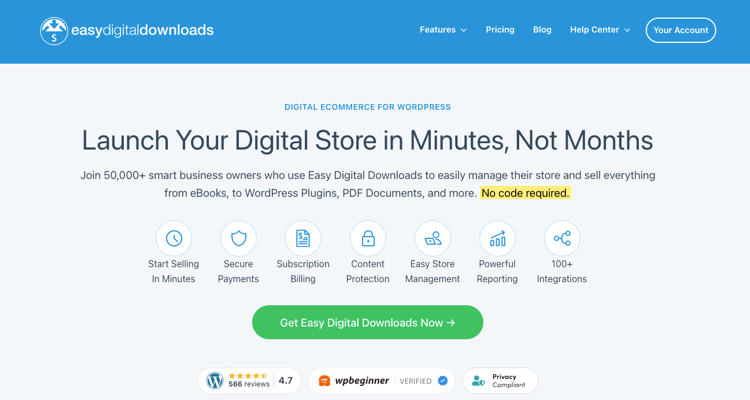
Easy Digital Downloads (EDD) is de plugin die je winkel aandrijft. Het beheert productvermeldingen, veilige bestandslevering, afrekenen en klantbeheer — allemaal speciaal gebouwd voor digitale producten.
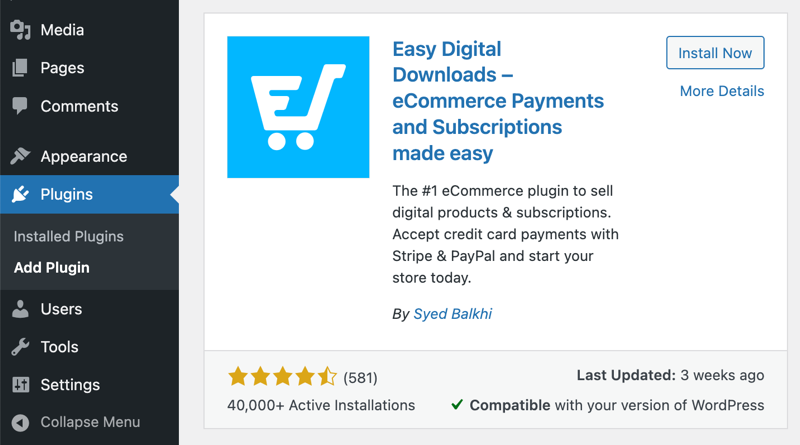
Om het te installeren, ga je naar je WordPress-dashboard en navigeer je naar Plugins » Nieuwe plugin toevoegen. Zoek naar Easy Digital Downloads, klik op Nu installeren, en vervolgens op Activeren.
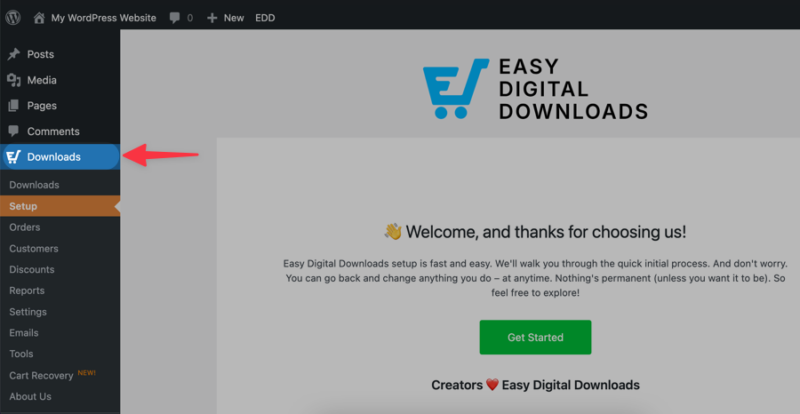
Eenmaal geactiveerd, voegt EDD een Downloads-menu toe aan je dashboard. Daar beheer je alles.
Het gratis plan van EDD dekt alles wat je nodig hebt om te beginnen met verkopen. Premium plannen, die ik ten zeerste aanbeveel, zijn beschikbaar als je functies wilt zoals abonnementen, softwarelicenties of geavanceerde rapportage — maar ze zijn optioneel.
Stap 2: Voeg je eerste grafische ontwerp of kunstwerk toe als product
Met EDD actief, ga naar Downloads » Download toevoegen. Hier maak je je eerste product aan.
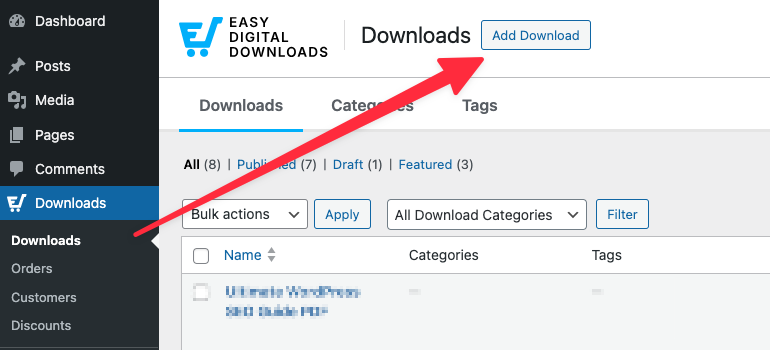
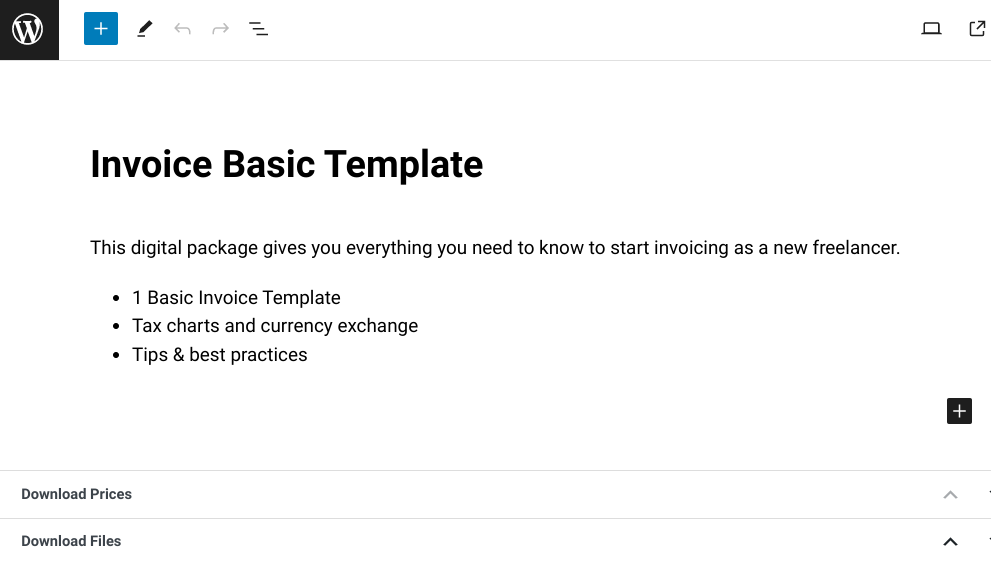
Geef je product een duidelijke, beschrijvende naam. Denk na over hoe een koper ernaar zou zoeken: "Minimalistisch CV-sjabloon – Google Docs & Word" vertelt hen precies wat ze krijgen.
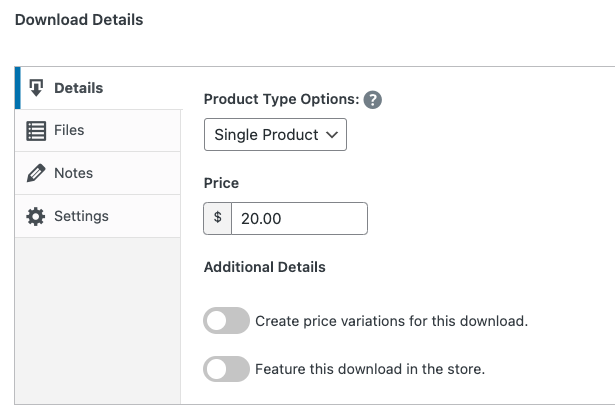
Voeg een prijs toe in het vak Downloadgegevens. Je kunt hier ook variabele prijzen instellen als je meerdere licentieniveaus wilt aanbieden (meer hierover in de volgende sectie).
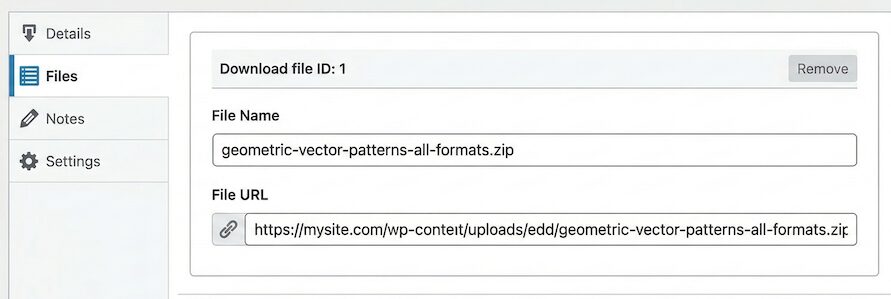
Upload je bestand onder Bestanden. Geef het een duidelijke bestandsnaam — je kopers zien dit wanneer ze downloaden.
Schrijf een productbeschrijving die converteert
Je beschrijving moet drie vragen beantwoorden: Wat is het? Welke formaten zijn inbegrepen? Wat kan de koper ermee doen?
Houd het kort en specifiek. "Een set van 20 minimalistische social media-sjablonen in Canva-formaat. Inclusief vierkante, portret- en story-formaten. Volledig bewerkbaar." Dat is nuttiger dan een paragraaf met bijvoeglijke naamwoorden.
Bescherm je kunst met een voorbeelduitbeelding
Gebruik niet je bestand met volledige resolutie als productafbeelding. Gebruik in plaats daarvan een versie met watermerk of een preview met lage resolutie.
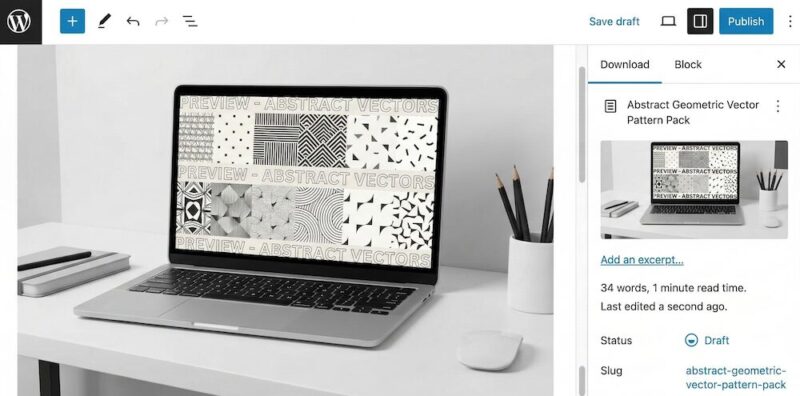
Dit geeft kopers een duidelijk beeld van wat ze kopen zonder het daadwerkelijke bestand weg te geven.
Stap 3: Stel licenties in voor je grafische ontwerpen
Licenties worden door de meeste verkopers overgeslagen - en dat is een fout. Een licentie vertelt uw koper precies wat hij wel en niet met uw werk mag doen. Het stelt u ook in staat om verschillende prijzen te vragen voor verschillende toepassingen.
Persoonlijk Gebruik vs. Commercieel Gebruik: Wat is het Verschil?
Een licentie voor persoonlijk gebruik staat de koper toe uw grafische element te gebruiken voor niet-commerciële doeleinden: persoonlijke projecten, geschenken, thuis afdrukken, enzovoort. Een licentie voor commercieel gebruik staat hen toe het te gebruiken in werk dat ze verkopen of waar ze winst uit halen, zoals een project voor een klant, een product dat ze doorverkopen, of marketingmateriaal van een bedrijf.
Commerciële licenties zijn meer waard. Het is volkomen normaal om 2-5x meer te vragen voor commerciële rechten dan voor persoonlijk gebruik.
Stel Licentie Niveaus in EDD in
Met variabele prijzen van EDD kunt u meerdere prijspunten voor hetzelfde product aanbieden. U kunt een optie "Persoonlijk Gebruik" en een optie "Commercieel Gebruik" maken, elk met zijn eigen prijs.
Ga naar uw product en schakel Variabele Prijzen in. Voeg een rij toe voor elk licentieniveau, geef het een duidelijke naam en stel de prijs in.
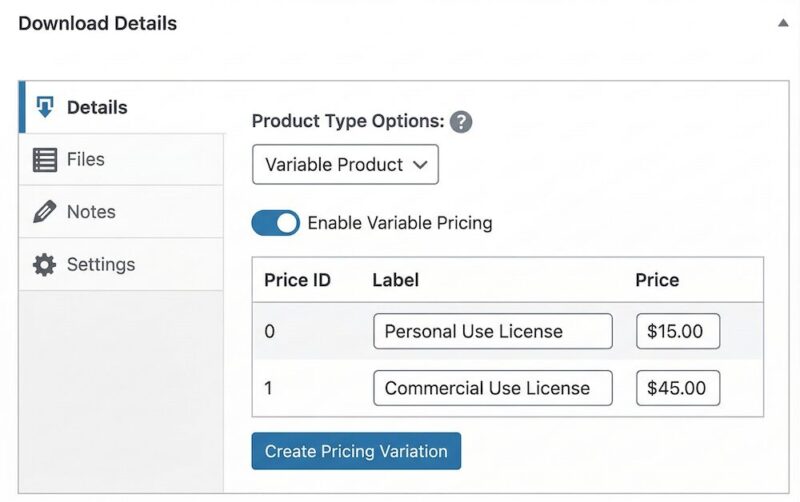
Zorg ervoor dat uw productbeschrijving - of een eenvoudige licentienotitie op de productpagina - uitlegt wat elke niveau inhoudt. Kopers waarderen duidelijkheid, en het vermindert verzoek om terugbetaling en misverstanden.
Verkoopt u WordPress thema's, plugins of sjablonen? Variabele prijzen werken voor gebruiks niveaus, maar de Software Licenties van EDD zijn het overwegen waard. Het genereert licentiesleutels, handhaaft limieten voor site-activatie en beheert vernieuwingen - dingen die belangrijk zijn voor software, maar niet nodig zijn voor grafische elementen of kunstwerken.
Stap 4: Koppel een betaalmethode
EDD ondersteunt Stripe en PayPal kant-en-klaar.
Stripe is de betere keuze voor de meeste verkopers. Het ondersteunt meer betaalmethoden (creditcards, Apple Pay, Google Pay) en heeft een schonere checkout-ervaring.
Ga naar Downloads » Instellingen » Betalingen om uw gateway te verbinden.
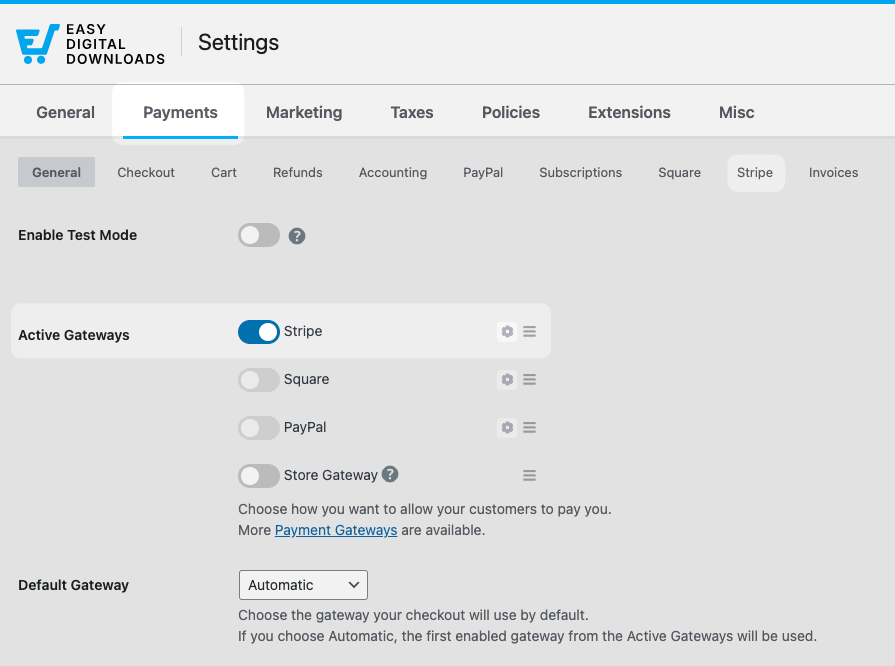
Als u Stripe gebruikt, verbindt u uw account via de Stripe-installatiewizard van EDD. Het duurt een paar minuten en leidt u door alles heen.
Een korte opmerking over betalingsverwerkingskosten: Stripe brengt 2,9% + $0,30 per transactie in rekening. De tarieven van PayPal zijn vergelijkbaar. Dit zijn standaardkosten - EDD voegt er niets aan toe.
⚙️ Hoe Stripe in te stellen met Easy Digital Downloads.
Stap 5: Test je winkel voordat je lanceert
Sla deze stap niet over. Voer een testaankoop uit voordat u iemand naar uw winkel stuurt.
Ga naar Downloads » Instellingen » Betalingen en schakel Testmodus in.
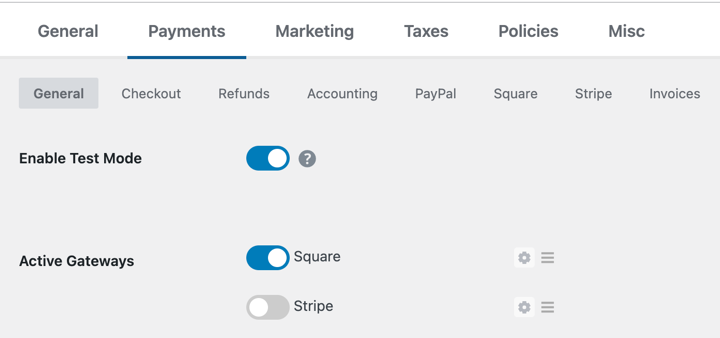
Sla je wijzigingen op.
Bezoek vervolgens uw site, voeg uw product toe aan de winkelwagen en voltooi een aankoop met de testbetaaloptie.
Controleer of:
- De checkout zonder fouten wordt voltooid
- U een bevestigings-e-mail van de aankoop ontvangt
- De downloadlink in de e-mail werkt
- Het bestand dat de koper ontvangt het juiste is
Zodra alles klopt, schakelt u de testmodus uit en bent u klaar om live te gaan.
Hoe je je digitale grafische ontwerpen prijst
Prijzen voor digitale grafische elementen is deels wetenschap, deels gevoel. Hier zijn de modellen die werken.
Prijsmodellen voor Digitale Grafische Elementen
Vaste prijzen is het eenvoudigst. Eén product, één prijs. Werkt goed voor individuele assets zoals iconen, lettertypen of illustraties.
Licentiegebaseerde prijzen (zoals hierboven besproken) rekent verschillende bedragen voor persoonlijk versus commercieel gebruik. Dit is de standaardpraktijk voor sjablonen, clip art en stockillustraties.
Bundelprijzen groeperen gerelateerde producten met korting. Een sjabloonpakket voor sociale media, een logokit of een lettertypefamilie met alternatieven werken allemaal goed als bundels. Kopers hebben het gevoel dat ze meer waarde krijgen en uw gemiddelde bestelwaarde stijgt.
Introductieprijzen betekent lanceren tegen een lagere prijs om recensies en sociaal bewijs op te bouwen, en deze vervolgens verhogen zodra u tractie heeft. Dit werkt goed voor nieuwe winkels zonder publiek.
Moet u bundels aanbieden?
Ja — en EDD maakt het gemakkelijk met de Bundled Products-extensie. Een bundel van 5 gerelateerde sjablonen met 30% korting op de individuele prijs is een sterke conversiehefboom, vooral voor kopers die voor het eerst kopen.
Begin eenvoudig: één bundel, duidelijk gepositioneerd als de optie met de beste prijs-kwaliteitverhouding.
Welke bestandsformaten moet je aanbieden?
De juiste bestandsformaten zijn afhankelijk van wat u verkoopt en wie er koopt. Hier leest u hoe u erover kunt nadenken.
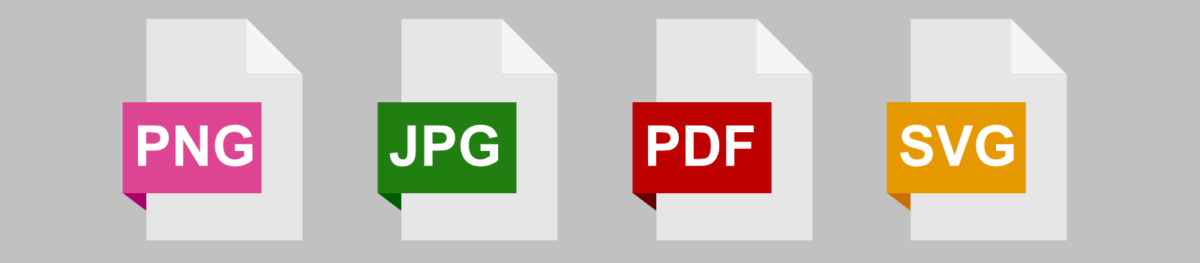
Uitvoerformaten (wat kopers ontvangen)
Dit zijn de definitieve, kant-en-klare bestanden:
- PNG — Het beste voor afbeeldingen met transparantie. Ideaal voor logo's, iconen, stickers en illustraties. Voor gebruik op het web is 72 DPI en 1000–3000px breed standaard. Gebruik voor afdrukken 300 DPI.
- JPEG — Het beste voor fotografie en afbeeldingen zonder transparantie. Gebruik op het web: 72 DPI. Gebruik voor afdrukken: 300 DPI op de uiteindelijke afdrukmaat.
- PDF — Het beste voor afdrukbare producten zoals planners, werkbladen en kunstdrukken. Exporteer op 300 DPI met afloop als het ontwerp van rand tot rand loopt.
- SVG — Het beste voor vectorafbeeldingen die oneindig schaalbaar moeten zijn. Geweldig voor snijbestanden, logo's en illustraties die in ontwerptools worden gebruikt.
Bij twijfel, neem meerdere formaten op. Een koper die een logo koopt, moet PNG, SVG en PDF ontvangen — niet slechts één.
Bewerkbare bronbestanden (Gelaagde/Sjabloonbestanden)
Bronbestanden stellen kopers in staat het ontwerp aan te passen. Het aanbieden ervan tegen een hogere prijs (of als onderdeel van een commerciële licentie) voegt aanzienlijke waarde toe.
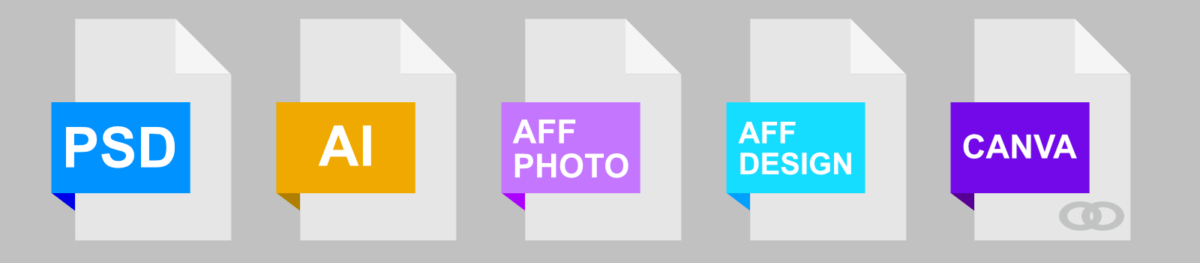
Veelvoorkomende bewerkbare formaten:
- PSD — Adobe Photoshop. Veel gebruikt voor fotocomposities, mockups en digitale illustraties.
- AI — Adobe Illustrator. Standaard voor vectorwerk en professionele ontwerpassets.
- Canva — Delen als een Canva-sjabloonlink. Extreem populair bij niet-ontwerpers. Geweldig voor sjablonen voor sociale media, presentaties en afdrukbare producten.
- Affinity (AFPHOTO / AFDESIGN) — Groeiend aantal gebruikers, vooral onder kopers die zijn overgestapt van Adobe-abonnementen.
Niet iedereen heeft bronbestanden nodig. Maar als uw kopers ontwerpers of bedrijfseigenaren zijn die uw werk willen aanpassen, is het aanbieden van bewerkbare bestanden tegen een meerprijs een eenvoudige manier om meer te vragen.
Hoe Bestanden als ZIP te Verpakken
Als uw product meerdere bestanden bevat, comprimeer ze dan tot een ZIP voordat u ze uploadt.
- Op Windows: Selecteer al uw bestanden, klik met de rechtermuisknop en kies Comprimeren naar ZIP-bestand.
- Op Mac: Selecteer al uw bestanden, klik met de rechtermuisknop (of Control-klik) en kies Comprimeer [n] items.
Geef de ZIP een beschrijvende naam: resume-template-minimalist-edd.zip is duidelijker dan files.zip. Uw koper ziet de bestandsnaam wanneer deze wordt gedownload.
Welke grafische ontwerpen en digitale kunst kun je verkopen?
Als u het als bestand kunt opslaan, kunt u het verkopen. Hier zijn de populairste categorieën:
Sjablonen
CV-sjablonen, visitekaartjesjablonen, social media kits, presentatiedekken, e-mailkoppen, Canva-sjablonen, Notion-dashboards.
Printbare kunst en briefpapier
Wandkunst, planners, dagboeken, werkbladen, kleurplaten, feestprintables, certificaten.
Ontwerpassets
Lettertypen, pictogramsets, penseelbundels, texturen, patronen, mockups, stockfoto's, UI-kits.
Fijne kunst en illustraties
Digitale schilderijen, karakterillustraties, oppervlaktepatroonontwerpen, clip-art sets.
Andere digitale producten
Logo's, merkidentiteitskits, infographics, e-boekcovers, LUT's en presets.
Hoe specifieker uw niche, hoe gemakkelijker het is om de juiste kopers aan te trekken. Een winkel die volledig gericht is op Canva-sjablonen voor bruiloftsbriefpapier, zal beter converteren dan een winkel die alles verkoopt.
interne link: hoe Canva-sjablonen te verkopen met Easy Digital Downloads
Hoe je meer digitale kunst kunt marketen en verkopen
Het opzetten van uw winkel is de eerste stap. Verkopen genereren is het doorlopende werk.
Bouw vanaf dag één een e-maillijst op
Uw e-maillijst is het meest waardevolle bezit van uw winkel. In tegenstelling tot volgers op sociale media, bent u er eigenaar van.
De eenvoudigste manier om te beginnen: bied een gratis download aan in ruil voor een e-mailadres. Een gratis pictogramset, een voorbeeld sjabloon of een enkele printable geeft kopers een voorproefje van uw werk en krijgt ze op uw lijst.
EDD integreert met Mailchimp, ConvertKit en andere e-mailplatforms, zodat nieuwe klanten automatisch aan uw lijst worden toegevoegd bij het afrekenen.
Voor meer ideeën, kijk hoe u uw e-maillijst kunt opbouwen met lead magnets.
Gebruik kortingscodes om eerste verkopen te stimuleren
EDD heeft ingebouwde ondersteuning voor kortingscodes. Een lanceringskorting van 20-30% is een laagdrempelige manier om uw eerste kopers en beoordelingen te krijgen.
Ga naar Downloads » Kortingscodes » Nieuwe toevoegen om er een te maken. Stel een vervaldatum in om urgentie te creëren.
Pinterest en Instagram voor visuele kunstontdekking
Visuele producten verkopen op visuele platforms. Pinterest is bijzonder sterk voor digitale kunst, printables en sjablonen — pins hebben een lange levensduur en genereren consistent zoekverkeer.
Maak een pin voor elk product die rechtstreeks naar uw EDD-productpagina linkt. Gebruik duidelijke, trefwoordrijke pinbeschrijvingen. Instagram werkt goed voor het opbouwen van een publiek, maar Pinterest genereert meer directe aankoopintentie.
Werk samen met andere kunstenaars en makers
Zoek makers in aangrenzende niches (niet directe concurrenten) en kijk naar manieren om elkaar te promoten.
Een lettertypeontwerper en een illustratieverkoper delen dezelfde kopers. Een simpele shoutout of een bundel-samenwerking kan warme, vooraf gekwalificeerde bezoekers naar je winkel sturen.
Veelgestelde vragen over het verkopen van grafische ontwerpen en kunst op WordPress
Laten we afsluiten met enkele veelgestelde vragen die gebruikers hebben bij het leren verkopen van graphics en digitale kunst op WordPress-sites.
Wat is beter voor de verkoop van digitale kunst: WooCommerce of Easy Digital Downloads?
Easy Digital Downloads is de betere keuze voor het verkopen van uitsluitend digitale producten zoals graphics en kunstwerken. Het is speciaal gebouwd voor digitale downloads, dus de installatie is eenvoudiger en de checkout is geoptimaliseerd voor bestandlevering. WooCommerce is het overwegen waard als je ook fysieke producten verkoopt, maar voor een pure digitale kunstwinkel is EDD sneller te installeren en gemakkelijker te beheren.
Kan ik gratis graphics verkopen op WordPress?
Ja. Easy Digital Downloads heeft een gratis plan dat productvermeldingen, veilige bestandlevering en checkout bevat. Je betaalt standaard betalingsverwerkingskosten (ongeveer 2,9% + $0,30 per transactie via Stripe of PayPal), maar er zijn geen maandelijkse platformkosten en geen commissie op verkopen.
Kan ik zowel digitale als fysieke kunst verkopen op dezelfde WordPress-site?
Ja. Easy Digital Downloads beheert digitale downloads, en je kunt WooCommerce ernaast toevoegen voor fysieke producten zoals prints of originelen. Als alternatief kan EDD's Simple Shipping-functie een geschikte optie zijn.
Hoe bescherm ik mijn digitale kunst tegen downloaden zonder te betalen?
Easy Digital Downloads levert bestanden via beveiligde, verlopende downloadlinks — kopers krijgen pas toegang na een voltooide aankoop, en links verlopen na een bepaald aantal keren gebruiken of een tijdslimiet. Gebruik voor preview-afbeeldingen van producten altijd een versie met watermerk of lage resolutie in plaats van het volledige bestand.
Wat is de beste manier om digitale graphics voor de eerste keer te prijzen?
Begin met te kijken naar wat vergelijkbare producten kosten op Creative Market en Etsy. Positioneer vervolgens je prijzen op basis van het formaat: licenties voor persoonlijk gebruik lopen meestal van $5–25 voor individuele assets, commerciële licenties 2–5x hoger, en bundels kunnen variëren van $20–75, afhankelijk van hoeveel er is inbegrepen. Onderschat je werk niet — kopers associëren lage prijzen met lage kwaliteit.
Heb ik een bedrijfslicentie nodig om digitale kunst online te verkopen?
Vereisten variëren per land en staat. Op veel plaatsen kun je beginnen met verkopen als eenmanszaak zonder formele registratie. Maar zodra je consistent inkomen verdient, is het de moeite waard om een lokale accountant of bedrijfsadvocaat te raadplegen — vooral als je aan internationale klanten verkoopt, waar btw- en belastingregels voor digitale goederen van toepassing kunnen zijn. Dit is geen juridisch advies; vereisten variëren aanzienlijk op basis van waar je woont.
Gebruik EDD om Graphics en Digitale Kunst te Verkopen op WordPress
Je hebt geen marktplaats nodig om je afbeeldingen en digitale kunst te verkopen. Je hebt een WordPress-site, Easy Digital Downloads en je bestanden nodig.
Je behoudt de inkomsten. Je beheert de klantrelaties. En je bent niet overgeleverd aan het algoritme of beleidswijzigingen van een platform.
Pak je Easy Digital Downloads-pas en zet vandaag nog je eerste product op.
📣 P.S. Vergeet niet om zich te abonneren op onze nieuwsbrief en ons te volgen op Facebook, Twitter/X, of LinkedIn voor meer WordPress-bronnen!








