


Abonnementsinkomsten zijn een van de meest betrouwbare manieren om een duurzaam online bedrijf op te bouwen. In plaats van eenmalige verkopen na te jagen, verdien je voorspelbare inkomsten volgens een vast schema. Je klanten betalen automatisch en je kunt met vertrouwen vooruit plannen.
De addertje onder het gras? WordPress handelt abonnementen niet vanzelf af. Om abonnementen met WordPress te verkopen, heb je een plugin nodig om terugkerende facturering, automatische verlengingen en klantmeldingen te beheren.
Het goede nieuws: er zijn verschillende sterke opties, en de juiste hangt af van wat je verkoopt. Deze gids leidt je door hoe je abonnementen met WordPress verkoopt, helpt je de juiste plugin voor jouw situatie te kiezen, en begeleidt je stap voor stap door een complete installatie.
Belangrijkste punten
Plugin vereist: WordPress verwerkt geen terugkerende betalingen native. Je hebt een abonnementsplugin nodig om facturering en verlengingen af te handelen.
Stem je tool af op je product: De beste plugin hangt af van of je digitale bestanden, fysieke goederen verkoopt, of een lidmaatschapscommunity afsluit.
Beste voor digitale verkopers: Easy Digital Downloads (EDD) is speciaal gebouwd voor makers van digitale producten en beheert abonnementen, bestandslevering en licenties op één plek.
Laten we beginnen!
- Wat betekent het om abonnementen op WordPress te verkopen?
- Abonnementen vs. Lidmaatschappen: Wat is het verschil?
- Wat kun je verkopen met WordPress-abonnementen?
- De beste WordPress-abonnementsplugins [Vergelijking]
- Hoe verkoop je abonnementen met WordPress met behulp van EDD
- Abonnementen beheren en churn verminderen
- Veelgestelde vragen over het verkopen van abonnementen met WordPress
- Heeft WordPress ingebouwde abonnementsfunctionaliteit?
- Wat is de beste WordPress-plugin voor het verkopen van abonnementen?
- Wat is het verschil tussen een abonnement en een lidmaatschap in WordPress?
- Kan ik een gratis proefperiode aanbieden met mijn WordPress-abonnementen?
- Hoeveel kost het om abonnementen op WordPress te verkopen?
- Welke betaalpoorten ondersteunen terugkerende betalingen in WordPress?
- Kan ik meerdere abonnementsniveaus verkopen op één product in EDD?
- Verkoop abonnementen met WordPress en verdien terugkerende inkomsten
Wat betekent het om abonnementen op WordPress te verkopen?
Abonnementen verkopen op WordPress betekent het gebruik van een plugin om klanten op een terugkerend schema te factureren: maandelijks, jaarlijks of een andere door jou ingestelde interval. De plugin regelt de facturering automatisch.
Het factureert de klant, stuurt een ontvangstbewijs, verlengt het abonnement bij de volgende cyclus, probeert mislukte betalingen opnieuw, en meldt de klant wanneer er iets verandert. Je stelt het eenmalig in en het draait op de achtergrond.
WordPress zelf wordt niet met al deze functionaliteit geleverd. Out of the box is het een contentmanagementsysteem. Om enige vorm van betaling te accepteren, heb je een ecommerce plugin nodig. Specifiek voor abonnementen heb je een plugin nodig die ook de logica voor terugkerende facturering afhandelt.
Het resultaat is een winkel waar klanten zich eenmalig aanmelden en toegang blijven houden tot je product of dienst zolang hun abonnement actief blijft.
Abonnementen versus lidmaatschappen: Wat is het verschil?
Deze twee termen worden constant door elkaar gehaald, maar ze beschrijven verschillende dingen. Het begrijpen van het onderscheid helpt u om vanaf het begin de juiste plugin te kiezen.
Wat is een WordPress-abonnement?
Een abonnement gaat over facturering. Wanneer een klant een abonnement koopt, stemt hij ermee in om op een terugkerend schema te worden gefactureerd: maandelijks, per kwartaal of jaarlijks. Het product wordt geleverd wanneer ze betalen en vernieuwd wanneer hun factureringscyclus wordt vernieuwd.
Zie het als een softwarelicentie die elk jaar automatisch wordt verlengd. U betaalt, u krijgt toegang en het gaat door zolang u blijft betalen.
Wat is een WordPress-lidmaatschap?
Een lidmaatschap gaat over toegangscontrole. Een lidmaatschapsplugin beperkt wie bepaalde pagina's, berichten, downloads of contentgebieden op uw site kan zien. Leden loggen in en zien dingen die niet-leden niet kunnen.
Zie het als een contentbibliotheek alleen voor leden. Uw inloggegevens geven u toegang. Of u nu maandelijks of jaarlijks hebt betaald, is een aparte vraag.
Heeft u beide nodig?
Het hangt af van wat u aan het bouwen bent.
Als u een digitaal bestand op terugkerende basis verkoopt, regelt een abonnementsplugin dit. Als u een afgesloten community of contentportaal bouwt waarbij toegang tot meerdere gebieden van uw site is gekoppeld aan een betaald abonnement, heeft u mogelijk een abonnementsplugin nodig voor facturering en een lidmaatschapsplugin voor toegangscontrole.
Easy Digital Downloads regelt beide voor verkopers van digitale producten in één plugin, wat een van de redenen is waarom het een populaire keuze is voor makers en ontwikkelaars.
Wat kun je verkopen met WordPress-abonnementen?
Abonnementen werken voor elk product of elke service waarbij voortdurende toegang of terugkerende levering zinvol is. Hier zijn enkele van de meest voorkomende gebruiksscenario's:
- Software- en licentieabonnementen met jaarlijkse verlenging
- Digitale assetbibliotheken (foto's, iconen, lettertypen, sjablonen)
- Premium nieuwsbrieven of gecureerde contentfeeds
- Online cursussen of trainingsportalen met druppelinhoud
- Muziek-, audio- of videobibliotheken
- Coaching- of consultatietoegang met maandelijkse retentiecontracten
- E-book- of documentcollecties die in de loop van de tijd groeien
- Ledencommunities met afgesloten forums of bronnen
De plugin die u kiest, moet passen bij uw gebruiksscenario. Als u bestanden en licenties levert, heeft u iets nodig dat speciaal is gebouwd voor digitale producten. Als u een communitysite runt met beperkte pagina's en berichten, is een op lidmaatschappen gerichte plugin logischer.
De beste WordPress-abonnementsplugins [Vergelijking]
Geen enkele plugin is de juiste keuze voor elke situatie. Hier is een snelle vergelijking van de meest gebruikte opties:
| Plug-in | Beste Voor | Startprijs | Gratis versie? |
|---|---|---|---|
| Easy Digital Downloads | Digitale producten en downloads | € 99,50/jaar | Ja (basis) |
| WooCommerce Abonnementen | Fysieke en gemengde productwinkels | € 279/jaar | Nee |
| MemberPress | Lidmaatschapswebsites met afgeschermde inhoud | €179/jaar | Nee |
| Paid Memberships Pro | Meerlaagse lidmaatschapsgemeenschappen | Gratis / €297/jaar | Ja |
Easy Digital Downloads (Beste voor digitale producten) 🏆
Easy Digital Downloads (EDD) is speciaal gebouwd voor mensen die digitale goederen verkopen: software, e-books, sjablonen, muziek, lettertypen en meer.
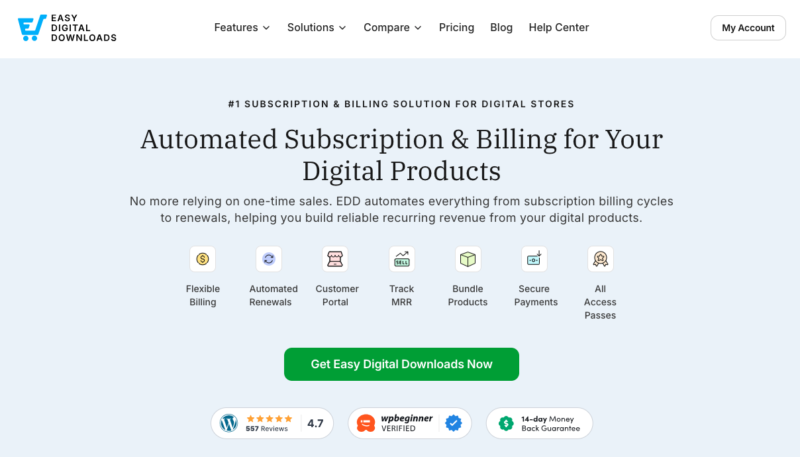
Het beheert abonnementen, terugkerende facturering, bestandslevering en softwarelicenties op één plek, zonder commissie van het platform. U betaalt alleen standaard betalingsverwerkingskosten.
Als uw bedrijf is opgebouwd rond digitale downloads, is EDD de meest gerichte en efficiënte optie. De rest van deze gids beschrijft stap voor stap hoe u abonnementen met EDD instelt.
🔎 Meer informatie over EDD gratis vs Pro-abonnementen.
WooCommerce Subscriptions (Beste voor fysieke of gemengde producten)
WooCommerce Subscriptions is de juiste keuze als u al een WooCommerce-winkel runt en fysieke goederen verkoopt, of een mix van fysieke en digitale producten. Het integreert met meer dan 25 betalingsgateways en biedt klanten zelfbedieningsbeheer van abonnementen.
Het is duurder dan EDD en voegt meer complexiteit toe aan de installatie. Als u alleen digitale producten verkoopt, is het meer dan u nodig heeft.
Vergelijk EDD en WooCommerce.
MemberPress (Beste voor lidmaatschapswebsites)
MemberPress is de sterkste optie als uw primaire doel is om inhoud af te schermen: cursussen, artikelen, gemeenschappen of videobibliotheken vergrendelen achter een betaald abonnement. Het heeft krachtige toegangsregels, ingebouwde cursuscreatie en solide integratie met e-mailmarketingtools.
Het is niet ontworpen voor bestandslevering, dus als het verkopen van downloads uw hoofddoel is, zal EDD u beter van dienst zijn.
Paid Memberships Pro (Beste gratis startpunt)
Paid Memberships Pro heeft een gratis niveau dat het een solide instappunt maakt voor meerlaagse lidmaatschapswebsites. Het ondersteunt onbeperkte lidmaatschapsniveaus, inhoudsbeperking en standaard Stripe- en PayPal-betalingen.
De gratis versie dekt de basis. Premium-abonnementen ontgrendelen beheer van terugkerende facturering, kortingscodes en diepere integraties.
Hoe verkoop je abonnementen met WordPress met behulp van EDD
Als u digitale producten verkoopt, is Easy Digital Downloads de meest eenvoudige manier om abonnementen op WordPress in te stellen. Hier leest u hoe u van nul naar live abonnementen gaat.
Stap 1: Koop Easy Digital Downloads Pro
De gratis versie van Easy Digital Downloads beheert eenmalige betalingen, maar abonnementen vereisen de Recurring Payments-functie, die is inbegrepen in EDD Pro.
Nadat u een EDD-pas kiest, downloadt u de plugin vanuit uw accountdashboard.
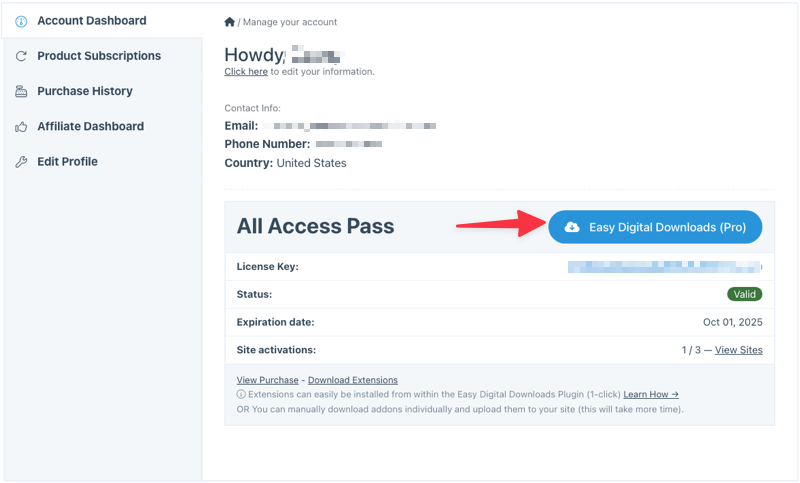
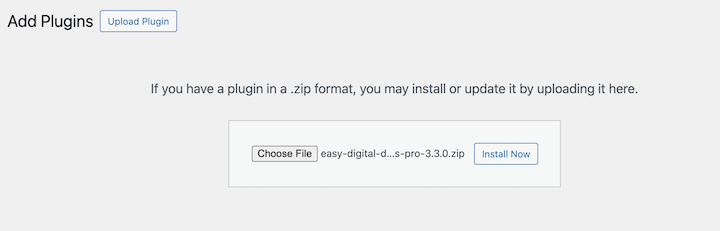
Ga in uw WordPress-admin naar Plugins » Nieuwe plugin toevoegen » Plugin uploaden. Selecteer het gedownloade zip-bestand, klik op Nu installeren, en vervolgens Plugin activeren.
Na activering ziet u een nieuw Downloads-menu in uw WordPress-dashboard.
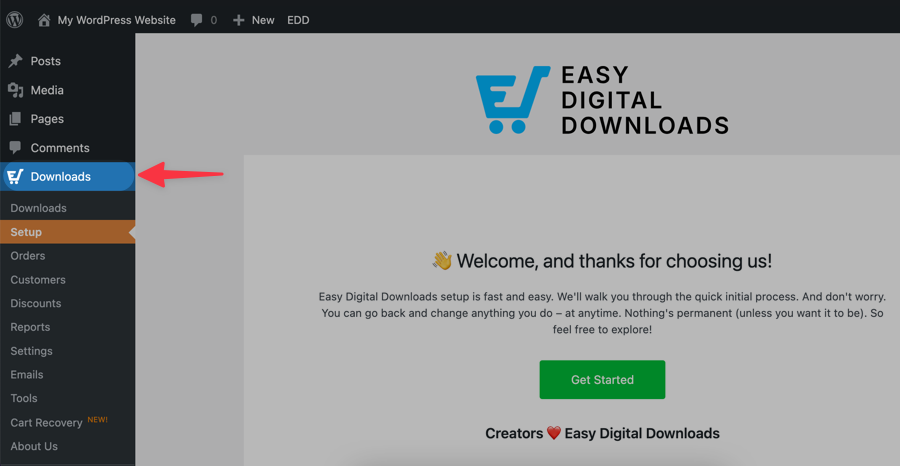
Klik op Aan de slag om de installatiewizard te starten, die u door basiskonfiguratie leidt, zoals de valuta, locatie en belastinginstellingen van uw winkel.
U kunt ook uw licentiesleutel activeren onder Downloads » Instellingen.
Bekijk de onderstaande video voor stapsgewijze begeleiding.
Stap 2: Terugkerende betalingen inschakelen
Zodra Easy Digital Downloads Pro actief is, navigeert u naar Downloads » Extensies. Zoek Recurring Payments in de lijst en klik op Installeren. Het wordt automatisch geactiveerd.
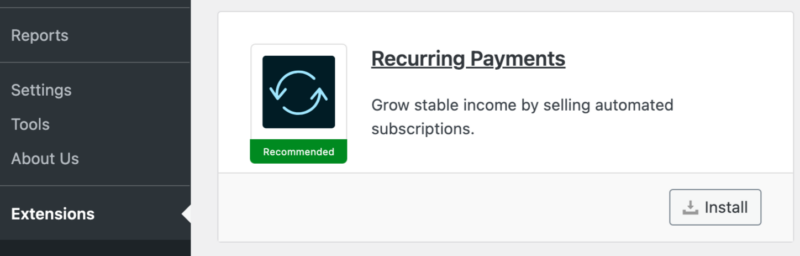
Deze extensie maakt abonnementen mogelijk. Het handelt automatische verlengingen, pogingen tot herhaalde betalingen, het volgen van abonnementsstatussen en e-mails met klantmeldingen af — allemaal zonder handmatig werk van uw kant.
Stap 3: Verbind je betaalprovider
Ga naar Downloads » Instellingen » Betalingen en verbind uw voorkeursgateway.
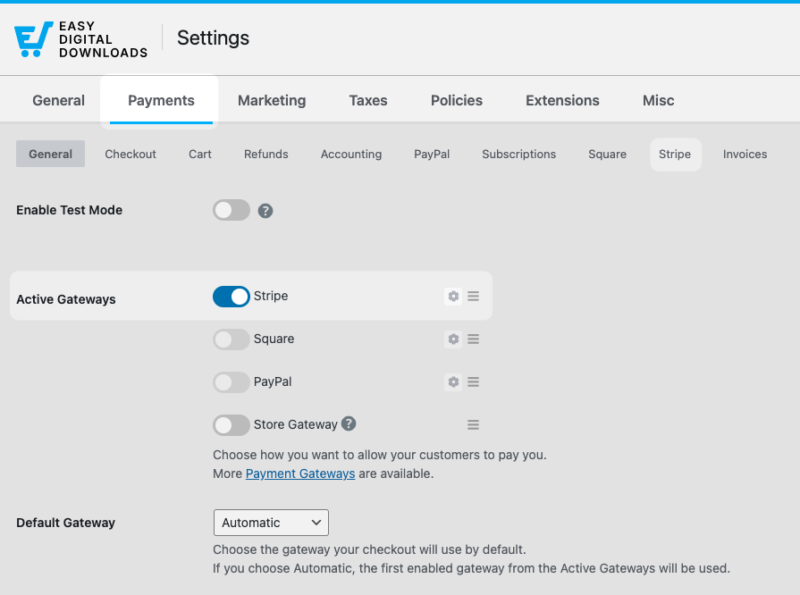
Stripe is de aanbevolen optie. Het ondersteunt alle belangrijke creditcards en debetkaarten, verwerkt verlengingen automatisch bij elke factureringscyclus en handelt pogingen tot herhaalde betalingen af. Klik op Connect with Stripe en volg de instructies om uw account te koppelen.
PayPal wordt ook ondersteund als alternatief. U kunt meerdere gateways inschakelen als u klanten een keuze wilt geven bij het afrekenen.
U moet uw Stripe-verbinding configureren onder het tabblad Stripe.
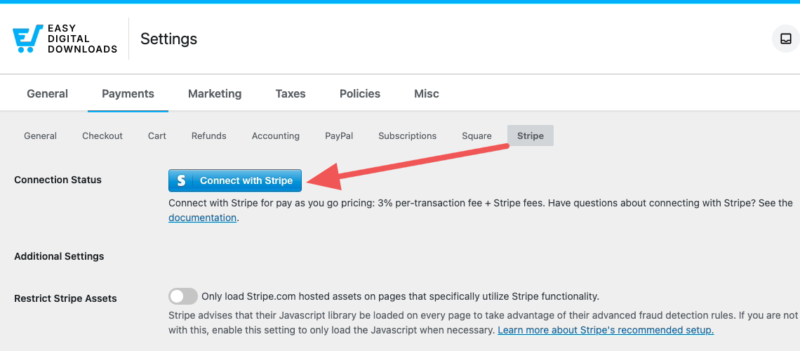
Het proces duurt ongeveer twee minuten en handelt alle technische instellingen automatisch af. Als u er geen heeft, kunt u er gratis een aanmaken.
⚙️ Volg onze Stripe setup doc voor stapsgewijze instructies.
Stap 4: Creëer je eerste abonnementsproduct
Nu het spannende deel: het maken van uw daadwerkelijke abonnementsproduct. In EDD worden producten 'downloads' genoemd.
Ga naar Downloads » Download toevoegen om uw eerste aanbieding te maken.
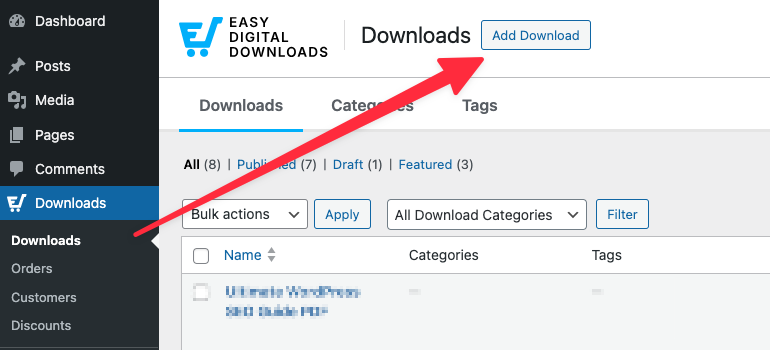
In het onderstaande voorbeeld gebruik ik een maandelijks Marketing Trends Report waarin gebruikers zich abonneren voor een maandelijks bedrag om bijgewerkte gegevens te bekijken.
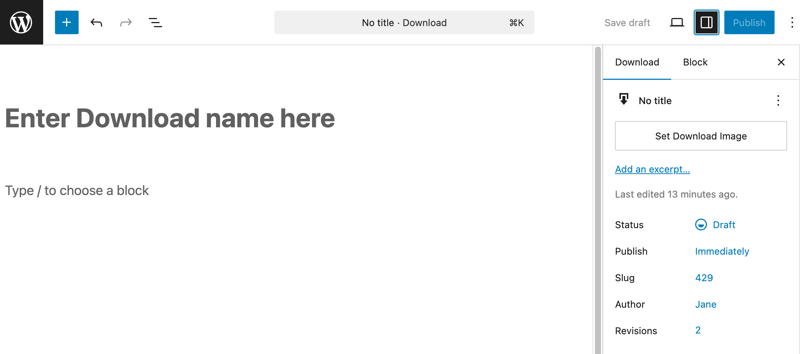
Begin met de basis. Geef uw abonnement een pakkende titel, schrijf een beschrijving die duidelijk uitlegt wat klanten krijgen, en voeg een aantrekkelijke uitgelichte afbeelding toe.
Zie het als elke andere productpagina; het moet bezoekers overtuigen om zich te abonneren.
Onder Download Details kunt u een verscheidenheid aan instellingen configureren om het het type abonnement te maken dat u wilt.
Stel in de sectie Prijs uw basis abonnementsprijs in. Selecteer vervolgens onder Terugkerend Ja uit de vervolgkeuzelijst.
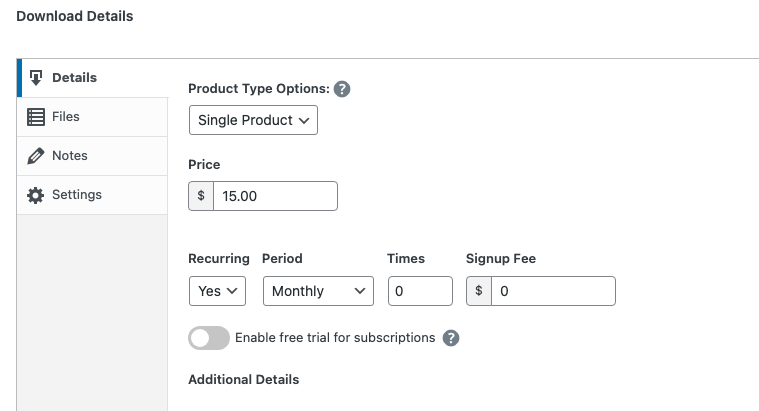
Stel voor elke prijslaag de prijs, de factureringsperiode (wekelijks, maandelijks, per kwartaal of jaarlijks) en optioneel een gratis proefperiode in. Een gratis proefperiode is een geweldige manier om de aanmeldingsdrempel te verlagen. De facturering begint automatisch wanneer de proefperiode afloopt.
Als u een bestand levert, scrollt u naar de sectie Bestanden en uploadt u het. Easy Digital Downloads handelt de bestandslevering automatisch af na een succesvolle betaling en opnieuw bij elke verlenging.
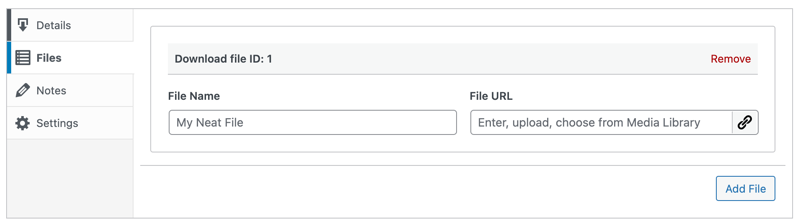
De Bestandsnaam is de klikbare tekst die gebruikers selecteren om het product te downloaden. U kunt specifieke downloadinstructies toevoegen onder Opmerkingen.
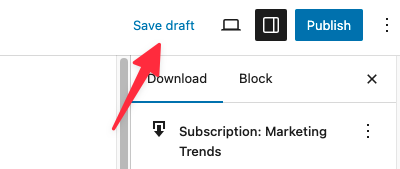
Als u er klaar voor bent, klikt u op Concept opslaan gevolgd door Publiceren.
Na het publiceren van uw download verschijnt er bovenaan een banner met een link Download bekijken.
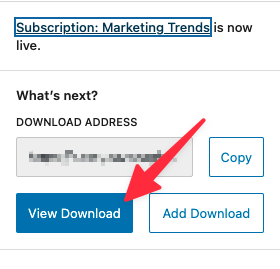
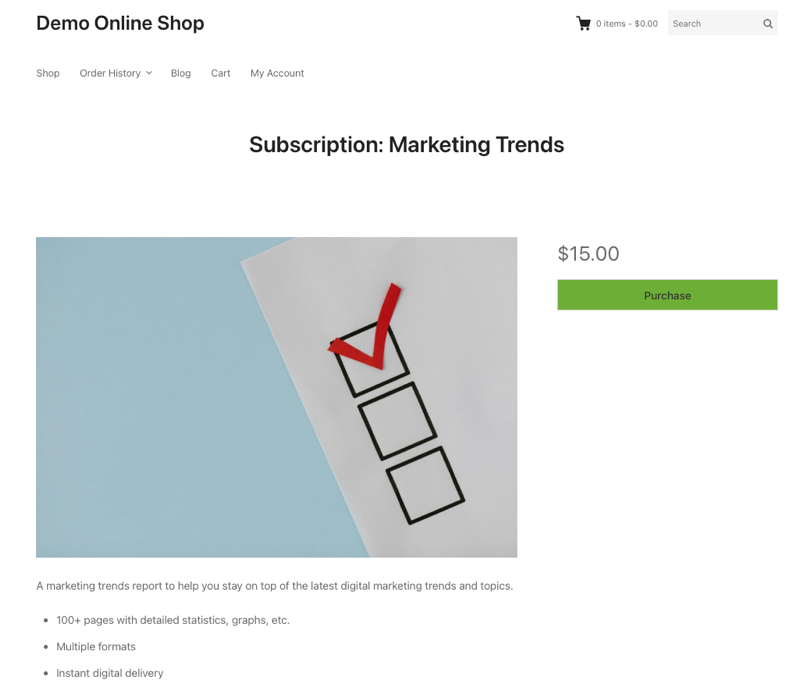
Klik op Download bekijken om uw nieuwe abonnementproduct op de front-end van uw website te zien.
⚙️ Voor meer informatie over elke optie, bekijk onze documentatie voor het maken van producten.
Stap 5: Test en lanceer je abonnement
Voer een testtransactie uit voordat u live gaat om er zeker van te zijn dat alles van begin tot eind werkt.
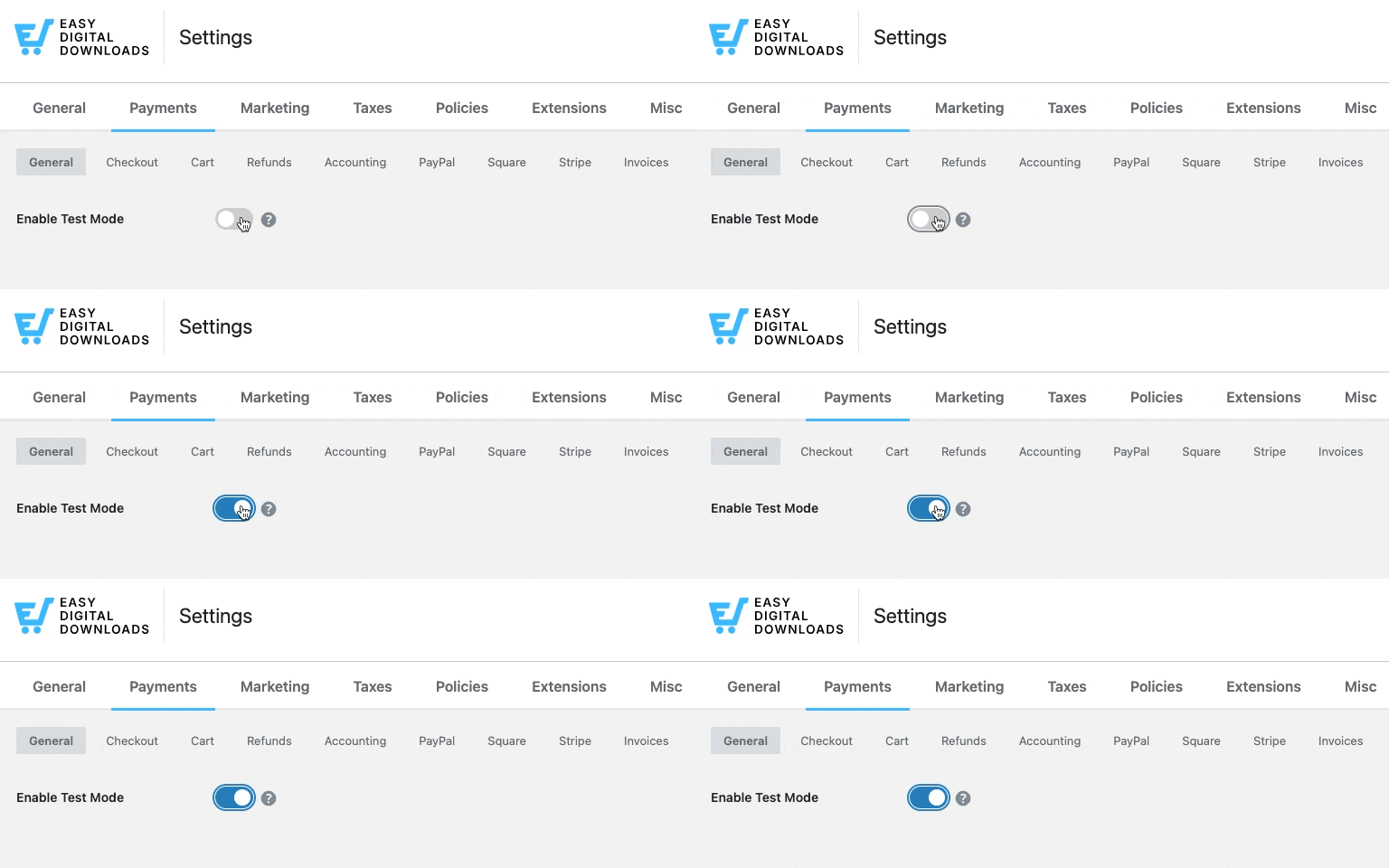
Ga naar Downloads » Instellingen » Betalingen en schakel Testmodus in. Bezoek vervolgens uw productpagina, voeg het toe aan de winkelwagen en voltooi een test-checkout met het testkaartnummer van Stripe (4242 4242 4242 4242).
Verifieer na de checkout drie dingen:
- De klant heeft toegang tot het bestand vanaf hun aankoopbewijs.
- Er is een bevestigingsmail aangekomen.
- Het abonnement verschijnt onder Downloads » Abonnementen.
Lees meer over hoe u betalingen test.
Als alles klopt, ga terug naar Instellingen » Betalingen en schakel Testmodus uit. Uw winkel is klaar voor live abonnementen.
Abonnementen beheren en churn verminderen
Het werven van abonnees is stap één. Ze behouden is waar duurzame terugkerende inkomsten worden opgebouwd.
Abonnementen beheren in EDD
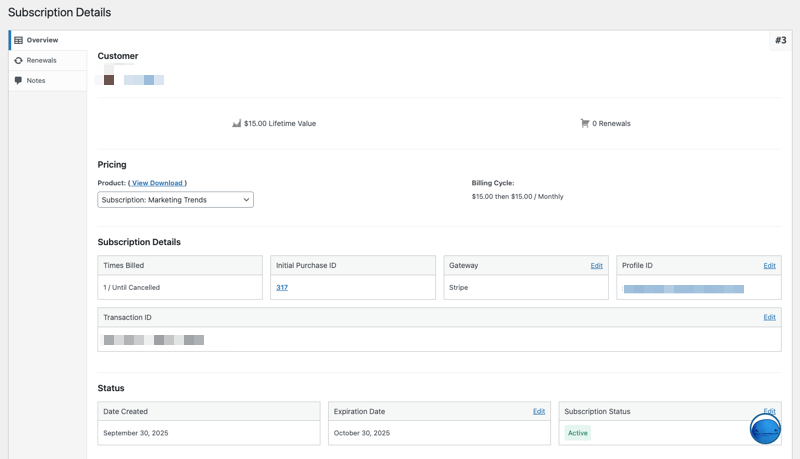
Alle actieve abonnementen zijn zichtbaar onder Downloads » Abonnementen. Vanaf hier kunt u de facturatiestatus, de verlengingsdatum en de betalingsgeschiedenis van elke abonnee bekijken.
U kunt ook individuele abonnementen beheren: annuleren, pauzeren, de verlengingsdatum wijzigen of een terugbetaling uitvoeren. Klanten kunnen hun eigen abonnementen beheren vanaf hun accountpagina zonder contact met u op te hoeven nemen.
Onder Downloads » Abonnementen kunt u alle actieve, verlopen en geannuleerde abonnementen bekijken.
Elke vermelding toont de naam van de klant, de abonnementsstatus, de volgende verlengingsdatum en het totale betaalde bedrag.
⚙️ Lees meer over het beheren van abonnementen.
Omgaan met mislukte betalingen
Mislukte betalingen zijn de meest voorkomende oorzaak van onvrijwillige churn. Een kaart verloopt, een bank markeert de transactie, of het saldo van een klant is laag. Zonder een herhaalsysteem worden die abonnementen stilzwijgend geannuleerd.
De Recurring Payments-functie van EDD regelt dit automatisch. Wanneer een betaling mislukt, probeert het de transactie meerdere keren in de dagen erna opnieuw en stuurt de klant een e-mail om hun betalingsgegevens bij te werken. De meeste mislukte betalingssituaties worden vanzelf opgelost voordat het abonnement wordt geannuleerd.
Tips om abonnementschurn te verminderen
Een paar praktijken helpen consequent om abonnees langer te behouden:
- Bied jaarplannen met korting aan. Klanten die voor een heel jaar betalen, churnen veel minder dan maandelijkse abonnees.
- Gebruik gratis proefversies om de aanmeldingsdrempel te verlagen. Klanten laten proberen voordat ze zich committeren, verbetert de conversie en bouwt vertrouwen op.
- Verstuur herinneringen voor verlengingen. Een vriendelijke e-mail een paar dagen voor de facturatie vermindert verrassingsannuleringen.
- Maak het bijwerken van betalingen eenvoudig. Hoe eenvoudiger het is om een kaart bij te werken, hoe minder abonnementen u verliest aan verlopen betalingsgegevens.
Veelgestelde vragen over het verkopen van abonnementen met WordPress
Laten we afsluiten met het beantwoorden van enkele veelgestelde vragen over de beste manier om abonnementen te verkopen met WordPress.
Heeft WordPress ingebouwde abonnementsfunctionaliteit?
Nee. WordPress heeft geen ingebouwde functies voor betalingen of terugkerende facturering. Om abonnementen te verkopen, moet u een e-commerce plug-in installeren die terugkerende betalingen ondersteunt, zoals Easy Digital Downloads, WooCommerce Subscriptions of MemberPress.
Wat is de beste WordPress-plug-in voor het verkopen van abonnementen?
De beste plug-in hangt af van wat u verkoopt. Easy Digital Downloads (EDD) is de topkeuze voor verkopers van digitale producten: software, e-books, sjablonen en downloads. WooCommerce Subscriptions is beter geschikt voor fysieke of gemengde productwinkels. MemberPress is de sterkste optie voor beveiligde lidmaatschapswebsites en contentcommunities.
Wat is het verschil tussen een abonnement en een lidmaatschap in WordPress?
Een abonnement gaat over terugkerende facturering. Een lidmaatschap gaat over toegangscontrole. Abonnementen factureren klanten volgens een vast schema; lidmaatschappen beperken wie specifieke inhoud kan bekijken of downloaden. Veel makers gebruiken beide samen, maar Easy Digital Downloads regelt beide in één plug-in voor bedrijven met digitale producten.
Kan ik een gratis proefperiode aanbieden met mijn WordPress-abonnementen?
Ja. Easy Digital Downloads laat u een gratis proefversie toevoegen aan elk abonnementproduct wanneer u uw prijsniveaus configureert. U stelt de proefduur in en de facturering start automatisch wanneer de proefperiode afloopt. WooCommerce Subscriptions en MemberPress ondersteunen ook gratis proefversies met vergelijkbare instellingsopties.
Hoeveel kost het om abonnementen op WordPress te verkopen?
Easy Digital Downloads Pro begint bij € 99,50/jaar en bevat de Recurring Payments-extensie. WooCommerce Subscriptions kost € 279/jaar. MemberPress begint bij € 179/jaar. Bovenop de plug-in kosten betaalt u standaard transactiekosten van de betaalprovider: Stripe rekent 2,9% + 30 cent per transactie, zonder extra platformkosten van EDD.
Welke betaalpoorten ondersteunen terugkerende betalingen in WordPress?
Stripe en PayPal zijn de meest ondersteunde opties in alle grote WordPress-abonnementplug-ins. Easy Digital Downloads ondersteunt beide, met extra gateways beschikbaar via extensies. WooCommerce Subscriptions integreert met meer dan 25 betaalgateways, waaronder Mollie, Authorize.net en meer.
Kan ik meerdere abonnementsniveaus verkopen op één product in EDD?
Ja. De functie Variabele Prijzen van Easy Digital Downloads laat u meerdere niveaus op één productpagina maken, elk met zijn eigen prijs, factureringsinterval en proefduur. Dit maakt het eenvoudig om maandelijkse en jaarlijkse abonnementen naast elkaar aan te bieden, of verschillende functieniveaus tegen verschillende prijspunten.
Verkoop abonnementen met WordPress en verdien terugkerende inkomsten
Abonnementen zijn een van de meest betrouwbare manieren om een voorspelbaar inkomen op te bouwen als verkoper van digitale producten. U verdient inkomsten volgens een schema, vermindert de afhankelijkheid van eenmalige verkopen en bouwt langdurigere relaties op met uw klanten.
Als u digitale producten verkoopt op WordPress, biedt Easy Digital Downloads u alles wat u nodig heeft: terugkerende facturering, automatische verlengingen, bestandslevering en abonneebeheer, allemaal op één plek.
Klaar om uw abonnementenbedrijf op te bouwen? Koop vandaag nog uw EDD Pro-pas en transformeer uw eenmalige verkopen in voorspelbare terugkerende inkomsten.
Wilt u meer weten over het bouwen van uw digitale productwinkel? Hoe u digitale producten verkoopt met WordPress.
📣 P.S. Vergeet niet om zich te abonneren op onze nieuwsbrief en ons te volgen op Facebook, Twitter/X, of LinkedIn voor meer WordPress-bronnen!








