


Wilt u creditcardbetalingen instellen voor uw WordPress-website?
Met de juiste WordPress-plugin is het configureren van uw eCommerce-winkel voor het accepteren van online betalingen vrij eenvoudig.
🔎 In dit artikel behandel ik:
De Juiste Betaalplugin Kiezen
De beste WordPress-betaalplugin hangt af van een paar factoren. Wat voor soort item(s) verkoopt u bijvoorbeeld? Biedt u een dienst aan?
Gebruik de onderstaande tabel om meer te weten te komen over enkele van de meest populaire eCommerce-plugins en beslis welke optie het beste is voor uw specifieke behoeften.
| Gebruikstype | Voorgestelde Oplossing |
|---|---|
| 💻 🎮 📱 🧑🏽🔧 Digitale Producten of Diensten Verkopen | Easy Digital Downloads (EDD) • Geweldig voor het verkopen van downloads zoals e-books, afbeeldingen, documenttemplates, software, thema's of plugins. • Ook goed voor het verkopen van service 'pakketten' zoals logo-ontwerp of andere creatieve/digitale diensten die via internet worden geleverd. • Heeft flexibele afrekenopties (winkelwagen of nu-kopen knoppen), testmodus ➡️ Aan de slag met EDD |
| 🧾 ⛪️ 💒 🕌 Betalingen of Donaties Accepteren | WP Simple Pay of WPForms • Deze plugins zijn goed voor eenvoudige betaalformulieren wanneer u geen volledige online winkel of winkelwagen nodig heeft. Geweldig voor donaties of professionele diensten met online facturering. ➡️ Meer Informatie over WP Simple Pay of WPForms |
| 👕 ☕️ 💄 🛍 Fysieke Producten Verkopen | WooCommerce • De WooCommerce-plugin is geweldig als u fysieke producten verkoopt zoals kleding, voedsel, gezondheids- of schoonheidsproducten. • Biedt flexibele afrekenopties (winkelwagen of nu-kopen knoppen, mogelijk extensies nodig) ➡️ Meer Informatie |
Creditcardbetalingen Instellen Met EDD
Als u digitale bestanden/producten of diensten verkoopt, is de beste manier om creditcards te accepteren met Easy Digital Downloads (EDD):

EDD verandert uw WordPress-site met een paar klikken in een volwaardige eCommerce-website. U hoeft geen code te kennen of een ontwikkelaar in te huren om onze geavanceerde betalingsverwerkingsfunctionaliteit te gebruiken.
In tegenstelling tot andere eCommerce-platforms, is EDD gefocust op de beste manier om digitale producten te verkopen. U kunt een onbeperkt aantal items verkopen, klanten beheren en betalingsverwerkers zoals Stripe of PayPal (samen met vele anderen) gebruiken.
Ik laat u zien hoe u eenvoudig creditcardbetalingen kunt instellen met Stripe, onze aanbevolen betaalprovider.
Met EDD is Stripe geen bijkomende add-on, het is volledig geïntegreerd.
Stap 1: Installeer Easy Digital Downloads
Installeer en activeer eerst Easy Digital Downloads. Hiermee krijgt u toegang tot al onze betaalproviders, evenals functies zoals e-mailintegratie en abonnementsbetalingen.
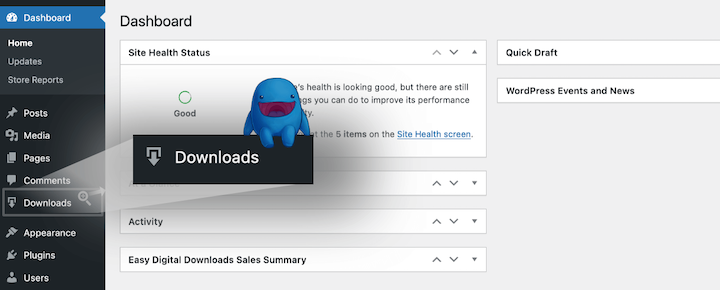
Wanneer EDD op uw site is geïnstalleerd, heeft u een nieuw menu-item genaamd Downloads. Zoek ernaar aan de linkerkant van uw WordPress-dashboard:
2 sep: Verbind Easy Digital Downloads & Stripe
Zorg er voordat we beginnen voor dat Stripe beschikbaar is in uw land. Zo niet, dan raad ik PayPal-betalingen aan als een andere geweldige optie. Klik hier om meer te leren over de installatie van PayPal.
Vervolgens is het integreren van EDD met Stripe eenvoudig, vooral als u al een Stripe-account heeft. U hoeft geen API-sleutels te beheren of te kopiëren/plakken.
Installatie met een bestaand Stripe-account
Als u een Stripe-account heeft, hoeft u in principe maar op één knop te drukken.
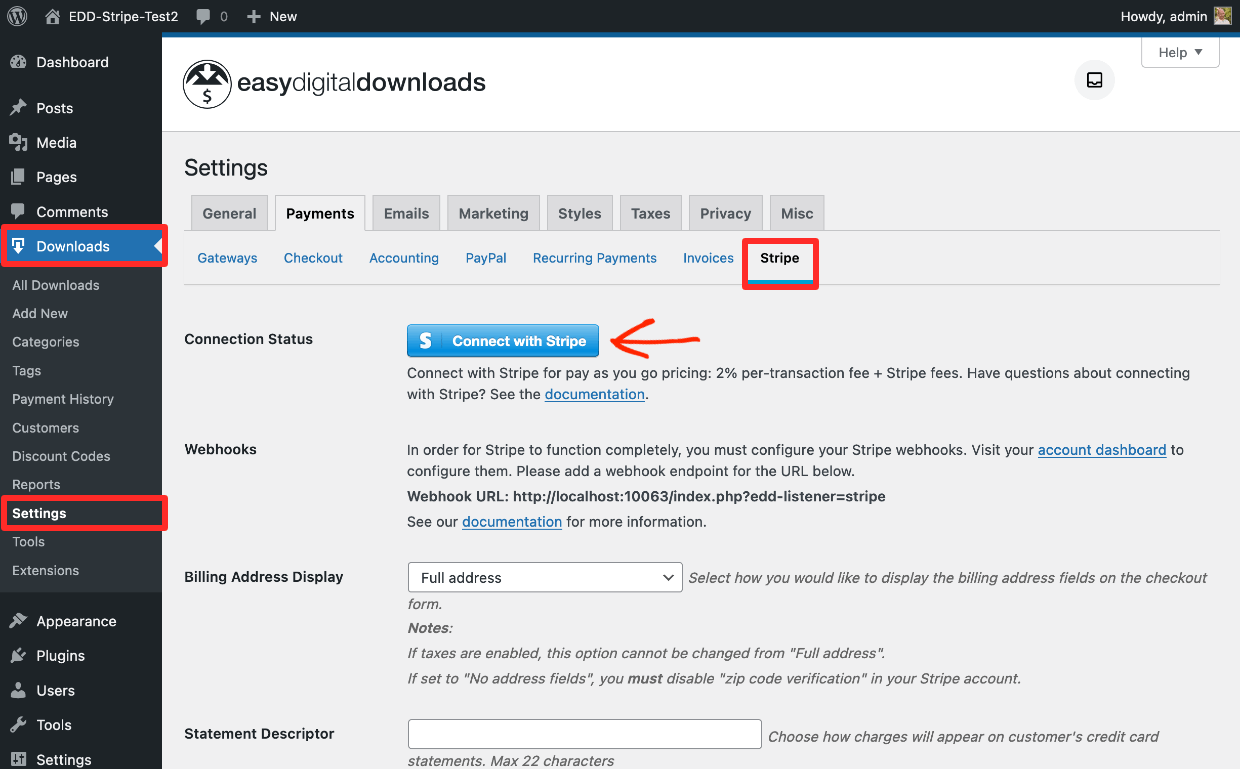
Ga vanuit uw WordPress-dashboard naar Downloads » Instellingen » Betalingen » Stripe.
Klik op de blauwe knop Verbinden met Stripe:
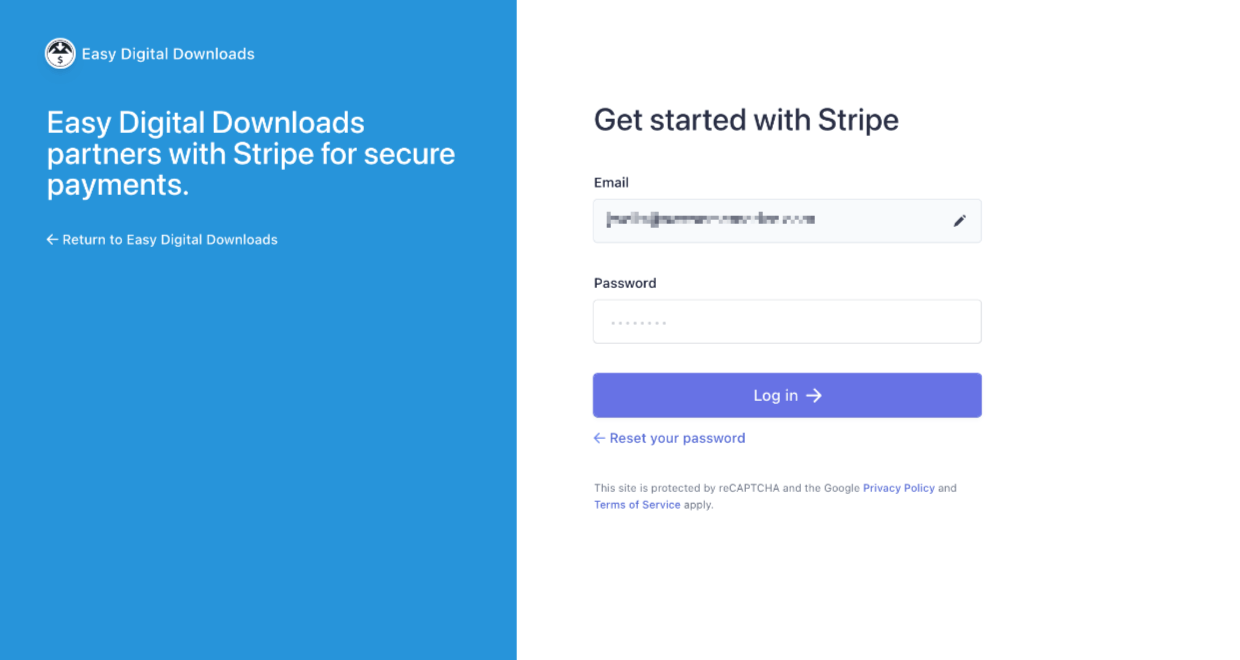
Log vervolgens in met uw Stripe-e-mailadres en wachtwoord (en voer een code in als u tweefactorauthenticatie heeft ingeschakeld).
Vervolgens kunt u uw account kiezen en op Verbinden → klikken om het te koppelen aan EDD:
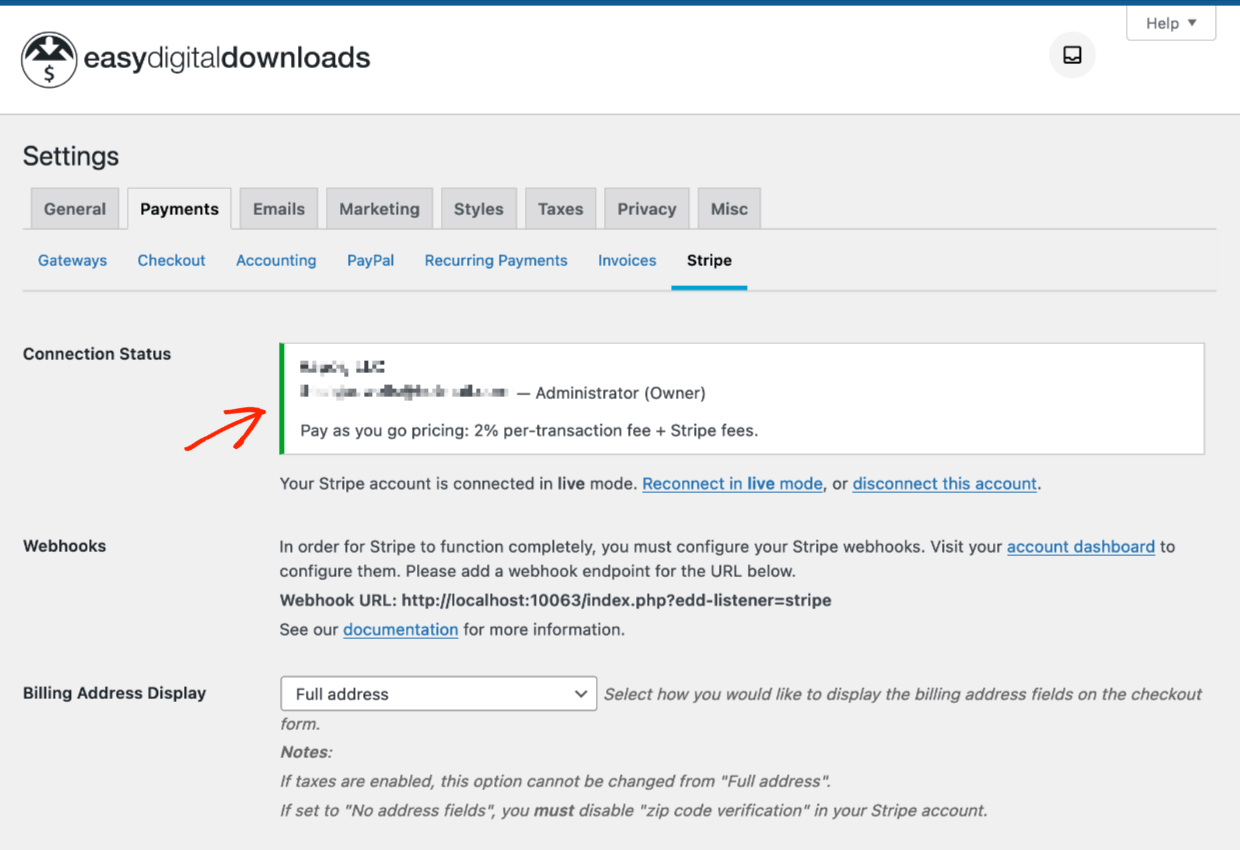
U ziet een groen meldingenvenster dat uw verbindingsstatus bevestigt:
Installatie zonder bestaand Stripe-account
Heeft u geen Stripe-account? Geen probleem. Stripe maakt het eenvoudig om een nieuwe aan te maken (gratis) en deze te koppelen aan EDD.
Het proces ziet er anders uit, afhankelijk van het land waarin u zich bevindt. Ik zal een installatie vanuit de Verenigde Staten doorlopen. Houd er rekening mee dat deze screenshots na verloop van tijd enigszins kunnen veranderen, aangezien Stripe hun interface aanpast.
Ga vanuit uw WordPress-dashboard naar Downloads » Instellingen » Betalingen » Stripe. Klik op de blauwe knop met de tekst Verbinden met Stripe.
U wordt naar het Stripe Connect-scherm geleid. Het doorloopt een formulier van meerdere pagina's. Stripe vraagt naar uw contactgegevens en bedrijfsgegevens. De vragen variëren afhankelijk van uw regio.
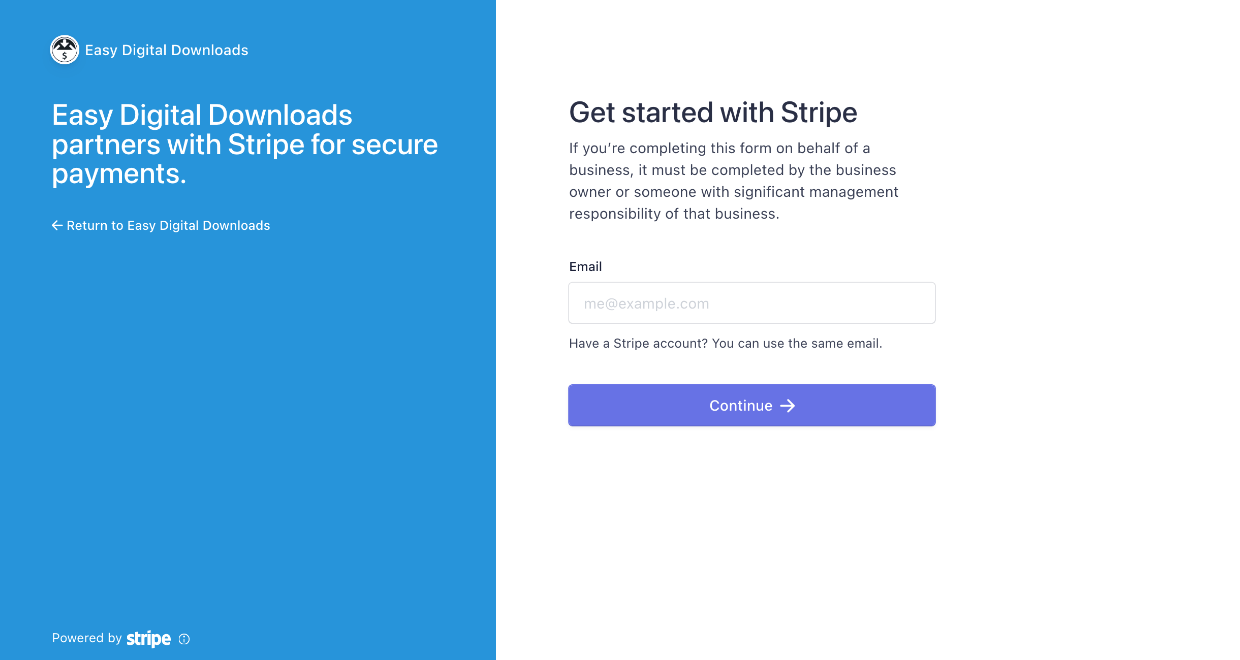
Zorg ervoor dat u ons logo en 'Easy Digital Downloads' aan de linkerkant ziet.
U wordt door een formulier van meerdere pagina's geleid. Stripe vraagt naar uw contactgegevens en bedrijfsgegevens. De vragen variëren afhankelijk van uw regio.
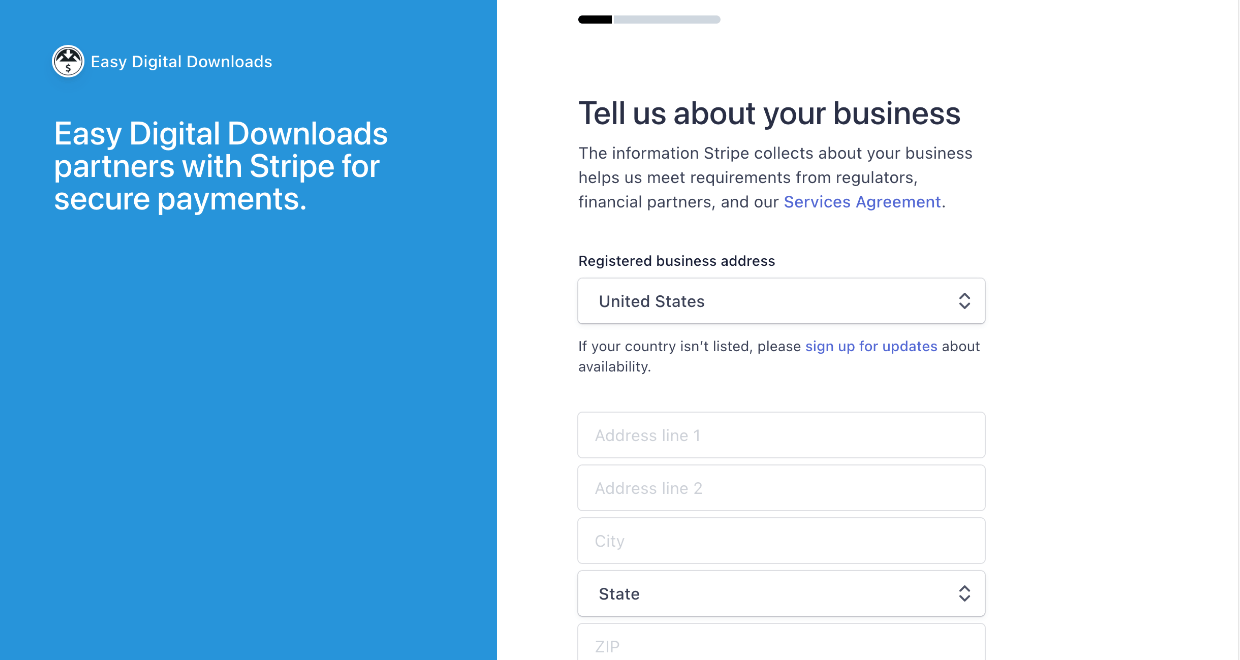
Vragen zullen waarschijnlijk omvatten:
- Naam, adres, telefoonnummer
- Persoonlijke informatie, zoals overheidsidentificatienummers
- Bedrijfsinformatie (type bedrijf, bedrijfsadres)
- De laatste stap in de meeste regio's is het koppelen van een bankrekening waar Stripe uw geld op kan storten wanneer u verkopen doet!
Sommige banken hebben begeleide presets. Als die van u er niet is, hoeft u zich geen zorgen te maken, u kunt de rekeningnummers handmatig invoeren.
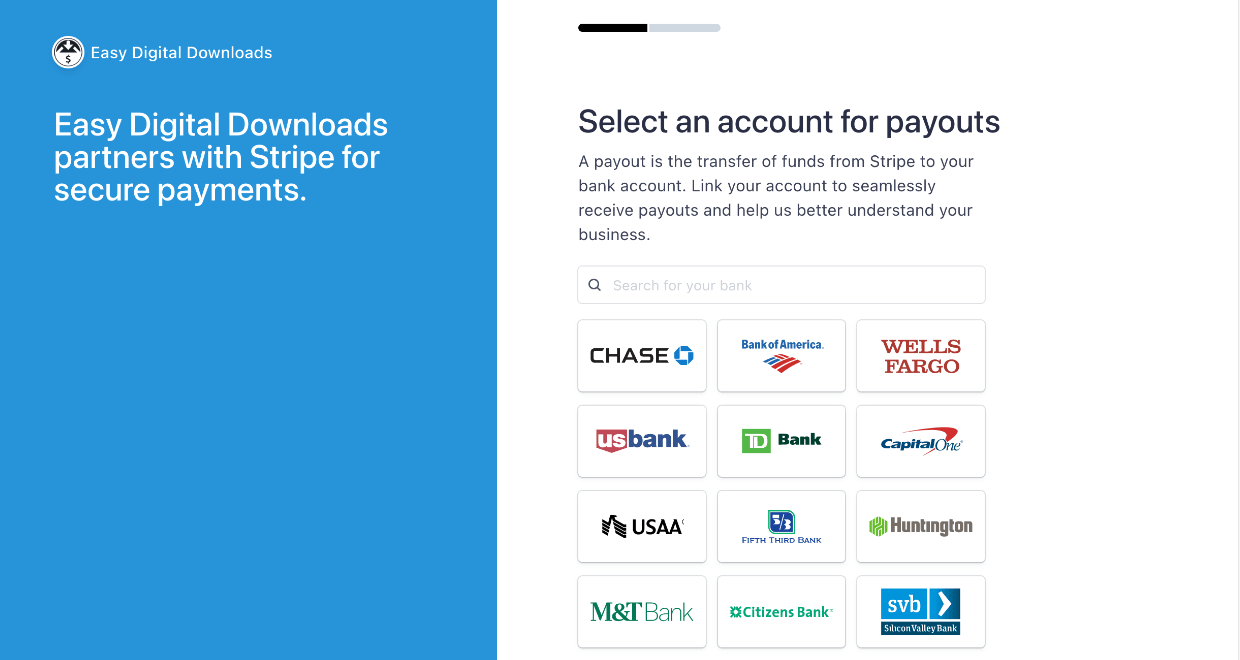
Na het invullen van dit formulier van meerdere pagina's, heeft u een nieuw Stripe-account.
Webhooks configureren
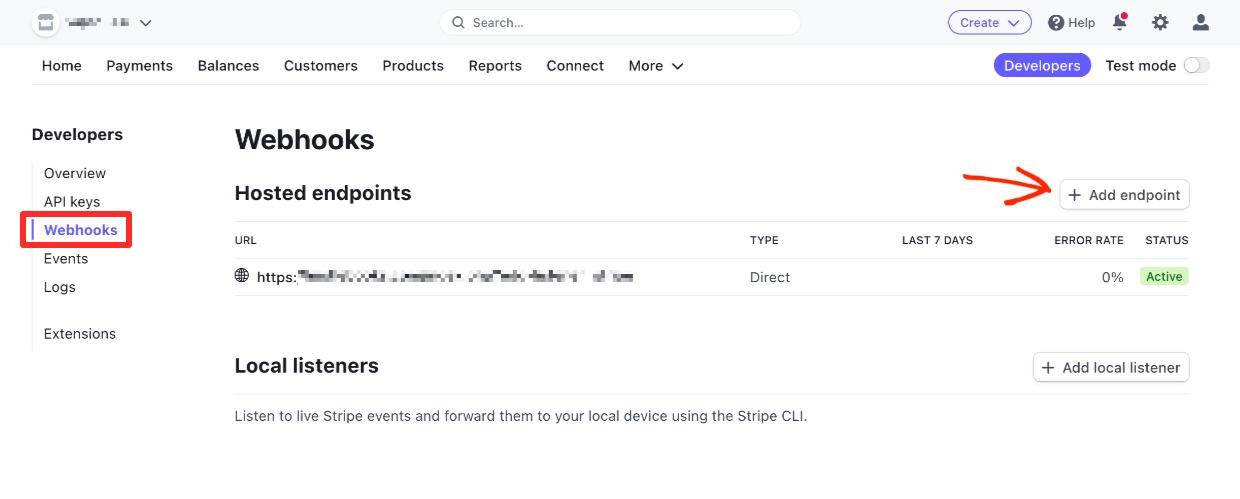
Vervolgens moet u een webhook configureren. Dit zorgt ervoor dat terugbetalingen worden gecommuniceerd tussen uw EDD-winkel en Stripe.
Ga vanuit uw nieuwe Stripe-dashboard naar Ontwikkelaars » Webhooks. U kunt ook de onderstaande directe link gebruiken (u moet zijn ingelogd):
https://dashboard.stripe.com/webhooks
Klik op de knop Eindpunt toevoegen:
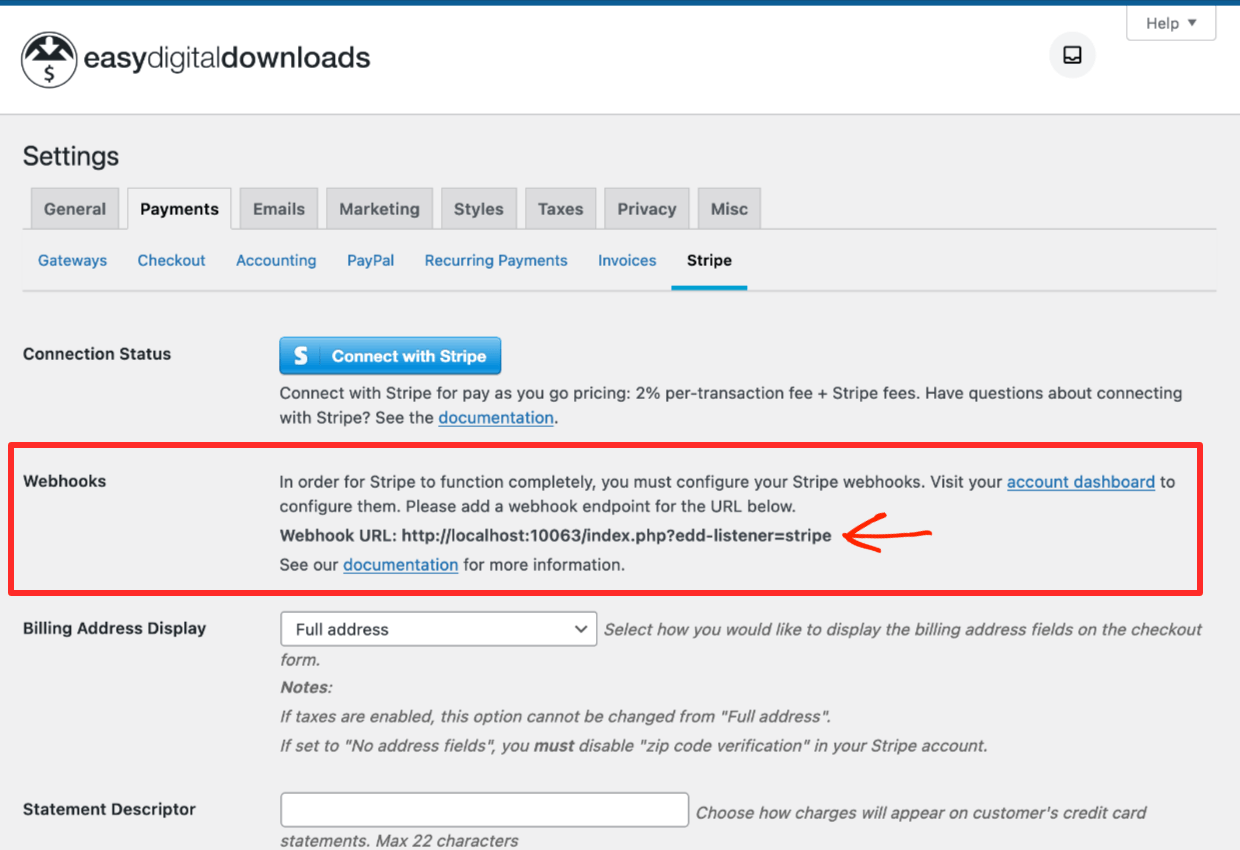
Voeg uw domeinnaam toe met aan het einde ‘/?edd-listener=stripe’. Het zou er als volgt uit moeten zien:
https://yourwebsite.com/?edd-listener=stripe
Vervang ‘uwwebsite.com’ door de domeinnaam van uw eigen website. Een andere optie is om het te kopiëren en te plakken vanaf het scherm dat zich bevindt op Downloads » Instellingen » Betalingen » Stripe in de sectie Webhooks:
Selecteer de volgende instellingen op het Stripe Dashboard:
- Zorg ervoor dat het vakje Luister naar gebeurtenissen op verbonden accounts is uitgeschakeld
- De API-versie moet Laatste versie zijn
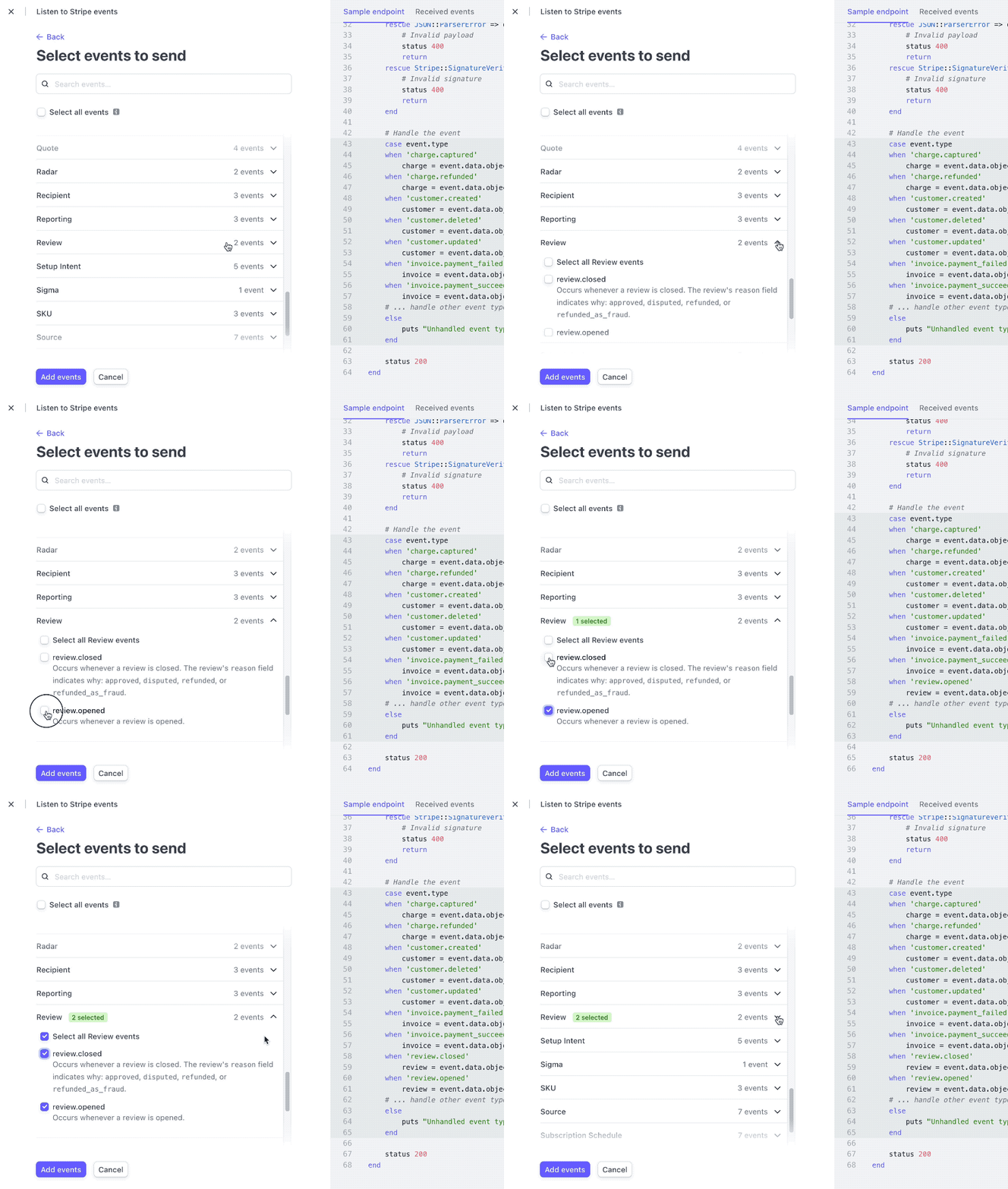
- Selecteer de volgende gebeurtenissen:
- charge.succeeded
- charge.refunded
- customer.subscription.deleted
- klant.abonnement.bijgewerkt
- klant.abonnement.aangemaakt
- factuur.betaling_mislukt
- factuur.betaling_geslaagd
- beoordeling.geopend
- beoordeling.gesloten
In de onderstaande animatie ziet u de Review-gebeurtenissen worden geselecteerd:
Eenmaal voltooid, zou uw webhooks-pagina er als volgt uit moeten zien:
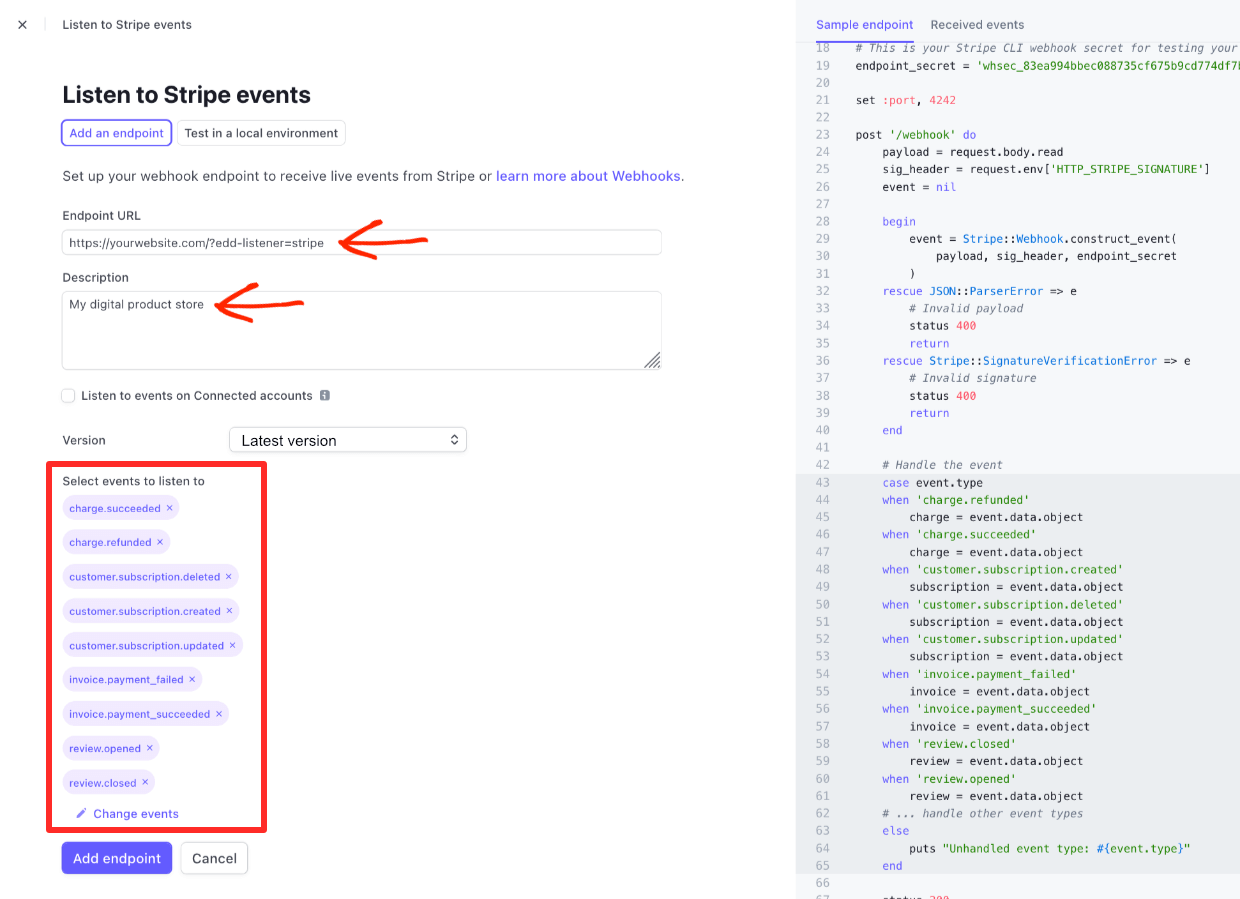
Klik op de knop Eindpunt toevoegen om deze instellingen op te slaan. Uw integratie met EDD is dan voltooid.
🔍 Klik hier voor meer details over Stripe-configuratie
Stripe instellen als Standaard Betaal-gateway
Ga ten slotte naar Downloads » Instellingen en klik vervolgens op het tabblad Betalingen.
Selecteer onder de secties Actieve Gateways en Standaard Gateway de opties Stripe. Kies in de sectie Betaalmethoden Icoon welke creditcardmerken u wilt accepteren:
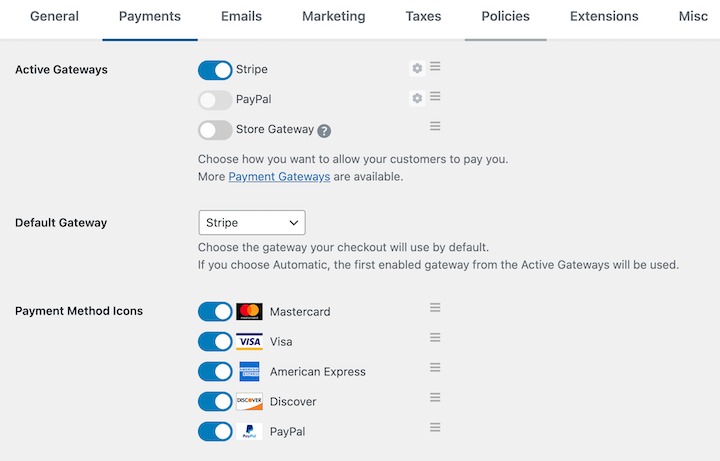
Weet u niet zeker welke u moet kiezen? Kies voor Mastercard, Visa, American Express en Discover, tenzij u een reden heeft om deze populaire merken niet te gebruiken. Beschikbaarheid kan per land/regio verschillen.
Zorg ervoor dat u op de knop Wijzigingen opslaan klikt als u klaar bent.
🥳 Stripe en EDD zijn klaar voor gebruik. U kunt nu creditcardbetalingen accepteren! Nu
Stap 3: Uw Download Toevoegen
Goed werk tot nu toe. Vervolgens moet u uw digitale product of dienst instellen. Dit worden 'Downloads' genoemd in EDD.
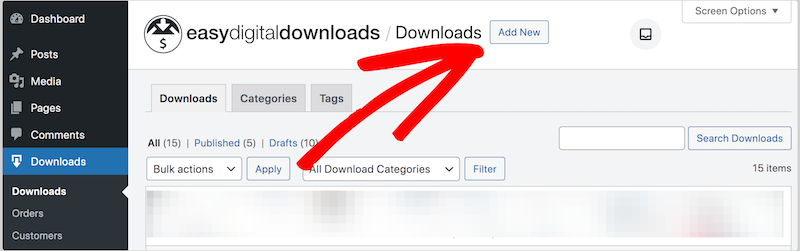
Klik vanuit uw WordPress-dashboard op Downloads gevolgd door de knop Nieuwe toevoegen:
Geef uw download een:
- Naam & beschrijving
- Prijs
- Downloadafbeelding (dit is wat de potentiële klant ziet tijdens het winkelen of browsen op uw site)
- Specificeer het bestand dat de klant ontvangt na aankoop (het kan een instructie of een link voor diensten zijn)
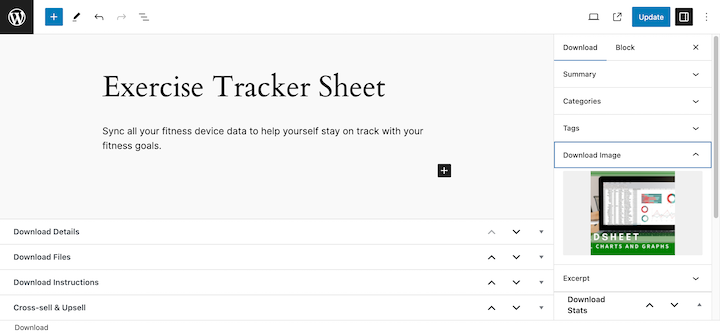
➡️ Klik hier voor een gedetailleerde stapsgewijze handleiding voor het maken van een download.
Zodra uw download is gepubliceerd, kunnen websitebezoekers deze aan de voorkant van uw website zien.
Wanneer een bezoeker op de knop Kopen klikt en het afrekenproces voltooit, wordt deze naar de aankoopbevestiging (bedankt) pagina geleid waar uw klanten kunnen klikken om hun bestand(en) te downloaden.
Nieuwe klanten ontvangen ook een aankoopbewijs met hun informatie en downloadlink.
We hebben veel meer betaalopties dan alleen Stripe.
Heeft u nog geen WordPress-site? U heeft alleen WordPress-hosting nodig. Krijg EDD en WordPress vooraf geïnstalleerd en perfect geconfigureerd met SiteGround EDD Managed Web Hosting.
Alternatieven voor Creditcardbetalingen
Hier zijn onze top suggesties voor Easy Digital Downloads alternatieven als u niet primair digitale producten of diensten verkoopt.
WP Simple Pay
Als u donaties wilt accepteren of een klein aantal producten of diensten wilt verkopen, is WP Simple Pay een geweldige optie. Het is de beste WordPress Stripe-betalingsplugin.
- Voeg betaalknoppen of betaalformulieren toe met een drag-and-drop interface
- Voeg knoppen of sjablonen voor formulieren in als shortcodes of blokken in de blok-editor
- Bied abonnementen, betalingsplannen of gratis proefversies aan
- Voeg andere betaalopties toe, zoals Apple Pay, Google Pay, ACH-debet en Koop Nu, Betaal Later met Klarna en Afterpay/Clearpay
- De plugin werkt met meer dan 135 valuta's, evenals betaalmethoden zoals iDeal, SEPA, Alipay, giropay, Bancontact, Przelewy24 en FPX
Begin gratis of lees meer over de pro-abonnementen. Sommige functies vereisen een Pro- of Elite-licentie.
WPForms
WPForms is de beste WordPress-formulierbouwerplugin. U kunt het gebruiken om betalingen/betalingsinformatie of donaties te innen met betaalformulieren. WPForms wordt vertrouwd door meer dan 5 miljoen websites (zowel kleine als grote bedrijven).
Er zijn drie belangrijke redenen waarom u WPForms zou willen gebruiken in plaats van WP Simple Pay:
- Als u ook een formulierbouwer nodig heeft voor andere doeleinden, zoals contactformulieren, e-mailregistratieformulieren of enquêtes. Mogelijk kunt u alles met één formulierplugin doen!
- Als u een unieke aanpassing nodig heeft, biedt WPForms meer aangepaste velden en andere opties.
- WP Simple Pay gebruikt Stripe. Als u meer creditcardbetaalopties nodig heeft, kunt u de PayPal- of Square-add-ons gebruiken met een Pro-licentie. U kunt de Authorize.net-add-on gebruiken met een Elite-licentie.
WPForms heeft een gratis/lite-versie, maar voor betalingen moet u een Pro- of Elite-licentie aanschaffen.
WooCommerce

WooCommerce is een geweldige oplossing als u fysieke producten verkoopt. Als u digitale goederen verkoopt, raad ik EDD aan.
WooCommerce wordt vertrouwd door meer dan een miljoen websites en het is gratis. Er zijn duizenden extensies waarmee u Woo kunt aanpassen aan uw exacte behoeften.
Ik raad aan om WooCommerce vooraf te installeren op een beheerde server. Zo ben je klaar voor pieken in het verkeer en hoef je je geen zorgen te maken over de technische zaken achter de schermen. Alles wordt voor je geregeld.
Veelgestelde Vragen over het Instellen van Creditcardbetalingen
Laten we afsluiten met enkele veelgestelde vragen.
Wat heb ik nodig om creditcardbetalingen in te stellen?
Om creditcardbetalingen in WordPress in te stellen, heb je nodig:
- Een webhost
- WordPress-site
- SSL-certificaat
- Een plugin zoals Easy Digital Downloads die de creditcardbetaling verwerkt
- Een account bij de betaalprovider, gekoppeld aan je creditcard of bankpas, zodat je inkomsten naar je kunt laten sturen
Hoe kies ik een goede webhost?
Lees deze gids over het kiezen van een webhost (het bevat kortingscodes!). Of je kunt onze topkeuze selecteren op basis van wat je met je website doet:
- Voor Easy Digital Downloads, bekijk SiteGround Managed EDD WordPress Hosting
- Voor WPForms of WP Simple Pay, overweeg Bluehost.
- Voor WooCommerce raden we Bluehost Premium Managed Hosting aan
Accepteer Creditcardbetalingen Met EDD
Goed gedaan. Je hebt geleerd hoe je creditcardbetalingen instelt met WordPress. Je bent klaar om een winstgevende online bedrijf of bijverdienste op te bouwen.
Als je dat nog niet hebt gedaan, begin vandaag nog met EDD!
📣 PS. Vergeet niet u aan te melden voor onze nieuwsbrief en volg ons op Facebook of Twitter voor meer WordPress-bronnen!








