

ソフトウェアライセンス拡張機能のご購入には、ソフトウェアライセンスのzipファイル内のサンプルディレクトリにあるサンプルプラグインが含まれています。拡張機能は、当社のウェブサイトのアカウントページからダウンロードしてください。これを展開して全体を確認することを強くお勧めします。
サンプルには2つのコンポーネントがあります。
- WordPressプラグインでソフトウェアライセンスAPIの作業を開始するために必要なすべてを設定する
composer.jsonファイル。 - メインプラグインファイルには、EDDソフトウェアライセンスSDKにフックするコードが含まれています。これは、WordPressプラグインおよびテーマ開発者が複雑なセットアップやカスタム管理インターフェイスなしで、Easy Digital Downloadsソフトウェアライセンスを製品に迅速に統合するためのドロップインソリューションです。
ステップ1:Composerパッケージのインストール
メインプラグインディレクトリにあるプラグインのcomposer.jsonファイルを更新(または作成)します。composer installを実行して、プラグインにソフトウェアライセンスSDKを追加します(このリンクには最新の指示と例も含まれています)。
ステップ2:SDKを使用するようにプラグインを更新する
このスニペットは、SDKとの統合に必要なコードの開始点を提供します:
/**
 * Plugin Name: AAA Sample Plugin
 * Plugin URI: https://easydigitaldownloads.com
 * Description: Illustrates how to include an updater in your plugin for EDD Software Licensing.
 * Author: Sandhills Development, LLC
 * Author URI: https://easydigitaldownloads.com
 * Version: 1.0.0
 * License: GNU General Public License v2.0 or later
 * License URI: https://www.gnu.org/licenses/gpl-2.0.html
 */

add_action(
	'edd_sl_sdk_registry',
	function ( $init ) {
		$init->register(
			array(
				'id'      => 'edd-sample-plugin', // The plugin slug.
				'url'     => 'https://edd.local', // The URL of the site with EDD installed.
				'item_id' => 83, // The download ID of the product in Easy Digital Downloads.
				'version' => '1.0.0', // The version of the product.
				'file'    => __FILE__, // The path to the main plugin file.
			)
		);
	}
);

// Load the SDK from the vendor directory. The SDK handles autoloader setup automatically.
if ( file_exists( __DIR__ . '/vendor/easy-digital-downloads/edd-sl-sdk/edd-sl-sdk.php' ) ) {
	require_once __DIR__ . '/vendor/easy-digital-downloads/edd-sl-sdk/edd-sl-sdk.php';
}
ストアに合わせて情報を変更してください:
id– プラグイン/テーマのスラッグ。url– ストアのURL。item_id– アイテムID(ストア上の)。version– 現在のバージョン番号。file– メインプラグインファイル。テーマには不要です。type–pluginまたはtheme。プラグインには不要です。weekly_check– オプション:ライセンス状況を確認するために週に1回リクエストを行うかどうか。デフォルトはtrueです。
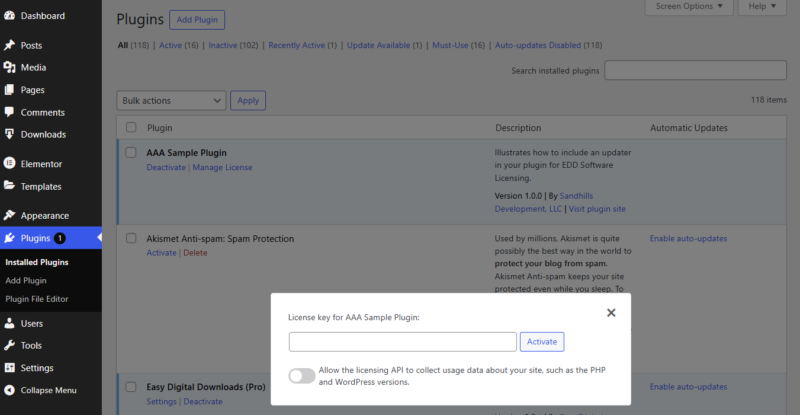
プラグインがアクティブ化されると、顧客はライセンスキーを追加し、ストアがPHPおよびWordPressのバージョンをアクティベーションデータに追加できるように選択できます。
これで完了です!
重要な注意点
- アップデートをリクエストする際にSSL検証で問題が発生した場合は、
edd_sl_api_request_verify_sslフィルターを使用してSSL検証フラグを無効にすることができます。 - ユーザーがテーマまたはプラグインの自動更新を有効にすることを防ぎたい場合は、配布コードにスニペットを追加して自動更新を無効にすることができます。
add_filter( 'auto_update_plugin', 'edd_sample_disable_plugin_autoupdates', 10, 2 );
function edd_sample_disable_plugin_autoupdates( $update, $plugin ) {
	if ( 'my-plugin/my-plugin.php' === $plugin->plugin ) {
		return false;
	}

	return $update;
}

add_filter( 'auto_update_theme', 'edd_sample_disable_theme_autoupdates', 10, 2 );
function edd_sample_disable_theme_autoupdates( $update, $theme ) {
	if ( 'my-theme' === $theme->theme ) {
		return false;
	}

	return $update;
}


