


Wilt u gebruikers automatisch registreren bij het afrekenen op uw WordPress-site?
Een snel, beknopt afrekenproces is cruciaal. Daarom kan het nuttig zijn om klanten als gast te laten afrekenen. Maar het registreren van gebruikers kan u ook helpen om conversies en verkopen te verhogen.
Het is niet het idee om een account aan te maken op een e-commerce site dat online shoppers irriteert. Het is eerder de extra tijd die het kost om het daadwerkelijk te doen. Een eenvoudige oplossing is om het proces te versnellen en gebruikers automatisch te registreren bij het afrekenen.
🔎 In dit artikel behandelen we:
Waarom gebruikers registreren bij het afrekenen?
Een snel en naadloos afrekenproces is belangrijk voor elke e-commerce website. Als klanten door hoepels moeten springen om een aankoop te doen, zullen ze waarschijnlijk opgeven en hun zaken elders naartoe brengen.
Daarom is het vaak slim om gastafrekening op uw e-commerce site in te schakelen. Er zijn echter enkele nadelen. U heeft geen toegang tot waardevolle klantgegevens, zoals bestelgeschiedenis en voorkeuren. Dit beperkt uw vermogen om gerichte marketingcampagnes uit te voeren of inzicht te krijgen in wat kopers zoeken.
Wanneer u gebruikers registreert bij het afrekenen, creëert u een gestroomlijndere winkelervaring. Het kan de klantloyaliteit en tevredenheid met uw winkel verhogen en meer verkopen converteren.
Geregistreerde gebruikers hebben toegang tot hun klantaccountpagina om de bestelgeschiedenis te bekijken en betalings- en facturerings-/verzendadressen te beheren. Dit vermindert wrijving in het afrekenproces en maakt het voor hen gemakkelijker om in de toekomst bij uw winkel te kopen.
Hoe gebruikers automatisch te registreren bij het afrekenen in WordPress
Klaar om te beginnen? In deze stapsgewijze handleiding laten we u zien hoe u gebruikers kunt registreren bij het afrekenen in WordPress:
- Installeer Easy Digital Downloads
- Voeg de Auto Register-extensie toe
- Configureer Checkout & Auto Register-instellingen
Stap 1: Installeer Easy Digital Downloads
Als u momenteel WordPress gebruikt of van plan bent dit te gebruiken voor uw online winkel, heeft u een e-commerce plugin nodig. Een populaire keuze is WooCommerce.
Maar als u digitale producten of downloads verkoopt, is de beste oplossing de Easy Digital Downloads (EDD) plugin:

Easy Digital Downloads stelt u in staat om een e-commerce site in WordPress te maken en te beheren. U kunt het gebruiken om online digitale downloads en verkopen eenvoudig toe te voegen, te verkopen en te volgen.
Het wordt ook geleverd met een volledig winkelwagentje en afrekeningssysteem, ondersteuning voor meerdere betalingsgateways, tracking- en rapportagefuncties, en nog veel meer.
Er is een gratis versie beschikbaar. Ik raad echter aan om op zijn minst een Extended Pass aan te schaffen. Dit geeft u toegang tot een breed scala aan premium extensies die helpen uw e-commerce winkel uit te breiden en te verbeteren.
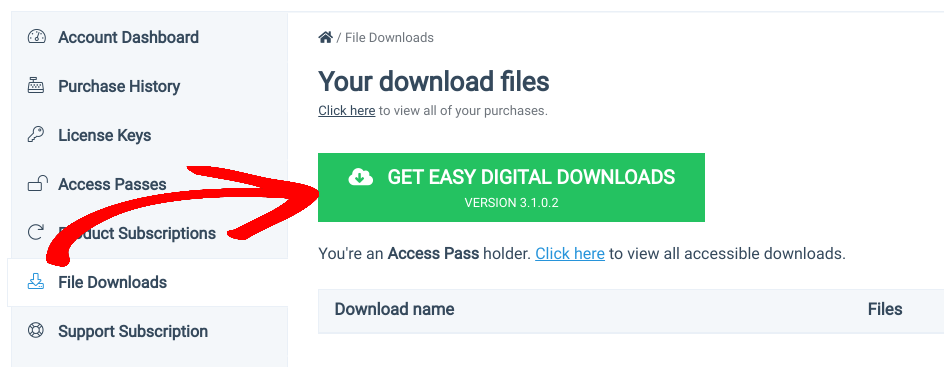
Nadat u uw plan hebt gekocht, kunt u naar uw EDD-accountdashboard gaan. Klik vervolgens op Get Easy Digital Downloads onder File Downloads:
Upload vervolgens de Easy Digital Downloads-plugin naar uw WordPress-website (Plugins » Add New » Upload Plugin):
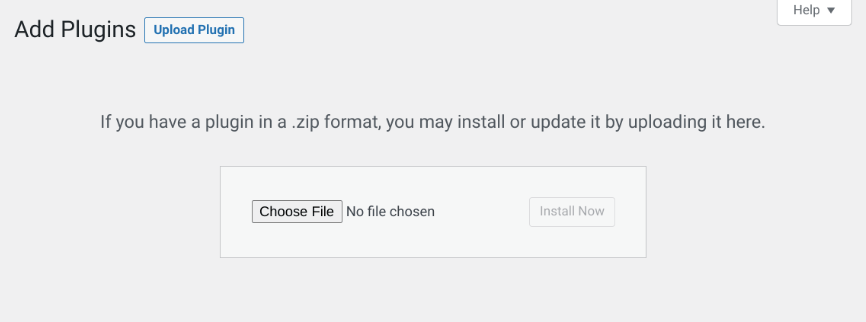
Installeer en activeer de plugin. Vervolgens kunt u uw bedrijfsgegevens invoeren, een betalingsgateway configureren en andere basisinstellingen aanpakken.
⚙️ Gebruik deze handleidingen voor hulp bij het starten en het opzetten van uw winkel:
Stap 2: Voeg de Auto Register-extensie toe
Nu gaan we de Auto Register-extensie installeren:
Deze premium add-on, inbegrepen bij betaalde abonnementen, vereenvoudigt de gebruikersregistratie. Meestal nemen winkel eigenaren de accountregistratie en/of inlogformulieren op de afrekenpagina op:
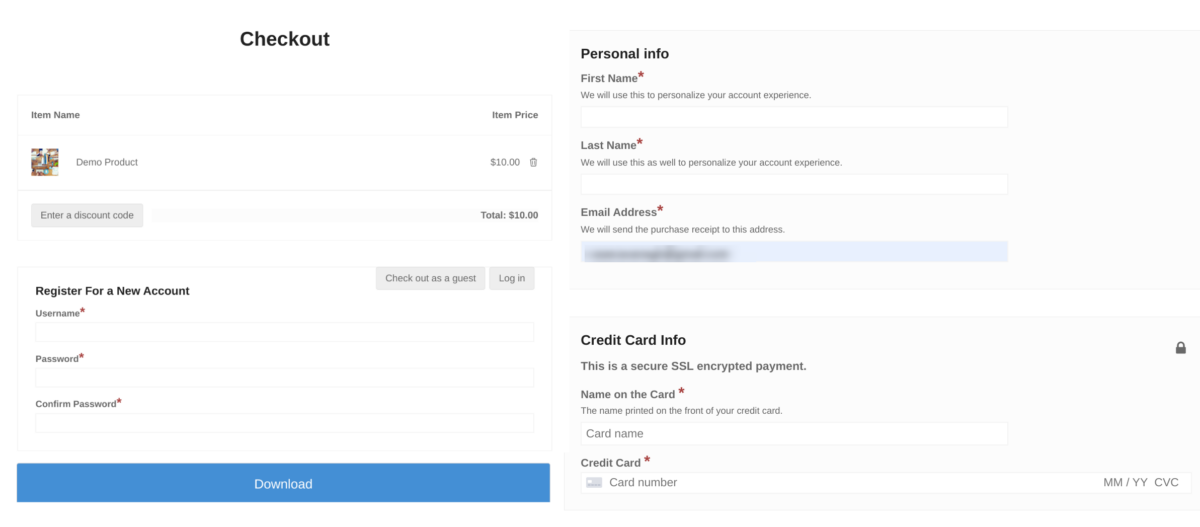
Dit standaard sjabloon is een goede manier om gebruikers in staat te stellen in te loggen of een nieuw account aan te maken. Maar het kan de afrekenpagina een beetje lang en onhandig maken. De formuliervelden zijn een beetje overbodig.
Auto Register elimineert deze stap. Het gebruikt automatisch bestaande gegevens om een WordPress-gebruikersaccount aan te maken bij het afrekenen. Gastgebruikers hoeven geen extra formuliervelden in te vullen voor hun accountaanmaak. Het gebruikersregistratieformulier is in wezen ingebouwd in de checkout.
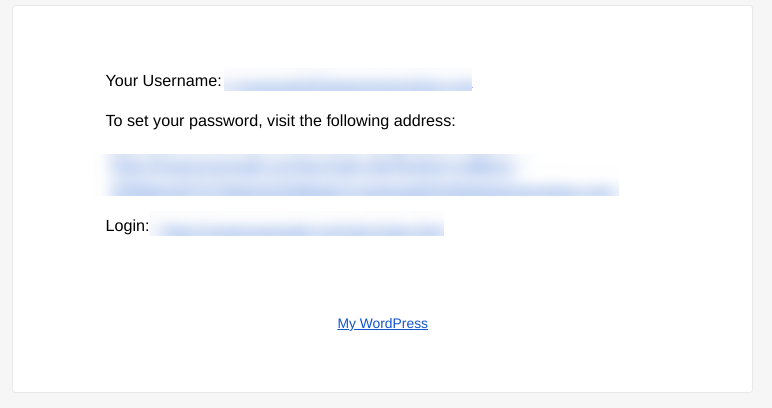
Hun e-mailadres, dat altijd nodig is bij het afrekenen, wordt hun gebruikersnaam. Een willekeurig accountwachtwoord wordt automatisch gegenereerd. EDD stuurt deze inloggegevens per e-mail naar de klant zodra ze hun aankoop hebben voltooid:
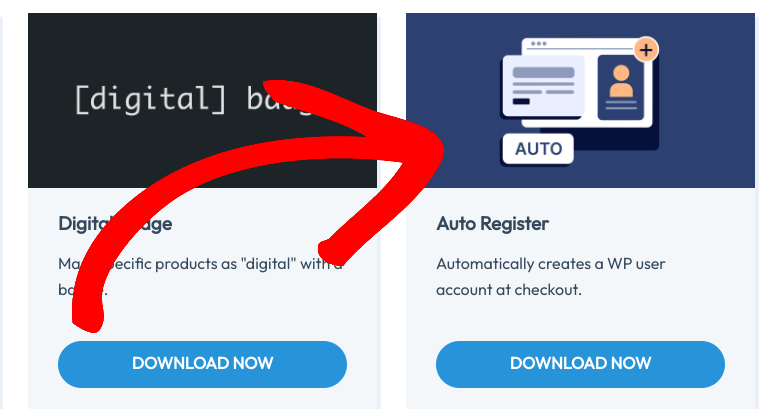
Ga om te beginnen naar Downloads » Extensies » Alle. Scroll op de EDD Extensies-pagina naar Auto Register en selecteer Nu downloaden:
Upload vervolgens de Auto Register-plugin naar uw WordPress-site. Vergeet niet deze te activeren.
Stap 3: Configureer Checkout & Auto Register-instellingen
Eenmaal geactiveerd, voegt de Easy Digital Downloads-plugin automatisch een Afrekenpagina toe aan uw e-commerce website (Pagina's » Afrekenen):
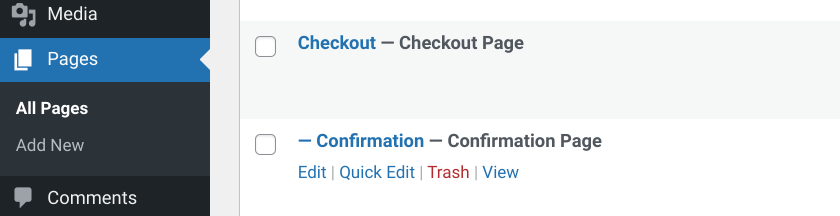
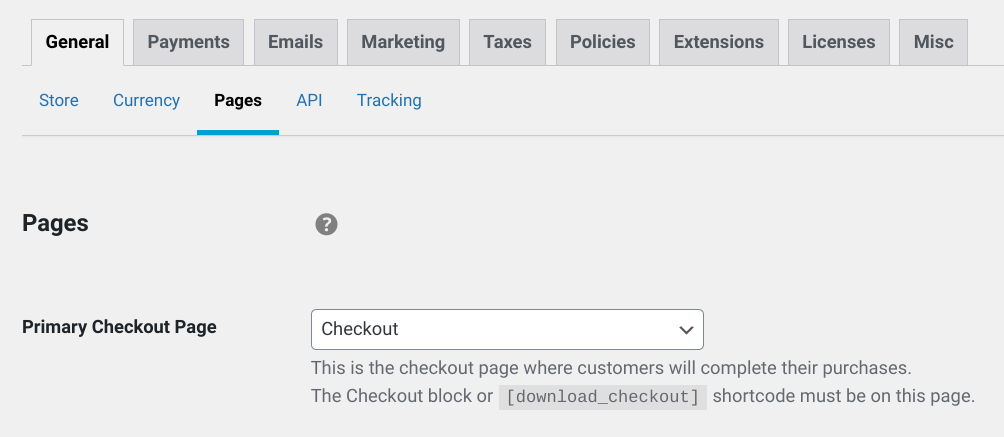
Als u een nieuwe aangepaste afrekenpagina maakt of wilt wijzigen welke als Primaire afrekenpagina moet worden gebruikt, kunt u naar Downloads » Instellingen » Pagina's gaan:
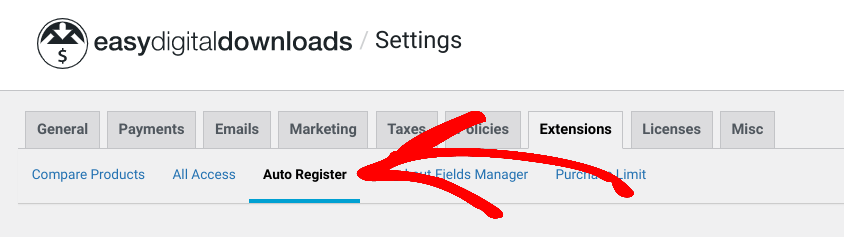
Zodra u Auto Register installeert en activeert, kunt u de instellingen configureren. Ga naar Downloads » Instellingen » Extensies en klik vervolgens op Auto Register:
Er zijn drie selectievakje-instellingen:
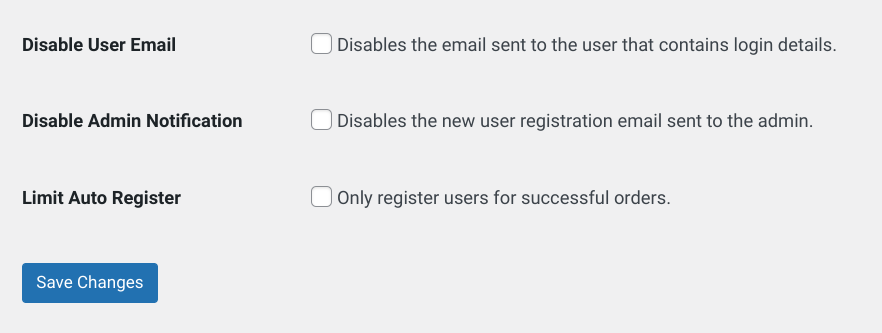
U kunt:
- Gebruikers-e-mail uitschakelen als u gebruikers niet automatisch hun inloggegevens wilt e-mailen
- Adminmelding uitschakelen als u geen e-mail van de beheerder wilt ontvangen na een nieuwe gebruikersregistratie
- Auto Register beperken alleen om te wijzigen wie alleen voltooide/succesvolle transacties heeft
Wanneer u klaar bent, selecteert u de knop Wijzigingen opslaan. Dat is alles!
Nu op de voorkant van uw site ziet u het afrekenformulier:
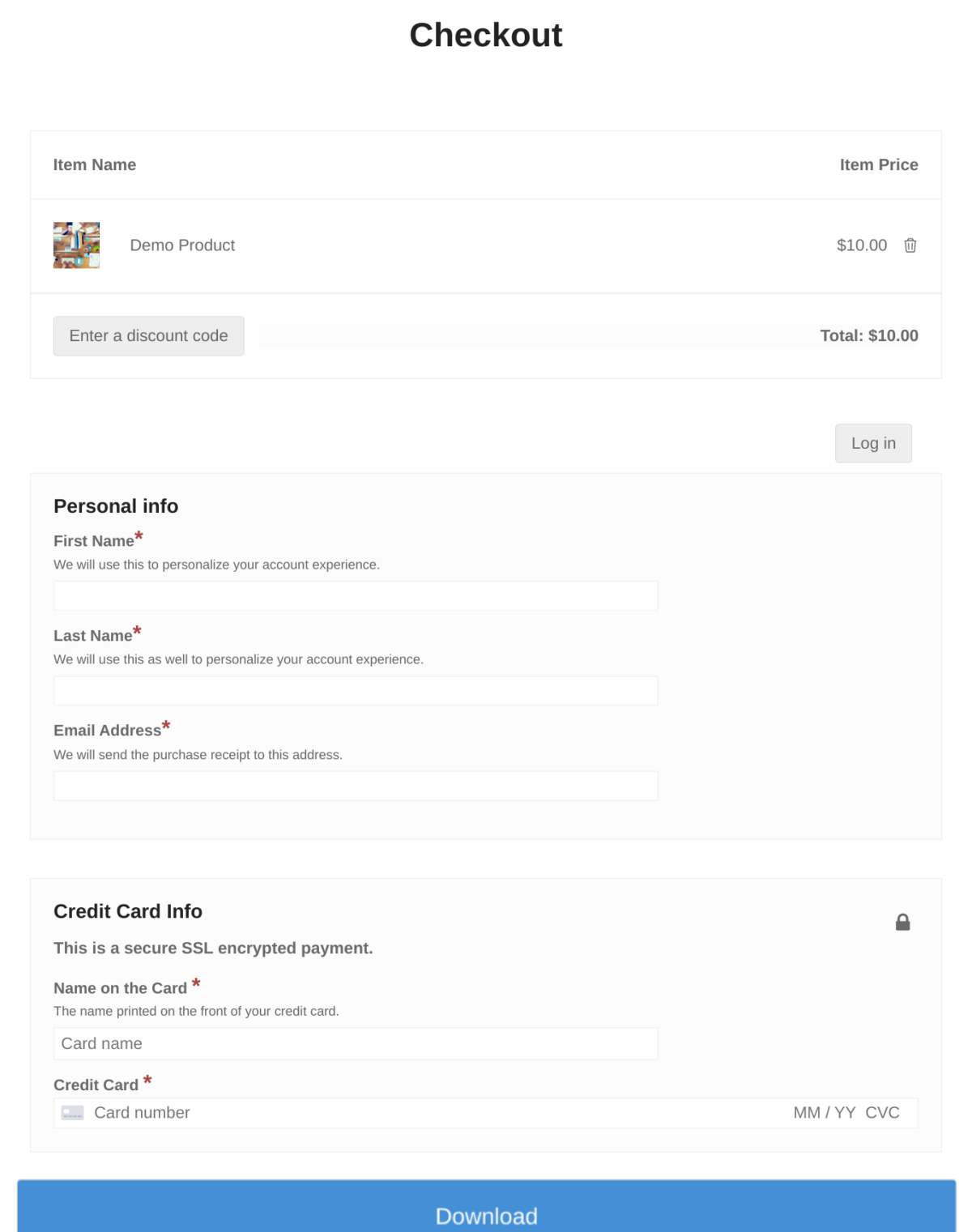
Het voegt de extra formulieren voor het aanmaken/inloggen van gebruikersaccounts niet toe die anders aanwezig zouden zijn. Als u deze formulieren wel wilt inschakelen of weergeven, kunt u naar Downloads » Instellingen » Betalingen » Afrekenen gaan:
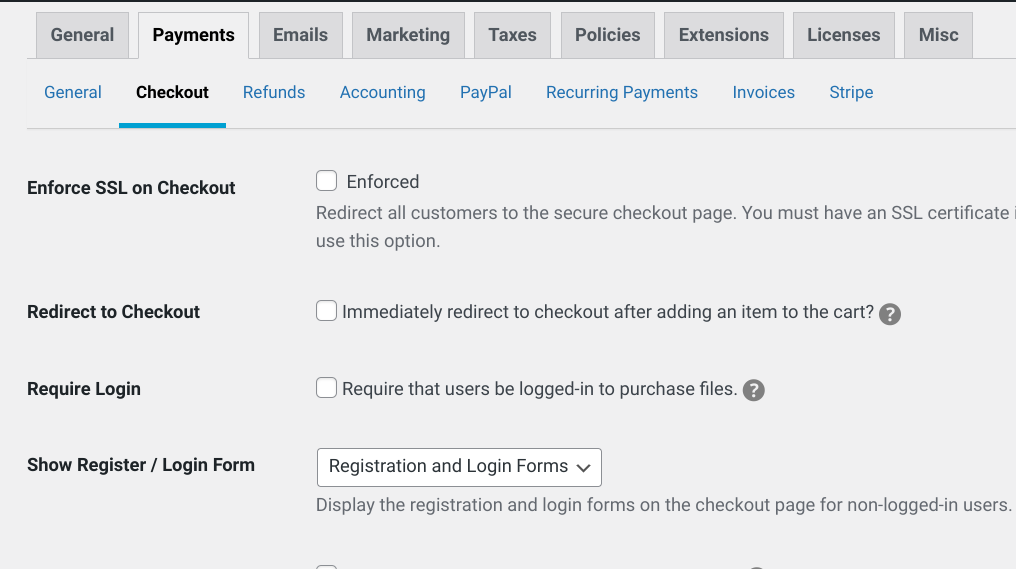
Onder Registratie-/inlogformulier weergeven kunt u kiezen welke (indien aanwezig) van deze formulieren u wilt weergeven bij het afrekenen. U kunt de formulieren ook aanpassen en aangepaste velden toevoegen onder Downloads » Afrekenformulieren.
Houd er ten slotte rekening mee dat u de gastafrekening niet kunt inschakelen nadat u Automatische registratie hebt geactiveerd. Gebruikers die niet zijn ingelogd, krijgen automatisch een account aangemaakt.
📬 Wilt u uw e-maillijsten laten groeien? U kunt ook integreren met e-mailmarketing-add-ons om klanten automatisch toe te voegen aan lijsten bij het afrekenen:
Gebruik EDD om snel gebruikers te registreren bij het afrekenen
Het configureren van uw e-commerce site om gebruikers automatisch te registreren bij het afrekenen kan een geweldige manier zijn om de klantervaring te verbeteren en de betrokkenheid te vergroten. Het helpt bij het creëren van een gestroomlijnder winkelproces, toont shoppers hun aankoopgeschiedenis en biedt waardevolle gegevens die u kunnen helpen de behoeften van uw klanten beter te begrijpen.
Dankzij Easy Digital Downloads kunt u eenvoudig gebruikers registreren bij het afrekenen in WordPress. Download de plugin en de Auto Register-extensie om aan de slag te gaan!
📣 PS. Vergeet niet u aan te melden voor onze nieuwsbrief en volg ons op Facebook of Twitter voor meer WordPress-bronnen!








