


Een van de beste manieren om eCommerce-afhakers te verminderen, is door klanten bij het afrekenen een betaalmethode te laten kiezen.
Het aanbieden van meerdere betalingsopties verbetert de winkelervaring en verhoogt de conversieratio's.
Maar wat is de beste manier om dit te doen? Als je een WordPress-gebruiker bent, kun je dit in een paar eenvoudige stappen doen. Easy Digital Downloads (EDD) maakt het eenvoudig om meerdere betaalmethoden in te stellen en je afrekenproces te stroomlijnen.
🔎 In dit artikel behandel ik:
- Belangrijkste punten
- Waarom meerdere betaalmethoden aanbieden?
- Beslissen welke betaalmethoden je wilt aanbieden
- Meerdere betaalmethoden toevoegen in WordPress
- Veelgestelde vragen over het toevoegen van meerdere betaalmethoden in WordPress
- Wat is de makkelijkste manier om klanten een betaalmethode te laten kiezen in WordPress?
- Wat zijn de beste manieren om betalingen van klanten te ontvangen?
- Welke betaal-gateways zijn compatibel met EDD?
- Ondersteunt Easy Digital Downloads 'koop nu, betaal later' (BNPL)?
- Hoeveel betaalmethoden moet ik aanbieden in mijn WordPress-winkel?
- Laat klanten een betaalmethode kiezen
Belangrijkste punten
| Meerdere betalingsopties verminderen winkelwagenverlating | Winkelaars voltooien een aankoop eerder wanneer ze op hun favoriete manier kunnen betalen. Het wegnemen van die frictie is een van de snelste manieren om je conversieratio te verhogen. |
| EDD en Stripe geven je de meeste flexibiliteit | Hun ingebouwde integratie ondersteunt kaarten, digitale portemonnees, 'koop nu, betaal later' en meer dan 10 regionale betaalmethoden vanuit één dashboard. |
| Installatie duurt slechts 5 stappen | Installeer EDD, verbind Stripe, configureer je voorkeursbetaalmethoden, pas de checkout aan en test voordat je live gaat. |
| Test voordat je lanceert | Gebruik de testmodus van Stripe om te verifiëren dat elke betaalmethode correct werkt voordat je echte transacties accepteert. |
Waarom meerdere betaalmethoden aanbieden?
Stel je voor dat je een winkel binnenloopt en te horen krijgt dat je alleen met één specifiek type creditcard kunt betalen. Frustrerend, toch? Hetzelfde principe geldt voor online winkelen.
Klanten hebben uiteenlopende voorkeuren als het gaat om externe transacties en contactloze betalingen. Het beperken van hun keuzes kan leiden tot winkelwagenverlating en verloren verkopen.
Hier zijn de belangrijkste redenen om meerdere populaire betaalmethoden op te nemen:
- Voldoe aan de veranderende verwachtingen van klanten. Betalingstrends verschuiven naarmate technologie vordert. Het aanbieden van een reeks methoden toont aan dat u zich kunt aanpassen en toegewijd bent om aan de behoeften van uw klanten te voldoen.
- Verhoog conversieratio's. Inspelen op diverse betaalvoorkeuren verwijdert drempels voor aankoop. Klanten zullen eerder doorgaan als ze hun voorkeursbetaalmethode kunnen gebruiken.
- Verbeter de klantervaring. Een soepele, gemakkelijke checkout bouwt klanttevredenheid en loyaliteit op. Het creëert een positieve indruk en moedigt herhaalaankopen aan.
- Breid uw wereldwijde bereik uit. Het accepteren van wereldwijde betalingen opent uw winkel voor internationale klanten. Ondersteuning van meerdere valuta's en regionale betaalvoorkeuren kan kopers van over de hele wereld aantrekken.
- Bouw vertrouwen en geloofwaardigheid op. Het aanbieden van bekende en veilige betaalopties geeft shoppers een zelfverzekerd gevoel. Klanten zullen eerder een aankoop voltooien wanneer ze bekende, gerenommeerde processors zien bij het afrekenen.
Beslissen welke betaalmethoden je wilt aanbieden
Om klanten een soepele checkout-ervaring te bieden, biedt u een verscheidenheid aan opties die de populairste betaalvoorkeuren dekken.
Dit omvat ondersteuning voor populaire methoden zoals creditcards en debetkaarten, evenals alternatieve betaalmethoden zoals bankoverschrijvingen en ACH-betalingen, digitale portemonnees en mobiele betalingen, en 'koop nu, betaal later'-opties.
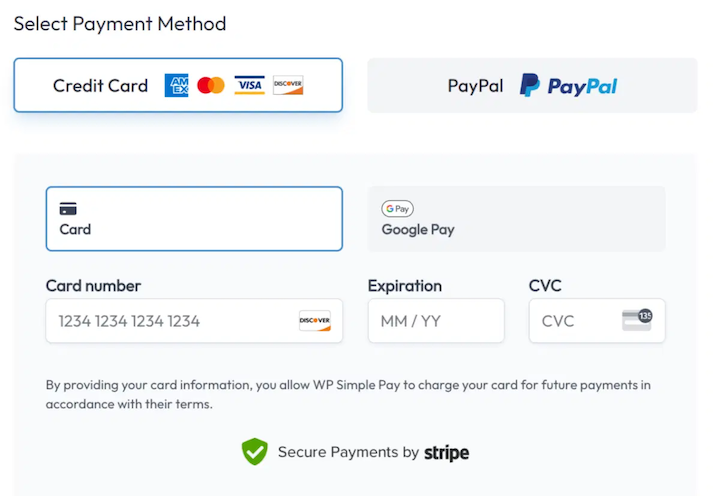
Een enquête van Acquired.com wees uit dat bijna 70% van de online shoppers Apple Pay of Google Pay als hun voorkeursbetaalmethode noemt. Debet- en creditcardbetalingen kwamen op de tweede plaats.
Mobiele en digitale portemonnees worden steeds populairder. Volgens het Worldpay Global Payments Report 2025 waren digitale portemonnees in 2024 goed voor 53% van de wereldwijde e-commerce transacties, waarmee ze de populairste online betaalmethode wereldwijd zijn.
Het benadrukt ook het belang van het bieden van klanten wrijvingsloze checkout-ervaringen.
Houd bij het bepalen welke methoden u uw klanten wilt aanbieden rekening met een paar belangrijke factoren.
Zorg er ten eerste voor dat uw online betaalgateways betrouwbaar en veilig zijn. De persoonlijke en financiële gegevens van klanten moeten worden beschermd. Elke betalingsverwerker die u kiest, moet een sterke reputatie hebben op het gebied van beveiliging.
Overweeg bovendien de kosten voor betalingsverwerking die aan elke gateway zijn verbonden. Kies opties die kosteneffectief zijn voor zowel u als uw klanten.
Meerdere betaalmethoden toevoegen in WordPress
Opmerking: WordPress heeft geen ingebouwde mogelijkheid om betalingen te accepteren. U heeft een plugin nodig. Er zijn er genoeg om uit te kiezen.
Als u digitale producten verkoopt, is de beste manier om meerdere betaalopties in WordPress toe te voegen met de Easy Digital Downloads-plugin en de Stripe-betalingsgateway.
Met Stripe en EDD kunt u:
- Betaalgegevens opslaan voor snellere checkout
- Monitor vroege fraudewaarschuwingen om terugboekingen te voorkomen
- Terugbetalingen goedkeuren of weigeren binnen WordPress
- Veel meer
Hieronder loop ik je stap voor stap door het proces en laat ik je zien hoe je gemakkelijk klanten een betaalmethode laat kiezen op je WordPress-site. Als je al een Easy Digital Downloads- en Stripe-gebruiker bent, kun je direct doorgaan naar Stap 3.
💻 Heb je nog geen WordPress-website?
Zet er een op in een mum van tijd via Levamo (voorheen Rapyd Cloud) managed hosting. Gebruik gerust onze stapsgewijze handleiding voor het maken van een online winkel in WordPress.
Stap 1: Installeer Easy Digital Downloads
Easy Digital Downloads (EDD) is een krachtige en gebruiksvriendelijke WordPress-plugin die is ontworpen om digitale producten te verkopen.
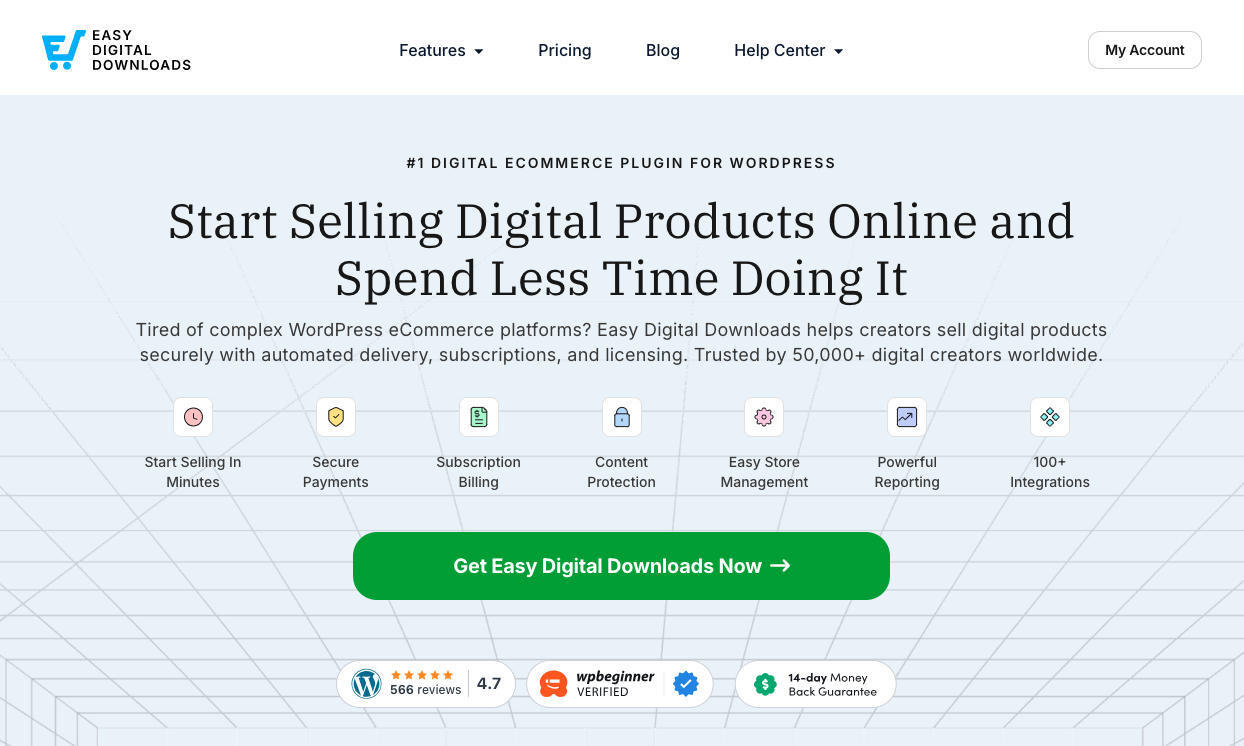
Hoewel de gratis versie de standaard Stripe-betaalgateway bevat, raad ik ten zeerste aan om te upgraden naar een EDD Pro-abonnement. Dit elimineert Stripe-transactiekosten en geeft je toegang tot meer betalingsopties.
Zodra je je abonnement hebt gekozen en de EDD-plugin hebt gedownload, installeer je deze op je WordPress-site.
Ga naar Plugins » Plugin toevoegen » Plugin uploaden » Bestand kiezen. Klik vervolgens op Nu installeren gevolgd door Activeren.
Dit activeert de plugin op je WordPress-site en voegt een nieuw Downloads-menu-item toe aan je beheergedeelte.
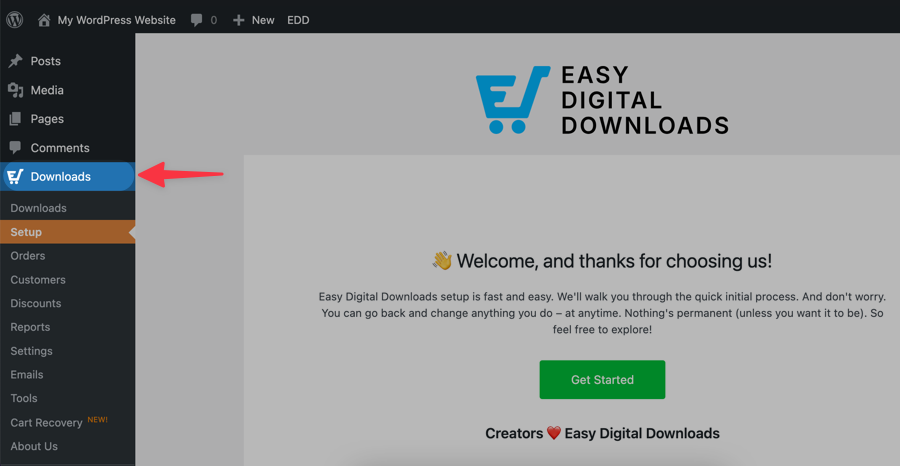
Klik op Aan de slag om de EDD-installatiewizard te starten. Deze wizard begeleidt je door enkele basisconfiguratiestappen.
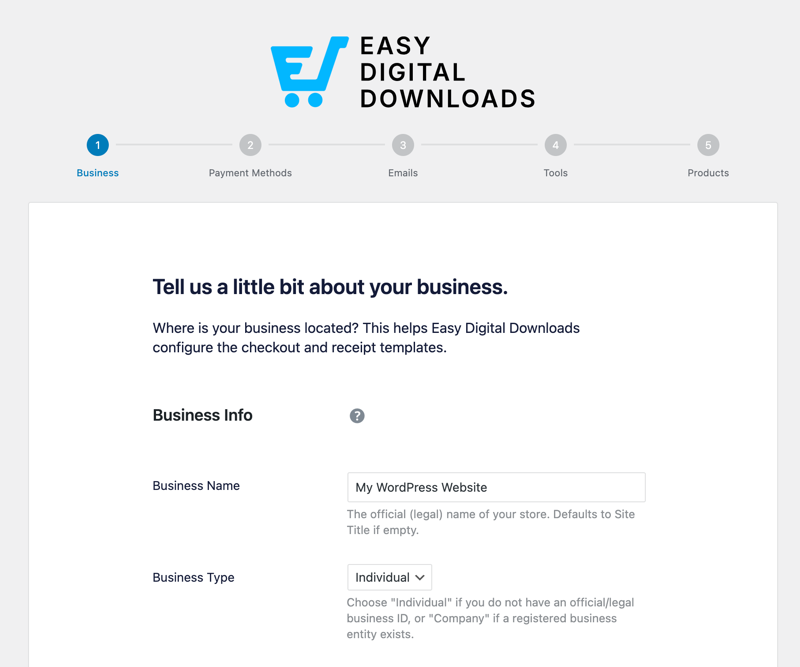
Je wordt bijvoorbeeld gevraagd om de naam, het basisland en de valuta van je winkel op te geven. Je kunt ook de juiste instellingen voor je bedrijf kiezen.
De wizard vraagt je om de Stripe-betaalgateway te verbinden en te configureren. Je kunt dit nu doen of het later configureren in de EDD-instellingen. Ik zal dit in de volgende stap in meer detail behandelen.
Stap 2: Stripe Betaal-gateway verbinden
EDD heeft Stripe ingebouwd als betaalgateway. Je kunt deze instellen als je Standaard en Actieve Gateways onder Downloads » Instellingen » Betalingen.
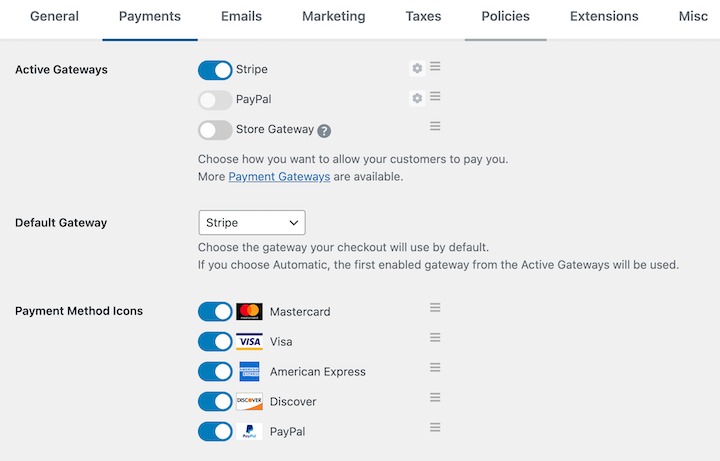
Als u klaar bent, klikt u op Wijzigingen opslaan.
Als je Stripe niet met de installatiewizard met je site hebt verbonden, ga dan naar het tabblad Stripe binnen Instellingen » Betalingen.
Selecteer vervolgens Verbinden met Stripe.
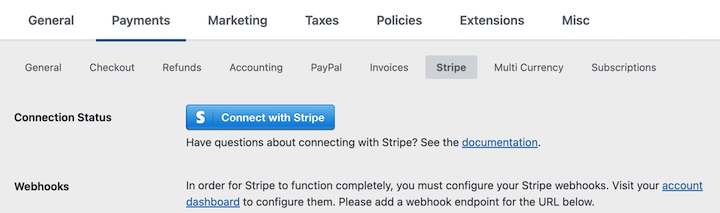
Als je al een Stripe-account hebt, wordt je gevraagd om in te loggen. Als je geen account hebt, word je door het gratis aanmeldingsproces geleid.
Na het inloggen of aanmelden zal Stripe je vragen om de verbinding tussen je Stripe-account en je WordPress-website te autoriseren. Bekijk de machtigingen en klik op Verbinden.
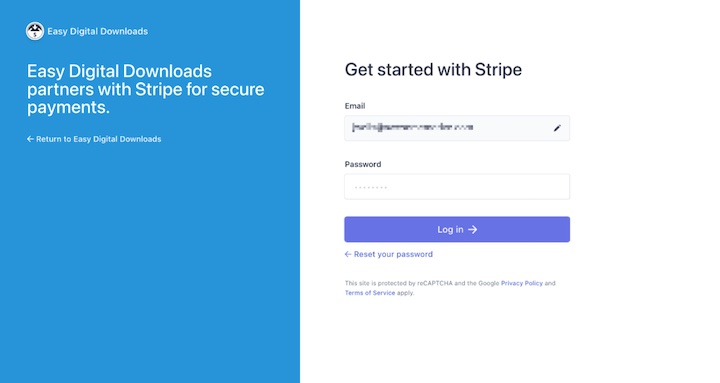
Zodra de verbinding is geautoriseerd, word je automatisch teruggestuurd naar je EDD-betalingsinstellingen.
Je zou een bevestigingsbericht moeten zien dat aangeeft dat je Stripe-account is verbonden. Selecteer onder Verbindingsstatus de optie Webhooks automatisch instellen.

U kunt ze handmatig toevoegen. Maar deze methode is over het algemeen voor meer gevorderde gebruikers, of als u problemen ondervindt met de automatische verbindingsoptie.
Op deze pagina vind je ook een aantal andere instellingen en aanpassingsopties.
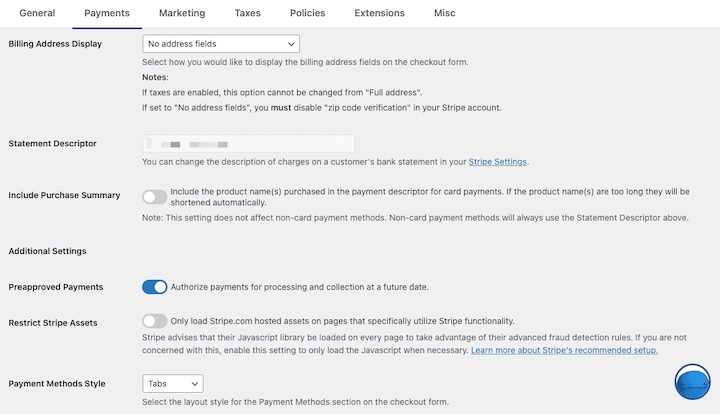
Je kunt bijvoorbeeld Stripe-assets beperken, de betaalomschrijving wijzigen en een aankoopoverzicht toevoegen.
⚙️ Bekijk onze Stripe-installatiedocumentatie voor meer informatie.
Stap 3: Voorkeursbetaalmethoden configureren
Door Stripe als je EDD-betaalgateway te gebruiken, kun je bankoverschrijvingen en ACH-betalingen, debetkaarten en creditcards, en Apple/Google Pay accepteren.
De Stripe Payment Element-integratie van EDD geeft verbonden accounts toegang tot aanvullende betalingsopties. Dit omvat:
| Kaarten | Koppeling |
| Bevestigen | Bancontact |
| AliPay | EPS |
| Klarna | BLIK |
| Amazon Pay | giropay |
| Apple Pay | iDEAL |
| CashApp Pay | Przelewy2 |
| Google Pay | WeChat Pay |
| SEPA | Bacs |
Om ingeschakelde betaalmethoden in EDD te bekijken en toe te voegen, ga naar Downloads » Instellingen » Betalingen » Stripe. Beheer vervolgens welke zijn ingeschakeld onder Betaalmethoden.
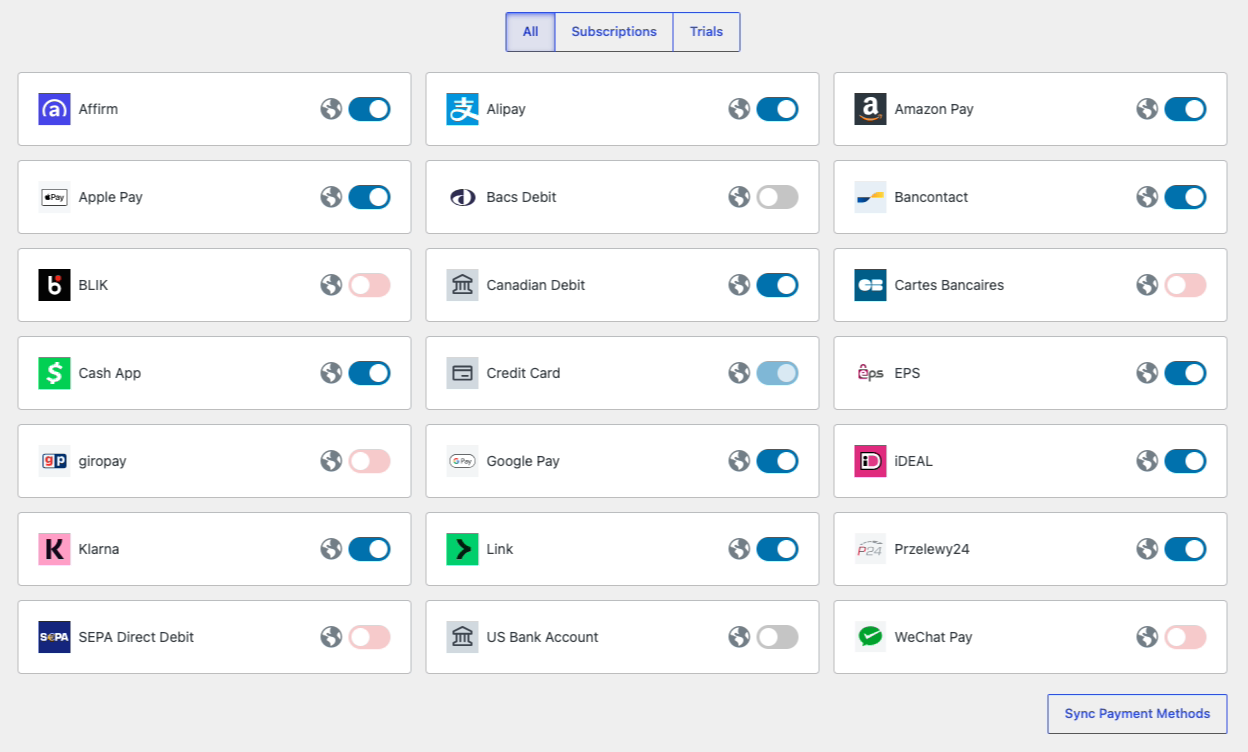
De opties die je klanten kunt aanbieden, kunnen variëren afhankelijk van factoren zoals valuta, land en wat er in hun winkelwagentje zit.
Sommige providers vereisen aanvullende stappen, zoals het aanvragen van toegang, om te configureren en in te schakelen. Je kunt dit doen vanuit je Stripe-dashboard. Ga naar Instellingen ⚙︎ gevolgd door Betalingen.
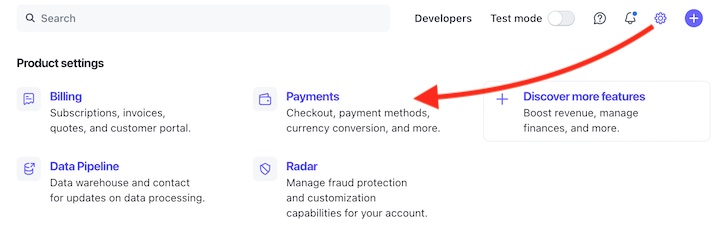
Klik onder het tabblad Betaalmethoden op Inschakelen naast degene die je wilt toevoegen. Er staat dan In afwachting totdat deze is goedgekeurd.
Stap 4: Je betaalformulier en afrekenpagina aanpassen
Nadat je de betalingsinstellingen hebt geconfigureerd, kun je ook het uiterlijk en de lay-out van je betaalformulier en afrekenpagina aanpassen.
Onder dezelfde tab Instellingen » Betalingen » Stripe, is er een vervolgkeuzemenu Stijl betaalmethoden.
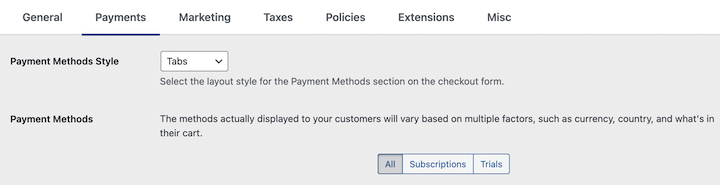
Je kunt Tabs of Accordion kiezen als lay-outstijl voor het afrekenformulier. Zo verschijnen ze op het afrekenformulier voor je klanten.
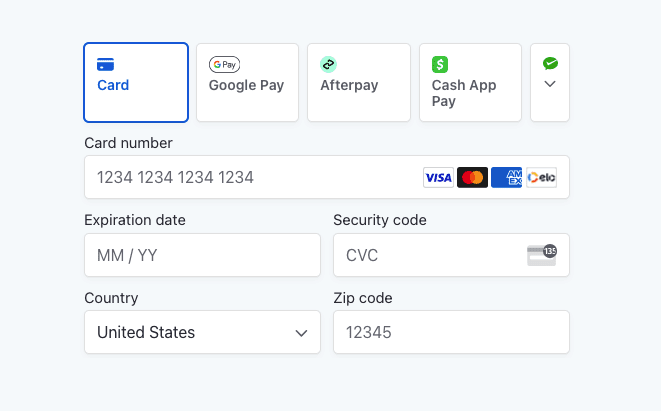
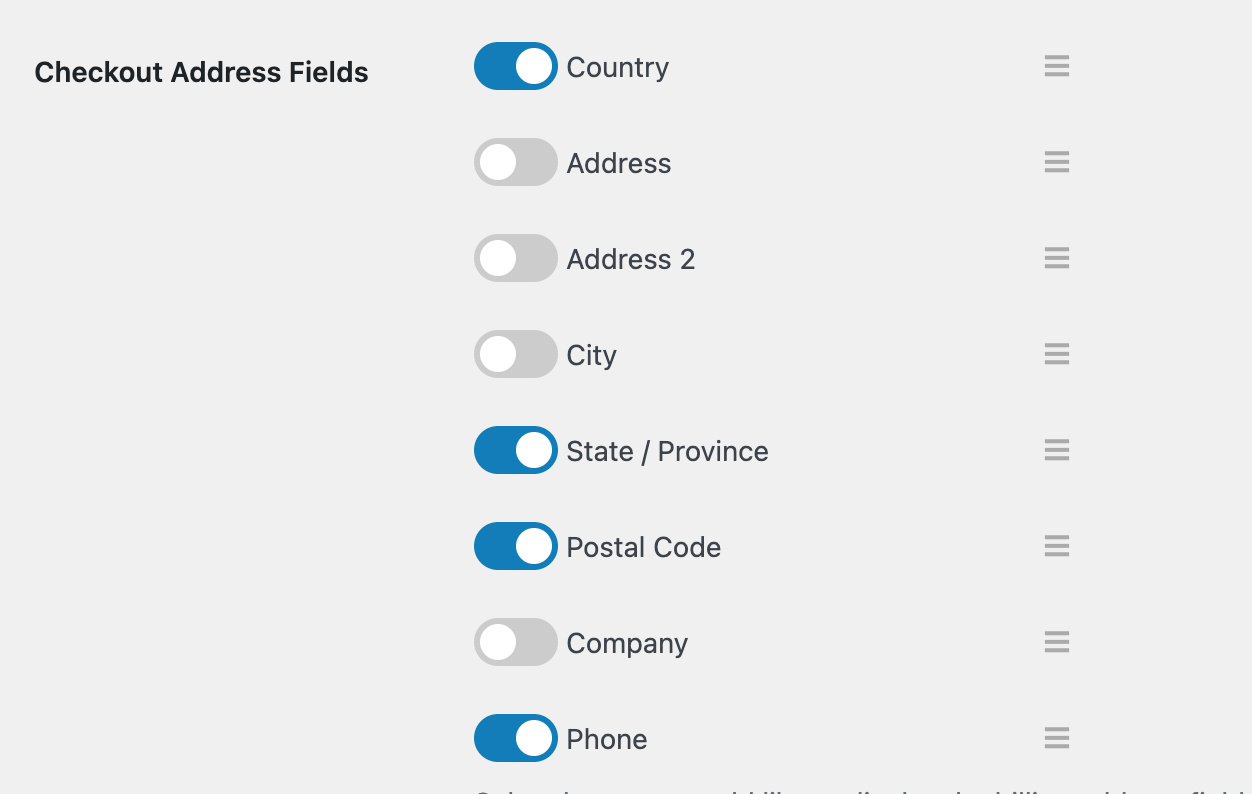
Op deze pagina kun je ook de instellingen voor Weergave factuuradres aanpassen. Meer afrekeninstellingen vind je onder Instellingen » Betalingen » Afrekenen. Je kunt bijvoorbeeld de adresvelden aanpassen voor het afrekenformulier.
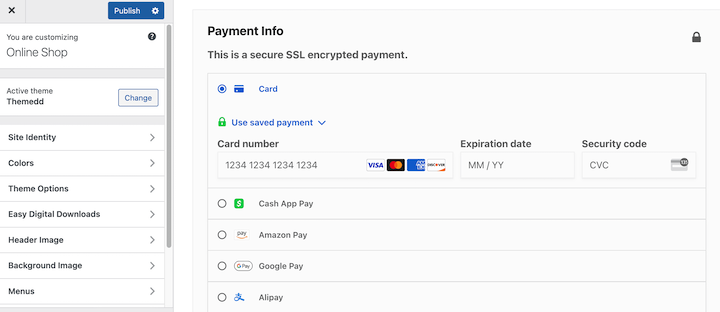
Easy Digital Downloads maakt automatisch een WordPress-afrekenpagina (Pagina's » Afrekenen) die de EDD Checkout-blok gebruikt.
Houd er rekening mee dat het algehele ontwerp en uiterlijk van je afrekenpagina is gebaseerd op je WordPress-thema. Je vindt de instellingen voor ontwerp-aanpassing onder Uiterlijk » Aanpassen.
💡 Leer meer manieren om je EDD-winkel aan te passen.
Stap 5: Je betaalmethoden en instellingen testen
Voordat u live gaat, bekijkt u een voorbeeld van uw online winkel vanuit de voorkant van uw site. Naast het controleren of alles eruitziet zoals het hoort, voert u meerdere testtransacties uit om te verifiëren dat de betaalmethoden die u hebt ingesteld correct werken.
Om dit te doen, moet u een product in uw winkel hebben (echt of een demo). U moet ook Testmodus inschakelen inschakelen onder Instellingen » Betalingen.
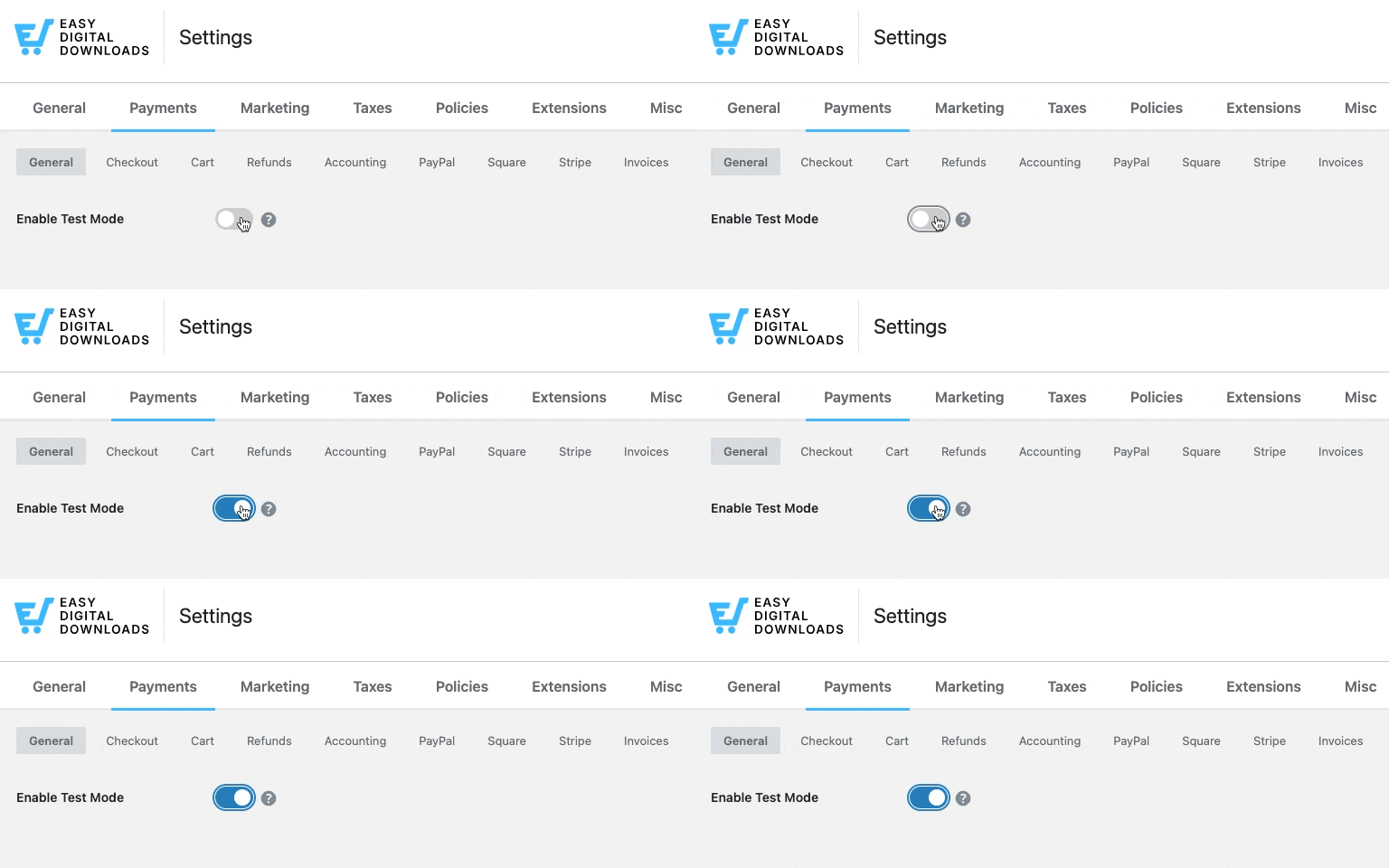
Sla je wijzigingen op.
Voeg vanaf de voorkant van uw site een product toe aan uw winkelwagen en ga naar de kassa. Voltooi het afrekenproces zoals een klant dat zou doen.
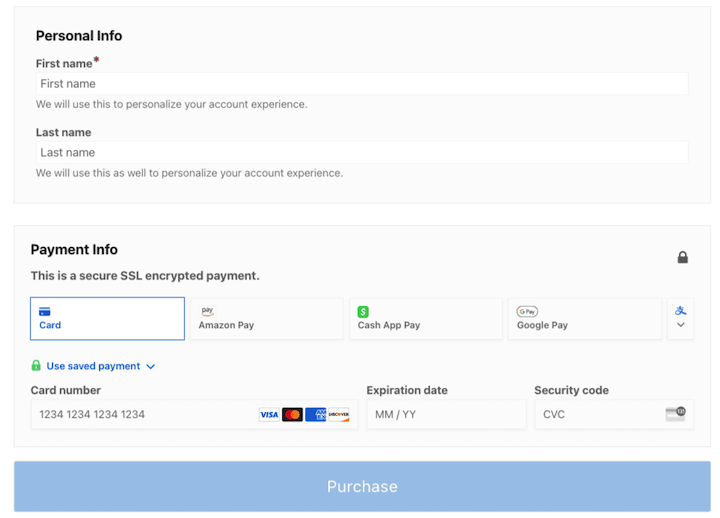
Gebruik de testkaartnummers van Stripe om de testtransactie uit te voeren.
- Kaartnummer: 4242 4242 4242 4242
- Vervaldatum: Elke toekomstige datum
- CVC: Elk getal van drie cijfers
Als de aankoop 'succesvol' was, ziet u een pagina met aankoopbevestiging.
Dat is alles!
Veelgestelde vragen over het toevoegen van meerdere betaalmethoden in WordPress
Laten we afsluiten met enkele veelgestelde vragen over het laten kiezen van een betaalmethode door klanten in WordPress.
Wat is de gemakkelijkste manier om klanten een betaalmethode te laten kiezen in WordPress?
De beste plugin om te gebruiken hangt af van wat u verkoopt. Als u een bedrijf met digitale producten hebt, zijn Easy Digital Downloads en Stripe de beste oplossing. Hun ingebouwde integratie ondersteunt kaarten, digitale portemonnees, 'later betalen'-opties en regionale betaalmethoden vanuit één instellingenpaneel.
Als u een eenvoudig betalingsformulier toevoegt, kunnen WP Simple Pay of WPForms helpen.
Wat zijn de beste manieren om betalingen van klanten te ontvangen?
Het kiezen van de juiste online betaalmethode voor uw bedrijf hangt af van verschillende factoren. De meeste betalingsproviders hebben verwerkingskosten die variëren op basis van wat en waar u verkoopt.
Het hangt ook af van het platform dat u gebruikt. Voor eCommerce-transacties in WordPress raden we Stripe aan. Het ondersteunt het breedste scala aan betaalmethoden en heeft een sterke ingebouwde fraudebescherming.
Welke betaal-gateways zijn compatibel met EDD?
Easy Digital Downloads ondersteunt een reeks betalingsgateways. De beschikbare opties zijn afhankelijk van uw EDD-abonnement. Momenteel ondersteunde gateways zijn onder andere:
- Stripe (ingebouwd; alle abonnementen)
- PayPal (ingebouwd; alle abonnementen)
- Square (ingebouwd; alle abonnementen)
- Authorize.net
- Apple Pay en Google Pay (via Stripe)
- Amazon Pay (via Stripe Payment Element)
- En meer via integraties
Ondersteunt Easy Digital Downloads 'koop nu, betaal later' (BNPL)?
Ja. Via de Stripe Payment Element-integratie van EDD kunt u 'later betalen'-opties zoals Klarna en Affirm inschakelen bij het afrekenen. Deze methoden verschijnen automatisch op basis van de locatie en het winkelwagenbedrag van de klant.
U hebt een EDD-abonnement nodig met Stripe verbonden om toegang te krijgen tot het Stripe Payment Element en het volledige scala aan BNPL-opties.
Hoeveel betaalmethoden moet ik aanbieden in mijn WordPress-winkel?
Een goed startpunt is drie tot vier methoden: een grote credit- en debetkaartverwerker, een digitale portemonnee zoals Apple Pay of Google Pay, en een 'later betalen'-optie zoals Affirm. Te weinig aanbieden beperkt uw bereik; te veel aanbieden kan klanten overweldigen bij het afrekenen.
EDD's Stripe Payment Element toont automatisch de meest relevante opties op basis van de locatie en het apparaat van elke klant, zodat u de volledige lijst niet handmatig hoeft te beheren.
Laat klanten een betaalmethode kiezen
Het aanbieden van meerdere betaalopties aan klanten is een cruciaal onderdeel van het runnen van een succesvolle online onderneming. Door klanten een betaalmethode te laten kiezen uit een verscheidenheid aan betrouwbare opties, kunt u de klanttevredenheid verhogen, conversies stimuleren en uw marktbereik vergroten.
Met Easy Digital Downloads en Stripe is het toevoegen van meerdere betaalopties aan uw WordPress-site eenvoudig. Koop een EDD-pas en maak binnen enkele minuten verbinding met Stripe.
Wat is de volgende stap? Leer hoe u onvrijwillige churn kunt verminderen met eenmalige updates van betaalkaarten!
📣 P.S. Vergeet niet om zich te abonneren op onze nieuwsbrief en ons te volgen op Facebook, Twitter/X, of LinkedIn voor meer WordPress-bronnen!








