


Het verkopen van digitale producten is een van de beste manieren om online een bedrijf op te bouwen. Er is geen voorraad te beheren, geen verzending te coördineren en uw producten kunnen de klok rond verkopen zonder extra werk van uw kant.
Het moeilijke is niet om iets te maken dat de moeite waard is om te verkopen. Het is uitzoeken waar en hoe je het verkoopt.
Marktplaatsen zoals Gumroad of Etsy maken het gemakkelijk om te beginnen, maar ze nemen een deel van elke verkoop en laten je weinig controle over je winkel, je prijzen of je klantrelaties. Het bouwen van je eigen digitale downloadwinkel op WordPress is anders. Jij bepaalt de regels.
Met Easy Digital Downloads (EDD), vertrouwd door meer dan 50.000 bedrijven, kun je binnen een uur een volledig werkende winkel operationeel hebben. Je behoudt je inkomsten (minus standaard betalingsverwerkingskosten), bent eigenaar van je klantgegevens en beheert elk deel van hoe je winkel eruitziet en functioneert.
Deze gids behandelt elke stap, van het verkrijgen van hosting tot het doen van je eerste verkoop.
- Belangrijkste punten
- Wat is een digitale downloadwinkel?
- Wat kun je verkopen in een digitale downloadwinkel?
- EDD vs. WooCommerce: Welke moet je gebruiken?
- Hoe maak je een digitale downloadwinkel in WordPress
- Veelgestelde vragen over het maken van een digitale downloadwinkel
- Begin vandaag nog met het verkopen van je digitale producten
Belangrijkste punten
| Beste plugin | Easy Digital Downloads is speciaal gebouwd voor digitale verkopers en werkt met elke WordPress-site. |
| Wat je kunt verkopen | eBooks, software, foto's, muziek, sjablonen, cursussen en elk downloadbaar bestand. |
| Kosten om te starten | De EDD-kernplugin is gratis; geavanceerde functies zijn beschikbaar via betaalbare betaalde pass-niveaus. |
| Installatietijd | De meeste winkels zijn binnen een uur operationeel met de onboarding-wizard van EDD. |
| Betalingsopties | Stripe en PayPal worden direct ondersteund in het gratis abonnement. |
Wat is een digitale downloadwinkel?
Een digitale downloadwinkel is een online winkel waar klanten downloadbare bestanden kopen en direct ontvangen. Er wordt geen fysiek product verzonden. Na het afrekenen krijgt de koper een beveiligde link om zijn aankoop direct te downloaden.
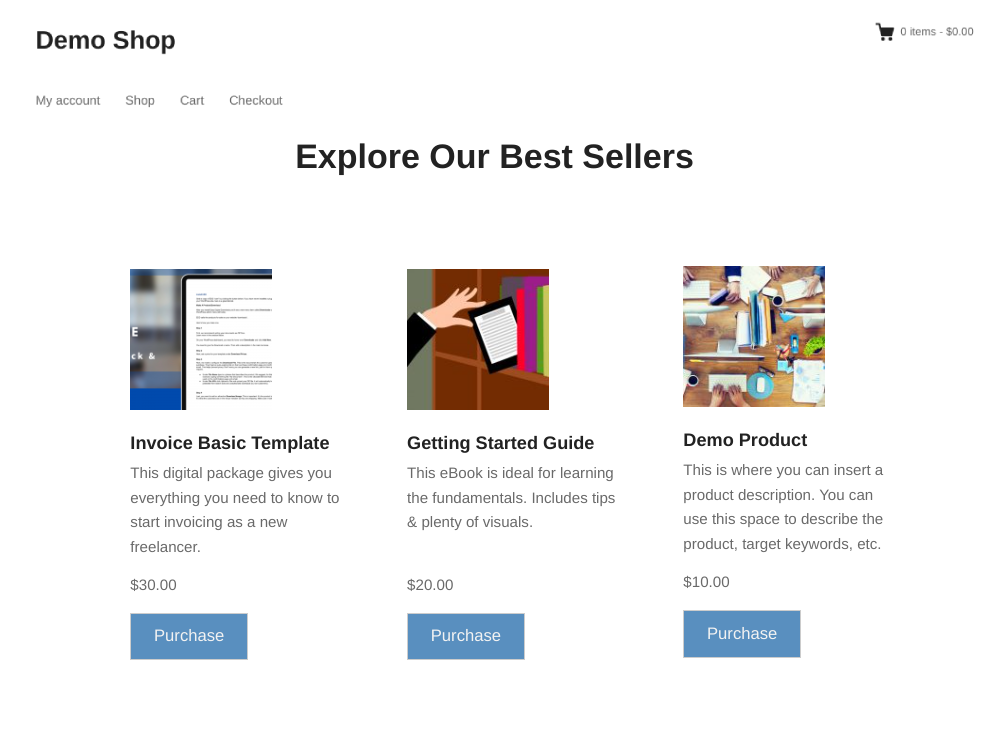
Dit model werkt voor elk bestand dat je eenmaal kunt maken en herhaaldelijk kunt verkopen: documenten, audio, video, software en meer. Je maakt het product één keer en EDD regelt de levering telkens als iemand het koopt.
Het belangrijkste verschil tussen je eigen winkel en een marktplaats is eigendom. Op een marktplaats bepaalt het platform je prijsopties, neemt het een percentage van elke verkoop en is het eigenaar van de klantrelatie.
Je eigen WordPress-winkel geeft je volledige controle over alle drie, en dat leidt op de lange termijn tot aanzienlijk hogere marges.
Wil je meer leren? Bekijk:
- Hoe maak je een online winkel met WordPress
- Marktplaats vs. Uw Eigen Winkel (Welke is beter?)
- Hoe te verhuizen: Marktplaats ➡️ Je eigen digitale winkel
Wat kun je verkopen in een digitale downloadwinkel?
Bijna alles wat als bestand kan worden opgeslagen. Hier zijn de populairste digitale producttypen:
- eBooks en PDF-handleidingen: Geschreven inhoud, handleidingen, kookboeken, sjablonen en rapporten
- Software en plugins: Desktop-apps, WordPress-plugins en thema's (met geautomatiseerde levering van licentiesleutels via de Software Licensing-functie van EDD)
- Stockfoto's en digitale kunst: Afbeeldingspakketten, illustraties, iconen en ontwerpassets
- Muziek en audio: Nummers, geluidspakketten, beats en audiocursussen
- Video-inhoud: Tutorialopnames, cursussen en film
- Sjablonen: Canva-sjablonen, PowerPoint-presentaties, Figma-bestanden en document-sjablonen
- Werkbladen en planners: Printables, trackers en educatief materiaal
- Online cursusmateriaal: Gestructureerde leermateriaal geleverd als downloadbare bestanden of ZIP-pakketten
Easy Digital Downloads ondersteunt elk bestandstype dat WordPress accepteert in de Mediatheek, dus je bent niet beperkt tot een specifiek formaat.
EDD vs. WooCommerce: Welke moet je gebruiken?
Als je alleen digitale producten verkoopt, is Easy Digital Downloads de betere keuze.
WooCommerce is een krachtig platform, maar het is gebouwd voor fysieke goederen. Functies zoals verzendopties, voorraadbeheer en productgewichtvelden zijn nuttig als je T-shirts verkoopt. Ze voegen onnodige complexiteit toe als je eBooks of software verkoopt.
EDD is exclusief gebouwd voor digitale verkopers, dus elke functie die het bevat, is er een die je daadwerkelijk zult gebruiken.
| Easy Digital Downloads | WooCommerce | |
|---|---|---|
| Gebouwd voor digitale goederen | Ja | Nee (gebouwd voor fysiek) |
| Gratis kernplugin | Ja | Ja |
| Beheer van licentiesleutels | Ja (Software Licensing functie) | Nee |
| Installatiecomplexiteit | Eenvoudig | Meer betrokken |
| Fysieke goederenfuncties die je niet nodig hebt | Geen | Veel |
Als je van plan bent fysieke en digitale producten samen te verkopen, is WooCommerce misschien het overwegen waard. Voor een puur digitale winkel wint EDD op focus en eenvoud.
🔎 Meer informatie over EDD vs Woo
Hoe maak je een digitale downloadwinkel in WordPress
Laten we nu ingaan op de tutorial over hoe je een digitale downloadwinkel maakt in WordPress.
Hier is het volledige proces, van het instellen van je site tot het doen van je eerste verkoop.
Stap 1: Verkrijg een domeinnaam en hosting
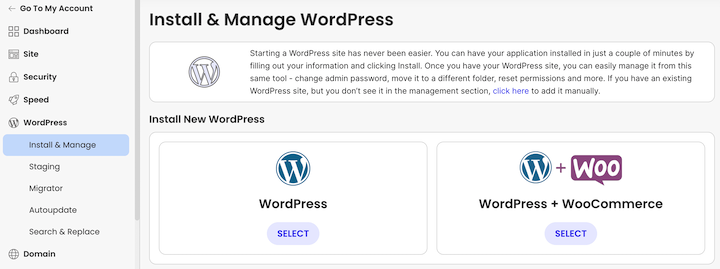
Voordat je WordPress kunt installeren, heb je een domeinnaam en een hostingplan nodig.
Uw domeinnaam is het adres van uw winkel op het web (bijvoorbeeld uwwinkel.com). Houd het kort, makkelijk te spellen en relevant voor wat u verkoopt. Gebruik indien mogelijk een .com-extensie en vermijd getallen en koppeltekens die het moeilijker maken om het mondeling door te geven.
Voor hosting heeft u een provider nodig die het volgende omvat:
- Eén-klik WordPress-installatie
- Een gratis SSL-certificaat (vereist voor veilige afrekening)
- Betrouwbare uptime en solide laadsnelheden
- Ondersteuning die u daadwerkelijk kunt bereiken als er iets misgaat
Managed WordPress-hostingproviders zoals SiteGround, WP Engine of Bluehost zijn solide opties die goed werken met Easy Digital Downloads. Zij beheren serveronderhoud voor u, zodat u zich kunt concentreren op het runnen van uw winkel in plaats van op het beheren van technische infrastructuur.
Stap 2: Installeer Easy Digital Downloads
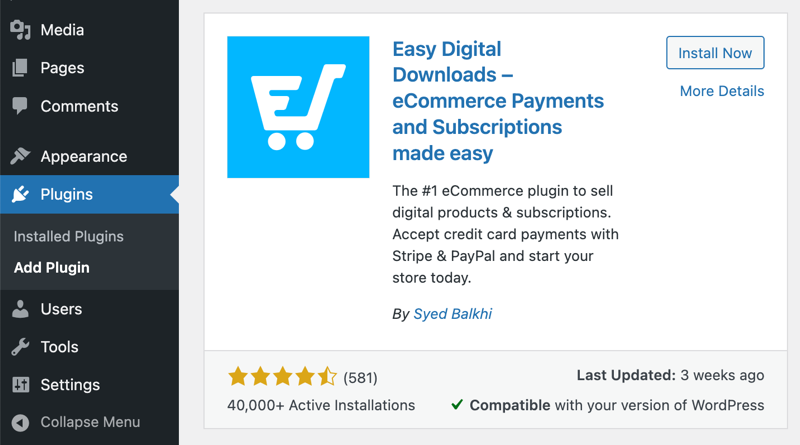
Easy Digital Downloads is een freemium plugin die rechtstreeks beschikbaar is in de WordPress plugin directory.
Ga in uw WordPress-dashboard naar Plugins » Nieuwe plugin toevoegen. Zoek naar "Easy Digital Downloads", klik vervolgens op Nu installeren en Activeren.
Eenmaal geactiveerd, voegt EDD een Downloads-menu toe aan uw dashboard. De eerste keer dat u het uitvoert, begeleidt de onboarding-wizard u door de initiële instellingen: het invoeren van uw bedrijfsnaam en locatie, het verbinden van een betaalpoort, en het toevoegen van uw eerste product.
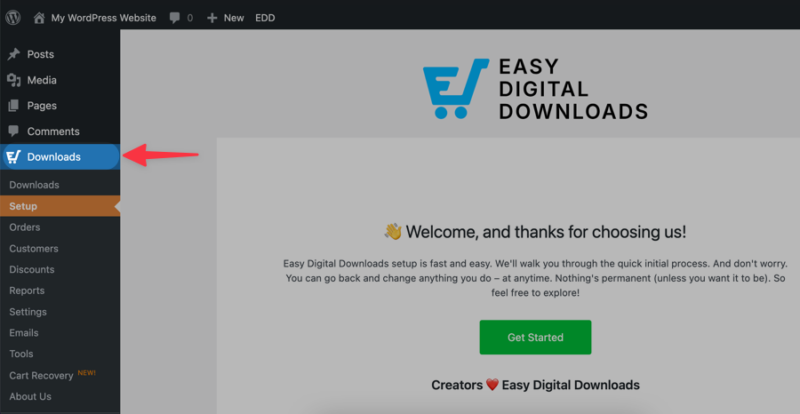
U kunt de wizard nu voltooien of overslaan en elke sectie handmatig configureren. Hoe dan ook, de wizard behandelt de meeste stappen zoals de onderstaande stappen, dus er is geen verkeerde aanpak.
De gratis Easy Digital Downloads plugin bevat alles wat u nodig heeft om een winkel te maken, onbeperkte producten toe te voegen en betalingen te accepteren. Premium functies zijn beschikbaar via de betaalde pass-niveaus van EDD als u ze later nodig heeft.
💡 Voel je vrij om deze handleidingen te raadplegen:
Stap 3: Kies een thema voor je winkel
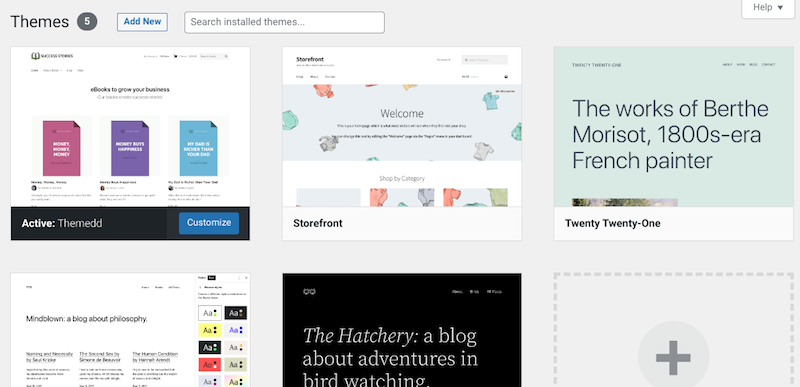
Easy Digital Downloads werkt met de meeste WordPress-thema's, maar een paar zijn speciaal ontworpen voor digitale downloadwinkels en maken de installatie nog eenvoudiger.
Twee thema's gebouwd voor EDD:
- Vendd: Een schoon, minimaal thema speciaal ontworpen voor Easy Digital Downloads-winkels, met ingebouwde styling voor productpagina's en afrekenen
- Themedd: Een flexibel EDD-native thema met volledige ondersteuning voor de lay-out en afrekenfuncties van EDD direct uit de doos
Als u liever een algemener thema gebruikt, zoek er dan een dat snel laadt, goed werkt op mobiel en een schone lay-out van de productpagina heeft. Thema's zoals GeneratePress passen goed bij EDD.
Om een thema te installeren, ga naar Uiterlijk » Thema's » Nieuwe toevoegen en zoek op naam.
Stap 4: Verbind een betaalpoort
Om betalingen te verwerken, moet u ten minste één betaalpoort verbinden. Ga naar Downloads » Instellingen en klik op het tabblad Betalingen.
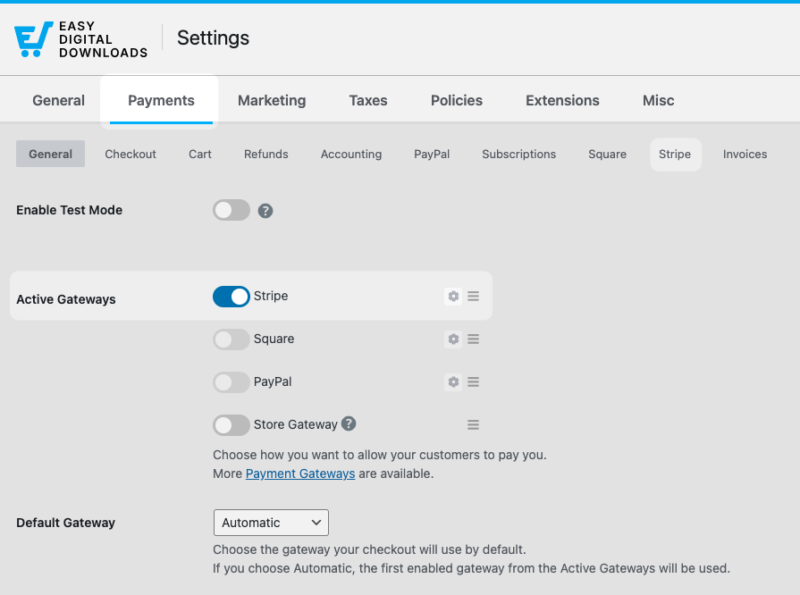
EDD bevat ingebouwde ondersteuning voor Stripe, PayPal en Square in het gratis abonnement.
Stripe is de aanbevolen keuze voor de meeste winkels. Het verwerkt betalingen direct op uw afrekenpagina, zodat klanten uw site nooit verlaten om een aankoop te voltooien.
Nadat u het hebt ingeschakeld onder het tabblad Betalingen, gaat u naar het tabblad Stripe. Klik vervolgens op Verbinden met Stripe en volg de instructies om uw Stripe-account te koppelen. Stripe brengt een standaardtarief per transactie in rekening en geen extra platformkosten.
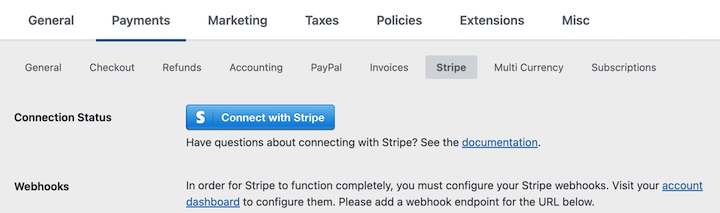
PayPal is een sterke secundaire optie, vooral als een deel van uw kopers liever met een PayPal-saldo betaalt.
Nadat u een betaalmethode hebt gekoppeld, voert u een testtransactie uit voordat u uw winkel opent voor het publiek. Schakel de testmodus in onder Downloads » Instellingen » Betalingen » Algemeen, plaats een testbestelling en bevestig dat het aankoopproces van begin tot eind werkt.
⚙️ Raadpleeg onze Stripe Setup-documentatie voor volledige begeleiding bij dit proces.
Aanvullende betaalproviders, waaronder Authorize.net en andere, zijn beschikbaar via de betaalde pass-niveaus van EDD.
Stap 5: Voeg je digitale producten toe
Hier begint uw winkel vorm te krijgen.
Ga naar Downloads » Download toevoegen.
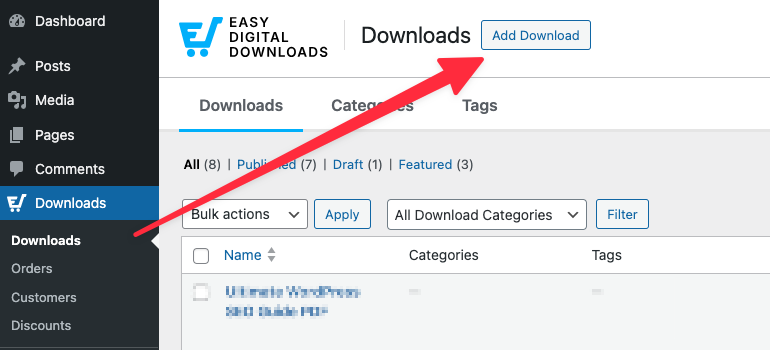
De producteditor lijkt op de standaard WordPress-posteditor, met een paar extra secties voor prijsstelling en bestandsbeheer.
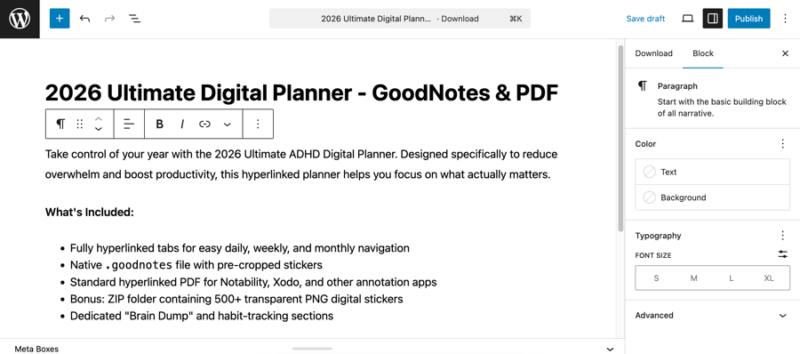
Vul het volgende in voor elk product:
Producttitel. Gebruik een duidelijke, beschrijvende naam die kopers precies vertelt wat ze krijgen. Goede producttitels helpen ook bij de zichtbaarheid in zoekmachines.
Productbeschrijving. Gebruik de volledige editor om uit te leggen wat de koper krijgt, voor wie het is en waarom het waardevol is. Voeg opmaak, afbeeldingen of een voorbeeld toe als dat helpt.
Downloadprijs. Voer uw prijs in de sectie Download Details » Prijzen in.
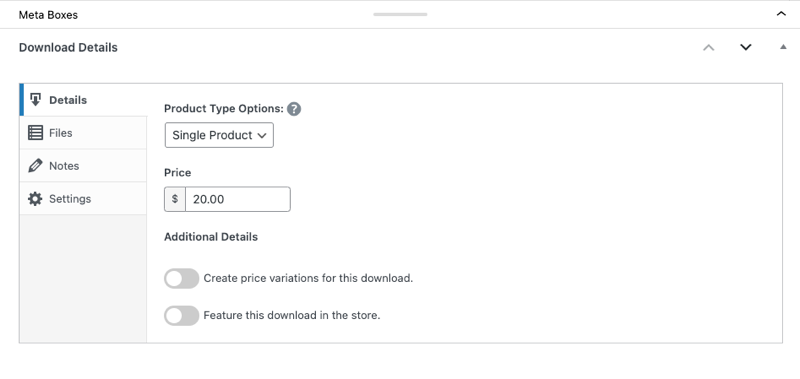
EDD ondersteunt ook variabele prijzen als u meerdere niveaus wilt aanbieden (bijvoorbeeld een persoonlijke licentie tegen één prijs en een commerciële licentie tegen een hogere prijs).
Downloadbestanden. Upload onder het tabblad Bestanden uw bestand rechtstreeks vanaf uw computer of plak een URL.
U kunt indien nodig meerdere bestanden aan één product koppelen. EDD regelt de veilige levering automatisch na elke aankoop.
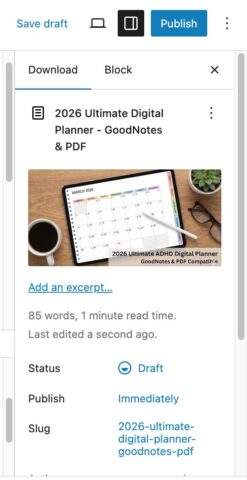
Productafbeelding. Klik in het rechterpaneel op Downloadafbeelding instellen.
Kies en upload een afbeelding die uw product een professionele uitstraling geeft in uw winkel en op productpagina's.
Wanneer u klaar bent, klikt u op Concept opslaan of Publiceren. Easy Digital Downloads maakt automatisch een afrekenpagina en een aankoopbevestigingspagina voor uw winkel.
U kunt beide vinden en bewerken onder Downloads » Instellingen » Pagina's.
Stap 6: Pas je winkel en afrekenproces aan
Een paar aanvullende instellingen maken uw winkel gepolijster en gemakkelijker te beheren.
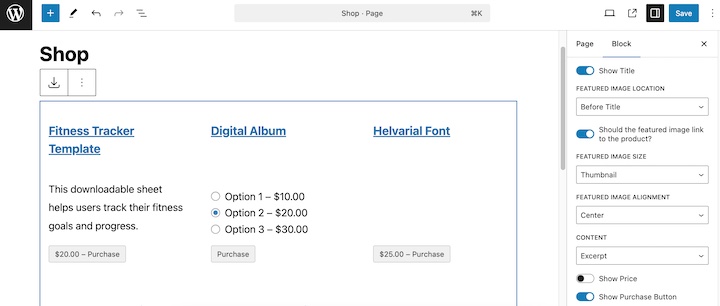
Winkelweergave-instellingen. Easy Digital Downloads gebruikt het EDD Products-blok om uw producten op elke pagina weer te geven. U kunt het aantal kolommen, de sorteervolgorde en meer regelen door de blokinstellingen direct aan te passen op de pagina waar uw winkel wordt weergegeven.
Kortingscodes. Het aanmaken van kortingsbonnen is eenvoudig. Ga naar Downloads » Kortingen » Korting toevoegen.
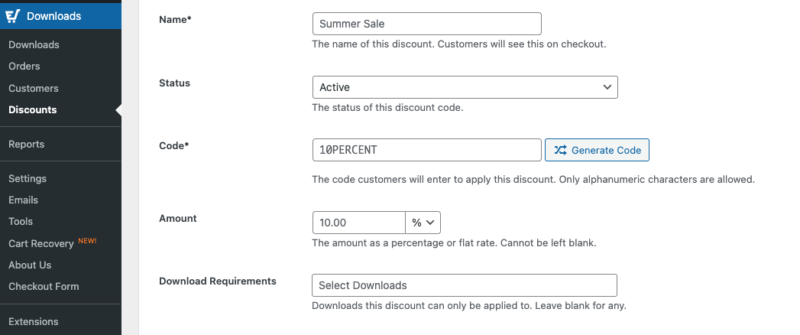
Stel een percentage of vast kortingsbedrag in, een optionele vervaldatum en een gebruiks limiet als u wilt dat de aanbieding verloopt na een bepaald aantal keren gebruiken. Kortingscodes zijn handig voor lanceringspromoties, aanbiedingen voor e-mailabonnees of om terugkerende klanten te belonen.
Vervaldatum downloadlink. Standaard bevatten de aankoopbevestigings-e-mails van EDD een beveiligde downloadlink. U kunt die links laten verlopen na een aantal dagen of na een bepaald aantal downloads.
Vind deze instelling onder Downloads» Instellingen » Diversen » Bestandsdownloads.
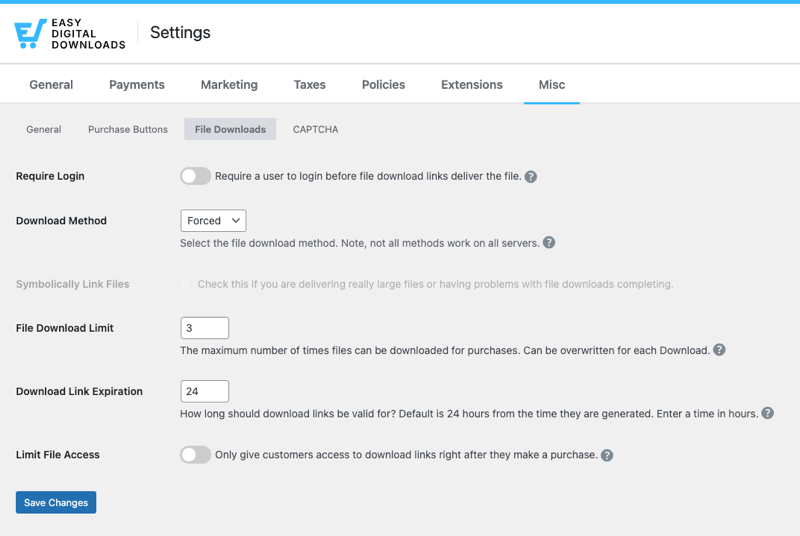
Het beperken van downloadtoegang helpt uw bestanden te beschermen tegen delen buiten de oorspronkelijke koper.
Aankoopbewijs e-mails. Easy Digital Downloads stuurt automatisch een aankoopbevestigings-e-mail naar elke koper. Pas de onderwerpregel, de naam van de afzender en de e-mailtekst aan onder Downloads » E-mails.
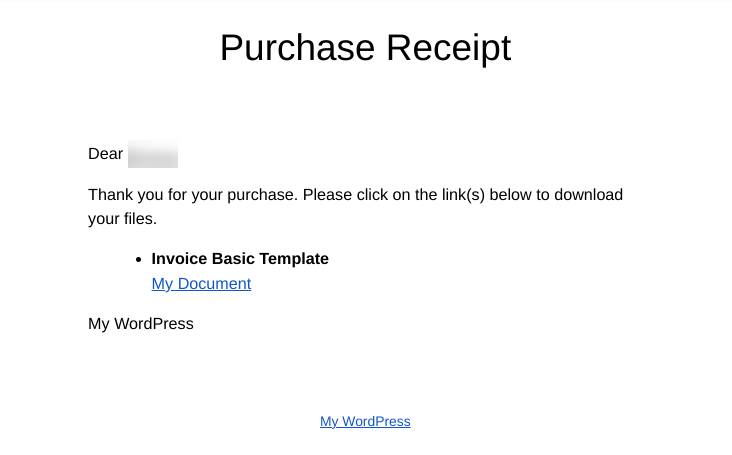
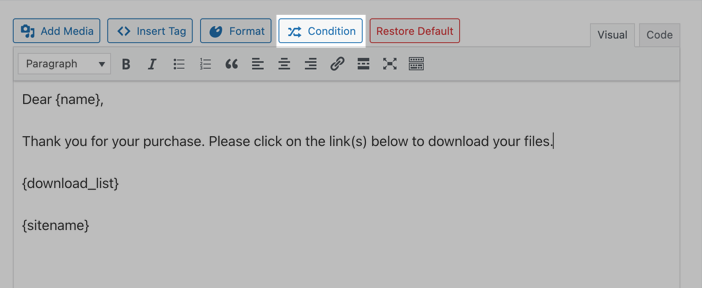
EDD bevat ingebouwde sjabloontags die u kunt invoegen om elk ontvangstbewijs te personaliseren met de naam van de koper en hun specifieke aankoopdetails.
Klik op Tag invoegen in de e-mail-editor om alle beschikbare opties te zien. U kunt ook een voorwaardelijke tag toevoegen om het bericht dat bepaalde klanten ontvangen aan te passen op basis van de door u ingestelde criteria.
⚙️ Leer hoe u uw aankoop-e-mails kunt personaliseren.
Stap 7: Promoot je digitale downloadwinkel
Het bouwen van uw winkel is slechts de helft van het werk. Hier leest u hoe u deze onder de aandacht brengt bij kopers.
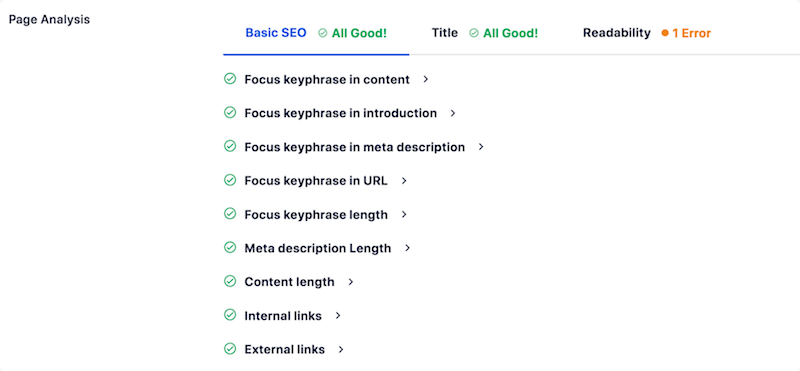
Elke productpagina in uw winkel is een kans om te ranken in zoekresultaten. Installeer een SEO-plugin zoals AIOSEO (All in One SEO) om metatitels en -beschrijvingen toe te voegen aan uw productpagina's, een XML-sitemap te genereren en inzicht te krijgen in hoe uw pagina's presteren.
Uw e-maillijst is een van de meest waardevolle bezittingen die u kunt opbouwen als digitale verkoper.
Koppel EDD aan een e-mailmarketingdienst zoals Mailchimp of ConvertKit om klanten automatisch aan uw lijst toe te voegen nadat ze een aankoop hebben gedaan. Gebruik uw lijst om nieuwe producten aan te kondigen, exclusieve promoties uit te voeren en eerdere kopers terug te laten komen voor herhaalaankopen.
In tegenstelling tot volgers op sociale media, is uw e-maillijst van u. Geen enkele algoritme-wijziging kan u van uw publiek afsluiten.
AffiliateWP integreert direct met Easy Digital Downloads en laat je filialen werven om je producten te promoten in ruil voor een commissie die jij instelt. Het is een van de meest kosteneffectieve manieren om nieuwe verkopen te stimuleren, omdat je alleen betaalt voor resultaten.
🔎 Hoe start je een affiliateprogramma
Content en sociale media
Het publiceren van blogposts, tutorials of korte video's met betrekking tot je niche bouwt organisch verkeer op lange termijn op en helpt je geloofwaardigheid bij je publiek te vestigen.
Deel nieuwe producten en kijkjes achter de schermen op de sociale platforms waar je kopers hun tijd doorbrengen. Consistentie is hier belangrijker dan perfectie.
Veelgestelde vragen over het maken van een digitale downloadwinkel
Laten we afsluiten met enkele veelgestelde vragen.
Is Easy Digital Downloads gratis?
Ja. De Easy Digital Downloads kernplugin is gratis te downloaden en te gebruiken vanaf WordPress.org. Het bevat alles wat je nodig hebt om een winkel te bouwen, producten toe te voegen en betalingen te accepteren via Stripe of PayPal. Geavanceerde functies zoals Software Licensing, Recurring Payments en prioriteitssupport zijn beschikbaar via de betaalde pass-niveaus van EDD.
Wat is de beste plugin voor het verkopen van digitale downloads in WordPress?
Easy Digital Downloads is de beste plugin voor het verkopen van digitale downloads in WordPress. Het is speciaal gebouwd voor digitale producten, dus er is geen extra complexiteit van functies voor fysieke goederen. Het regelt automatisch veilige bestandslevering, ondersteunt alle grote betalingsgateways en heeft een volledige bibliotheek met functies voor verkopers die geavanceerde functionaliteit nodig hebben, zoals abonnementen of licentiesleutelbeheer.
Kan ik gratis digitale downloads verkopen op WordPress?
Ja. Je kunt een winkel lanceren met de gratis Easy Digital Downloads plugin. Je moet nog steeds betalen voor domeinregistratie en webhosting, maar de plugin zelf kost niets. Standaard betalingsverwerkingskosten van Stripe of PayPal zijn van toepassing op elke transactie, maar Easy Digital Downloads brengt geen platform- of transactiekosten bovenop die kosten in rekening.
Verlopen downloadlinks voor digitale producten in EDD?
Ja, en jij beheert de instellingen. Ga naar Downloads » Instellingen » Diversen » Bestandsdownloads om de vervaldatum van de link in te stellen op basis van het aantal dagen of het aantal toegestane downloads. Het instellen van een vervaltermijn helpt je bestanden te beschermen tegen delen buiten de oorspronkelijke koper, zonder legitieme toegang te beperken.
Hoe worden digitale downloads geleverd aan klanten?
Nadat een klant de checkout heeft voltooid, stuurt Easy Digital Downloads automatisch een aankoopbevestigingsmail met een beveiligde downloadlink. De link brengt hen rechtstreeks naar hun bestand. Er is geen handmatige actie van uw kant nodig. Klanten kunnen ook inloggen op hun accountpagina op uw site om hun aankopen op elk moment te bekijken.
Is Easy Digital Downloads beter dan WooCommerce voor digitale producten?
Voor uitsluitend digitale winkels, ja. Easy Digital Downloads is exclusief ontworpen voor digitale goederen, dus de functieset is relevanter en de installatie is eenvoudiger. WooCommerce bevat tools voor verzending, voorraadbeheer en beheer van fysieke producten die onnodige complexiteit toevoegen wanneer u alleen bestanden verkoopt. Als u van plan bent om fysieke en digitale producten naast elkaar te verkopen, is WooCommerce mogelijk een betere keuze.
Hoeveel kost het om een digitale downloadwinkel in WordPress te bouwen?
Reken op ongeveer € 10 tot € 15 per jaar voor een domeinnaam en € 5 tot € 15 per maand voor webhosting. De kernplugin van Easy Digital Downloads is gratis. Geavanceerde functies zoals Software Licensing of Recurring Payments zijn beschikbaar via de betaalde pass-niveaus van EDD, die beginnen tegen een betaalbaar jaarlijks tarief. Betaalverwerkers zoals Stripe rekenen een standaardtarief per transactie, maar er worden geen platformkosten bovenop gerekend.
Begin vandaag nog met het verkopen van je digitale producten
Het creëren van een digitale downloadwinkel in WordPress is eenvoudiger dan de meeste mensen verwachten. Met de juiste hosting, de Easy Digital Downloads plugin en een beetje initiële configuratie, kunt u vandaag nog een professionele winkel hebben die betalingen accepteert.
Het grootste voordeel van het bezitten van uw eigen winkel gaat verder dan het besparen op marktplaatskosten. Het is de directe relatie die u opbouwt met uw klanten. U beheert uw prijzen, uw branding en uw gegevens. Geen enkele beleidswijziging van een platform kan dat wegnemen.
Meer dan 50.000 bedrijven verkopen al hun digitale producten met Easy Digital Downloads. Installeer de gratis plugin en lanceer vandaag nog uw winkel.
Als u klaar bent om te verkopen met meer geavanceerde functies, bekijk dan onze passes om te zien welke het beste bij uw behoeften past!
📣 P.S. Vergeet niet om zich te abonneren op onze nieuwsbrief en ons te volgen op Facebook, Twitter/X, of LinkedIn voor meer WordPress-bronnen!








