

EDD Blocks zijn beschikbaar op WordPress-pagina's wanneer de blokeditor wordt gebruikt. Ze zijn bedoeld als een eenvoudig en verbeterd alternatief voor hun equivalente shortcode. Blocks zijn beschikbaar voor gebruikers die EDD 3.1 en WordPress 5.8 of hoger gebruiken.
Opmerking: EDD-pagina's die een shortcode vereisen, kunnen het equivalente blok gebruiken in plaats van de shortcode. Niet alle shortcodes hebben block-equivalenten.
EDD Koopknop
De EDD Koopknop is een eenvoudig blok en voegt een enkele aankoopknop toe voor een specifieke download (toont prijsopties voor een variabele download). Het kan overal worden gebruikt.
EDD Winkelwagen (Widget)
De EDD Winkelwagen is bedoeld om te worden gebruikt in de WordPress-widgets, maar kan overal worden gebruikt waar blocks worden ondersteund. Het blok kan worden weergegeven als een miniwinkelwagen (alleen hoeveelheid/totaal tonen) of een gedetailleerde winkelwagen die lijkt op de winkelwagen op de afrekenpagina.
Blokinstellingen:
Mini Winkelwagen presenteert een winkelwagenicoon, aantal items en totaal. Wanneer uitgeschakeld, wordt een volledige winkelwagen gepresenteerd, met een lijst van toegevoegde producten en bedragen.
Verbergen indien leeg verbergt dit blok als er geen items aan de winkelwagen zijn toegevoegd.
Verbergen op afrekenpagina verbergt het blok bij het bezoeken van de afrekenpagina.
Link Winkelwagen naar Afrekenen voegt een link toe naar uw afrekenpagina.
Aantal items in winkelwagen tonen toont het aantal items dat aan de winkelwagen is toegevoegd.
Winkelwagen Totaal tonen toont de totale kosten van de items in de winkelwagen.
EDD Afrekenen
Het afrekenblok is bedoeld om te worden gebruikt op de Afrekenpagina in plaats van de [download_checkout] shortcode. Dit heeft een verbeterd ontwerp ten opzichte van de shortcode en is op de hoogte of de gebruiker is ingelogd.
Het afrekenblok wordt opgesplitst in individuele blokken voor de winkelwagen, persoonlijke informatie, betalingsgegevens en een kortingsformulier, elk met zijn eigen instellingen, en een lay-outpaneel biedt verschillende kant-en-klare startlay-outs. Zie Uw afrekenpagina lay-out aanpassen voor de volledige handleiding.
EDD Bevestiging
Dit blok lijkt erg op het ontvangstbewijsblok, maar mag niet in plaats daarvan worden gebruikt, omdat het bijvoorbeeld geen details uit abonnementsinformatie bevat. Dit is een bijgewerkte versie van [edd_receipt], maar wordt alleen gebruikt op de orderbevestigingspagina. Het kan niet worden gebruikt op de ontvangstpagina van de bestelling (gebruik in plaats daarvan het EDD Ontvangstbewijsblok).
EDD Inloggen
Het EDD Inloggen blok stelt u in staat om een inlogformulier aan elke pagina toe te voegen.
EDD Bestelgeschiedenis
Het Bestelgeschiedenis blok toont de aankoopgeschiedenis, bedoeld voor gebruik op een klantaccountpagina.
EDD Downloads van gebruiker
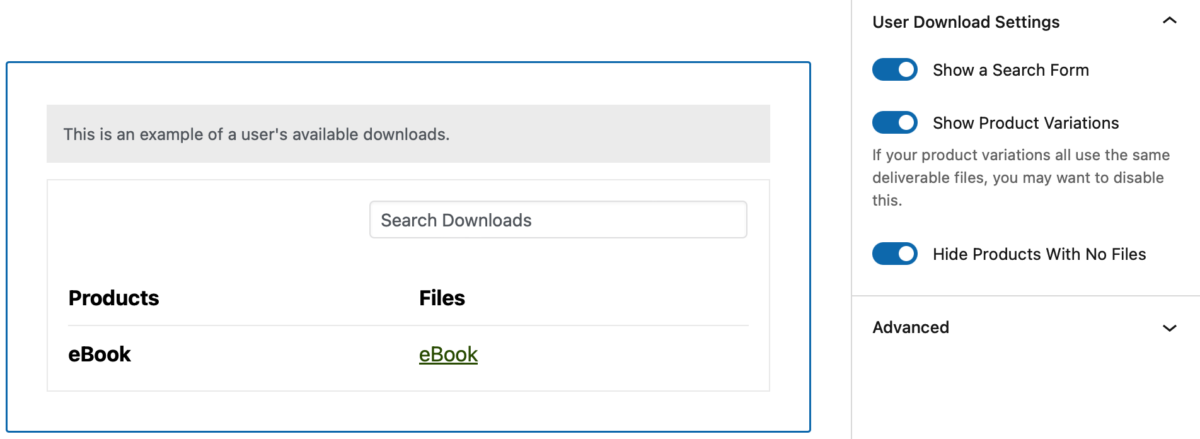
Het Gebruikers Downloads blok toont een lijst met bestanden die beschikbaar zijn voor de klant om te downloaden. Dit blok vervangt de [download_history] shortcode. Beschikbare blokinstellingen:
Zoekformulier tonen: Wanneer ingeschakeld, verschijnt er een zoekformulier bovenaan het blok. Deze functie is alleen beschikbaar voor Easy Digital Downloads (Pro) gebruikers.
Productvariatie tonen: Als uw productvariaties toegang hebben tot dezelfde bestanden, wilt u dit misschien verbergen.
Producten zonder bestand verbergen: Wanneer ingeschakeld, worden producten zonder bestanden niet in de lijst weergegeven.
EDD Producten
Het EDD Producten blok toont uw product(en) met rijen en kolommen. Het is een vervanging voor de [downloads] shortcode. Er zijn een aantal blokinstellingen beschikbaar om aan te passen hoe uw producten worden weergegeven.
EDD Profiel-editor
Het EDD Profiel-editorblok voegt een klantgericht accountbeheergebied toe aan elke pagina op uw WordPress-site. Hiermee kunnen uw klanten eenvoudig hun eigen informatie en accountgegevens bijwerken zonder een ondersteuningsverzoek in te dienen.
EDD Bon
De bonblok is een gedetailleerde bon en de bestelling is vergelijkbaar met de shortcode, hoewel alle markup is vernieuwd voor verbeterde responsiviteit. Het is bedoeld om te worden gebruikt op de "Bonpagina" (voorheen "Succespagina").
Wanneer de bonblok wordt bekeken als een gebruiker die niet is ingelogd, moet u een van de twee flows ervaren:
- Als de aankoop geen gebruikers-ID heeft (het is een gastenaankoop), kunt u het e-mailadres van de koper invoeren om de bestelling te bevestigen en alle details te bekijken.
- Als de aankoop een gebruikers-ID heeft die ermee is geassocieerd, krijgt u een inlogformulier.
EDD Registratie
Het EDD Registratieblok presenteert een WordPress-gebruikersregistratieformulier.
EDD Downloadvoorwaarden (Categorieën / Tags)
Het EDD Voorwaardenblok toont downloadcategorieën of tags. Bezoekers kunnen op de naam van de categorie / tag klikken en producten binnen die term bekijken.



