

Met de EDD Cross-sell en Upsell Pro-functie kun je klanten op het juiste moment gerelateerde producten aanbevelen: terwijl ze een product bekijken, en opnieuw bij het afrekenen.
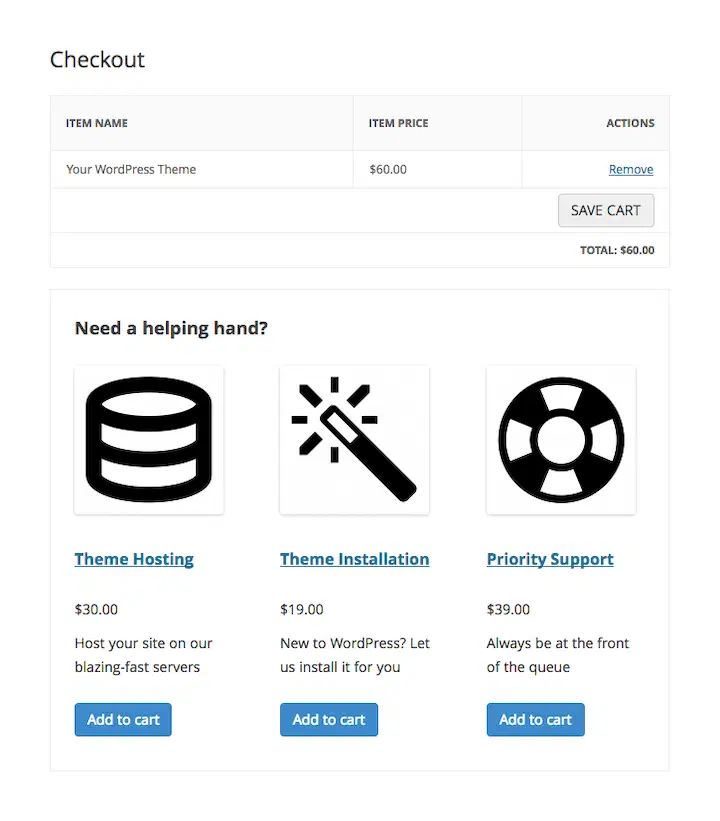
Hier is het onderscheid dat er het meest toe doet: Upsells verschijnen op je productpagina's, onder de productbeschrijving. Cross-sells verschijnen op de afrekenpagina, onder de winkelwagen.
De rest van dit document leidt je door het instellen van aanbevelingen, het begrijpen van wat je klanten zien, het lezen van je rapporten en het oplossen van veelvoorkomende problemen.
Hoe Cross-sells en Upsells eruitzien voor klanten
Voordat je iets instelt, is het handig om precies te weten wat je klanten zullen zien:
- Upsells worden weergegeven onder de productbeschrijving op de individuele productpagina.
- Cross-sells worden weergegeven onder de winkelwagen op de afrekenpagina.
- Als een product al in de winkelwagen van de klant staat, wordt het automatisch verborgen voor aanbevelingen. Je zult niet per ongeluk iets aanbevelen dat ze al hebben toegevoegd.
- Als een klant op Toevoegen aan winkelwagen klikt op een cross-sell-aanbeveling, blijven ze op de afrekenpagina. Ze worden niet weggetrokken van het voltooien van hun aankoop.
Cross-sells en Upsells toevoegen
Om te beginnen, zorg ervoor dat de Cross-sells en Upsells-functie is ingeschakeld op je site. Ga hiervoor naar Downloads » Extensies, zoek naar de functie en selecteer vervolgens Installeren.
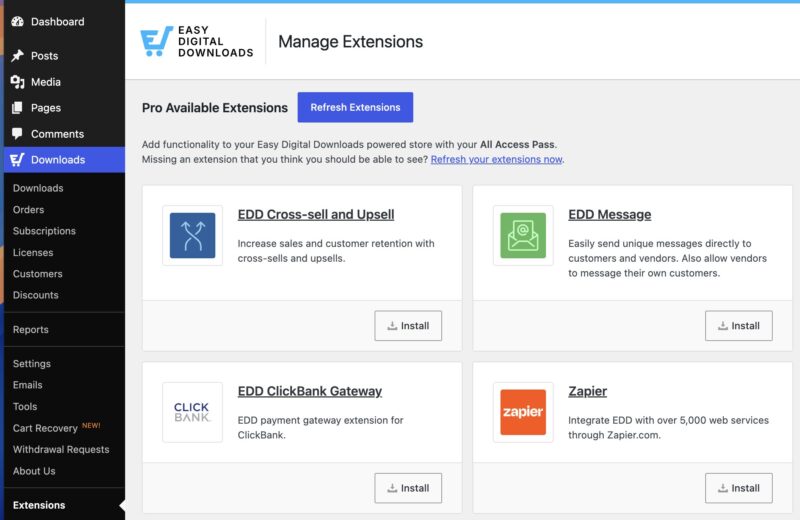
Opmerking: Deze functie is inbegrepen in elk Pro-abonnement.
Volg deze stappen om een cross-sell of upsell toe te voegen aan een product:
- Ga naar de download in je WordPress-admin waaraan je cross-sells of upsells wilt toevoegen.
- Scroll naar beneden naar de sectie Cross-Sell & Upsell op de productbewerkingspagina.
- Stel een aangepaste kop in als je die wilt. Anders wordt de standaardkop uit je hoofdinstellingen gebruikt.
- Klik in de opgegeven velden en selecteer de producten die je als cross-sells of upsells wilt aanbevelen.
- Klik op Opslaan.
Onthouden: cross-sells worden weergegeven op de afrekenpagina en upsells worden weergegeven op de individuele productpagina.
Cross-sells en Upsells instellen
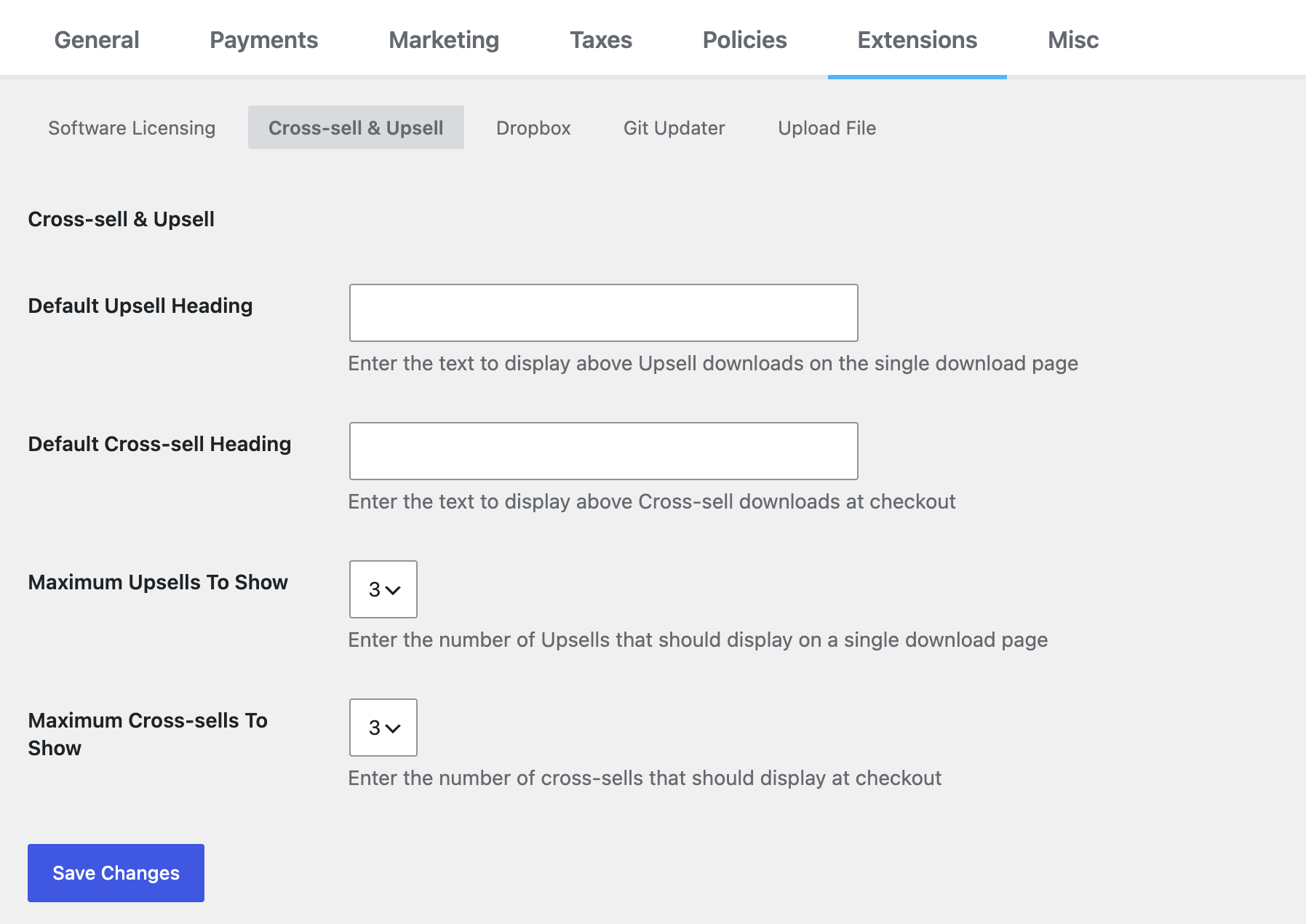
Ga naar Downloads » Instellingen » Extensies » Cross-sell & Upsell om uw standaardinstellingen te beheren.
Standaardkoppen
Het Standaard Upsell-koptekst wordt weergegeven op individuele productpagina's. U kunt de koptekst ook per product aanpassen vanaf de bewerkingspagina van elk individueel product.
De Standaard Cross-Sell Koptekst is de standaardkoptekst die bij het afrekenen wordt weergegeven voor cross-sellproducten. U kunt dit ook per product aanpassen. Zie Aangepaste Kopteksten hieronder voor precies wanneer de standaardkoptekst versus de aangepaste koptekst wordt gebruikt.
Maximaal weer te geven
Deze twee opties bepalen het maximale aantal cross-sells/upsells dat op de respectieve pagina's (individuele productpagina of afrekenpagina) wordt weergegeven.
Het standaardmaximum voor beide is ingesteld op 3.
Als u er meer toewijst aan een van beide, wordt alleen het maximum aantal weergegeven. De functie selecteert uit de producten die u hebt toegewezen, tot de door u ingestelde limiet.
Aangepaste Koppen
Aangepaste kopteksten zijn een geweldige manier om de verkoop te verhogen en een persoonlijkere band met klanten op te bouwen.
Naast het toevoegen van een standaardkoptekst aan een van beide soorten upsells in de hierboven getoonde functie-instellingen, kunt u ook een aangepaste koptekst instellen voor specifieke producten in de sectie Cross-sell en Upsell van de bewerkingspagina van elk product.
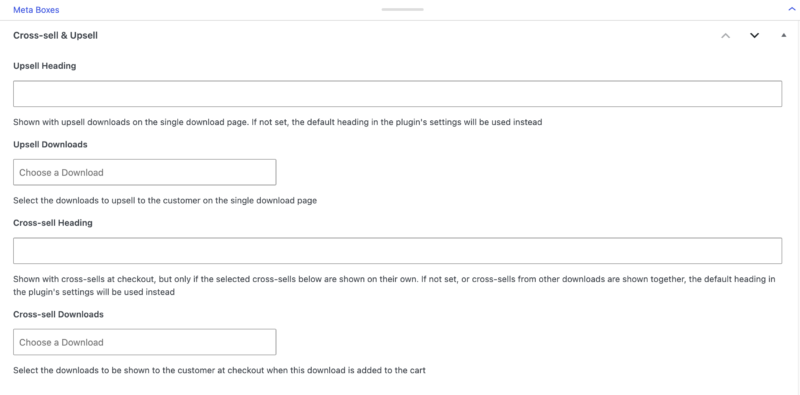
De aangepaste kopteksten die u hier instelt, worden boven de upsellproducten op de pagina van dat product weergegeven. Het is een geweldige plek voor een persoonlijkere boodschap die aan dat specifieke product is gekoppeld.
De aangepaste cross-sellkoptekst wordt weergegeven op de afrekenpagina. Als een klant bijvoorbeeld een nummer van een specifieke artiest in zijn winkelwagentje heeft, kunt u een aangepaste koptekst instellen die meer muziek van die artiest aanbiedt.
Hier ziet u precies wanneer uw aangepaste koptekst wordt weergegeven en wanneer niet:
- Als slechts één product in het winkelwagentje van de klant cross-sells activeert, en dat product heeft zijn eigen aangepaste koptekst, dan wordt die aangepaste koptekst weergegeven.
- Als meerdere producten in het winkelwagentje van de klant tegelijkertijd cross-sells activeren, wordt in plaats daarvan de globale koptekst uit uw instellingen gebruikt.
Dit is belangrijk omdat als u per-productkopteksten hebt ingesteld, u misschien merkt dat ze niet altijd worden weergegeven. Dat is verwacht. Stel uw globale koptekst in op iets algemeens genoeg om te werken voor elke combinatie van producten.
Cross-sell en Upsell-rapporten bekijken
Naast de installatie houdt de functie ook een overzicht bij van elke cross-sell- en upselltransactie, zodat u kunt zien of uw aanbevelingen daadwerkelijk werken.
Transactielogboeken
Ga naar Downloads » Hulpprogramma's » Gebeurtenislogboek » Cross-sells / Upsells om een volledige geschiedenis van elke cross-sell- en upselltransactie te zien. Elke logboekvermelding toont de productnaam, betalings-ID en datum.
Dit is de snelste manier om te controleren of uw cross-sells en upsells daadwerkelijk worden geactiveerd.
Onder Downloads » Rapporten vindt u ook een speciaal tabblad voor elk waar u nog meer rapporten kunt vinden.
Cross-sell/Upsell-geschiedenis exporteren
Navigeer naar het tabblad Exporteren om uw volledige cross-sell- en upsellgeschiedenis naar een CSV-bestand te exporteren. U kunt de export filteren op maand, jaar of bestelstatus.
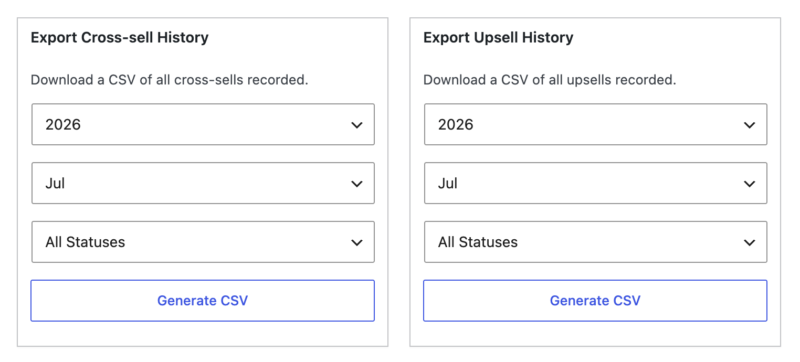
Dit is handig voor maandelijkse rapportage of om gegevens door te geven aan uw accountant.
Producten Filteren in de Admin
Producten kunnen in uw WordPress-admin worden gefilterd vanaf de hoofdpagina Downloads, met behulp van de vervolgkeuzemenu's boven uw downloadlijst. Een speciaal vervolgkeuzemenu laat u snel weergeven:
- Downloads met cross-sells
- Downloads met upsells
- Downloads met zowel cross-sells als upsells
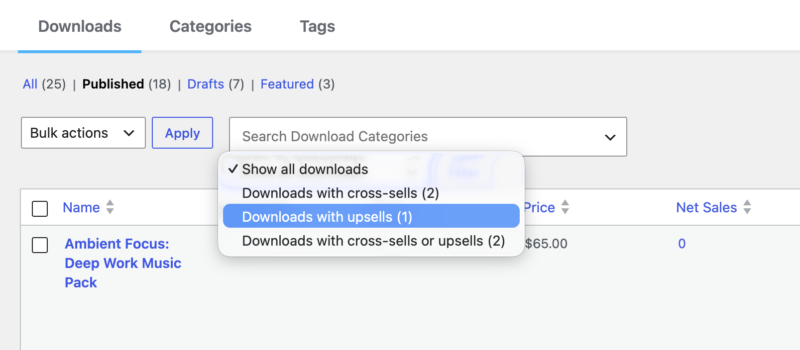
In combinatie met de standaard WordPress-filteropties is dit een snelle manier om al uw downloads te vinden met ingestelde cross-sells en upsells.
Probleemoplossing
Mijn geconfigureerde aanbevelingen worden niet weergegeven
Dit komt meestal neer op een van de volgende twee dingen:
- Het product is mogelijk al in de winkelwagen van de klant. Artikelen die al in de winkelwagen staan, worden automatisch verborgen voor aanbevelingen.
- U hebt mogelijk het maximale aantal aanbevelingen bereikt. Controleer uw limiet onder Downloads » Instellingen » Extensies » Cross-sell & Upsell.
Mijn aangepaste koptekst wordt niet weergegeven bij het afrekenen
Als meerdere winkelwagenartikelen tegelijkertijd cross-sells activeren, wordt de globale koptekst uit uw instellingen altijd gebruikt in plaats van kopteksten per product. Dit is het verwachte gedrag. Stel uw globale koptekst in op iets dat goed werkt voor al uw producten.
Mijn inkomstentotalen zien er verkeerd uit in de rapporten
Gebruik de tool Statistieken opnieuw berekenen om uw totalen opnieuw te berekenen. Ga naar Downloads » Hulpmiddelen » Statistieken opnieuw berekenen en voer de optie Cross-sell & Upsell opnieuw berekenen uit.
Voor ontwikkelaars
De onderstaande secties zijn voor ontwikkelaars die willen aanpassen hoe cross-sells en upsells werken met code. Als u zich niet prettig voelt bij het bewerken van het functions.php bestand van uw thema of het toevoegen van een aangepaste plugin, kunt u deze sectie volledig overslaan. Alles wat u nodig hebt voor dagelijkse installatie wordt hierboven behandeld.
Het Excerpt Verwijderen
Om het uittreksel te verwijderen, kopieert en plakt u een van de volgende functies (laat de openings-PHP-tag weg als u dit toevoegt aan een bestaand PHP-bestand) in het functions.php bestand van uw child-thema of een aangepaste plugin.
Dit voorbeeld verwijdert het uittreksel overal:
/**
 * EDD Cross-sell & Upsell - Removing the excerpt
 * https://easydigitaldownloads.com/extensions/cross-sell-and-upsell/?ref=166
*/
function sumobi_edd_csau_show_excerpt() {
	return false;
}
add_filter( 'edd_csau_show_excerpt', 'sumobi_edd_csau_show_excerpt' );
Dit voorbeeld verwijdert het uittreksel alleen op individuele downloadpagina's:
/**
 * EDD Cross-sell & Upsell - Removing the excerpt, but only on single download pages
 * https://easydigitaldownloads.com/extensions/cross-sell-and-upsell/?ref=166
*/
function sumobi_edd_csau_show_excerpt() {
	if ( is_singular( 'download' ) ) {
		return false;
	}

	return true;
}
add_filter( 'edd_csau_show_excerpt', 'sumobi_edd_csau_show_excerpt' );
Upsells Ontkoppelen van een Enkele Productpagina
Als u upsells wilt verwijderen van weergave na de inhoud, gebruik dan de onderstaande filter. U kunt dit doen als u upsells opnieuw wilt koppelen aan een andere actiehook.
remove_filter( 'the_content', 'edd_csau_single_download_upsells', 100 );
Cross-sells boven de productlijst plaatsen bij het afrekenen
Standaard worden cross-sells net onder de productlijst op de afrekenpagina weergegeven. Om ze in plaats daarvan boven de productlijst te verplaatsen, plakt u dit in het functions.php bestand van uw thema:
	function sumobi_edd_csau_move_cross_sells_at_checkout() {
    // remove cross-sells from after the product listing at checkout
    remove_action( 'edd_after_checkout_cart', 'edd_csau_display_on_checkout_page' );

    // add the cross-sells before the product listing at checkout
    add_action( 'edd_before_checkout_cart', 'edd_csau_display_on_checkout_page' );
}
add_action( 'template_redirect', 'sumobi_edd_csau_move_cross_sells_at_checkout' );
Het verwijderen van de stylesheet
De functie wordt geleverd met stijlen die van invloed zijn op hoe voorgestelde downloads worden weergegeven. Om deze stylesheet te verwijderen, voegt u de volgende code toe aan het functions.php bestand van uw thema of een aangepaste plugin.
	function sumobi_edd_csau_deregister_styles() {
	wp_deregister_style( 'edd-csau-css' );
}
add_action( 'wp_enqueue_scripts', 'sumobi_edd_csau_deregister_styles', 20 );



