

Inhoudsopgave
De EDD_Customer klasse wordt gebruikt voor het ophalen van klantgegevens, het aanmaken van nieuwe klantrecords en het bewerken van bestaande klantrecords. De waarden die met deze klasse beheerd kunnen worden zijn:
- gebruiker_id
- naam
- betalings_id's
- aankoopwaarde
- aankooptellingen
- notities
Een klant ophalen
Uw redenen om klantgegevens op te halen kunnen variëren van het simpelweg weergeven van de informatie tot het gebruiken ervan voor statistieken of logging of iets anders. Hier zijn de stappen om klantinformatie op te halen en weer te geven.
Stap 1, Haal de gegevens op
Om een Customer-object aan te maken, moet u een soort identificatie doorgeven bij het instantiëren van de klasse. Dit kan een e-mailadres, klant-ID of WordPress-gebruikers-ID zijn.
Voorbeelden:
E-mail
$customer = new EDD_Customer( '[email protected]' );
Klant-ID
$customer = new EDD_Customer( 33 );
WordPress gebruikers-ID
$customer = new EDD_Customer( 96, true );
Opmerking: voor de WordPress gebruikers-ID moet u een waarde van true als tweede parameter doorgeven, zodat het weet dat het in WordPress moet zoeken in plaats van in EDD.
Stap 2, Gebruik de gegevens
Nu kunt u eigenschappen van het klantobject benaderen zoals dit:
- $klant->naam;
- $klant->email;
- $klant->datum_aangemaakt;
- $klant->aankooptellingen;
- $klant->aankoopwaarde;
- $customer->id; // Klant-ID
- $customer->user_id; // WordPress gebruikers-ID
- $klant->betalings_id's;
Je kunt deze echoën, parsen; wat je maar wilt.
Betalingsgegevens van klant ophalen
De EDD_Customer klasse heeft een methode genaamd
get_payments(). Deze methode retourneert een array van EDD_Payment objecten. Voorbeeld:
$customer = new EDD_Customer( 33 );

$payments = $customer->get_payments();
Nu bevat $payments een array van EDD_Payment objecten. Voor meer informatie over hoe die array eruitziet,
zie de documentatie over de EDD_Payment klasse.
Een klant aanmaken
Instantieer eerst een object:
$klant = new EDD_Customer;
Voorbeeld 1:
$args = array(
	'user_id'        => 12
	'name'           => 'Jose Canseco',
	'email'          => '[email protected]',
	'payment_ids'    => '',
	'purchase_value' => '',
	'purchase_count' => '',
	'notes'          => 'Whatever note you'd like',
);
Opmerking: de
user_id hierboven is een WordPress gebruikers-ID nummer. Het is alleen vereist als je je Klant wilt koppelen aan een WordPress gebruiker. Zo niet, verwijder het dan uit de array.
$klant->create( $args );
vereiste optie is e-mail, dus dit zou ook werken:
$args = array(
	'email' => '[email protected]',
);
$klant->create( $args );
Dit maakt een klant aan met alleen het opgegeven e-mailadres, wat prima werkt.
Een klant bijwerken
Stap 1, Verkrijg de gegevens.
Gebruik de voorbeeldcode uit "Een Klant Verkrijgen" hierboven.
Stap 2, Werk de gegevens bij
Er zijn twee manieren om klantgegevens bij te werken met EDD_Customer. Eén is het gebruik van de
update() methode en het bijwerken van meerdere velden tegelijk.
Voorbeeld:
$customer = new EDD_Customer( 33 );

$update_args = array(
	'email'          => '[email protected]',
	'name'          => 'Jose Canseco',
);
Nu heeft klant 33 een bijgewerkt e-mailadres en een nieuwe notitie.
Opmerking: het bijwerken van het notitieveld met deze methode zal alle bestaande notities wissen. Gebruik de hieronder genoemde add_note() methode om een nieuwe notitie toe te voegen.
Specifieke velden bijwerken
In plaats van de algemene update() methode hierboven te gebruiken, moet je over het algemeen proberen een van de onderstaande helpermethoden te gebruiken. Deze bieden specifieke beperkte functionaliteit die kan helpen fouten te verminderen.
Voor elk van de volgende methoden zou je eerst de klantklasse instantiëren zoals hierboven:
$klant = new EDD_Customer( 33 );
attach_payment() en remove_payment()
Deze worden gebruikt voor het koppelen en ontkoppelen van betalingen aan en van een klant. Ze nemen beide een payment_id als eerste variabele, en een boolean optie als tweede. De tweede zal statistieken bijwerken als deze op true is ingesteld.
Voorbeelden:
$klant->attach_payment( 33, true );
$klant->remove_payment( 33, true );
increase_purchase_count() en decrease_purchase_count()
Deze worden gebruikt om het
aantal aankopen van een enkele klant te verhogen en te verlagen. Ze nemen beide simpelweg een geheel getal aan en veranderen de opgeslagen waarde daarmee.
Voorbeelden:
$klant->increase_purchase_count( 1 );
$klant->decrease_purchase_count( 1 );
increase_value() en decrease_value()
Deze worden gebruikt om het bestede bedrag door een enkele klant te verhogen en te verlagen. Ze nemen beide simpelweg een decimaal getal, tot op twee plaatsen, en veranderen de opgeslagen waarde daarmee.
Voorbeelden:
$klant->increase_value( 14.98 );
$klant->decrease_value( 3.00 );
get_notes()
Deze methode retourneert notities die op het account van de klant zijn achtergelaten. Het accepteert 2 variabelen, de eerste voor hoeveel notities je wilt, en de tweede is een offset.
Voorbeelden:
$klant->get_notes( 5 ); // haalt de eerste 5 notities op$klant->decrease_value( 5, 6 ); // haalt 5 notities op beginnend bij positie 6, dus notities 6-10get_notes_count()
Deze methode retourneert het aantal notities op het account van de klant. Het vereist geen invoer.
Voorbeeld:
$klant->get_notes_count();
add_note()
Deze methode accepteert een string als invoer en slaat deze op als een nieuwe notitie op het account van de klant. Het behoudt harde returns, maar staat geen HTML toe.
Voorbeeld:
$klant->add_note( 'Dit is een notitie. Is dat niet cool?' );
Klantmeta
Willekeurige klantgegevens kunnen worden beheerd met behulp van de meta-functies die zijn ingebouwd in de EDD_Customer klasse.
get_meta( $meta_key = ”, $single = true )
get_meta neemt simpelweg een meta-sleutel en retourneert de waarde. Als single is ingesteld op false, retourneert het altijd een array.
add_meta( $meta_key = ”, $meta_value, $unique = false )
add_meta accepteert een meta-sleutel en de waarde ervan, maar accepteert ook een boolean voor uniek. Als de derde invoer true is, zal add_meta alleen slagen als de meta-sleutel nog niet bestaat. Retourneert false bij falen. True bij succes.
update_meta( $meta_key = ”, $meta_value, $prev_value = ” )
update_meta accepteert een meta-sleutel en de nieuwe waarde die u ervoor wilt instellen. Als u meerdere sleutels met dezelfde naam heeft, worden ze allemaal bijgewerkt met de nieuwe waarde. De derde invoer accepteert een waarde om de vorige waarde mee te vergelijken. Dus als u al verschillende meta-sleutels van
foo heeft, maar slechts één met een waarde van bar, kunt u bar als derde invoer gebruiken en de update zal alleen op die ene plaatsvinden. Retourneert false bij falen. True bij succes.
delete_meta( $meta_key = ”, $meta_value = ” )
delete_meta verwijdert alle meta-gegevens met een overeenkomende sleutel. Als er ook een waarde wordt doorgegeven, moeten beide overeenkomen. Retourneert false bij falen. True bij succes.
E-mailadressen van klanten
Elke klant kan meerdere e-mailadressen hebben, waardoor ze vanaf meer dan één adres kunnen kopen, of vanaf één adres kunnen kopen en ondersteuning van een ander kunnen krijgen. Elke klant heeft ook een primair e-mailadres, dat als standaard voor de klant wordt gebruikt. In het tabblad Klantbeheer ziet de UI er als volgt uit: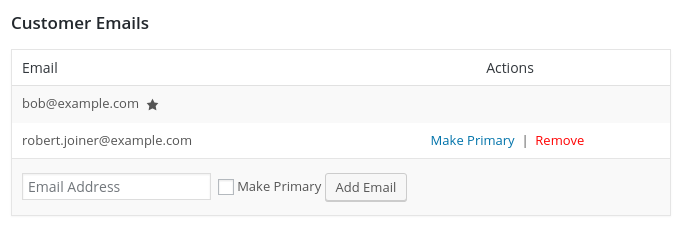
De EDD_Customer klasse stelt de ontwikkelaar in staat om adressen van een klant te verwijderen en adressen aan een klant toe te voegen, evenals een specifiek adres als primair te maken.
add_email( $email = ”, $primary = false )
Deze functie accepteert een e-mailadres dat moet worden toegevoegd aan de klant. Als de tweede invoer waar is, wordt het nieuwe e-mailadres ingesteld als het primaire adres voor de klant. Geeft false terug voor een storing. True voor succes.
set_primary_email( $new_primary_email = ” )
Deze functie accepteert een e-mailadres en als het e-mailadres al aan deze klant is gekoppeld, wordt het het primaire e-mailadres voor die klant. Geeft false terug voor een storing. True voor succes.
remove_email( $email = ” )
Deze functie accepteert een e-mailadres en als het e-mailadres al aan deze klant is gekoppeld, wordt het van die klant verwijderd. Geeft false terug voor een storing. True voor succes.



