

Na het voltooien van een aankoop kunnen de volledige details van de aankoop met de [edd_receipt] shortcode aan de klant worden getoond. Dit toont een gedetailleerde uitsplitsing van wat de klant heeft gekocht, het aankoopbedrag, de datum, de bon-ID en meer.
De aankoopoverzicht ziet er als volgt uit:
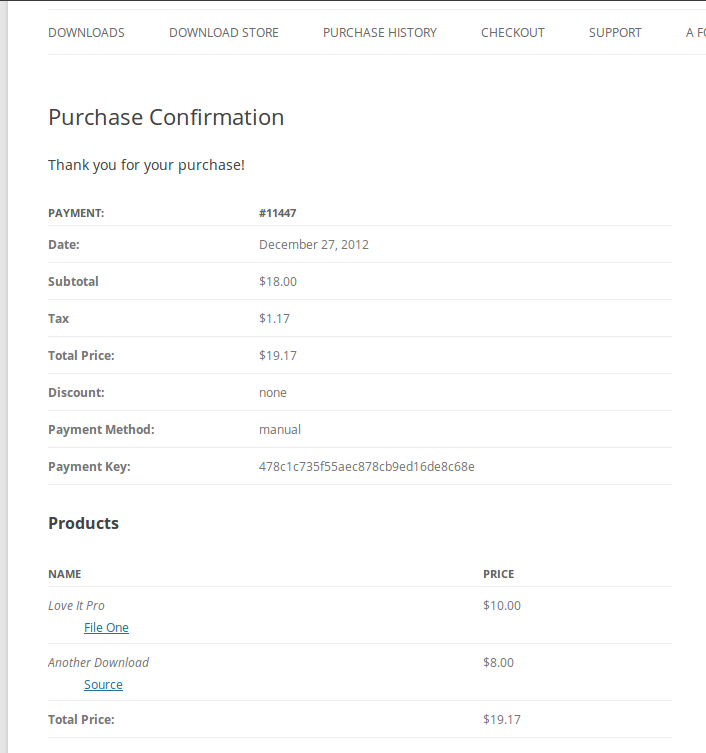
U kunt de shortcode als volgt gebruiken:
[edd_receipt]Het is het beste als dit op de aankoopsuccespagina wordt geplaatst.
Als u de uitvoer van de bonpagina wilt aanpassen, vindt u hier een lijst met ondersteunde parameters:
- ‘error’ – om het standaardfoutbericht te wijzigen dat wordt weergegeven wanneer de bon niet zichtbaar is: error=”Uw foutbericht komt hier.”
- ‘price’ – de prijs van de gekochte artikel(en).
- ‘discount’ – de gebruikte kortingscode.
- ‘products’ – toont de gekochte producten.
- ‘date’ – de datum van aankoop.
- ‘payment_key’ – de unieke identificatie voor de bestelling.
- ‘payment_method’ – toont de betaalmethode die voor de aankoop is gebruikt.
- ‘payment_id’ – toont het bestelnummer.
Tenzij anders vermeld, kunnen alle shortcode-attributen worden uitgeschakeld door ze een waarde van ‘0’ te geven. Om bijvoorbeeld de aankoopdatum op uw bonpagina uit te schakelen en het standaardfoutbericht te wijzigen:
[edd_receipt date="0" error="Unfortunately, the receipt cannot be viewed."]Mogelijke redenen waarom een bon niet zichtbaar is:
Soms, bij het bekijken van de bonpagina, is een bon niet zichtbaar. Standaard krijgt u dit foutbericht: “Probleem met het ophalen van de betalingsbon.”
1. Direct bekijken.
Als u een pagina met de [edd_receipt] shortcode direct bekijkt, kunt u een foutmelding zien. Doorgaans wordt de [edd_receipt] shortcode op uw Bevestigingspagina geplaatst – waarnaar Easy Digital Downloads vanuit verschillende plaatsen zal linken. Wanneer het naar die pagina linkt, bevat het informatie over voor welke betaling het is. Als u simpelweg naar Dashboard > Pagina’s > Pagina bekijken voor uw Bevestigingspagina gaat, wordt een foutmelding weergegeven omdat het niet weet welke bon het moet tonen. Dit is niets om u zorgen over te maken, omdat uw gebruikers alleen door Easy Digital Downloads naar die pagina worden omgeleid.
2. Agressieve caching.
Als uw site agressieve caching heeft, kan dit ertoe leiden dat de [edd_receipt] shortcode niet correct werkt. U kunt proberen uw caching uit te schakelen op de Afreken- en Bevestigingspagina's. Mogelijk moet u uw webhost dit voor u laten doen als u er niet zeker van bent hoe.
3. Conflicterende plugins.
Het is mogelijk dat een geïnstalleerde plugin een conflict veroorzaakt. Om dit uit te sluiten, probeer alle plugins te deactiveren behalve Easy Digital Downloads en doe een test aankooop. Als de aankoopbon dan correct wordt weergegeven, weet je dat het probleem werd veroorzaakt door een van die nu-inactieve plugins. Om plugins in WordPress te deactiveren, ga naar de pagina Dashboard > Plugins en klik op “deactiveren” naast elke plugin.



