

Hieronder vindt u vragen die specifiek betrekking hebben op de
Frontend Submissions extensie voor Easy Digital Downloads.
Werkt Frontend Submissions met PHP 7?
Ja, vanaf FES versie 2.4.
Waarom tonen mijn Vendor-pagina's een 404-fout?
Meestal kan dit worden opgelost door naar
Instellingen → Permalinks te navigeren en op de knop Wijzigingen opslaan te klikken. Er hoeven geen wijzigingen te worden aangebracht; het opslaan van de bestaande instellingen zal in de meeste gevallen de juiste herschrijvingen creëren.
Zorg er ook voor dat er een Vendor-pagina is ingesteld onder
EDD FES → Instellingen → Formulieren/Pagina's.
Waarom krijg ik een foutmelding bij het uploaden van afbeeldingen?
Er zijn een aantal redenen waarom u een foutmelding kunt krijgen bij het uploaden van bestanden via de mediabestanden-uploader. Hoewel niet alle weergegeven fouten gedetailleerd zijn, hebben we een lijst samengesteld met mogelijke redenen waarom u een fout bent tegengekomen. Controleer alstublieft het volgende:
- Gebrek aan machtigingen – Heeft de gebruiker toestemming om bestanden te uploaden? Zorg ervoor dat de machtigingen van de verkoper niet per ongeluk op deze manier zijn gewijzigd. WPBeginner heeft een artikel waarin wordt uitgelegd wat de benodigde machtigingen zijn en hoe u deze kunt instellen.
- Gebrek aan geheugen – Dit is een algemeen WordPress-probleem dat optreedt wanneer u uw standaard geheugenlimiet overschrijdt. Om deze te verhogen, probeer
define('WP_MEMORY_LIMIT', '64M');in uw wp-config.php-bestand direct BOVEN de regel/* Dat's all, stop editing! Happy blogging. */te plaatsen. - Niet-ondersteunde bestandsextensie – Standaard staat WordPress alleen bepaalde afbeeldings-, document-, audio- en videobestands types toe. Zorg ervoor dat de poging tot uploaden van een toegestaan bestandstype is.
- Machtigingen voor uploadmap – Heeft u de machtigingen voor een van uw uploadmappen gewijzigd?
- Een andere plugin die de opslagmap wijzigt naar een niet-ondersteunde map – Controleer of u de fout tegenkomt met alle andere plugins gedeactiveerd, behalve EDD en FES.
- Slechte bestandsnaam – Hoewel zeldzaam, controleer uw bestandsnaam op abnormale tekens zoals
'of vergelijkbaar. - PHP-versie – Neem contact op met uw host om te zien welke PHP-versie u gebruikt. U zou op minimaal versie 5.6 moeten draaien om compatibel te zijn met WordPress.
- Jetpack-conflicten – Heeft u uploadfouten na het tijdelijk deactiveren van Jetpack? U kunt testen door Jetpack opnieuw te activeren en vervolgens instellingen te wisselen om te zien of een individuele Jetpack-module het conflict veroorzaakt.
- Plugin die het bestand minimaliseert bij upload – Als u deze functionaliteit heeft geïmplementeerd, probeer dan het uploadproces met de bovengenoemde functionaliteit verwijderd.
- Blokkeren van
media-upload.phpofadmin-ajax.php– Zorg ervoor dat u geen .htaccess-beperkingen, caching of beveiligingsplugins/instellingen hebt die de toegang tot bestanden blokkeren die nodig zijn voor het uploaden. Plugins, zoals WP Admin No Show, die de toegang tot /wp-admin/ voor niet-beheerders verwijderen, zijn veelvoorkomende oorzaken van dit probleem.
Opmerking: Er is een bekend conflict tussen de "User Avatars Plugin" en FES. Als u een fout bij het uploaden van afbeeldingen ervaart, controleer dan of u die plugin hebt geactiveerd. Zo ja, deactiveer deze dan. Als u deze niet hebt geactiveerd, deactiveer dan tijdelijk alle andere plugins behalve EDD en FES en probeer het nogmaals.
Kunnen verkopers nieuwe categorieën aanmaken?
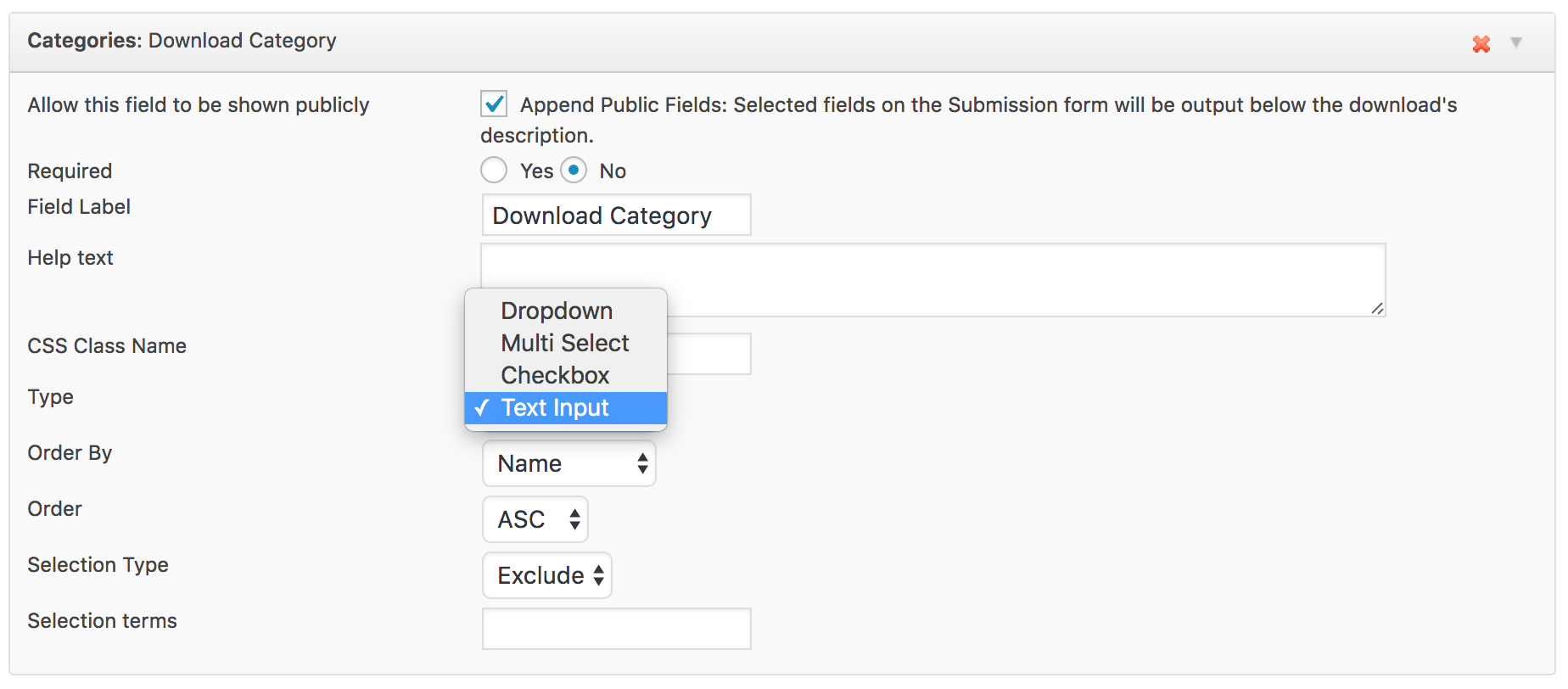
Ja. Door het veld "Categorie" te gebruiken in uw inzendingformulier en de optie "type" in te stellen op "Tekstinvoer", kunnen uw verkopers categorieën aanmaken door bij inzending door komma's gescheiden categorieën in te voeren. Ze kunnen bijvoorbeeld "Categorie 1, Categorie 2, Categorie 3" invoeren in dat veld en categorieën met die namen worden aangemaakt bij inzending.
Hebben verkopers toegang tot klantverkoopgegevens?
Vanuit het automatisch aangemaakte Verkopersdashboard kunnen verkopers hun producten bekijken, evenals verkoopgegevens voor hun producten.
Kunnen er meerdere inzendingformulieren zijn?
FES ondersteunt momenteel slechts één inzendingformulier.
Voorwaardelijke logica voor formuliervelden?
FES ondersteunt momenteel geen voorwaardelijke logica voor formuliervelden. Dit betekent dat de status van het ene veld niet afhankelijk kan zijn van de huidige status van een ander veld.
Kan ik inzendingformuliergegevens weergeven op de productpagina?
FES heeft momenteel geen sjabloontagsysteem om eenvoudig inzendingformuliergegevens weer te geven op productpagina's of andere pagina's op uw site. Dit wordt echter momenteel ontwikkeld en zal in een toekomstige release worden toegevoegd.
Kan ik de maximale bestandsgrootte voor uploads voor verkopers wijzigen?
De maximale bestandsgrootte voor uploads kan niet specifiek in FES worden ingesteld. FES gebruikt de instellingen die alle mediabestanden in uw WordPress-installatie gebruiken, wat gebaseerd is op uw PHP-instellingen. U kunt uw PHP-instellingen aanpassen om een nieuwe maximale bestandsgrootte te creëren, maar dat betekent dat deze van toepassing zal zijn op
alle mediabestanden en niet alleen op FES.
U zou de volgende code (pas indien nodig aan) in uw php.ini-bestand gebruiken:
upload_max_filesize=128M
Kan ik het aantal producten dat een verkoper kan indienen beperken?
Ja, u kunt het aantal producten dat een verkoper kan publiceren beheren met Restrict Content Pro en de EDD FES Vendor Limits add-on.
Het beperken van het aantal producten dat een verkoper kan publiceren
Momenteel ondersteunt Frontend Submissions dit niet standaard. U kunt dit echter doen met Restrict Content Pro en de gratis
EDD FES Vendor Limits add-on voor Restrict Content Pro.
Google Maps-veld ontbreekt
Google Maps is verwijderd in FES 2.1 vanwege compatibiliteitsproblemen.
Kan ik de sjablonen van Frontend Submissions aanpassen?
Ja, Frontend Submissions gebruikt dezelfde
themamethoden die de kern van Easy Digital Downloads gebruikt.
Let op: Er zijn codefragmenten specifiek voor Frontend Submissions die nog meer aanpassingen mogelijk maken hier beschikbaar.



