

Bij uw aankoop van de Software Licensing-extensie is een voorbeeldplugin inbegrepen, die zich in de map 'samples' bevindt binnen het zip-bestand van Software Licensing. Download de extensie van de pagina Account op onze website. Het wordt sterk aanbevolen om dit te openen en volledig te bekijken.
Er zijn twee onderdelen aan het voorbeeld:
- Het
composer.json-bestand dat alles instelt wat u nodig hebt om te beginnen met de Software Licensing API in uw WordPress-plugin. - Het hoofdpluginbestand, dat de code bevat om te koppelen met de EDD Software Licensing SDK, een kant-en-klare oplossing voor ontwikkelaars van WordPress-plugins en -thema's om Easy Digital Downloads Software Licensing snel in hun producten te integreren zonder complexe installatie of aangepaste beheerdersinterfaces.
Stap 1: Installeer het Composer-pakket
Werk het composer.json-bestand voor uw plugin bij (of maak het aan) in uw hoofdpluginmap. Voer composer install uit om de Software Licensing SDK aan uw plugin toe te voegen (merk op dat deze link ook de laatste instructies en voorbeelden bevat).
Stap 2: Werk uw plugin bij om de SDK te gebruiken
Dit codefragment biedt een startpunt voor de code die in uw plugin nodig is om te integreren met de SDK:
/**
 * Plugin Name: AAA Sample Plugin
 * Plugin URI: https://easydigitaldownloads.com
 * Description: Illustrates how to include an updater in your plugin for EDD Software Licensing.
 * Author: Sandhills Development, LLC
 * Author URI: https://easydigitaldownloads.com
 * Version: 1.0.0
 * License: GNU General Public License v2.0 or later
 * License URI: https://www.gnu.org/licenses/gpl-2.0.html
 */

add_action(
	'edd_sl_sdk_registry',
	function ( $init ) {
		$init->register(
			array(
				'id'      => 'edd-sample-plugin', // The plugin slug.
				'url'     => 'https://edd.local', // The URL of the site with EDD installed.
				'item_id' => 83, // The download ID of the product in Easy Digital Downloads.
				'version' => '1.0.0', // The version of the product.
				'file'    => __FILE__, // The path to the main plugin file.
			)
		);
	}
);

// Load the SDK from the vendor directory. The SDK handles autoloader setup automatically.
if ( file_exists( __DIR__ . '/vendor/easy-digital-downloads/edd-sl-sdk/edd-sl-sdk.php' ) ) {
	require_once __DIR__ . '/vendor/easy-digital-downloads/edd-sl-sdk/edd-sl-sdk.php';
}
Wijzig de informatie zodat deze overeenkomt met uw winkel:
id– Plugin/thema slug.url– De winkel-URL.item_id– De item-ID (in uw winkel).version– Het huidige versienummer.file– Het hoofdpluginbestand. Niet nodig voor thema's.type–pluginoftheme. Niet nodig voor plugins.weekly_check– Optioneel: of er wekelijks een verzoek wordt gedaan om de licentiestatus te bevestigen. Standaard is dit waar.
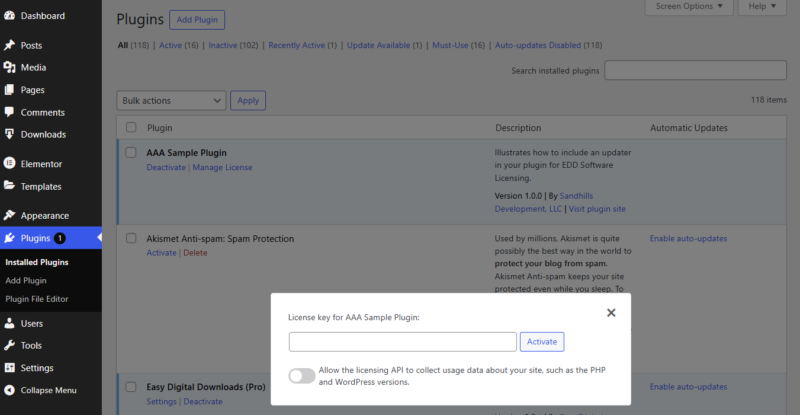
Zodra uw plugin is geactiveerd, kunnen uw klanten hun licentiesleutel toevoegen en ervoor kiezen om uw winkel toe te staan hun PHP- en WordPress-versies toe te voegen aan hun activeringsgegevens:
Dat is alles!
Belangrijke opmerkingen
- Als u problemen ondervindt met SSL-verificatie bij het aanvragen van updates, kunt u de filter
edd_sl_api_request_verify_sslgebruiken om het SSL-verificatievlag uit te schakelen. - Als u wilt voorkomen dat uw gebruikers automatische updates inschakelen voor uw thema of plugin, kunt u een codefragment toevoegen aan uw gedistribueerde code om automatische updates uit te schakelen:
add_filter( 'auto_update_plugin', 'edd_sample_disable_plugin_autoupdates', 10, 2 );
function edd_sample_disable_plugin_autoupdates( $update, $plugin ) {
	if ( 'my-plugin/my-plugin.php' === $plugin->plugin ) {
		return false;
	}

	return $update;
}

add_filter( 'auto_update_theme', 'edd_sample_disable_theme_autoupdates', 10, 2 );
function edd_sample_disable_theme_autoupdates( $update, $theme ) {
	if ( 'my-theme' === $theme->theme ) {
		return false;
	}

	return $update;
}


