


Si has estado vendiendo tus gráficos o arte digital en Etsy, Creative Market o Gumroad, ya conoces las desventajas: comisiones por cada venta, reglas que no escribiste y una lista de clientes que no posees.
Vender gráficos y obras de arte en WordPress cambia todo eso. Tú estableces los precios, te quedas con los ingresos y posees la relación con tus compradores.
Esta guía te muestra todo lo que necesitas para empezar, desde instalar el plugin correcto hasta configurar licencias, ponerle precio a tu trabajo y realizar tu primera venta.
Puntos clave
- Vende en tus propios términos: WordPress te permite vender gráficos y arte digital sin pagar comisiones de mercado.
- Gratis para empezar: Easy Digital Downloads tiene un plan gratuito que se encarga de las listas de productos, la entrega de archivos y el proceso de pago.
- Conserva el 100% de tus ingresos: Solo pagas las tarifas estándar de procesamiento de pagos (sin comisión de plataforma).
- Ofrece múltiples tipos de licencia: Cobra más por uso comercial y protege tu trabajo con licencias claras.
- Sé dueño de tus clientes: Crea tu propia lista de correo y base de clientes en lugar de alquilar el acceso a una plataforma.
- ¿Por qué vender gráficos en WordPress en lugar de un mercado?
- Qué necesitas para vender arte digital en WordPress
- Paso 1: Instalar Easy Digital Downloads
- Paso 2: Agrega tu primer gráfico u obra de arte como producto
- Paso 3: Configura las licencias para tus gráficos
- Paso 4: Conecta un método de pago
- Paso 5: Prueba tu tienda antes de lanzarla
- Cómo ponerle precio a tus gráficos digitales
- ¿Qué formatos de archivo debes ofrecer?
- ¿Qué gráficos y arte digital puedes vender?
- Cómo comercializar y vender más arte digital
- Preguntas frecuentes sobre la venta de gráficos y arte en WordPress
¿Por qué vender gráficos en WordPress en lugar de un mercado?
Mercados como Etsy y Creative Market facilitan la publicación de tu trabajo. Pero la facilidad tiene un costo.
Etsy cobra una comisión de transacción del 6.5% en cada venta. Creative Market también se lleva una parte. Y además de las comisiones, estás creando una audiencia para su plataforma, no para la tuya. Si cambian su algoritmo o sus términos, tus ingresos se ven afectados.
WordPress es diferente. Tú eres dueño del sitio, de la tienda y de los datos del cliente.
Así es como se comparan las opciones:
| WordPress/EDD | Etsy | Gumroad | Creative Market | |
|---|---|---|---|---|
| Comisión por transacción | $0 (+ procesamiento de pagos) | 6.5% | Hasta 10% | 30–40% |
| Sé dueño de tu lista de clientes | ✓ | ✗ | Parcial | ✗ |
| Control total de la marca | ✓ | Limitado | Limitado | ✗ |
| Entrega de archivos | ✓ | ✓ | ✓ | ✓ |
| Licencias personalizadas | ✓ | Limitado | Limitado | Limitado |
| Gratis para empezar | ✓ | Tarifas de listado | Nivel gratuito | ✗ |
La contrapartida es que eres responsable de generar tu propio tráfico. Pero las herramientas para hacerlo — SEO, marketing por correo electrónico, redes sociales — también están bajo tu control.
Qué necesitas para vender arte digital en WordPress
Antes de empezar con la configuración, esto es lo que necesitarás:
- Un sitio de WordPress.org autoalojado (no WordPress.com — necesitas acceso completo a los plugins)
- Un plan de hosting y nombre de dominio
- El plugin Easy Digital Downloads
- Tus archivos digitales listos para subir
¡Eso es todo!
¿Cuánto cuesta empezar?
El hosting suele costar entre $3 y $10 al mes, y un nombre de dominio cuesta alrededor de $12 al año. Easy Digital Downloads es gratuito para instalar.
Compara eso con la tarifa del 6.5% de Etsy. Si vendes $500 al mes en gráficos, son $32.50 que van a Etsy cada mes, más de tres meses de hosting.
Paso 1: Instalar Easy Digital Downloads
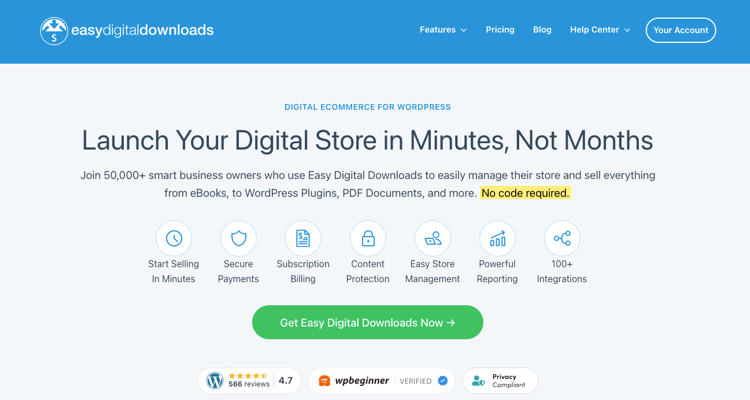
Easy Digital Downloads (EDD) es el plugin que potencia tu tienda. Maneja listados de productos, entrega segura de archivos, pago y gestión de clientes — todo diseñado específicamente para productos digitales.
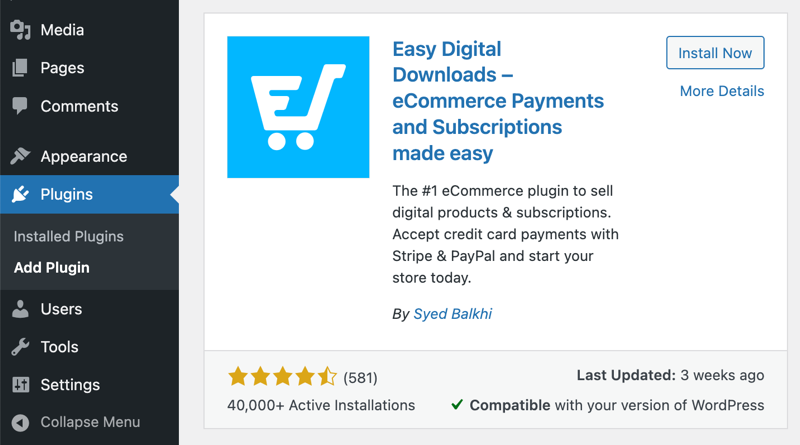
Para instalarlo, ve a tu panel de WordPress y navega a Plugins » Añadir nuevo. Busca Easy Digital Downloads, haz clic en Instalar ahora y luego en Activar.
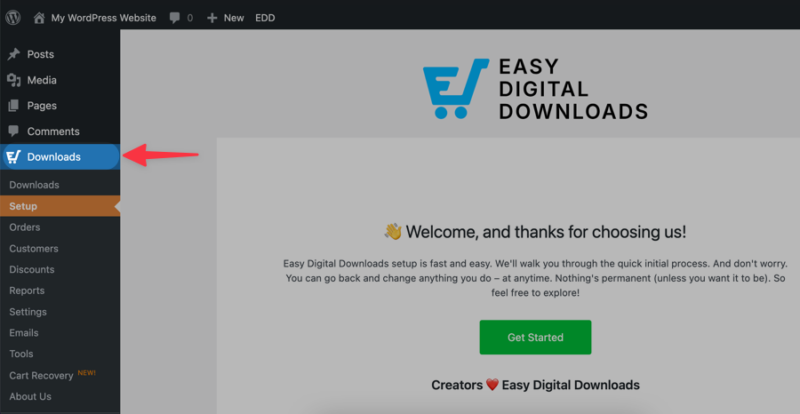
Una vez activado, EDD añade un menú de Descargas a tu panel. Ahí es donde gestionarás todo.
El plan gratuito de EDD cubre todo lo que necesitas para empezar a vender. Los planes premium, que recomiendo encarecidamente, están disponibles si deseas funciones como suscripciones, licencias de software o informes avanzados, pero son opcionales.
Paso 2: Agrega tu primer gráfico u obra de arte como producto
Con EDD activo, ve a Descargas » Añadir descarga. Aquí es donde creas tu primer producto.
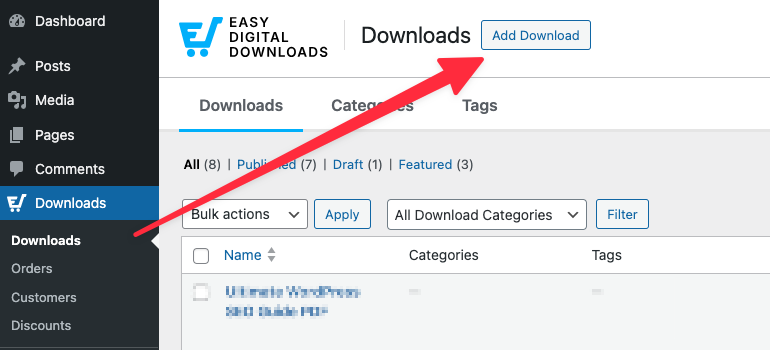
Dale a tu producto un nombre claro y descriptivo. Piensa en cómo un comprador lo buscaría: "Plantilla de Currículum Minimalista – Google Docs y Word" les dice exactamente lo que están obteniendo.
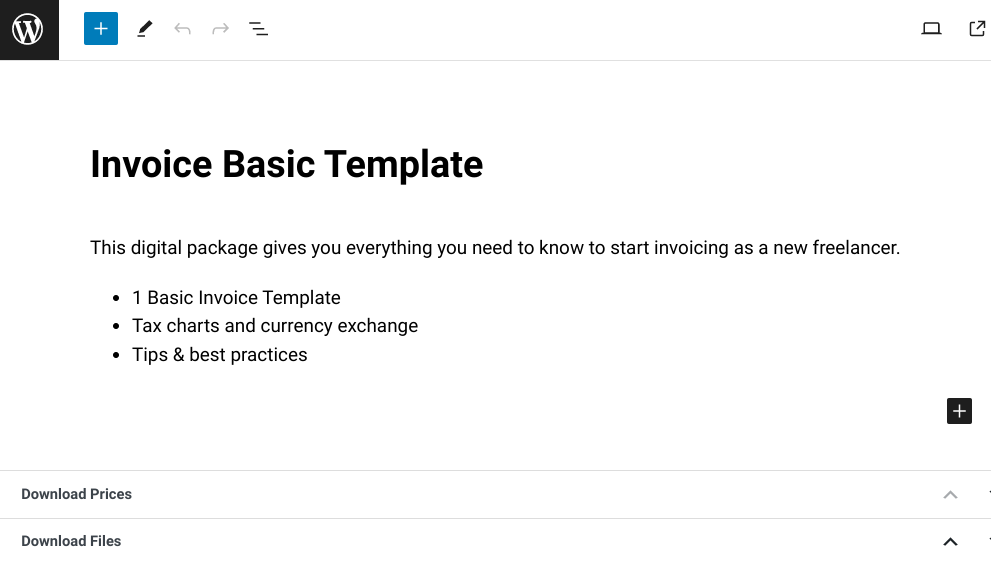
Añade un precio dentro del cuadro Detalles de la descarga. También puedes configurar precios variables aquí si deseas ofrecer múltiples niveles de licencia (más sobre eso en la siguiente sección).
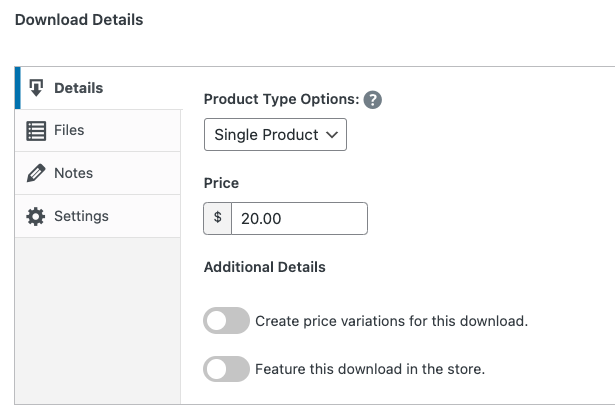
Sube tu archivo en Archivos. Dale un nombre de archivo limpio; tus compradores verán esto cuando lo descarguen.
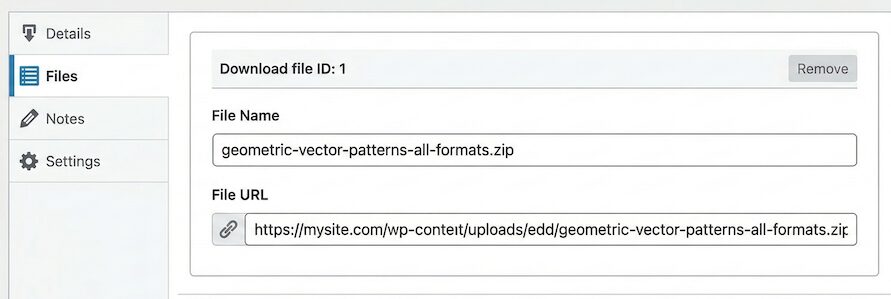
Escribe una descripción del producto que convierta
Tu descripción debe responder tres preguntas: ¿Qué es? ¿Qué formatos incluye? ¿Qué puede hacer el comprador con él?
Mantenlo corto y específico. "Un conjunto de 20 plantillas minimalistas para redes sociales en formato Canva. Incluye tamaños cuadrados, verticales y de historia. Totalmente editable." Es más útil que un párrafo de adjetivos.
Protege tu obra de arte con una imagen de vista previa
No uses tu archivo de alta resolución como imagen del producto. Usa una versión con marca de agua o una vista previa de baja resolución en su lugar.
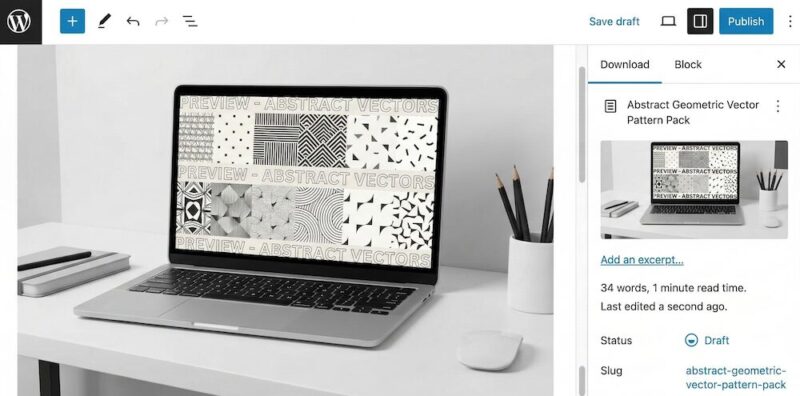
Esto da a los compradores una visión clara de lo que están comprando sin entregar el archivo real.
Paso 3: Configura las licencias para tus gráficos
La concesión de licencias es algo que la mayoría de los vendedores omiten, y es un error. Una licencia le dice a tu comprador exactamente qué puede y qué no puede hacer con tu trabajo. También te permite cobrar precios diferentes para usos diferentes.
Uso personal vs. Uso comercial: ¿Cuál es la diferencia?
Una licencia de uso personal permite al comprador usar tu gráfico para fines no comerciales: proyectos personales, regalos, impresiones caseras, etc. Una licencia de uso comercial les permite usarlo en trabajos que venden o de los que obtienen ganancias, como un proyecto de cliente, un producto que revenden o los materiales de marketing de una empresa.
Las licencias comerciales valen más. Es completamente normal cobrar entre 2 y 5 veces más por derechos comerciales que por uso personal.
Configurar Niveles de Licencia en EDD
Los precios variables de EDD te permiten ofrecer múltiples puntos de precio para el mismo producto. Puedes crear una opción de "Uso Personal" y una opción de "Uso Comercial", cada una con su propio precio.
Ve a tu producto y activa Precios Variables. Agrega una fila para cada nivel de licencia, nómbrala claramente y establece el precio.
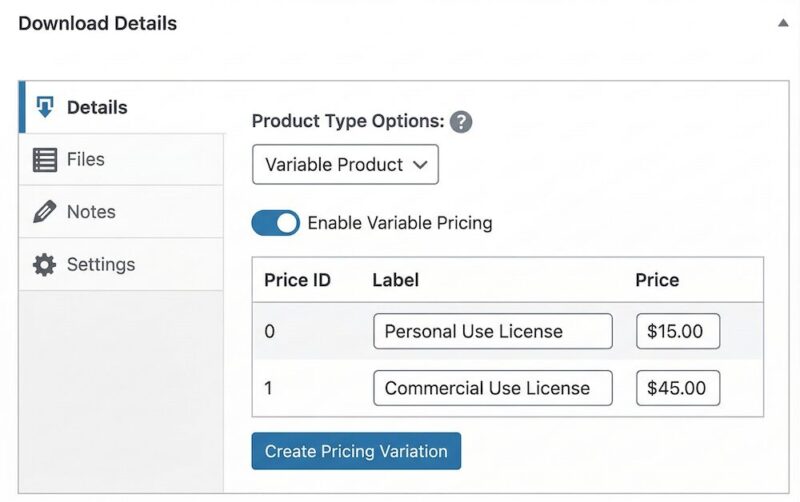
Asegúrate de que la descripción de tu producto, o una nota de licencia simple en la página del producto, explique qué cubre cada nivel. Los compradores aprecian la claridad y reduce las solicitudes de reembolso y los malentendidos.
¿Vendes temas, plugins o plantillas de WordPress? Los precios variables funcionan para los niveles de uso, pero vale la pena considerar las Licencias de Software de EDD. Genera claves de licencia, aplica límites de activación de sitios y maneja renovaciones, cosas que importan para el software pero no son necesarias para gráficos o arte.
Paso 4: Conecta un método de pago
EDD soporta Stripe y PayPal de forma nativa.
Stripe es la mejor opción para la mayoría de los vendedores. Soporta más métodos de pago (tarjetas de crédito, Apple Pay, Google Pay) y tiene una experiencia de pago más limpia.
Ve a Descargas » Ajustes » Pagos para conectar tu pasarela.
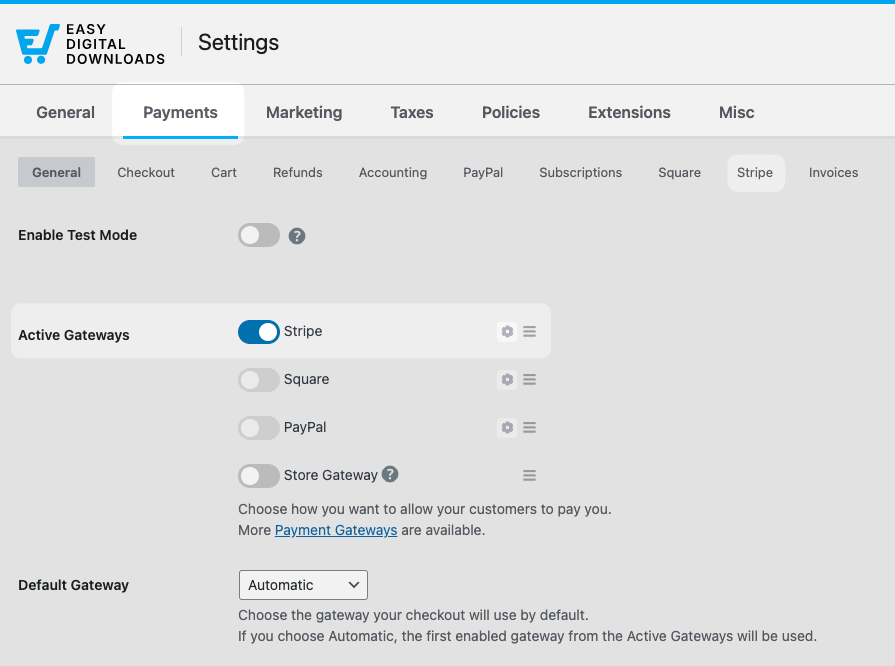
Si estás usando Stripe, conectarás tu cuenta a través del asistente de configuración de Stripe de EDD. Toma unos minutos y te guía a través de todo.
Una nota rápida sobre las tarifas de procesamiento de pagos: Stripe cobra 2.9% + $0.30 por transacción. Las tarifas de PayPal son similares. Estas son tarifas estándar, EDD no agrega nada adicional.
⚙️ Cómo configurar Stripe con Easy Digital Downloads.
Paso 5: Prueba tu tienda antes de lanzarla
No te saltes este paso. Realiza una compra de prueba antes de enviar a nadie a tu tienda.
Ve a Descargas » Ajustes » Pagos y habilita el Modo de Prueba.
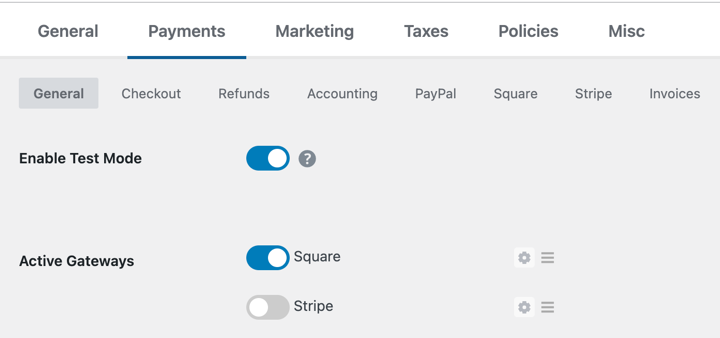
Guarda tus cambios.
Luego visita tu sitio, agrega tu producto al carrito y completa una compra usando la opción de pago de prueba.
Verifica que:
- El pago se completa sin errores
- Recibes un correo electrónico de confirmación de compra
- El enlace de descarga en el correo electrónico funciona
- El archivo que recibe el comprador es el correcto
Una vez que todo esté en orden, desactiva el modo de prueba y estarás listo para lanzar.
Cómo ponerle precio a tus gráficos digitales
Ponerle precio a los gráficos digitales es parte ciencia, parte instinto. Aquí están los modelos que funcionan.
Modelos de Precios para Gráficos Digitales
Precios de tarifa fija es lo más simple. Un producto, un precio. Funciona bien para activos individuales como íconos, fuentes o ilustraciones.
Precios basados en licencias (como se explicó anteriormente) cobra diferentes cantidades para uso personal vs. comercial. Esta es una práctica estándar para plantillas, clip art e ilustraciones de stock.
Los precios por paquete agrupan productos relacionados con un descuento. Un paquete de plantillas para redes sociales, un kit de logotipos o una familia de fuentes con alternativas funcionan bien como paquetes. Los compradores sienten que obtienen más valor y su valor promedio de pedido aumenta.
Precios introductorios significa lanzar a un precio más bajo para generar reseñas y prueba social, y luego aumentarlo una vez que tenga tracción. Esto funciona bien para tiendas nuevas sin audiencia todavía.
¿Deberías ofrecer paquetes?
Sí, y EDD lo hace fácil con la extensión Bundled Products. Un paquete de 5 plantillas relacionadas con un 30% de descuento sobre el precio individual es una poderosa palanca de conversión, especialmente para los compradores primerizos.
Empieza de forma sencilla: un paquete, claramente posicionado como la opción de mejor valor.
¿Qué formatos de archivo debes ofrecer?
Los formatos de archivo correctos dependen de lo que vendas y de quién compre. Aquí te explicamos cómo pensarlo.
Formatos de salida (lo que reciben los compradores)
Estos son los archivos finales, listos para usar:
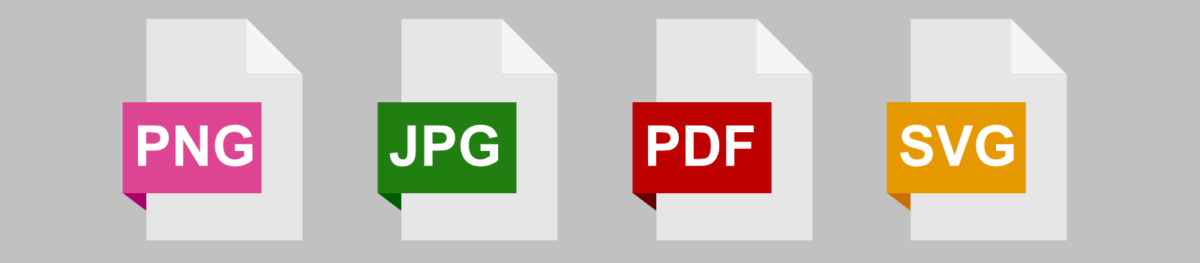
- PNG — Mejor para gráficos con transparencia. Ideal para logotipos, iconos, pegatinas e ilustraciones. Para uso web, 72 DPI y 1000–3000px de ancho es el estándar. Para impresión, usa 300 DPI.
- JPEG — Mejor para fotografía y gráficos sin transparencia. Uso web: 72 DPI. Uso de impresión: 300 DPI al tamaño de impresión final.
- PDF — Mejor para productos imprimibles como planificadores, hojas de trabajo y láminas artísticas. Exporta a 300 DPI con sangrado si el diseño va de borde a borde.
- SVG — Mejor para gráficos vectoriales que necesitan escalarse infinitamente. Ideal para archivos de corte, logotipos e ilustraciones utilizados en herramientas de diseño.
En caso de duda, incluye varios formatos. Un comprador que adquiere un logotipo debería recibir PNG, SVG y PDF, no solo uno.
Archivos fuente editables (archivos de plantilla/con capas)
Los archivos fuente permiten a los compradores personalizar el diseño. Ofrecerlos a un precio más alto (o como parte de una licencia comercial) agrega un valor significativo.
Formatos editables comunes:
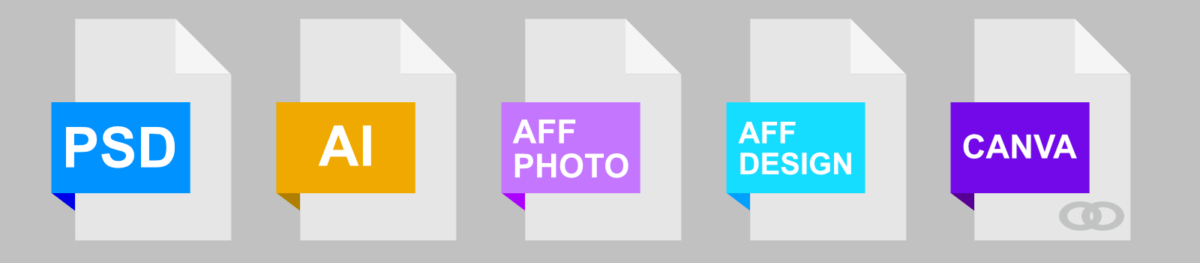
- PSD — Adobe Photoshop. Ampliamente utilizado para fotocomposiciones, maquetas e ilustraciones digitales.
- AI — Adobe Illustrator. Estándar para trabajos vectoriales y activos de diseño profesional.
- Canva — Comparte como un enlace de plantilla de Canva. Extremadamente popular entre los compradores no diseñadores. Ideal para plantillas de redes sociales, presentaciones e imprimibles.
- Affinity (AFPHOTO / AFDESIGN) — Base de usuarios en crecimiento, especialmente entre los compradores que se han alejado de las suscripciones de Adobe.
No todos necesitan archivos fuente. Pero si tus compradores son diseñadores o dueños de negocios que desean personalizar tu trabajo, ofrecer archivos editables a un precio superior es una forma sencilla de cobrar más.
Cómo empaquetar archivos en un ZIP
Si tu producto incluye varios archivos, comprímelos en un ZIP antes de subirlos.
- En Windows: Selecciona todos tus archivos, haz clic derecho y elige Comprimir en archivo ZIP.
- En Mac: Selecciona todos tus archivos, haz clic derecho (o Control-clic) y elige Comprimir [n] elementos.
Nombra el ZIP con algo descriptivo: resume-template-minimalist-edd.zip es más limpio que files.zip. Tu comprador ve el nombre del archivo cuando lo descarga.
¿Qué gráficos y arte digital puedes vender?
Si puedes guardarlo como un archivo, puedes venderlo. Estas son las categorías más populares:
Plantillas
Plantillas de currículum, plantillas de tarjetas de presentación, kits para redes sociales, presentaciones, encabezados de correo electrónico, plantillas de Canva, tableros de Notion.
Arte e papelería imprimibles
Arte de pared, planificadores, diarios, hojas de trabajo, páginas para colorear, imprimibles para fiestas, certificados.
Recursos de diseño
Fuentes, paquetes de íconos, paquetes de pinceles, texturas, patrones, maquetas, ilustraciones de stock, kits de interfaz de usuario.
Bellas artes e ilustraciones
Pinturas digitales, ilustraciones de personajes, diseños de patrones de superficie, conjuntos de clip art.
Otros productos digitales
Logotipos, kits de identidad de marca, infografías, portadas de libros electrónicos, LUTs y preajustes.
Cuanto más específico sea tu nicho, más fácil será atraer a los compradores adecuados. Una tienda enfocada completamente en plantillas de Canva para papelería de bodas tendrá mejores conversiones que una tienda que vende de todo.
enlace interno: cómo vender plantillas de Canva con Easy Digital Downloads
Cómo comercializar y vender más arte digital
Configurar tu tienda es el primer paso. Conseguir ventas es el trabajo continuo.
Crea una lista de correo desde el primer día
Tu lista de correo es el activo más valioso que tiene tu tienda. A diferencia de los seguidores en redes sociales, tú la posees.
La forma más fácil de empezar: ofrece una descarga gratuita a cambio de una dirección de correo electrónico. Un conjunto de íconos gratuito, una plantilla de muestra o un solo imprimible le da a los compradores una muestra de tu trabajo y los incluye en tu lista.
EDD se integra con Mailchimp, ConvertKit y otras plataformas de correo electrónico para que los nuevos clientes se agreguen a tu lista automáticamente al finalizar la compra.
Para más ideas, consulta cómo crear tu lista de correo con imanes de prospectos.
Usa códigos de descuento para impulsar las primeras ventas
EDD tiene soporte incorporado para códigos de descuento. Un descuento de lanzamiento del 20-30% es una forma de baja fricción para conseguir tus primeros compradores y reseñas.
Ve a Descargas » Códigos de Descuento » Añadir Nuevo para crear uno. Establece una fecha de caducidad para crear urgencia.
Pinterest e Instagram para el descubrimiento de arte visual
Los productos visuales se venden en plataformas visuales. Pinterest es particularmente fuerte para el arte digital, los imprimibles y las plantillas: los pines tienen una larga vida útil y generan tráfico de búsqueda constante.
Crea un pin para cada producto que enlace directamente a tu página de producto de EDD. Usa descripciones de pin claras y ricas en palabras clave. Instagram funciona bien para construir una audiencia, pero Pinterest impulsa una mayor intención de compra directa.
Colabora con otros artistas y creadores
Encuentra creadores en nichos adyacentes (no competidores directos) y busca formas de promocionarse mutuamente.
Un diseñador de fuentes y un vendedor de ilustraciones comparten los mismos compradores. Un simple saludo o una colaboración en paquete pueden enviar tráfico cálido y precalificado a tu tienda.
Preguntas frecuentes sobre la venta de gráficos y arte en WordPress
Concluyamos con algunas preguntas frecuentes que tienen los usuarios al aprender a vender gráficos y arte digital en sitios de WordPress.
¿Qué es mejor para vender arte digital: WooCommerce o Easy Digital Downloads?
Easy Digital Downloads es la mejor opción para vender productos exclusivamente digitales como gráficos y obras de arte. Está diseñado específicamente para descargas digitales, por lo que la configuración es más simple y el proceso de pago está optimizado para la entrega de archivos. WooCommerce vale la pena considerarlo si también vendes productos físicos, pero para una tienda de arte digital pura, EDD es más rápido de configurar y más fácil de administrar.
¿Puedo vender gráficos en WordPress gratis?
Sí. Easy Digital Downloads tiene un plan gratuito que incluye listados de productos, entrega segura de archivos y proceso de pago. Pagarás las tarifas estándar de procesamiento de pagos (alrededor del 2.9% + $0.30 por transacción a través de Stripe o PayPal), pero no hay tarifas mensuales de plataforma ni comisiones sobre las ventas.
¿Puedo vender arte digital y físico en el mismo sitio de WordPress?
Sí. Easy Digital Downloads se encarga de las descargas digitales, y puedes agregar WooCommerce junto con él para productos físicos como impresiones u originales. Alternativamente, la función de envío simple de EDD podría ser una opción adecuada.
¿Cómo protejo mi arte digital para que no se descargue sin pagar?
Easy Digital Downloads entrega archivos a través de enlaces de descarga seguros y que caducan: los compradores solo obtienen acceso después de una compra completada, y los enlaces caducan después de un número determinado de usos o un límite de tiempo. Para las imágenes de vista previa del producto, usa siempre una versión con marca de agua o de baja resolución en lugar del archivo completo.
¿Cuál es la mejor manera de ponerle precio a los gráficos digitales por primera vez?
Comienza por ver a qué precio se venden productos similares en Creative Market y Etsy. Luego, posiciona tus precios según el formato: las licencias de uso personal suelen costar entre $5 y $25 por activo individual, las licencias comerciales de 2 a 5 veces más, y los paquetes pueden costar entre $20 y $75 dependiendo de cuánto se incluya. No subestimes tu trabajo: los compradores asocian los precios bajos con la baja calidad.
¿Necesito una licencia comercial para vender arte digital en línea?
Los requisitos varían según el país y el estado. En muchos lugares, puedes comenzar a vender como propietario único sin registro formal. Pero una vez que obtengas ingresos constantes, vale la pena consultar a un contador local o abogado de negocios, especialmente si vendes a clientes internacionales, donde pueden aplicarse las reglas del IVA y los impuestos sobre bienes digitales. Esto no es asesoramiento legal; los requisitos varían significativamente según dónde vivas.
Usa EDD para vender gráficos y arte digital en WordPress
No necesitas un mercado para vender tus gráficos y arte digital. Necesitas un sitio WordPress, Easy Digital Downloads y tus archivos.
Tú te quedas con los ingresos. Tú posees las relaciones con los clientes. Y no estás a merced del algoritmo o de los cambios de política de una plataforma.
Obtén tu pase de Easy Digital Downloads y configura tu primer producto hoy mismo.
📣 P.S. Asegúrate de suscribirte a nuestro boletín y síguenos en Facebook, Twitter/X o LinkedIn para obtener más recursos de WordPress.








