

継続払いには、サブスクリプションを管理するための新しいEDDクラスが付属しています。EDD_Subscriptionクラスを使用すると、開発者はサブスクリプションをプログラムで操作できます。このドキュメントでは、EDD_Subscriptionのプロパティ、メソッド、および推奨される機能について説明します。
プロパティ
- $id = 0;
- $customer_id = 0;
- $period = ”;
- $initial_amount = ”;
- $recurring_amount = ”;
- $bill_times = 0;
- $parent_payment_id = 0;
- $product_id = 0;
- $created = ‘0000-00-00 00:00:00’;
- $expiration = ‘0000-00-00 00:00:00’;
- $status = ‘pending’;
- $profile_id = ”;
- $gateway = ”;
- $customer;
メソッド
- create( $data = array() )
- update( $args = array() )
- delete()
- get_original_payment_id()
- get_child_payments()
- get_total_payments()
- get_lifetime_value()
- add_payment( $args = array() )
- renew()
- complete()
- expire()
- failing()
- cancel()
- can_cancel()
- get_cancel_url()
- can_update()
- get_update_url()
- is_active()
- is_expired()
- get_expiration()
- get_expiration_time()
- get_status()
- get_status_label()
- payment_exists( $txn_id = ” )
使用方法
基本的なインスタンス化
「空の」EDD_Subscriptionオブジェクトは、このコードで作成できます。
$subscription = new EDD_Subscription();
これは、この構造を持つオブジェクトを返します。
EDD_Subscription Object
(
    [subs_db:EDD_Subscription:private] => EDD_Subscriptions_DB Object
        (
            [table_name] => wp_edd_subscriptions
            [version] => 1.0
            [primary_key] => id
        )

    [id] => 0
    [customer_id] => 0
    [period] =>
    [initial_amount] =>
    [recurring_amount] =>
    [bill_times] => 0
    [parent_payment_id] => 0
    [product_id] => 0
    [created] => 0000-00-00 00:00:00
    [expiration] => 0000-00-00 00:00:00
    [status] => pending
    [profile_id] =>
    [gateway] =>
    [customer] =>
)
既存のサブスクリプションのインスタンス化
EDD_Subscriptionコンストラクタは2つの引数を受け取ります。最初の引数はサブスクリプションIDを表す整数ですが、2番目の引数がtrueの場合、最初の引数はサブスクリプションのprofile_idになる可能性があります。
サブスクリプションIDは、サブスクリプションを表示しているときにURLで見つけることができます。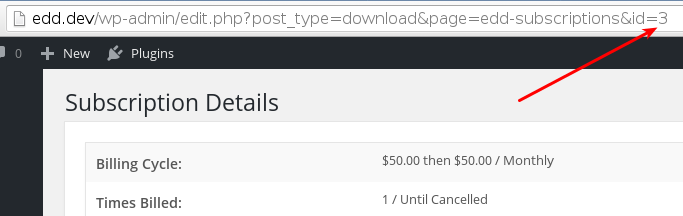
プロファイルIDは、サブスクリプションを表示しているときにリストされているのを見つけることができます。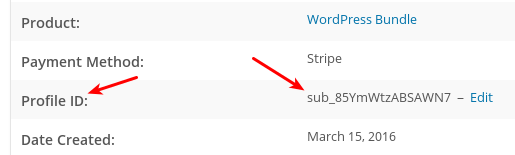
これらの2行のコードは、同じサブスクリプションを参照しているため、同じ出力を返します。
$subscription = new EDD_Subscription( 3 );
$subscription = new EDD_Subscription( 'sub_85YmWtzABSAWN7', true );
上記のコード行は、それぞれ次のようなオブジェクトを返します。
EDD_Subscription Object
(
    [subs_db:EDD_Subscription:private] => EDD_Subscriptions_DB Object
        (
            [table_name] => wp_edd_subscriptions
            [version] => 1.0
            [primary_key] => id
        )

    [id] => 1
    [customer_id] => 3
    [period] => month
    [initial_amount] => 50.00
    [recurring_amount] => 50.00
    [bill_times] => 0
    [parent_payment_id] => 87
    [product_id] => 85
    [created] => 2016-03-15 15:36:30
    [expiration] => 2016-04-15 23:59:59
    [status] => pending
    [profile_id] => paypal-363e3cc178dab152bb59b958024bce75
    [gateway] => paypal
    [customer] => EDD_Customer Object
        (
            [id] => 3
            [purchase_count] => 3
            [purchase_value] => 110.000000
            [email] => [email protected]
            [name] => Bob Smith
            [date_created] => 2016-03-08 15:01:02
            [payment_ids] => 54,63,87,88,91
            [user_id] => 2
            [notes] => Array
                (
                    [0] => March 16, 2016 14:37:22 - Subscription #3 cancelled admin
                )

            [db:protected] => EDD_DB_Customers Object
                (
                    [table_name] => wp_edd_customers
                    [version] => 1.0
                    [primary_key] => id
                )

        )

)
オブジェクトの変更
含まれているメソッドを使用すると、サブスクリプションでほぼすべてのことができます。
特に記載がない限り、すべてのメソッド例ではこのインスタンス化モデルを使用します。
$subscription = new EDD_Subscription();
操作メソッド
EDD_Subscriptionには、サブスクリプションの作成、削除、更新、更新、および支払い追加のためのメソッドが含まれています。
$subscription->create()
サブスクリプションを正しく作成するには、いくつかの情報を提供する必要があります。これらの項目は必須です。
$data = array(
    'customer_id'       => 0, // an integer, should be a valid customer_id
    'period'            => '', // accepts 'day', 'week', 'month', or 'year'; how often the subscription renews
    'initial_amount'    => '', // accepts a float
    'recurring_amount'  => '', // accepts a float
    'bill_times'        => 0, // accepts an integer; the number of times billing should happen, 0 means indefinite
    'parent_payment_id' => 0, // accepts an integer; the payment id returned by the initial payment
    'product_id'        => 0, // accepts an integer; the id of the product
    'created'           => '', // accepts a date string; formatted like 0000-00-00 00:00:00
    'expiration'        => '', // accepts a date string; formatted like 0000-00-00 00:00:00
    'status'            => '', // accepts 'Pending', 'Active', 'Cancelled', 'Expired', 'Failing', 'Completed'
    'profile_id'        => '', // accepts a string returned by the payment gateway as their subscription ID
);
次に、その情報を使用してcreate()メソッドを呼び出すことができます。
$subscription->create( $data );
create()メソッドは、特定のサブスクリプションIDをクエリした場合と同じデータを取得できるオブジェクトを返します。
$subscription->update()
サブスクリプションの更新では、create()メソッドで使用される配列オプションのサブセットを使用してupdate()メソッドを使用します。update()メソッドにはサブスクリプションIDも必要です。次のようなものが機能します。
$data = array(
    'expiration' => '2019-07-17 23:59:59',
);
$subscription->update( $data );
$subscription->delete()
delete()メソッドはサブスクリプションIDを受け取り、サブスクリプションをEDDストアから完全に削除します。これは、支払いゲートウェイに登録されているサブスクリプションには影響しないことに注意してください。それらは個別に処理する必要があります。
$subscription->renew()
このメソッドは、サブスクリプションを更新し、現在の有効期限を過ぎて1期間延長します。
$subscription->add_payment( $args = array() )
このメソッドを使用すると、支払いを行うことができます。配列を受け取り、次の3つの配列要素が必要です。
- amount: 支払われる金額
- transaction_id: 支払いゲートウェイからのサブスクリプションのトランザクションID。例: ‘ch_17q04L4NqFpaKRwY8ucZjW3t’
- gateway: サブスクリプションに使用された支払いゲートウェイ。例: ‘stripe’
成功すると、add_payment()はtrueを返します。
サブスクリプション情報の取得
EDD_Subscriptionは、サブスクリプションに関する情報を取得するための多くのメソッドを提供します。
$subscription->get_original_payment_id()
このメソッドは、元の支払いのIDである整数を返します。ユーザーインターフェイスでは、この支払いは[ダウンロード]→[支払い履歴]で見つけることができます。
$subscription->get_child_payments()
このメソッドは、各オブジェクトが子支払いであるEDD_Paymentオブジェクトの配列を返します。オブジェクトは次のようになります。
Array
(
    [0] => EDD_Payment Object
        (
            [ID] => 1111111
            [_ID:protected] => 1111111
            [new:protected] =>
            [number:protected] => 1111111
            [mode:protected] => live
            [key:protected] => 8d6f842jkf66cb6312117b9ad417dc6be
            [total:protected] => 57.4
            [subtotal:protected] => 57.4
            [tax:protected] => 0
            [discounted_amount:protected] => 0
            [tax_rate:protected] =>
            [fees:protected] => Array
                (
                )

            [fees_total:protected] => 0
            [discounts:protected] => samplediscount
            [date:protected] => 2018-05-17 06:40:29
            [completed_date:protected] =>
            [status:protected] => edd_subscription
            [post_status:protected] => edd_subscription
            [old_status:protected] =>
            [status_nicename:protected] => Renewal
            [customer_id:protected] => 111111
            [user_id:protected] => 1nan1
            [first_name:protected] => Bob Smith
            [last_name:protected] => Smith
            [email:protected] => [email protected]
            [user_info:EDD_Payment:private] => Array
                (
                    [first_name] => Bob Smith
                    [last_name] => Smith
                    [discount] => samplediscount
                    [id] => 1nan1
                    [email] => [email protected]
                    [address] => Array
                        (
                            [line1] =>
                            [line2] =>
                            [city] =>
                            [country] =>
                            [state] =>
                            [zip] =>
                            [vat] =>
                            [notes] =>
                        )

                )

            [payment_meta:EDD_Payment:private] => Array
                (
                    [key] => 8d6f842jkf66cb6312117b9ad417dc6be
                    [email] => [email protected]
                    [date] => 2018-05-17 06:40:29
                    [user_info] => Array
                        (
                            [first_name] => Bob Smith
                            [discount] => samplediscount
                            [id] => 1nan1
                            [email] => [email protected]
                            [address] => Array
                                (
                                    [line1] =>
                                    [line2] =>
                                    [city] =>
                                    [country] =>
                                    [state] =>
                                    [zip] =>
                                    [vat] =>
                                    [notes] =>
                                )

                        )

                    [downloads] => Array
                        (
                            [0] => Array
                                (
                                    [id] => 1234
                                    [quantity] => 1
                                    [options] => Array
                                        (
                                            [quantity] => 1
                                            [price_id] => 0
                                        )

                                )

                        )

                    [cart_details] => Array
                        (
                            [0] => Array
                                (
                                    [name] => Sample Product
                                    [id] => 1234
                                    [item_number] => Array
                                        (
                                            [id] => 1234
                                            [quantity] => 1
                                            [options] => Array
                                                (
                                                    [quantity] => 1
                                                    [price_id] => 0
                                                )

                                        )

                                    [item_price] => 57.4
                                    [quantity] => 1
                                    [discount] => 0
                                    [subtotal] => 57.4
                                    [tax] => 0
                                    [fees] => Array
                                        (
                                        )

                                    [price] => 57.4
                                )

                        )

                    [fees] => Array
                        (
                        )

                    [currency] => USD
                )

            [address:protected] => Array
                (
                    [line1] =>
                    [line2] =>
                    [city] =>
                    [country] =>
                    [state] =>
                    [zip] =>
                    [vat] =>
                    [notes] =>
                )

            [transaction_id:protected] => 7M999999999999999
            [downloads:protected] => Array
                (
                    [0] => Array
                        (
                            [id] => 1234
                            [quantity] => 1
                            [options] => Array
                                (
                                    [quantity] => 1
                                    [price_id] => 0
                                )

                        )

                )

            [ip:protected] => 192.168.1.1
            [gateway:protected] => paypalexpress
            [currency:protected] => USD
            [cart_details:protected] => Array
                (
                    [0] => Array
                        (
                            [name] => Sample Product
                            [id] => 1234
                            [item_number] => Array
                                (
                                    [id] => 1234
                                    [quantity] => 1
                                    [options] => Array
                                        (
                                            [quantity] => 1
                                            [price_id] => 0
                                        )

                                )

                            [item_price] => 57.4
                            [quantity] => 1
                            [discount] => 0
                            [subtotal] => 57.4
                            [tax] => 0
                            [fees] => Array
                                (
                                )

                            [price] => 57.4
                        )

                )

            [has_unlimited_downloads:protected] =>
            [pending:EDD_Payment:private] => Array
                (
                )

            [parent_payment:protected] => 830936
        )
)
$subscription->get_total_payments()
このメソッドは、最初の支払いとすべての子支払いを合わせた、行われた支払いの総数をカウントする整数を返します。
$subscription->get_lifetime_value()
このメソッドは、これまでに支払われたすべての金額の合計である浮動小数点数を返します。
$subscription->get_cancel_url()
このメソッドは、サブスクリプションが購入されたゲートウェイを通じて処理されるサブスクリプションをキャンセルするためのURLを返します。
$subscription->get_update_url()
このメソッドは、サブスクリプションが購入されたゲートウェイを通じて処理されるサブスクリプションを更新するためのURLを返します。
$subscription->get_expiration()
サブスクリプションが期限切れになる日時を次の形式で返します。
2016-04-15 23:59:59
$subscription->get_expiration_time()
このメソッドは、有効期限のUnixタイムスタンプである整数を返します。
$subscription->get_status()
このメソッドは、コードで利用しやすい形式でサブスクリプションの現在のステータスを返します。オプションは「pending」、「active」、「cancelled」、「expired」、「failing」、「completed」です。
$subscription->get_status_label()
このメソッドは、プレゼンテーションで利用しやすい形式でサブスクリプションの現在のステータスを返します。オプションは「Pending」、「Active」、「Cancelled」、「Expired」、「Failing」、「Completed」です。
サブスクリプション条件分岐
EDD_Subscriptionは、多くの条件付きメソッドを提供します。
$subscription->can_cancel()
このメソッドはブール値を返し、支払いゲートウェイによってフィルタリングされるため、マーチャントプロセッサを介してプロファイルIDでキャンセルできるサブスクリプションに対してtrueを返します。
$subscription->can_update()
このメソッドはブール値を返し、サブスクリプションの支払い方法を更新できる場合にtrueを返すように支払いゲートウェイによってフィルタリングされます。これは、支払い方法が更新できるかどうかを判断するためだけのものです。
$subscription->is_active()
$subscription->is_expired()
$subscription->payment_exists( $txn_id = ” )
このメソッドは、支払いゲートウェイによって作成されたトランザクションIDを受け入れます。StripeからのサブスクリクショントランザクションIDの例を次に示します。
ch_17q04L4NqFpaKRwY8ucZjW3t
このメソッドは、提供されたIDを持つトランザクションを見つけた場合にブール値(true)を返します。
ステータスメソッド
$subscription->complete()
このメソッドは、サブスクリプションのステータスを「complete」に変更します。
$subscription->expire()
このメソッドは、サブスクリプションのステータスを「expired」に変更します。
$subscription->failing()
このメソッドは、サブスクリプションのステータスを「failing」に変更します。
$subscription->cancel()
このメソッドは、サブスクリプションのステータスを「cancelled」に変更します。



