


Wil je leren hoe je geautomatiseerde e-commerce e-mails verzendt in WordPress? Deze gids helpt je!
Het automatiseren van e-mails kan je tijd en moeite besparen en tegelijkertijd zorgen voor consistente en tijdige communicatie met klanten. Bovendien, wanneer je een oplossing voor digitale verkoop gebruikt zoals Easy Digital Downloads (EDD), kun je je e-mails eenvoudig maken, aanpassen en configureren.
🔎 In dit artikel behandelen we:
Voordelen van Geautomatiseerde E-commerce E-mails
Geautomatiseerde e-commerce e-mails bieden een reeks voordelen voor je online bedrijf.
Ten eerste bespaar je aanzienlijke tijd en moeite. Zodra je de automatisering hebt ingesteld, stuurt het systeem e-mails op basis van vooraf gedefinieerde triggers, zoals aankopen of verlaten winkelwagentjes. Dit maakt je tijd vrij om je te concentreren op andere essentiële aspecten van je bedrijf.
Geautomatiseerde e-commerce e-mails helpen bij het zorgen voor consistente en tijdige communicatie met je klanten. Uiteindelijk kan dit helpen de tevredenheid, het vertrouwen en de loyaliteit te vergroten.
Waarom Easy Digital Downloads gebruiken voor E-commerce E-mails?
Wanneer je Easy Digital Downloads gebruikt, kun je naadloos e-mails zoals aankoopbewijzen en orderbevestigingen verzenden, zodat je klanten essentiële informatie snel ontvangen. Het stelt je ook in staat om je geautomatiseerde e-commerce e-mails te personaliseren, wat kan leiden tot hogere klantbetrokkenheid.
De geautomatiseerde e-commerce e-mailfuncties en -functionaliteiten van EDD kunnen je helpen met:
- Verloren verkopen terugwinnen. Met de geautomatiseerde e-commerce e-mails van Easy Digital Downloads kun je verloren verkopen van verlaten winkelwagentjes terugwinnen. Geautomatiseerde herinneringen kunnen worden verzonden naar klanten die items hebben achtergelaten, waardoor ze worden verleid om hun aankopen te voltooien. Dit helpt je potentiële inkomsten te innen die anders verloren zouden zijn gegaan.
- Upselling en cross-selling mogelijkheden. Geautomatiseerde e-mails bieden uitstekende mogelijkheden voor upselling en cross-selling. Met Easy Digital Downloads kun je strategisch complementaire of geüpgradede producten aanbevelen aan klanten op basis van hun aankoopgeschiedenis. Hiermee kun je de gemiddelde orderwaarde verhogen en extra verkopen genereren.
- Data-gedreven optimalisatie. Easy Digital Downloads biedt ingebouwde analyse- en rapportagefuncties die je kunt gebruiken om waardevolle gegevens te verzamelen. Je kunt belangrijke statistieken volgen en dagelijkse, wekelijkse of maandelijkse samenvattingen van de prestaties van je winkel rechtstreeks in je inbox ontvangen.
EDD biedt ook een uitgebreide extensiebibliotheek die je kunt gebruiken om de functionaliteit van je online winkel te verbeteren en uit te breiden. Velen kunnen helpen met geautomatiseerde e-commerce e-mails.
Samenvatting van EDD E-mail Extensies
| 🔌 EDD Functie/Add-on | ✅ Best voor | 🔑 Toegang vereist |
|---|---|---|
| Geautomatiseerde Aankoopbewijzen | Verzend aankoopbewijzen naar klanten na aankoop | EDD Lite/Gratis abonnement |
| E-mails Per Product | Verzend aangepaste e-mails per product | Persoonlijk Pasje |
| Download E-mail Bijlagen | Verzend downloadbestanden naar gebruikers als e-mailbijlagen | All-Access Pas |
| Voorwaardelijke E-mails | Verzend geautomatiseerde e-commerce e-mails op basis van vooraf gedefinieerde voorwaarden | Persoonlijk Pasje |
| EDD E-mail Rapporten | Ontvang gedetailleerde verkooprapporten rechtstreeks in uw inbox | All-Access Pas |
In het volgende gedeelte ga ik dieper in op elke extensie en hoe u deze kunt gebruiken voor uw geautomatiseerde eCommerce-e-mails in WordPress.
Hoe Geautomatiseerde E-commerce E-mails te Verzenden in WP
Klaar om te beginnen? In deze stapsgewijze handleiding laat ik u zien hoe u geautomatiseerde eCommerce-e-mails in WordPress configureert en verzendt met EDD.
Stap 1: Installeer de Easy Digital Downloads Plugin
Voordat u geautomatiseerde eCommerce-e-mails kunt gaan verzenden, moet u de Easy Digital Downloads plugin installeren en activeren op uw WordPress-site:

Deze complete eCommerce WordPress plugin is het ideale alternatief voor WooCommerce als u geen fysieke goederen verkoopt. EDD heeft een gebruiksvriendelijke interface en intuïtieve functies die het eenvoudig maken om een online winkel op te zetten en te beheren. Het biedt een naadloze en efficiënte oplossing voor het verkopen van digitale producten zoals e-books, software, muziek, cursussen en meer.
De functies van EDD zijn specifiek afgestemd op de verkoop van digitale producten, wat zorgt voor een soepele klantervaring en checkout.
De functies voor e-mailmarketingautomatisering en het verzenden van e-mails omvatten de mogelijkheid om e-mailmarketingcampagnes te optimaliseren, transactionele e-mails en vervolg-e-mails te verzenden, te integreren met populaire e-mailmarketingplatforms en WordPress e-mailworkflows te stroomlijnen.
Om te beginnen kunt u een EDD-pas aanschaffen op onze website.
🏷 Meer informatie over EDD Free vs EDD Pro
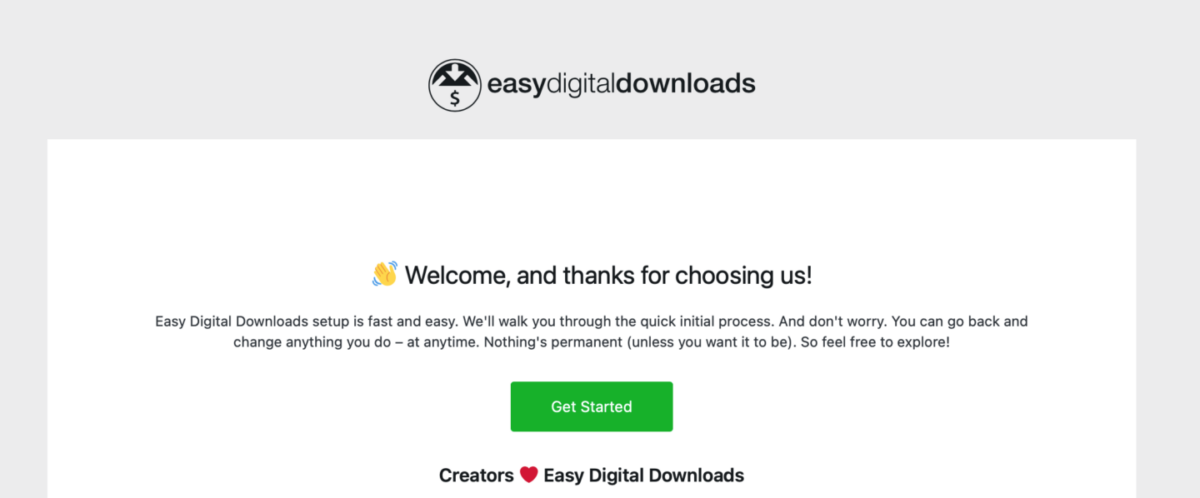
Nadat u uw EDD-pas hebt aangeschaft en de EDD-plugin hebt gedownload, kunt u deze uploaden, installeren en activeren op uw WordPress-site. Volg vervolgens de Onboarding Wizard om uw winkel in te richten:
⚙️ Voor hulp bij het configureren van uw EDD-winkel kunt u deze handleidingen gebruiken:
Stap 2: Configureer de instellingen voor aankoopbon-e-mails
Eenmaal geactiveerd, kunt u de e-mailinstellingen in EDD instellen. Ga om te beginnen naar Downloads » Instellingen » E-mails:
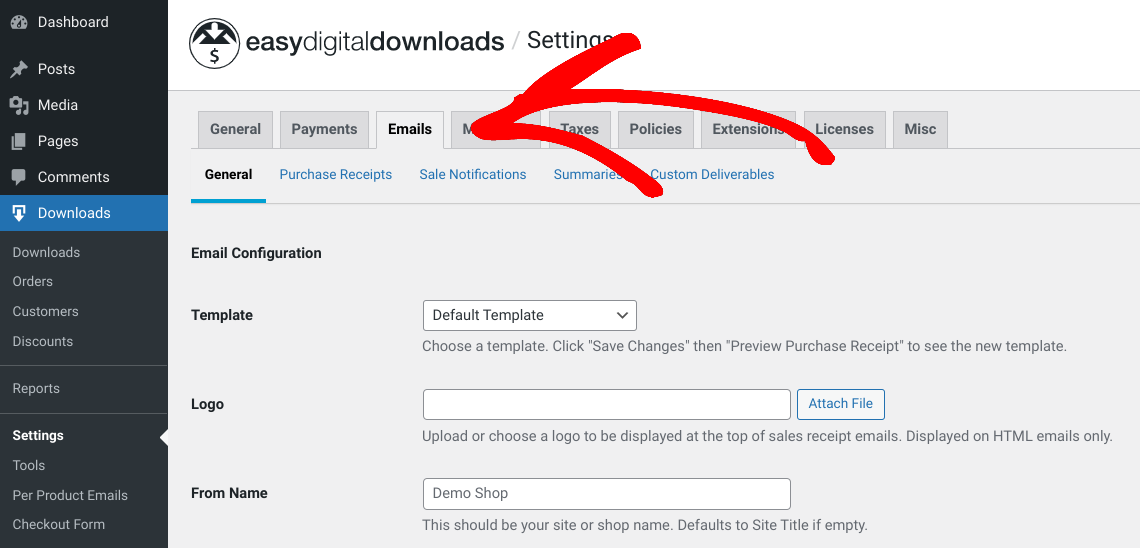
Hier vindt u verschillende e-mailinstellingen voor uw WordPress-website en online winkel. Onder het tabblad Algemeen kunt u de standaard e-mailsjabloon kiezen of deze wijzigen in alleen platte tekst. Vervolgens kunt u een logo uploaden dat u wilt opnemen in uw verkoopbon-e-mails naar klanten.
In het veld Van naam kunt u uw site- of winkelnaam toevoegen die zal verschijnen in het gedeelte 'Van' van de e-mailinbox van gebruikers. U kunt hetzelfde doen in het veld Van e-mail, wat ook het e-mailadres is dat e-mailberichten zal ontvangen wanneer klanten op 'antwoord' klikken.
Als u klaar bent, klikt u op de knop Wijzigingen opslaan onderaan het scherm.
Configuratie van instellingen voor aankoopbonnen
Ga vervolgens naar het tabblad Aankoopbonnen:
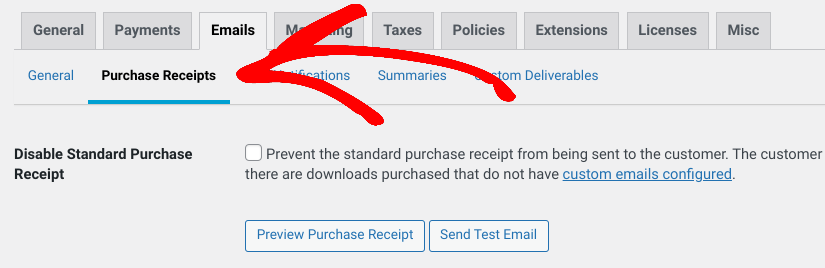
Op dit scherm vindt u tal van opties voor het maken en aanpassen van uw aankoopbonnen. Dit zijn de geautomatiseerde eCommerce-e-mails die naar uw klanten worden verzonden nadat ze een aankoop hebben gedaan op uw website.
Het eerste selectievakje, Schakel standaard aankoopbewijs uit, is alleen van toepassing als u aangepaste e-mails configureert. U kunt dit voorlopig negeren. Ik kom zo meteen op aangepaste e-mails per product.
Standaard volgen de EDD aankoopbewijs e-mails dit sjabloon:
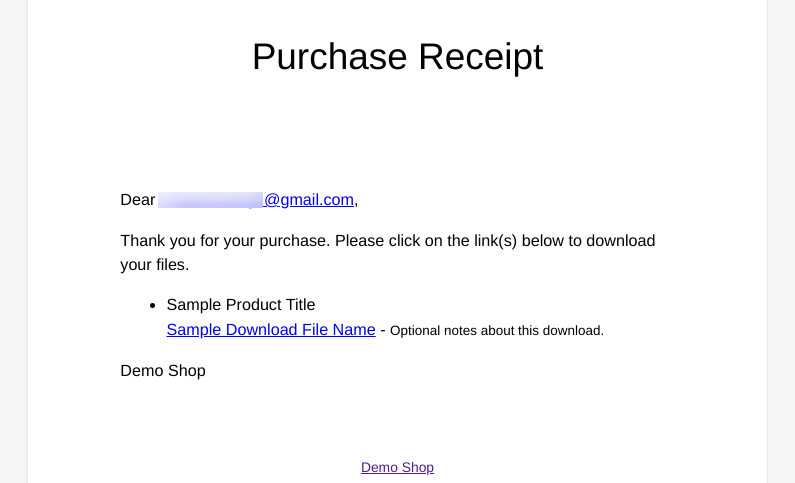
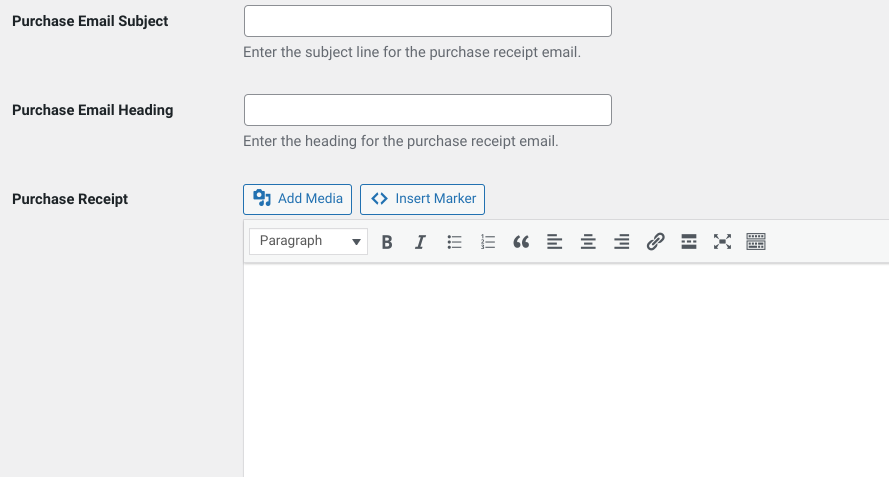
Om dit sjabloon aan te passen, kunt u de onderwerpregel van de aankoop-e-mail, de koptekst en de hoofdtekst invoeren in de volgende velden:
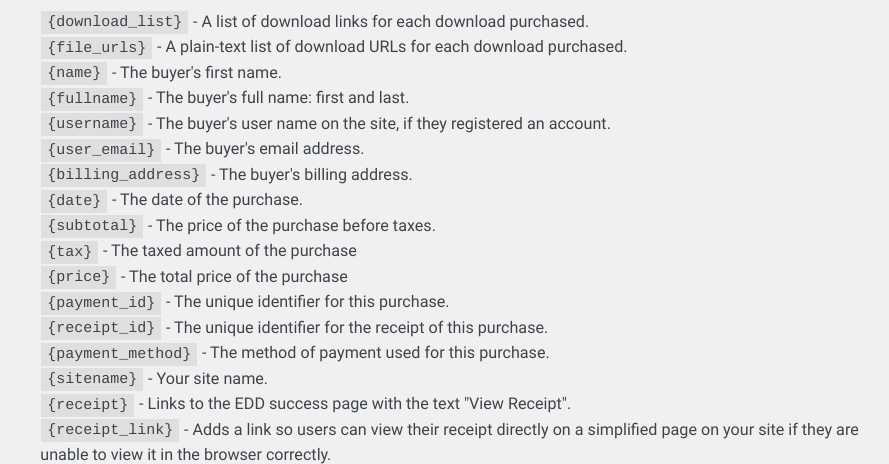
Om uw geautomatiseerde e-commerce e-mails aan te passen, raad ik u aan de HTML en {tag} markeringen te gebruiken die EDD biedt/ondersteunt. U vindt een lijst hiervan onder het tekstveld voor de e-mailtekst:
Vergeet niet op Wijzigingen opslaan te klikken als u klaar bent.
Configuratie van andere EDD e-mailinstellingen
Er zijn een paar extra e-mailinstellingen die EDD biedt en die u kunt configureren. Deze hebben echter betrekking op de e-mails die naar u worden verzonden om u op de hoogte te houden van uw winkelactiviteit.
U kunt bijvoorbeeld onder het tabblad Verkoopmeldingen de e-mails configureren die automatisch naar u (of een ander admin-e-mailadres dat u op deze pagina invoert) worden verzonden en die u waarschuwen wanneer er een verkoop is gedaan.
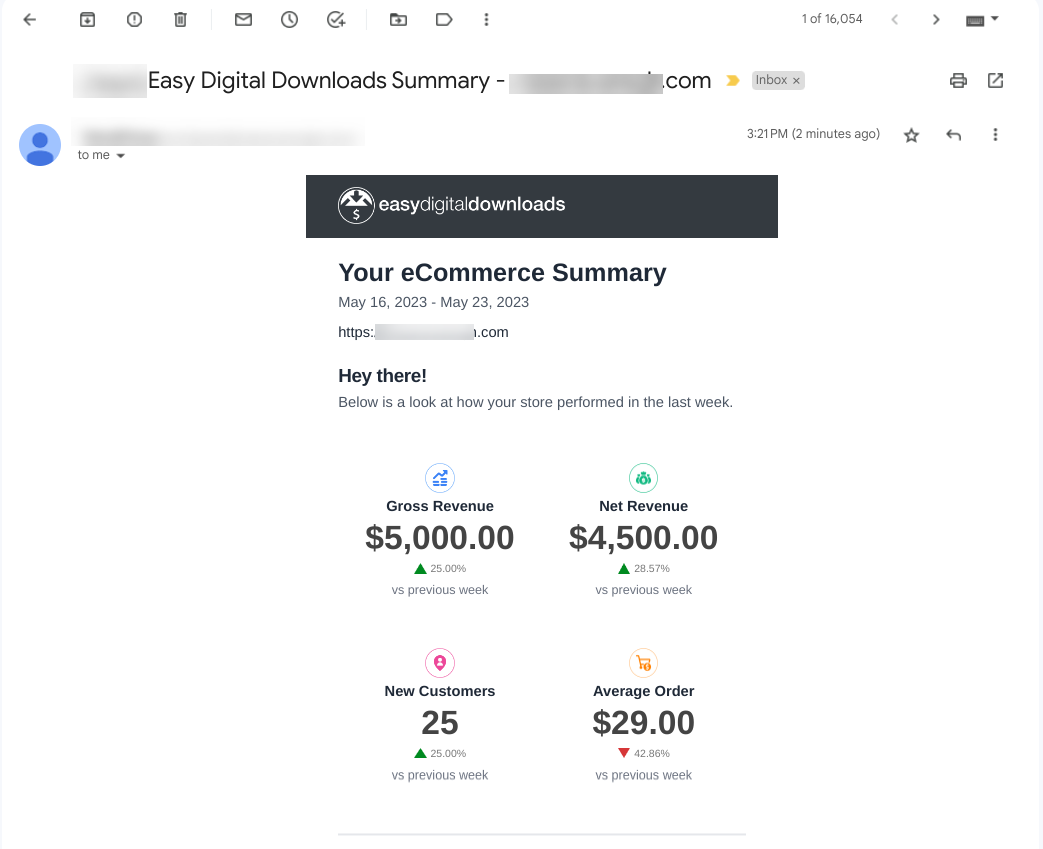
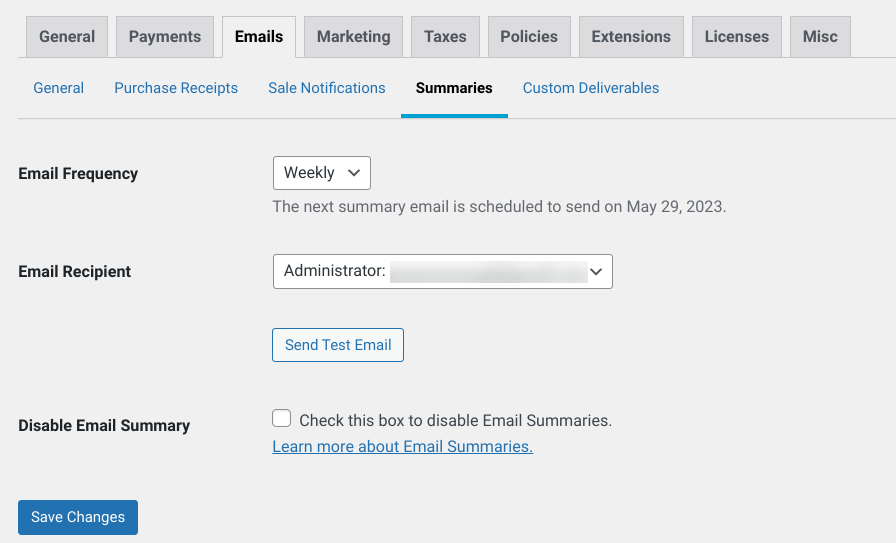
Onder het tabblad Samenvattingen kunt u de instellingen configureren voor de e-mails die naar u worden verzonden en die de samenvattingen van de winkelactiviteit belichten. Deze e-mail rapporteert iets als dit:
U kunt de E-mailfrequentie (wekelijks of maandelijks) selecteren en de E-mailontvanger kiezen (standaard beheerder of aangepaste ontvangers toevoegen via het vervolgkeuzemenu). U kunt ook Test-e-mail verzenden en de E-mailsamenvoeging uitschakelen helemaal:
Stap 3: Test/Bekijk uw geautomatiseerde e-commerce e-mails
Zodra u klaar bent met het configureren van uw e-mailinstellingen, kunt u deze testen om een voorbeeld te bekijken hoe ze eruitzien. Om te zien hoe uw aankoopbewijs e-mails eruit zullen zien voor uw klanten, kunt u naar Downloads » Instellingen » E-mails » Aankoopbewijzen gaan, en vervolgens de knoppen Voorbeeld aankoopbewijs en/of Test-e-mail verzenden selecteren:
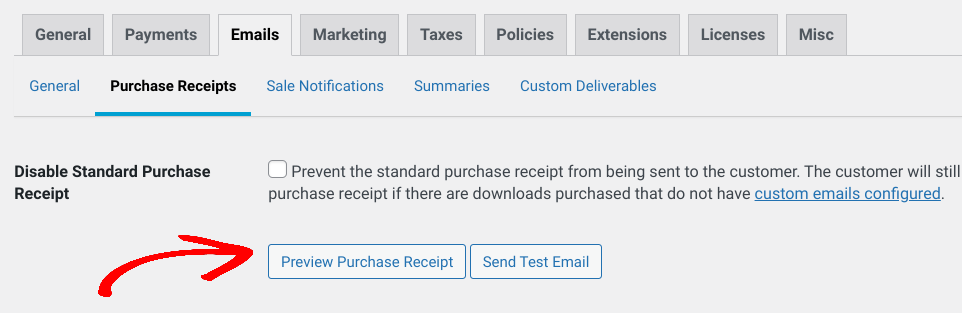
De voorbeeldoptie opent de e-mail in een nieuw browsertabblad. De test-e-mail wordt verzonden naar uw beheerders-e-mailadres voor uw WordPress-website/e-commercewinkel.
Stap 4: Installeer & Configureer EDD E-mail Add-ons
Zoals ik eerder al zei, biedt EDD tal van extensies, waaronder e-mailgerelateerde add-ons, die u kunt gebruiken voor meer geavanceerde functies en mogelijkheden. De extensies waartoe u toegang heeft, variëren afhankelijk van uw EDD-abonnement. Met een All Access Pass krijgt u toegang tot de volledige bibliotheek van premium add-ons.
Om beschikbare EDD-extensies te zoeken en installeren, kunt u naar Downloads » Extensies gaan vanuit uw WordPress-dashboard:
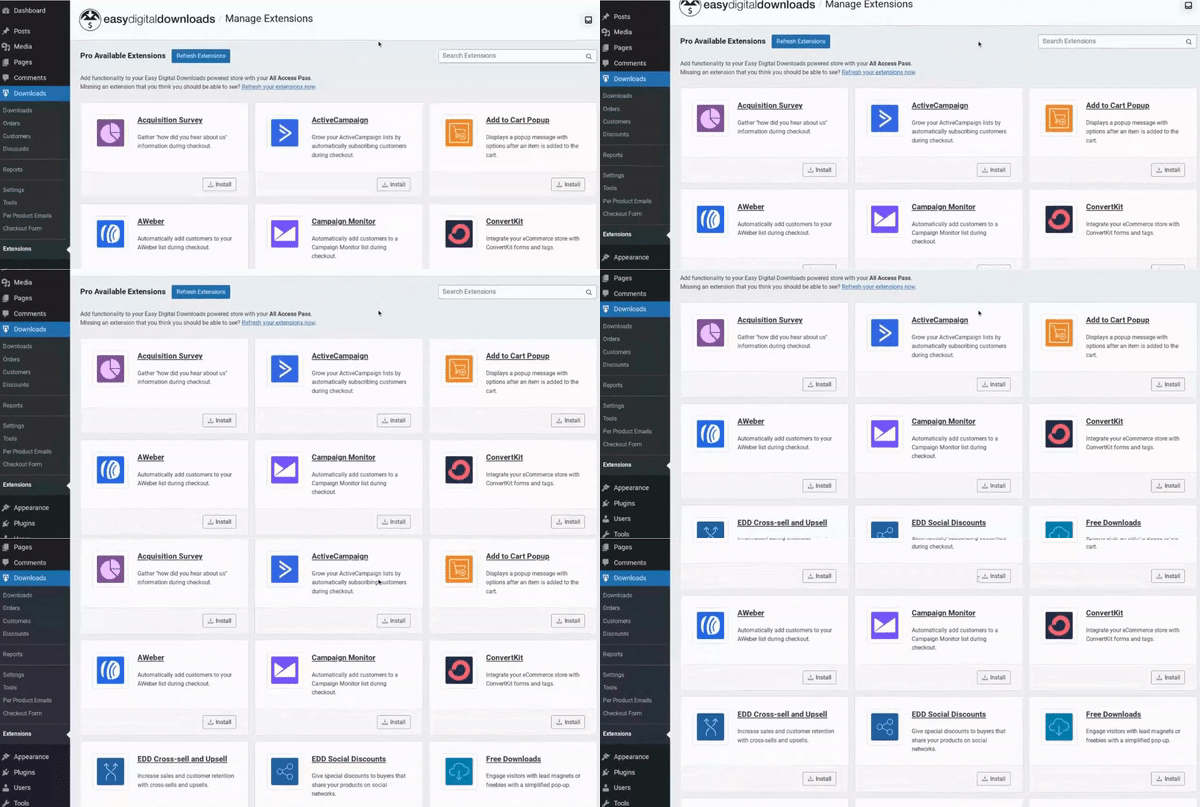
U krijgt ook de mogelijkheid om te upgraden naar EDD Pro om toegang te ontgrendelen tot add-ons die uw abonnement mogelijk niet dekt. Als u hulp nodig heeft, bekijk dan onze handleiding voor het installeren van EDD-extensies.
Hieronder bespreek ik enkele van de beste EDD e-mail-extensies en waarom/hoe u ze kunt configureren.
E-mails Per Product
EDD laat je automatisch een e-mail sturen naar de klant bij elke verkoop. Maar met de Per Product Emails addon, kun je ook aangepaste e-mails sturen naar klanten voor individuele producten of downloads. Dit kan je helpen met gepersonaliseerde communicatie, gerichte marketing en verhoogde conversies.
Je kunt het gebruiken om je geautomatiseerde e-mailinspanningen voor eCommerce te optimaliseren en een meer op maat gemaakte en impactvolle ervaring te leveren aan je klanten.
Eenmaal geactiveerd, kun je naar Downloads » Per Product Emails gaan en vervolgens Nieuwe toevoegen selecteren:
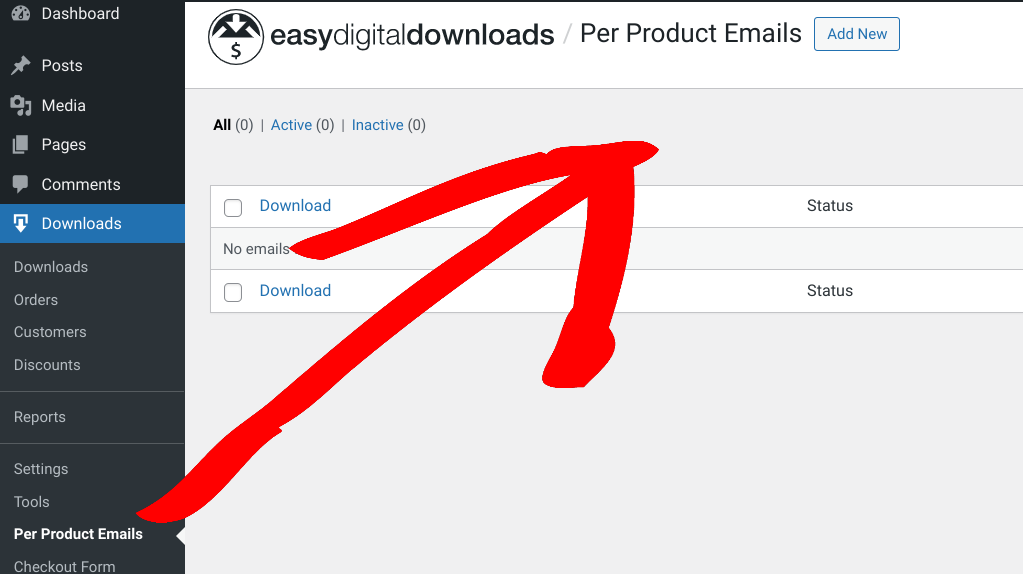
Vervolgens vind je een interface die vergelijkbaar is met de standaard EDD Aankoopbewijs instellingen uit Stap 2:
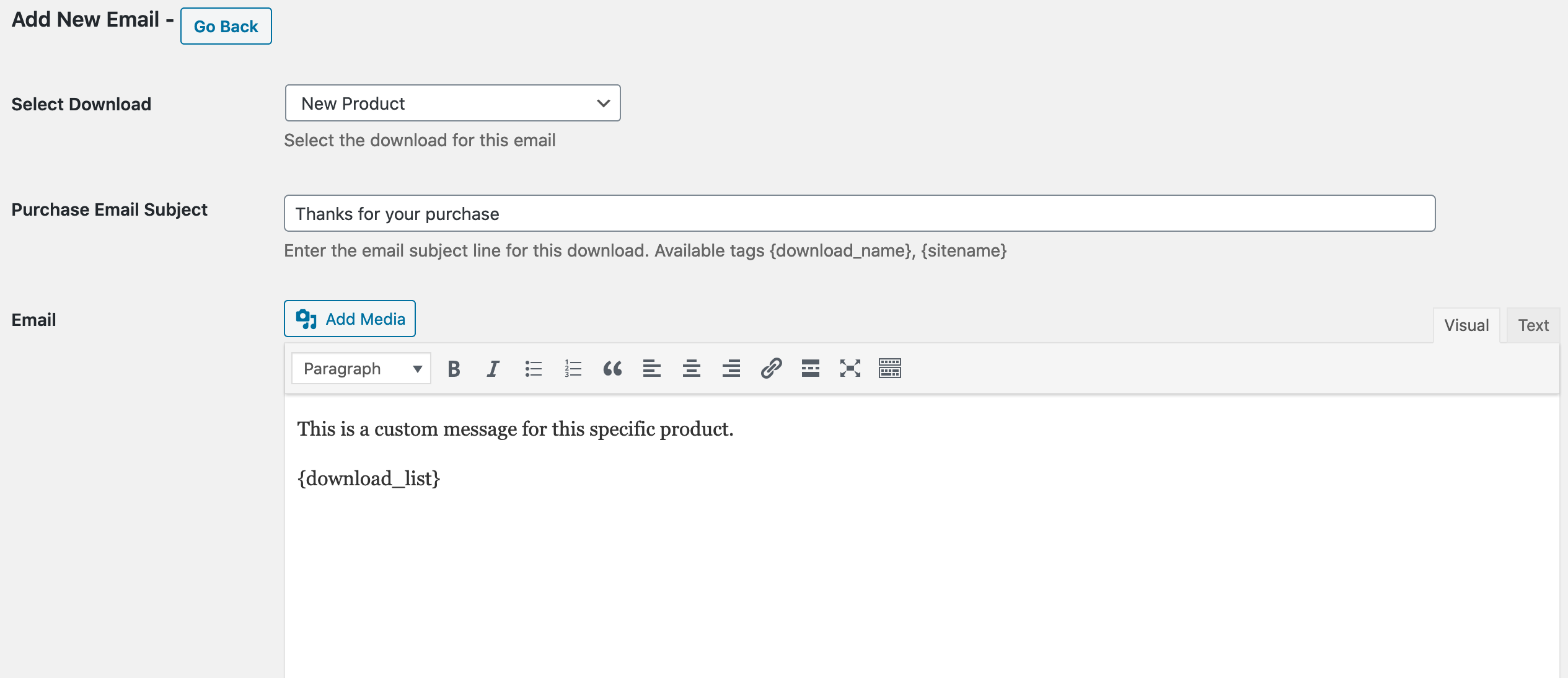
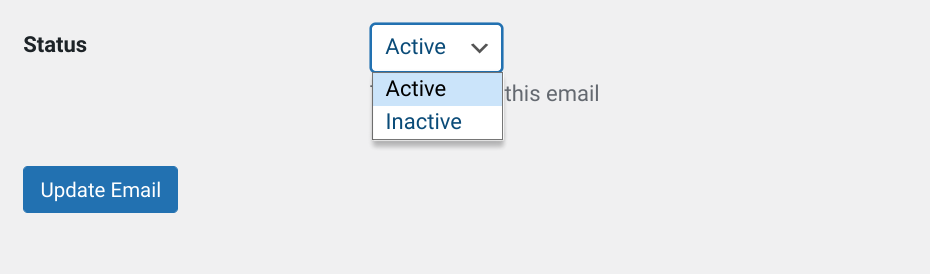
Op deze pagina kies je een product uit het dropdownmenu Selecteer Download, voer je een Onderwerp van de aankoope-mail in, en voeg je de tekst van de E-mail body toe. Vervolgens kun je de Status instellen op Actief of Inactief:
⚙️ Voor verdere hulp kun je onze Per Product Emails documentatie raadplegen
Download E-mail Bijlagen
De Download Email Attachments extensie laat je automatisch downloadbestanden (inclusief gebundelde downloads) als e-mailbijlagen meesturen in de aankoopbewijs(zen) naar klanten. Deze functie kan per download worden aangepast.
Ook, met deze extensie ingeschakeld, verschijnen de downloadlinks nog steeds op e-mails met aankoopbewijzen en orderafleverpagina's. Je kunt deze links echter handmatig verwijderen als je dat wilt.
Eenmaal geïnstalleerd en geactiveerd, kun je de extensie-instellingen configureren onder Downloads » Instellingen » E-mails » Algemeen. Helemaal onderaan vind je de sectie Download Email Attachments met een selectievakje Per download bestandbijlagen inschakelen:

Als deze instelling niet is ingeschakeld, zullen alle downloads e-mailbijlagen hebben voor de bestandsdownloads. Aan de andere kant, als je deze optie selecteert/inschakelt, moet je de functionaliteit handmatig inschakelen voor elke download waarvoor je deze wilt gebruiken.
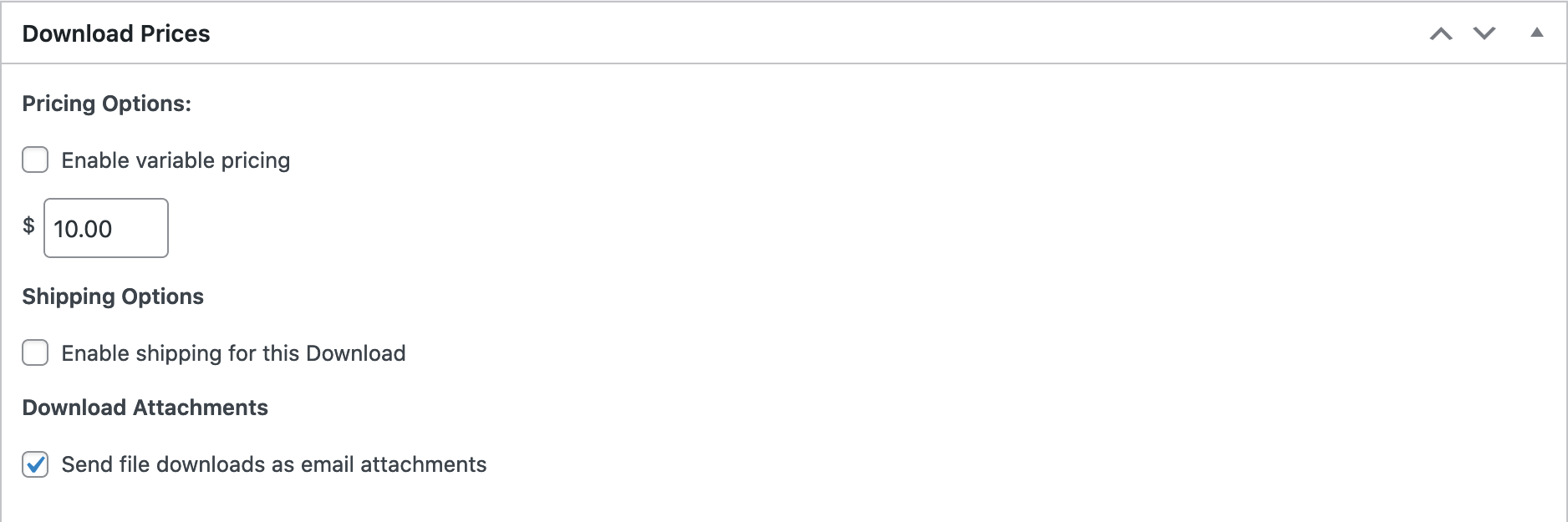
Dit kun je doen vanaf de downloadproductpagina. Navigeer naar Download Prijzen » Download Bijlagen. Selecteer vervolgens Bestandsdownloads als e-mailbijlagen verzenden:
⚙️ Download Email Attachments Documentatie
Voorwaardelijke E-mails
Met Conditional Emails kun je geautomatiseerde eCommerce e-mails genereren die worden getriggerd door specifieke voorwaarden/gebeurtenissen. Je kunt bijvoorbeeld een e-mail configureren die wordt verzonden wanneer een klant een specifieke aankoop doet, hun winkelwagentje achterlaat, of aan een andere door jou gedefinieerde voorwaarde voldoet.
Op dezelfde manier kun je een e-mail instellen die naar je websitebeheerders wordt gestuurd wanneer er een wijziging is in de betalingsstatus van een bestelling.
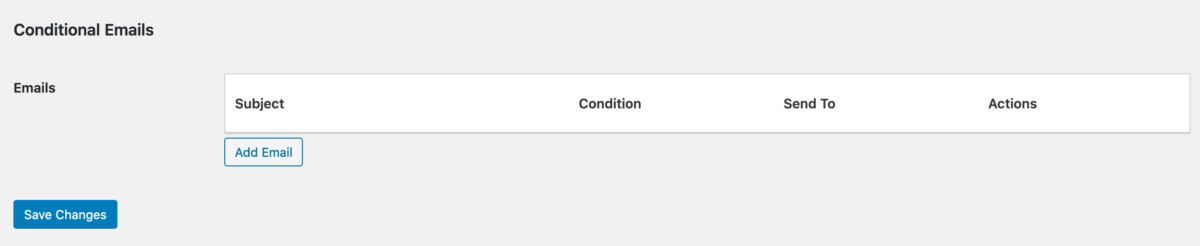
Nadat je deze extensie hebt geïnstalleerd en geactiveerd, kun je naar Downloads » Instellingen » E-mails gaan. Klik vervolgens op het tabblad Conditional Emails, gevolgd door E-mail toevoegen:
Vervolgens kunt u de e-mailvoorwaarde, de statusvoorwaarden en waar de e-mail naartoe moet worden verzonden, configureren:
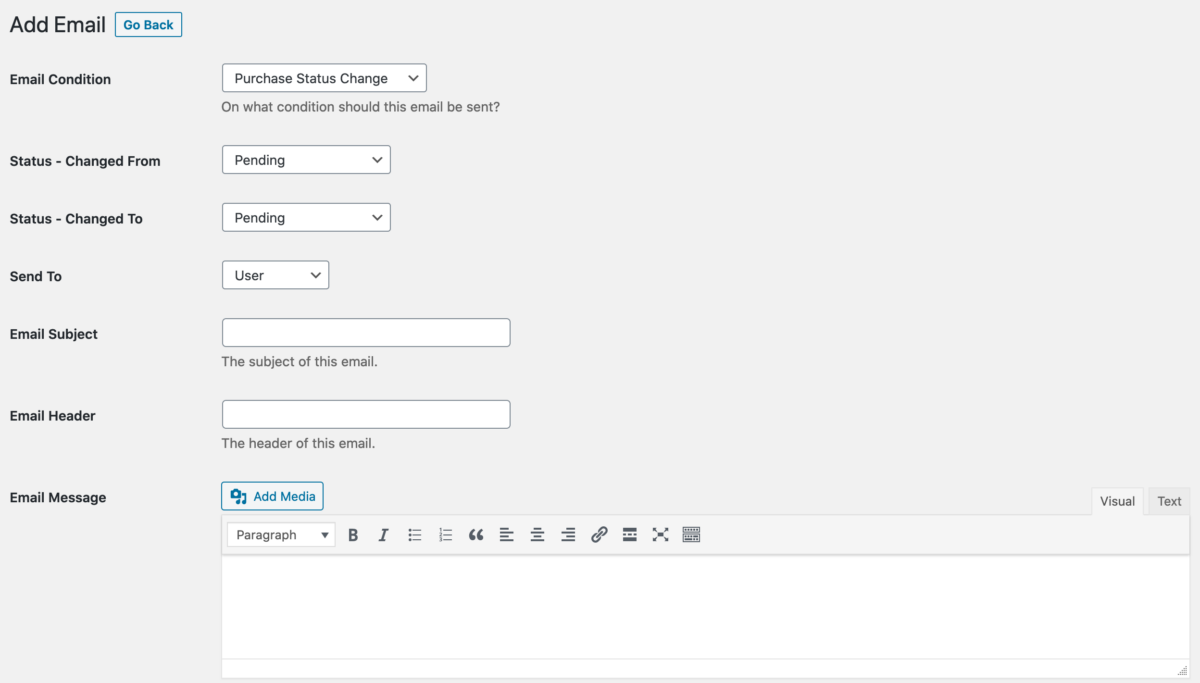
U kunt ook het onderwerp, de kop en het bericht van de e-mail invoeren. Als u klaar bent, selecteert u E-mail bijwerken.
⚙️ Hulp nodig? Raadpleeg onze documentatie over het instellen van voorwaardelijke e-mails
EDD E-mail Rapporten
De EDD Email Reports-extensie levert dagelijks een gedetailleerd verkooprapport rechtstreeks in uw e-mailinbox. Zoals u zich misschien herinnert, kunt u e-mailsamenstellingen configureren met de ingebouwde instellingen van EDD.
Maar met deze plugin kunt u e-mailrapporten configureren om automatisch eenmaal per dag te worden verzonden. U kunt de prestaties van uw e-commerce site eenvoudig bekijken, volgen en beheren. De extensie helpt u gegevensgestuurde beslissingen te nemen, e-commerce marketingcampagnes te optimaliseren en conversies en inkomsten te stimuleren.
Eenmaal geactiveerd, kunt u naar Downloads » Instellingen » E-mails gaan. Scroll vervolgens op het tabblad Algemeen naar E-mailrapportinstellingen:
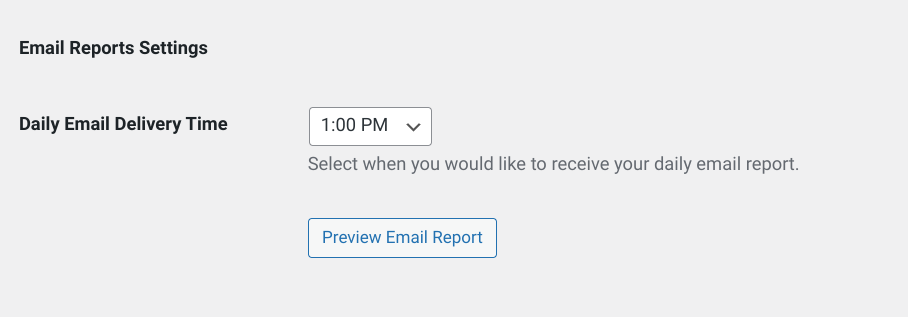
In het vervolgkeuzemenu Dagelijkse e-mailbezorgingstijd kunt u de gewenste tijd voor deze rapporten selecteren. U kunt Voorbeeld e-mailrapport selecteren om een idee te krijgen van hoe deze rapporten eruit zullen zien.
Als u klaar bent, vergeet dan niet op Wijzigingen opslaan te klikken.
⚙️ Lees meer in onze EDD Email Reports-documentatie
WP Mail SMTP
Transactie-e-mails zijn een cruciaal onderdeel van elk succesvol online bedrijf. Maar problemen met de e-mailaflevering komen vaak voor.
Om problemen zoals het niet verzenden van uw e-mails te voorkomen, raad ik ten zeerste aan WP Mail SMTP te installeren. Deze krachtige plugin van het WPForms-team helpt ervoor te zorgen dat uw e-mails consistent en betrouwbaar bij uw klanten worden afgeleverd.
Lees meer over het gebruik van WP Mail SMTP om de e-mailaflevering te verbeteren.
Veelgestelde Vragen WordPress Geautomatiseerde E-commerce E-mails
Kan ik e-mailsjablonen aanpassen met EDD?
Ja, Easy Digital Downloads stelt u in staat om e-mailsjablonen aan te passen aan uw branding, zoals het toevoegen van uw logo. Bovendien kunt u tags gebruiken om uw e-mailinhoud te personaliseren.
Kan ik EDD integreren met e-mailmarketingplatforms?
Absoluut! Easy Digital Downloads biedt naadloze integraties met populaire e-mailmarketingtools en e-mailmarketingproviders. Het combineren van deze platforms kan u helpen uw e-maillijst op te bouwen en het voor bezoekers gemakkelijk te maken om zich aan te melden voor e-mailcampagnes.
EDD heeft add-ons voor Mailchimp, MailPoet, AWeber, GetResponse, Mad Mimi, enz. Deze integraties stellen u in staat om klantgegevens te synchroniseren, nieuwe abonnees en e-mailnieuwsbriefaanmeldingen aan te trekken, en nog veel meer.
Verzend Geautomatiseerde E-commerce E-mails Met EDD
Van het besparen van tijd en moeite tot het leveren van gepersonaliseerde communicatie, het terugwinnen van verloren verkopen en het verbeteren van klanttevredenheid, geautomatiseerde e-commerce e-mails in WordPress helpen u uw e-mailinspanningen te optimaliseren en groei te stimuleren. U kunt uw activiteiten stroomlijnen, de betrokkenheid van klanten vergroten en uiteindelijk de verkoop en omzet verhogen.
Download Easy Digital Downloads vandaag om te beginnen!
📣 PS. Vergeet niet u aan te melden voor onze nieuwsbrief en volg ons op Facebook of Twitter voor meer WordPress-bronnen!








