

Om de 2Checkout betaalpoort te configureren, volg deze stappen:
1. Configureer 2Checkout
2. Stel Instant Notification Service in
Probleemoplossing / Veelgestelde vragen
1. Configureer 2Checkout (Verifone)
Houd er rekening mee dat u een 2Sell of 2Subscribe account bij 2Checkout nodig heeft om de 2Checkout (Verifone) gateway te gebruiken. Als u terugkerende downloads (abonnementen) wilt verkopen, moet uw account 2Subscribe zijn.
Zodra de extensie is geïnstalleerd en geactiveerd, gaat u naar Downloads > Instellingen > Betalingen > 2Checkout
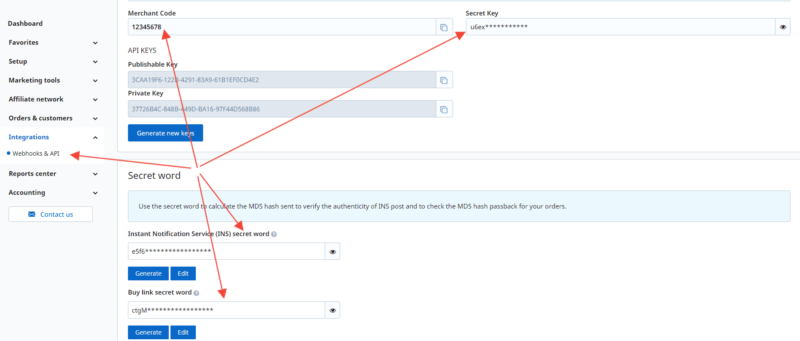
Op deze pagina moet u uw API-gegevens toevoegen, die u kunt verkrijgen uit uw 2Checkout (Verifone) account onder Integraties > Webhooks & API.
De vereiste gegevens zijn:
- Merchantcode
- Geheime sleutel
- Instant Notification Service (INS) geheime woord
- Koop link geheime woord
Nadat u de gegevens hebt toegevoegd aan de 2Checkout-instellingenpagina binnen EDD, schakelt u over naar het hoofdgedeelte Betalingen > Algemeen en vinkt u het vakje aan naast elke gateway die u op de website wilt inschakelen.
U krijgt de optie om een of beide 2Checkout-gateways in te schakelen:
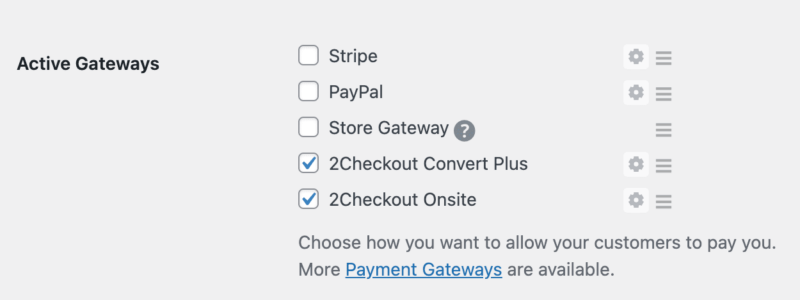
2Checkout Convert Plus: Aankopen die met deze gateway worden gedaan, sturen de klanten naar de 2Checkout-website waar ze de transactie zullen voltooien.
2Checkout Onsite: Aankopen die met 2Checkout Onsite worden gedaan, houden klanten op uw website en stellen hen in staat hun creditcard-/debetcardgegevens in te voeren op het afrekenscherm. Opmerking: deze optie vereist een SSL-certificaat dat op uw website is geïnstalleerd.
Nadat u hebt gekozen welke gateway-opties u wilt gebruiken, klikt u op de knop Wijzigingen opslaan op die pagina.
2. Stel Instant Notification Service (INS) in in 2Checkout
Als INS niet correct is geconfigureerd, werkt de verwerking van aankopen niet correct
2Checkout's Instant Notification Service stelt 2Checkout in staat om te communiceren met uw winkel, waardoor transactiegegevens gesynchroniseerd blijven. INS moet correct worden ingesteld voor correcte verwerking van aankopen en terugkerende facturering.
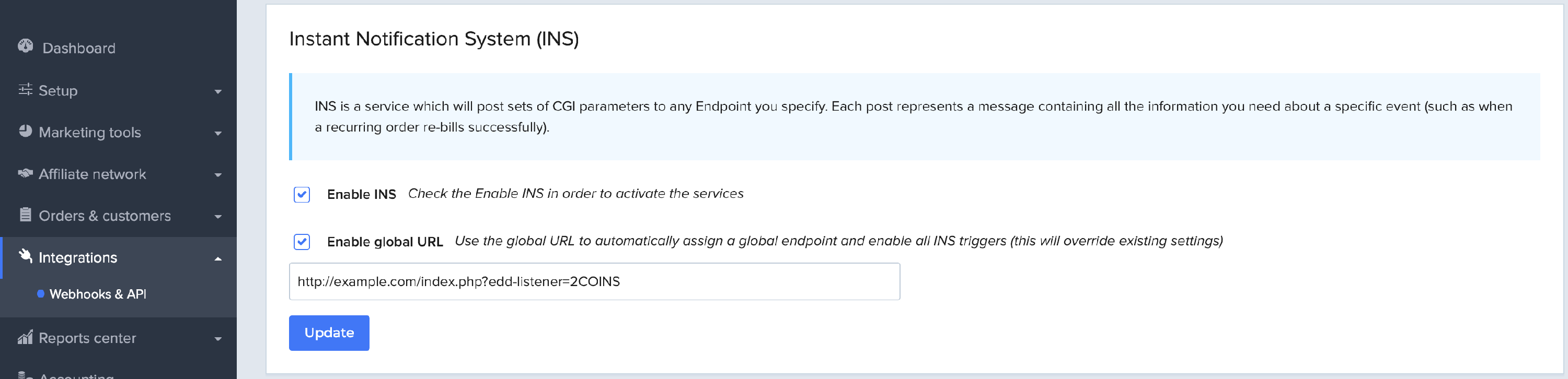
Navigeer vanuit uw 2Checkout-account naar het scherm Integraties / Webhooks & API en zoek de sectie Instant Notification System (INS). Schakel INS & Global INS in en stel de URL in op: https://example.com/index.php?edd-listener=2COINS
Vervang "example.com" door de juiste naam van uw website. U kunt de volledige URL ook vinden op de 2Checkout Configuratiepagina binnen EDD.
Terugkerende Aankopen
Bij gebruik van 2Checkout samen met Terugkerende Betalingen kan een abonnement worden geannuleerd vanaf uw website of binnen het 2Checkout Dashboard.
Terugbetalingen
Bij gebruik van de 2Checkout betaalpoort worden terugbetalingen op dezelfde manier verwerkt als elke andere transactie. Lees hier onze volledige documentatie over terugbetalingen. Momenteel ondersteunt de 2Checkout gateway GEEN gedeeltelijke terugbetalingen, dus het volledige bedrag moet worden terugbetaald binnen EDD.
Probleemoplossing
INS Fouten
Als je merkt dat je INS-verzoeken mislukken, zorg er dan voor dat je hetzelfde protocol gebruikt voor alle verzoeken. Als je bijvoorbeeld je verzoek via HTTP doet, maar vervolgens HTTPS vereist voor inkomende verzoeken (van 2Checkout bijvoorbeeld), dan zullen deze mislukken, omdat ze niet overeenkomen.
Fout: Niet geautoriseerd
Dit bericht kan verschijnen wanneer het factuuradres niet is ingevuld. Het factuuradres is vereist, dus het verbergen of verwijderen ervan zal ertoe leiden dat de transactie mislukt.
Onjuist verzoek – parameterfout
Als je deze fout ontvangt, betekent dit een van de volgende twee dingen:
1. Je 2Checkout-account is nog niet volledig goedgekeurd. Neem contact op met het ondersteuningsteam van 2Checkout om dit te bevestigen en je account volledig te activeren.
2. Niet alle vereiste velden worden naar 2Checkout verzonden. Dit kan gebeuren als je het factuuradres of andere vereiste velden op het afrekenformulier hebt verwijderd. Om het probleem op te lossen, herstel je de verwijderde velden.
Kunnen klanten hun creditcardgegevens bijwerken?
Op dit moment niet.



