

You’ve got a skill people will pay for, whether that’s design work, business coaching, or something else.
Freelance marketplaces like Fiverr and Upwork can sell it for you, but they take a cut of every job. Most store plugins aren’t a great fit either, since they’re built for shipping physical products, not selling your time.
Selling services means a client pays first, then you do the work. Learning how to sell services on WordPress lets you take those payments right on your own website.
In this guide, you’ll use Easy Digital Downloads (EDD) to turn your services into products clients can buy. By the end, you’ll have a working services page ready for your first order.
- Key Takeaways
- What Does It Mean to Sell Services on WordPress?
- Why Use Easy Digital Downloads to Sell Services?
- How to Sell Services on WordPress With EDD
- How to Sell Retainers and Subscription Services on WordPress
- How to Collect Project Details and Deliver the Work
- Tips for Writing Service Pages That Sell
- FAQs About Selling Services on WordPress
Key Takeaways
| Takeaway | Why It Matters |
|---|---|
| Service products are free | EDD’s built-in Service product type sells your work without attaching a download file. |
| Packages use variable pricing | One product can hold several service tiers, so clients pick the level that fits their budget. |
| Retainers bill automatically | Recurring Payments in EDD Pro charges clients every month or year without manual invoices. |
| Collect details at checkout | Checkout Fields Manager asks for project info and files before you start the work. |
What Does It Mean to Sell Services on WordPress?
Selling services on WordPress means clients buy your time or expertise through your own website instead of a marketplace. They pay at checkout, then you deliver the work, whether that’s a coaching call or a finished design. Your site handles the payment and keeps the customer record.
That’s the key difference from selling digital products. With an ebook, the file is the product. With a service, the product is the work you do after the sale.
Not sure what to offer yet? Our list of the best services to sell online with WordPress can help you pick a starting point.
Why Use Easy Digital Downloads to Sell Services?
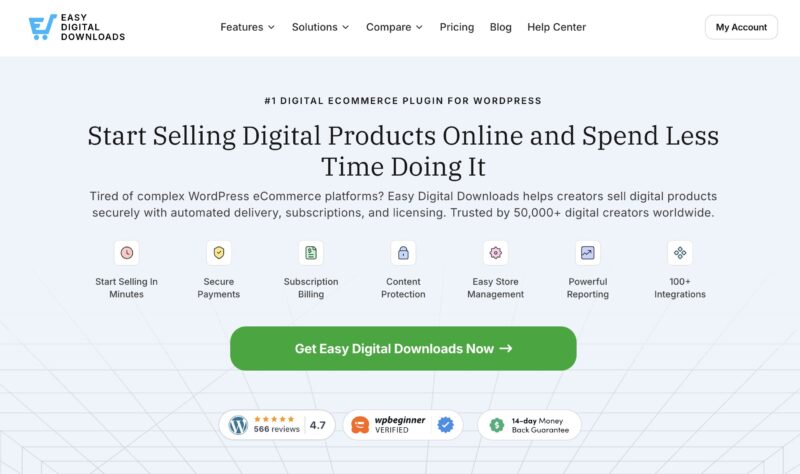
Easy Digital Downloads is built for selling products you don’t ship. That makes it a natural fit for services, which have no inventory or shipping to manage.
Selling Services on WordPress Without WooCommerce
Many WordPress tutorials point you to WooCommerce. It’s a solid plugin, but it’s designed around physical products. You’ll spend time working around stock and shipping settings that a service business never uses.
Easy Digital Downloads keeps things simpler. You create a product, mark it as a service, set a price, and you’re ready to sell.
You also own the whole setup. Client details stay on your site, and you decide how your services look and how they’re priced.
What’s Free and What Needs EDD Pro
This table shows which tool handles each part of a service business:
| What you want to do | EDD tool | Available in |
|---|---|---|
| Sell a one-time service | Service product type | Core |
| Offer service packages | Variable pricing | Core |
| Show services on one page | EDD Products block | Core |
| Bill monthly retainers | Recurring Payments | EDD Pro |
| Ask for project details | Checkout Fields Manager | EDD Pro |
| Deliver finished files | Custom Deliverables | EDD Pro |
| Email clients from your dashboard | EDD Message | EDD Pro |
The free plugin is enough to start taking payments today. The EDD Pro features help once you’re ready to bill retainers or manage client projects.
How to Sell Services on WordPress With EDD
Follow these seven steps to set up your first service and start selling it from your site. All you need is a WordPress site.
Step 1. Install Easy Digital Downloads
Skip this step if Easy Digital Downloads is already active on your site.
Otherwise, download the Easy Digital Downloads plugin, then install and activate it on your WordPress site. You’ll see a new Downloads menu in your dashboard.
Want a hand with the first-time setup? Our getting started guide walks you through it.
Step 2. Connect a Payment Gateway
A payment gateway moves money from your client’s card to your bank account. Without one, nobody can check out.
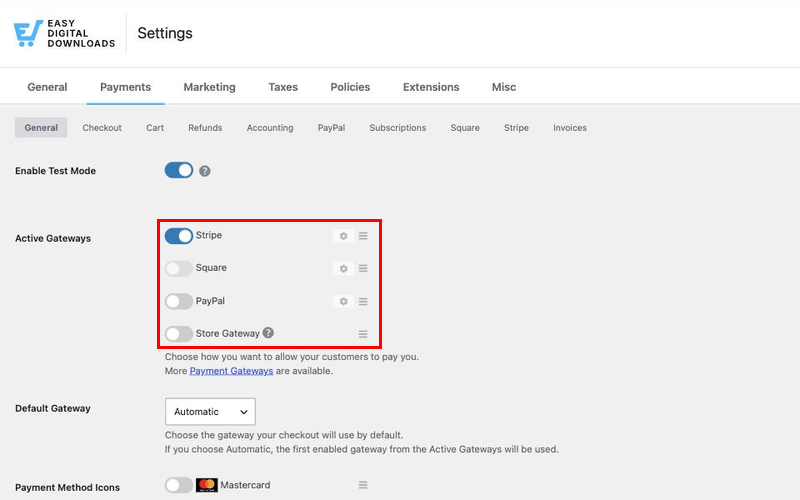
Go to Downloads » Settings » Payments to connect your gateway. Popular choices include Stripe and PayPal, and Easy Digital Downloads supports more gateways depending on your plan.
For a closer look at your options, see our docs on payment gateways.
Step 3. Create a Service Product
Now you’re ready to turn your service into something clients can buy. Go to Downloads » Add Download.
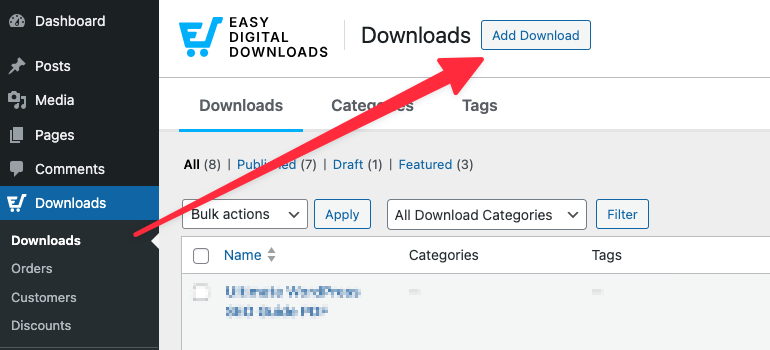
In Easy Digital Downloads, every product is called a “download,” even when there’s no file involved. So your services live under Downloads too.
Give your service a clear name, like “30-Minute Strategy Call.” Use the product description to explain what’s included and what the client gets.
Scroll down to the Download Details box. On the Details tab, set Product Type Options to Service. Then enter your rate in the Price field.
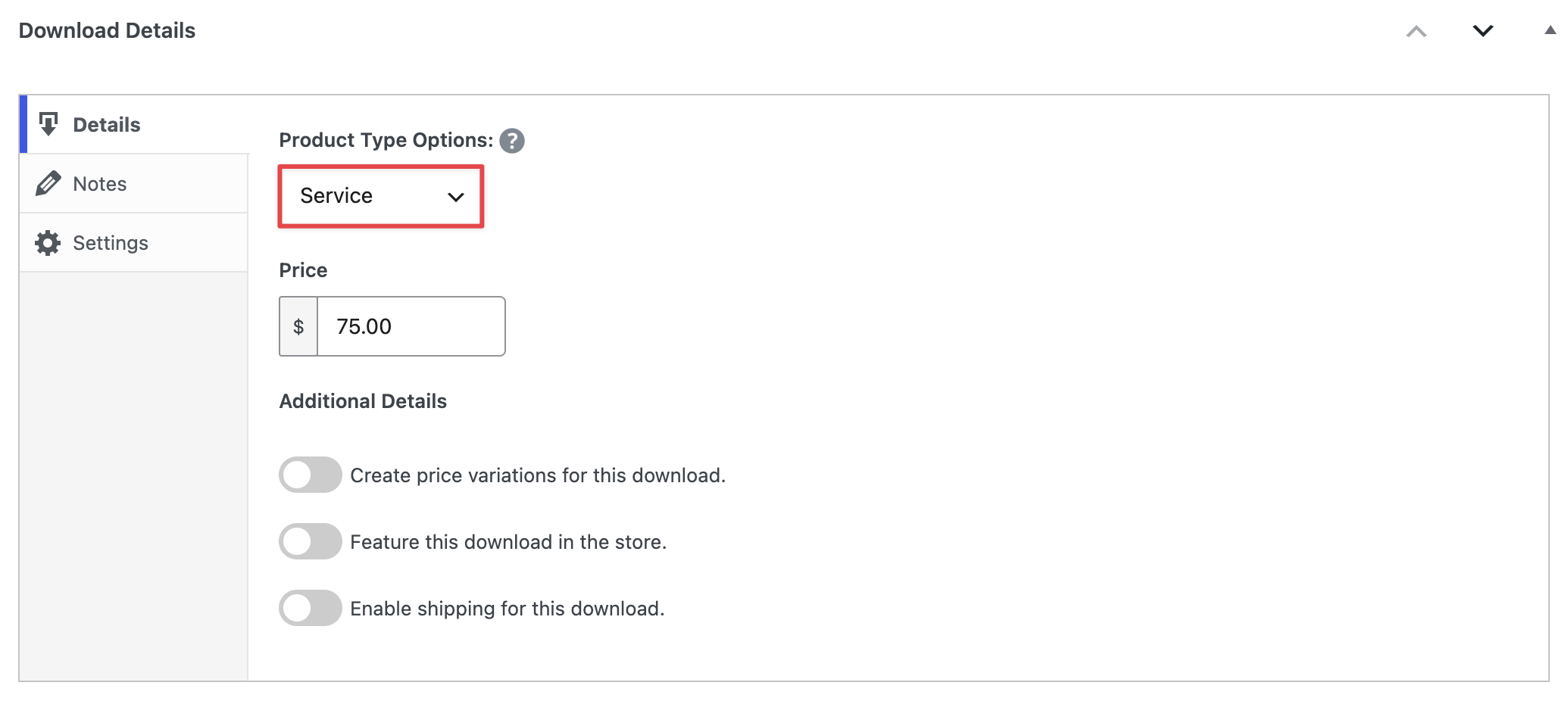
The Service type tells Easy Digital Downloads there’s no file to deliver. Your client’s receipt won’t show an empty download section or a “No downloadable files found” message. It simply confirms the purchase.
Click Publish when you’re done. To see how your service looks to clients, click View Download.
Step 4. Offer Service Packages With Variable Pricing
Packages make it easier for clients to say yes. Instead of one price, you give them a few levels to choose from.
Say you offer website audits. You could sell a Quick Audit, a Full Audit, and a Full Audit With a Follow-Up Call.
To set this up, open your service product. In the Download Details box, check Create price variations for this download.
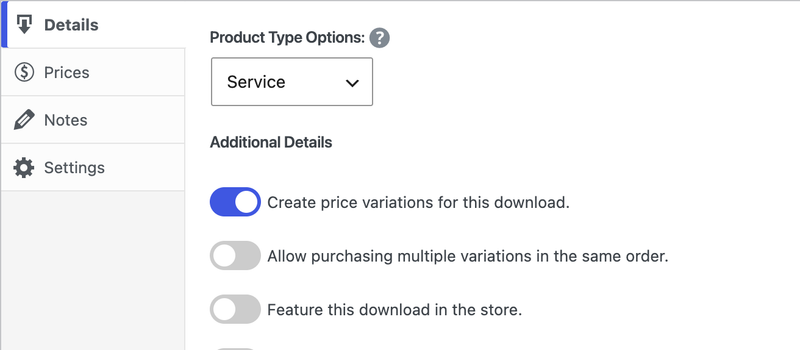
A new Prices tab appears.
Add a row for each package, then give each one a name and a price.
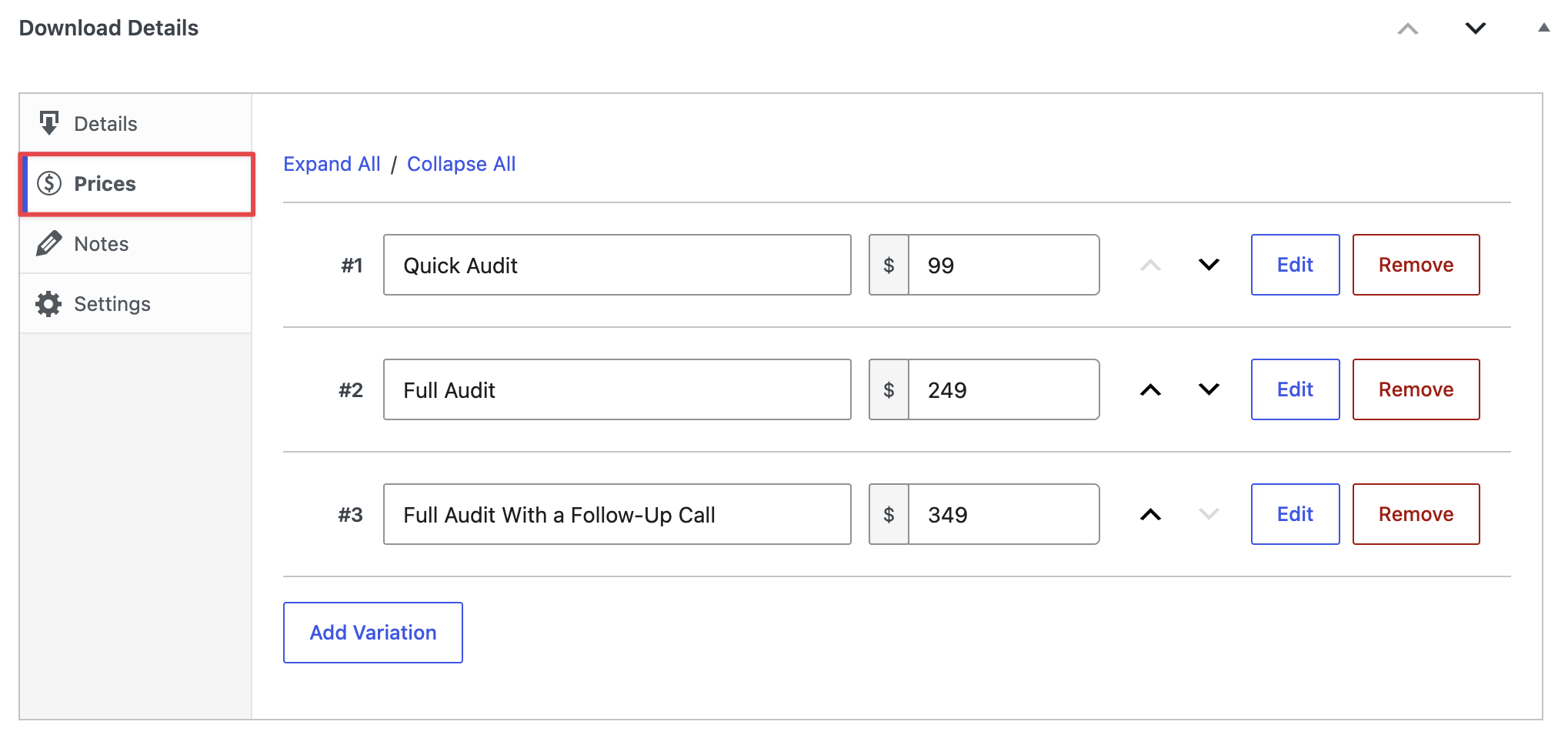
Variable pricing is built into the free plugin, so there’s nothing extra to install.
List exactly what each tier includes in your product description. Clients compare packages side by side, and clear details help them pick the right one.
Our guide to creating products covers variable pricing, product types, and every other product setting in more detail.
Step 5. Tell Clients What Happens Next
After someone buys a service, they’ll want to know what comes next. Should they send you files, or wait for your email?
Use the Notes tab in the Download Details box to answer that. Easy Digital Downloads adds these notes to the purchase receipt page and the receipt email.
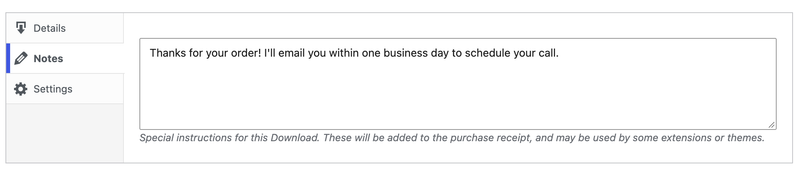
Good notes are short and specific. For example: “Thanks for your order! I’ll email you within one business day to schedule your call.”
Clear next steps cut down on worried emails. They also make your service feel professional from the moment someone pays.
Step 6. Build a Services Page
If you sell more than one service, give them a home of their own.
First, put your services in a category. Go to Downloads » Categories, create a category named Services, and assign it to each service product.
Want a shortcut? Go to Downloads » Settings » Marketing and choose that category in the Downloads as Services setting. Easy Digital Downloads then treats every product in it as a service, so you don’t have to set the product type one by one.
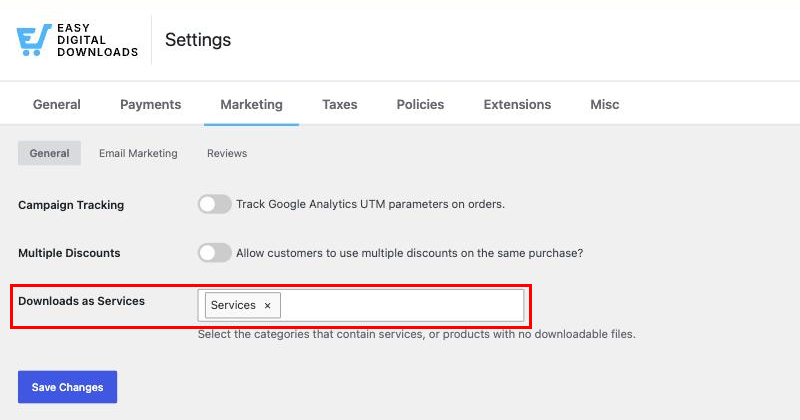
Next, go to Pages » Add Page and name it Services. Add the EDD Products block.
In the block settings sidebar, open Download Term Settings. Pick your Services category under Show Downloads From Categories. Now the page only shows your services.
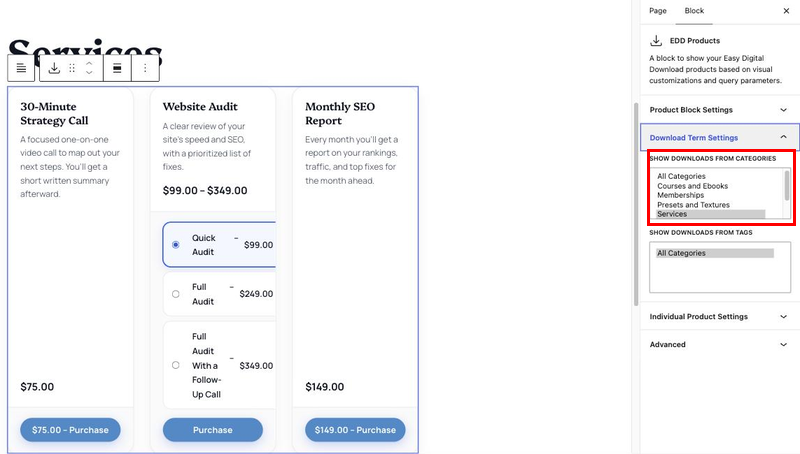
Finally, add the page to your site’s menu. On a block theme, go to Appearance » Editor » Navigation. On a classic theme, use Appearance » Menus.
Step 7. Test Your Checkout
Before you share your services page, buy one of your own services to make sure everything works.
Go to Downloads » Settings » Payments and turn on Enable Test Mode. Then place a test order using your gateway’s test card.
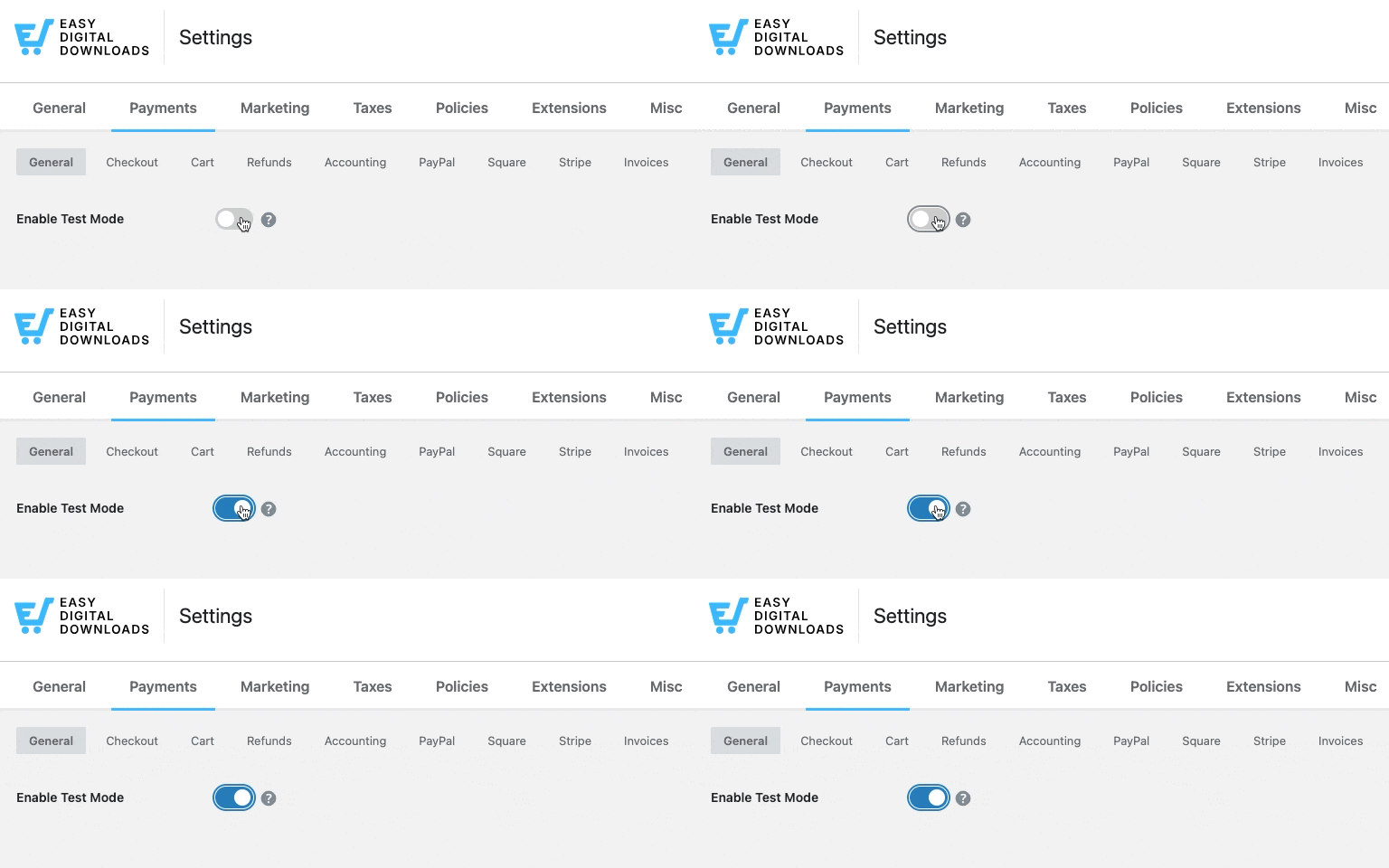
Check the receipt page and the receipt email. You should see your notes and no download links. When it all looks right, turn test mode off.
💡 Side note: Want your checkout to look as polished as your services page? You can customize your checkout page layout with blocks, or start from one of the Elementor checkout templates.
How to Sell Retainers and Subscription Services on WordPress
Some services don’t end after one job. Monthly SEO reports and ongoing coaching both need regular billing.
Recurring Payments in Easy Digital Downloads Pro handles this for you. Clients sign up once, and EDD charges them automatically every billing period.
Open your service product. Next to the Price field, set Recurring to Yes. Then choose a Period, like monthly or yearly, and set how many Times to bill.
If you use packages, click Show advanced settings on each price row. You’ll find that package’s Recurring Payments Settings there.
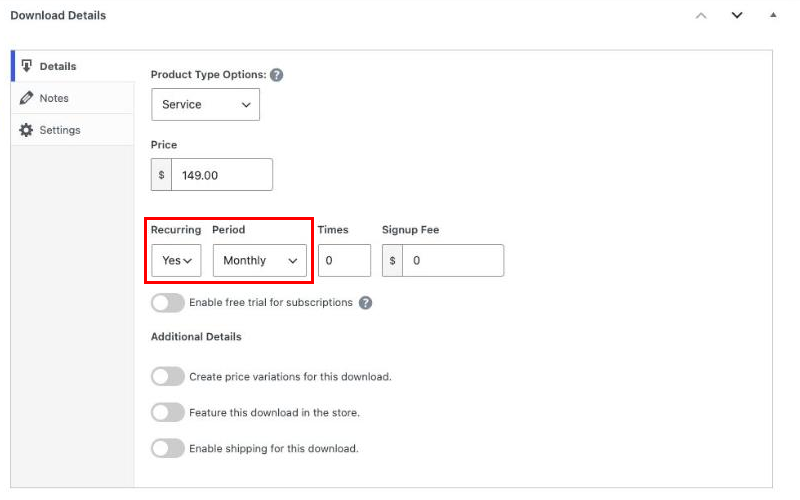
You can also add a Signup Fee to cover onboarding work. Or offer a Free Trial so new clients can try your service first.
For the full walkthrough, see our guide on how to sell subscriptions with WordPress, or learn more about EDD’s subscription billing.
How to Collect Project Details and Deliver the Work
Plenty of services can’t start until you know more about the job. And many end with a file the client needs. These Easy Digital Downloads Pro features help with both.
Ask for Project Details at Checkout
A designer needs brand colors. A copywriter needs to know the target audience.
Checkout Fields Manager lets you add your own questions to the checkout form. Go to Downloads » Checkout Form to add text boxes, drop-downs, or a File Upload field for logos and briefs.
Your client’s answers show up on the order details screen. Everything you need to start the job lives in one place.
Deliver Finished Files to Your Client
Once the work is done, you need a safe way to hand it over. Custom Deliverables lets you attach finished files to a specific client’s order.
Open the order at Downloads » Orders. Find the Custom Deliverables section and click Upload a File. Then notify the client so they know their files are ready.
One thing to know: if you plan to deliver files this way, set the product type to Single Product instead of Service. The Service type hides download links, which would hide your finished files too.
Our Custom Deliverables docs cover the full setup.
Keep the Conversation in One Place
Service work usually means a few emails back and forth. EDD Message lets you email a client right from their customer record, attachments included.
It also keeps a history of every message, so you never have to dig through your inbox to remember what you promised.
Tips for Writing Service Pages That Sell
A good service page answers questions before a client has to ask them. Keep these in mind as you write yours:
- Say exactly what’s included: “Website audit” is vague. “A 15-page report on your site’s speed and SEO” is clear.
- Share your turnaround time: Clients want to know when they’ll hear back from you.
- List what you need from them: If you need logins or files, say so up front.
- Show your price: For smaller services, a clear price makes it easier to buy on the spot.
- Add proof: A short testimonial from a past client builds trust fast.
FAQs About Selling Services on WordPress
Still have questions? These are the ones service sellers ask most when they’re getting started.
How do I sell my services online?
The simplest way to sell services online is from your own website. Install a plugin like Easy Digital Downloads on WordPress, create a product for each service, and connect a payment gateway. Then add your services to a page. Clients pay at checkout, and you deliver the work afterward.
Can you sell services on WordPress without WooCommerce?
Yes. Easy Digital Downloads lets you sell services on WordPress without WooCommerce. Its built-in Service product type is made for work that doesn’t include a file, so you skip shipping and inventory settings entirely. The free version covers one-time services and service packages.
Is Easy Digital Downloads free for selling services?
Yes. The free version of Easy Digital Downloads includes the Service product type, variable pricing for packages, and the EDD Products block for your services page. Features for retainers, custom checkout questions, and file delivery, like Recurring Payments and Custom Deliverables, come with EDD Pro.
How should I price services on my website?
Start with what you’d charge a client directly, then turn it into clear packages. A basic, standard, and premium tier lets clients choose by budget. Show prices openly when you can, since a visible price makes it easier for someone to buy right away.
Can I charge clients a monthly retainer?
Yes. With Recurring Payments in Easy Digital Downloads Pro, you can set any service to bill monthly, quarterly, or yearly. Clients sign up once, and EDD charges them automatically each period. You can also add a signup fee to cover onboarding work.
How do I collect project details from a client?
Use Checkout Fields Manager in Easy Digital Downloads Pro to add your own questions to the checkout form. You can ask about goals and deadlines, and add a file upload field for logos or briefs. The answers appear on the order details screen so you can find them later.
How do I deliver finished work to a client?
If your service ends with a file, use Custom Deliverables in Easy Digital Downloads Pro. You upload the finished file to the client’s order and send a notification email. The client then downloads it from their account, protected by the same secure delivery EDD uses for regular products.
Start Selling Your Services From Your Own Site
Now you know how to sell services on WordPress, from your first service product to monthly retainers.
You could start with the free version of Easy Digital Downloads to sell one-time services and packages. When you’re ready to bill retainers or manage client projects, EDD Pro has the tools to grow with you.
📣 P.S. Be sure to subscribe to our newsletter and follow us on Facebook, Twitter/X, or LinkedIn for more WordPress resources!