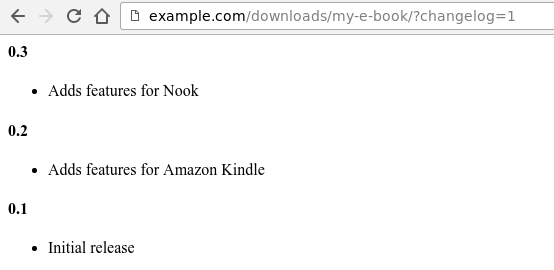
L'extension Licences de logiciel dispose d'un mécanisme intégré pour associer un journal des modifications à un Téléchargement. Cela permet de maintenir facilement le journal des modifications à jour et de le consulter facilement sur le Web pour tout Téléchargement.
Créer un journal des modifications
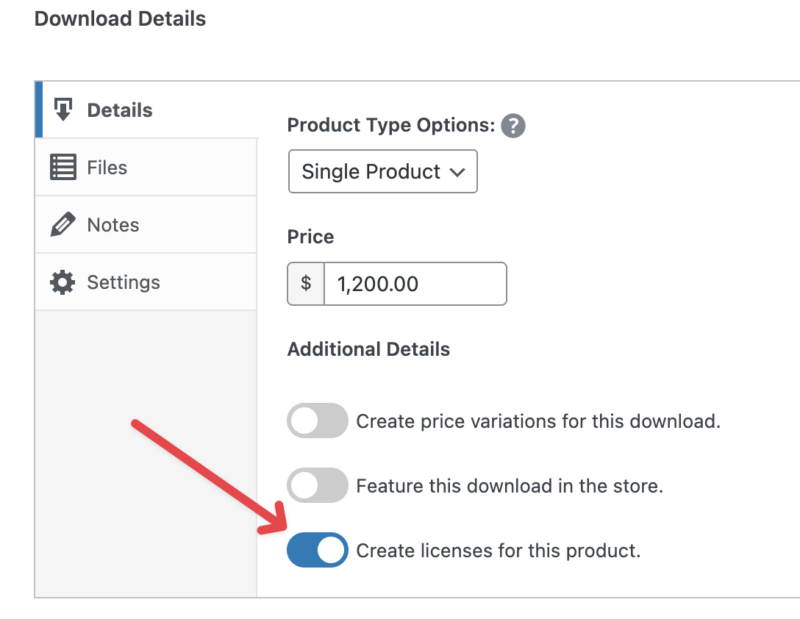
Lors de la modification d'un Téléchargement dans la zone d'administration, recherchez la boîte de métadonnées Licences. Assurez-vous que des licences sont créées pour ce Téléchargement en cochant la case.
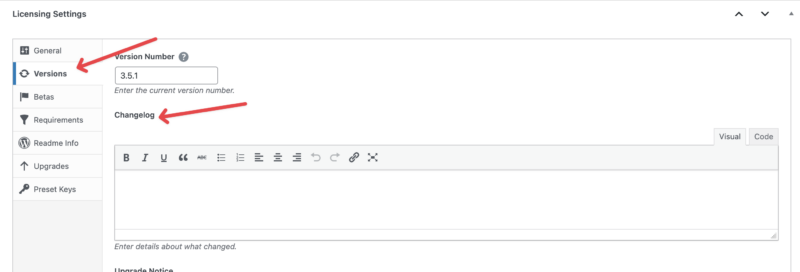
L'une des fonctionnalités qui apparaîtra lorsque les licences seront activées est une grande zone de texte WYSIWYG. Créez votre journal des modifications dans cette zone.
Au fur et à mesure que votre journal des modifications s'allonge, vous pourriez trouver bénéfique de réduire sa longueur lors de sa fourniture via la requête API `get_version`. Depuis Software Licensing 3.6.10, les journaux des modifications prennent désormais en charge la balise « Lire la suite », qui tronquera le journal des modifications lorsqu'il sera consulté uniquement via l'API. Un lien vers le journal des modifications complet sera placé à la fin du journal des modifications tronqué. Insérez simplement ce qui suit au point approprié de votre journal des modifications :
Afficher un journal des modifications
Pour afficher le journal des modifications d'un Téléchargement qui en possède un, visitez d'abord la page produit de ce Téléchargement.

Ajoutez ensuite ceci à la fin de l'URL :
?changelog=1
Et ensuite la page affichera le journal des modifications.