

定期支払いには、購読者を管理するための新しいEDDクラスが付属しています。EDD_Recurring_Subscriberクラスを使用すると、購読顧客およびアカウント上の購読を操作できます。
オブジェクトの作成
EDD_Recurring_Subscriberは、サイト上のEDD顧客またはWordPressユーザーの識別子を指定して呼び出す必要があります。これは、メールアドレス、WordPressユーザーID、またはEDD顧客IDのいずれかです。以下に例を示します。
$subscriber = new EDD_Recurring_Subscriber( '[email protected]' );
整数を渡すと、そのcustomer_idを持つEDD顧客を検索します。
$subscriber = new EDD_Recurring_Subscriber( 3 );
整数と2番目の引数としてtrueを渡すと、そのuser_idを持つWordPressユーザーを検索します。
$subscriber = new EDD_Recurring_Subscriber( 3, true );
上記のいずれかを渡すと、次のようなオブジェクトが返されます。
EDD_Recurring_Subscriber Object
(
    [subs_db:EDD_Recurring_Subscriber:private] => EDD_Subscriptions_DB Object
        (
            [table_name] => wp_edd_subscriptions
            [version] => 1.4.1.3
            [primary_key] => id
        )

    [id] => 11111
    [purchase_count] => 19
    [purchase_value] => 2173.3
    [email] => [email protected]
    [emails] => Array
        (
            [0] => [email protected]
        )

    [name] => Bob Smith
    [date_created] => 2015-06-15 16:38:08
    [payment_ids] =>
    [user_id] => 1nan1
    [notes:protected] =>
    [raw_notes:EDD_Customer:private] =>
    [db:protected] => EDD_DB_Customers Object
        (
            [meta_type] => customer
            [date_key] => date_created
            [cache_group] => customers
            [table_name] => wp_edd_customers
            [version] => 1.0
            [primary_key] => id
        )
)
利用可能なメソッド
以下の各メソッドは、特定の顧客に関連付けられたオブジェクトがあると仮定し、その顧客を「顧客」と呼びます。
条件付きメソッド
$subscriber->has_active_subscription()
このメソッドは、顧客がアクティブまたはキャンセル済みだが、期限切れではない購読を持っているかどうかを確認します。
ブール値を返します。次のようにフィルタリングされます。
apply_filters( 'edd_recurring_has_active_subscription', $ret, $this );
$subscriber->has_product_subscription( $product_id = 0 )
このメソッドは、顧客が特定のEDD製品IDに対して何らかの種類の購読を持っているかどうかを確認します。
EDD製品IDである整数を受け入れます。
ブール値を返します。次のようにフィルタリングされます。
return apply_filters( 'edd_recurring_has_product_subscription', $ret, $product_id, $this );
$subscriber->has_active_product_subscription( $product_id = 0 )
このメソッドは、顧客が特定のEDD製品IDに対してアクティブな購読を持っているかどうかを確認します。
EDD製品IDである整数を受け入れます。
ブール値を返します。次のようにフィルタリングされます。
return apply_filters( 'edd_recurring_has_active_product_subscription', $ret, $product_id, $this );
購読者情報の取得
$subscriber->get_subscription_by_profile_id( $profile_id = ” )
このメソッドは、支払いプロファイルIDを受け取り、その購読に関するすべての情報を含むEDD_Subscriptionオブジェクトを返します。
支払いゲートウェイのプロファイルIDを受け入れます。特定の購読のプロファイルIDは、Downloads → Subscriptionsの下にある特定の購読の詳細ページで見つけることができます。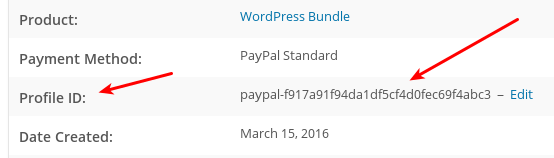
EDD_Subscriptionオブジェクトを返します。例はEDD_Subscriptionのドキュメントにあります。
$subscriber->get_subscription( $subscription_id = 0 )
このメソッドは、購読を受け取り、$subscriber->get_subscription_by_profile_id()と同様に、その購読に関するすべての情報を含むEDD_Subscriptionオブジェクトを返します。
$subscriber->get_subscriptions( $product_id = 0, $statuses = array() )
このメソッドは、入力要件を満たす顧客のすべての購読を取得します。これは、最初の引数としてproduct_id、2番目の引数としてstatusesの配列を受け取ります。以下に例を示します。
// gets all subscriptions for the customer
$subscriber->get_subscriptions();
// gets all subscriptions for the customer for product ID 85
$subscriber->get_subscriptions( 85 );
// gets all active subscriptions for the customer for product ID 85
$subscriber->get_subscriptions( 85, array( 'active' ) );
// gets all active subscriptions for the customer, regardless of product
$subscriber->get_subscriptions( '', array( 'active' ) );
// gets all active and cancelled subscriptions for the customer, regardless of product
$subscriber->get_subscriptions( '', array( 'active', cancelled' ) );
$subscriber->get_new_expiration( $download_id = 0, $price_id = null )
このメソッドは、現在の有効期限より1期間先の購読の有効期限を決定します。たとえば、有効期限が2017-01-01 23:59:59で、期間が1か月の場合、このメソッドは2017-02-01 23:59:59を返します。
必須の最初の引数として download_id の整数を受け取ります。
変動価格の場合、price_id の整数を受け取ります。オプションです。
Y-m-d H:i:s の形式の日付を返します。
$subscriber->get_recurring_customer_ids()
このメソッドは、顧客のために支払いゲートウェイによって作成されたすべての顧客 ID を含む配列を返します。例としては次のようになります。
Array
(
    [stripe] => cus_85YmUU1QuH5yxY
)
出力はこのようにフィルタリングされます。
apply_filters( 'edd_recurring_customer_ids', $ids, $this );
$subscriber->get_recurring_customer_id( $gateway = false )
このメソッドはゲートウェイ名を受け取り、顧客に関連付けられた顧客 ID を含む文字列を返します。
stripe のようなゲートウェイ名を含む文字列を受け取ります。
cus_85YmUU1QuH5yxY のような顧客 ID を含む文字列を返します。
出力はこのようにフィルタリングされます。
apply_filters( 'edd_recurring_get_customer_id', $customer_id, $this );
購読者オプションの設定
$subscriber->set_as_subscriber()
このメソッドは顧客を受け取り、その情報を持つ EDD 顧客を作成します。
$subscriber->set_recurring_customer_id( $recurring_id = ”, $gateway = false )
このメソッドは、支払いゲートウェイの定期的な ID と支払いゲートウェイ名を受け取り、それらを顧客に関連付けます。
cus_85YmUU1QuH5yxY のような支払いゲートウェイの定期的な ID を含む文字列を受け取ります。必須です。
stripe のようなゲートウェイ名を含む文字列を受け取ります。必須です。サブスクリプションの管理
$subscriber->add_subscription( $args = array() )
このメソッドは、EDD 顧客にサブスクリプションを追加します。customer_id が含まれていない場合は、WordPress 顧客から作成します。
このメソッドは EDD_Subscription::create() を使用するため、すべて同じ要件があります。EDD_Subscription::create() の完全なドキュメント。
EDD_Subscription::create() で必要とされるデータの配列を受け取ります。
サブスクリプションオブジェクトを返します。
$subscriber->add_payment( $args = array() )
このメソッドは、顧客の特定のサブスクリプションに支払いレコードを追加します。次のような配列を受け取ります。
$args = array(
    'subscription_id' => 0,
    'amount'          => '0.00',
    'transaction_id'  => '',
);
subscription_id の配列キーは空であってはならず、整数である必要があります。
このメソッドは EDD_Subscription::add_payment() を使用するため、すべて同じ要件があります。EDD_Subscription::add_payment() の完全なドキュメント。
true を返します。



