
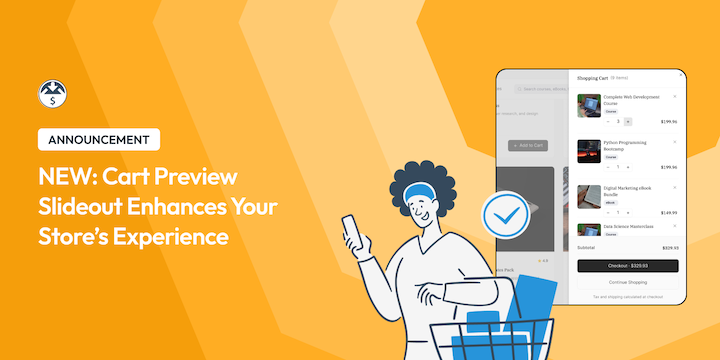


When a customer adds an item to their cart in your store, you want that moment to feel smooth. But offering multiple products can make discoverability a challenge.
Fortunately, smart Add To Cart functionality and product recommendations help solve that problem and can even increase your AOV.
That’s why we’ve launched the Cart Preview for Easy Digital Downloads! 🛒 🎉
This new feature creates a modern, slide-out cart drawer that appears the moment a customer adds a product to their order. It keeps your customers on the page, keeps them engaged, and makes the checkout flow feel faster and easier.
Let’s take a look at how it works and how you can set it up.
What’s Cart Preview?
Cart Preview is a slide-panel (or drawer) that slides into view whenever a customer adds a download to their shopping cart.

Instead of reloading the page or redirecting the user to a separate checkout screen immediately, this sleek slide-out lets them see their updated cart instantly.
Customers can view product thumbnails, names, and prices without leaving the current page. This encourages them to shop without interruption.
The Cart Preview feature is available now to all EDD users. But that’s not at all — when you use EDD Pro, you also get access to the new sophisticated AI Cart Recommendations tool! 👀✨
How Cart Preview Works for Your Customers
Let’s look at what the experience is like for your customers once you enable the feature.
When they click Add to Cart, the cart drawer slides out. They get immediate confirmation that the item is ready to go.
Inside the panel, customers have full control over their cart contents.

They can:
- Change quantities to buy multiple products.
- Delete items with a simple click if they change their mind.
- Proceed to Checkout when they’re ready to pay.
If they aren’t done yet, they can select Continue Shopping. The drawer slides away, but it doesn’t disappear completely.
A small floating shopping cart icon will stay in the screen corner (you choose which side).
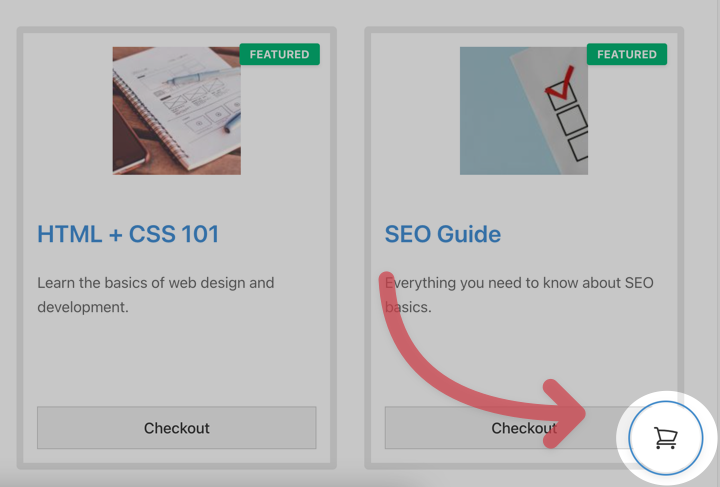
If they want to check their total again, they just click that icon, and the cart slides back out.
Pro Exclusive: Smart Cart Recommendations ✨
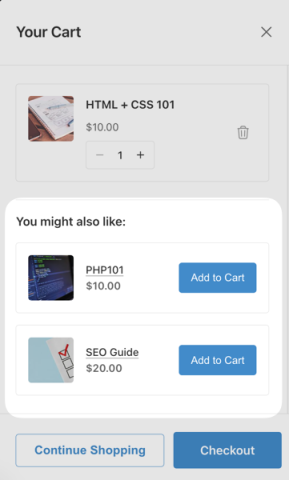
While the Cart Preview is free for everyone, we’ve added Cart Recommendations, a powerful tool to help boost revenue, when you use EDD Pro.
This adds a “You might also like” section directly inside the cart slide-out. It’s a great way to cross-sell products right when the buyer is most interested.
Case studies conservatively show that personalized and well-implemented product recommendations can increase the average order value by over 10% for digital product owners.
They also show that customers who add recommended products to the cart are more likely to complete their purchase instead of abandoning.
Why these recommendations are smarter 🧠
While many eCommerce systems have recommendations, EDD doesn’t just use categories and tags like most of them.
Our AI-powered recommendation agent is continually learning about your products as you publish and update them. This means your customers see the most relevant products, and you can stay focused on building your products and business.
The recommendations sync and refresh weekly to ensure your store data stays up to date. This includes product titles, descriptions, categories, tags, and other custom data points to help ensure relevant recommendations.
Why You Should Use Cart Preview
Cart Preview isn’t just about making your site look great. It’s designed to reduce friction in the purchasing process and provide a practical boost to your bottom line.
By allowing the cart to overlay your existing content smoothly, you create a streamlined experience that helps reduce cart abandonment and makes it easier for customers to complete their purchases.
Here’s how Cart Preview benefits both you and your customers.
💸 Increase Average Order Value (AOV): Keeping users on the product page increases the chance they’ll browse and add a second or third item to their cart. This is even more effective if you use the Pro Cart Recommendations feature.
🛒 Total Cart Control: Customers can adjust item quantities, remove unwanted items instantly, or proceed to checkout with a single click—all without having to load a separate cart page.
📱 Better Mobile Experience: The slide-out interface is completely mobile-friendly. It saves mobile users from having to load multiple pages on slower connections, making the shopping experience much faster.
🖌️ Works With Any Theme: You don’t need to change your site design. Cart Preview works with any theme right out of the box, ensuring a seamless integration with your brand.
How to Enable Cart Preview
Ready to try it out? It only takes a minute to set up.
Step 1. Update Easy Digital Downloads
Make sure you’ve updated to the latest version of Easy Digital Downloads.
Step 2. Configure Cart Preview Settings
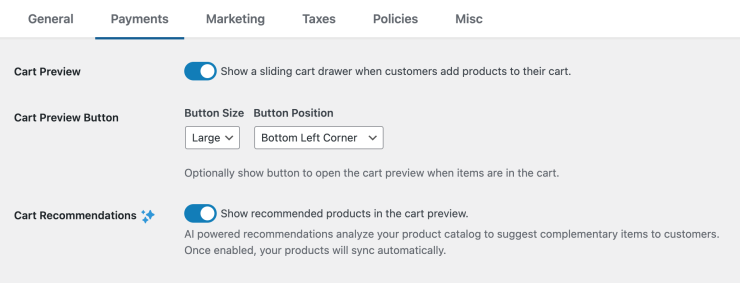
From your WordPress dashboard, go to Downloads » Settings » Payments » Cart.
Toggle on the new Cart Preview setting to enable it.

Step 3. Customize the Button
Below the main setting, you’ll see options for the Cart Preview Button.
- Show/Hide: Decide if you want the floating button to appear when the cart is minimized.
- Position: Place the button in either the left or right bottom corner of the screen.
- Button Size: Choose the appropriate icon size for your site.
Step 4. Enable Cart Recommendations (Pro Users)
If you’re a Pro user, you’ll see the Cart Recommendations section. Enable this and click Save Changes.
Note: If you’re enabling recommendations for the first time, EDD will start learning about your products. Depending on the size of your store, this may take some time. But we’ll start showing recommendations as soon as they are ready. You don’t have to do anything else.
🔎 Learn more about setting up Cart Recommendations.
FAQs About Cart Previews
Is Cart Preview available in the free version of EDD?
Yes, the Cart Preview slide-out and floating button features are included in the free EDD Core plugin. However, the Cart Recommendations feature is only available for EDD Pro users.
Can I hide the floating cart button?
Yes. If you want the slide-out to appear when adding an item but don’t want the floating icon to stay on the screen afterward, you can disable the button in the settings under Downloads » Settings » Payments » Cart. Under the Cart Preview Button Size dropdown menu, select None.
Does Cart Preview work on mobile devices?
Yes, the Cart Preview is fully responsive. It is designed to work perfectly on mobile phones and tablets, making it easier for mobile visitors to manage their cart without reloading pages.
How often do Cart Recommendations update?
For Pro users, the Cart Recommendations are synced and refreshed weekly. Product information is also updated anytime you publish, update, or delete a product. This ensures that new products are included and that the recommendations remain relevant to your store’s inventory.
Display Cart Preview & Boost AOV
The standard Cart Preview is a fantastic update for the free core plugin, but the Cart Recommendations feature is a game-changer for increasing sales.
Update your EDD plugin (Dashboard » Updates) from your WordPress admin to access the new Cart Preview features.
🔎 For more, feel free to check out our Cart Preview documentation and see what else is new in our EDD (Pro) 3.6.3 Release Notes.
Still using EDD Lite? If you want to automatically show customers the exact products they are most likely to buy, now is the perfect time to upgrade your pass.
📣 P.S. Be sure to subscribe to our newsletter and follow us on Facebook, Twitter/X, or LinkedIn for more WordPress resources!








