

Finding the best WordPress multi-currency plugins for selling digital products is one of the fastest ways to increase your international revenue.
When you sell software, eBooks, or files, your storefront is global by default. But if a visitor from France lands on your site and sees a price in US Dollars, they hesitate. They worry about math, conversion fees, and bank charges—and often, they simply leave.
This guide is to help you decide which multi-currency plugin is the best option for your WordPress site.
To create this list, I evaluated the most popular multi-currency plugin options against the strict criteria that matter to digital sellers — from real-time exchange rate updates to lightweight code performance. Plus, ease of use, feature sets, pricing, and more.
Quick Comparison: Top Multi-Currency Plugins
If you want a quick overview of how the best multi-currency plugins stack up, here’s a breakdown based on use case, pricing, and ease of setup.
| Plugin | Best For | Price | Auto-Detect | Currencies |
|---|---|---|---|---|
| 🥇 Easy Digital Downloads | Digital Stores (Software/Files) | Free with Pass $99/yr | Native | 200+ |
| 🥈 WP Simple Pay | No Store Single Payments | $49.50/yr | Stripe | 135+ |
| 🥉YITH Multi Currency | High-Volume WooCommerce Stores | $99.99/yr | API Key | 160+ |
| CURCY | Low-Budget Woo Option | $34 | API Key | 200+ |
| Price Based on Country | Regional Pricing | $59/yr | API Key | N/A |
The Importance of Multi-Currency Plugins
A multi-currency plugin for WordPress is a tool that automatically detects a visitor’s geolocation (usually via IP address) and displays product prices in their local currency.
Some also include a currency selector/switcher tool for users to change it themselves.
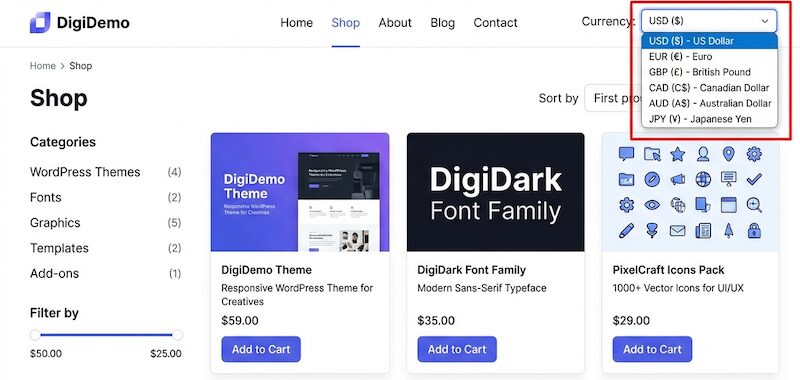
For digital product sellers, this creates a seamless “local” shopping experience without the logistics of physical retail.
Here is why implementing one is crucial for your digital store:
- Higher Conversion Rates: Customers are significantly more likely to hit “Buy Now” when they see a familiar currency. It builds immediate trust and eliminates the friction of doing mental math to calculate exchange rates.
- Reduced Cart Abandonment: Hidden costs or confusing pricing are top reasons for cart abandonment. Displaying the exact price—and ideally accepting payment in that currency—prevents sticker shock at checkout.
- Global Scalability: Since digital products have no shipping restrictions, your market is worldwide. A multi-currency plugin instantly optimizes your store for international audiences, allowing you to scale revenue without increasing overhead.
- Competitive Advantage: Offering local pricing differentiates you from competitors who force international buyers to pay currency conversion fees, making your digital products the more attractive option.
What’s the Best Multi-Currency Plugin?
If you want to sell digital products internationally, Easy Digital Downloads is the best WordPress multi-currency plugin. Unlike generic eCommerce tools that require complex configuration for shipping and inventory, EDD is optimized specifically for files and software.
It supports over 200 currencies, includes native auto-detection to instantly show local prices to international visitors, and updates exchange rates hourly to protect you from conversion fee losses.
Best WordPress Multi-Currency Plugins Compared
Now let’s get into the details of each option. Below are some of the best multi-currency plugins for WordPress users, including both free and paid options.
1. Easy Digital Downloads (Best Overall)
If you’re selling digital files—like software, documents, photos, or eBooks—you don’t need the heavy baggage that comes with traditional eCommerce plugins.
You don’t need shipping zones, inventory management for t-shirt sizes, or logistics calculators. You just need a fast, secure way to deliver a file and get paid.
That’s why Easy Digital Downloads (EDD) is the best choice for this list. It’s built entirely for digital creators. And when it comes to selling internationally, the Multi-Currency feature gives you complete control over your pricing strategy.
⭐️ Why It’s Great for Digital Sellers
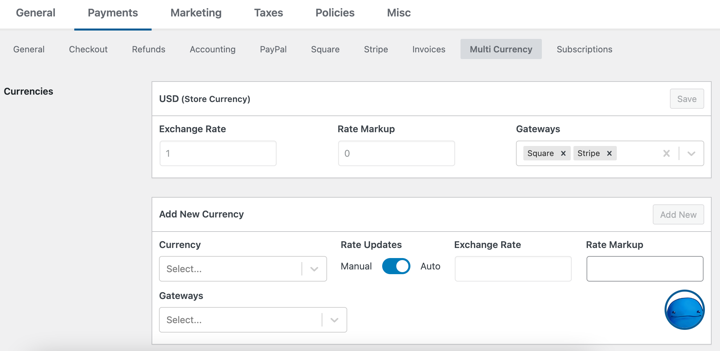
Native Auto-Detection (No APIs Needed): Unlike other plugins that require expensive third-party subscriptions or complex API keys, EDD’s auto-detection works right out of the box. It utilizes built-in geolocation technology to determine a customer’s location and display the price in their local currency instantly.
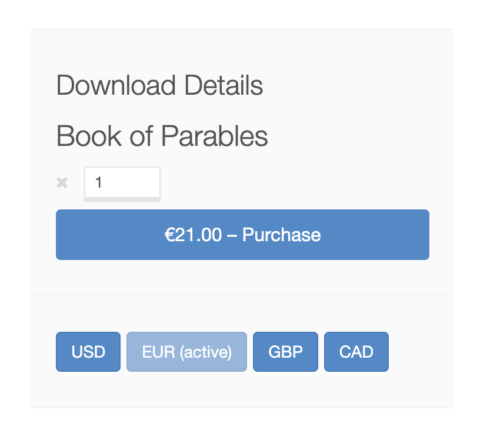
Manual Rates & Purchasing Power Parity (PPP): Want to charge $50 in the US but only$20 in countries with lower purchasing power? EDD lets you set Manual Exchange Rates. You aren’t forced to use strict mathematical conversions. You can lock in specific prices for specific currencies to open your products to a wider global audience.
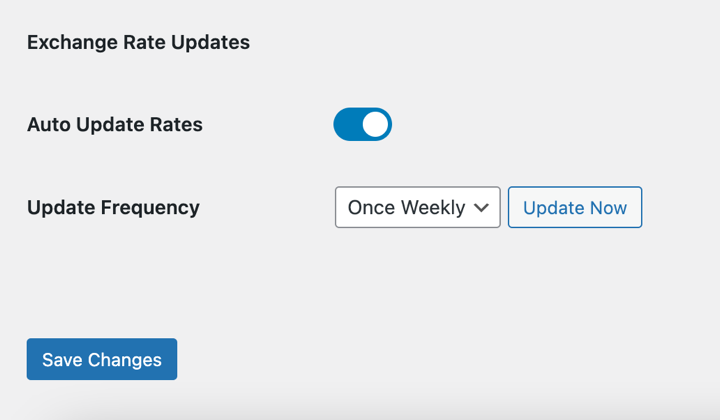
Exchange Rate Protection: If you do prefer automatic pricing, EDD protects your margins. It syncs with Open Exchange Rates to update your prices (hourly, daily, or weekly), ensuring you never lose money on a sale due to market shifts overnight.
Currency Selector Widget: Sometimes auto-detection gets it wrong (like if a customer is using a VPN). EDD lets you add a simple dropdown or button widget so customers can manually swap to their preferred currency if they need to.
Pros ✅
- Native auto-detect instantly shows local currency based on IP without complex setup.
- Updates exchange rates automatically to protect your profit margins.
- Allows for manual and regional pricing strategies (PPP) to boost global sales.
- Lightweight and built specifically for digital files, so it won’t slow down your site.
- Free Open Exchange Rate API keys for non-USD-based stores.
- Option to display supported currencies using a widget as a dropdown or button.
Cons ⚠️
- Not designed for physical products.
If you’re building a business around digital downloads, this is the industry standard. It gives you Amazon-level currency features—including both auto-calculation and manual regional pricing—without slowing down your WordPress site.
🏷 Price: Included in any Easy Digital Downloads Pro pass (Personal, Extended, or higher).
2. WP Simple Pay
Sometimes, you don’t need a full shopping cart at all.
If you’re a podcaster accepting donations or a consultant selling a single service, setting up a full eCommerce store might be overkill.
WP Simple Pay is the best Stripe payment plugin for WordPress. It’s designed to let you put a payment form on your site in minutes.
⭐️ Why It’s a Strong Contender
- Stripe Integration: Since it’s built specifically for Stripe, it leverages Stripe’s massive global network. It supports over 135 currencies right out of the box.
- No “Store” Required: You don’t have to set up product pages or checkout flows. You just create a payment form, embed it, and you’re ready to accept Yen, Pounds, or Dollars.
- Local Payment Methods: Beyond just currency, it also supports local payment methods (like iDEAL in the Netherlands or Bancontact in Belgium), which can significantly boost conversion rates in those regions.
Pros ✅
- Fast setup to create payment forms in minutes
- 135+ currencies supported in Stripe’s network
- Auto-detect user location to display appropriate currency
- Automatic tax calculations
- 10+ payment methods
Cons ⚠️
- No shopping cart
- Not suitable if you need eCommerce features like customer accounts, file download history, or software licensing
WP Simple Pay is the leanest option. If you don’t need an “Add to Cart” system and just want a “Buy Now” button that works globally, it might be your best bet.
🏷 Price: Pro plans start at $49.50/year.
3. YITH MultiCurrency Switcher
If you’re running a store that sells physical goods (like merch, apparel, or hardware) alongside your digital files, you’re likely using WooCommerce.
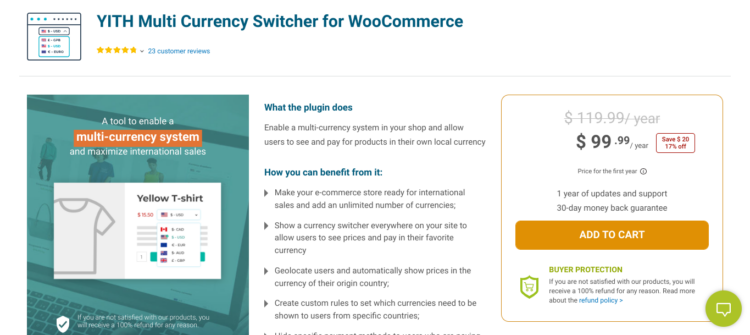
While Woo is heavier than EDD, it’s the right tool for physical inventory. For that setup, YITH Multi Currency Switcher is a solid premium add-on.
Similar to EDD, YITH allows you to automatically show prices based on the user’s IP address. You can force customers to pay in their local currency, or allow them to browse in one currency but pay in your store’s base currency (useful for simplified accounting).
YITH also offers decent options for where to place the currency switcher widget (header, sidebar, or shortcode).
Pros ✅
- WooCommerce native; convenient for current Woo users.
- Checkout flexibility allows you to choose between charging in local currency or converting back to base currency.
- Geo-targeting for detecting the user’s location.
Cons ⚠️
- Adding Woo + YITH can be heavy on site speed/performance if you only sell files.
- It’s a separate premium purchase on top of other WooCommerce costs.
If you’re already committed to the WooCommerce ecosystem for physical goods, YITH is a reliable, supported extension, though it comes with a higher price tag than some alternatives.
🏷 Price: ~$99.99/year.
4. CURCY Multi Currency for WooCommerce

If you’re just starting out with WooCommerce and aren’t ready to commit to a premium plugin yet, CURCY (also known as “Multi Currency for WooCommerce”) is a popular plugin.
It operates on a freemium model. This means you can get basic currency switching features for free, but many advanced features—like unlimited currencies or specific payment gateway integrations—are only available in the Pro version.
You can install the free version from the WordPress Plugin Directory to test basic functionality without an upfront cost. Even the free version attempts to auto-update exchange rates, though the sources and update frequency are more limited compared to the Pro version.
Pros ✅
- Free to start
- Basic widget includes a floating currency bar for currency switching
- Show price in default currency or approximate price in the customer’s native currency
- Option to hide currencies
Cons ⚠️
- Free version has limitations on features that serious stores often need, like unlimited currencies or specific gateway support.
For Woo users, CURCY is a decent starting point if you have a minimal budget. However, most growing stores eventually hit a wall with the free version and end up paying for the Pro upgrade anyway. At that point, a dedicated solution often provides better value.
🏷 Price: Pro version is ~$34/year.
5. Price Based on Country
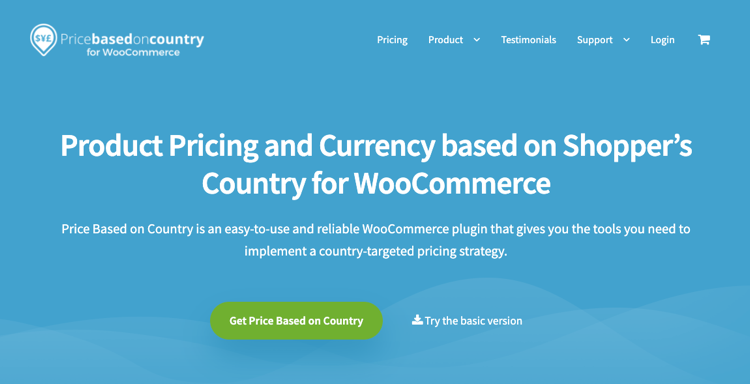
Price Based on Country is a niche tool. It’s not just for currency switching, but for regional pricing strategies.
Most plugins on this list convert prices based on exchange rates (e.g., $10 USD becomes €9 EUR). But what if you want to sell your software for 50 in the US, but only $20 in a country with lower purchasing power?
Similar to EDD, Price Based on Country lets you do exactly that. Instead of just a math-based conversion, you can manually set a fixed price for each region. This is crucial for “Purchasing Power Parity” strategies.
It also integrates directly into the standard WooCommerce product data tab. This plugin is a solid alternative to EDD Multi-Currency if you only sell physical products or already have a WooCommerce store set up.
Pros ✅
- Strategic pricing for PPP
- Manual control lets you decide the exact price for every region, regardless of exchange rates.
- Native Woo integration adds fields directly to product data tab.
Cons ⚠️
- Manual price configuration for each product/country
- Overkill for those looking for simple currency conversion
If your business model relies on offering discounts to developing markets, this is the tool to use.
🏷 Price: Pro starts at $59/year.
How to Choose the Right Multi-Currency Plugin
With so many options, how do you decide? I recommend asking yourself three questions to narrow it down.
What are you selling?
This is the most important factor. If you sell…
- Digital products (software, eBooks, files): Use Easy Digital Downloads. It’s optimized for file delivery and licensing, and the currency tools are built-in, not bolted on.
- Physical products (merch, shipping): Use YITH or Curcy with WooCommerce. You’ll need the shipping and inventory features that WooCommerce provides.
- A single service/item: Use WP Simple Pay. It’s the fastest way to get a “Buy Now” button up without building a whole store.
What’s your pricing strategy?
Do you want “fair” mathematical conversions, or do you want “strategic” regional pricing?
- Mathematical: If you just want $100 USD to equal roughly €95 EUR, look for a plugin with Automatic Exchange Rate Updates (like Easy Digital Downloads or YITH).
- Strategic (PPP): If you want to lower prices for developing nations to increase sales volume, ensure your plugin supports Manual Exchange Rates. (Again, EDD handles this natively, while WooCommerce users might need the Price Based on Country plugin).
Do you need auto-detection?
While having a currency switcher button on your site is an excellent idea, that being the only option could hurt conversions. The best WordPress multi-currency plugins, like Easy Digital Downloads, use geolocation to switch the currency automatically the moment the page loads.
In 2026, this feature isn’t a luxury—it’s a requirement for a good user experience.
FAQs on Multi-Currency Options in WordPress
Let’s wrap up by answering some common questions about using multi-currency plugins to sell digital products internationally.
What’s the best WordPress multi-currency plugin for selling digital products?
The best WordPress multi-currency plugin for selling digital products is Easy Digital Downloads. Unlike general eCommerce tools, EDD is optimized specifically for digital files and includes native multi-currency support, automatic exchange rate updates, and location-based pricing without requiring complex third-party API integrations.
How do I automatically show local currency in WordPress?
To automatically show local currency in WordPress, you need a plugin with geolocation detection, such as Easy Digital Downloads or YITH Multi Currency. These tools identify a visitor’s IP address and instantly switch the product price to their native currency (e.g., showing Euros to a user in France) to reduce checkout friction.
Can I set different prices for different countries?
Yes, you can set different prices for different countries using Easy Digital Downloads. The plugin supports “Manual Exchange Rates,” allowing you to override mathematical conversions and set fixed prices for specific regions. This enables Purchasing Power Parity (PPP) strategies, where you lower prices for developing nations to increase sales volume.
Does WooCommerce support multi-currency out of the box?
No, WooCommerce does not support multi-currency out of the box. To accept international payments in different currencies on WooCommerce, you must install an additional extension like YITH Multi Currency Switcher or the official WooCommerce Payments add-on. In contrast, Easy Digital Downloads includes this feature natively in its Pro passes.
Do I need a separate plugin for Stripe multi-currency?
If you use WP Simple Pay, you do not need a separate multi-currency plugin, as it handles Stripe currency conversion automatically. However, for full eCommerce stores using WooCommerce or EDD, the payment gateway (Stripe) processes the payment, but the plugin controls the display price. You need a multi-currency plugin to ensure the customer sees the correct price before they reach the checkout page.
What’s the difference between a currency switcher and multi-currency pricing?
A currency switcher only changes the display price (often just an estimate), while the final charge happens in the store’s base currency. True multi-currency pricing (like in EDD) changes both the display price and the transaction currency, ensuring the customer is charged exactly what they see, with no hidden bank conversion fees.
Try the Best Multi-Currency Plugin for Digital Products
The internet has no borders, and your pricing shouldn’t either. If a customer wants to buy your eBook or software, they shouldn’t have to pause to do mental math.
By installing one of the best WordPress multi-currency plugins that we discussed, you remove that friction, build trust, and ultimately close more sales.
For most digital sellers, Easy Digital Downloads is the clear winner. It combines powerful features like auto-detection and manual price controls with a lightweight code base that keeps your site fast.
Ready to take your digital store global? If you’re not already a Pro user, grab a pass today to easily enable multi-currency pricing and explore the many global payment options available.
📣 P.S. Be sure to subscribe to our newsletter and follow us on Facebook, Twitter/X, or LinkedIn for more WordPress resources!