

Aggiungere campi personalizzati al modulo di checkout è facile con solo un paio di funzioni. Il codice seguente ti permetterà di aggiungere due campi aggiuntivi, uno per il Telefono e uno per l'Azienda.
Nota: abbiamo impostazioni integrate per personalizzare i campi dell'indirizzo di checkout e disporli come preferisci. In alternativa, abbiamo anche un'estensione ufficiale che ti permette di creare campi di checkout personalizzati. Visualizza l'estensione Checkout Fields Manager.
Il codice seguente aggiunge un campo Numero di Telefono al modulo di checkout .
<?php
/**
 * Adding a custom field to the checkout screen
 *
 * Covers:
 *
 * Adding a phone number field to the checkout
 * Making the phone number field required
 * Setting an error when the phone number field is not filled out
 * Storing the phone number into the payment meta
 * Adding the customer's phone number to the "view order details" screen
 * Adding a new {phone} email tag so you can display the phone number in the email notifications (standard purchase receipt or admin notification)
 */

/**
 * Display phone number field at checkout
 * Add more here if you need to
 */
function sumobi_edd_display_checkout_fields() {
?>
    <p id="edd-phone-wrap">
        <label class="edd-label" for="edd-phone">
		<?php esc_html_e( 'Phone Number', 'easy-digital-downloads' ); ?>
		<?php if ( edd_field_is_required( 'edd_phone' ) ) : ?>
			<span class="edd-required-indicator">*</span>
		<?php endif; ?>
		</label>
        <span class="edd-description" id="edd-phone-description"><?php esc_html_e( 'Enter your phone number so we can get in touch with you.', 'easy-digital-downloads' ); ?></span>
        <input class="edd_phone edd-input<?php if ( edd_field_is_required( 'edd_phone' ) ) { echo ' required'; } ?>" type="text" name="edd_phone" id="edd-phone" placeholder="<?php _e( 'Phone Number', 'easy-digital-downloads' ); ?>">
    </p>
 <?php
}
add_action( 'edd_purchase_form_user_info_fields', 'sumobi_edd_display_checkout_fields' );

/**
 * Make phone number required
 * Add more required fields here if you need to
 */
function sumobi_edd_required_checkout_fields( $required_fields ) {
    $required_fields['edd_phone'] = array(
        'error_id' => 'invalid_phone',
        'error_message' => 'Please enter a valid Phone number'
    );

    return $required_fields;
}
add_filter( 'edd_purchase_form_required_fields', 'sumobi_edd_required_checkout_fields' );

/**
 * Set error if phone number field is empty
 * You can do additional error checking here if required
 */
function sumobi_edd_validate_checkout_fields( $valid_data, $data ) {
    if ( empty( $data['edd_phone'] ) ) {
        edd_set_error( 'invalid_phone', 'Please enter your phone number.' );
    }
}
add_action( 'edd_checkout_error_checks', 'sumobi_edd_validate_checkout_fields', 10, 2 );

/**
 * Store the custom field data into EDD's order mtea
 */
function sumobi_edd_store_custom_fields( $order_id, $order_data ) {

	if ( 0 !== did_action('edd_pre_process_purchase') ) {
		$phone = isset( $_POST['edd_phone'] ) ? sanitize_text_field( $_POST['edd_phone'] ) : '';
		edd_add_order_meta( $order_id, 'phone', $phone );
	}

}
add_action( 'edd_built_order', 'sumobi_edd_store_custom_fields', 10, 2 );

/**
 * Add the phone number to the "View Order Details" page
 */
function sumobi_edd_view_order_details( $order_id ) {
	$phone = edd_get_order_meta( $order_id, 'phone', true );
?>
	<div class="column-container">
		<div class="column">
			<strong>Phone: </strong>
			<?php echo $phone; ?>
		</div>
	</div>
 <?php
}
add_action( 'edd_payment_view_details', 'sumobi_edd_view_order_details', 10, 1 );

/**
 * Add a {phone} tag for use in either the purchase receipt email or admin notification emails
 */
function sumobi_edd_add_email_tag() {

	edd_add_email_tag( 'phone', 'Customer\'s phone number', 'sumobi_edd_email_tag_phone' );
}
add_action( 'edd_add_email_tags', 'sumobi_edd_add_email_tag' );

/**
 * The {phone} email tag
 */
function sumobi_edd_email_tag_phone( $payment_id ) {
	$phone = edd_get_order_meta( $payment_id, 'phone', true );
	return $phone;
}
Il modulo di checkout apparirà quindi simile a questo:
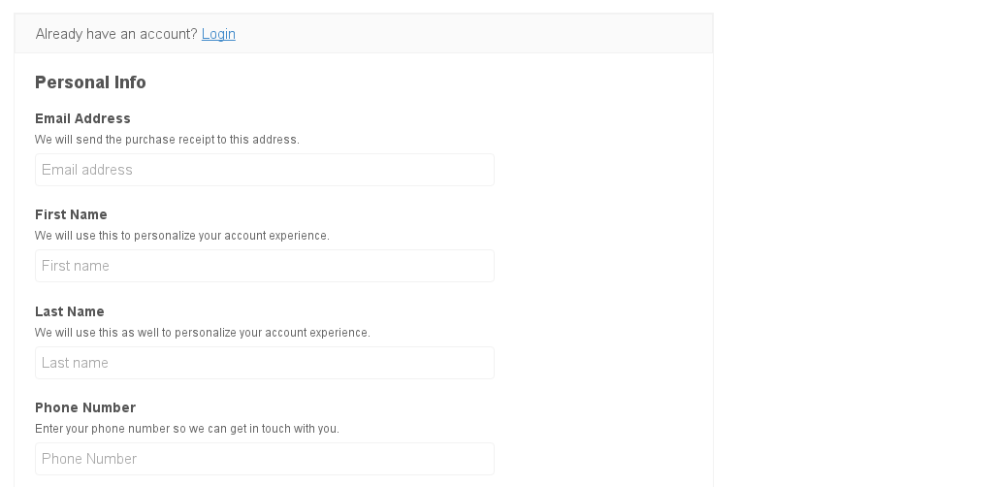 E poi, guardando la transazione nella Cronologia Pagamenti Download, vedrai una meta box simile a questa:

Questo codice è inteso semplicemente come esempio e può essere modificato come desideri per aggiungere ancora più campi.
Per aggiungere questo esempio di codice al tuo sito, ti consigliamo di utilizzare
Pluginception per creare un nuovo plugin personalizzato e incollare il codice nel nuovo plugin.