


Wil je leren hoe je een uitverkoop runt op je e-commerce site? Er zijn veel redenen waarom je dat zou moeten doen!
Het kortingen geven op je producten of het aanbieden van een promotie voor een korte periode kan je helpen om de verkoop te stimuleren, de winst te verhogen en de zichtbaarheid van je website te vergroten.
Maar het is belangrijk om strategisch te plannen en grondig voor te bereiden om ervoor te zorgen dat het een succes wordt.
🔎 In dit artikel behandel ik:
Voordelen van het houden van een e-commerce uitverkoop
Het houden van uitverkopen op je e-commerce site is een krachtige marketingtactiek die een overvloed aan voordelen kan bieden. Laten we enkele van de belangrijkste bekijken.
Verhoog de verkoop
Het houden van een uitverkoop is een snelle manier om omzet en/of winstgroei in je bedrijf te stimuleren. Wanneer je bedrijf meer geld verdient, kun je fondsen herinvesteren in mensen, tools en tijd om je productaanbod nog beter te maken voor je klanten.
Het houden van een e-commerce uitverkoop kan meer klanten aanmoedigen om tijdens een specifieke periode aankopen te doen.
Een van de meest populaire verkoop-evenementen die wereldwijd blijft groeien, zowel online als offline, is bijvoorbeeld Black Friday/Cyber Monday (BFCM). Tienduizenden fysieke winkeliers en digitale verkopers nemen wereldwijd deel aan deze seizoensgebonden uitverkoop.
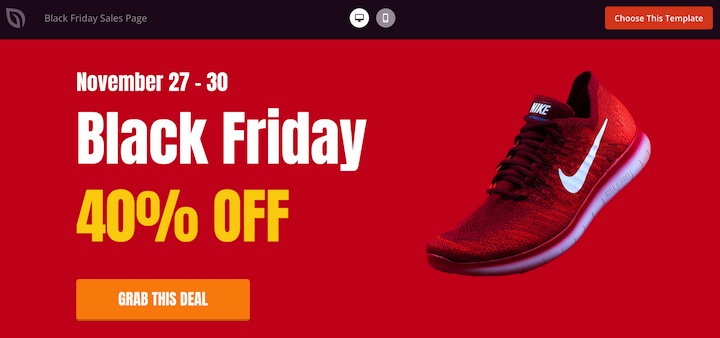
Klanten aantrekken & belonen
Je kunt loyaliteit belonen door kortingen of promotionele specials aan te bieden aan bestaande klanten. Het is slechts een van de vele manieren waarop je kunt zeggen: "Jullie zijn geweldig, bedankt dat jullie bij ons blijven!"
Voor nieuwe klanten helpt een introductieaanbieding hen om aan boord te komen. In beide gevallen bouw je voort op die relaties en bevorder je de steun en bewondering voor je bedrijf.
Promoot specifieke producten
Of je nu fysieke of digitale goederen verkoopt, uitverkopen kunnen je helpen producten te verkopen. Voor traditionele retailers zijn uitverkoopperiodes een uitstekende manier om langzaam bewegende of overtollige voorraad te verkopen om de inventaris op te ruimen.
Het houden van een tijdelijke uitverkoop om digitale producten te verkopen is aanzienlijk minder ingewikkeld, maar net zo voordelig. Er is geen verzendstress, geen voorraadproblemen of vertragingen bij de levering.
Klanten ervaren onmiddellijke voldoening zodra ze hun aankoop hebben voltooid. Bestanden worden direct geleverd of ze kunnen hun gekochte producten meteen downloaden.
Bovendien kun je met de juiste e-commerce oplossingen en tools het hele proces automatiseren.
Hoe u een uitverkoop op uw e-commerce site kunt houden
Het houden van een uitverkoop kan leuk en spannend zijn, maar het is niet per se gemakkelijk. Om je te helpen, heb ik de stappen voor het houden van een uitverkoop op je WordPress-site opgedeeld in drie hoofdcategorieën:
Voor de uitverkoop
Voorbereiding is de sleutel tot succesvol een uitverkoop runnen. Zoals Benjamin Franklin zei: "Door te falen in voorbereiding, bereid je je voor op falen."
Hoe beter voorbereid je bent, hoe voordeliger de uitverkoop zal zijn voor jou, je team en je bedrijf.
1. Definieer je verkoopdoelen
Wanneer je overweegt een uitverkoop te houden, heb je een duidelijk doel voor ogen. Wat wil je bereiken als je een succesvolle uitverkoop op je website houdt?
Enkele veelvoorkomende verkoopdoelen zijn:
- Nieuwe klanten aan trekken.
- Herhaalaankopen van bestaande klanten stimuleren.
- Verkoop verhogen tijdens een over het algemeen rustige periode van het jaar.
- Klanten van het ene product naar het andere laten overstappen.
Schrijf een specifiek doel op om naartoe te werken. Dit kan van invloed zijn op hoe je je uitverkoop opzet, wie je target, de tekst of taal die je gebruikt in je marketingmateriaal, en de kanalen die je gebruikt om je uitverkoop te promoten.
2. Kies een type uitverkoop
Beslissen wat je aanbod zal zijn, is een van de lastigste onderdelen van het opzetten van een uitverkoop.
Neem je bijvoorbeeld slechts één product op in de uitverkoop of allemaal? Hoe groot zal het aanbod zijn?
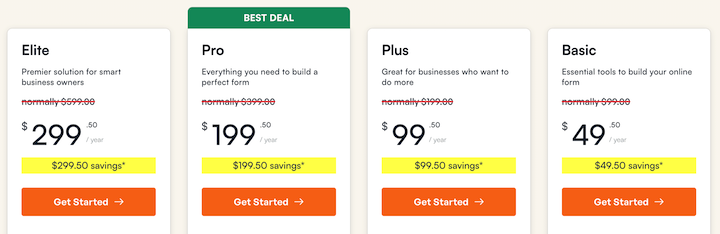
Enkele van de meest voorkomende soorten e-commerce uitverkopen zijn:
- Sitebrede uitverkoop: Korting op alle producten op je site.
- Categorie-specifieke uitverkoop: Bied kortingen op specifieke productcategorieën.
- Flash uitverkoop: Tijdgebonden kortingen op geselecteerde producten.
- Koop er één, krijg er één gratis (BOGO): Stimuleer grotere aankopen met deze populaire promotie.
- Percentagekorting: Verlaag de prijs van producten met een bepaald percentage.
- Vasteprijskorting: Bied een vast dollarbedrag korting op de prijs van producten.
De korting moet de moeite waard zijn voor de klant – kleine kortingen zullen het verschil niet maken. Je moet tevreden zijn met hoeveel je overhoudt per voltooide aankoop, nadat de korting is toegepast.
Als je product laag geprijsd is en je korting hoog, verdien je niet genoeg geld per aankoop gedurende de uitverkoopperiode om het de moeite waard te maken voor je bedrijf.
3. Stel je verkoopschema vast
Kies vervolgens de datum of datums waarop je je uitverkoop houdt, en hoe lang deze zal duren.
Je kunt ervoor kiezen om een uitverkoop te houden buiten drukke feestdagenverkopen om het meeste te halen uit wat meestal een rustige maand is, of tijdens een seizoensgebonden uitverkoopperiode om te proberen te profiteren van de enorme hoeveelheid verkeer die door de bekendheid van de uitverkoop wordt gecreëerd.
Bepaal de tijden waarop je je uitverkoop houdt. Zijn die tijden gebaseerd op jouw tijdzone of een andere tijdzone? Houd rekening met waar de meerderheid van je klanten zich bevindt bij het bepalen in welke tijdzone je uitverkoop zal plaatsvinden.
4. Creëer en configureer je aanbieding
Zodra je de details van hoe je uitverkoop eruit zal zien hebt uitgewerkt, is het tijd om deze tot leven te brengen. De beste manier om dit aan te pakken, hangt af van de kortingsmechanisme die je tijdens je uitverkoop gaat gebruiken.
Je kunt bijvoorbeeld automatisch een sitebrede korting toepassen of een coupon of kortingscode aanbieden die klanten bij het afrekenen invoeren.
Automatisering is ongelooflijk nuttig als het gaat om het runnen van een uitverkoop.
Hoe je een uitverkoop runt in WordPress
Easy Digital Downloads is de ideale oplossing voor het verkopen en promoten van digitale producten. Het bevat ook ingebouwde kortingscode-generatie en -beheer.
Om een uitverkoop te houden in WordPress met Easy Digital Downloads, bekijk de volgende handleidingen:
Het opnemen van specifieke tactieken en elementen kan u helpen een succesvolle eCommerce-uitverkoop te houden.
Werk uw prijs- of prijstabelpagina bij om de korting en verkoopprijs weer te geven en om de besparingen te benadrukken.
Speel in op exclusiviteit en urgentie. Toon een afteltimer om urgentie en FOMO (Fear Of Missing Out) te stimuleren.
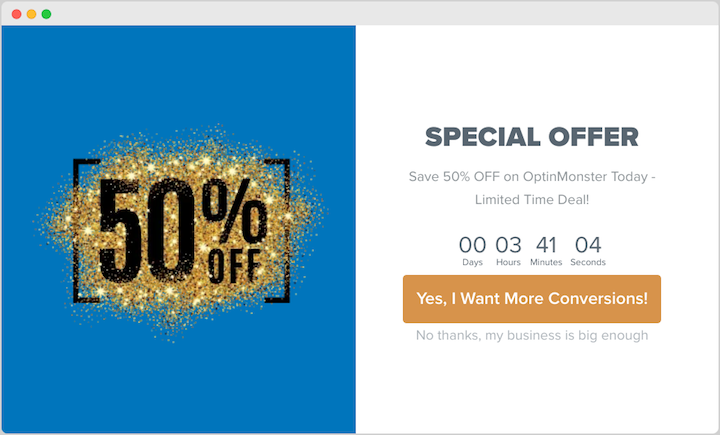
Lees meer hierover in de promotiesectie van dit bericht.
5. Communiceer de verkoopdetails duidelijk
Gebruik bij het maken van uw uitverkoopaanbieding duidelijke en beknopte berichten. Eenvoudige taal en duidelijke beelden kunnen helpen om uw uitverkoop te communiceren.
Voeg de specifieke data en tijden van uw uitverkoop toe en vermeld duidelijk het kortingsbedrag.
Controleer uw servicevoorwaarden. Zijn er specifieke voorwaarden die u wilt opnemen of introduceren voor uw uitverkoopperiode? Zijn er regels, beperkingen of uitsluitingen?
Enkele voorbeelden van andere voorwaarden die u kunt opnemen zijn:
- “Er zijn enkele uitsluitingen van toepassing.” Geef een lijst met uitgesloten producten of diensten.
- “Om in aanmerking te komen voor de korting, moet u…” Voeg een specifieke actie toe als klanten in aanmerking moeten komen voor een korting.
- “Licenties zijn niet overdraagbaar.”
- “De kortingscode kan niet worden gebruikt in combinatie met andere promotiecodes.”
- “Geen restitutie, uitverkoop is definitief.”
Zorg ervoor dat deze duidelijk ergens op uw website worden weergegeven. U kunt deze plaatsen in uw reguliere algemene voorwaarden, in de kleine lettertjes van promotiemateriaal, of voordat de klant naar de kassa gaat.
Als u met een team van mensen werkt, informeer iedereen dan over de details van de uitverkoop. Deel de algemene voorwaarden met hen. Teamleden die zich bezighouden met klantenservice moeten voorbereid zijn.
6. Test en optimaliseer je site
Voordat u uw uitverkoop start en promoot, zorg ervoor dat u uw site test en optimaliseert.
Gebruikers worden ongeduldig als uw website traag is, zowel op desktop als mobiel. Ze kunnen uw site verlaten als uw pagina's niet laden of het afrekenproces vertraagt.
Zorg ervoor dat uw website responsief en mobiel-ready is voor een prachtige ervaring op elk apparaat. Zorg ervoor dat uw afrekenproces zo eenvoudig mogelijk is door onnodige formuliervelden te verwijderen.
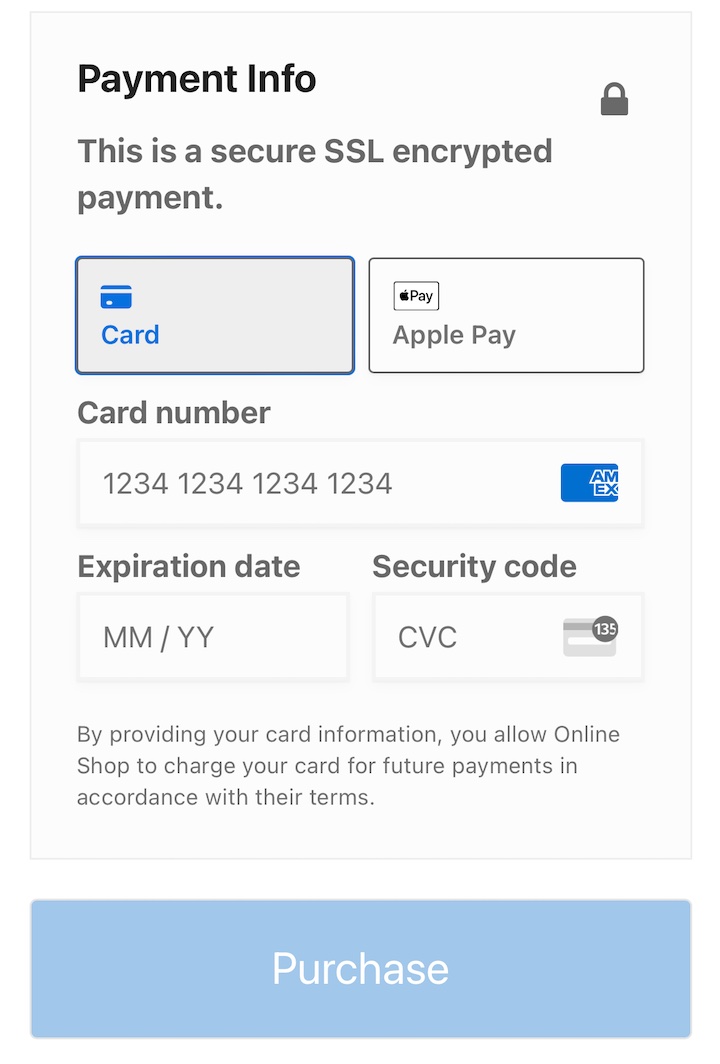
Test het aankoopproces zelf, zodat u precies weet hoe het werkt en u er zeker van bent dat het functioneert zoals het hoort.
Het is bijna onmogelijk om precies te weten hoeveel bezoekers uw website zal krijgen tijdens een uitverkoop. Maar als uw site uitvalt, zullen uw verkopen lijden. Zorg ervoor dat uw hostingprovider en het plan waarop u zit, kunnen schalen indien nodig.
Als u niet zeker weet of uw server of hostingplan een piek in het verkeer aankan, neem dan contact op met uw hostingprovider of bekijk hun documentatie.
💡Leer meer manieren om uw afrekenproces te optimaliseren en de snelheid van uw site te verbeteren.
7. Promoot je uitverkoop
Nu je je klaarmaakt om een uitverkoop te houden, is het belangrijk om een marketing- en promotestrategie te creëren. Dit omvat de methoden die je zult gebruiken en de marketingkanalen.
Er zijn tal van opties. Maak gebruik van sociale media en e-mailmarketing.
Creëer boeiende berichten en voer betaalde advertentiecampagnes uit. Je kunt ook online weggeefacties en wedstrijden organiseren om enthousiasme te genereren.
Stuur gerichte e-mails naar je abonneelijst.
Benadruk de uitverkoop op je startpagina, productpagina's en prijsstellingpagina. Gebruik websitebanners en pop-ups. Ik raad OptinMonster ten zeerste aan voor het maken van exit-intent pop-ups en andere on-site campagnes.
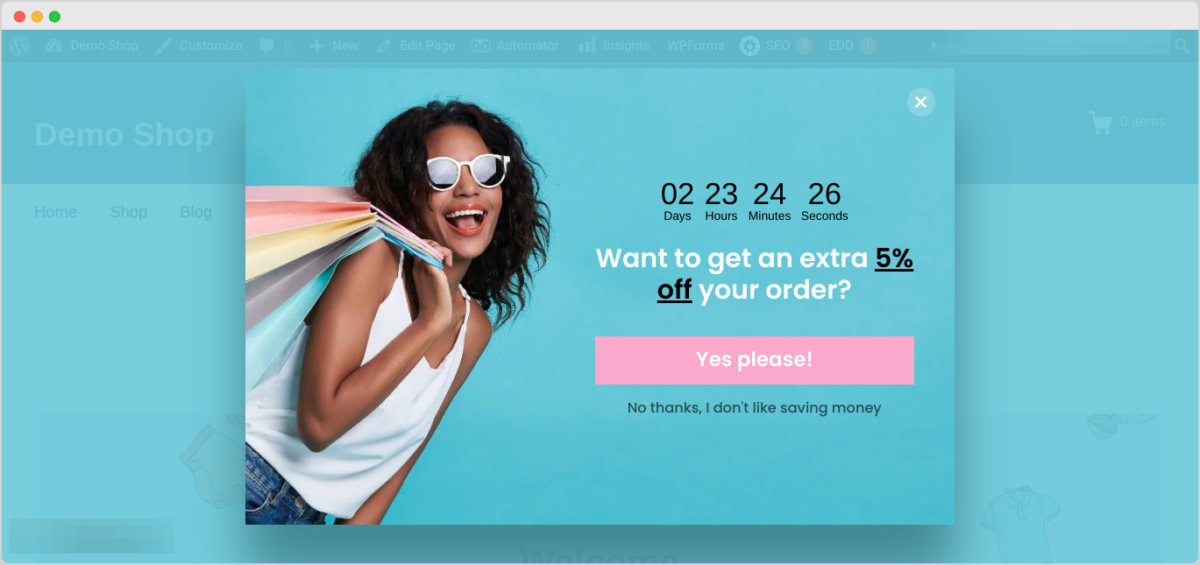
Werk samen met influencers en affiliate partners om een breder publiek te bereiken.
Gebruik taal in je marketingmateriaal die een gevoel van urgentie creëert om enthousiasme voor je uitverkoop op te wekken:
- “Alleen voor een beperkte tijd…”
- “Mis het niet…”
- “Laatste kans om…”
- “Haast je, nog maar 10 uur…”
Denk bij het promoten van je uitverkoop na over wat je klanten krijgen wanneer ze je product of dienst kopen. Wat is uniek aan je bedrijf en welk probleem los je voor hen op? Gebruik de antwoorden op deze vragen om te bepalen welke berichten je in je marketing moet opnemen.
Tijdens de uitverkoop
Wahoo! Je bent begonnen! En nu?
- Monitor actief je verkopen.
- Blijf op de hoogte van klantenservice-e-mails en reageer tijdig op je klanten.
- Als je personeel hebt, zorg er dan voor dat je team paraat staat en op de hoogte is van de relevante voorwaarden.
- Ga tijdens de uitverkoop in gesprek met klanten via sociale media, beantwoord vragen en los eventuele problemen zo snel mogelijk op.
Blijf natuurlijk je uitverkoop promoten als een dolle.
Als er iets misgaat…
Adem in. Begin zo snel mogelijk met het diagnosticeren van het probleem. Als je een team hebt en hulp nodig hebt, vraag hen dan om hulp, liever vroeg dan laat.
Je kunt de uitverkoop altijd pauzeren en besluiten deze op een later moment te hervatten. Als het zover komt, probeer dan alle site-notities of creatieve elementen te verwijderen en eventuele live advertenties zo snel mogelijk te pauzeren. Bied je excuses oprecht aan aan eventuele boze klanten en maak eventuele fouten of problemen later goed indien nodig.
Na de uitverkoop
Poeh, je bent helemaal klaar! Nadat je diep adem hebt gehaald, werk je deze korte checklist door om af te ronden.
- Zorg ervoor dat al het verkoopmateriaal, creatieve elementen en verkooponderdelen op de site zijn verwijderd of ongepubliceerd. Stop alle advertenties die nog live zijn.
- Analyseer je verkoopresultaten. Volg belangrijke statistieken zoals verkopen, conversieratio's en klantbetrokkenheid. Vergelijk de resultaten van je uitverkoopperiodes met verschillende niet-uitverkoopperiodes als controle.
- Gebruik analysehulpmiddelen zoals MonsterInsights om klantvoorkeuren en -gedrag te begrijpen. Als je geen feedback hebt ontvangen, vraag je klanten dan of ze feedback voor je hebben.
- Beheer uw eigen verwachtingen van hoe uw verkoop zal presteren. Als u korting aanbiedt en u ziet een piek in de verkoopcijfers, zal deze waarschijnlijk tijdelijk zijn. Laat u niet ontmoedigen als de verkopen na een verkoopperiode terugkeren naar een lager niveau (zelfs lager dan uw reguliere basis) - dit is volkomen normaal.
Leer ten slotte van fouten. Identificeer verbeterpunten voor toekomstige verkopen.
Veelgestelde vragen over hoe u succesvol een uitverkoop organiseert
Voordat we afsluiten, wilde ik enkele veelgestelde vragen beantwoorden. Door deze veelgestelde vragen te begrijpen en de uiteengezette strategieën te implementeren, kunt u effectief succesvolle e-commerceverkopen organiseren en de winst van uw bedrijf verhogen.
Wanneer is de beste tijd om een uitverkoop op uw website te houden?
Hier is geen goed of fout antwoord. Maar er zijn een paar populaire strategieën. Eén daarvan is om uw uitverkoop te koppelen aan feestdagen of seizoensgebonden evenementen. Dit zijn tijden van het jaar waarin veel consumenten online willen winkelen.
U kunt ook periodes met minder verkopen benutten. Richt u op periodes met lagere verkopen om de omzet te verhogen.
Wat specifieke dagen en tijden betreft voor het houden van een uitverkoop, kijk naar uw eigen analyses om te zien wanneer uw klanten en doelgroep het meest actief online zijn.
Welke e-mailmarketingstrategieën kan ik gebruiken om de verkoop te stimuleren?
Personaliseer e-mails en stem uw bericht af op de individuele voorkeuren van de klant. Gebruik gesegmenteerde campagnes en stuur gerichte e-mails naar specifieke klantgroepen.
Herinner klanten aan artikelen die in hun winkelwagentje zijn achtergebleven. Stuur post-aankoop e-mails om aanvullende kortingen of promoties aan te bieden om herhaalaankopen aan te moedigen.
Hoe vaak moet ik een uitverkoop houden?
Er is geen magisch getal voor hoeveel verkopen u per jaar moet houden. Er is geen correct kortingspercentage dat u moet aanbieden. Elke website is anders. Elk bedrijf is anders. Begin met één uitverkoop (weg van grote feestdagen) en ga van daaruit verder. Probeer een extra promotieperiode toe te voegen. Vergelijk de resultaten terwijl u bezig bent.
Voer eenvoudig een uitverkoop op uw WordPress-site
Het organiseren van een uitverkoop is altijd een leerervaring, maar met enige voorbereiding en een specifiek doel voor ogen, kunt u succesvol een uitverkoop organiseren op uw e-commerce site. De tips in dit artikel kunnen worden toegepast op elke uitverkoop, ongeacht de lengte of schaal. Vergeet niet het aankoopproces te testen, zorg goed voor uw klanten en promoot uw uitverkoop enorm om meer mensen naar uw site te trekken.
Als u digitale producten verkoopt, maakt Easy Digital Downloads het aanmaken en beheren van kortingen en andere aanbiedingen snel en eenvoudig.
Koop vandaag nog een pas om binnen enkele minuten aan de slag te gaan:
📣 P.S. Vergeet niet om zich te abonneren op onze nieuwsbrief en ons te volgen op Facebook, Twitter/X, of LinkedIn voor meer WordPress-bronnen!








