


Wilt u leren hoe u e-commercefraude op uw WordPress-site kunt voorkomen?
Als online verkoper begrijpt u waarschijnlijk het belang van een betrouwbare e-commercewinkel.
Met zoveel beveiligingsdreigingen die het digitale landschap teisteren, is het cruciaal om uw site te beschermen tegen frauduleuze activiteiten.
🔎 In dit artikel behandelen we:
Soorten e-commercefraude
Om uw winkel grondig te beveiligen tegen fraude, is het nuttig om te weten wat u kunt verwachten. Online fraude kent vele vormen, elk met zijn eigen methoden en kenmerken.
E-commercefraude verwijst naar illegale of frauduleuze activiteiten die plaatsvinden tijdens een online transactie. Het is cruciaal om op de hoogte te zijn van de verschillende soorten om ze te identificeren en te voorkomen dat ze op uw eigen site plaatsvinden.
Betalingsfraude
Een van de meest voorkomende en schadelijke soorten is betalingsfraude. Volgens Statista verloren e-commercebedrijven in 2022 alleen al ongeveer $41 miljard aan online betalingsfraude.
Betalingsfraude omvat ongeautoriseerde transacties waarbij oplichters gestolen creditcardinformatie gebruiken of zich bezighouden met chargeback-oplichting. Oplichters kunnen creditcardgegevens verkrijgen via verschillende middelen, zoals datalekken, phishing en hacking.
Card Not Present (CNP) is creditcardfraude waarbij oplichters gestolen creditcardinformatie gebruiken voor online aankopen, vaak zonder beveiligingscontroles.
Een ander voorbeeld is wat bekend staat als carding. Dit is wanneer gebruikers gestolen creditcardnummers testen door kleine, ogenschijnlijk onschuldige aankopen te doen om te controleren of de kaart geldig is.
Terugbetalings- en chargebackfraude
Ook bekend als vriendelijke fraude, is chargebackfraude wanneer een legitieme klant een online aankoop doet en later de betaling betwist bij hun creditcardmaatschappij. Ze vragen om een terugbetaling terwijl ze het gekochte artikel behouden.
Een vergelijkbare variant hiervan, terugbetalingsfraude, treedt op wanneer een klant een terugbetaling vraagt voor een product dat ze al hebben ontvangen, vaak door te beweren dat het beschadigd of defect is.
Accountovername
Accountovername treedt op wanneer fraudeurs ongeautoriseerde toegang krijgen tot gebruikersaccounts. Ze kunnen wachtwoorden wijzigen, ongeautoriseerde aankopen doen en persoonlijke informatie en klantgegevens stelen.
Dit kan gebeuren via phishing- of spoofingaanvallen, waarbij misleidende e-mails worden verzonden om gebruikers te misleiden hun inloggegevens prijs te geven.
Hackers gebruiken ook geautomatiseerde tools om herhaaldelijk wachtwoorden te raden totdat ze toegang krijgen tot een account. Dit staat bekend als een brute-force aanval.
Het is belangrijk om waakzaam te zijn en beveiligingsmaatregelen te implementeren om uw WordPress-site te beschermen tegen alle soorten e-commercefraude. Gelukkig zijn er een paar best practices en tools die u kunnen helpen een veilige winkelervaring te garanderen voor klanten.
Beste praktijken voor het voorkomen van e-commercefraude
Laten we de verschillende manieren verkennen om eCommerce-fraude op uw WordPress-site te voorkomen.
1. Beveilig uw WordPress-site
De eerste stap bij het voorkomen van fraude is ervoor te zorgen dat uw website veilig is - te beginnen met uw hostingprovider.
Een betrouwbare WordPress-hostingprovider helpt beveiligingsdreigingen te minimaliseren. SiteGround’s Managed EDD Hosting is een uitstekende optie voor eigenaren van online winkels:

Naast de vele beveiligingsfuncties bevat SiteGround een gratis SSL-certificaat bij elk abonnement.
Het is ook belangrijk om een kwalitatief eCommerce-platform te gebruiken, zoals WooCommerce (voor fysieke goederen) of Easy Digital Downloads (voor digitale producten):
Zorg ervoor dat WordPress en alle thema's en plug-ins up-to-date blijven.
2. Gebruik veilige betaalgateways
Een van de belangrijkste dingen die online verkopers kunnen doen, is het selecteren van gerenommeerde betaalproviders die sterke eCommerce-fraudebescherming bieden.
Populaire opties zijn onder meer Stripe en PayPal, die werken met zowel WooCommerce- als Easy Digital Downloads-winkels.
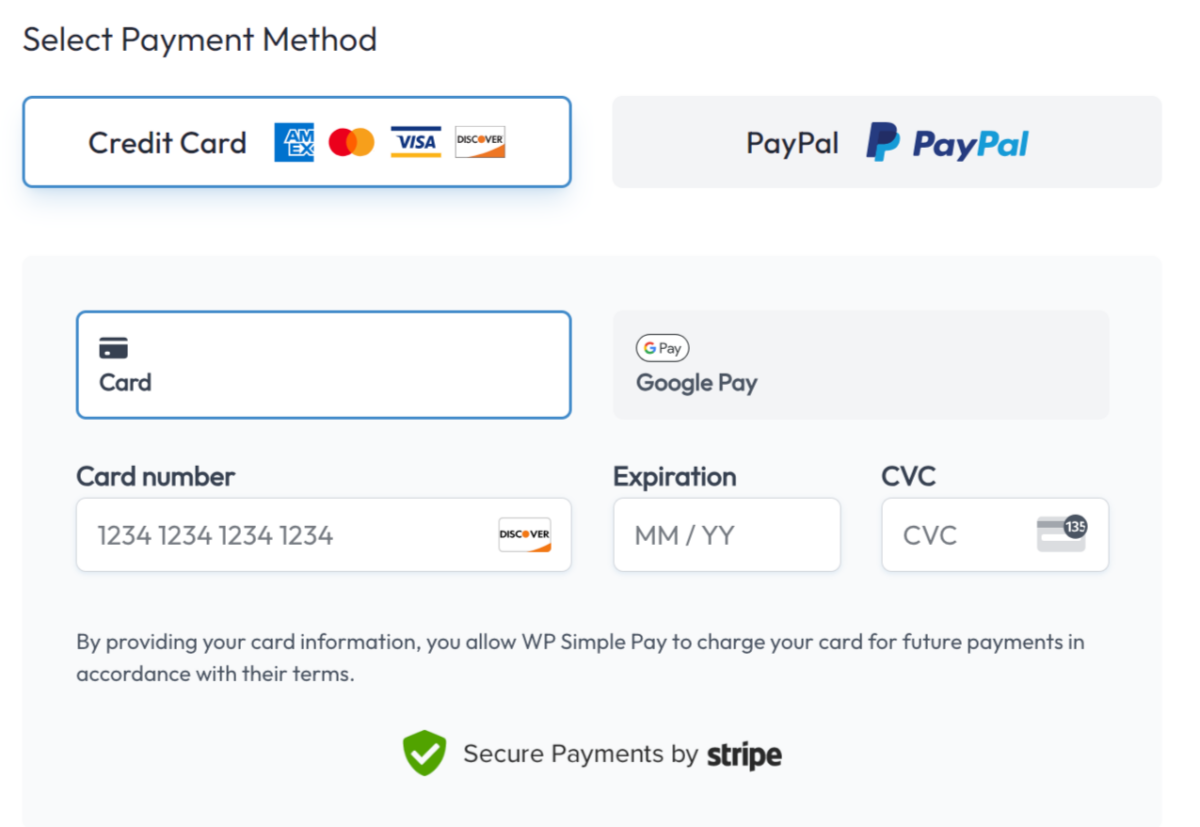
Naast PCI-conformiteit en het aanbieden van meerdere betaalmethoden, helpen deze gateways bij de detectie en preventie van eCommerce-fraude.
De EDD Stripe Pro betaalprovider bevat nog meer geavanceerde functies. Klanten kunnen bijvoorbeeld Link by Stripe gebruiken om hun betalingsgegevens veilig op te slaan.
3. Implementeer toegangscontroles
Een andere best practice voor het voorkomen van fraude op uw eCommerce-website is het implementeren van toegangscontroles.
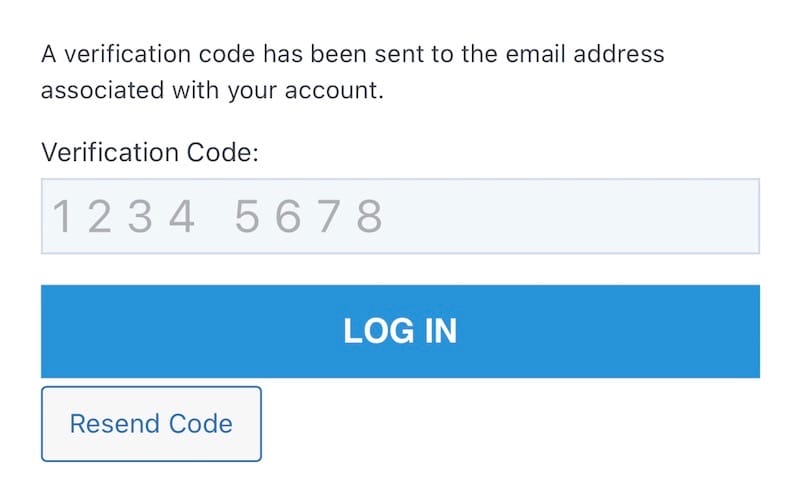
Naast het gebruiken van sterke wachtwoorden, voegt u tweefactorauthenticatie (2FA) toe aan inlogpagina's. Dit vereist dat gebruikers hun identiteit verifiëren via een tweede methode, zoals een eenmalige code die naar hun mobiele apparaat wordt verzonden.
reCAPTCHA is een ander hulpmiddel voor het voorkomen van eCommerce-fraude. Het toevoegen van reCAPTCHA op uw inlog- en afrekenpagina's vermindert het risico op geautomatiseerde fraudepogingen aanzienlijk:
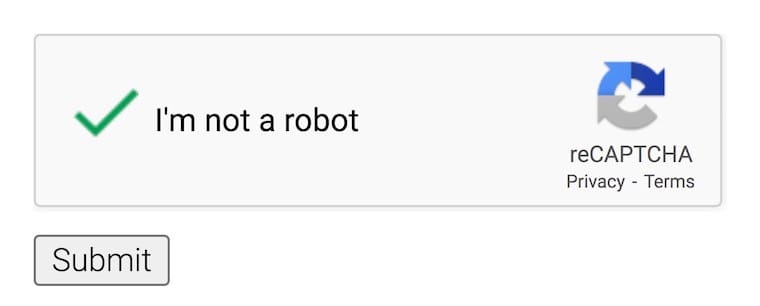
De extra beveiligingslaag zorgt ervoor dat alleen legitieme gebruikers toegang hebben tot uw site, waardoor uw site wordt beschermd tegen bots en kwaadaardige activiteiten.
4. Schakel gastafrekening uit
Er zijn enkele voordelen van het inschakelen van gastafrekening. Helaas kan het fraudeurs ook gemakkelijker maken om snelle, anonieme transacties uit te voeren, wat het risico op betalingsfraude vergroot.
Door accountcreatie te vereisen, voegt u een extra stap toe die het voor hen moeilijker maakt om uw site te misbruiken. U verzamelt ook waardevolle informatie die kan worden gebruikt om potentieel frauduleuze activiteiten te identificeren en te beperken.
Easy Digital Downloads laat u aankopen beperken tot alleen ingelogde gebruikers:
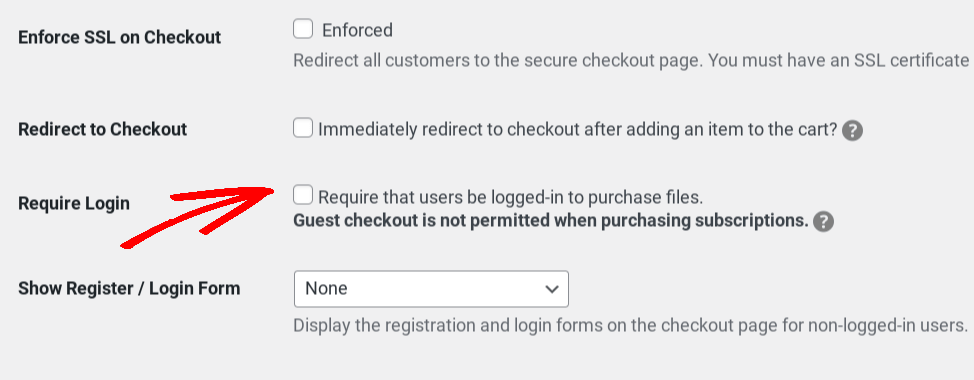
Dit zorgt ervoor dat alle downloadbare bestanden vereisen dat gebruikers inloggen op WordPress voordat ze toegang krijgen tot de downloadlink(s) van het bestand.
5. Gebruik Address Verification Service (AVS)
Een adresverificatieservice (AVS) is een hulpmiddel voor fraudepreventie waarmee verkopers potentieel frauduleuze creditcard- of debetcardtransacties kunnen detecteren en voorkomen. AVS vergelijkt het factuuradres dat door een klant wordt verstrekt met het factuuradres dat bij de kaart geregistreerd staat, om te bevestigen dat deze overeenkomen.
Een discrepantie activeert een rode vlag voor mogelijke fraude. Door AVS te gebruiken, kunt u inconsistenties in klantgegevens vaststellen en passende maatregelen nemen om frauduleuze aankopen te voorkomen.
Online verkopers kunnen AVS implementeren door een betalingsverwerker te gebruiken die AVS ondersteunt. De meeste grote betalingsverwerkers, waaronder Stripe en PayPal, ondersteunen AVS.
In dezelfde geest is CVC (of CVV) een code van drie of vier cijfers die op een creditcard of debetcard staat afgedrukt. Stripe Radar bevat een regel om betalingen te blokkeren die niet overeenkomen met de CVC-code. Als u de Radar-integratie gebruikt, kunt u deze regel in uw dashboard in- of uitschakelen.
6. Vereis e-mailverificatie
E-mailverificatie helpt de legitimiteit van klanten te bevestigen. Wanneer gebruikers zich op uw site registreren, zorgt het verzenden van een verificatie-e-mail naar hun opgegeven e-mailadressen ervoor dat ze toegang hebben tot de inbox die bij dat account hoort.
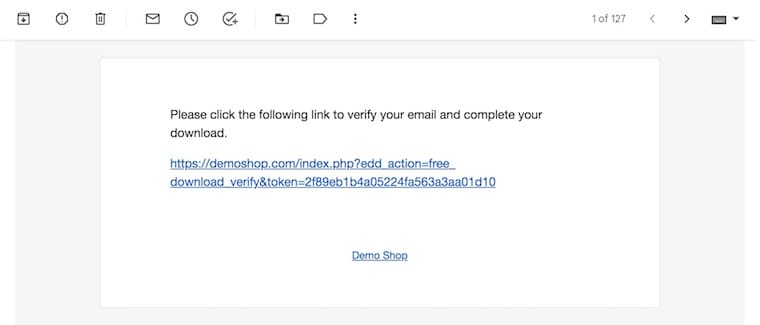
Door gebruikers te verplichten op een verificatielink te klikken of een code in te voeren die naar hun e-mail is verzonden, wordt het aanmaken van accounts door bots of fraudeurs met ongeldige of wegwerp-e-mailadressen voorkomen. Dit verificatieproces is een eenvoudige maar effectieve manier om ervoor te zorgen dat uw gebruikers echt zijn en betrokken zijn.
7. Installeer een WordPress-beveiligingsplugin
Een beveiligingsplugin kan realtime bescherming bieden tegen veelvoorkomende online bedreigingen, zoals malware, brute-force-aanvallen en hackpogingen.
Firewalls filteren inkomend verkeer om kwaadaardige verzoeken te blokkeren, terwijl beveiligingsplugins uw website continu scannen op kwetsbaarheden en potentiële inbreuken.
Er zijn veel WordPress-beveiligingsplugins om uit te kiezen. Een van de populairste is Wordfence:

Wordfence helpt met realtime firewall- en malware-scans, het beperken van inlogpogingen, het blokkeren van IP-adressen en het volgen en rapporteren van website-activiteit.
8. Controleer uw site regelmatig
Monitor en audit uw website continu om potentiële fraudeurs voor te blijven. Bekijk regelmatig uw website-logs en gebruikersactiviteit om ongebruikelijke patronen of tekenen van frauduleus gedrag te detecteren.
Let op meerdere mislukte inlogpogingen, verdachte IP-adressen of ongebruikelijke accountactiviteit. Hoe sneller u potentiële bedreigingen identificeert, hoe sneller u actie kunt ondernemen om e-commercefraude te voorkomen.
Handige tools voor het voorkomen van e-commercefraude
Het implementeren van de bovenstaande praktijken is eenvoudiger met de juiste tools. De beste plugins voor fraudepreventie variëren afhankelijk van het type e-commercewinkel dat u heeft.
Als u de WooCommerce-plugin gebruikt om fysieke producten te verkopen, heeft u mogelijk functies nodig die digitale verkopers niet nodig hebben. U kunt bijvoorbeeld zoeken naar tools die de factuur- en verzendadressen van klanten op bestellingen verifiëren.
💡 Leer hoe u fraude en valse bestellingen op WooCommerce kunt voorkomen.
Aan de andere kant zijn sommige extensies bedoeld voor het verkopen van digitale producten met Easy Digital Downloads. Naast de ingebouwde EDD-functies zijn er een paar add-ons die winkels verder beschermen tegen fraude.
Fraude Monitor
Een van de beste extensies voor het beschermen van uw eCommerce-winkel tegen frauduleuze aankopen is EDD Fraud Monitor. De krachtige monitoringsmogelijkheden detecteren automatisch verdachte en potentieel frauduleuze betalingen.
Fraud Monitor beoordeelt de legitimiteit van een transactie en markeert verdachte transacties. Vervolgens wordt de sitebeheerder op de hoogte gesteld dat aanvullende informatie nodig is om het verificatieproces van de aankoop te voltooien.
Fraud Monitor helpt bij het voorkomen van terugboekingen en fraudestrafen. Als u (of de sitebeheerder) bijvoorbeeld een aankoop als frauduleus bestempelt, kunt u de betaling eenvoudig ongedaan maken.
Fraud Monitor is beschikbaar voor EDD-gebruikers met een All Access Pass. U kunt uw pas vandaag nog aanschaffen:
MaxMind Fraude Preventie

MaxMind is een robuuste oplossing die diensten biedt voor fraudepreventie, zoals IP-geolocatie en proxy-detectie. De MaxMind Fraud Protection-extensie voor Easy Digital Downloads laat u deze diensten integreren met uw online winkel om fraude te helpen verminderen.
EDD Aankooplimiet
EDD Aankooplimiet stelt u in staat om aankooplimieten per product in te stellen. Naast het instellen van een maximum aantal keren dat een product kan worden gekocht, kunt u de datums beperken waarop het te koop is.
Aankooplimiet is inbegrepen bij EDD Pro, dus u heeft een Professional- of All Access Pass nodig om het te gebruiken. Als u de gratis versie van Easy Digital Downloads gebruikt, kunt u eenvoudig upgraden van EDD Lite naar Pro.
Veelgestelde vragen over het voorkomen van e-commercefraude
Laten we afsluiten met enkele veelgestelde vragen.
Wat is de beste manier om e-commercefraude te voorkomen?
Zoals bij alle aspecten van online en websitebeveiliging, is er geen pasklare oplossing voor de preventie van e-commercefraude. Het is het beste om een veelzijdige aanpak te hanteren die bestaat uit het gebruik van een veilige en betrouwbare hostingprovider en e-commerceplugin, het toevoegen van 2FA en andere soorten toegangscontroles, en het regelmatig controleren van uw site op verdachte activiteiten.
Kan ik alle soorten e-commercefraude voorkomen?
Geen enkele website is ooit 100% volledig veilig tegen beveiligingsdreigingen. Hoewel u niet alle soorten fraude kunt voorkomen, kunt u het risico aanzienlijk verminderen door beveiligingsbest practices te volgen en betrouwbare betalingsgateways te gebruiken.
Wat moet ik doen als ik e-commercefraude detecteer?
Als u frauduleuze betalingen of activiteiten op uw e-commerce site detecteert, onderneem dan onmiddellijk actie. Schort, blokkeer of plaats het verdachte account op een zwarte lijst en meld het incident bij uw betalingsgatewayprovider.
Gebruik EDD om e-commercefraude te voorkomen
Fraudebescherming voor e-commerce sites is een doorlopend proces dat waakzaamheid en continue verbetering vereist. Door de tips in deze gids te volgen en op de hoogte te blijven van de nieuwste beveiligingsdreigingen, kunt u uw online winkel beschermen en een veilige winkelervaring bieden aan uw klanten.
Wilt u Easy Digital Downloads gebruiken om uw e-commerce site te beveiligen? Koop vandaag nog uw pas:
📣 PS. Vergeet niet u aan te melden voor onze nieuwsbrief en volg ons op Facebook of Twitter voor meer WordPress-bronnen!








