


Wilt u Excel of Google spreadsheets verkopen?
Het maken en verkopen van spreadsheets of sjablonen kan een winstgevende bijverdienste zijn om passief inkomen te genereren. Wie wil dat nu niet?
Gelukkig kunt u met WordPress en Easy Digital Downloads eenvoudig Excel of Google spreadsheets verkopen zonder te coderen.
In dit artikel behandelen we:
Waarom Excel of Google Spreadsheets verkopen
Laten we eerlijk zijn, voor veel mensen zijn spreadsheets niet supergemakkelijk te gebruiken, althans niet voor geavanceerd werk. Daarom zoeken veel mensen naar Excel-sjablonen en Google Sheets-sjablonen, werkbladen, enz.
Dit betekent dat er volop mogelijkheden zijn om Excel- of Google-spreadsheets en werkbladen te verkopen en online spreadsheettraining aan te bieden.
Er zijn talloze manieren om dingen gedaan te krijgen met spreadsheets. Slimme ondernemers, marketeers, datawetenschappers en zelfs creatievelingen kennen de waarde van een goede spreadsheet.
Ze kunnen worden gebruikt om:
- Website-analyses en complexe datasets opslaan/bijhouden
- Uitgaven beheren
- Boekhouding
- Klanten en e-maillijsten bijhouden
- Klantenenquêtes organiseren
- Data-analyse
- Doelen bijhouden
- Donaties beheren
- Productiviteit van werknemers of freelancers evalueren
- Projectmanagement
Er is geen limiet aan de manieren waarop u spreadsheets kunt gebruiken om informatie op te slaan, te vergelijken, te analyseren, te organiseren en te benutten. Ze helpen u getallen te begrijpen en te gebruiken op een manier die zonder hen onmogelijk zou zijn.
Ze zijn een essentieel zakelijk hulpmiddel. De CEO van Microsoft heeft gezegd dat Excel het belangrijkste product is dat Microsoft ooit heeft gemaakt.
Waar Excel of Google Spreadsheets verkopen
Besluiten om spreadsheets of sjablonen te verkopen is één ding; uitzoeken waar u ze kunt verkopen is iets anders.
De beste manier om het meeste geld te verdienen met de verkoop van spreadsheet-sjablonen en andere spreadsheet-gerelateerde producten is op uw eigen website.
U hebt uw eigen e-commerce winkel nodig om uw eigen bedrijf op te bouwen. U kunt geen succesvol online bedrijf opbouwen op de website van iemand anders.
Vroeger was dit moeilijk, maar nu is het volledig doe-het-zelf-stijl te doen. U hoeft niet te kunnen coderen.
Naast de groeiende populariteit van Excel-influencers zijn er online marktplaatsen voor spreadsheets. Bijvoorbeeld, Spreadsheet Nut is een online marktplaats gewijd aan spreadsheet-sjablonen. U kunt zelfs Etsy-winkels vinden die zich richten op spreadsheets.
Helaas rekenen deze platforms en marktplaatsen tussenpersonen-kosten en commissies.
Bijvoorbeeld:
- Met Spreadsheet Nut nemen ze 40% van uw omzet. Dat is behoorlijk zwaar. Dat cijfer daalt tot 30% nadat u uw eerste $1.000 hebt verdiend. Er is ook een minimum verkoopprijs van $5 voor elke spreadsheet die op hun marktplaats wordt vermeld.
- Met Etsy nemen ze 6,5% van de totale prijs die is ingesteld voor digitale downloads. Ze nemen ook $0,20 aan aanmeldingskosten, geen probleem, tenzij u veel producten heeft. Vermeldingen verlopen na 4 maanden, dus u moet ze voor nog eens $0,20 vernieuwen als u wilt dat ze actief blijven in uw winkel.
Ik raad aan om spreadsheets op uw eigen website te verkopen. Het is de beste manier om het grootste deel van uw omzet te behouden.
Voor- en nadelen van het verkopen van spreadsheets op marktplaatsen
| 🟢 Voordelen | 🔴 Nadelen |
|---|---|
| Platforms en marktplaatsen trekken al veel bezoekers naar hun site. Dit kan het gemakkelijker maken om een publiek te vinden (maar er is geen garantie). | Ze nemen een deel van uw omzet. Hoe meer u verdient, hoe meer ze nemen. |
| Het is gemakkelijker om op andere sites te vermelden dan om uw eigen website te bouwen | Je klanten zijn niet jouw klanten, het zijn de klanten van het platform |
| U kunt mogelijk sneller een publiek opbouwen | Geen manier om directe communicatie te hebben met 'uw' klanten |
| Mogelijk geen manier om na aankoop contact op te nemen met 'uw' klanten, u wilt hen misschien helpen slagen (soms onboarding genoemd) en kunt dat niet | |
| U kunt uw eigen merk en klantervaring niet opbouwen op de website van iemand anders | |
| U moet zich houden aan hun gebruiksvoorwaarden, die op elk moment kunnen veranderen | |
| Veel platforms hebben beperkingen op de prijzen die u kunt vragen |
Veel andere e-commerce-oplossingen zijn gebouwd voor de verkoop van fysieke producten. U moet een reeks verzend- en voorraadbeheerhulpmiddelen installeren en instellen die u niet eens nodig heeft. In sommige gevallen kan dit uw website vertragen. Het verkopen van spreadsheets op veel platforms is een bijzaak.
Beste manier om Excel- of Google-spreadsheets te verkopen: WordPress + EDD
De beste manier om uw eigen website te bouwen is door WordPress te gebruiken. WordPress biedt de meeste kracht en flexibiliteit, terwijl u controle over de kosten behoudt.
Het Content Management Systeem (CMS) drijft nu 43% van het internet aan. Het is ook open source, wat betekent dat je het bezit en er alles mee kunt doen wat je wilt.
Hier is een geheim dat andere platforms je niet willen laten weten: ze kosten meer, doen minder, of zijn moeilijker te gebruiken dan WordPress.
WordPress heeft het grootste ecosysteem van plugins, thema's (templates) en services ter wereld. Geen enkel ander platform heeft meer manieren om uitgebreid te worden.
De beste manier om digitale producten zoals Google Sheets spreadsheets te verkopen in WordPress is met Easy Digital Downloads (EDD):

Met WordPress en EDD heb je volledige controle, krachtige functies, geen tussenpersoonkosten en lage overheadkosten. Lees hieronder meer.
Hoe Excel of Google Spreadsheets verkopen
Klaar om te beginnen? Hieronder neem ik je mee door het stapsgewijze proces van het verkopen van spreadsheets op je eigen website.
Stap 1. Een WordPress-site instellen
Als je er nog geen hebt, heb je eerst een WordPress-site nodig. We kunnen je helpen snel aan de slag te gaan.
Om te beginnen, heb je eerst een domein en hostingplan nodig. Ik raad SiteGround's Managed EDD hosting aan, omdat het je alles geeft wat je nodig hebt om een online winkel op te zetten en te laten draaien:

Naast je hostingpakket bevat dit ook een SSL-certificaat en de kern Easy Digital Downloads plugin.
Gebruik dit artikel om een goede webhost te vinden, er zijn ook kortingscodes!
Stap 2. Installeer Easy Digital Downloads
Als je dat nog niet hebt gedaan, is de volgende stap het installeren en activeren van Easy Digital Downloads. EDD is een complete e-commerce oplossing die je met een paar klikken kunt instellen.
EDD is gemakkelijk te gebruiken, zelfs voor beginners. Het wordt geleverd met alles wat je nodig hebt om e-commerce functionaliteit aan je WordPress-site toe te voegen en digitale producten te verkopen om online geld te verdienen.
Out-of-the-box biedt Easy Digital Downloads:
- Beveiligde productbestanden & gebruikersverificatie
- Volledige controle over de prijzen
- Winkelwagen
- Flexibele afrekenopties
- Klantbeheer (basale CRM)
- eCommerce-rapporten
- Kortingscodes
- Stripe en/of PayPal-integratie
Je kunt beginnen met EDD gratis of een pas aanschaffen voor geavanceerde functies en extensies:
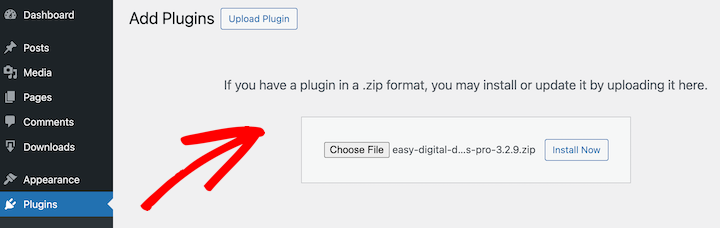
Zodra je account is ingesteld, ga je naar je accountgebied en download je de EDD-plugin, upload deze vervolgens naar je WordPress-site (Plugins » Nieuwe Plugin Toevoegen » Plugin Uploaden):
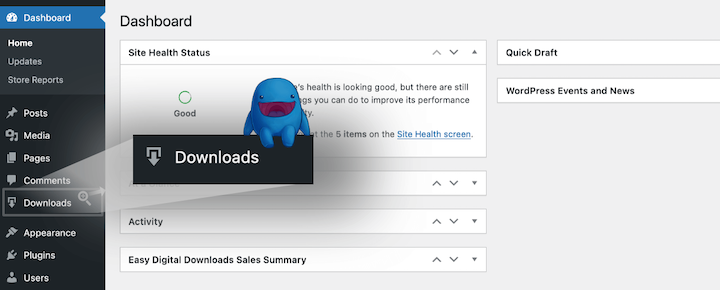
Na het installeren van Easy Digital Downloads verschijnt er een nieuw menu-item Downloads aan de linkerkant van je WordPress-dashboard. Hier beheer je je winkel en spreadsheetproducten:
EDD heeft een handige Onboarding Wizard die je kunt gebruiken om te beginnen. Voel je vrij om deze video te gebruiken voor stapsgewijze begeleiding:
Stap 3. Selecteer een betaalverwerker
Zodra je online winkel is opgezet, heb je een manier nodig om betalingen van je klanten te accepteren.
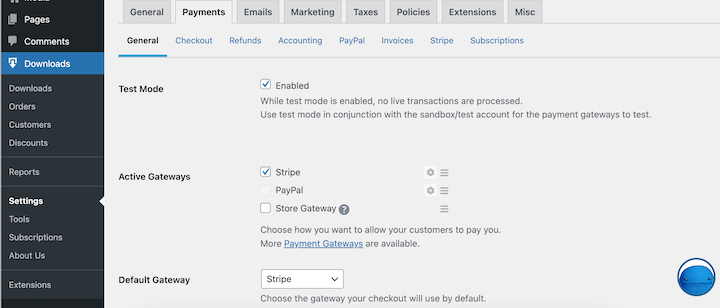
Ik raad aan om Stripe Pro te gebruiken. Wij gebruiken het hier bij Easy Digital Downloads. Als Stripe niet beschikbaar is in je land, is PayPal een andere goede optie.
Je kunt je betaalpoorten configureren onder Downloads » Instellingen » Betalingen:
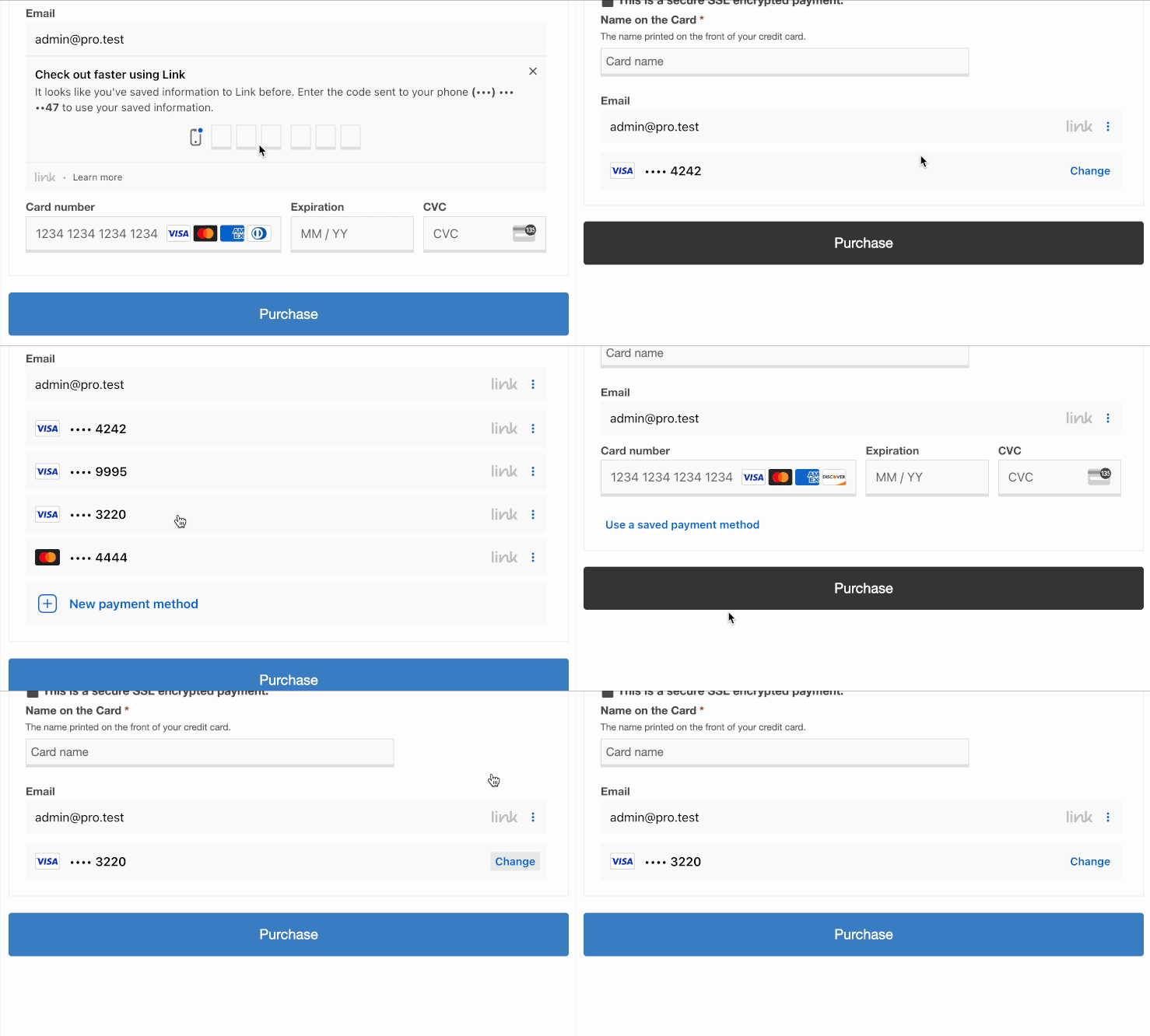
Met Stripe kun je creditcards en digitale portemonneebetalingen zoals Apple Pay en Google Pay accepteren. Het laat je ook toe om klantbetalingsgegevens op te slaan voor toekomstige aankopen:
Klik op de onderstaande links om aan de slag te gaan:
Stap 4. Voeg uw spreadsheet toe om te verkopen
Het opzetten van uw spreadsheet voor verkoop kost slechts een paar eenvoudige stappen. En aangezien het een digitaal product is, heeft u een onbeperkte voorraad!
Ik zal elke deeltaak uitleggen.
De items die u verkoopt in uw EDD-winkel worden Downloads genoemd.
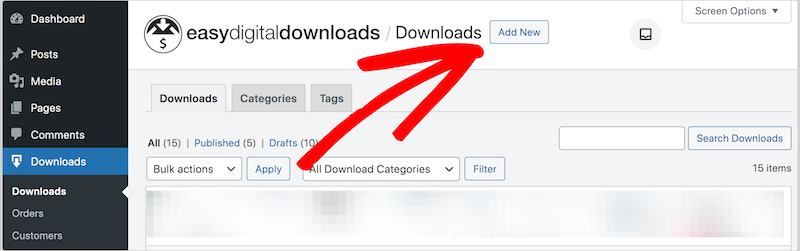
Klik eerst op Downloads en dan op Nieuwe toevoegen:
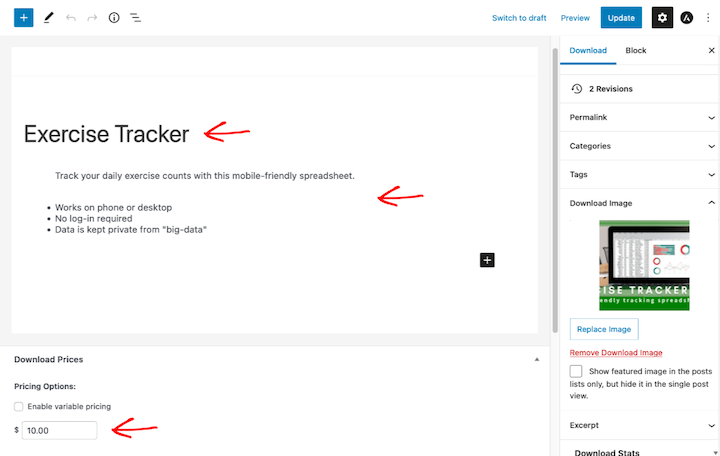
Geef vervolgens uw Download een naam en een beschrijving. Beschrijf hoe uw spreadsheet de problemen van de potentiële klant kan oplossen. Voeg technische details toe met een lijst met opsommingstekens.
Geef het daarna een Prijs:
Download Afbeelding
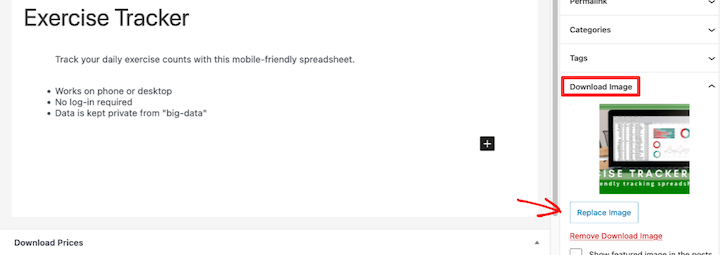
Voeg vervolgens een Download Afbeelding toe aan de spreadsheet. Dit is belangrijk. Het is de productafbeelding, een voorbeeld van wat de klant koopt. Zorg ervoor dat deze er mooi uitziet en hen helpt begrijpen wat dit product is.
Zodra u een afbeelding klaar heeft, kunt u deze uploaden onder Download Afbeelding:
Weet u niet zeker hoe u een Download Afbeelding maakt? Klik hier om te downloaden onze gratis Canva spreadsheet productafbeelding sjabloon. U kunt deze naar wens bewerken en aanpassen. U heeft alleen een gratis Canva-account nodig!
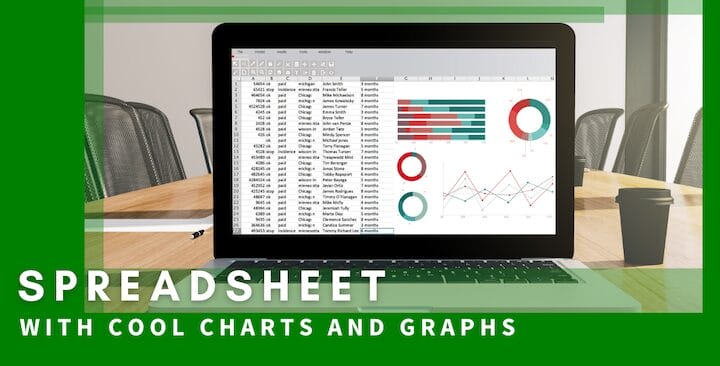
Bekijk ook onze post over het maken van aantrekkelijke afbeeldingen (het bevat ook gratis sjablonen!).
Downloadbestanden
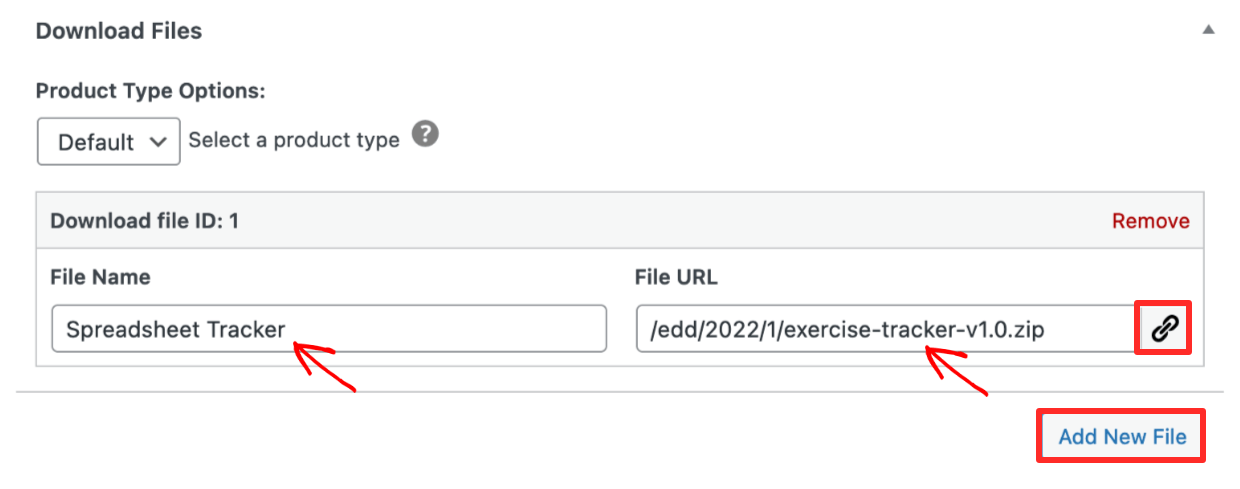
Configureer vervolgens het downloadbare bestand of de link onder Download Bestanden. Dit is wat de klant ontvangt na aankoop op de aankoopbevestigingspagina en in de aankoopbewijs-e-mail. Dit is de spreadsheet die u aan de klant gaat leveren.
- Als u een Microsoft Excel-bestand of Apple Numbers-bestand verkoopt, uploadt u het bestand naar uw WordPress-site.
- Als u een Google Sheet verkoopt, verkoopt u toegang tot een link of een 'Certificaat van Download'.
👉🏾 Belangrijk – Ik raad aan om uw Excel- of Apple Numbers-spreadsheetbestand te converteren naar een ZIP-bestand. U kunt meer leren over spreadsheetbestandsformaten verderop in dit bericht.
- Klik onder Bestands-URL op Bestand uploaden en upload uw ZIP-bestand (indien u een MS Excel- of Apple Numbers-bestand verkoopt). Plak anders de Google Sheet-link. Uw link wordt automatisch beschermd tegen zoekrobots en ongeautoriseerde downloads (door niet-klanten).
- Onder Bestandsnaam wordt de naam van uw bestand automatisch toegevoegd na het uploaden. Of u kunt een zin typen zoals "Klik hier om te downloaden". Dit is de klikbare linktekst die wordt gebruikt op de bevestigingspagina en in de e-mail.
Verkoop van Google Sheets Bestanden
Als u van plan bent Google Sheets te verkopen, is er een kleine uitdaging. Google Sheet-bestanden draaien alleen in een webbrowser op Google Servers. Dus wanneer u een Google Sheet verkoopt, verkoopt u eigenlijk een weblink.
Maak een kopie link
Open het Google Sheet waarvan u een kopie wilt verkopen in uw webbrowser.
- Kies de optie Bewerker rol onder Link ophalen onder de deelinstellingen van Google Sheets.
- Selecteer de instelling Iedereen met de link.
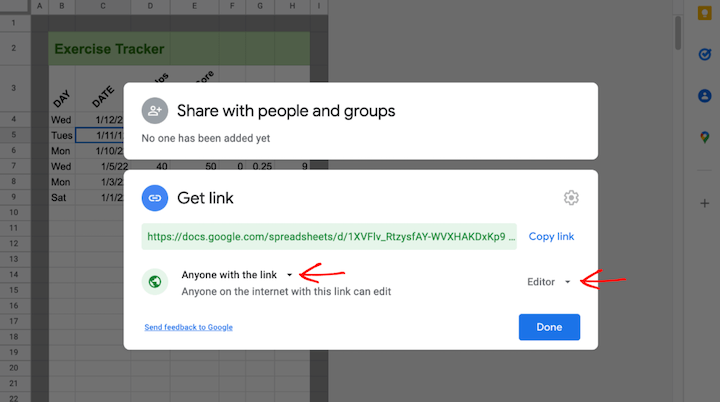
Dit laatste deel is lastig, u moet een "kopieerlink" maken, die Google om de een of andere reden alleen handmatig toestaat:
- Plak de link die Google verstrekt in het vak Link ophalen in een teksteditor.
- Voeg "copy" toe aan het einde van de link, en verwijder het woord "edit".
Als uw link was:
https://docs.google.com/spreadsheets/d/12345/edit?usp=sharing
Verander deze in:
https://docs.google.com/spreadsheets/d/12345/copy
Wanneer de klant op deze link klikt, wordt hij naar een pagina geleid waar hij een kopie van het werkblad moet maken, waardoor het origineel onaangetast blijft!

U heeft twee opties om toegang tot deze link te verkopen.
Optie 1: Plaats link in bestands-URL
Plaats simpelweg de Google Sheets kopieerlink in de Bestands-URL onder Bestanden downloaden (zoals hieronder gedemonstreerd):
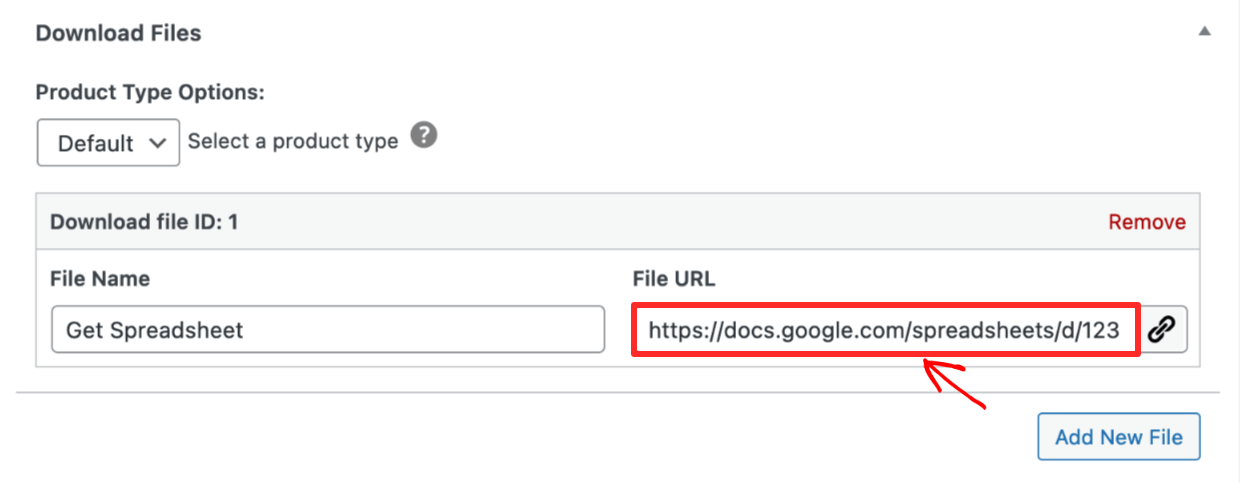
Het nadeel van deze optie is dat de klant ingelogd moet zijn op zijn Google-account wanneer hij op de link klikt. Zo niet, dan wordt hij doorgestuurd naar een Google-login. Sommige klanten vinden dit misschien verwarrend.
Optie 2: Maak een downloadcertificaat
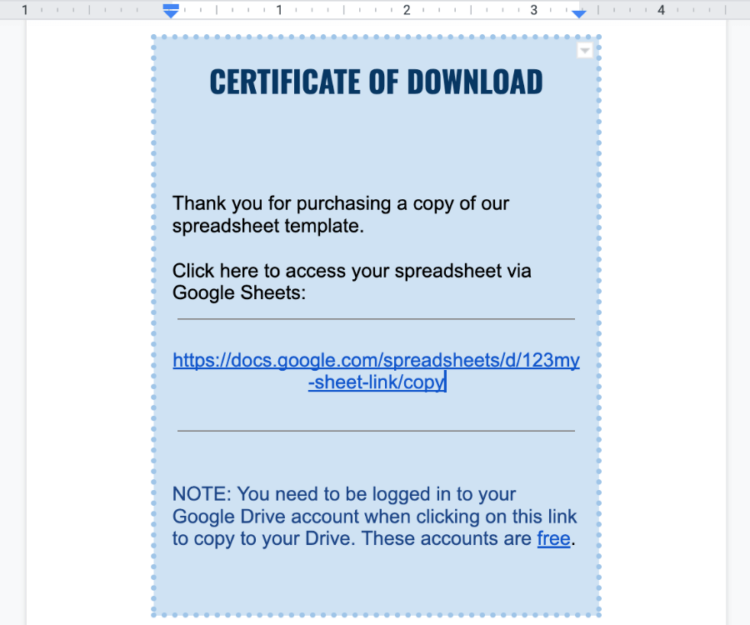
Aangezien een link geen downloadbaar bestand is, kunt u een 'downloadcertificaat'-document maken. Dit document bevat instructies en de link naar het Google-blad. Dit is hoe het op sommige andere platforms zoals Etsy wordt gedaan.
Gebruik dit Word/Google Doc-bestand dat instructies en de link bevat. We hebben dit voor u gedaan! Bewerk gewoon de tekst en de link in het onderstaande document:
📄 Klik hier om een ZIP-bestand van het certificaat te downloaden
Het is een Word-document (.DOCX-bestand) dat u ook naar Google Drive kunt uploaden en converteren naar een Google-document.
Ik raad aan dit document als PDF te exporteren en te uploaden als het Downloadbestand:
Goed gedaan! Klik op Publiceren en laat dit tabblad open in uw webbrowser.
Toegangscontrole configureren
Eén van de dingen die EDD speciaal maakt, is dat het Downloadbestand dat uw klant ontvangt automatisch beveiligd is tegen ongeautoriseerde toegang.
- De link op hun bevestigingspagina en e-mail verloopt na 24 uur, waardoor ze deze niet met niet-klanten kunnen delen. U kunt die vervaltijd van 24 uur naar alles wat u wilt wijzigen. Meer informatie in dit document.
- U kunt klanten die erom vragen op elk moment met een klik een nieuwe downloadlink verstrekken.
- De downloadlink is ook niet doorzoekbaar op internet. Niemand behalve uw klanten heeft toegang tot uw producten.
Stap 5. Bekijk, publiceer en promoot uw spreadsheet
Uw spreadsheet is ingesteld als een product en u kunt betalingen accepteren. Laten we de pagina bekijken hoe potentiële klanten deze zullen zien.
Klik op de knop Download bekijken:
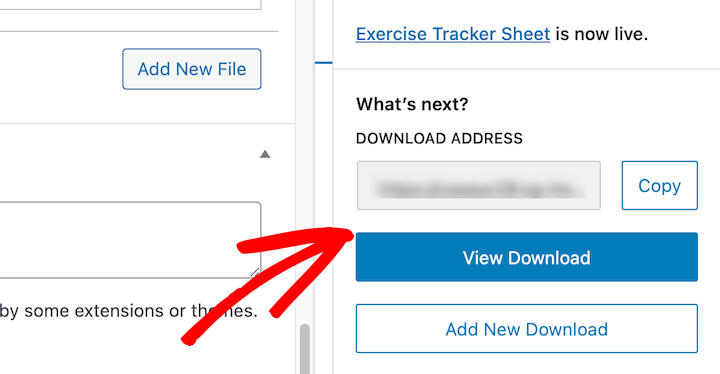
U ziet uw spreadsheet-sjabloonpagina op de voorkant van uw website. In het onderstaande voorbeeld gebruiken we het Astra-thema. EDD-pagina's zien er goed uit op elk thema, klik hier voor onze gratis en aanbevolen thema's.
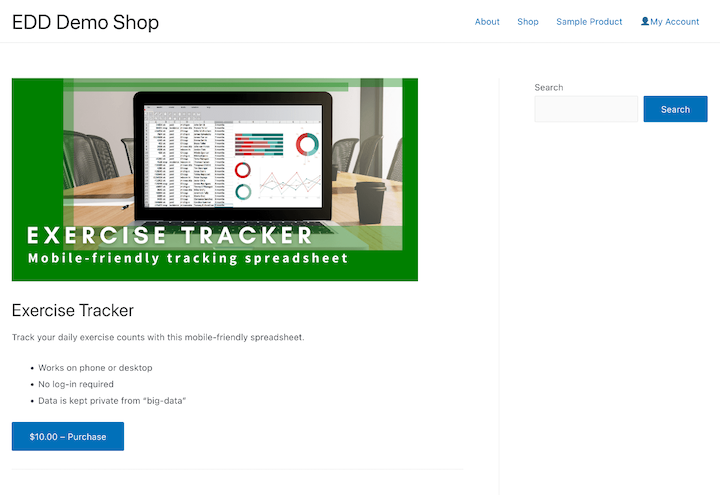
Het uiterlijk van uw pagina zal variëren, afhankelijk van welk WordPress-thema u heeft.
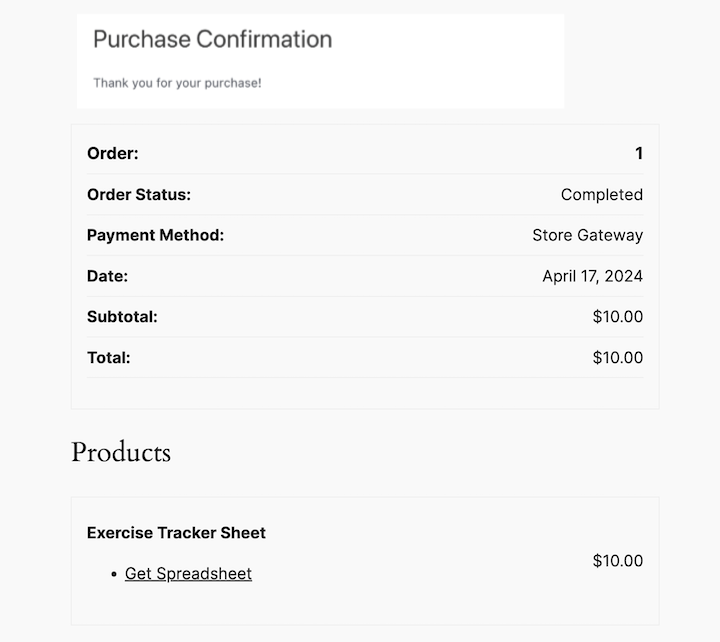
Klanten klikken op de knop Kopen, voegen toe aan hun winkelwagentje en rekenen af. Vervolgens worden ze naar de aankoopbevestigingspagina geleid. Deze pagina bevat een downloadlink:
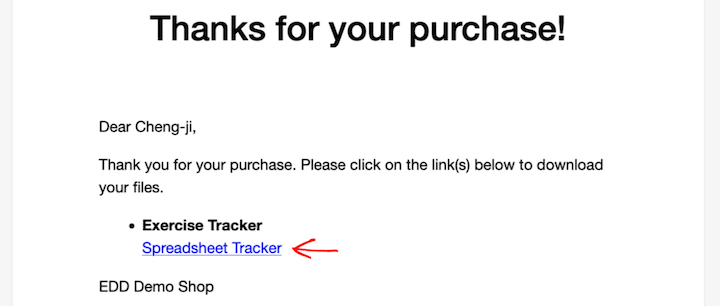
Klanten ontvangen ook een e-mail met de aankoopbon en een downloadlink:
Spreadsheet-bestandsformaten begrijpen
Ik wil wat technische informatie over spreadsheets en professionele tips geven die u zullen helpen bij het opbouwen van een bedrijf.
CSV's & TSV's
Microsoft Excel-spreadsheets, Google Spreadsheets en Apple Numbers-documenten kunnen allemaal gegevens importeren of exporteren als CSV of TSV.
- CSV – Door komma’s gescheiden waarden
- TSV – Door tabs gescheiden waarden
Deze bestanden kunnen worden geïmporteerd in databases, SaaS'en, webapplicaties en contentmanagementsystemen. Ze worden dagelijks gebruikt door datawetenschappers, marketeers en webontwikkelaars.
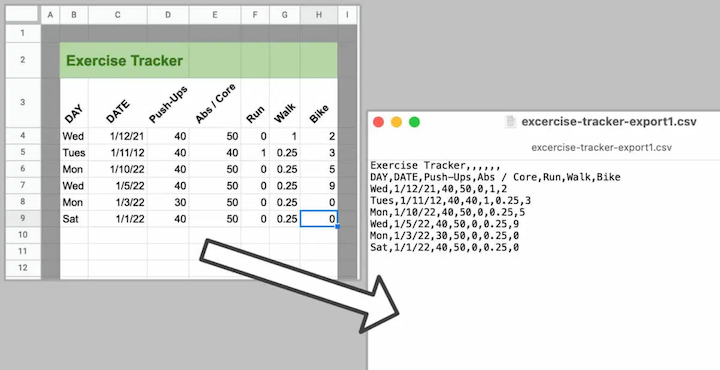
Het gebruik van CSV's en TSV's is een standaardpraktijk in veel sectoren. Dit helpt de markt voor spreadsheet-sjablonen en online cursussen groot te maken.
De belangrijkste conclusie hier is dat uw kennis van spreadsheets erg waardevol is. Gebruik het om digitale producten te maken die anderen helpen en geld verdienen terwijl u bezig bent. De markt is er.
Meest voorkomende spreadsheet-bestandsformaten
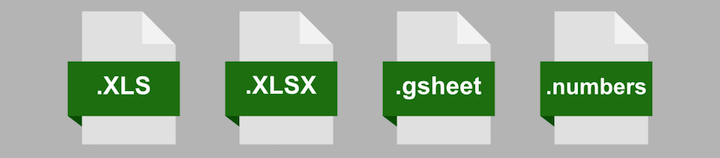
| EXTENSIE | FORMAAT INFO | OPMERKINGEN |
|---|---|---|
| .XLSX | Microsoft Excel-spreadsheet | Het huidige formaat van Microsoft Excel, soms ‘Excel-werkmappen’ genoemd |
| .XLS | Microsoft Excel-spreadsheet (oude versie, soms MS Excel genoemd) | Het oorspronkelijke bestandsformaat van Microsoft Excel. Dit formaat werd in 2007 stopgezet. U kunt deze bestanden nog steeds tegenkomen, het is vaak het beste om naar XLSX te converteren |
| .gsheet | Google Sheet | Niet echt een bestand, maar een link naar een Google sheet online. Eenmaal geopend in een webbrowser kunnen Google Spreadsheets downloaden/exporteren naar XLSX en XLS (evenals CSV). |
| .numbers | Apple Numbers-spreadsheet | Apples spreadsheet-applicatie. Apple Numbers kan XLSX- en XLS-bestanden importeren en exporteren. |
| CSV | Door komma’s gescheiden waarden | Een plat tekstbestand met kolommen en rijen gescheiden door komma’s, gebruikt voor import/export tussen spreadsheet-apps, databases en andere technologie |
| TSV | Door tabs gescheiden waarden | Een plat tekstbestand met kolommen en rijen gescheiden door een tab-teken (spaties), gebruikt voor import/export tussen spreadsheet-apps, databases en andere technologie |
Weet u niet zeker of u CSV of TSV moet gebruiken? Kies voor CSV, tenzij u een reden hebt om dat niet te doen. CSV's werken waarschijnlijk beter en zijn gebruikelijker.
Verplaatsen tussen Excel & Google Sheets Formaat
U kunt eenvoudig een MS Excel-blad openen in GoogleDrive en het bewerken als een XLS-bestand of converteren naar een Google Sheet. Maar er zijn een paar dingen die niet werken of verloren gaan in het proces.
Als u Notities in een cel invoegt, worden dit opmerkingen in het Google Sheet. Dit is niet ideaal en kan verwarring veroorzaken.
Soms, als u kleurformattering gebruikt, gaat deze verloren, of ontbreekt deze aan de rechterkant van uw blad. Houd dat in de gaten.
Aanvinkvakjes worden niet altijd overgezet, de cellen waar u aanvinkvakjes gebruikte, kunnen er gewoon 'False' in hebben staan.
Visual Basic for Applications (VBA)
Microsoft Excel bevat een krachtige scripttaal genaamd Visual Basic for Applications (VBA). Het is de ruggengraat van Excel en alle Microsoft Office-apps.
VBA maakt de creatie van Macro's mogelijk. Macro's worden gebruikt om ingewikkelde bedrijfsprocessen te automatiseren. U zou bijvoorbeeld een Macro in Excel kunnen maken die een bepaalde waarde een bepaalde kleur geeft.
Excel heeft ook Power Queries voor 'business intelligence'-werk. U kunt gegevens uit veel verschillende bronnen importeren en de gegevens laten wijzigen en interageren met gegevens in Excel-spreadsheets.
Deze krachtige tools maken Excel, naar men zegt, de krachtigste van de spreadsheet-apps. Er is bijna geen limiet aan wat u ermee kunt doen. Sommige mensen gebruiken het zelfs om videogames te maken die binnen Excel draaien!
Google Sheets heeft ook zijn eigen Macro-scripttaal.
Tips om Excel of Google Spreadsheets te verkopen
Sommige mensen vinden spreadsheets misschien saai. Maar onderschat de nederige kleine spreadsheet niet. Spreadsheets zijn krachtig en nog steeds erg nuttig! Hier zijn enkele tips om ze op de markt te brengen.
1. Marktonderzoek & Concurrentieonderzoek Uitvoeren
Vele mensen vinden spreadsheets cool en gebruiken ze voor zowel persoonlijke als professionele doeleinden. Miljoenen mensen gebruiken ze dagelijks of af en toe op hun werk.
Mensen verdienen VEEL geld met het verkopen van spreadsheet-sjablonen en online cursussen. Microsoft Excel is de populairste spreadsheet-app. Ook erg populair zijn Google Sheets en Apple Numbers.
U kunt zelfs cool zijn op sociale media door een 'Excel Influencer' te zijn. Hier zijn enkele van de beste die er zijn:
- Miss Excel – met meer dan 960.000 TikTok-volgers
- Your Excel Friend – met meer dan 2,6 miljoen TikTok-volgers
- Excel Daddy – met meer dan 493.000 TikTok-volgers
2. Gebruik Hulpmiddelen om Gegevens op te Halen
Spreadsheets organiseren gegevens. Ze kunnen vaak gegevens uit apps voeden of gegevens uit apps halen.
U kunt automatiseringshulpmiddelen zoals Uncanny Automator, Zapier of IFTTT gebruiken om gegevens uit een spreadsheet te halen of erin te plaatsen. Hulpmiddelen zoals deze zijn in opkomst en worden gebruikt om bedrijfsprocessen te automatiseren.
Spreadsheets zijn de ruggengraat van automatisering. Vrijwel elk bedrijf probeert steeds meer automatisering te realiseren. De markt voor sjablonen en training zal dus vrijwel zeker groeien.
3. Voeg een Uniek Verkoopargument Toe
Je moet je ervan bewust zijn dat er tal van websites zijn die gratis spreadsheet-sjablonen weggeven. Dit vormt een uitdaging voor jou om sjablonen te verkopen, en om ze voor een hoge prijs te verkopen.
Zorg ervoor dat je spreadsheet een probleem oplost. Zorg ervoor dat het gemakkelijk te gebruiken is en waarde biedt. Het moet gemakkelijk te begrijpen zijn. Mensen zijn nog steeds op zoek naar een snelle oplossing voor hun probleem. Als je het oplost en mensen het kunnen vinden, zullen ze geld betalen om hun probleem op te lossen.
4. Verkoop Excel- of Google Spreadsheets Training
Een andere optie die je kunt gebruiken om een uniek verkoopargument toe te voegen, is het aanbieden van spreadsheet training. Als je ook een 'how-to'-video bij je sjabloon voegt, of als je mensen traint om spreadsheets zelf te gebruiken, zal dat je product helpen opvallen.
Er zijn twee manieren die we aanbevelen om dit te doen:
- Gebruik de Content Restriction-extensie van EDD om pagina's te bouwen die alleen voor klanten zijn. Dit is een geweldige oplossing als je zowel spreadsheet-sjablonen als trainingvideo's verkoopt.
- Gebruik MemberPress om een meer geavanceerde online cursuswebsite te bouwen. Dit is een geweldige oplossing als je alleen van plan bent cursussen te verkopen.
Je zou een cursus kunnen maken op populaire platforms zoals Udemy of LinkedIn Learning. Maar je zult de inkomsten moeten delen met het platform.
Neem de volledige controle over de klantervaring en overheadkosten. Begin vandaag nog met EDD!
Veelgestelde vragen over het verkopen van spreadsheets
Laten we afsluiten met enkele veelgestelde vragen over hoe je Excel- of Google spreadsheets kunt verkopen.
Wat is een Excel-spreadsheet?
Een Excel-spreadsheet is een computerprogramma-applicatie voor het maken en manipuleren van gegevens in een rasterformaat. Het maakt deel uit van de Microsoft Office-suite en is een populair hulpmiddel voor accountants, analisten en vele andere beroepen.
Wat is een Google Sheet?
Een Google Sheet is een spreadsheetprogramma dat deel uitmaakt van de gratis online Google Docs Editors-suite die door Google wordt aangeboden. Google Sheets stelt gebruikers in staat om spreadsheets in samenwerking met anderen te maken en te bewerken.
Kan ik spreadsheets als product verkopen?
Ja, je kunt Excel- of Google spreadsheets als product verkopen met behulp van WordPress en Easy Digital Downloads (EDD). Spreadsheets kunnen een passieve inkomstenbron zijn.
Is het winstgevend om Excel- of Google spreadsheets te verkopen?
Het hangt af van de waarde die je biedt in je spreadsheets en je marketinginspanningen. Er is een markt voor informatieve en goed ontworpen spreadsheets, maar je zult potentiële kopers ervan moeten overtuigen dat je spreadsheets de prijs waard zijn.
Gebruik EDD om Excel- of Google Spreadsheets te verkopen
Excel-lent! 😜 Je hebt geleerd hoe je Excel- of Google spreadsheets kunt verkopen. Je weet ook veel meer over de markt, kansen en enkele technische details om je een voordeel te geven.
Begin nu met de krachtigste e-commerce oplossing voor digitale producten:
We hebben tal van artikelen voor ondernemers en digitale makers zoals jij! Waar wil je hierna meer over leren?
- 💸 Tips voor het prijzen van uw digitale producten
- 🤑 De Verbazingwekkende Voordelen van het Verkopen van Digitale Producten
- 💰 De populairste digitale producten die u kunt verkopen
- 📄 Documenten verkopen
📣 PS. Vergeet niet u aan te melden voor onze nieuwsbrief en volg ons op Facebook of Twitter voor meer WordPress-bronnen!








