

If you sell digital products, you know the struggle of “guessing” where your sales come from. Did that customer find you through the newsletter, or was it that Facebook ad?
Usually, figuring this out means jumping between your WordPress dashboard and Google Analytics (GA4). It’s tedious, and frankly, the data in GA4 can be overwhelming.
That’s why we’re excited to announce that Campaign Tracker is now available directly within Easy Digital Downloads Pro! This is a full marketing attribution suite with advanced reporting and exports.
It helps you see exactly which marketing efforts are making you money, right from your EDD store dashboard.
🔎 Here’s what’s new and how to start tracking your success.
What’s Campaign Tracker? 🎯
Campaign Tracker monitors the UTM parameters (tracking codes) in the URLs that bring visitors to your site.
When a customer clicks a link—like one in your email newsletter—and makes a purchase, Campaign Tracker records exactly where they came from. It captures the Campaign, Source, Medium, Term, and Content.
Note: It doesn’t sync with Google Analytics. Instead, it detects the same UTM parameters you use for Google Analytics and stores that data locally in your EDD store. This gives you ownership of your data and keeps your reporting refreshingly simple.
Get Instant Snapshots of Marketing Health
One of the biggest updates in this release is the visual campaign data.
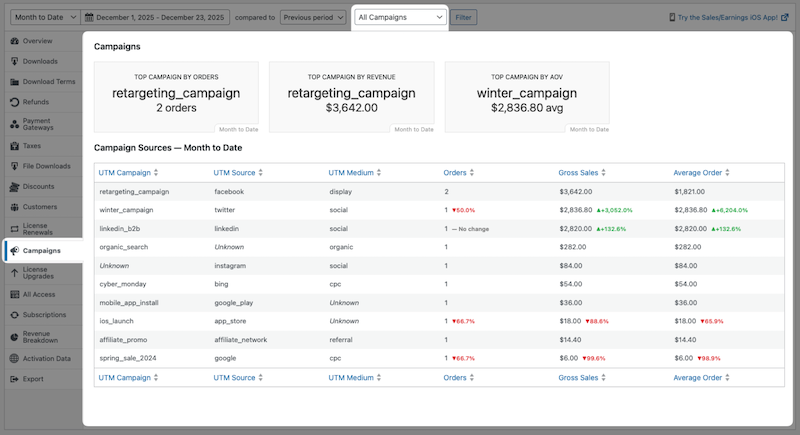
Once you enable tracking, you’ll see a dedicated Campaigns tab under Downloads » Reports.
Performance Tiles
At the top of the report, you get a quick snapshot of your marketing health. We added performance tiles that highlight:
- Top Campaign by Orders: The winner for volume.
- Top Campaign by Revenue: The winner for income.
- Top Campaign by AOV: Which traffic source brings the biggest spenders.
These tiles also show comparison data. You’ll see green or red indicators showing percentage changes compared to the previous period. It’s a great way to spot trends instantly.
Detailed Breakdown
Below the tiles is a comprehensive table that breaks down performance by specific Source and Medium combinations.
For example, you can distinctly see the difference between facebook / cpc (paid ads) and facebook / social (organic posts). You can sort these columns to see which specific combination drives the most Gross Sales.
Easily Access Better Order Insights
We didn’t just improve the high-level reports. We improved the individual order view, too.
With the latest update, when you go to Downloads » Orders and click on a specific order, you’ll see a dedicated Campaign tab in the Order Details area.
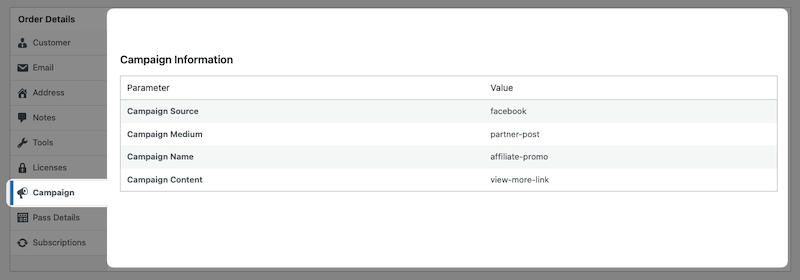
It clearly lists:
- Campaign Name (e.g.,
summer_sale_2026) - Traffic Source (e.g.,
newsletter) - Medium (e.g.,
email)
This gives you incredible context when handling support tickets or reviewing high-value orders.
Turn Data Into Action
So, why does this matter for your store?
Prove Your ROI.
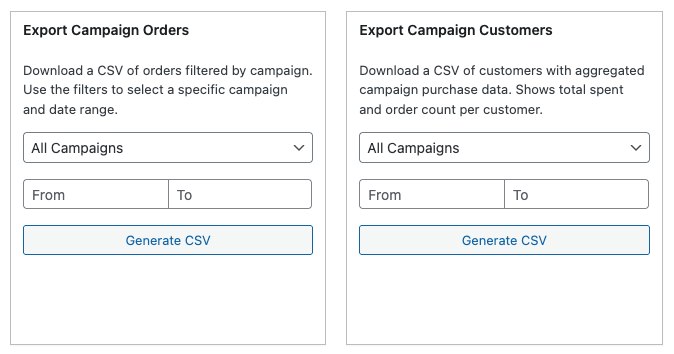
Stop guessing if your paid ads are working. Use the Export Campaign Orders feature to download a CSV. You can match the revenue generated in EDD against your ad spend to see your true Return on Investment.
Focus on What Works.
You might find that while Facebook brings a lot of traffic, your Email Newsletter brings higher Average Order Value (AOV). Use the new reporting tiles to identify your winners and double down on them.
Optimize Your Emails.
We included a {campaign_info} email tag. You can add this to your “New Sale Notification” emails. This lets you see exactly where the sale came from instantly, without even logging into your site.
How to Enable Campaign Tracker ⚙️
If you’re an existing EDD Pro user, you can enable Campaign Tracker under Downloads » Settings » Marketing.
Under the General tab, click on the Campaign Tracking toggle to enable tracking of Google Analytics UTM parameters on orders.
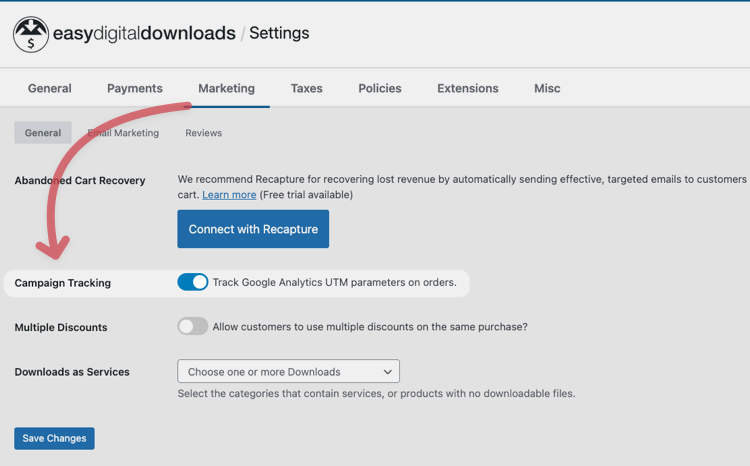
Select the Save Changes button.
Note for existing users: If you were using the standalone Campaign Tracker plugin, EDD Pro will automatically detect it, migrate your settings, and deactivate the old plugin. All your historical data stays safe!
FAQs on EDD’s UTM Campaign Tracking
Does this replace Google Analytics?
No, it works alongside it. While Google Analytics provides broad traffic data, Campaign Tracker provides precise, order-specific data stored directly in your store’s database. This ensures you have 100% accurate revenue attribution attached to specific customer records.
Do I need to manually tag my links?
Yes. For Campaign Tracker to work, your marketing links need UTM parameters (like ?utm_source=newsletter). Most email platforms and ad managers (like Facebook Ads) have tools to build these links for you automatically.
What happens if a customer clicks multiple links?
Campaign Tracker uses a “first-touch” attribution model. This means the very first campaign link a visitor clicks to arrive at your store is the one credited for the sale. This helps you understand how customers are initially finding you.
I already have the old extension installed. What do I do?
Nothing! When you update to the latest version of EDD Pro, the system automatically migrates your data and enables the feature. It will deactivate the old standalone plugin for you, which you can then delete.
Upgrade to EDD Pro Today
With these updates, we want to help you make smarter decisions without leaving your WordPress dashboard.
This feature is available now for all Easy Digital Downloads Pro users.
Simply go to Dashboard » Updates from your WordPress admin area to update to EDD Pro 3.6.3+ and unlock these insights.
If you don’t have a Pro pass yet, you’re missing out on the easiest way to track your marketing success.
For more, feel free to check out:
📣 P.S. Be sure to subscribe to our newsletter and follow us on Facebook, Twitter/X, or LinkedIn for more WordPress resources!