


If you run an online store, you know the stinging feeling of seeing traffic spike, but sales remain flat. You did the hard work to get them there. They added your product to the cart. Then… poof. They vanished.
It happens to the best of us. In fact, research suggests that nearly 70% of online carts are abandoned, which is a massive chunk of change left on the table.
That’s why we’re thrilled to introduce Abandoned Cart Recovery for Easy Digital Downloads. This powerful new feature is designed to bring those customers back and boost your bottom line without you lifting a finger.
🔎 In this post, I’ll cover:
Standout Features of EDD’s Cart Recovery ⭐️
Here’s what makes this update a total game-changer for your store.
- Automated Email Sequences
- Visual Customer Journeys
- Deep Dive Analytics
Automated Email Sequences 📧
The core of this feature is the ability to send the right message at the right time.
We’ve set up a system that detects when a cart has been inactive for a set time (default is 60 minutes). Once that clock runs out, the cart is marked “Abandoned,” and the recovery sequence begins.
You aren’t stuck with a single generic email, either. The system supports a smart sequence:
- Immediate Recovery: A quick nudge sent shortly after they leave (e.g., 30 minutes).
- Value Reinforcement: A reminder of why they wanted the product (e.g., 24 hours later).
- Final Attempt: A last call, perhaps using standard EDD email tags like
{cart_link}to take them straight back to checkout.
Visual Customer Journeys 🗺️
Data is great, but visualizing the flow is better.
We designed the Journey tab to take the guesswork out of your funnel. It shows you exactly how carts move from Creation » Abandoned » Email Sent » Opened » Clicked » Restored » Converted.
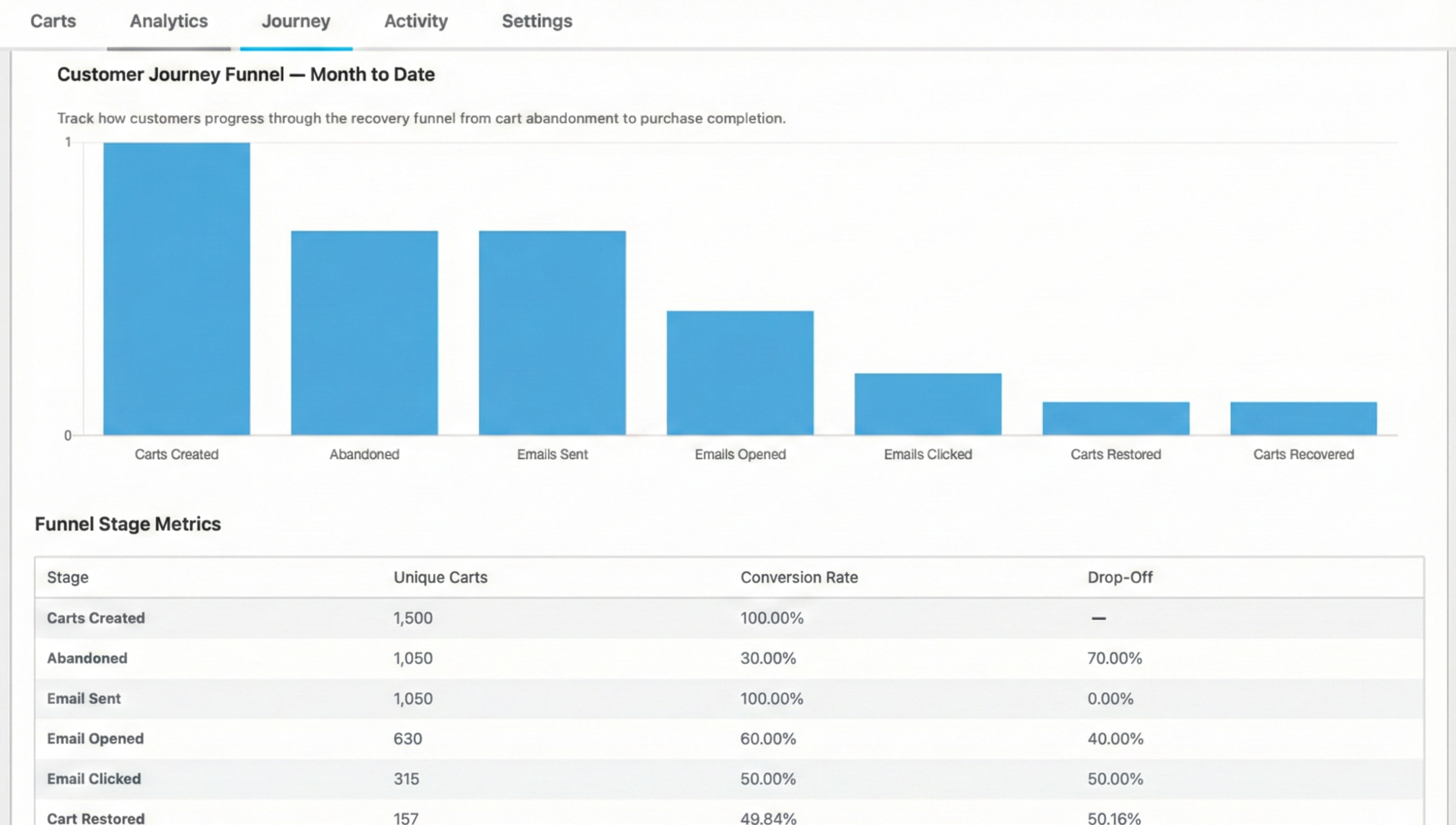
If you see a huge drop-off between “Email Sent” and “Opened,” you know your subject lines might need some work. If they open but don’t click, maybe your call-to-action isn’t strong enough.
It’s like having an X-ray view of your sales funnel.
Deep Dive Analytics 📊
Confidence is key when adding new tools to your stack; you need to know that these features are actively generating revenue for your store.
Head over to Downloads » Cart Recovery » Analytics. We’ve built a dashboard that tracks:
- Recovered revenue (my favorite metric)
- Recovery rate percentages
- Total abandoned carts
You can filter this by date to see how your recovery efforts improve over time.
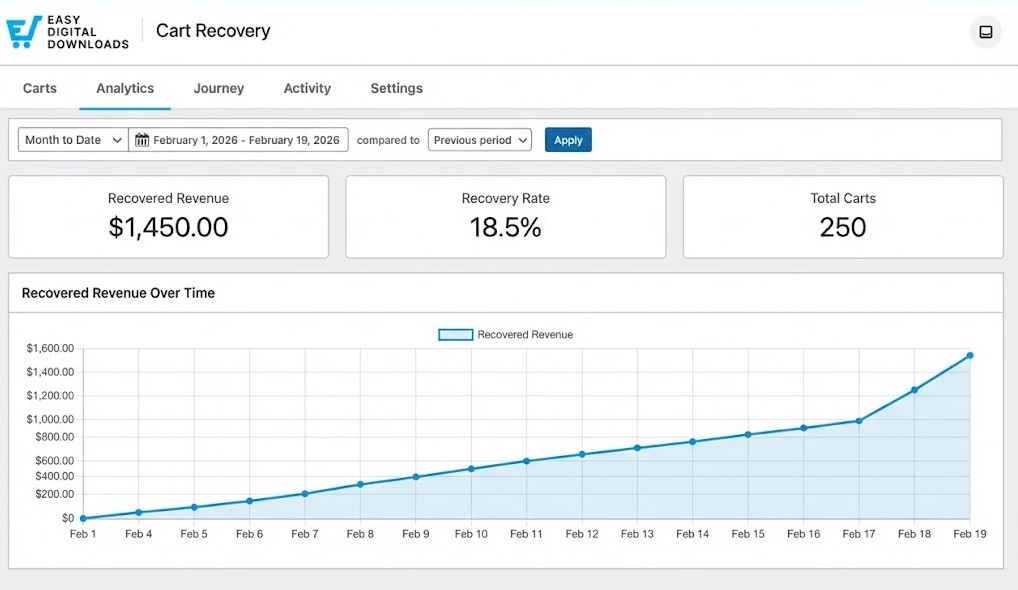
Seeing that “Recovered Revenue” number tick up is a testament to how smart automation acts as a huge boost to eCommerce businesses, maximizing your sales potential without increasing your daily workload.
How to Enable & Use Abandoned Cart Recovery ✅
Ready to stop losing sales? If you have an active EDD Pro license, you can turn this on right now.
- Enable EDD Cart Recovery Feature
- Configure Your Cart Recovery Settings
- Check Your Sender Info
- Customize Abandoned Cart Recovery Emails
Note: You’ll need to update your EDD (Pro) plugin to the latest version (3.6.5+).
Step 1. Enable the Feature
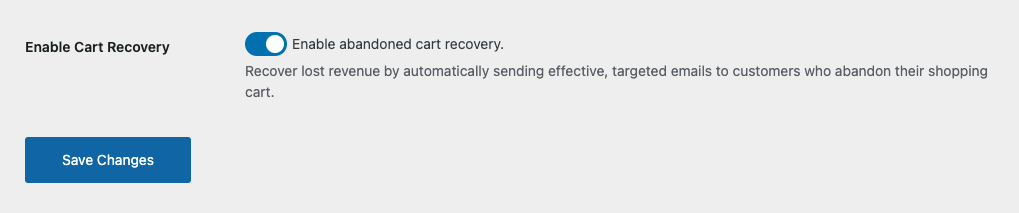
From your WordPress dashboard, go to Downloads » Cart Recovery.
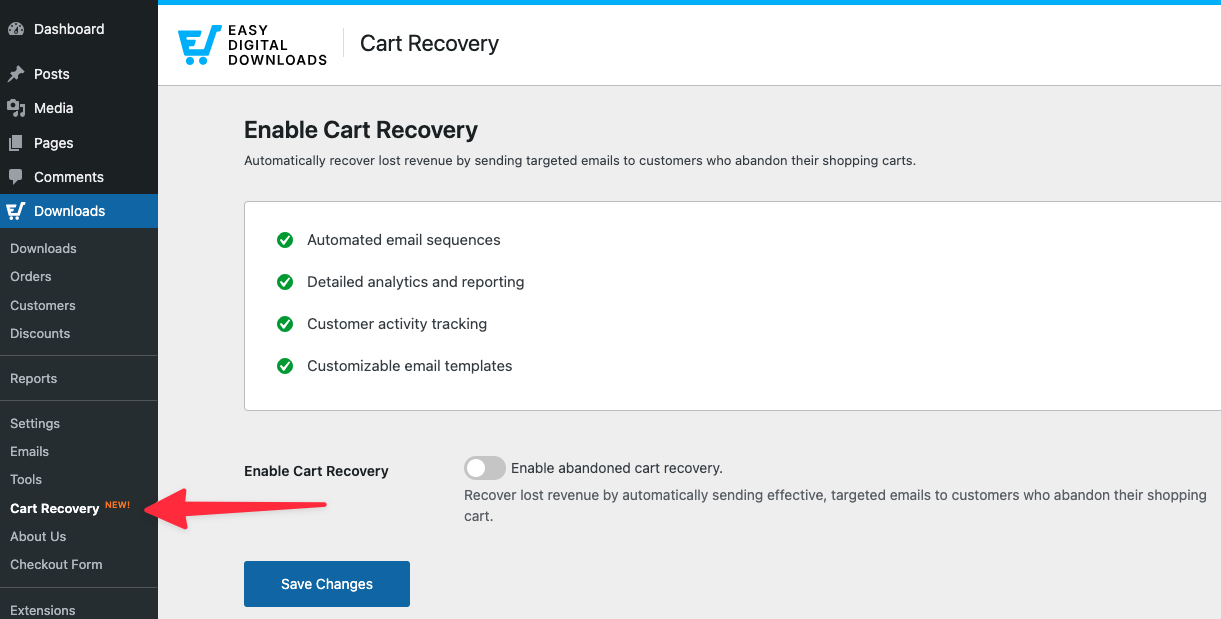
You’ll see a toggle switch. Click Enable abandoned cart recovery, then Save Changes.
Step 2. Configure Your Settings
Once enabled, the full Cart Recovery menu appears.
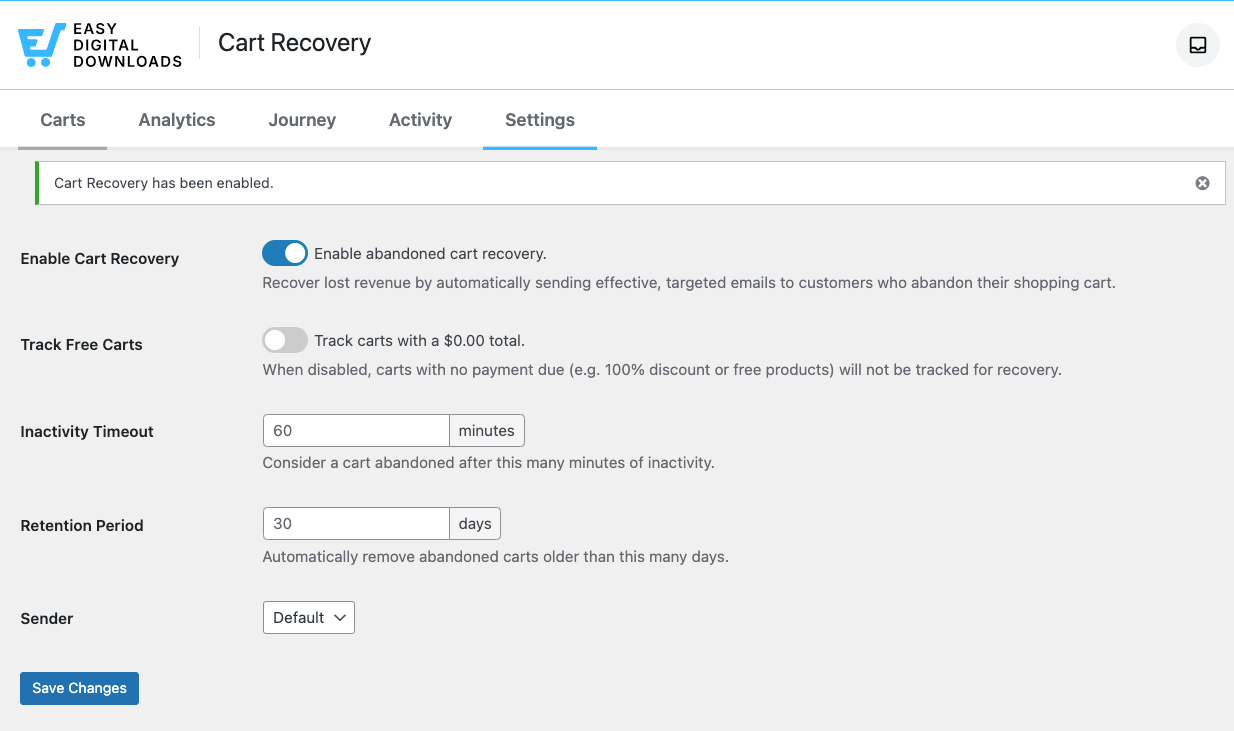
The next step is to decide when a cart is actually considered “abandoned.”
Under the Settings tab, locate the Inactivity Timeout option.
The default is set to 60 minutes. This gives shoppers enough time to come back on their own, but not so long that they’ve forgotten you.
However, you can adjust this from 15 minutes up to 24 hours depending on your store’s traffic.
Step 3. Check Your Sender Info
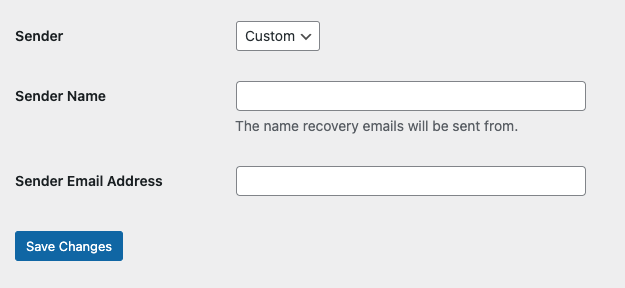
Next, make sure the Sender is correct.
You can leave it on the default option, or select Custom from the drop-down menu and enter a different Sender Name and Email Address.
💡 Tip: You want these emails to look like they are coming from a real person or your official brand, not a “do-not-reply” robot.
Step 4. Customize Your Emails
Next, scroll down to Email Templates.
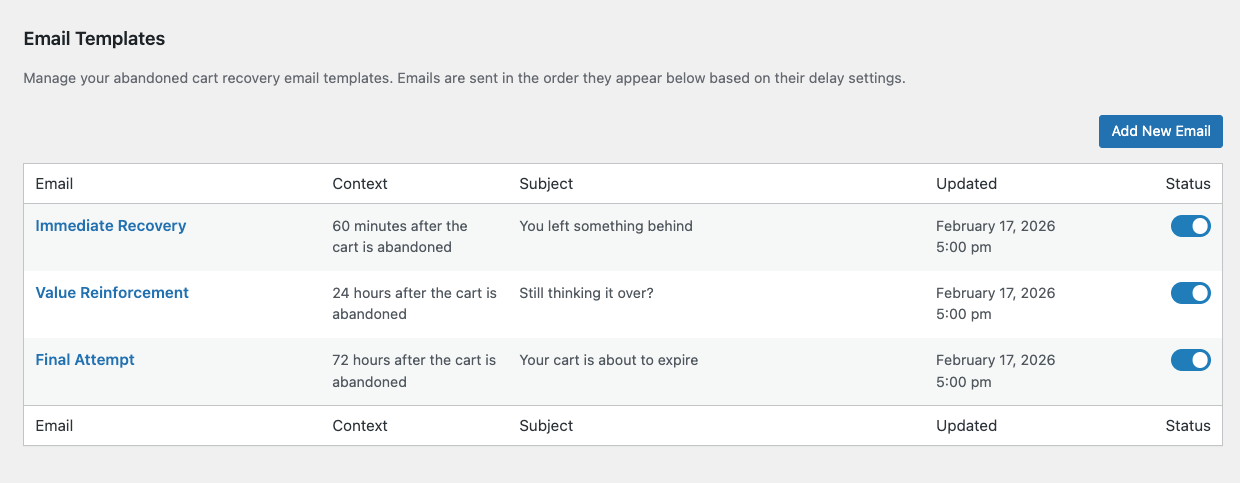
The three default email templates that I mentioned earlier are automatically enabled.
Here, you can select and review or change the default text for the “Immediate Recovery” and follow-up emails.
Within the editor of each email template, you can update the:
- Email Delay
- Discount Code
- Subject/heading
- Message
Within the message editor, you can insert email smart tags, change the wording, and update the styling.
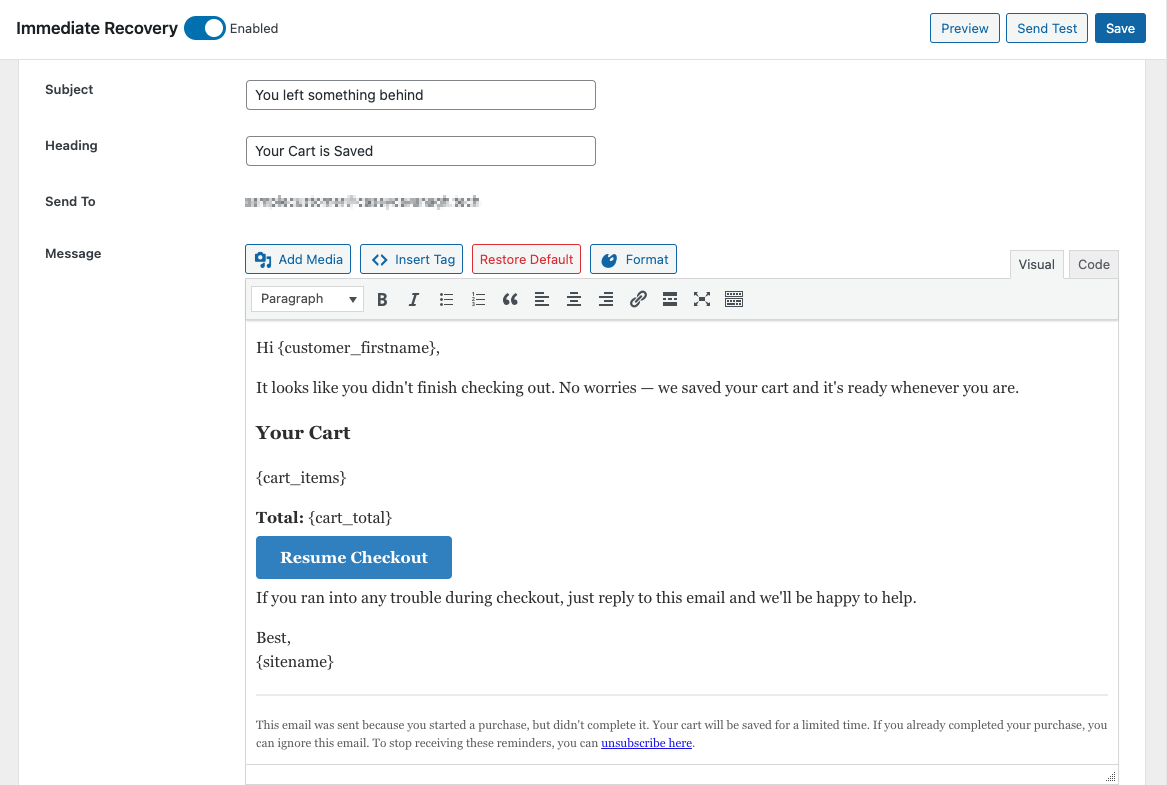
Make sure to keep the {cart_link} and {unsubscribe_link} tags intact!
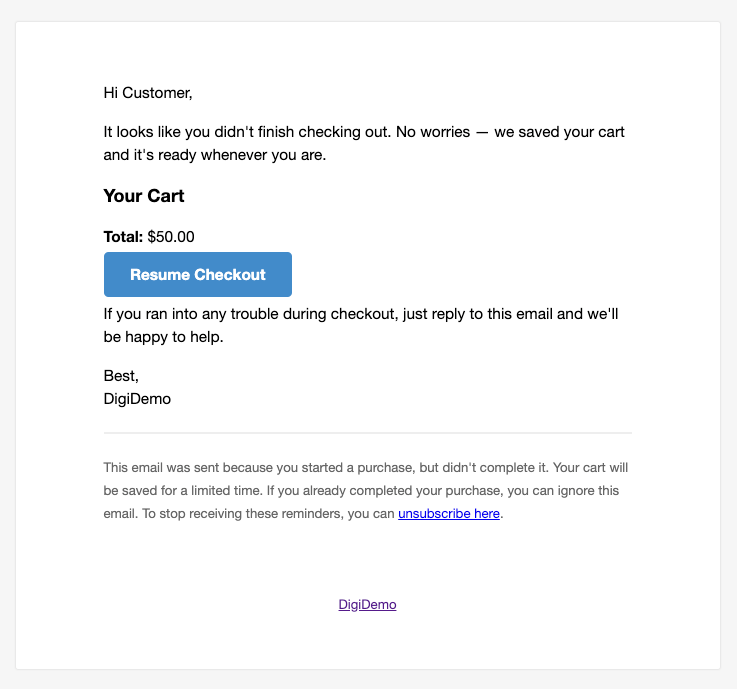
When you’re done, click Preview or Send Test to see how it looks. Finally, select Save.
You can also create your own email templates by clicking on the Add New Email button.
⚙️ For more, refer to our Abandoned Cart Recovery documentation.
FAQs About EDD Cart Recovery
Let’s wrap up with some frequently asked questions about abandoned cart recovery and how it works for Easy Digital Downloads.
Does Abandoned Cart Recovery work for guest checkout?
Yes. As long as the customer enters their email address on the checkout form before abandoning, or if they’re a logged-in user, EDD captures the email and can send recovery messages.
Can I offer a discount to encourage them to finish?
Absolutely. You can attach a discount code specifically to a recovery email template. When the customer clicks the {cart_link}, the discount automatically applies to their cart to sweeten the deal. It replaces any discount currently in the cart.
Is EDD Cart Recovery GDPR compliant?
We have built-in features to help. Every email requires an {unsubscribe_link} tag, allowing customers to opt out of recovery sequences immediately. We also include a retention period setting to automatically delete abandoned cart data after a set number of days (default is 30).
If a user requests that their data be removed from the site, any cart recovery data gets removed.
What happens if they buy the item before the second email is sent?
The system is smart. If a customer completes their purchase, the cart status changes to “Recovered.” Any remaining scheduled emails for that cart are automatically cancelled.
Use EDD Cart Recovery to Recover Sales
If you’re currently using EDD Lite, the Cart Recovery tab will show you the features you’re missing out on and give you the option to upgrade.
Think about it this way: recovering just a handful of carts could pay for the upgrade itself.
This feature is available now to all EDD Pro users.
For more on this update, feel free to check out our EDD Release Notes and Cart Recovery documentation.
📣 P.S. Be sure to subscribe to our newsletter and follow us on Facebook, Twitter/X, or LinkedIn for more WordPress resources!







