


Spotify pays between $0.003 and $0.005 per stream. At that rate, you need 250,000 streams every month just to earn $1,000. That’s before your distributor takes their cut.
Streaming platforms are great for getting discovered. But they’re not where independent artists build sustainable income. The artists making real money are the ones selling directly to fans.
This guide covers everything you need to know about how to sell music online: what types of audio products you can sell, how streaming compares to direct sales, music licensing basics, how to price your work, and a step-by-step walkthrough for setting up your own store with WordPress and Easy Digital Downloads (EDD).
- Key Takeaways
- What You Can Sell: Music and Audio Product Ideas
- Where to Sell Music Online: Platforms vs. Your Own Store
- How Much Do Music Streaming Platforms Pay?
- Music Licensing: How to Earn More From Every Track
- How to Price Your Music and Audio
- Audio File Formats: What to Deliver to Customers
- How to Sell Music Online With WordPress and Easy Digital Downloads
- FAQs About Selling Music and Audio Content Online
- Can I sell music online for free?
- What's the best platform to sell music online?
- Do I need to copyright my music before selling it online?
- What's the difference between royalty-free and sync licensing?
- What audio file format should I sell my music in?
- How do I sell beats online?
- Can I sell both digital music and physical merch from one WordPress store?
- Start Selling Your Music on Your Own Terms
Key Takeaways
| What to sell | Tracks, beats, SFX packs, audiobooks, courses, samples, and royalty-free background music are all in demand. |
| Platforms vs. direct | Streaming builds reach; your own store builds revenue. The smartest artists do both. |
| Licensing matters | Royalty-free licenses mean one-time sales. Sync licensing places your music in video content for higher fees. |
| Pricing your music | Individual tracks sell for $1 to $5 direct. Commercial licenses can command $20 to $200 or more per track. |
| Your own store | Easy Digital Downloads lets you sell music from WordPress with no platform fees and full control over your files. |
What You Can Sell: Music and Audio Product Ideas
One of the biggest advantages of selling music online is how many different products you can create. You’re not limited to singles and albums.
Music and Audio Products Worth Selling
If you make music or audio, here’s what independent creators are selling today:
- Music tracks and albums: Singles, EPs, and full-length releases for direct download
- Beats and instrumentals: Selling to rappers, content creators, and filmmakers is a fast-growing market
- Sound effects and SFX packs: Foley sounds, UI sounds, ambient effects, and cinematic audio for video and game producers
- Podcast intros and background music: Short, licensable tracks tailored for podcasters and video creators
- Royalty-free background music: Tracks licensed for use in YouTube videos, ads, and social media content
- Audiobooks and spoken word: Narrated books, guided meditations, affirmations, and ASMR recordings
- Online music courses and lessons: Teaching what you know is one of the highest-margin products a musician can create
- MIDI files: For composers and producers who want to work with your musical arrangements
- Sample packs and loops: Pre-recorded audio clips for producers to use in their own tracks
If you’re creating any of these, you have something worth selling as music and audio content.
Where to Sell Music Online: Platforms vs. Your Own Store
Every independent artist faces the same question: should you sell on platforms, or build your own store?
The honest answer is both. But for different reasons.
Selling on Streaming and Marketplace Platforms
Streaming platforms like Spotify, Apple Music, and Amazon Music give you access to massive audiences. Distribution services like DistroKid, TuneCore, and CD Baby make it easy to get your music on 150-plus platforms for an annual fee.
Bandcamp is a stronger option if you want to sell downloads directly to fans. They take a 15% cut of sales. That’s far better than the fractions of a cent you earn per stream.
The downside: you’re playing by their rules. You don’t own the customer relationship, you can’t freely control pricing, and you keep only a small fraction of the revenue. For a full breakdown of the tradeoffs, see our guide on selling through your own store vs. a marketplace.
Selling From Your Own Website
Selling from your own website is where the real margin lives. You keep 100% of every sale (minus payment processing fees), you own your customer data, and you control the entire buying experience.
It’s harder to drive traffic to your own site than to appear on Spotify. But the fans who find you there are your most valuable customers. They’re choosing to support you directly.
Even if streaming is part of your strategy, having your own store is worth building. It’s your home base.
How Much Do Music Streaming Platforms Pay?
Here’s the honest math on streaming royalties in 2026:
| Platform | Per Stream (approx.) | To earn $1,000 you need |
|---|---|---|
| Apple Music | $0.01 | 100,000 streams |
| Amazon Music | $0.004 | 250,000 streams |
| Spotify | $0.003 to $0.005 | 200,000 to 333,000 streams |
| YouTube Music | $0.001 to $0.002 | 500,000 to 1,000,000 streams |
| Bandcamp (direct sale) | You keep 82 to 90% of sale price | Depends on your pricing |
Compare that to selling a $10 album directly from your own store: you keep roughly $9.70 after payment processing. That’s the equivalent of 2,000-plus Spotify streams from a single purchase.
Streaming is still worth doing for discovery. But it shouldn’t be your only revenue channel.
Music Licensing: How to Earn More From Every Track
Licensing is one of the most overlooked revenue streams for independent musicians. Instead of selling a file once, you license the right to use it. And you can sell that right to many different buyers.
Types of Music Licenses
Understanding the main license types helps you price your music correctly and attract the right buyers:
- Royalty-free license. The buyer pays once and can use the track as many times as they want, within the terms you set. This is the most common license for background music and SFX packs. “Royalty-free” means the buyer doesn’t pay ongoing royalties. It does not mean the music is free.
- Rights-managed license. The price varies based on how the buyer uses the track: the medium (YouTube, TV, film), the territory, and the duration. This model can command significantly higher fees for commercial placements.
- Sync license. A sync license lets a buyer pair your music with video content, such as ads, films, TV shows, or YouTube videos. It’s one of the most lucrative licensing opportunities for independent artists.
- Exclusive vs. non-exclusive. A non-exclusive license lets you sell the same track to multiple buyers. An exclusive license gives one buyer sole rights to your track, typically at a premium price.
Protecting Your Music Online
Before you start selling, take a few steps to protect your work:
- Register your copyright. In the US, registration with the Copyright Office gives you legal standing to pursue infringement claims. Your music is protected by copyright the moment you create it, but registration makes enforcement much easier.
- Set up YouTube Content ID. If your music appears on YouTube, whether uploaded by you or by someone else, Content ID can automatically detect those uses and monetize them on your behalf. Your distributor may offer this as part of their service.
- Use download protection. Easy Digital Downloads protects your download links automatically. Buyers receive a secure, time-limited link after purchase that can’t be shared freely.
For a deeper look at protecting your files, see our guide on protecting your digital products.
How to Price Your Music and Audio
Pricing varies depending on who you’re selling to and what license you’re offering.
Pricing for Individual Consumers
For listeners buying music for personal use:
- Single tracks: $1 to $5 for direct download sales (compare to $1.29 on Apple Music, where you keep only a small fraction of that)
- Albums: $8 to $15 depending on length and your following
- Audiobooks: $5 to $20 based on length and subject matter
- Sound effects packs: $5 to $50 depending on the number of files and quality
Pay-what-you-want pricing is also worth testing on your own store. Many fans pay more than your minimum when they feel good about supporting you directly.
Pricing for Business Use
Businesses pay more because they’re getting commercial value from your work:
- Royalty-free license (single track): $20 to $200 or more depending on scope and exclusivity
- SFX libraries and commercial bundles: $50 to $500 or more
- Sync and commercial placement: Negotiated per project, varying by media type, audience size, and territory
For a broader look at pricing strategy, see our best pricing models digital products.
Subscription and Membership Pricing
If your catalog is large, consider selling subscription access instead of individual downloads. Fans pay a monthly or annual fee to download as many tracks as they need.
EDD’s Recurring Payments feature makes this straightforward to set up.
Learn more on how to build recurring revenue streams.
Audio File Formats: What to Deliver to Customers
You don’t need to deliver your master file to customers. In fact, you shouldn’t.
Formats for Download Sales
Match the format to what your buyers actually need:
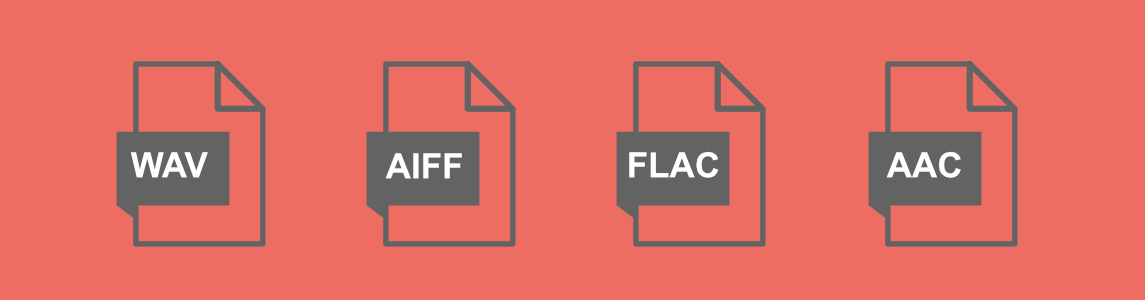
- MP3: The standard for most consumer downloads. Small file size, good quality, and it works on every device. Use a bit rate of 320 kbps for the best balance of quality and file size.
- WAV: Higher quality with a larger file size. Offer this for buyers who need broadcast-quality audio, such as producers, filmmakers, and sound designers.
- FLAC: Lossless quality in a smaller file than WAV. A good option if you want to offer hi-fi audio for audiophiles.
When in doubt, offer both MP3 and WAV. Easy Digital Downloads lets you attach multiple files to a single download product, so buyers can choose the version they need.
How to Sell Music Online With WordPress and Easy Digital Downloads
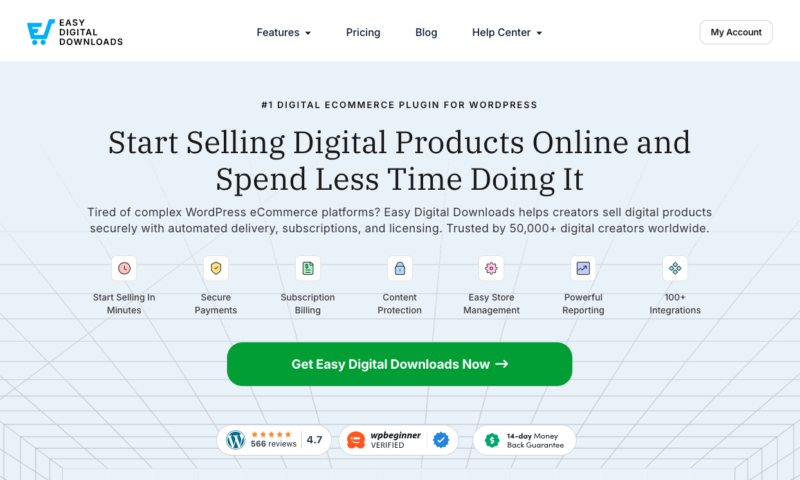
WordPress powers more than 43% of the web. Paired with Easy Digital Downloads (EDD), it’s one of the most practical ways for independent artists to build a direct-to-fan store, with no platform fees and full control over pricing and file delivery.
Learn more about using WordPress and the costs of creating your own site.
Here’s how to set it up.
Step 1: Install Easy Digital Downloads
In your WordPress dashboard, go to Plugins » Add Plugin and search for “Easy Digital Downloads.” Click Install Now, then Activate.
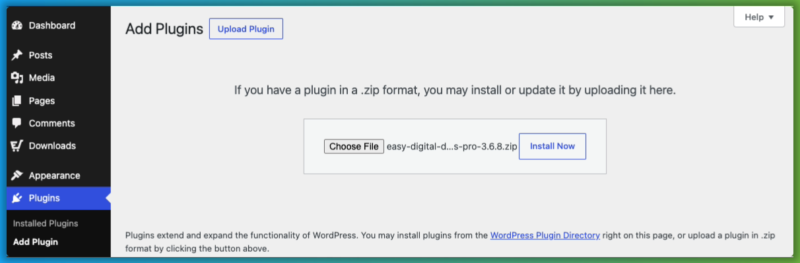
Once activated, the Setup Wizard (Setup » Get Started) walks you through connecting a payment method (Stripe and PayPal are both included in the free version), choosing your currency, and configuring your store basics. You can be live in minutes.
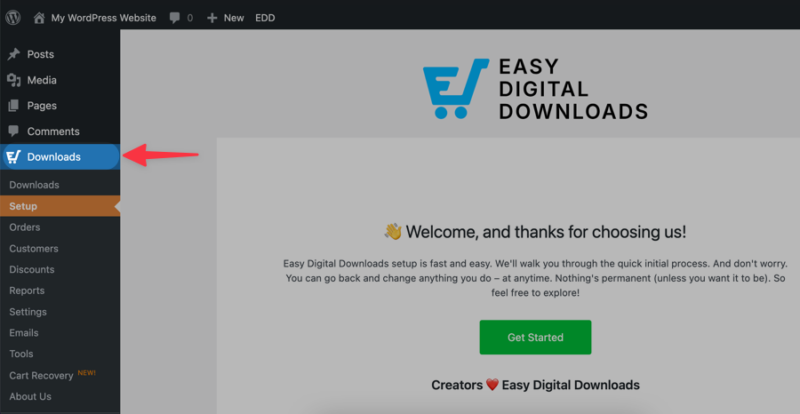
Step 2: Add Your Music as a Download
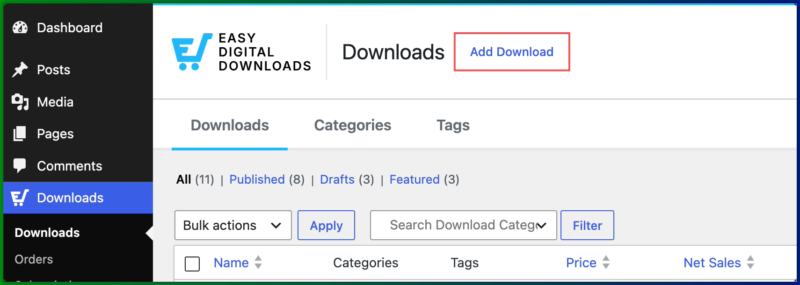
Go to Downloads » Add Download.
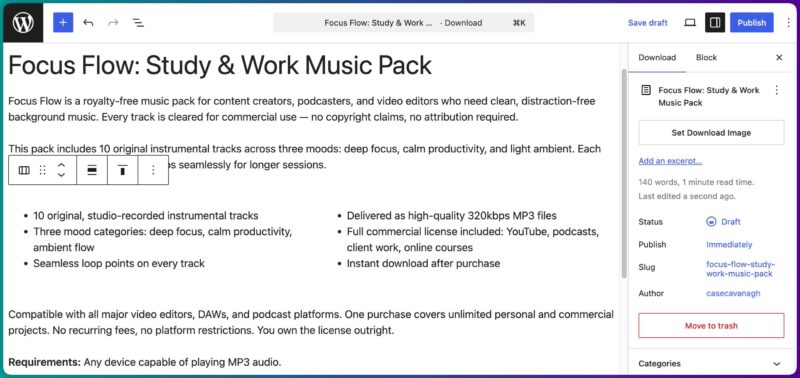
Give your product a title and add a detailed product description.
Upload your audio file in the Download Details » Files section.
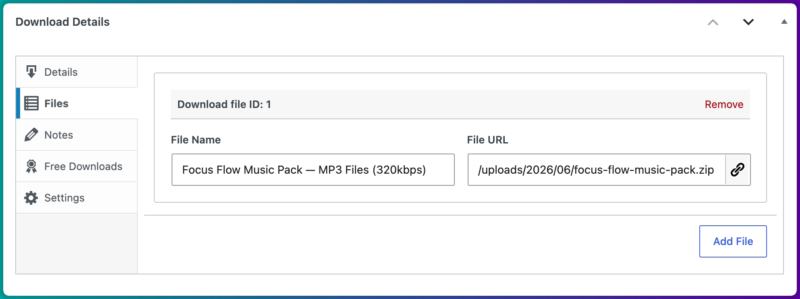
You can attach multiple files to the same product, so buyers can download both an MP3 and a WAV version if you want to offer both.
Step 3: Set Your Price and Licensing Options
Set a single price for personal use, or use variable pricing to offer multiple license tiers from one product page.
For example:
| License | Price |
|---|---|
| Personal License (1 project) | $15 |
| Commercial License (unlimited projects) | $29 |
| Extended License (resale/broadcast) | $79 |
This is how producers and sound designers sell the same track at different price points without managing multiple listings. Learn more in our guide on variable pricing for digital products.
Step 4: Protect Your Files
Easy Digital Downloads protects your download links automatically. After purchase, each buyer receives a secure, time-limited link that can’t be shared freely.
You can also set download limits (for example, 3 downloads per purchase) and link expiration times for additional control. See how in our guide on setting up link expirations in WordPress.
Step 5: Publish and Test Your Store
Save your download as a draft, then preview your product page.
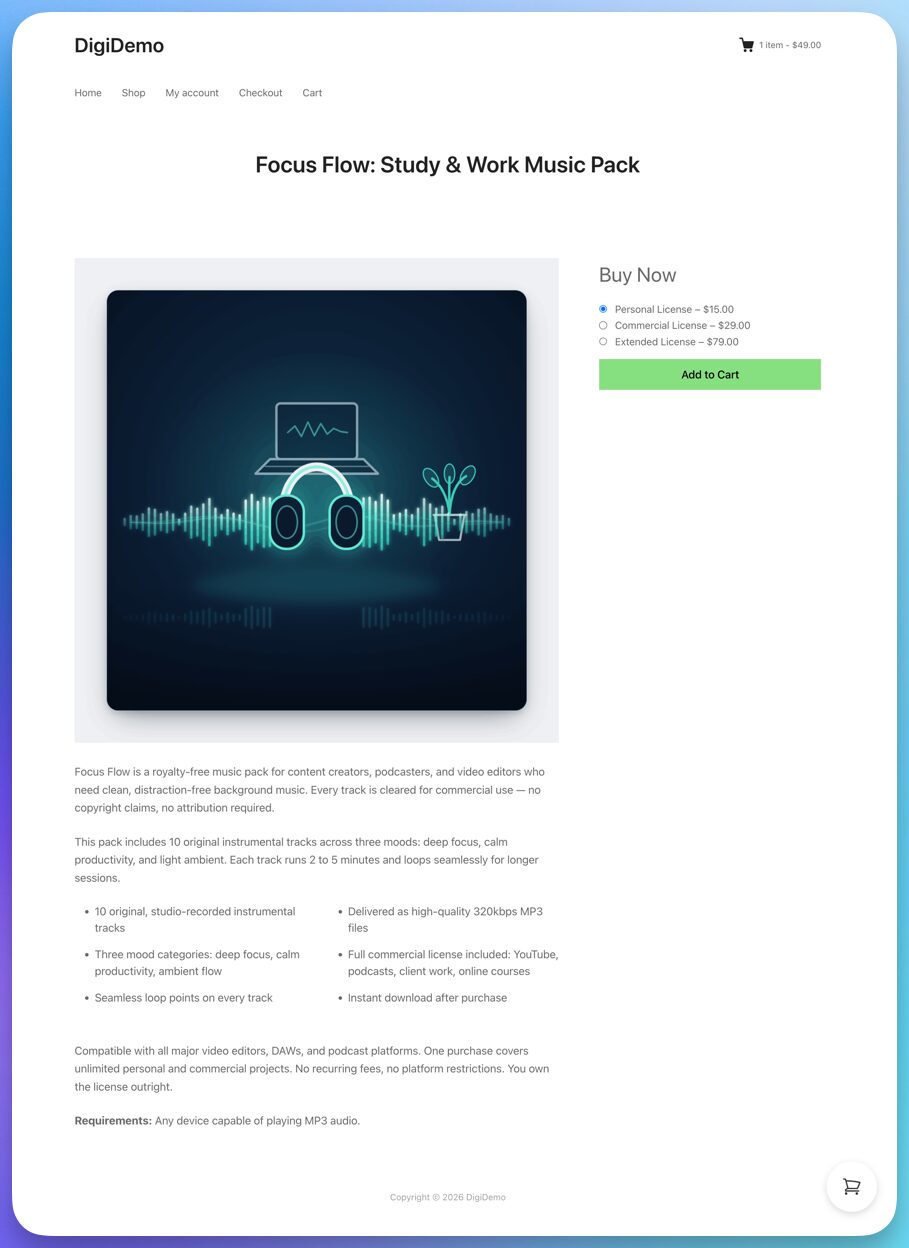
Run a test purchase using Stripe’s test mode to confirm checkout and file delivery work correctly.
If you’re happy with everything, change the status to Publish.
Then you’re live.
Don’t Forget Merch
Easy Digital Downloads is built for digital products, but you can sell physical goods too.
If you sell CDs, vinyl records, hats, or t-shirts alongside your digital music, the Simple Shipping feature (Professional Pass) lets you collect shipping info and set domestic and international rates at checkout, all from the same store.
For higher-volume fulfillment, services like Printful (apparel) and Disc Makers (CDs and vinyl) handle manufacturing and shipping on your behalf.
FAQs About Selling Music and Audio Content Online
Let’s wrap up by answering some frequently asked questions artists have about the best way to sell music and audio files online, and why selling directly makes the most sense.
Can I sell music online for free?
Yes. The free version of Easy Digital Downloads lets you sell unlimited digital downloads with no monthly fees. You’ll pay standard payment processing fees (Stripe charges 2.9% plus $0.30 per transaction), but there are no platform fees or commissions taken from your sales.
What’s the best platform to sell music online?
It depends on your goal. For discovery, streaming platforms like Spotify and Apple Music give you reach. For revenue, selling directly from your own website keeps more of what you earn. Most successful independent artists use both: streaming to get found, a direct store to convert fans into paying customers.
Do I need to copyright my music before selling it online?
Your music is protected by copyright the moment you create it. That said, registering your copyright with the US Copyright Office gives you stronger legal standing if someone infringes on your work. It’s worth doing for anything you plan to sell commercially.
What’s the difference between royalty-free and sync licensing?
Royalty-free means a buyer pays once and can use the track multiple times within the license terms, with no ongoing royalty payments required. Sync licensing lets a buyer pair your music with video content, like an ad, film, or YouTube video. Sync deals are typically negotiated per project and can be significantly more lucrative than standard royalty-free sales.
What audio file format should I sell my music in?
MP3 (320 kbps) is the standard for most consumer downloads. If you’re selling to producers, filmmakers, or sound designers, also offer WAV for broadcast-quality audio. Easy Digital Downloads lets you attach multiple file formats to a single product, so buyers can download whichever version they need.
How do I sell beats online?
Selling beats works well from your own WordPress store using Easy Digital Downloads. Set up individual beat listings with variable pricing for non-exclusive and exclusive licenses. You can also use an audio player plugin to let producers preview tracks on your site before buying.
Can I sell both digital music and physical merch from one WordPress store?
Yes. Easy Digital Downloads handles digital file delivery automatically, and the Simple Shipping feature (Professional Pass) lets you collect shipping info and set rates for physical products like CDs, vinyl, and apparel, all from the same store.
Start Selling Your Music on Your Own Terms
Streaming platforms are a great way to get discovered. They shouldn’t be the only way you earn money from your music.
When you sell directly from your own WordPress site with Easy Digital Downloads, you keep more of every sale, you own your customer relationships, and you control how your music is licensed and priced.
Setting up a store takes less time than you’d expect. The free version of EDD gets you started, and you can add subscriptions, variable licensing, and more as your catalog grows.
📣 P.S. Be sure to subscribe to our newsletter and follow us on Facebook, Twitter/X, or LinkedIn for more WordPress resources!








