

Das Hinzufügen benutzerdefinierter Felder zum Checkout-Formular ist mit ein paar Funktionen einfach zu bewerkstelligen. Der folgende Code ermöglicht es Ihnen, zwei zusätzliche Felder hinzuzufügen, eines für die Telefonnummer und eines für die Firma.
Hinweis: Wir haben integrierte Einstellungen, um die Adressfelder im Checkout anzupassen und sie beliebig anzuordnen. Alternativ haben wir auch eine offizielle Erweiterung, mit der Sie benutzerdefinierte Checkout-Felder erstellen können. Checkout Fields Manager-Erweiterung anzeigen.
Der folgende Code fügt dem Checkout Formular ein Feld für die Telefonnummer hinzu.
<?php
/**
 * Adding a custom field to the checkout screen
 *
 * Covers:
 *
 * Adding a phone number field to the checkout
 * Making the phone number field required
 * Setting an error when the phone number field is not filled out
 * Storing the phone number into the payment meta
 * Adding the customer's phone number to the "view order details" screen
 * Adding a new {phone} email tag so you can display the phone number in the email notifications (standard purchase receipt or admin notification)
 */

/**
 * Display phone number field at checkout
 * Add more here if you need to
 */
function sumobi_edd_display_checkout_fields() {
?>
    <p id="edd-phone-wrap">
        <label class="edd-label" for="edd-phone">
		<?php esc_html_e( 'Phone Number', 'easy-digital-downloads' ); ?>
		<?php if ( edd_field_is_required( 'edd_phone' ) ) : ?>
			<span class="edd-required-indicator">*</span>
		<?php endif; ?>
		</label>
        <span class="edd-description" id="edd-phone-description"><?php esc_html_e( 'Enter your phone number so we can get in touch with you.', 'easy-digital-downloads' ); ?></span>
        <input class="edd_phone edd-input<?php if ( edd_field_is_required( 'edd_phone' ) ) { echo ' required'; } ?>" type="text" name="edd_phone" id="edd-phone" placeholder="<?php _e( 'Phone Number', 'easy-digital-downloads' ); ?>">
    </p>
 <?php
}
add_action( 'edd_purchase_form_user_info_fields', 'sumobi_edd_display_checkout_fields' );

/**
 * Make phone number required
 * Add more required fields here if you need to
 */
function sumobi_edd_required_checkout_fields( $required_fields ) {
    $required_fields['edd_phone'] = array(
        'error_id' => 'invalid_phone',
        'error_message' => 'Please enter a valid Phone number'
    );

    return $required_fields;
}
add_filter( 'edd_purchase_form_required_fields', 'sumobi_edd_required_checkout_fields' );

/**
 * Set error if phone number field is empty
 * You can do additional error checking here if required
 */
function sumobi_edd_validate_checkout_fields( $valid_data, $data ) {
    if ( empty( $data['edd_phone'] ) ) {
        edd_set_error( 'invalid_phone', 'Please enter your phone number.' );
    }
}
add_action( 'edd_checkout_error_checks', 'sumobi_edd_validate_checkout_fields', 10, 2 );

/**
 * Store the custom field data into EDD's order mtea
 */
function sumobi_edd_store_custom_fields( $order_id, $order_data ) {

	if ( 0 !== did_action('edd_pre_process_purchase') ) {
		$phone = isset( $_POST['edd_phone'] ) ? sanitize_text_field( $_POST['edd_phone'] ) : '';
		edd_add_order_meta( $order_id, 'phone', $phone );
	}

}
add_action( 'edd_built_order', 'sumobi_edd_store_custom_fields', 10, 2 );

/**
 * Add the phone number to the "View Order Details" page
 */
function sumobi_edd_view_order_details( $order_id ) {
	$phone = edd_get_order_meta( $order_id, 'phone', true );
?>
	<div class="column-container">
		<div class="column">
			<strong>Phone: </strong>
			<?php echo $phone; ?>
		</div>
	</div>
 <?php
}
add_action( 'edd_payment_view_details', 'sumobi_edd_view_order_details', 10, 1 );

/**
 * Add a {phone} tag for use in either the purchase receipt email or admin notification emails
 */
function sumobi_edd_add_email_tag() {

	edd_add_email_tag( 'phone', 'Customer\'s phone number', 'sumobi_edd_email_tag_phone' );
}
add_action( 'edd_add_email_tags', 'sumobi_edd_add_email_tag' );

/**
 * The {phone} email tag
 */
function sumobi_edd_email_tag_phone( $payment_id ) {
	$phone = edd_get_order_meta( $payment_id, 'phone', true );
	return $phone;
}
Das Checkout-Formular sieht dann ungefähr so aus:
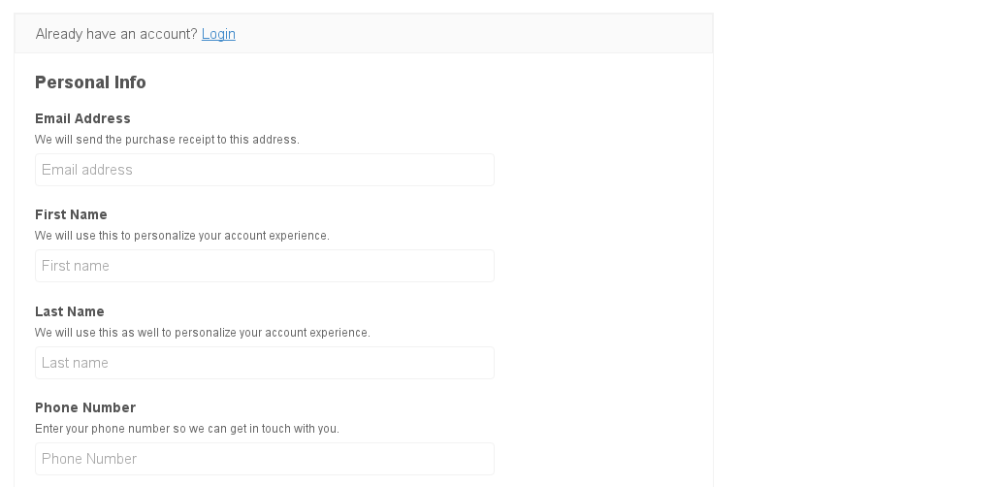 Und dann, wenn Sie die Transaktion unter Downloads Zahlungsverlauf betrachten, sehen Sie eine Meta-Box ähnlich wie diese:

Dieser Code ist lediglich als Beispiel gedacht und kann nach Belieben angepasst werden, um noch weitere Felder hinzuzufügen.
Um dieses Codebeispiel auf Ihrer Website hinzuzufügen, empfehlen wir die Verwendung von
Pluginception, um ein neues benutzerdefiniertes Plugin zu erstellen und den Code in das neue Plugin einzufügen.



