

Inhaltsverzeichnis
Wiederkehrende Zahlungen wird mit einer neuen EDD-Klasse zur Verwaltung von Abonnements geliefert. Die Klasse EDD_Subscription ermöglicht es einem Entwickler, programmatisch mit Abonnements zu arbeiten. Dieses Dokument listet die Eigenschaften, Methoden und vorgeschlagenen Funktionalitäten von EDD_Subscription auf.
Eigenschaften
- $id = 0;
- $customer_id = 0;
- $period = "";
- $initial_amount = "";
- $recurring_amount = "";
- $bill_times = 0;
- $parent_payment_id = 0;
- $product_id = 0;
- $created = '0000-00-00 00:00:00';
- $expiration = '0000-00-00 00:00:00';
- $status = 'pending';
- $profile_id = "";
- $gateway = "";
- $customer;
Methoden
- create( $data = array() )
- update( $args = array() )
- delete()
- get_original_payment_id()
- get_child_payments()
- get_total_payments()
- get_lifetime_value()
- add_payment( $args = array() )
- renew()
- complete()
- expire()
- failing()
- cancel()
- can_cancel()
- get_cancel_url()
- can_update()
- get_update_url()
- is_active()
- is_expired()
- get_expiration()
- get_expiration_time()
- get_status()
- get_status_label()
- payment_exists( $txn_id = ” )
Verwendung
Grundlegende Instanziierung
Ein „leeres“ EDD_Subscription-Objekt kann mit diesem Code erstellt werden:
$subscription = new EDD_Subscription();
Dies gibt ein Objekt mit dieser Struktur zurück:
EDD_Subscription Object
(
    [subs_db:EDD_Subscription:private] => EDD_Subscriptions_DB Object
        (
            [table_name] => wp_edd_subscriptions
            [version] => 1.0
            [primary_key] => id
        )

    [id] => 0
    [customer_id] => 0
    [period] =>
    [initial_amount] =>
    [recurring_amount] =>
    [bill_times] => 0
    [parent_payment_id] => 0
    [product_id] => 0
    [created] => 0000-00-00 00:00:00
    [expiration] => 0000-00-00 00:00:00
    [status] => pending
    [profile_id] =>
    [gateway] =>
    [customer] =>
)
Instanziierung eines bestehenden Abonnements
Der EDD_Subscription-Konstruktor akzeptiert 2 Argumente. Das erste ist entweder eine Ganzzahl, die eine Abonnement-ID darstellt, oder wenn das zweite Argument true ist, kann das erste eine Abonnement-Profil-ID sein.
Sie finden eine Abonnement-ID in der URL, während Sie ein Abonnement anzeigen. 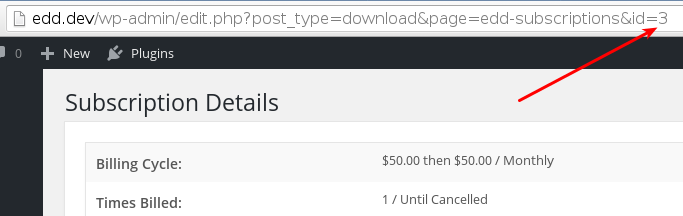
Sie finden die Profil-ID, die angezeigt wird, wenn Sie ein Abonnement anzeigen. 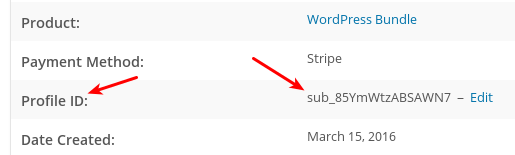
Diese beiden Codezeilen geben die gleiche Ausgabe zurück, da sie sich auf dasselbe Abonnement beziehen:
$subscription = new EDD_Subscription( 3 );
$subscription = new EDD_Subscription( 'sub_85YmWtzABSAWN7', true );
Die obigen Codezeilen würden jeweils ein Objekt wie dieses zurückgeben:
EDD_Subscription Object
(
    [subs_db:EDD_Subscription:private] => EDD_Subscriptions_DB Object
        (
            [table_name] => wp_edd_subscriptions
            [version] => 1.0
            [primary_key] => id
        )

    [id] => 1
    [customer_id] => 3
    [period] => month
    [initial_amount] => 50.00
    [recurring_amount] => 50.00
    [bill_times] => 0
    [parent_payment_id] => 87
    [product_id] => 85
    [created] => 2016-03-15 15:36:30
    [expiration] => 2016-04-15 23:59:59
    [status] => pending
    [profile_id] => paypal-363e3cc178dab152bb59b958024bce75
    [gateway] => paypal
    [customer] => EDD_Customer Object
        (
            [id] => 3
            [purchase_count] => 3
            [purchase_value] => 110.000000
            [email] => [email protected]
            [name] => Bob Smith
            [date_created] => 2016-03-08 15:01:02
            [payment_ids] => 54,63,87,88,91
            [user_id] => 2
            [notes] => Array
                (
                    [0] => March 16, 2016 14:37:22 - Subscription #3 cancelled admin
                )

            [db:protected] => EDD_DB_Customers Object
                (
                    [table_name] => wp_edd_customers
                    [version] => 1.0
                    [primary_key] => id
                )

        )

)
Objektmodifikation
Mit den enthaltenen Methoden kann fast alles mit einem Abonnement gemacht werden.
Sofern nicht anders angegeben, verwenden alle gegebenen Methodenbeispiele dieses Instanziierungsmodell:
$subscription = new EDD_Subscription();
Operationale Methoden
EDD_Subscription enthält Methoden zum Erstellen, Löschen, Aktualisieren und Erneuern von Abonnements sowie zum Hinzufügen von Zahlungen.
$subscription->create()
Um ein Abonnement ordnungsgemäß zu erstellen, müssen Sie einige Informationen übergeben. Diese Elemente sind erforderlich:
$data = array(
    'customer_id'       => 0, // an integer, should be a valid customer_id
    'period'            => '', // accepts 'day', 'week', 'month', or 'year'; how often the subscription renews
    'initial_amount'    => '', // accepts a float
    'recurring_amount'  => '', // accepts a float
    'bill_times'        => 0, // accepts an integer; the number of times billing should happen, 0 means indefinite
    'parent_payment_id' => 0, // accepts an integer; the payment id returned by the initial payment
    'product_id'        => 0, // accepts an integer; the id of the product
    'created'           => '', // accepts a date string; formatted like 0000-00-00 00:00:00
    'expiration'        => '', // accepts a date string; formatted like 0000-00-00 00:00:00
    'status'            => '', // accepts 'Pending', 'Active', 'Cancelled', 'Expired', 'Failing', 'Completed'
    'profile_id'        => '', // accepts a string returned by the payment gateway as their subscription ID
);
Anschließend können Sie die Methode create() mit diesen Informationen aufrufen.
$subscription->create( $data );
Die Methode create() gibt ein Objekt mit denselben Daten zurück, die Sie durch Abfragen einer bestimmten Abonnement-ID erhalten würden.
$subscription->update()
Beim Aktualisieren eines Abonnements wird die Methode update() mit einer Teilmenge der Array-Optionen verwendet, die für die Methode create() verwendet werden. Die Methode update() erfordert auch eine Abonnement-ID. Etwas wie folgt würde funktionieren:
$data = array(
    'expiration' => '2019-07-17 23:59:59',
);
$subscription->update( $data );
$subscription->delete()
Die Methode delete() akzeptiert eine Abonnement-ID und entfernt das Abonnement dauerhaft aus dem EDD-Store. Beachten Sie, dass dies keine Abonnements beeinflusst, die bei Zahlungsgateways registriert sind. Diese sollten individuell behandelt werden.
$subscription->renew()
Diese Methode erneuert ein Abonnement und verlängert es um eine Periode über das aktuelle Ablaufdatum hinaus.
$subscription->add_payment( $args = array() )
Diese Methode ermöglicht es Ihnen, eine Zahlung vorzunehmen. Sie akzeptiert ein Array und erfordert diese drei Array-Elemente:
- amount: der zu zahlende Geldbetrag
- transaction_id: die Transaktions-ID des Abonnements vom Zahlungsgateway. Beispiel: ‘ch_17q04L4NqFpaKRwY8ucZjW3t’
- gateway: das für das Abonnement verwendete Zahlungsgateway. Beispiel: ‘stripe’
Bei Erfolg gibt add_payment() true zurück.
Abonnementinformationen abrufen
EDD_Subscription bietet eine Reihe von Methoden, um Informationen über ein Abonnement zu erhalten.
$subscription->get_original_payment_id()
Diese Methode gibt eine Ganzzahl zurück, die die ID der ursprünglichen Zahlung ist. In der Benutzeroberfläche finden Sie diese Zahlung unter Downloads → Zahlungshistorie.
$subscription->get_child_payments()
Die Methode gibt ein Array von EDD_Payment-Objekten zurück, wobei jedes Objekt eine Teilzahlung ist. Die Objekte sehen ungefähr so aus:
Array
(
    [0] => EDD_Payment Object
        (
            [ID] => 1111111
            [_ID:protected] => 1111111
            [new:protected] =>
            [number:protected] => 1111111
            [mode:protected] => live
            [key:protected] => 8d6f842jkf66cb6312117b9ad417dc6be
            [total:protected] => 57.4
            [subtotal:protected] => 57.4
            [tax:protected] => 0
            [discounted_amount:protected] => 0
            [tax_rate:protected] =>
            [fees:protected] => Array
                (
                )

            [fees_total:protected] => 0
            [discounts:protected] => samplediscount
            [date:protected] => 2018-05-17 06:40:29
            [completed_date:protected] =>
            [status:protected] => edd_subscription
            [post_status:protected] => edd_subscription
            [old_status:protected] =>
            [status_nicename:protected] => Renewal
            [customer_id:protected] => 111111
            [user_id:protected] => 1nan1
            [first_name:protected] => Bob Smith
            [last_name:protected] => Smith
            [email:protected] => [email protected]
            [user_info:EDD_Payment:private] => Array
                (
                    [first_name] => Bob Smith
                    [last_name] => Smith
                    [discount] => samplediscount
                    [id] => 1nan1
                    [email] => [email protected]
                    [address] => Array
                        (
                            [line1] =>
                            [line2] =>
                            [city] =>
                            [country] =>
                            [state] =>
                            [zip] =>
                            [vat] =>
                            [notes] =>
                        )

                )

            [payment_meta:EDD_Payment:private] => Array
                (
                    [key] => 8d6f842jkf66cb6312117b9ad417dc6be
                    [email] => [email protected]
                    [date] => 2018-05-17 06:40:29
                    [user_info] => Array
                        (
                            [first_name] => Bob Smith
                            [discount] => samplediscount
                            [id] => 1nan1
                            [email] => [email protected]
                            [address] => Array
                                (
                                    [line1] =>
                                    [line2] =>
                                    [city] =>
                                    [country] =>
                                    [state] =>
                                    [zip] =>
                                    [vat] =>
                                    [notes] =>
                                )

                        )

                    [downloads] => Array
                        (
                            [0] => Array
                                (
                                    [id] => 1234
                                    [quantity] => 1
                                    [options] => Array
                                        (
                                            [quantity] => 1
                                            [price_id] => 0
                                        )

                                )

                        )

                    [cart_details] => Array
                        (
                            [0] => Array
                                (
                                    [name] => Sample Product
                                    [id] => 1234
                                    [item_number] => Array
                                        (
                                            [id] => 1234
                                            [quantity] => 1
                                            [options] => Array
                                                (
                                                    [quantity] => 1
                                                    [price_id] => 0
                                                )

                                        )

                                    [item_price] => 57.4
                                    [quantity] => 1
                                    [discount] => 0
                                    [subtotal] => 57.4
                                    [tax] => 0
                                    [fees] => Array
                                        (
                                        )

                                    [price] => 57.4
                                )

                        )

                    [fees] => Array
                        (
                        )

                    [currency] => USD
                )

            [address:protected] => Array
                (
                    [line1] =>
                    [line2] =>
                    [city] =>
                    [country] =>
                    [state] =>
                    [zip] =>
                    [vat] =>
                    [notes] =>
                )

            [transaction_id:protected] => 7M999999999999999
            [downloads:protected] => Array
                (
                    [0] => Array
                        (
                            [id] => 1234
                            [quantity] => 1
                            [options] => Array
                                (
                                    [quantity] => 1
                                    [price_id] => 0
                                )

                        )

                )

            [ip:protected] => 192.168.1.1
            [gateway:protected] => paypalexpress
            [currency:protected] => USD
            [cart_details:protected] => Array
                (
                    [0] => Array
                        (
                            [name] => Sample Product
                            [id] => 1234
                            [item_number] => Array
                                (
                                    [id] => 1234
                                    [quantity] => 1
                                    [options] => Array
                                        (
                                            [quantity] => 1
                                            [price_id] => 0
                                        )

                                )

                            [item_price] => 57.4
                            [quantity] => 1
                            [discount] => 0
                            [subtotal] => 57.4
                            [tax] => 0
                            [fees] => Array
                                (
                                )

                            [price] => 57.4
                        )

                )

            [has_unlimited_downloads:protected] =>
            [pending:EDD_Payment:private] => Array
                (
                )

            [parent_payment:protected] => 830936
        )
)
$subscription->get_total_payments()
Diese Methode gibt eine Ganzzahl zurück, die die Gesamtzahl der erfolgten Zahlungen darstellt, einschließlich der anfänglichen Zahlungen plus aller Teilzahlungen.
$subscription->get_lifetime_value()
Diese Methode gibt eine Gleitkommazahl zurück, die die monetäre Gesamtsumme aller jemals getätigten Zahlungen darstellt.
$subscription->get_cancel_url()
Diese Methode gibt eine URL zum Stornieren eines Abonnements zurück, das über das Gateway verarbeitet wird, über das das Abonnement erworben wurde.
$subscription->get_update_url()
Diese Methode gibt eine URL zum Aktualisieren eines Abonnements zurück, das über das Gateway verarbeitet wird, über das das Abonnement erworben wurde.
$subscription->get_expiration()
Gibt das Datum und die Uhrzeit zurück, zu der das Abonnement abläuft, in diesem Format:
2016-04-15 23:59:59
$subscription->get_expiration_time()
Diese Methode gibt eine Ganzzahl zurück, die ein Unix-Zeitstempel des Ablaufs ist.
$subscription->get_status()
Diese Methode gibt den aktuellen Status eines Abonnements in einem für Code nützlichen Format zurück. Optionen sind „pending“, „active“, „cancelled“, „expired“, „failing“, „completed“.
$subscription->get_status_label()
Diese Methode gibt den aktuellen Status eines Abonnements in einem für die Präsentation nützlichen Format zurück. Optionen sind „Pending“, „Active“, „Cancelled“, „Expired“, „Failing“, „Completed“.
Abonnement-Bedingungen
EDD_Subscription bietet eine Reihe von bedingten Methoden.
$subscription->can_cancel()
Diese Methode gibt einen booleschen Wert zurück und wird von den Zahlungs-Gateways gefiltert, um für Abonnements, die mit einer Profil-ID über den Händlerprozessor storniert werden können, true zurückzugeben.
$subscription->can_update()
Diese Methode gibt einen booleschen Wert zurück und wird von den Zahlungs-Gateways gefiltert, um true zurückzugeben, wenn die Zahlungsmethode des Abonnements aktualisiert werden kann. Sie dient nur zur Bestimmung, ob eine Zahlungsmethode aktualisiert werden darf.
$subscription->is_active()
und der Status
entweder 'aktiv' oder 'gekündigt' ist.
$subscription->is_expired()
$subscription->payment_exists( $txn_id = ” )
Diese Methode akzeptiert eine Transaktions-ID, die von einem Zahlungs-Gateway erstellt wurde. Hier ist ein Beispiel für eine Abonnement-Transaktions-ID von Stripe:
ch_17q04L4NqFpaKRwY8ucZjW3t
Diese Methode gibt einen booleschen Wert zurück, true, wenn sie eine Transaktion mit der angegebenen ID findet.
Statusmethoden
$subscription->complete()
Diese Methode ändert den Status eines Abonnements zu „complete“.
$subscription->expire()
Diese Methode ändert den Status eines Abonnements zu „expired“.
$subscription->failing()
Diese Methode ändert den Status eines Abonnements zu „failing“.
$subscription->cancel()
Diese Methode ändert den Status eines Abonnements zu „cancelled“.



