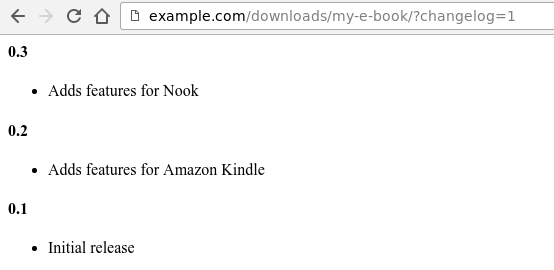
La extensión Licenciamiento de Software tiene un mecanismo incorporado para asociar un historial de cambios con una Descarga. Esto facilita mantener el historial de cambios actualizado, así como verlo fácilmente en la web para cualquier Descarga.
Crear un historial de cambios
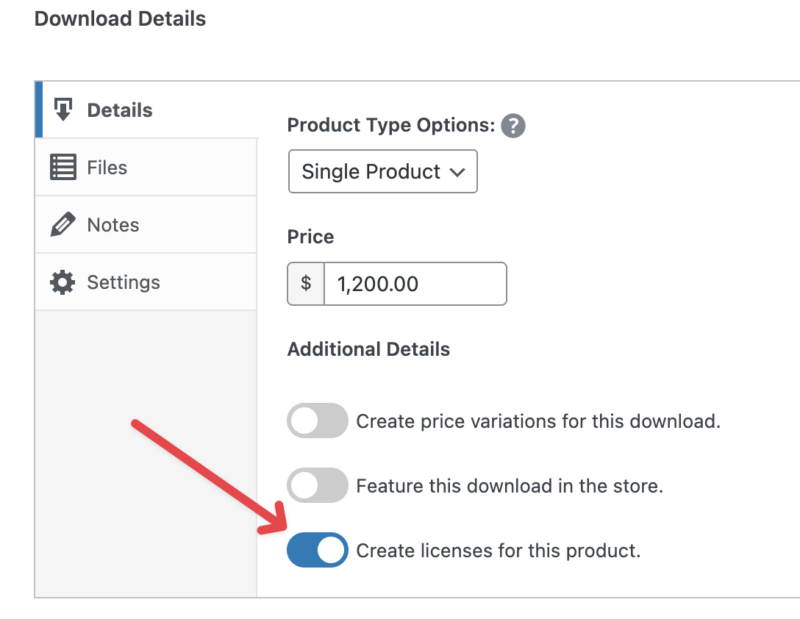
Al editar una Descarga en el área de administración, busca el cuadro meta de Licenciamiento. Asegúrate de que se hayan creado licencias para esta Descarga marcando la casilla.
Una de las características que aparecerán cuando el licenciamiento esté habilitado es un cuadro de texto WYSIWYG grande. Crea tu historial de cambios en este cuadro.
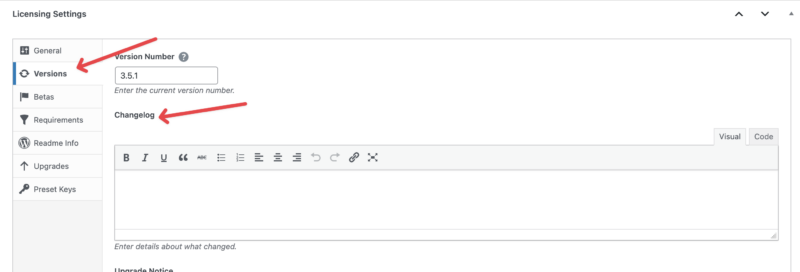
A medida que tu historial de cambios crezca en longitud, podrías encontrar beneficioso reducir su extensión al proporcionarlo a través de la solicitud de API `get_version`. A partir de Licenciamiento de Software 3.6.10, los historiales de cambios ahora admiten la etiqueta 'Leer más', que truncará el historial de cambios cuando se vea solo a través de la API. Se colocará un enlace al historial de cambios completo al final del historial truncado. Simplemente inserta lo siguiente en el punto apropiado de tu historial de cambios:
Ver un historial de cambios
Para ver el historial de cambios de una Descarga que lo tenga, primero visita la página del producto de esa Descarga.

Luego, agrega esto al final de la URL:
?changelog=1
Y luego la página mostrará el historial de cambios.