Selling documents online is one of the simplest ways to earn passive income. You create the file once, and it can sell indefinitely — no shipping, no inventory, no restocking.
WordPress makes it easy to build your own document store without handing a cut of every sale to a marketplace. Here’s the short version: install a digital downloads plugin, upload your documents, set a price, and connect a payment gateway.
Key Takeaways
- Keep 100% of revenue: Directly sell documents on WordPress instead of paying 30-70% marketplace commissions.
- Any document type works: PDFs, spreadsheets, legal templates, worksheets — if you can save it as a file, you can sell it.
- EDD is the right plugin: Easy Digital Downloads is built specifically for selling digital files on WordPress.
- Protect your files: Set download limits and expiring links so buyers can’t share your files for free.
- Start free: Easy Digital Downloads has a free version with everything you need to launch.
This guide walks through each of those steps in detail, including how to protect your files and price your documents for maximum return.
What Documents Can You Sell on WordPress?
You can sell just about any type of document online. Here are some of the most popular options:
- PDFs: Ebooks, guides, reports, whitepapers
- Spreadsheets: Excel templates, budget planners, project trackers
- Legal templates: Contracts, NDAs, lease agreements, bills of sale
- Worksheets and workbooks: Educational materials, journaling prompts, planners
- Business forms: Proposals, invoices, project briefs
- Study materials: Course handouts, study guides, cheat sheets
- Design template: Canva templates or Figma exports saved as PDFs
- Case studies and reports: Industry research, white papers, market analysis
If you can save it as a file, you can sell it. That goes for EPUBs and ebooks, Word documents, PowerPoint presentations, and any other format your buyers can open and use.
Why Sell Documents on Your Own WordPress Site?
Platforms like Etsy, Creative Market, and Teachers Pay Teachers make it easy to get started. But they take a cut of every sale — anywhere from 30% to 70% depending on the platform and plan.
When you sell documents on your own WordPress site, you keep 100% of your revenue.
Here’s how the two options compare:
| Marketplace | WordPress + EDD | |
|---|---|---|
| Revenue cut | 30–70% per sale | 0% — you keep it all |
| Pricing control | Limited | Full control |
| Branding | Marketplace branding | Your own brand |
| Customer data | Platform owns it | You own it |
| Competition | Competing listings next to yours | Your store, your terms |
You also own your customer list. On a marketplace, the platform owns that relationship. On your own site, you do.
🔎 Learn more about selling on WordPress vs Etsy.
What You Need to Get Started
Before you set up your store, here’s what you’ll need:
- A self-hosted WordPress site: WordPress.com won’t work here. You need WordPress.org installed on your own hosting account.
- Easy Digital Downloads (EDD): This is the plugin you’ll use to sell your documents. There’s a free version that covers the basics.
- A payment gateway: Stripe or PayPal. Stripe is recommended because it keeps buyers on your site during checkout. Both come included with EDD.
- Your document files: Have them formatted and ready to upload before you start.
That’s it. No developer needed, no complicated setup.
How to Sell Documents on WordPress
Once you have WordPress installed, here’s how to build your document store from scratch.
Step 1: Install and Configure Easy Digital Downloads
From your WordPress dashboard, go to Plugins » Add Plugin and search for “Easy Digital Downloads.”
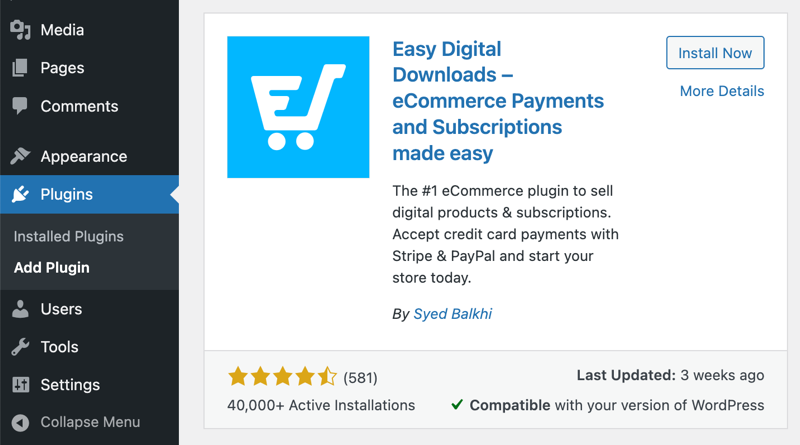
While I highly recommend using Pro, the free Core version is great for getting started.
Click on Install Now, then Activate.
After activation, Easy Digital Downloads adds a Downloads menu to your admin area.
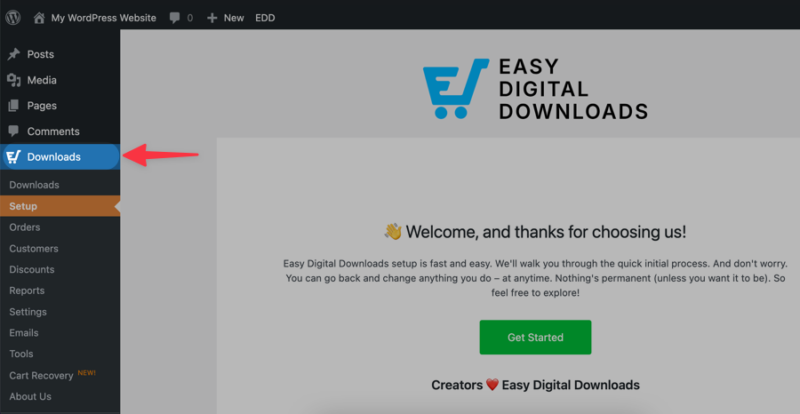
Under Setup, select Get Started to run a setup wizard.
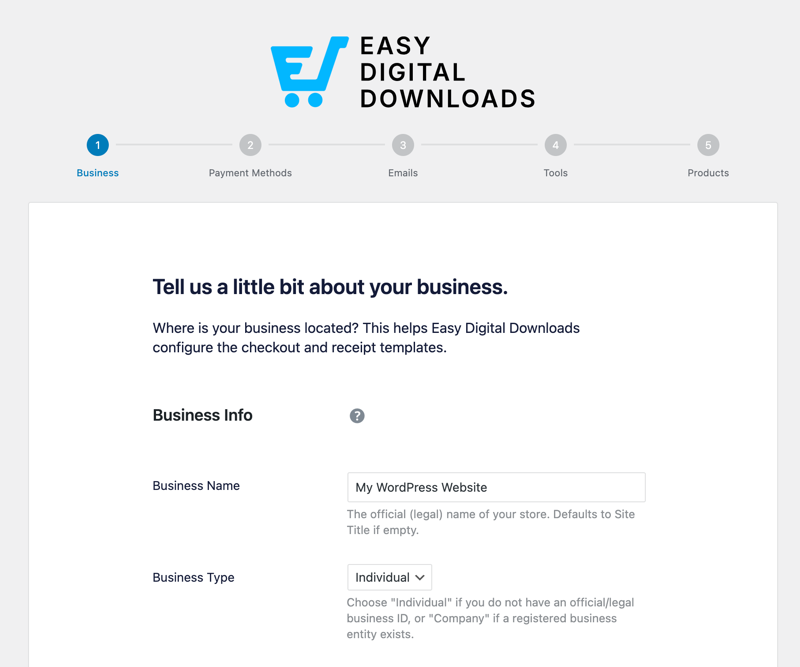
Walk through it to configure:
- Store currency: Choose USD, EUR, GBP, or whatever fits your market.
- Business location: Required if you need to calculate tax on sales.
- Payment method: This is a quick way to connect your store to Stripe – the recommended payment gateway.
- Receipts: Customize the purchase receipt that your customers will receive.
- And more
You can skip any of these steps if you’re not ready to complete them yet. It’s just to get the foundation in place.
Update or complete this information at any time under Downloads » Settings.
Step 2: Connect a Payment Gateway
Before you add digital documents or other products, you need a way to get paid.
Go to Downloads » Settings » Payments in your WordPress dashboard. Easy Digital Downloads supports both Stripe and PayPal out of the box.
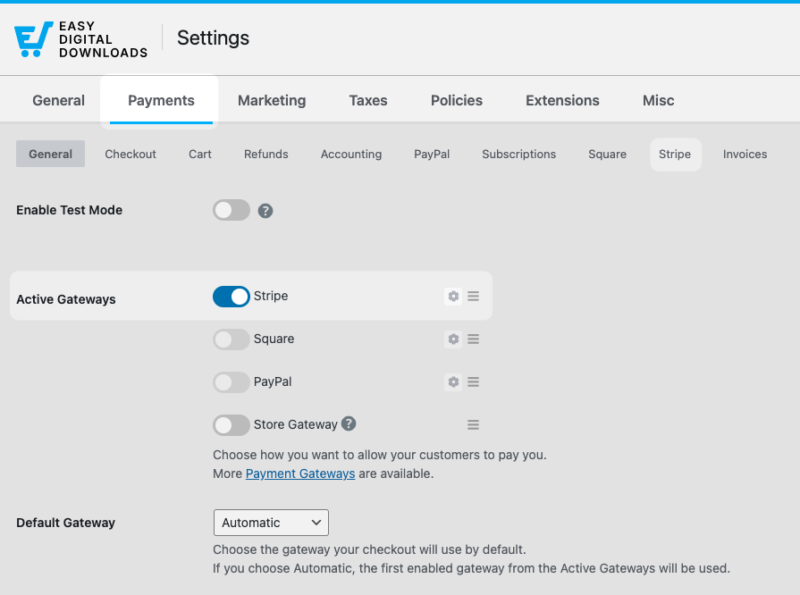
Stripe is the better choice for most sellers. It processes payments directly on your checkout page, so buyers never leave your site.
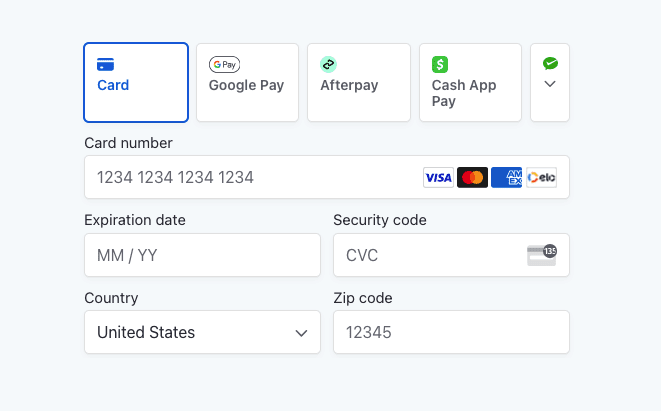
That reduces cart abandonment and keeps the buying experience clean.
PayPal is a solid backup if Stripe isn’t available in your country, or if your buyers prefer it as a payment option.
Connect your gateway by following the on-screen prompts. For Stripe, click Connect with Stripe and log into your Stripe account through the OAuth flow.
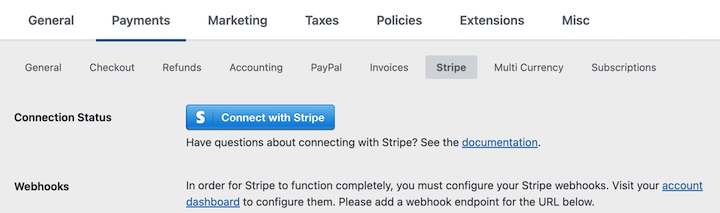
The whole process takes a few minutes.
Step 3: Upload Your Documents
Now it’s time to add your first digital product — which EDD refers to as “downloads”.
Go to Downloads » Add Download.
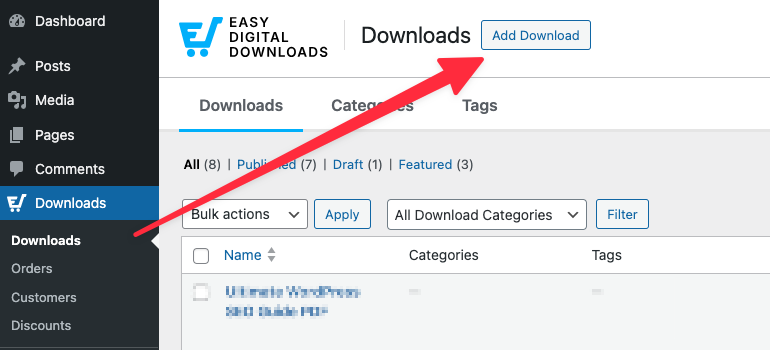
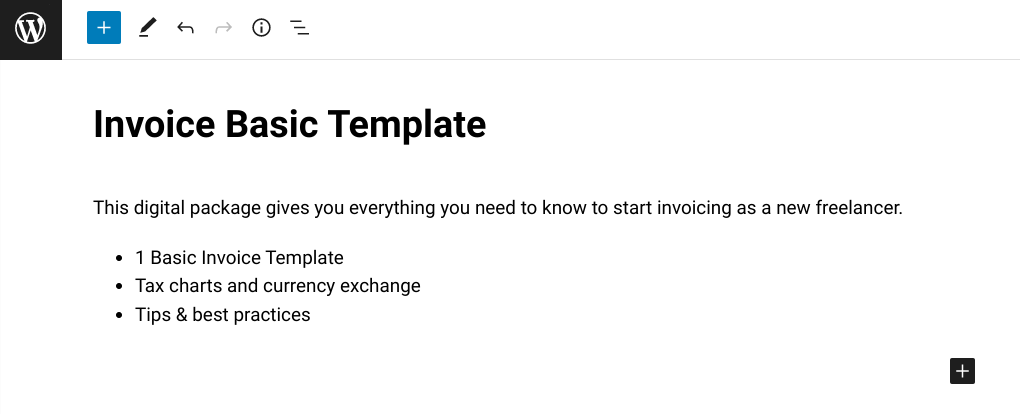
Easy Digital Downloads opens an editor that looks like a standard WordPress post editor.
Here’s what to fill in:
- Title: The name of your document download as it’ll appear in your store.
- Description: Explain what the buyer gets and who it’s for.
Under Download Details, located beneath the editor, there are two key sections.
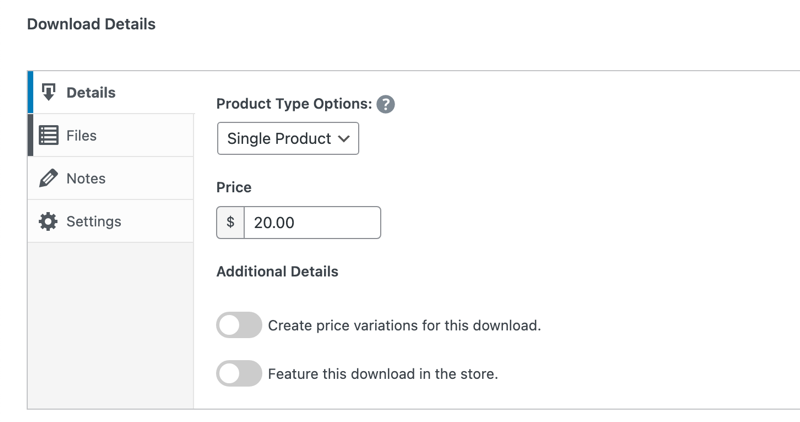
- Pricing: Set a fixed price, or enable variable pricing to offer multiple tiers (for example, a single-use license vs. a commercial license).
- Download files: Under the Files tab, click Upload a File and select your document from your computer or media library.
To the right, you can upload a feature image by selecting Set Download Image.
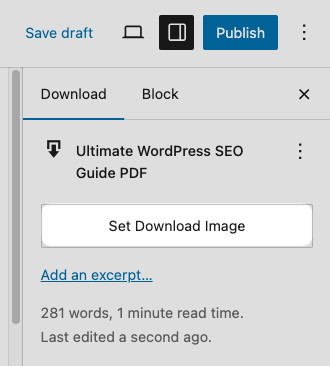
When you’re ready, click Publish. Your document is now live and available for purchase.
Step 4: Protect Your Files and Configure Delivery
File protection is how you make sure only paying customers can access your documents.
Go to Downloads » Settings » Misc » File Downloads. Easy Digital Downloads gives you a few key controls here:
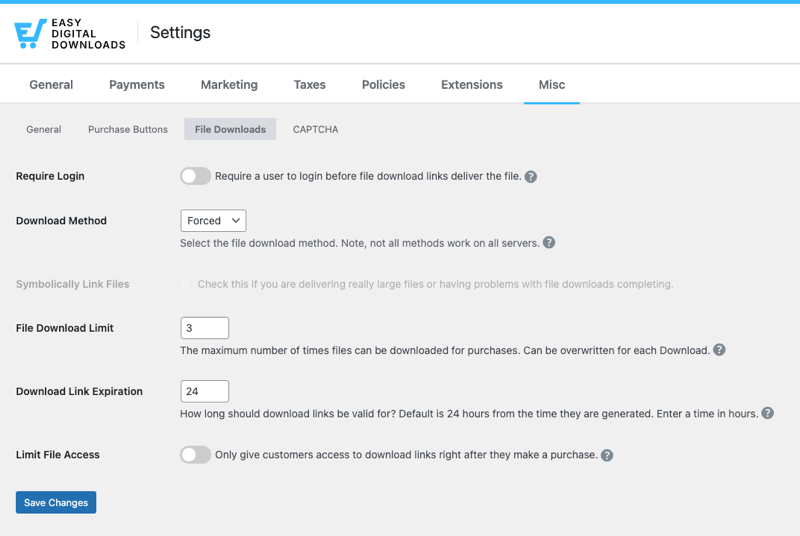
- Download method: Set this to Forced so files download directly instead of opening in a browser tab.
- Download link expiration: Set a time limit (24 or 48 hours works well) so links expire after purchase.
- Download limit: Restrict how many times a buyer can download the file, such as 3 times.
These settings stop buyers from sharing their download link publicly. Someone can’t paste your link in a forum and let everyone grab your file for free.
🔎 Learn more about how to protect digital downloads.
Step 5: Set Your Pricing and Grow Sales
Once your store is live, here are a few ways to grow it.
Variable pricing and bundles. EDD lets you offer multiple price points on a single product listing.
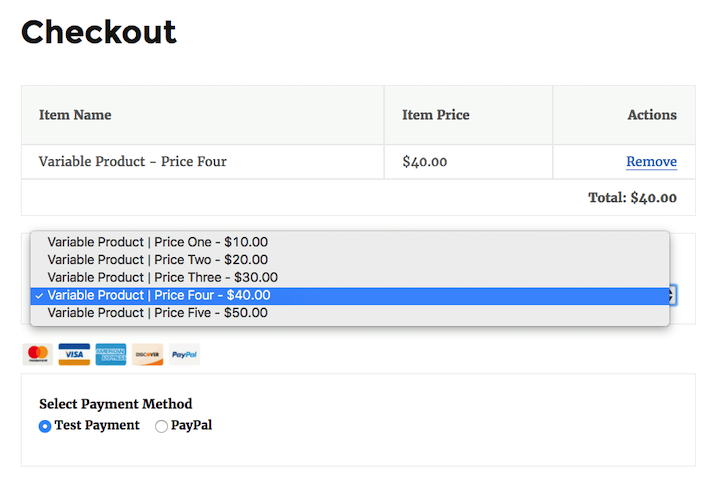
You can also bundle related documents together and sell the set at a discount. Bundles are one of the easiest ways to increase your average order value without adding more products.
🔎 Learn more about digital product pricing strategies.
Discount codes. Create limited-time offers to run promotions.
Go to Downloads » Discount Codes » Add New to set one up. Even a simple 20% off code can push hesitant buyers to convert.
Your customer list. Every buyer’s email address is stored in EDD.
Use that list to announce new documents, run seasonal sales, and bring customers back for repeat purchases.
What File Format Should You Use?
The format you choose affects how professional your product feels and how well you can protect it.
- PDF is the best default. It looks the same on every device, it’s difficult to edit without special software, and buyers expect it for most document types. Use PDF for ebooks, guides, reports, legal templates, and anything you don’t want modified.
- XLSX (Excel format) is the right choice when you’re selling editable spreadsheets. Buyers want to fill in the template themselves, so a static PDF won’t work here.
- DOCX (Word format) makes sense for editable templates where buyers need to customize the text, like contract templates or proposal frameworks.
When in doubt, go with PDF. It’s the most universally compatible format and the easiest to protect.
If you only sell PDFs, check out our dedicated guide to selling PDFs on WordPress for more on PDF-specific setup and file protection.
FAQs About Selling Documents on WordPress
Let’s wrap up by answering some frequently asked questions about how to sell files and documents on WordPress sites.
What’s the best plugin to sell documents on WordPress?
Easy Digital Downloads is the best plugin for selling documents on WordPress. It’s built specifically for digital products, handles secure file delivery automatically, and works with Stripe and PayPal out of the box. There’s a free version on WordPress.org that covers everything you need to get started.
Is Easy Digital Downloads free?
Yes. Easy Digital Downloads has a free version available on WordPress.org that includes product listings, payment processing, and secure file delivery. Pro plans add features like software licensing, recurring subscriptions, and advanced reporting if you need them later.
What types of documents can I sell online?
You can sell PDFs, spreadsheets, Word documents, legal templates, worksheets, workbooks, study guides, white papers, business forms, and design templates, among others. If you can save it as a file and it provides value to a buyer, you can sell it on WordPress.
Can I sell document bundles on WordPress?
Yes. Easy Digital Downloads lets you create product bundles: a single listing that delivers multiple files at checkout. You can group related documents together and offer them at a package price. Bundles are a practical way to increase your average order value and give buyers more value in one purchase.
How do I protect the documents I sell online?
Easy Digital Downloads protects your files by generating unique, encrypted download links for each purchase. You can set those links to expire after a set number of hours and limit how many times a buyer can download the file. This prevents buyers from sharing your link publicly or forwarding it to others.
Use EDD to Sell Documents on WordPress
Selling documents on WordPress is one of the lowest-barrier ways to start earning online. You don’t need a warehouse, a shipping account, or a big budget. You need a WordPress site, a plugin, and a document worth selling.
Easy Digital Downloads handles the rest: payments, secure file delivery, download protection, and customer management, all from your WordPress dashboard. You stay in control of your pricing, your brand, and your customer relationships.
Grab everything you need with an EDD Pass and get started in no time!
📣 P.S. Be sure to subscribe to our newsletter and follow us on Facebook, Twitter/X, or LinkedIn for more WordPress resources!