


As an online seller running a WordPress site, it’s frustrating to have customers fill their cart and reach checkout, only to abandon it because they can’t pay in their preferred currency.
Card issuers typically charge around 3% for currency conversions, and many international shoppers will leave rather than absorb that fee. Easy Digital Downloads’ Multi Currency feature is the simplest fix. It supports 200+ currencies and takes about 15 minutes to configure.
This step-by-step guide shows you exactly how to set up multi-currency payment options on your WordPress site.
🔎 In this article, I’ll cover:
- Multi-Currency Payments: Key Takeaways
- What Are Multi-Currency Payments?
- Why Offer Multi-Currency Payment Options?
- How Multi-Currency Payment Processing Works
- Multi-Currency WordPress Plugins
- How to Set Up Multi-Currency Payment Options
- FAQs About Multi-Currency Payments in WordPress
- Accept Multi-Currency Payments With EDD
Multi-Currency Payments: Key Takeaways
| Key Points | Details |
|---|---|
| 200+ currencies | EDD Multi Currency supports over 200 world currencies, so you can accept payments from customers almost anywhere. |
| Auto-detects location | The feature automatically detects visitors’ locations and displays prices in their local currency. |
| Rates update automatically | Set exchange rates to update hourly, twice daily, daily, or weekly with no manual work required. |
| Personal Pass required | You need an EDD Personal Pass or higher to unlock the Multi Currency feature. |
What Are Multi-Currency Payments?
Multi-currency payments allow your online store to display prices and accept payments in multiple currencies. Popular examples include:
| Abbreviation | Currency Name | Symbol |
|---|---|---|
| USD | US Dollar | $ |
| EUR | Euro | € |
| JPY | Japanese Yen | ¥ |
| GBP | British Pound | £ |
| AUD | Australian Dollar | A$ |
| CAD | Canadian Dollar | C$ |
| CNY | Chinese Yuan | ¥ |
| INR | Indian Rupee | ₹ |
| BRL | Brazilian Real | R$ |
Local currency is the primary currency used in a specific geographic region. It’s what your customers are most comfortable paying in.
Multi-currency options at checkout mean customers see product prices in their familiar currency. No guesswork, no mental math, no surprise conversion fees. Not sure how payment gateways handle the transaction behind the scenes? That guide covers the basics.
Why Offer Multi-Currency Payment Options?
Offering multi-currency payments in your ecommerce store has real, measurable benefits:
- Increased sales. When customers pay in their preferred currency, you remove a major friction point at checkout. No mental conversion math, no unexpected fees. That directly boosts your appeal to international shoppers.
- Elevated customer experience. Showing prices in a customer’s local currency builds trust and makes your products more accessible worldwide. Better experience leads to stronger SEO metrics and lower cart abandonment rates.
- Global reach. Multi-currency support removes one of the biggest barriers for international buyers. Tap into a much broader pool of potential customers worldwide.
Allowing multi-currency options isn’t without challenges. You’ll need to stay on top of exchange rate changes and follow international tax regulations. But the right WordPress multi-currency plugin handles all of that automatically.
How Multi-Currency Payment Processing Works
Multi-currency payment processing benefits both you and your customers. Here’s how it works:
- The customer visits your site and sees product prices displayed in their local currency.
- They proceed to checkout and confirm the purchase in their preferred currency.
- Your multi-currency plugin retrieves real-time exchange rates and converts the price from the customer’s currency to your store’s payout currency.
- The customer pays through your chosen payment gateway.
- The gateway processes the transaction and you receive the payout in your currency, minus any transaction or exchange fees.
Your customers pay in their familiar currency. You get paid in yours. Easier accounting, simpler business management.
Multi-Currency WordPress Plugins
You’ll need a plugin to add multi-currency support to your WordPress site. The right one depends on what you’re selling and which ecommerce platform you use.
For digital product sellers, Easy Digital Downloads is the purpose-built option. Its Multi Currency feature is included with any paid EDD pass and supports 200+ world currencies out of the box.
For WooCommerce stores (primarily physical products), popular alternatives include:
- YITH Multi-Currency Switcher for WooCommerce: Enables multi-currency payment options for WooCommerce stores.
- CURCY (Multi Currency for WooCommerce): Free plugin with an optional pro version for local currency payments.
- WPML: Adds multilingual and multi-currency functionality to WooCommerce stores.
WP Simple Pay is another solid option if you don’t need a full shopping cart. This Stripe payment plugin supports multi-currency alongside other gateway integrations.
EDD Multi Currency
If you sell digital products such as ebooks, software, music, or courses, Easy Digital Downloads (EDD) is the ideal platform.
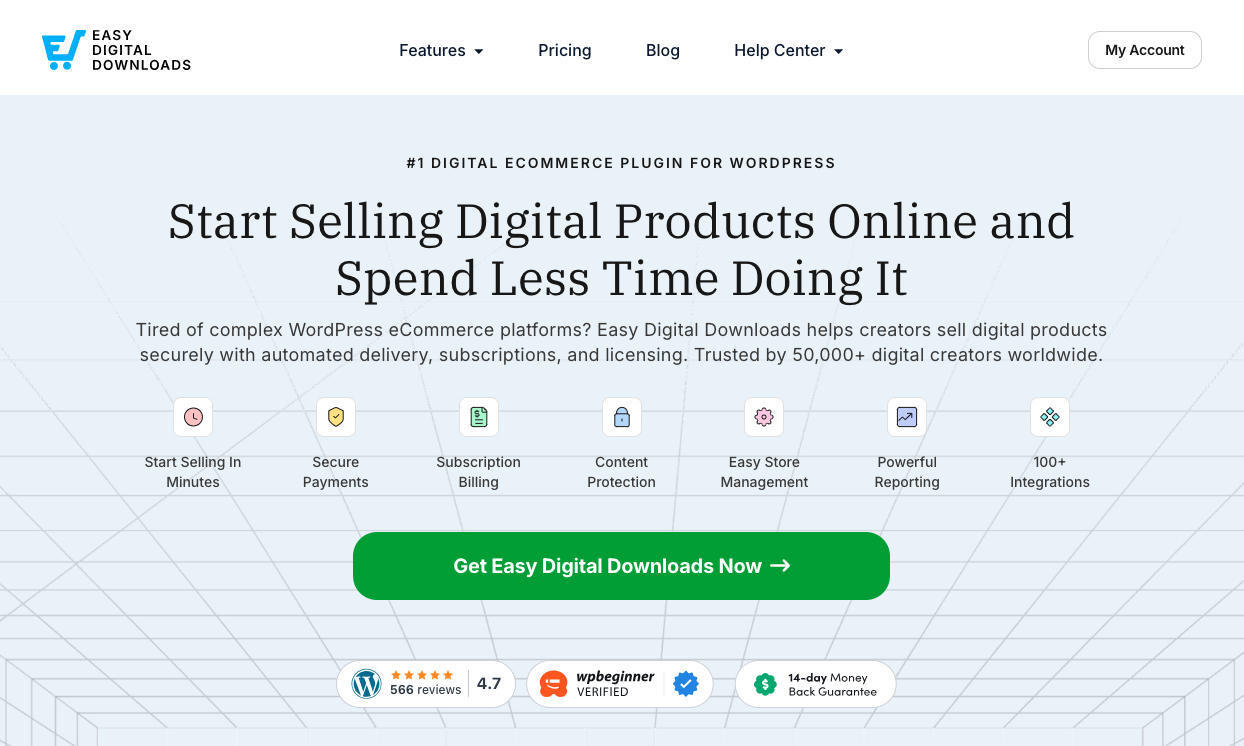
EDD’s Multi Currency feature supports 200+ world currencies and gives you full control over exchange rates. You can set rates to update automatically or configure them manually. It auto-detects your visitors’ locations and shows the right currency instantly, so customers see local prices without having to choose.
Once you’ve got Multi Currency configured, check out our companion guide on selling digital products in multiple currencies. It covers strategy: which currencies to add first, how to price by market, and purchasing power parity considerations.
How to Set Up Multi-Currency Payment Options
Ready to add multi-currency options to your WordPress site? Here’s how to configure Easy Digital Downloads’ Multi Currency feature step by step.
Step 1: Install and Activate Easy Digital Downloads
If you haven’t already, the first step is to install and activate the Easy Digital Downloads plugin.
You’ll need a Pro pass to unlock access to the Multi Currency extension. You can then download the EDD Pro plugin from account dashboard.
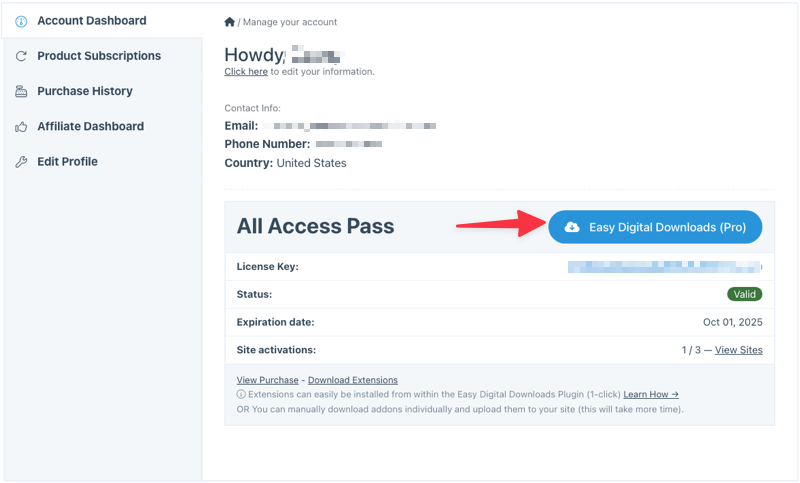
From your WP dashboard, go to Plugins » Add Plugin and upload your zip file. Select Install Now followed by Activate Plugin.
Once activated, a Downloads menu appears in your admin area.
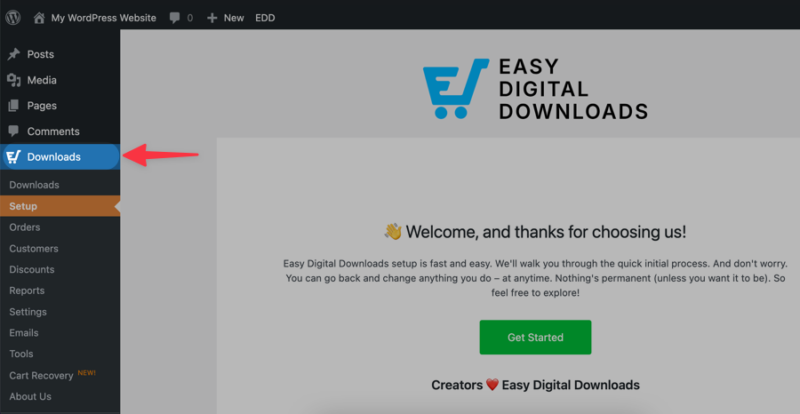
Under Setup, select Get Started to launch the Onboarding Wizard.
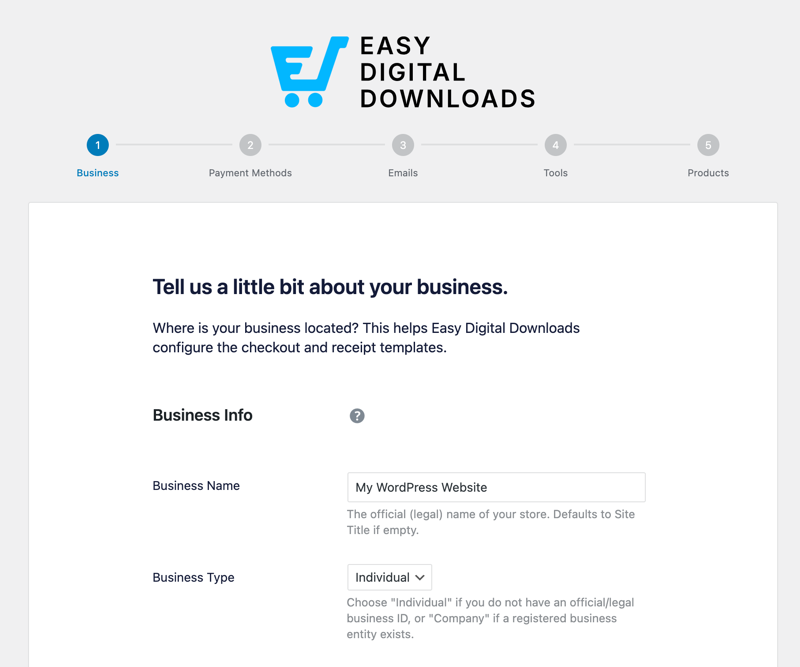
As part of your initial setup process, you’ll select your primary currency and choose and configure your payment gateway. I recommend Stripe, though PayPal and other payment gateways are also available.
For in-depth guidance, check out our Stripe Setup and Creating Products docs.
Step 2: Install the EDD Multi Currency Feature
Once your EDD store is up and running, go to Downloads » Extensions from your WordPress dashboard to install the Multi Currency feature.
Locate Multi Currency, then select Install.
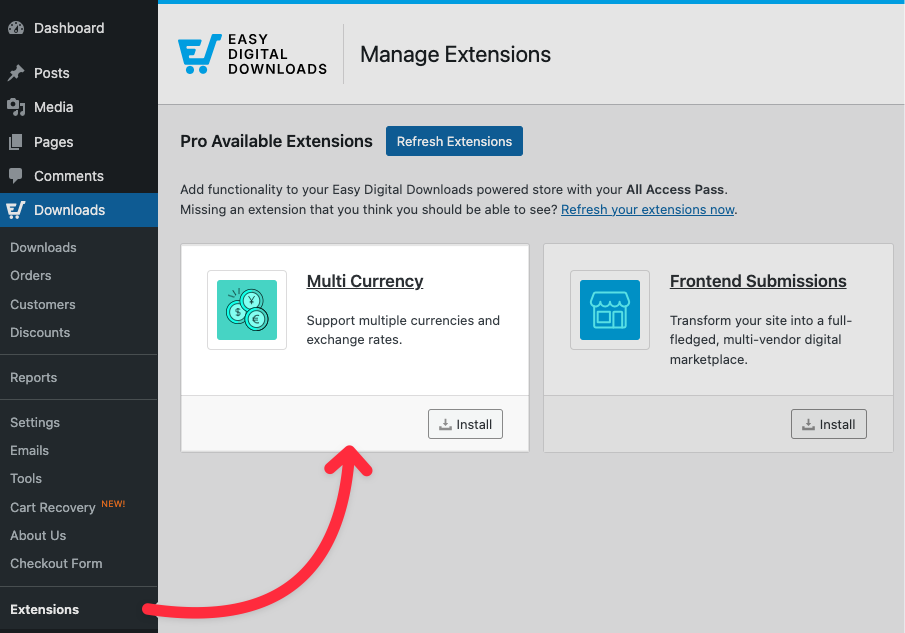
The extension activates automatically.
Step 3: Set Your General Currency Settings
Next, configure your primary default currency. Go to Downloads » Settings » General » Currency.
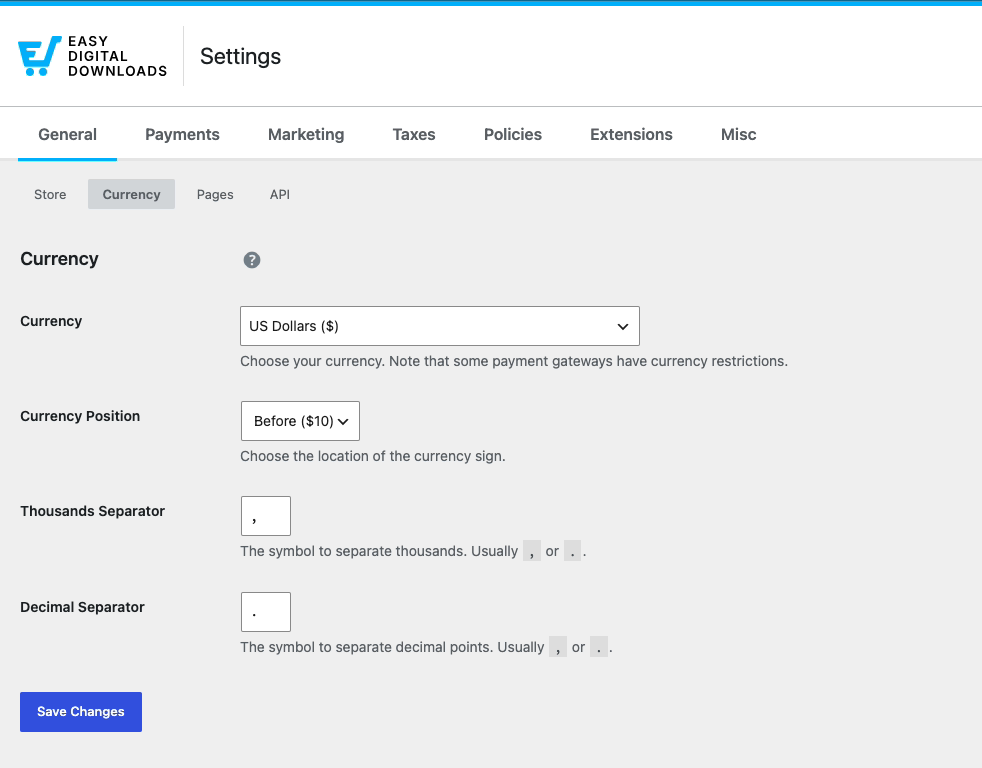
Choose your primary currency (such as USD) and set the Currency Position: whether the currency symbol appears before or after the price.
You can also configure the Thousand Separator and Decimal Separator.
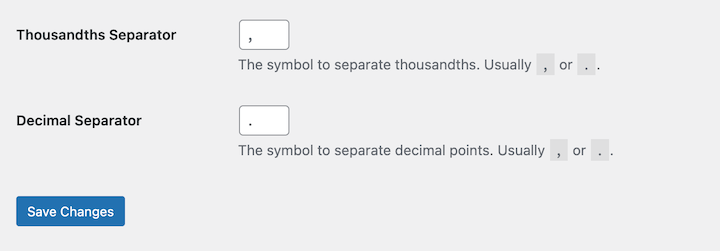
These control how numbers display throughout your store. For example, using commas for thousands separation.
Select Save Changes when you’re done.
Step 4: Configure the Multi-Currency Settings
Navigate to Downloads » Settings » Payments » Multi Currency.
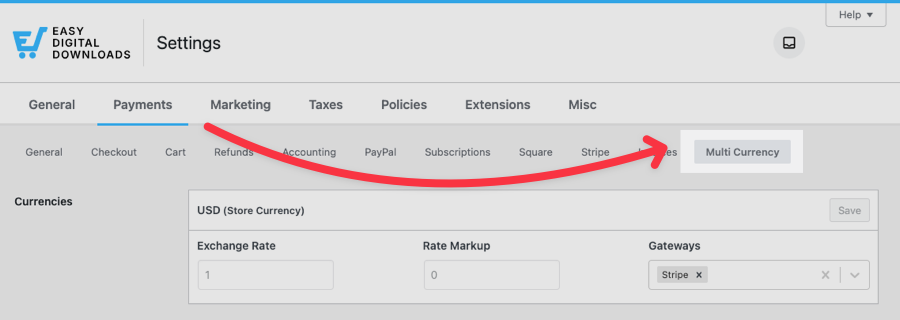
Under Currencies, select Add New Currency.
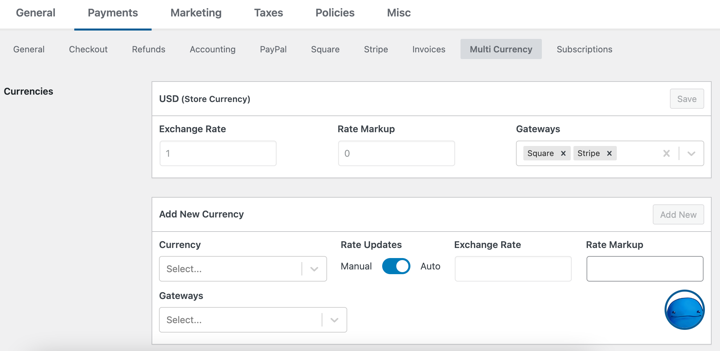
Choose the currency and select the applicable gateways for it.
In the Rate Updates column, automatic exchange rate updates are enabled by default. This keeps your currency converter displaying accurate rates at all times.
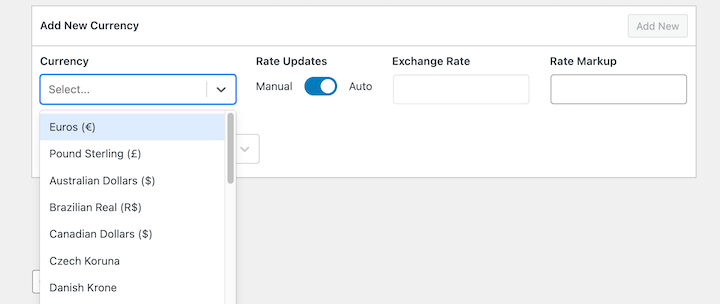
You can change this under the Exchange Rate Updates section.
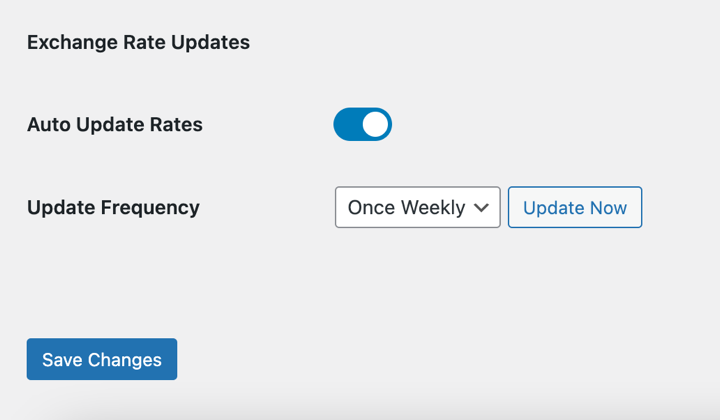
With Auto Rate Updates on, choose your Update Frequency: once hourly, twice daily, once daily, or once weekly.
Then enable the Auto Detect Currency feature.
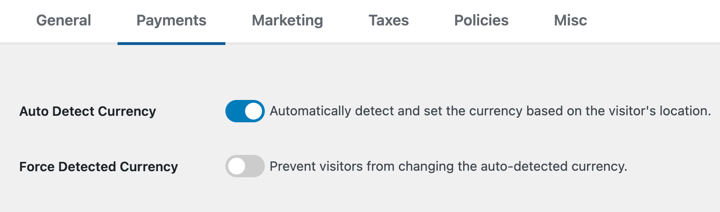
This makes the feature detect your visitors’ location automatically and display the appropriate currency. When you’ve added all your currencies, save your changes.
Step 5: Add the Currency Switcher Widget
Easy Digital Downloads’ Multi Currency feature includes a Currency Selector widget your customers can use to switch between currencies themselves.
To add it, go to Appearance » Widgets and choose where to place it, such as a sidebar or within a page or post. Select the + icon, then search for EDD Currency Selector.
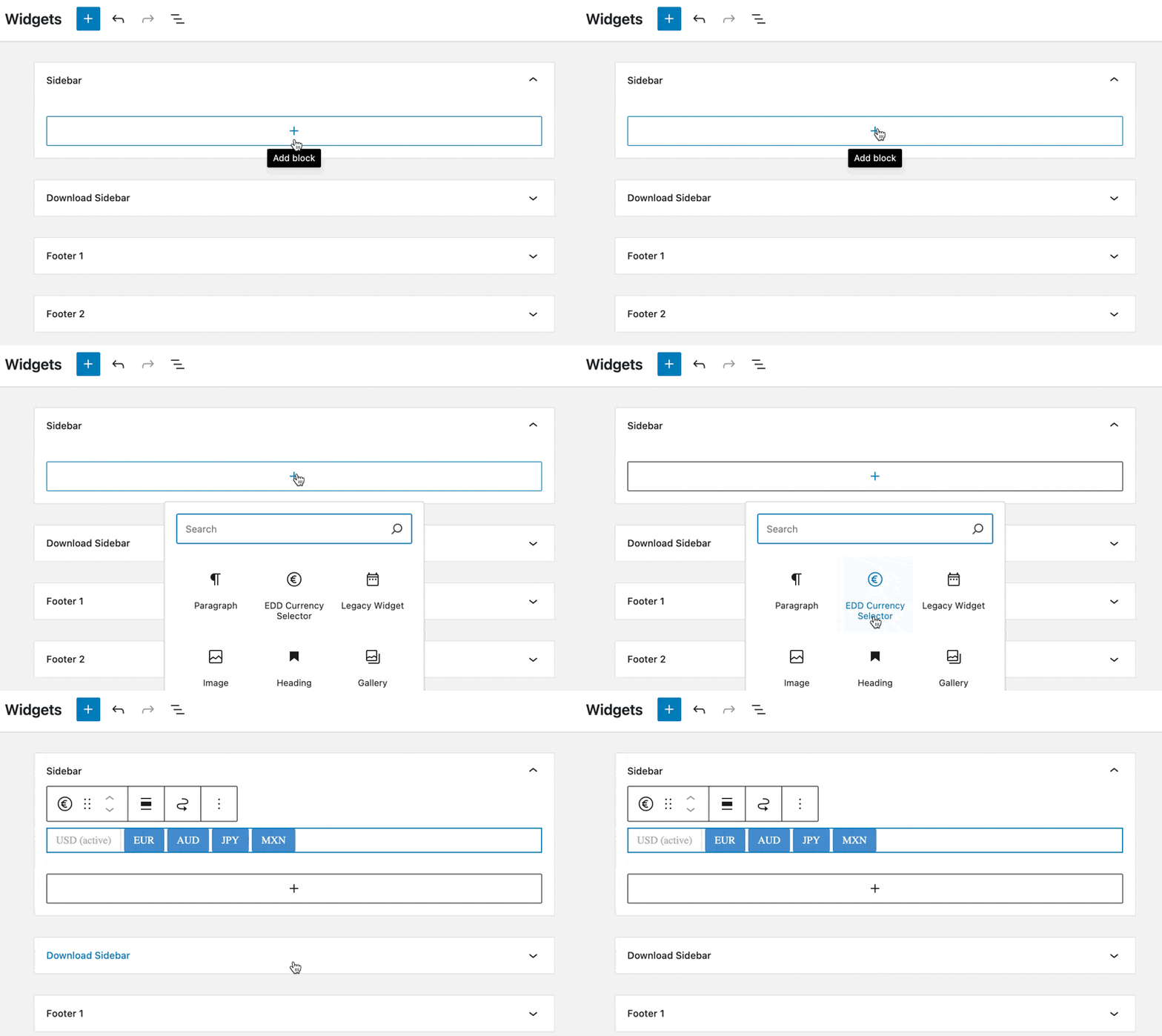
Under Block Settings, choose either Buttons or Dropdown from the Type options to control how the selector appears on your site.
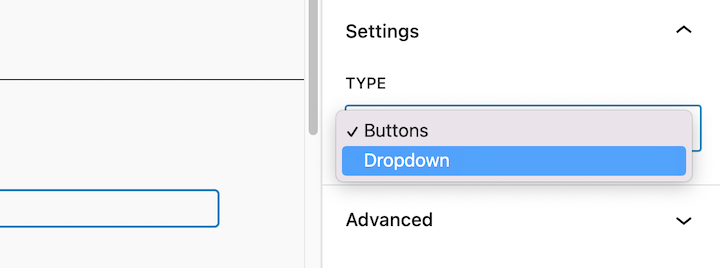
Save your changes when you’re done.
Learn more in our Multi Currency documentation.
Step 6: Preview and Test
Testing is essential before you go live. Once configured, visit the front end of your site and try the multi-currency options yourself.
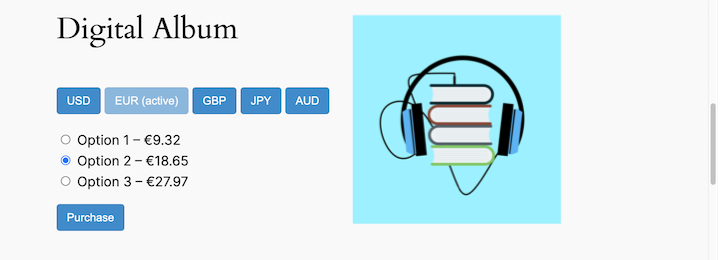
Switch currencies and confirm prices update correctly in each one. Then complete a test purchase in a few different currencies to verify the checkout process works end to end.
FAQs About Multi-Currency Payments in WordPress
Here are answers to common questions about multi-currency payment options in WordPress.
What is a multi-currency payment gateway?
A multi-currency payment gateway lets you accept payments in various currencies. Customers see prices in their preferred currency, which builds trust and reduces checkout friction. The gateway uses real-time exchange rates to convert the customer’s payment to your payout currency. Stripe handles conversions automatically, while PayPal may apply additional conversion fees.
What are the benefits of multi-currency payment options?
Multi-currency payment options can increase your sales by removing friction for international customers. They improve the customer experience by displaying familiar prices, expand your market reach, and reduce cart abandonment. Card issuers typically charge around 3% for currency conversions — letting customers pay in their local currency means they avoid that fee entirely, making a purchase more appealing.
Which are the best multi-currency plugins for WordPress?
For selling digital products, Easy Digital Downloads and tis Multi Currency feature is the top choice. It’s included with any EDD Personal Pass, supports 200+ currencies, and requires no third-party plugin. For WooCommerce stores, popular options include YITH Multi-Currency Switcher, CURCY, and WPML. WP Simple Pay is a solid alternative for Stripe-based payments without a full shopping cart.
Does EDD Multi Currency work with Stripe and PayPal?
Yes. EDD Multi Currency works with Stripe, PayPal, and other EDD-supported payment gateways. Stripe has strong native multi-currency support and handles conversions automatically. PayPal is also supported, though it may apply its own conversion fees. When you add a new currency in EDD, you choose which gateways to enable for that currency.
Will customers see prices in their local currency automatically?
Yes, if you enable the Auto-Detect Currency setting in EDD. The feature detects your visitor’s location and displays prices in their local currency instantly. You can also give customers a Currency Selector widget to switch currencies manually. If you prefer to lock in the detected currency with no override option, there’s a “Force Detected Currency” toggle in the settings.
Accept Multi-Currency Payments With EDD
Adding multi-currency payment options to your store makes it easier to reach a global audience. EDD’s Multi Currency feature is the simplest way to support 200+ currencies on your WordPress site, with automatic exchange rate updates and geo-detection built in.
Want to go further? Read our guide on selling digital products in multiple currencies to learn how to choose the right currencies for your market and set prices for global buyers.
Don’t have Easy Digital Downloads yet? Grab your pass and get started:
Learn how to further personalize the checkout process using geolocation detection.
📣 P.S. Be sure to subscribe to our newsletter and follow us on Facebook, Twitter/X, or LinkedIn for more WordPress resources!








