


Most digital sellers pick one currency and stick with it. USD if you’re based in the US. GBP if you’re in the UK. Whatever feels natural.
The problem? A buyer in Germany who sees “$29.99” has to stop and do math in their head. Most don’t. They leave.
If you’re selling digital products in multiple currencies on WordPress, you take that friction off the table. Easy Digital Downloads (EDD) lets you accept 200+ world currencies, auto-detect each visitor’s location, and show prices in their local currency from the moment they land on your store.
This guide walks you through how to set it up, which currencies to start with, and how to price your products smartly for different markets.
- Multiple Currencies on WordPress: Key Takeaways
- Why Selling in Multiple Currencies Matters for Digital Products
- Which Currencies Should You Accept First?
- How to Sell Digital Products in Multiple Currencies on WordPress
- How to Price Your Digital Products in Multiple Currencies
- FAQs About Selling in Multiple Currencies
- Sell Your Digital Products Globally
Sell in Multiple Currencies on WordPress: Key Takeaways 🔑
| Feature name 🪄 | Multi Currency (Requires an Easy Digital Downloads Pass). |
| Currencies supported 💶 | 200+ world currencies with automatic exchange rate updates. |
| Setup time ⏱ | Around 15 minutes from install to live. |
| Auto-detection 📍 | EDD automatically detects visitor location and displays their local currency. |
| Pricing tip ⭐️ | Consider setting manual prices in key markets for cleaner numbers and better conversion. |
Why Selling in Multiple Currencies Matters for Digital Products
Physical store owners who go international have to deal with shipping logistics, customs, and regional tax compliance. You don’t. As a digital seller, your products are delivered instantly, worldwide, with no extra complexity.
That means currency is one of the last real friction points between you and a global buyer. And it’s a bigger one than most sellers realize.
Customers are significantly more likely to complete a purchase when they see prices in their own currency. It’s not just about the math. A price in your local currency feels familiar. A foreign one feels like a complication, and complications kill conversions.
There’s a direct cost benefit for your buyers, too. When a customer pays in a currency that doesn’t match their bank account, their card issuer typically charges a conversion fee of around 3%. If they can pay in their own currency through your store, they avoid that charge entirely. Your pricing looks more competitive without you changing a thing.
Easy Digital Downloads is built to help you sell globally to 200+ countries. Adding the Multi Currency feature means you can sell digital products in multiple currencies and give every international buyer a checkout experience that feels built for them, not just translated for them.
Which Currencies Should You Accept First?
You don’t have to support every currency on day one. Start with where your buyers actually are.
Pull up your site analytics and look at your top countries by visitor volume or revenue. That’s your starting list.
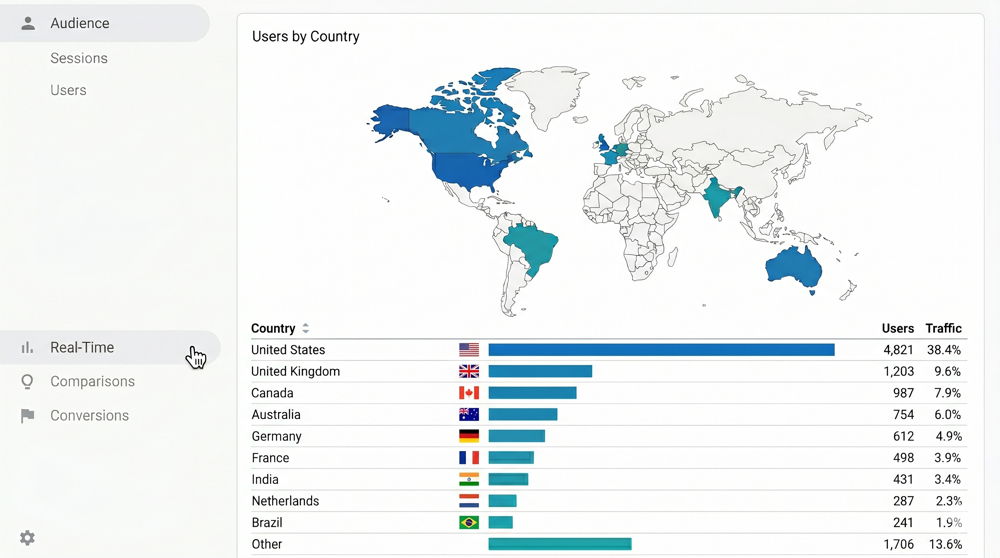
If you don’t have enough traffic data yet, these five currencies are a solid default for most English-language digital product stores:
- USD: US Dollar
- EUR: Euro
- GBP: British Pound
- CAD: Canadian Dollar
- AUD: Australian Dollar
Those five cover most English-speaking markets and a large portion of Western Europe.
From there, expand based on your data. Seeing strong traffic from Japan? Add JPY. Growing audience in Brazil? BRL is worth considering.
Before you add a currency, confirm that your payment gateway supports it. Stripe and PayPal (both built into Easy Digital Downloads) support a wide range of currencies, but not every currency is available in every country. Check the Multi Currency feature page for the full list of supported currencies.
The good news: EDD lets you add currencies one at a time and assign a specific gateway to each. You can start with two or three currencies and expand gradually as your international traffic grows.
How to Sell Digital Products in Multiple Currencies on WordPress
Here’s how to get everything set up, from installing the feature to testing your first multi-currency checkout.
Step 1: Get the Multi Currency Feature
Easy Digital Downloads’ Multi Currency feature is available with any Pro pass. If you don’t have one yet, head to the EDD site to select a pass.
Once your license is active, go to Downloads » Extensions in your WordPress dashboard. Find Multi Currency in the list, then click Install.
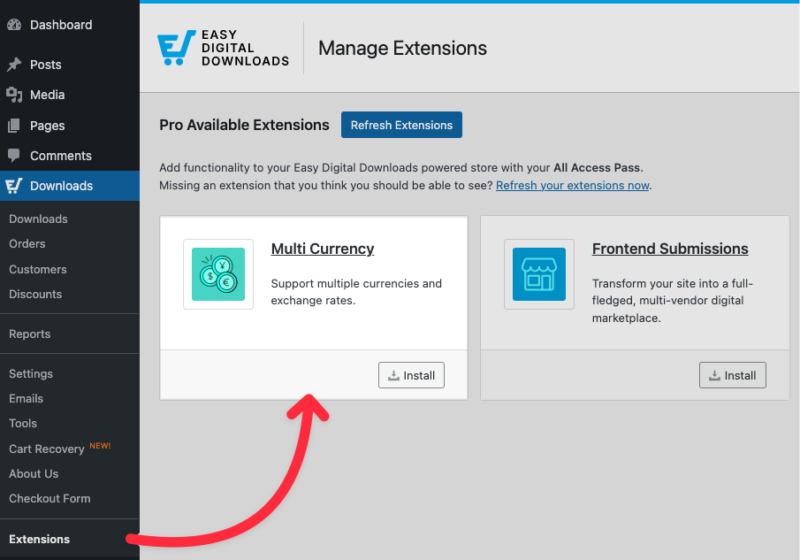
That’s the installation done. Now let’s configure it.
⚙️ If you need help setting up your EDD store, check out our Getting Started Guide.
Step 2: Add Your Currencies
Go to Downloads » Settings » Payments » Multi Currency. This is where you manage every currency your store supports.
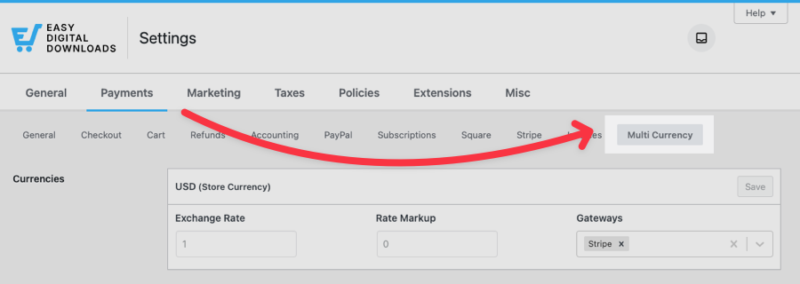
In the Add New Currencies section, use the dropdown to select the first currency you want to add.
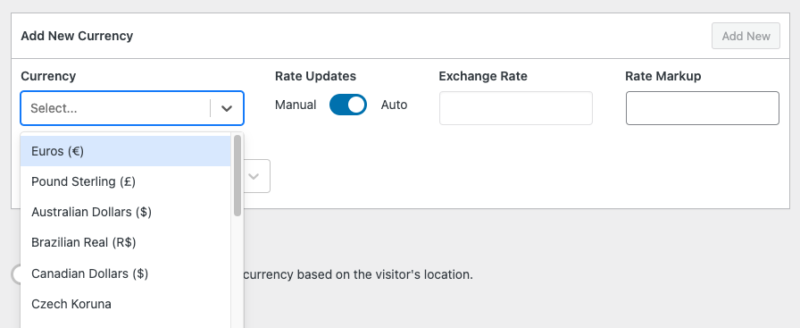
Assign the payment gateway (typically Stripe) that will process transactions in that currency. Then choose your exchange rate type:
- Auto:Easy Digital Downloads fetches and updates the rate automatically. This is the right choice for most stores.
- Manual: You set the exchange rate yourself and update it when you choose.
[Screenshot: Multi Currency settings screen showing the currency dropdown, gateway assignment, and exchange rate type toggle]
Click Add New to save the currency to your list. Repeat that process for each currency, then click Save Changes when you’re done.
⚙️ Follow step-by-step instructions with our Multi Currency doc.
Step 3: Set Up Exchange Rate Updates
When you use automatic exchange rates, EDD fetches live rates and keeps them updated on the schedule you choose. Your options are once hourly, twice daily, once daily, and once weekly.
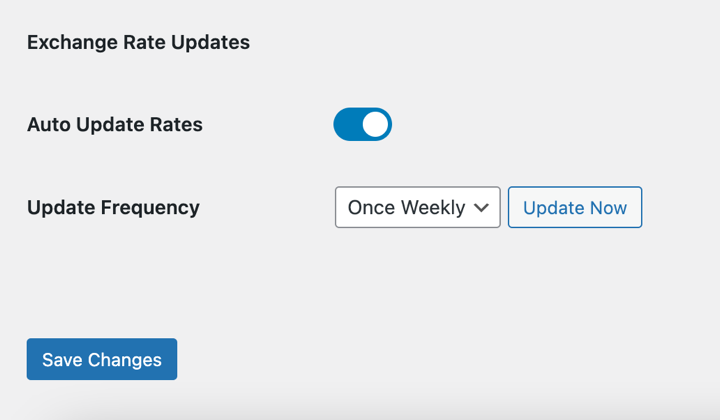
For most stores, once daily is the right call. Currency rates don’t shift enough on an hour-by-hour basis to justify more frequent updates, and daily keeps your pricing accurate without unnecessary overhead.
If you ever need to refresh rates immediately (say, before a launch or sale), click Update Now and EDD pulls the latest rates right away.
Step 4: Let EDD Detect Currency or Give Customers a Switcher
Easy Digital Downloads can automatically detect each visitor’s location and display prices in their local currency. To turn this on, toggle Auto Detect Currency in your Multi Currency settings.
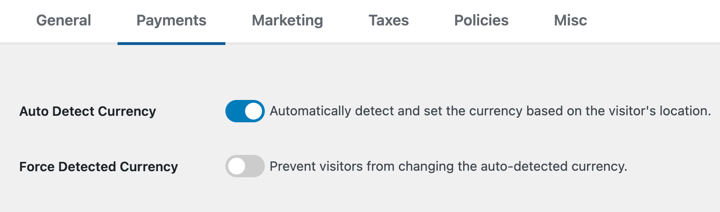
If a visitor’s location can’t be detected, Easy Digital Downloads falls back to your store’s base currency. That’s a safe, sensible default.
You have two options for how currency display works from there:
- Auto-detect only: Enable Force Detected Currency. Visitors see their local currency automatically and that’s what they pay in. No switcher is shown.
- Auto-detect and let them switch: Leave Force Detected Currency off, and add the EDD Currency Selector widget. Go to Appearance » Widgets, search for “EDD Currency Selector,” and add it to your sidebar or footer. Choose between a Dropdown or Buttons display style.
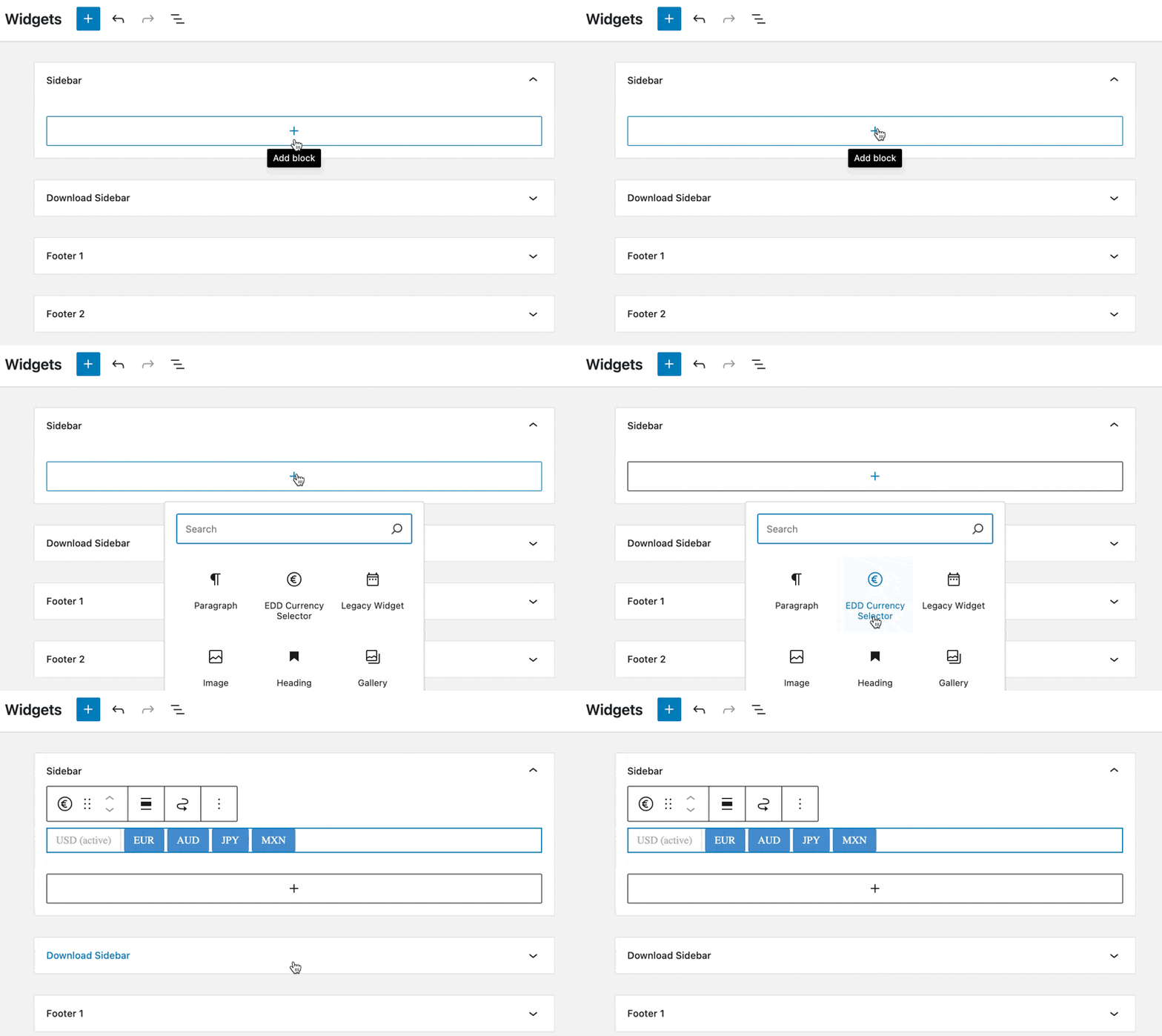
The currency selector updates prices in real time across your product pages and checkout. EDD auto-detects visitor location without requiring any additional API setup on your end.
Step 5: Test Before You Go Live
Before your buyers see your multi-currency setup, walk through it yourself.
The fastest way to preview any currency is with a URL parameter. Add ?currency=EUR (or any currency code) to your store URL: yoursite.com/?currency=EUR. Your product pages and checkout update to that currency instantly.
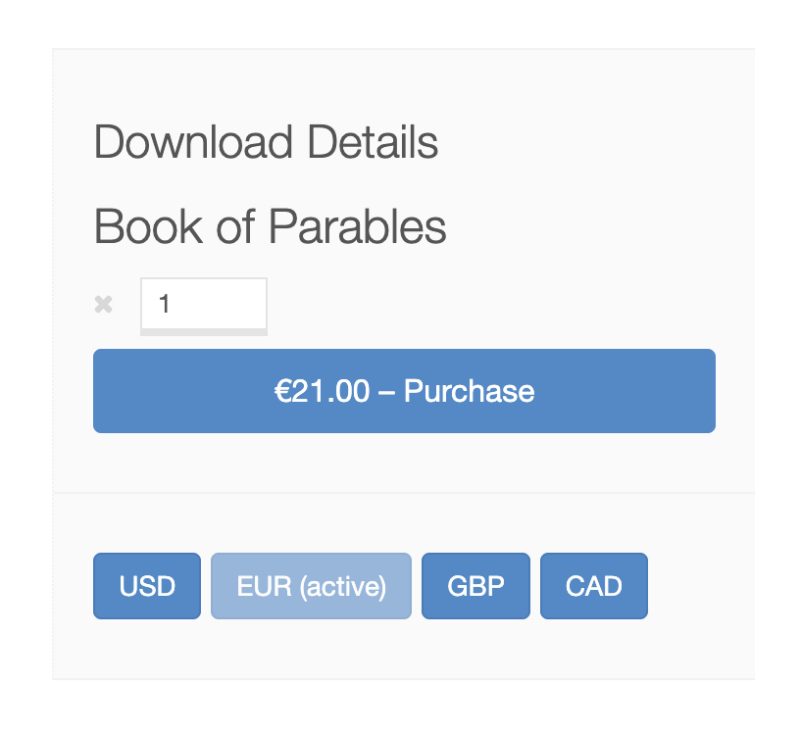
Run through the complete purchase flow in each currency you’ve enabled: product page, add to cart, checkout, and confirmation. Make sure the right currency appears at every step and that your payment gateway processes it correctly.
How to Price Your Digital Products in Multiple Currencies
Setting up the feature is the easy part. Deciding how to price your products for different markets takes a little more thought.
Easy Digital Downloads gives you two options: auto-convert or set manual prices.
Auto-convert is the default. You set one price in your base currency and EDD converts it into every other currency using the current exchange rate. It’s the simplest approach — when you update your base price, all other currencies update automatically.
Manual pricing gives you more control. When you add a currency, choose Manual as the exchange rate type and enter a specific price for that market. This is useful when you want clean, intentional numbers.
👉 Here’s why that matters: auto-converted prices often look off. If your product is $29 USD, the converted Euro price might come out to €26.83. That’s an awkward number. A manual price of €27 or €29 looks like you actually considered your European buyers. Apply the same charm pricing logic you already use in your base currency.
If you have meaningful traffic from markets with lower purchasing power (India, Brazil, Southeast Asia) auto-converted USD prices may be too high for local buyers.
Setting a lower manual price for those markets can improve conversions without affecting what you charge in higher-income markets. This is called purchasing power parity (PPP), and it’s worth factoring in as your international audience grows.
🔎 For a deeper look at this, EDD’s multi-currency pricing strategy guide covers the full approach including when to use manual pricing and how to think about regional rates.
FAQs About Selling in Multiple Currencies on WordPress
Let’s wrap up with some frequently asked questions about how to sell digital products in multiple currencies on WordPress sites.
Does Easy Digital Downloads support multiple currencies for free?
Multi Currency is not included in the free Easy Digital Downloads core plugin, but it’s included in any EDD Pro Pass. A Personal Pass gives you access to the Multi Currency feature along with other premium features and priority support. Visit the EDD pricing page to see what’s included at each tier.
How many currencies does Easy Digital Downloads support?
Easy Digital Downloads supports 200+ world currencies. With automatic exchange rate updates turned on, EDD keeps your pricing current without any manual work on your end.
Will adding multiple currencies slow down my WordPress site?
No. Easy Digital Downloads’ Multi Currency feature is lightweight. Exchange rates are fetched on a schedule and cached. They’re not pulled from an external source on every page load. Adding multi-currency support won’t have a meaningful impact on your site speed.
Do I need a separate plugin to add a currency switcher?
No separate plugin needed. The EDD Currency Selector widget is built into the Multi Currency feature. Once Multi Currency is activated, you can add the widget through Appearance » Widgets without installing anything extra.
What payment gateways work with EDD Multi Currency?
Stripe and PayPal are supported out of the box. When you add a currency in your Multi Currency settings, you assign it to a specific gateway. Just make sure the gateway you’re using supports the currency you want to add. Both Stripe and PayPal support a wide range, but coverage varies by country.
What happens with refunds when a customer paid in a different currency?
Refunds are processed in the currency of the original transaction. Easy Digital Downloads records the currency, amount, and exchange rate at the time of purchase, so the refund reflects exactly what the customer paid with no recalculation needed on your end.
Can I set different prices for different currencies instead of using automatic conversion?
Yes. When adding a currency in your Multi Currency settings, choose Manual as the exchange rate type and enter the specific price you want for that market. This gives you full control over regional pricing without affecting your other currencies.
Sell Your Digital Products Globally
Multi-currency support is one of the fastest, most practical ways to grow your digital product sales internationally. And with Easy Digital Downloads, the whole setup takes about 15 minutes.
You don’t need a developer. You don’t need a complicated international tax strategy. Digital products deliver instantly, so there’s no shipping to figure out. Add the currencies your buyers use, set your exchange rate preferences, and you’re open for business in every market you care about.
Ready to reach buyers worldwide? Get Multi Currency and start accepting payments from customers around the globe.
📣 P.S. Be sure to subscribe to our newsletter and follow us on Facebook, Twitter/X, or LinkedIn for more WordPress resources!








