Every paid Easy Digital Downloads pass is backed by a full refund for 14 days after you buy it. We stand behind our product, and we want it to be the right fit for your store.
This guide explains what the refund policy covers and how to send us your request.
What Does the EDD Refund Policy Cover?
You have 14 days from a new pass purchase to decide if the plugin works for you. If it doesn’t, we’ll refund your purchase in full.
When a refund is approved, your license key is disabled and your subscription’s automatic renewal is turned off.
Here are a few details to know before you ask for a refund:
- New pass purchases qualify. You can request a refund within 14 days of buying a new pass. After 14 days, we can’t process a refund.
- Renewals and upgrades don’t qualify. Upgrades and manual renewals of expired passes aren’t refundable. Refunds on automatic renewals are subject to our Terms and Conditions.
- Refunds are in US dollars. All prices, fees, and refunds are in USD. If your card uses another currency, the amount you see depends on the exchange rate. Exchange-rate differences aren’t refunded.
- Timing varies by card. Some refunds are instant. Others can take 5 to 10 business days to show up on your credit card statement.
For the full policy, see our Terms and Conditions and Refund Policy.
Requesting a Refund
Before you ask for a refund, give us a chance to help. Our support team is happy to work through any problem with you first.
To reach our support team, log in to your Easy Digital Downloads account and open the Support tab. The tab opens with a chat assistant, which can answer questions but can’t process refunds.
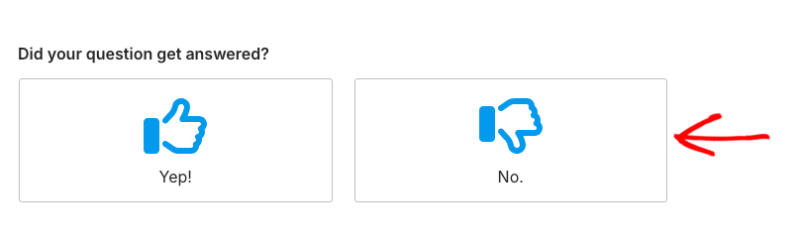
To send your request, look for Did your question get answered? below the chat and click No. Then, choose Account/Billing and fill in the form. Your request goes straight to our billing team.
Our support team is available Monday to Friday, 9am to 5pm Eastern Time. We try to respond to all requests within 24 hours on weekdays.
We’ll process your refund as soon as we’re able to. In some cases, we may first ask for the chance to resolve the issue for you.
That’s it! You now know how our refund policy works and how to request a refund. If you’d rather keep your pass but stop future renewals, see Can I Cancel My Subscriptions?
FAQ on Easy Digital Downloads Refunds
Below, we’ve answered some of the most common questions about refunds.
Can I get a refund on a renewal?
Manual renewals of expired passes don’t qualify, and refunds on automatic renewals are subject to our Terms and Conditions. To avoid a renewal charge, cancel your subscription from the Billing tab of your account before your renewal date.
Do I need to cancel my subscription separately after a refund?
No. When a refund is approved within the 14-day window, your license key is disabled and your subscription’s automatic renewal is turned off.
What if I miss the 14-day window?
Refunds can’t be processed after 14 days. You can still cancel your subscription at any time so your pass doesn’t renew, and you’ll keep access to support and updates until your license expires.
I sell with Easy Digital Downloads. How do I refund one of my customers?
This page covers refunds for passes bought from us. To refund an order in your own store, see our Refunds guide.