

What if your WordPress store could automatically recommend the perfect products to each customer? No manual setup. No complex rules. Just smart product recommendations that boost sales.
Studies show personalized recommendations increase average order value by 10% or more. And setting up AI product suggestions in WordPress makes this possible.
Easy Digital Downloads’ Cart Recommendations feature is an AI system that analyzes your product catalog automatically. It suggests relevant items directly in your cart preview — right when customers are most engaged.
The best part? Zero coding required. The system maintains itself as your catalog grows. In this tutorial, you’ll learn how to set up AI-powered recommendations on your WordPress site.
- What Are AI Product Recommendations? 🤖
- Benefits of AI Recommendations for Digital Stores
- How EDD's Smart Cart Recommendations Work
- Prerequisites: What You'll Need
- Set Up AI Product Recommendations in EDD
- Best Practices for Maximizing AI Product Recommendations
- FAQs on AI Product Recommendations in WordPress
What Are AI Product Recommendations? 🤖
AI product recommendations use machine learning algorithms to analyze your product catalog and how items relate to one another. Instead of you manually deciding which products go together, the AI studies your product titles, descriptions, and categories to identify deep relationships and suggest the best pairings based on your store’s unique data.
Think of it like having a super-smart sales assistant who learns from every purchase and gets better at making suggestions over time.
The key difference between rule-based recommendations (like “frequently bought together”) and true AI recommendations is learning. Rule-based systems follow pre-set rules. AI systems adapt and improve their suggestions based on new data.
Benefits of AI Recommendations for Digital Stores 📈
Increase Average Order Value (AOV)
AI recommendations typically increase AOV by about 10% or more. Some digital stores see even higher gains through automated cross-selling.
Average Order Value (AOV) = Total Revenue ÷ Total Number of Orders
Let’s say your current AOV is $50 with 100 orders per month ($5,000 revenue). A 20% increase in AOV means:
- New AOV: $60 per order
- Same 100 orders: $6,000 revenue
- Extra $1,000 monthly revenue with zero additional traffic
For digital products, this works especially well because you’re recommending complementary items like:
- An eBook to go with a video course
- A premium plugin with a WordPress theme
- Advanced templates with basic design packages
- Bonus materials with main products
Improved Customer Experience Through Personalization
Relevant recommendations help customers discover tools they didn’t know they needed. Instead of browsing through your entire catalog, they see personalized product suggestions that match their interests. This creates a more personalized shopping experience and increases customer satisfaction.
Reduced Cart Abandonment Rates
When customers see valuable add-ons during checkout, they’re more likely to complete their purchase. The AI catches them at peak buying intent and provides compelling reasons to finalize the transaction.
Time Savings From Automation
If you don’t want to manually curate related items for every single download, true cross-sell automation handles this for you. For digital sellers with dozens or hundreds of products, this saves countless hours while delivering more accurate recommendations than manual selection.
This works particularly well for files and downloads because of instant delivery and low overhead for add-ons. There’s no inventory management or shipping costs to worry about – just pure profit from intelligent suggestions.
How EDD AI Cart Recommendations Work 🎯
New to Easy Digital Downloads (EDD)? If you’re not already using it, Easy Digital Downloads is a complete eCommerce solution for WordPress designed specifically for selling digital products. While many users struggle with complex WooCommerce product recommendations that are built for physical shopping, EDD is streamlined for digital products and files, including software, eBooks, documents, and media files.
You don’t need a bloated third-party product recommendation plugin; EDD builds these powerful features right into the core platform. Because EDD understands the unique nature of digital selling, it can deliver smoother, faster checkout experiences.
EDD’s smart cart recommendations appear in the Cart Preview panel – that slide-out cart drawer that appears when customers add items.
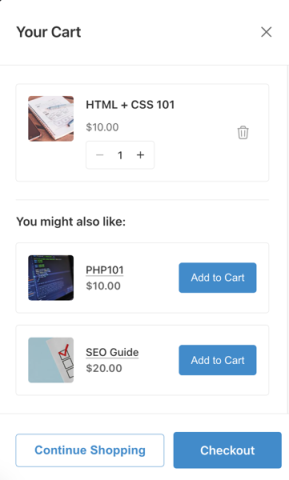
This is the perfect location because it doesn’t interrupt the shopping flow. Customers can see suggestions without leaving the current page or being redirected elsewhere.
These cart upsells for WordPress are designed to catch buyers at peak purchase intent. When someone adds an item to their cart, they’re already in “buying mode” – making this the ideal moment to suggest complementary products.
The Algorithm Behind the Magic
EDD’s system uses a sophisticated AI engine to deliver product-aware recommendations. By analyzing the content and context of your downloads, the AI identifies logical connections—like how a specific plugin complements a certain WordPress theme—and suggests the most relevant items automatically.
The system requires a minimum amount of data to make accurate recommendations. For new stores, it might take several weeks of sales data before the AI can identify strong patterns. However, once it has enough information, the suggestions become increasingly accurate.
EDD Recommended Products vs. Smart Cart Recommendations
EDD still offers the Recommended Products extension for basic product suggestions. However, this extension uses rule-based recommendations: you manually select which products to recommend for each item. It’s not powered by AI.
The recommended solution is the Smart AI Cart Recommendations feature available with Cart Preview functionality when you’re using an EDD Pro license. This provides true machine learning-powered suggestions that improve over time.
Prerequisites: What You’ll Need ✅
Before setting up AI product recommendations, make sure you have:
- WordPress installation
- Easy Digital Downloads plugin & active Pro license (required for AI recommendations)
- Products in your EDD catalog (at least 10-15 products work best for meaningful recommendations)
The free version of Easy Digital Downloads provides basic eCommerce functionality, including the slide-out Cart Preview. But the AI-powered cart recommendations require EDD Pro.
Set Up AI Product Recommendations in EDD
Let’s walk through the complete setup process. Each step is straightforward and takes just minutes to complete.
Step 1. Update to the Latest EDD Version 🔃
Before enabling Cart Recommendations, ensure you’re running the latest EDD Pro version.
Log into your WordPress admin dashboard. Navigate to Dashboard » Updates. Check for Easy Digital Downloads updates.

Click Update Now if an update is available. Wait for the update to complete.
This matters because Cart Recommendations is a newer feature. It requires the latest EDD version to function properly.
Step 2. Enable Cart Preview 🛒
The Cart Preview feature creates a slide-out cart drawer that appears when customers add items to their cart. This non-intrusive design lets customers view their cart contents and see AI recommendations without navigating away from the current page.
Here’s why the Cart Preview is the perfect location for AI product recommendations:
- It doesn’t interrupt the browsing experience.
- Customers are already in “purchase mode” when they see it.
- The slide-out design feels modern and professional.
- It works seamlessly on both desktop and mobile devices.
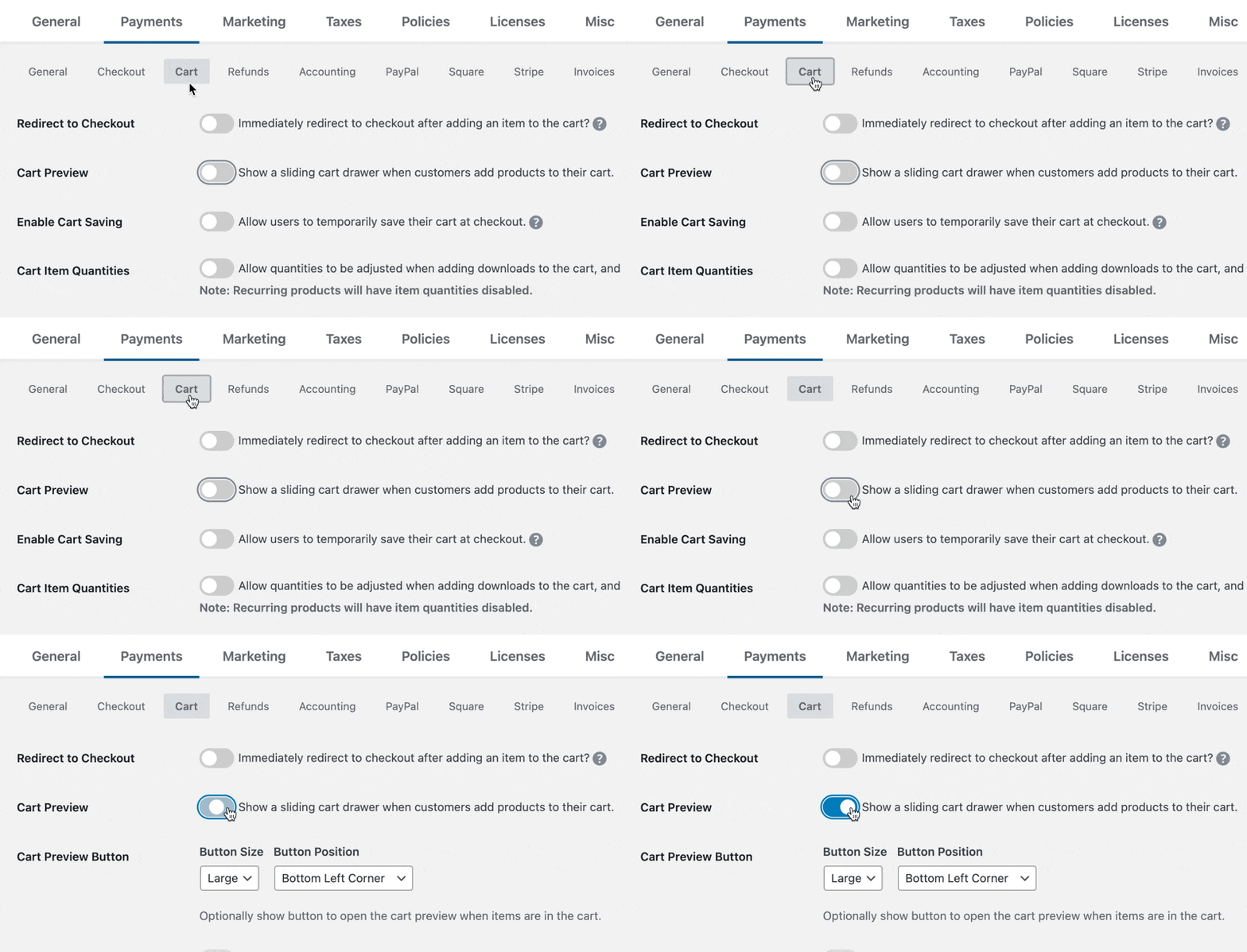
Accessing Cart Preview Settings
To enable Cart Preview in EDD, follow these steps:
- From your WordPress admin dashboard, navigate to Downloads » Settings » Payments.
- Click on the Cart tab at the top of the page.
- Scroll down to find the Cart Preview section.
- Check the box to Enable Cart Preview.
- Click Save Changes.
Once enabled, the Cart Preview creates a slide-out panel that appears from the right side of the screen when customers add products to their cart. This provides a smooth, modern shopping experience that encourages additional purchases.
Step 3. Enable Cart Recommendations 🔮
After turning on Cart Preview, you’ll see a new Cart Recommendations section appear directly underneath the Cart Preview settings. This is where the magic happens.
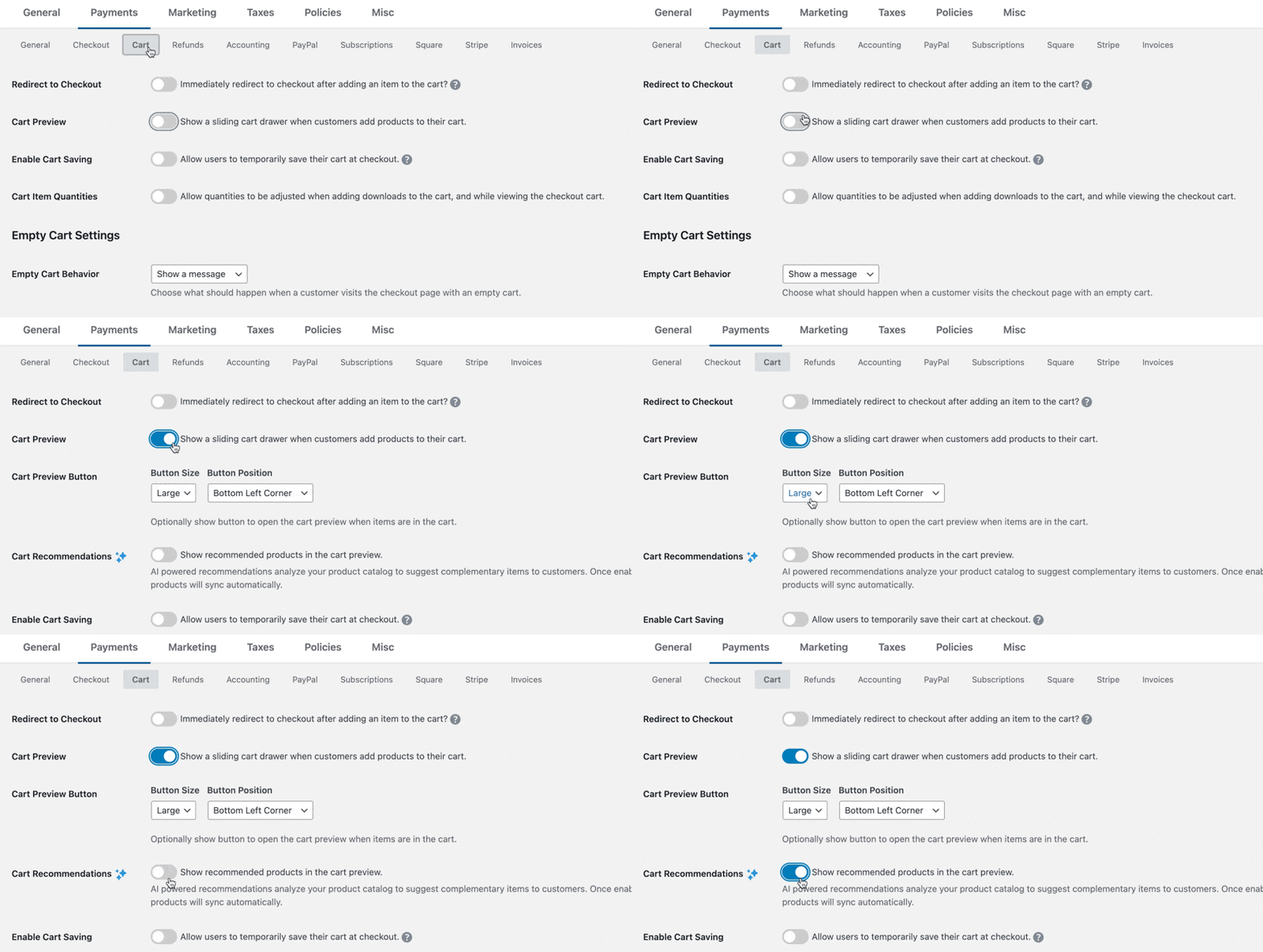
Enabling AI Cart Recommendations
- In the same Cart settings tab, scroll down to the Cart Recommendations section.
- Toggle the switch to Enable Cart Recommendations.
- Click Save Changes.
That’s it! The setup is intentionally simple because EDD handles all the complex AI processing in the background. You don’t need to configure algorithms, set up data feeds, or manage recommendation logic – the system does this automatically.
Step 4. Wait for Product Catalog to Sync ⏱️
Once you enable Cart Recommendations, EDD automatically begins syncing your product catalog to the AI recommendation service. This initial sync typically takes just a few minutes, depending on how many products you have in your store.
During the sync process, EDD:
- Analyzes your product catalog structure.
- Identifies product categories and relationships.
- Begins collecting product data.
- Prepares the foundation for recommendations.
You don’t need to do anything during this process – just wait for the sync to complete. For stores with hundreds of products, the sync might take 15-30 minutes. Most stores complete syncing within 5 minutes.
Step 5. Test AI Product Recommendations 🧪
Once syncing completes, AI product recommendations will automatically appear in the Cart Preview panel when customers add items to their cart.
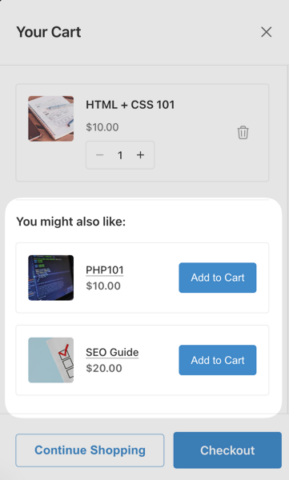
Here’s how to test the system.
Testing as a Customer
- Visit your store’s front-end (open a new incognito browser window).
- Add any product to your cart.
- Watch for the Cart Preview panel to slide out from the right.
- Look for the “Recommended for You” or “You Might Also Like” section.
- Verify that relevant products appear as suggestions.
What to Expect
Initially, recommendations might seem basic or limited because the AI needs time to learn. As you add more products and refine your descriptions and categories, the AI engine continues to learn and refresh its recommendations to stay perfectly synced with your inventory.
Monitoring Performance
Keep track of these key metrics to measure the effectiveness of your AI recommendations:
- Click-through rates on recommended products.
- Conversion rates from recommendations to purchases.
- Average order value improvements.
- Revenue attribution from AI-suggested products.
Most EDD Pro users see noticeable improvements in these metrics within 2-4 weeks of enabling Cart Recommendations, once the AI has collected sufficient data to make intelligent suggestions.
⚙️ For more guidance, check out our Enabling Cart Recommendations Doc.
Best Practices for Maximizing AI Product Recommendations
Starting with a New Store (Minimal Data)
When you’re just starting out, the AI doesn’t have much customer data to work with. Here are strategies to get better recommendations faster:
While waiting for the AI to collect data, you can still cross-sell effectively:
- Use EDD’s manual cross-sell features for your top products
- Create product bundles for obviously related items
- Add “Frequently Bought Together” sections to product pages
If you’re moving from another platform, import as much historical sales data as possible.
For new stores, the AI initially relies more on content similarity (product categories, descriptions, tags) rather than behavioral data. Make sure your products are properly categorized and tagged to help the system make logical connections.
Set Realistic Expectations
Don’t expect perfect recommendations immediately.
Remember, AI recommendations get better over time as they collect more data. Don’t expect perfect suggestions immediately. Give the system a few weeks to learn your products.
Categorize Products for Better Recommendations
Proper product categorization helps the AI understand relationships between items:
- Use specific, descriptive categories
- Apply relevant tags to products
- Write detailed product descriptions
- Group related products logically
FAQs on AI Product Recommendations in WordPress
Let’s wrap up by answering some frequently asked questions about AI-powered smart cart recommendations and how to use them for your digital store in WordPress.
Do I need EDD Pro for AI recommendations?
Yes, AI-powered cart recommendations require an active Easy Digital Downloads Pro license. The free version of EDD includes basic eCommerce functionality, but the smart Cart Recommendations feature with machine learning algorithms is only available in EDD Pro.
What’s the difference between EDD Recommended Products and AI product recommendations?
EDD Recommended Products is a separate extension that relies on historical sales, while Smart Cart Recommendations is a feature built into EDD Pro that uses AI to analyze product content. AI recommendations improve over time and require no manual configuration.
Will AI recommendations slow down my site?
No, EDD’s AI recommendations are designed for performance. The recommendation processing happens on EDD’s servers, not your WordPress site. The Cart Preview loads recommendations asynchronously, so they don’t affect your page load speeds or site performance.
Can I override AI recommendations manually?
Currently, EDD’s Cart Recommendations feature is fully automated – you can’t manually override specific recommendations. However, you can disable the feature entirely or use the separate Recommended Products extension for manual control alongside the AI system.
How many recommendations will customers see in their cart?
Customers see up to 3 recommended products per cart. The exact number depends on the AI algorithm’s relevance calculations. This limit prevents overwhelming customers while providing meaningful suggestions.
Boost Sales With AI Product Recommendations
Adding AI product recommendations to your WordPress store with Easy Digital Downloads is one of the smartest moves you can make to increase revenue without driving more traffic.
The Cart Recommendations feature makes this incredibly simple. Just enable Cart Preview, turn on Cart Recommendations, and let the machine learning algorithm do the work.
Ready to boost your digital product sales with smart recommendations? Enable EDD’s Cart Preview and Recommendations features today. If you don’t have a Pro pass yet, grab one today to try out this feature!
What’s next? Explore more ways to reduce cart abandonment rates in WordPress.
📣 P.S. Be sure to subscribe to our newsletter and follow us on Facebook, Twitter/X, or LinkedIn for more WordPress resources!