
Would you like to know exactly what an AI assistant can do with your store before you connect one? Easy Digital Downloads describes each store operation to your assistant as a named ability, so everything it can reach is listed rather than guessed at. Each ability covers one job, such as reading a sales report or building a discount code.
This guide walks you through every ability your store can expose, and what each one reads or changes.
Before you get started, make sure Easy Digital Downloads is installed and activated on your WordPress site, and that you have connected your store to an AI assistant.
Requirements: Easy Digital Downloads 3.7.1 or newer, running on WordPress 6.9 or newer.
How Do Store Abilities Work?
Every ability is registered with the WordPress Abilities API under a name your assistant sees, such as edd/sales-report. Your assistant reads that list, picks the ability that matches what you asked for, and runs it against your store’s own data.
Abilities fall into two groups, and the difference matters more than any other detail on this page. Read abilities look information up and change nothing. Write abilities create or edit records, and they only run when Allow AI to Change Store Data is switched on.
Your assistant also sees a short label on each one. Read abilities are marked read-only, and the handful of write abilities whose results cannot be undone are marked destructive, which is the signal assistants use to ask you before running them.
With that split in mind, here is what each group covers.
Looking Up Store Information
These work as soon as your store is connected, and none of them touch your data.
Orders
- Read Orders (
edd/order-read) looks up a single order by ID, including its items, or lists orders filtered by status, customer, product, email address, or date range. Lists contain sales unless you ask for refunds instead. - Read Order Notes (
edd/order-note-read) lists the notes recorded on an order, newest first.
Customers
- Read Customers (
edd/customer-read) looks up one customer by ID or email address, or searches and lists customers. Email addresses and address data are included only for accounts allowed to view sensitive shop data. - Read Customer Notes (
edd/customer-note-read) lists the notes recorded on a customer, newest first.
Products
- Read Products (
edd/product-read) looks up one product by ID, including its pricing, files, and download limit, or lists products filtered by search term, status, category, or tag.
Discounts
- Read Discounts (
edd/discount-read) looks up one discount by ID or code, or lists discounts filtered by status, type, or a search term. Archived discounts are left out unless you ask for a status.
Reports
- Sales Report (
edd/sales-report) returns sales and earnings statistics for a preset period or a custom date range, and it can be scoped to a single product. - Sales Summary (
edd/sales-summary) returns net earnings and sales counts for this month, last month, today, and all time.
Store configuration
- Store Settings (
edd/settings) returns a read-only summary of your configuration: currency, payment gateways, taxes, key pages, and version information. - Tax Rates (
edd/tax-rates) lists your tax rates and whether taxes are enabled, and the list can be filtered by country. - Store Health Check (
edd/health-check) returns a snapshot of store health: software versions, store mode, order and customer counts, and enabled payment gateways.
Logs
- File Download Logs (
edd/download-log) lists file download records, filtered by product, customer, order, or date range. - Email Logs (
edd/email-log) lists the emails your store has sent, filtered by recipient, email ID, related object, or date range.
Those cover every question an assistant can answer without changing anything. The next group is the one the write toggle governs.
Making Changes to Your Store
These stay unavailable until Allow AI to Change Store Data is on, and each one still respects what the connected account is allowed to do.
Orders
- Create Order (
edd/order-create) records a manual order for a customer, using an existing customer ID or an email address. Item prices come from the products, and an optional discount code applies to the whole order. No payment is collected, taxes are not calculated, and product-level discount restrictions are not enforced. The customer receipt and your store’s new-sale notification go out unless the request asks for a silent order. This one is marked destructive. - Update Order Status (
edd/order-update-status) changes an order’s status, firing the same hooks as the admin. Completing an order emails the customer a receipt and grants download access, and moving a completed order back subtracts it from store earnings and customer totals. This one is marked destructive. - Resend Order Receipt (
edd/order-resend-receipt) sends the purchase receipt again, to the email address on the order. - Add Order Note (
edd/order-note-add) adds an internal note to an order. Notes are never sent to the customer.
Note: Refunds are not part of this list. They stay on the order screen in your admin, so an assistant cannot issue one.
Customers
- Create Customer (
edd/customer-create) adds a customer record from an email address, with an optional name. It stops if a customer already exists with that address. - Update Customer (
edd/customer-update) changes an existing customer’s name, primary email address, or status. - Add Customer Note (
edd/customer-note-add) adds an internal note to a customer record.
Products
- Create Product (
edd/product-create) adds a product with an optional single price. New products are drafts unless the request asks for them to be published, so nothing reaches your storefront until you look it over. - Update Product (
edd/product-update) changes only the fields the request names: title, single price, status, or description.
Discounts
- Create Discount (
edd/discount-create) builds a percentage or flat-amount code, with start and end dates, usage limits, a minimum order amount, and product requirements or exclusions. New codes are inactive unless the request says otherwise, so you have a chance to review one before customers can use it. - Update Discount (
edd/discount-update) changes only the fields the request names: name, amount, status, usage limit, dates, minimum order amount, or the once-per-customer setting. - Delete Discount (
edd/discount-delete) removes a discount that has never been used. A code with recorded uses is archived instead. This one is marked destructive.
Every order and customer change also records a note on the record itself, naming the ability and the account it acted as, which What a Connected AI Assistant Can See and Change covers in full.
Abilities That Depend on Other Features
Your store only describes what it can actually do, so these three appear when the feature behind them is running and stay hidden when it is not.
- Get Invoice Link (
edd/invoice-link) returns the invoice URL for an order, ready to share with the customer. It appears when Invoices is available. - Read Abandoned Carts (
edd/abandoned-cart-read) lists carts that were abandoned, their totals, and how many items they held. It appears when Cart Recovery is turned on. - Read Campaigns (
edd/campaign-read) reports which campaigns are bringing in sales. It appears when Campaign Tracker is turned on.
All three read information rather than change it. They also show up as a Growth card on the AI tab, so the tab is the fastest way to tell which of them your own store is offering.
How Permissions Decide What Runs
Turning on write access does not hand an assistant more power than the account it connected with. Each ability checks that account against the same permission the matching admin screen uses, so an assistant connected as a shop accountant can read reports and still cannot touch a product.
The permission each group needs lines up with the dashboard in a way that is easy to predict:
- Order and customer abilities need permission to edit payments, which is what the Orders and Customers screens require. Reading customers and customer notes needs report-viewing permission instead.
- Product abilities need permission to edit products, and creating one needs permission to publish them.
- Discount abilities need permission to manage discounts.
- Report abilities need permission to view shop reports.
- Settings, tax rate, health check, and log abilities need permission to manage shop settings.
Choosing the account you connect is therefore the main way to narrow what an assistant can reach, and it applies to reads as well as changes.
Checking What Your Own Store Exposes
Rather than working from this page, you can read the live list on your own store. From your WordPress admin sidebar, go to Downloads » Tools, then select the AI tab.
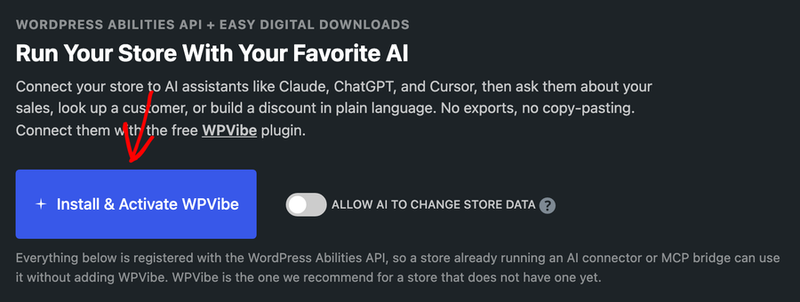
Further down that tab, the cards group everything your store currently describes, and the sentence beside the heading counts it: how many kinds of information an assistant can look up, and how many kinds of change it can make once you allow them.
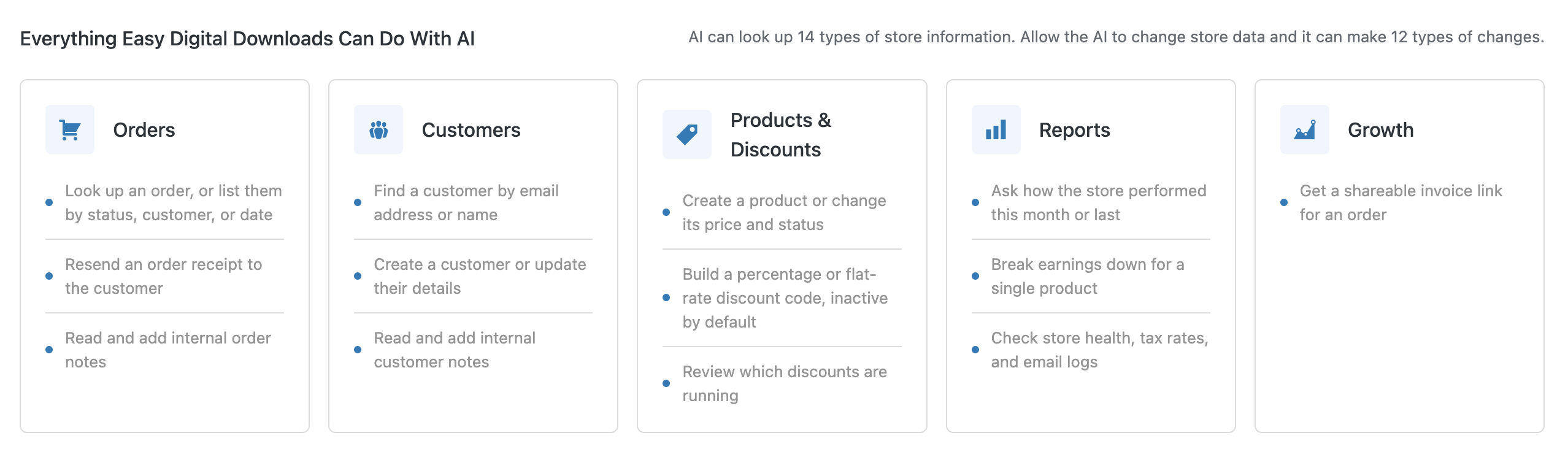
Because those counts are generated from what is registered, they are the reliable answer for your store, and they move on their own as you turn features on or off.
That’s it! You know what every ability does, which ones change data, and how to read the live list for your own store. Next, see What a Connected AI Assistant Can See and Change for the data behind these abilities, or Troubleshooting Your Store’s AI Connection if an ability is missing from your assistant’s list.
Frequently Asked Questions
Below, we’ve answered some of the most common questions about store abilities.
Why does my assistant list fewer abilities than this page?
The feature-dependent abilities only register when the feature behind them is running, so a store without Cart Recovery or Campaign Tracker describes fewer. The count on the AI tab is always the figure for your own store.
Do the write abilities disappear when I turn off write access?
No. They stay listed, and the ability count on the AI tab reads the same either way. What changes is that they refuse to run, so the toggle is the switch rather than the list.
Can I stop an assistant from using one specific ability?
Not individually. Access is decided by two things: the write toggle, and what the connected account is permitted to do. Connecting an account with narrower permissions is how you narrow the list.
Which abilities ask me before they run?
The three marked destructive: creating an order, changing an order’s status, and deleting a discount. Assistants use that label to prompt for confirmation first.
Does creating a product or discount put it in front of customers right away?
No. New products are created as drafts and new discount codes are created inactive, unless the request specifically asks for them to be live.
Can an assistant read my customers’ email addresses?
Only when the connected account is allowed to view sensitive shop data. The customer abilities withhold email and address data from accounts that are not.